Home Blog Page 42

All About Zwift’s New Draft Indicator

All About Zwift’s New Draft Indicator

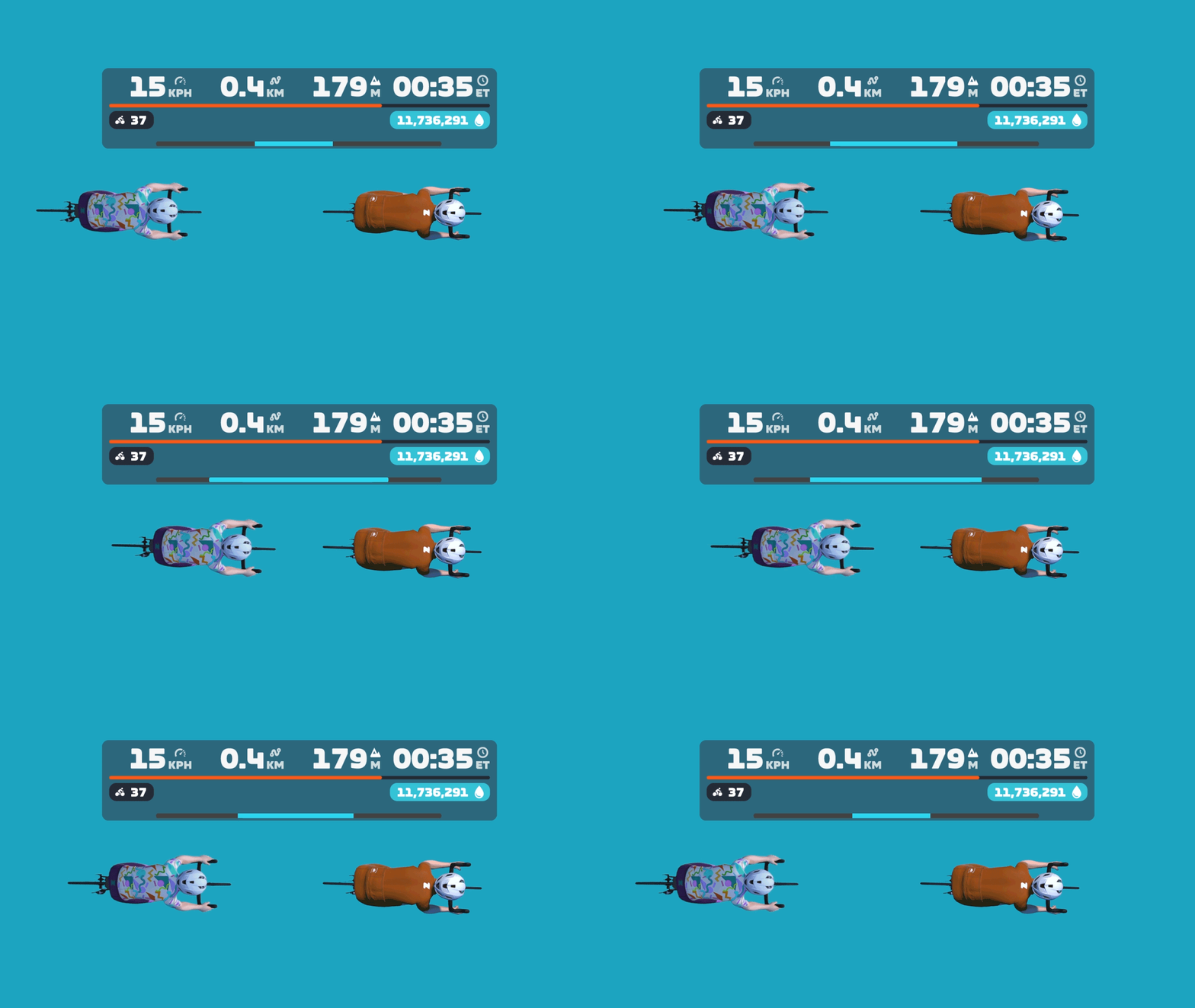
Yesterday’s Zwift update included the release of a long-awaited feature: a draft indicator! It’s a very simple yet useful addition to the game UI: a horizontal blue line that expands and contracts at the bottom of the center HUD element. This animation shows how it basically works:

Want to see it in action? Here’s a quick recording I made while spinning around Watopia yesterday:

Into the Weeds

The new draft indicator, in typical Zwift fashion, is a very simple UI element. But there are lots of details worth discussing, so let’s dig deeper…

What are we measuring?

This is a tricky question to answer, actually.

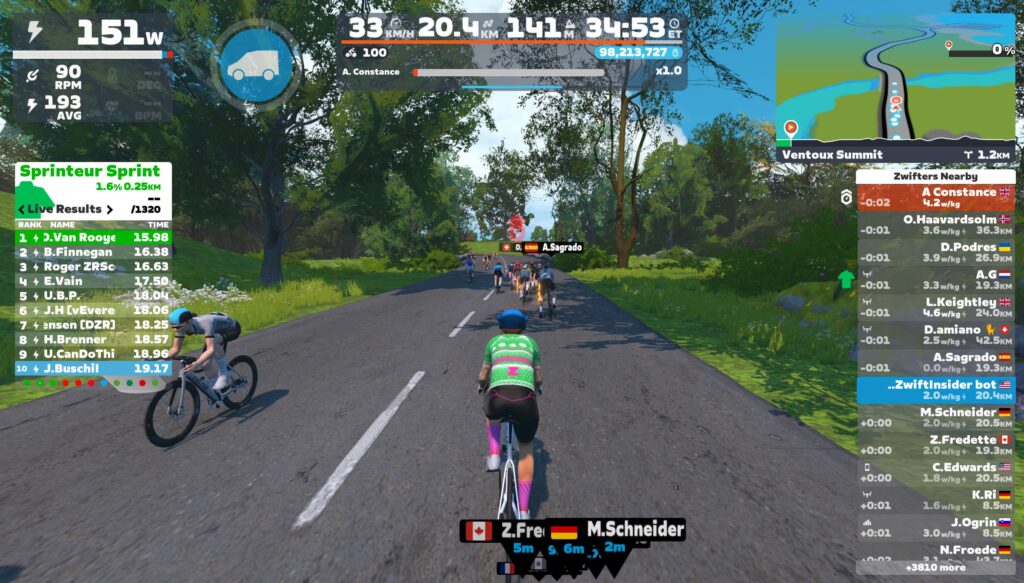
The blue bar isn’t showing exactly how much power you’re saving. If that were the case, it would be wider when drafting two riders at ~60kph on flat ground, vs drafting the same two riders at a lower speed. But that’s not the case. The bar is full even at 34kph, as shown here:

And here you can see it’s filled to the same level drafting off of one rider, whether I’m saving a lot of power at 48kph, or less power at 34kph:

The blue bar is also not indicating how much of the potential draft you are experiencing. If that were the case, the bar would be full when you’re on a climb in the middle of a pack, receiving as much draft as possible in your current location. But that’s not the case. On steep climbs, the bar only fills partway:

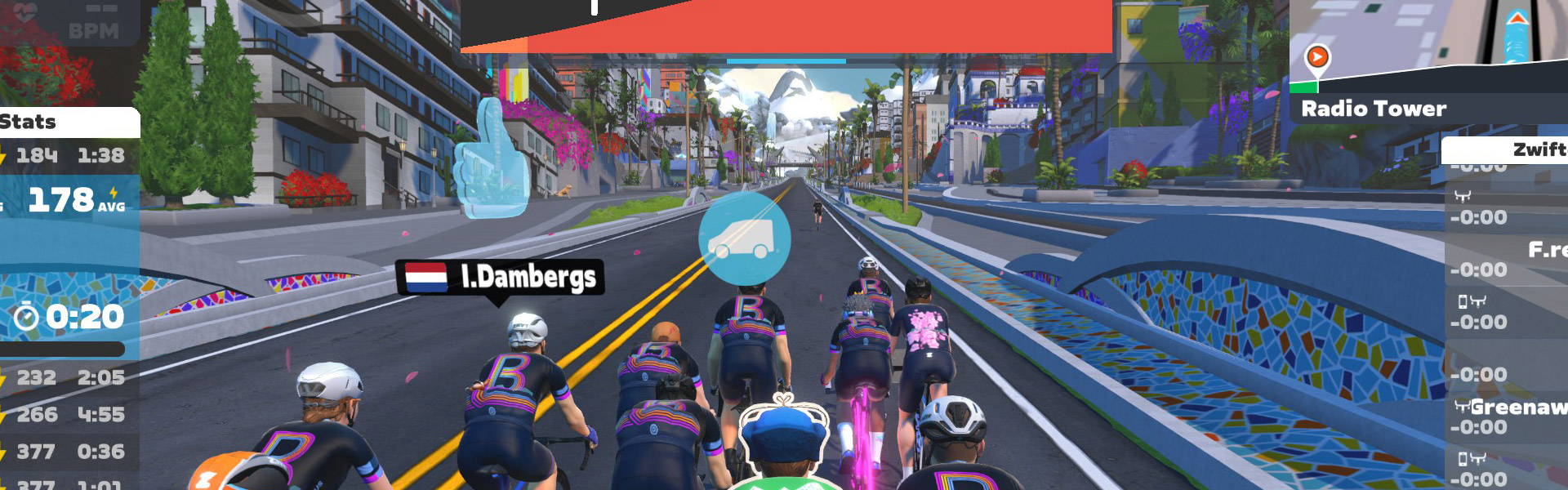
Draft Indicator partially filled while sitting mid-pack on a climb

So what is it displaying? I think it’s best to think of the Draft Indicator as showing what percentage of your power is being saved in the draft. This isn’t a perfect description of what it’s showing (especially since the blue bar fills up even when you’re coasting), but I think it’s as close as we’re going to get.

A Note About Bar Width

No, I’m not talking about the UCI’s controversial recent stance on handlebar widths. I’m referring to how the draft indicator’s design could stand to be polished a bit. Currently, the draft indicator bar only fills ~80% of the HUD’s width, but it’s so low-contrast that you can’t really tell how wide the bar should be, if there’s a dark background behind the center HUD:

Because of this, when the bar is fully filled, it can look like it’s only partially-filled, since it doesn’t go to the edges of the HUD.

The bar only expands to the edges of the HUD box when using a Draft Boost powerup (see below). But perhaps the bar should be the full width at all times, then a Draft Boost powerup changes the color of the indicator, or the bar expands to be a bit wider than the main HUD element?

Draft Boost Powerups

What happens when you activate a Draft Boost? I’m glad you asked. Here’s a demo:

How many riders for max draft?

How many riders have to be ahead of you for you to fill the Draft Indicator to max? The answer appears to be two, at least on flat ground at a descent speed.

If you’re well-positioned behind a single rider, the bar fills to this level (around 75% of max):

But get behind two riders, and it fills completely:

This doesn’t quite line up with my Pack Dynamics tests from past years (see Test 2 in this post, for example), which seemed to show that a 4th rider got a bit more benefit than the 3rd rider in a TTT. But my guess is the discrepancy can be explained by Zwift’s new draft indicator having a cap on the power savings it displays, as explained in “What are we measuring?” above.

Goodbye, “Close the Gap”

Zwift says the “Close the Gap” text will be retired with the rollout of the Draft Indicator. I don’t think anyone will complain about that, as long as the Draft Indicator is always visible in its place! (“Close the Gap” was a handy tool in TTT’s… IYKYK.)

How Far Back?

One thing the Draft Indicator will teach Zwifters is that you receive a draft benefit from riders quite far up the road. How far back can you be, and still receive some benefit? I don’t have precise measurements, but here’s a visual showing where the Draft Indicator begins to show a benefit on flat ground at 33kph:

Zwift vs Sauce for Zwift

Until this week’s release, the only draft gauge Zwifters could access was the one provided for Sauce for Zwift. Here’s a quick demo video where I compare Sauce’s drafting gauge and Zwift’s new Draft Indicator:

Sauce’s gauge is titled “W Savings” to indicate that it is showing how much power you’re saving in the draft. This isn’t perfectly accurate, though, as it’s actually showing you how much more power you’d need to be doing to hold your current speed on flat ground without a draft.

Some Zwifters prefer having an actual number displayed. But I think Zwift’s choice to keep it a simple bar is probably the right call, in the interest of keeping the HUD clean and simple.

Drafting Ghosts
With the Draft Indicator now being used by hundreds of thousands of riders, people are going to start discovering new things.

For example, on Zwifter wrote in yesterday to tell me they discovered in a Ladder Race that you can draft off of someone who is invisible due to the ghost powerup. I’d already written about this a few years back (see the post), and of course it makes sense: everyone knows ghosts still have bodies, even if they’re invisible. Right?
TTT Drafting

While Zwift’s Draft Indicator announcement in the forum says, “this indicator will not appear when riding a TT bike…” sources in Zwift tell me that’s not actually true. If you’re in an event where TT bikes can draft (like a TTT), Zwift says the Draft Indicator will be visible. I guess racers will find out tomorrow if that’s true!

Questions or Comments?

What do you think of the new draft indicator? Comment below, and you can also chat on this Zwift forum topic.


“No Sleep Till Brooklyn” Route Details

0

“No Sleep Till Brooklyn” Route Details

See zwiftinsider.com/route/no-sleep-till-brooklyn/


Nowhere Fast Episode 61 – Same As It Ever Was

1

Nowhere Fast Episode 61 – Same As It Ever Was

The newest episode of Nowhere Fast rolls into the Zwift season with its trademark mix of cycling news, casual chaos, and self-inflicted existential dread. The hosts recap their summers — which, in true virtual-cycling fashion, featured more KOM-hunting intentions than actual training — before diving into another classic Zwift storyline: someone cheated again. Apparently, virtual racing continues to deliver scandals with the reliability of a dropped chain on a neglected trainer bike.

At one point, Kevin makes a comparison that perfectly sums up the vibe: the latest “exit racing” format is basically the gluten-free pasta of virtual cycling — technically the same activity, but somehow missing flavor, texture, and joy.

The episode also marks a real-life milestone for host Zach Schuster, proving at least one member of the podcast occasionally contributes something meaningful to society outside Watopia.

The overall tone is equal parts mockery and affection — a reminder that while the racing is digital and sometimes ridiculous, the enthusiasm (and inability to stop caring) is painfully real.

About the Podcast

Nowhere Fast is a member of the Wide Angle Podium network. To support this podcast and help pay for Kevin’s gold-plated ankle weights, head to wideanglepodium.com and contribute to our advanced virtual racing research.

To keep up to date on all our real coverage of fake bike racing, subscribe via Apple Podcasts or Spotify. 


ZwiftPower ZRS Browser Extension Updated: ZRS History, Power Curves, + More

ZwiftPower ZRS Browser Extension Updated: ZRS History, Power Curves, + More

A few months ago, I wrote about the ZwiftPower ZRS Browser Extension. Since then, it has undergone substantial upgrades, including an incredibly detailed new profile page that charts your ZRS history! So I reached out to the creator (who goes by the pseudonym “int” on socials) for a look at what has changed, including a detailed list of new features. Here’s what I received…

From the Creator

Since the last Zwift Insider article, the extension has grown quite a bit.

The very first version took only a few hours to build. I probably spent almost the same amount of time writing my response to Zwift Insider when he first reached out. It was just a simple script to inject ZRS scores into ZwiftPower event pages. Nothing fancy.

Back then, I mentioned the article may “give the project new life.” Well, it did. The article brought in more users, and with them came requests. Profile page support. History graphs. More detailed analytics. Each feature request led to another and the codebase went from a few hundred lines to… well, something more substantial.

So here we are again, writing another response after Eric reached out asking if I had any “juicy details” to share.

Recent Development

The active users of the extension already know that not everything went smoothly.

The first major update went live and didn’t last long. Users started processing their lifetime event histories, and some corrupt Zwift events from years ago triggered an infinite fetching loop.

The combination—hundreds of users processing thousands of events each, plus the bug causing endless retries—created an API spike. I fixed the bug immediately after it was reported, but the damage was already done. Zwift decided to enforce authentication requirements, breaking the extension for everyone.

I reached out to Zwift, acknowledged I should have coordinated beforehand, and didn’t hear back. So a few days later I implemented a workaround that captures the user’s Zwift token (with the user’s permission, of course) to get things going again.

Besides restoring functionality, authentication unlocked additional API endpoints that made most of the newly added features possible. In the end, the authentication enforcement turned out to be a good thing.

Looking Forward

The extension serves a niche within the Zwift community, and I’m glad people find it useful. There’s still plenty to improve—I won’t be running out of ideas anytime soon. I appreciate everyone who’s taken the time to report bugs, suggest features, or simply tell your buddy about it. And special thanks to the testers.

Hopefully, Eric will have a reason to check in again down the road.

If you have thoughts or ideas, feel free to reach out.

(That goes for Zwift, too. It would be cool if we could implement proper OAuth2 authentication and you could relax your CORS restrictions a little bit.)

What ZRS Extension Does

The ZRS extension enhances ZwiftPower.com by adding ZRS (Zwift Racing Score) data, performance analytics, and racing statistics to profile and event pages. The extension operates as a fully decentralized system, running entirely within the browser environment. All data processing, storage, and analytics occur locally on the user’s device, with no external servers or databases involved.

Key Capabilities

  • ZRS Score Integration: Adds ZRS scores and changes directly into ZwiftPower event tables
  • Performance Analytics: Power analysis, phenotype detection, activity tracking
  • Racing Statistics: Head-to-head comparisons, ranking points visualization, ZRS history graphs

The Profile Dashboard

Layout Overview

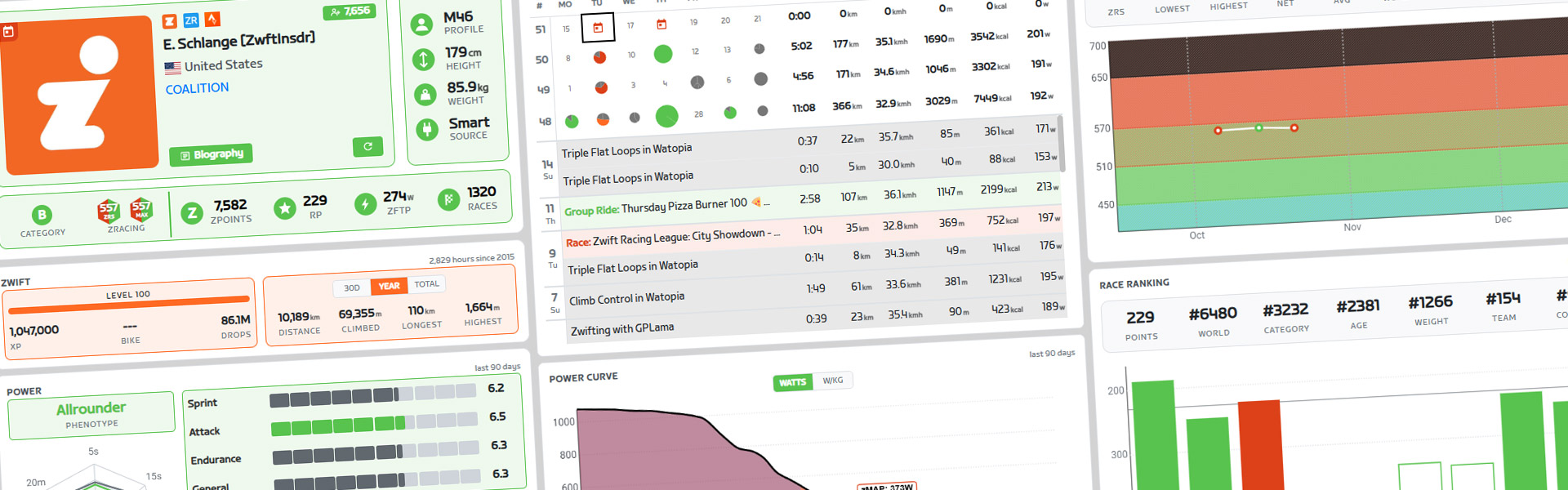
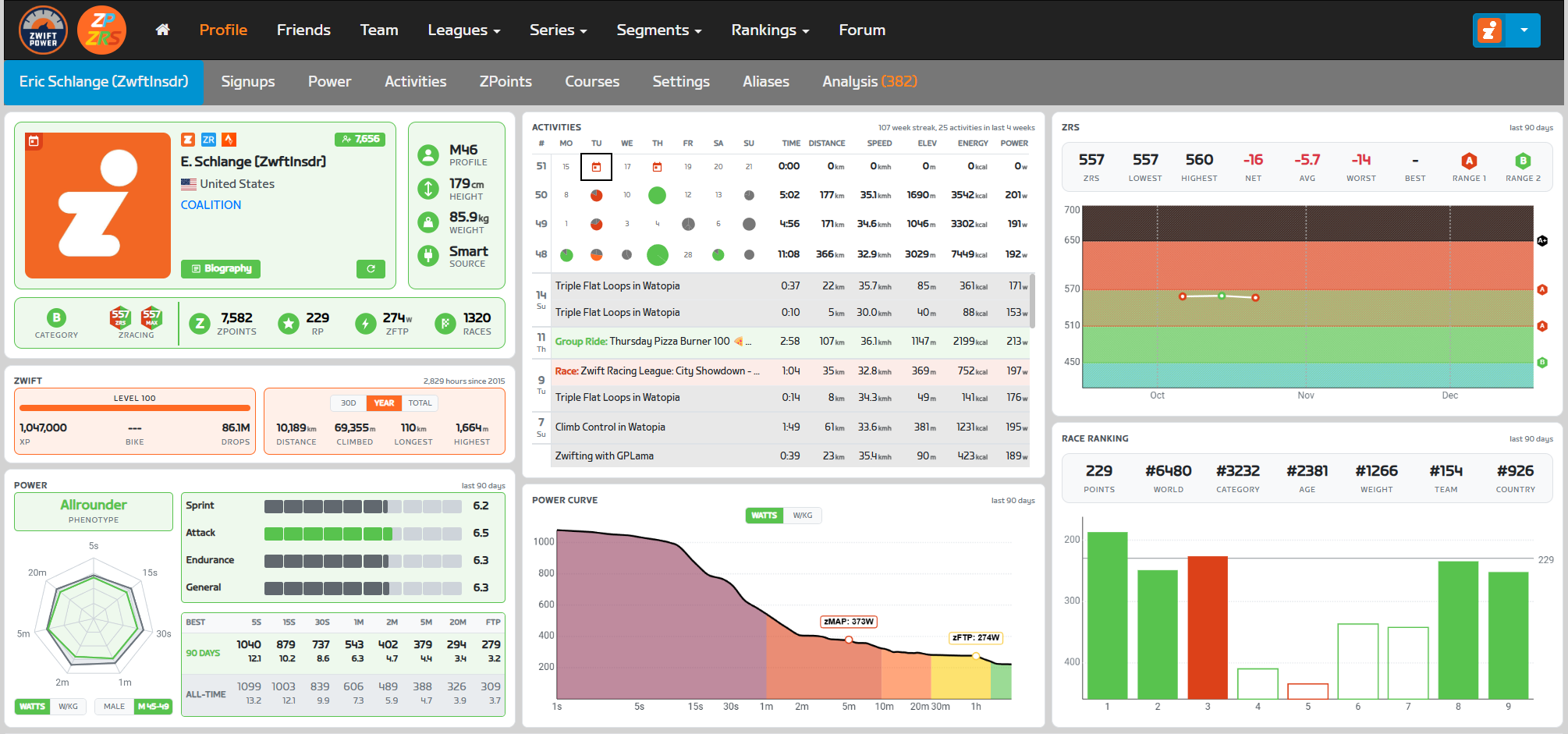
The extension redesigns the ZwiftPower profile page with a three-column dashboard layout:

  • Left Column: Athlete profile, Zwift stats, and power analysis
  • Middle Column: Activities, and context-aware panels (power curve for personal profiles, head-to-head for opponents)
  • Right Column: ZRS score history and race ranking points

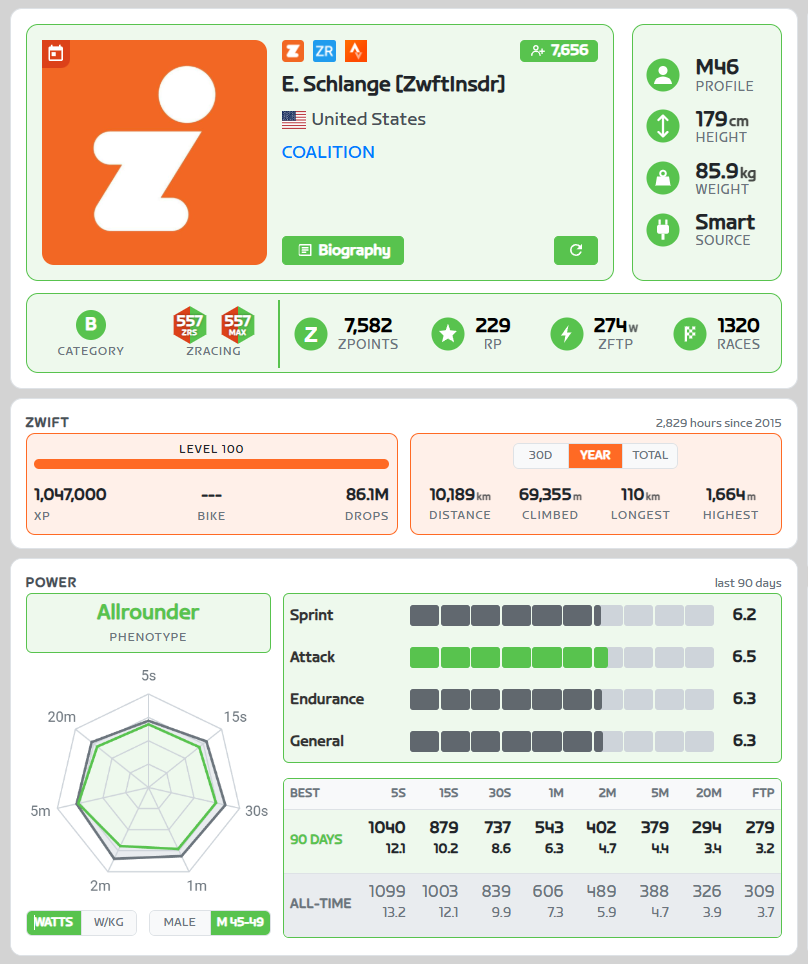
Left Column: Athlete Profile & Performance

Main Profile Panel

Identity Section:

  • Profile picture (or ZRS logo placeholder if no picture)
  • Zwift in-game name
  • Country flag and name (or “Zwifterland” fallback)
  • Team name (clickable link if available)
  • Platform links: Zwift.com, ZwiftRacing.app, Strava.com
  • Follower count button (links to Zwift follower page)
  • Bio button (displays rider biography in modal)
  • Refresh button (navigates to ZwiftPower profile update page)

Overlays (on profile picture):

  • Online indicator (if currently riding)
  • Signup indicator (if upcoming registered events exist)

Athlete Stats Section:

  • Profile: Gender and age (e.g., “M45”, “F33”)
  • Height (cm) with variation tooltip
  • Weight (kg) with variation tooltip
  • Power source (Smart Trainer, Power Meter, zPower)

Racing Stats Panel:

  • Category: Shows racing category with color-coded circle (Mixed and Women’s categories for female riders)
  • ZRS: Current racing score (dual badge showing both current and MAX30 score for personal profiles)
  • ZPoints and Ranking Points (metrics from ZwiftPower)
  • zFTP: Functional threshold power in watts and W/kg
  • Race count with win and podium rate in tooltip

All sections use category-based color theming (A+ = black, A = red, B = green, etc.).

Zwift Stats Panel

Progression Subpanel:

  • Level with progress bar showing percentage to next level
  • XP (experience points)
  • Current bike frame model
  • Drops

Riding Stats Subpanel (toggleable between 30d/Year/Total):

  • Distance (km)
  • Elevation climbed (m)
  • Longest ride (km)
  • Highest climb (m)

Header: Shows total hours and “since [year]” (year joined Zwift)

Power Panel

Power Radar Chart:

  • Spider web visualization for 7 durations (5s, 15s, 30s, 1min, 2min, 5min, 20min)
  • Shows both 90-day recent bests and all-time bests
  • Overlays intervals.icu distribution data (toggle between gender or gender-age data)
  • Interactive hover tooltips for exact values
  • Toggle between watts and W/kg display modes

Duration Power Table:

  • Numerical values for all durations plus FTP

Power Skills:
Three skill categories rated 0.0-10.0 based on percentile vs. intervals.icu distribution data:

  • Sprint (5s, 15s, 30s)
  • Attack (1min, 2min, 5min)
  • Endurance (20min)
  • General average score

Phenotype Detection:
Analyzes power distribution to classify rider into one of six types:

  • Sprinter: Explosive short-duration power specialist (example: Mark Cavendish)
  • Puncheur: 1-5 minute effort specialist (example: Mathieu van der Poel)
  • Time Trialist: High sustained raw watts (example: Stefan Küng)
  • Climber: High sustained W/kg (example: Nairo Quintana)
  • Allrounder: Balanced across all durations (example: Tadej Pogačar)
  • Pursuiter: High sprint and endurance, weak middle durations (example: Dan Bigham)

Middle Column: Context-Aware Analytics

The middle column displays different panels depending on whether viewing your own profile or an opponent’s profile.

Activity Panel

4-Week Calendar Grid:

  • Last 28 days displayed as 4 weeks × 7 days
  • Activity type icons color-coded by type (race, TT, group workout, group ride, etc.)
  • Signup indicator (calendar icon) for upcoming registered events
  • Weekly totals column

Scrollable Activity List:

  • Chronological list of recent activities
  • Background colors match activity type
  • Clickable rows link to detailed activity page on zwift.com

1v1 Head-to-Head Panel (Opponent Profile)

Summary Metrics:

  • Total shared events (same category races)
  • Win/loss record
  • Win rate percentage
  • Average position advantage/disadvantage (% of field size)

Match History List:

  • Scrollable list of all shared events
  • Each row shows: event name, category circle, zwift ingame name, date
  • Win/loss indicator (green/red)
  • Clickable to view full event results

This feature requires complete lifetime event processing for the user’s own profile. First-time processing may require a few minutes depending on race history volume.

Power Curve Panel (Personal Profile Only)

Power Curve Graph:

  • Line chart of best power outputs across all durations
  • X-axis: Duration (logarithmic scale, 5s to 60min)
  • Y-axis: Power (toggle between watts and W/kg)
  • Shows only 90-day best (all-time data from Zwift API is unreliable)

Power Zone Background:

Shaded regions showing Zwift’s 7 power zones based on FTP percentage:

  • Z1 Recovery (<60% FTP) – Gray
  • Z2 Endurance (60-75%) – Cyan
  • Z3 Tempo (75-89%) – Green
  • Z4 Threshold (89-104%) – Yellow
  • Z5 VO2 Max (104-118%) – Orange
  • Z6 Anaerobic (118-200%) – Red
  • Z7 Sprint (>200%) – Magenta

Interactive hover shows exact values at specific durations.

Right Column: Racing Performance

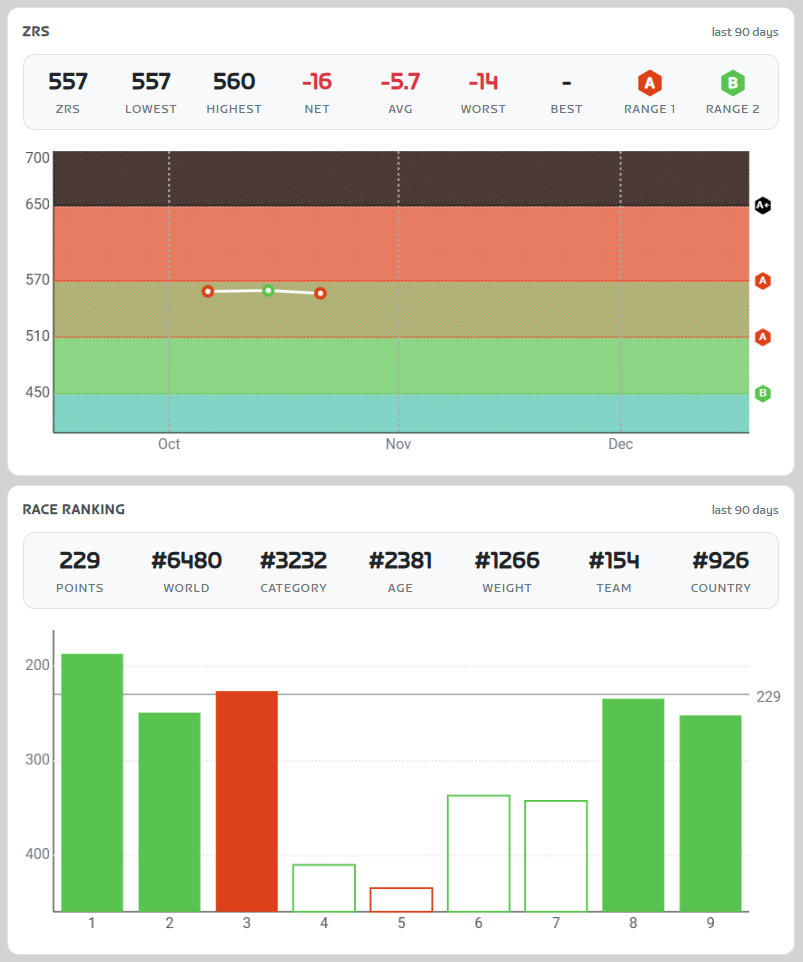
ZRS Graph Panel

Dashboard Metrics (7 cells):

  • Current ZRS score
  • Lowest score in last 90 days
  • Highest score in last 90 days
  • Net change (total gains/losses)
  • Average change per event
  • Worst single event loss
  • Best single event gain
  • Eligible race categories (hexagon badges, clickable to show upcoming events in that category)

Score History Graph:

  • Time-series line chart showing ZRS progression (last 90 days)
  • X-axis: Time with month labels
  • Y-axis: ZRS score (0-1000)
  • Background diagonal stripe patterns show category boundaries:
  • Range 1: E (0-159), D (160-269), C (270-389), B (390-509), A (510-649)
  • Range 2: E (0-209), D (210-329), C (330-449), B (450-569), A (570-724)
  • Advanced: A+ (650-1000)
  • Data points colored by category of event
  • Trophy icons displayed to highlight podium finishes
  • Hover tooltips show event name, date, score change, rank, field size
  • Smooth connecting lines show trajectory

Race Ranking Panel

Ranking Points Bar Chart:

  • X-axis: Chronological event sequence (oldest to newest)
  • Y-axis: Ranking points earned (0-100)
  • Each bar represents one ranked event
  • Bar height = points earned
  • Bar color = event category
  • Top 5 events highlighted with filled background (these count toward ranking)
  • Hover tooltips: event name, category, exact points, rider’s position

ZwiftPowers’s ranking system uses top 5 events from last 90 days. This visualization shows which races currently contribute to the ranking score.

Event Pages & Table Enhancements

ZwiftPower Table Enhancement

New ZRS Columns

  • “ZRS” column displaying current score
  • “±” column showing score change from the event
  • Score change type indicators (floor increased, at floor)

ZRS Prediction Accuracy

The extension calculates how accurately ZRS scores predicted the actual race results using Spearman’s rank correlation coefficient (ρ):

  • Compares predicted finishing order (based on pre-race ZRS scores) vs. actual results
  • Calculated per category, then weighted by field size for overall accuracy
  • Displayed as percentage: +100% = perfect prediction, 0% = random, -100% = inverse
  • Color-coded indicator: green (≥60%), yellow (30-59%), red (<30%)

This metric provides insight into whether the race results aligned with pre-race ZRS expectations (an objective way of determining how well ZRS is actually working).

Non-ZRS Event Detection

Events where no ZRS changes occurred (workouts, group rides, etc.) are identified and labeled with a “Non-ZRS Event” indicator, preventing confusion when no scores appear.

Under the Hood: Data Sources & Integration

The extension aggregates data from multiple sources to provide comprehensive racing analytics:

ZwiftPower

Profile and event metadata is extracted from ZwiftPower.com through two complementary methods:

Scraping: The extension reads visible event tables directly from the rendered page HTML to extract:

  • Event IDs and dates
  • Race categories and results
  • Rider rankings and positions
  • Event names and metadata

Interception: When ZwiftPower loads profile data via API calls, the extension intercepts these requests to capture:

  • Complete event history
  • ZwiftPower-specific metadata (race types, categories)
  • Signup information
  • Event results

Zwift Official API

ZRS scores and detailed race results come directly from Zwift’s official API.

Race Results Endpoint:

  • ZRS scores (current and change)
  • Score change types (floor increased, etc.)
  • Subgroup assignments
  • Field sizes and rankings

Profile Endpoint:

  • Rider name and basic info
  • Weight, height, FTP
  • Country and platform data

Activities Endpoint:

  • Recent ride history
  • Activity types (races, group rides, workouts)
  • Performance metrics

Max30 Endpoint: (personal profile only)

  • Only accessible for the authenticated user’s own profile

Power Curve Endpoint:

  • Complete power profile data across all durations
  • Recent best efforts (5s, 15s, 30s, 1min, 2min, 5min, 10min, 20min, 60min, etc.)
  • Only accessible for the authenticated user’s own profile

Intervals.icu Power Data

Benchmark power data embedded directly in the extension from Intervals.icu’s analysis of thousands of real cyclist power files:

Coverage: Age/gender-specific percentile data for:

  • Multiple age brackets (Under 23, 30-34, 40+, 50+, 60+, etc.)
  • Male and female categories
  • Seven key durations (5s, 15s, 30s, 1min, 2min, 5min, 20min)

Questions or Comments

Share your thoughts below!


Zwift Update Version 1.104 (156617) Released

Zwift version 1.104 begins its phased rollout today, the last game update for 2025. This release includes the long-awaited draft indicator, 6 new route badges, the official rollout of a new Progress Report end-of-activity screen, and some much-needed adjustments to New York’s escalators! Read on for details…

New Draft Indicator

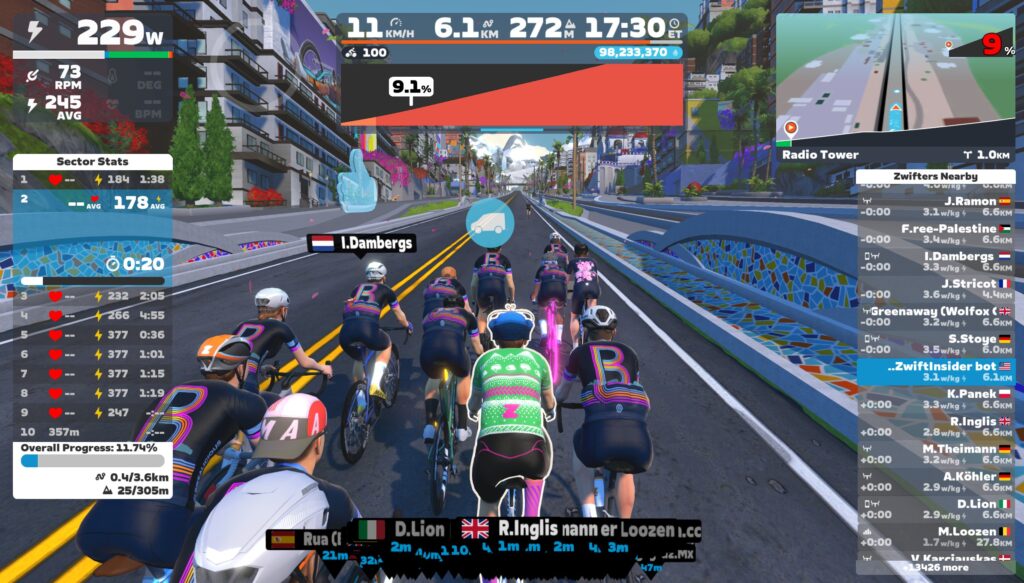
Not included in the original release notes (Zwift loves to bury the lede) is today’s release of the long-awaited draft indicator. Yep, you read that right! Here’s what it looks like:

Zwift says, “The long-awaited Draft Indicator is finally here! The new bar at the bottom of the HUD center keystone will show you when you are receiving a draft benefit, the longer the bar the greater the draft benefit – use the Draft Powerup to get max draft benefit! Details are on this thread.”

New Progress Report Screen

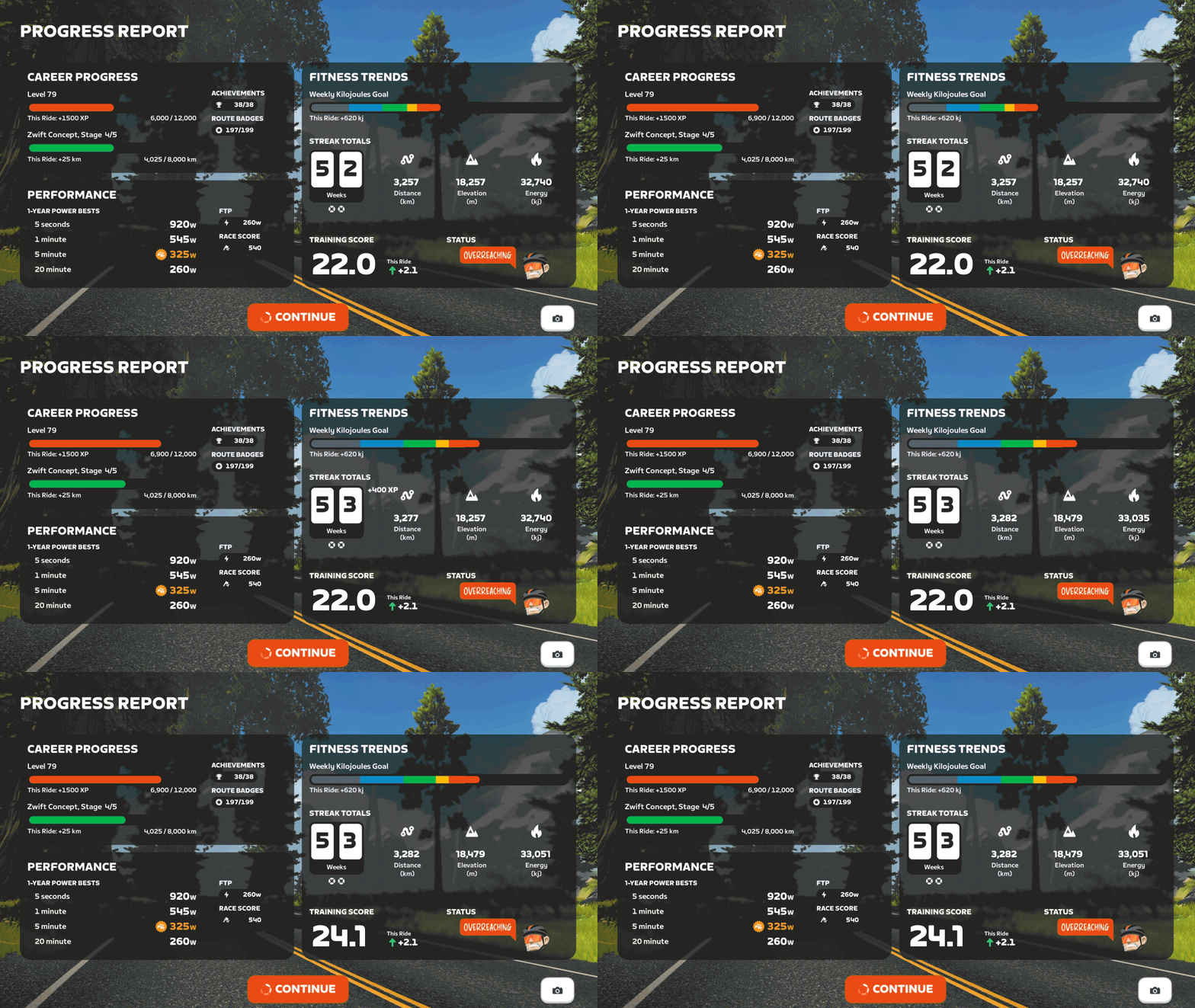
Zwift has been rolling out the new “Progress Report” screen over the past few weeks, with approximately 50% of Zwifters already seeing it before today’s update. But they’ve included the screen in today’s release notes, since it hadn’t been included previously.

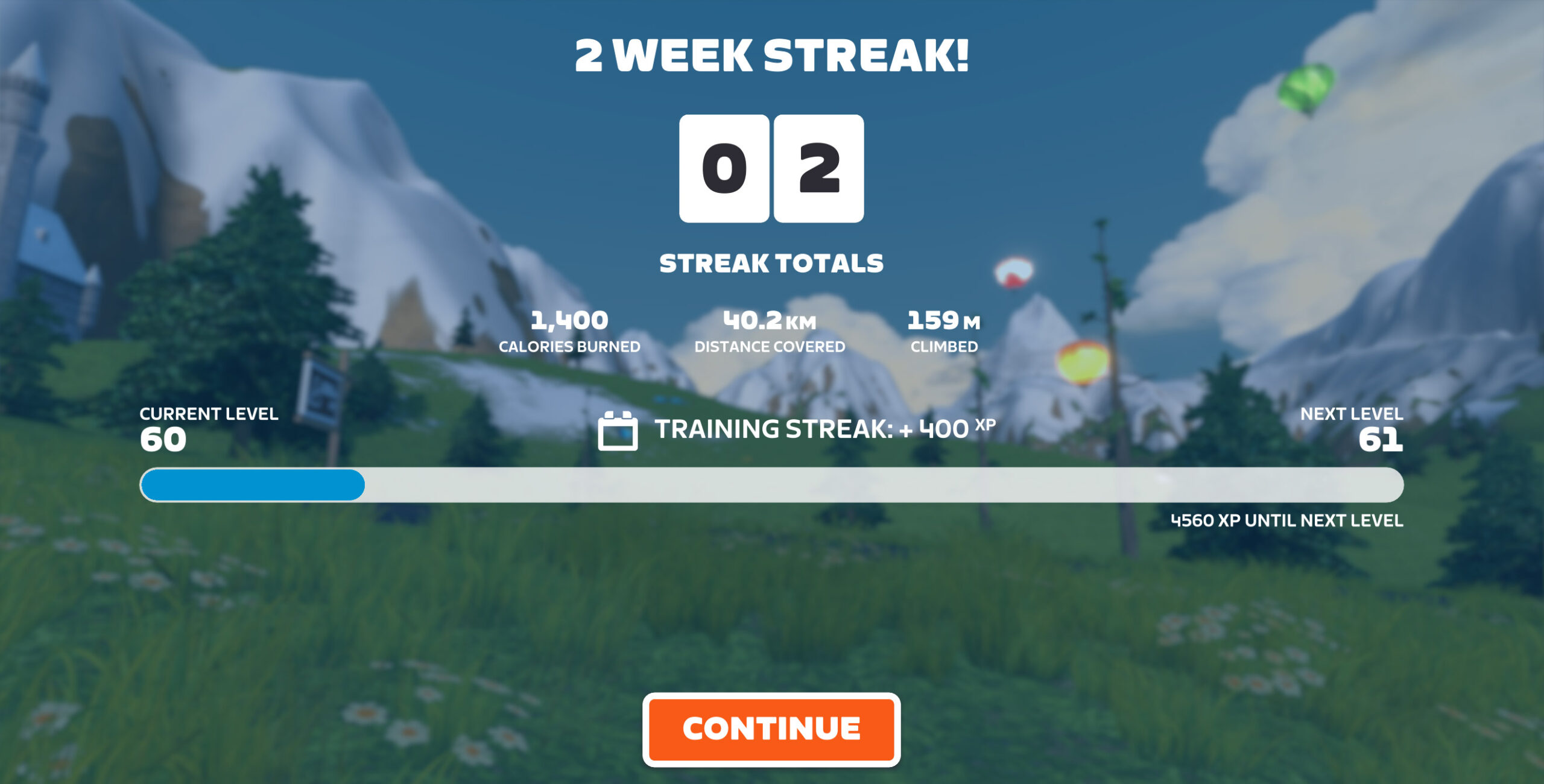
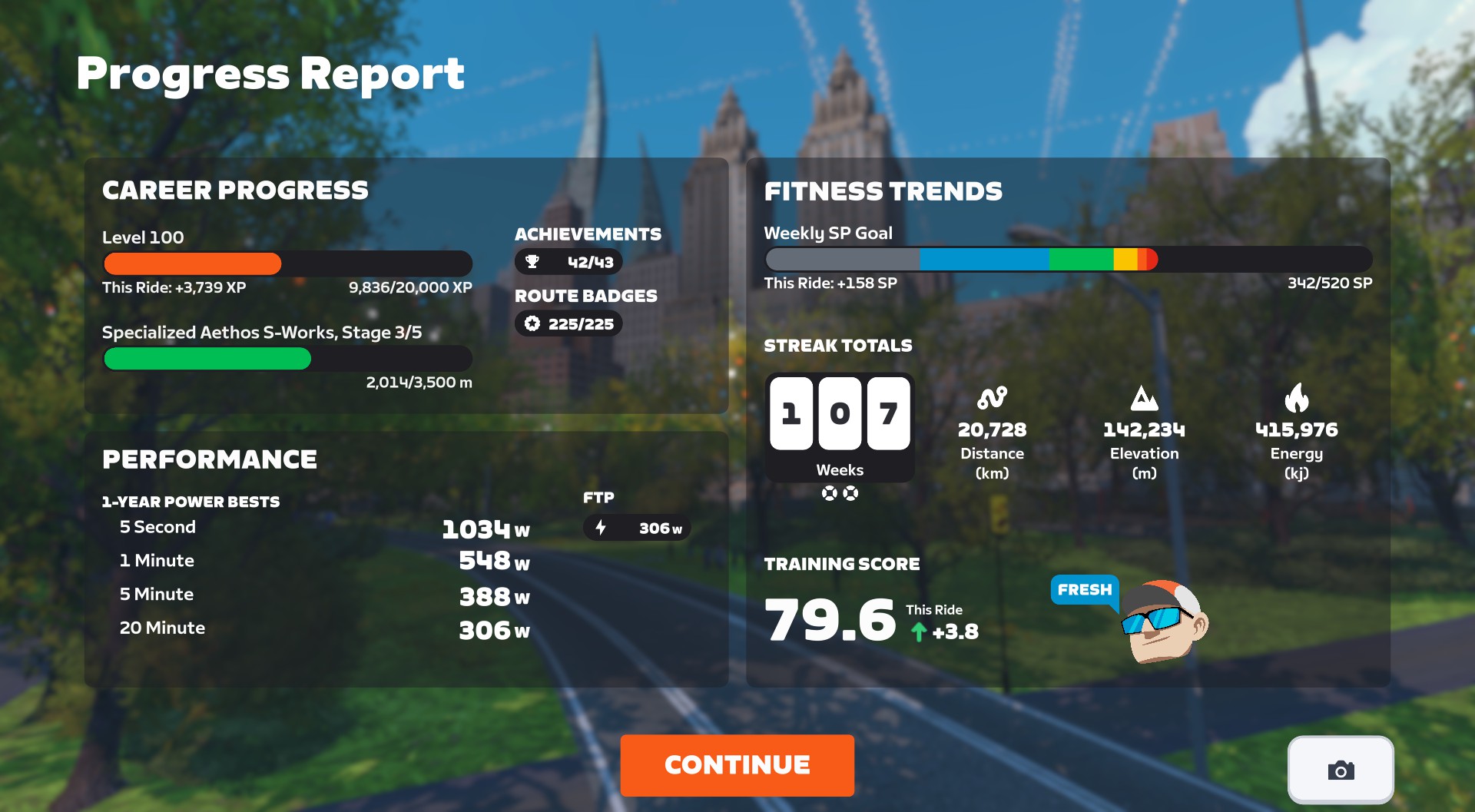
Zwift says, “A new Progress Report screen is now available at the end of every cycling activity and shows career progress, fitness trends, and performance data. The new Progress Report replaces the previous Streaks screen, and includes all information previously featured in the Streaks screen.”

Here’s a look at the old Streaks screen, and the new Progress Report:

I think Zwifters will be universally happy with this change, as the new Progress Report contains a lot of helpful info, including:

  • Career Progress
    • Current level, plus how close you are to the next level, and how much progress you made in this activity
    • Upgrade status of bike frame, plus how close you are to the next upgrade, and how much progress you made in this activity
  • Performance
    • 1-Year Power Bests, including indicators if you set a new PB in this activity
    • Current FTP
    • Current Race Score
  • Fitness Trends
    • Weekly goal progress
    • Streak totals (Streak count plus Streak distance, elevation, energy, and number of Streak Savers available)
    • Current Training Score, including change delta from this activity
    • Training Status

The screen even includes a button you can click to snap a screenshot. Nice!

Discuss the new Progress Report on Zwift’s forum >

New Route Badges

Six routes that were previously event-only are now available for free rides and meetups. Go get those badges!

Escalator Adjustments

Two of the release notes were related to the escalators on New York‘s newer roads:

  • Reduced the effort required to ride up the escalators in New York.
  • Improved the New York escalators to better balance the boost effect across riders of different weights.

After some testing, we can confirm that Zwift made two changes to the escalators to address complaints from Zwifters. First, they “reduced the effort,” which means they reduced the gradient feel of the escalators. To be precise, we’ll only feel 25% of the actual gradient. So while the escalators are around 20% in terms of physical pitch, Zwift will only send 5% to your trainer, and that’s only if your trainer difficulty is set at 100%.

This will make the escalators a bit more fun to ride, since it won’t feel like you’re “hitting a wall” when you encounter the short, sharp ramps.

Secondly, Zwift has changed the power “boost” given to help riders up the escalators. Prior to this change, Zwift provided a flat power boost to all riders up the escalators (Zwifters estimated it to be ~1,200W). This gave lighter riders a distinct advantage, so this update changes the boost to be more watts-per-kilo based, meaning riders of varying weights will more naturally match each other’s speeds up the escalators.

I tested the updated escalators, and they appear to be working quite nicely now. But give them a try yourself, and share what you think in the comments below!

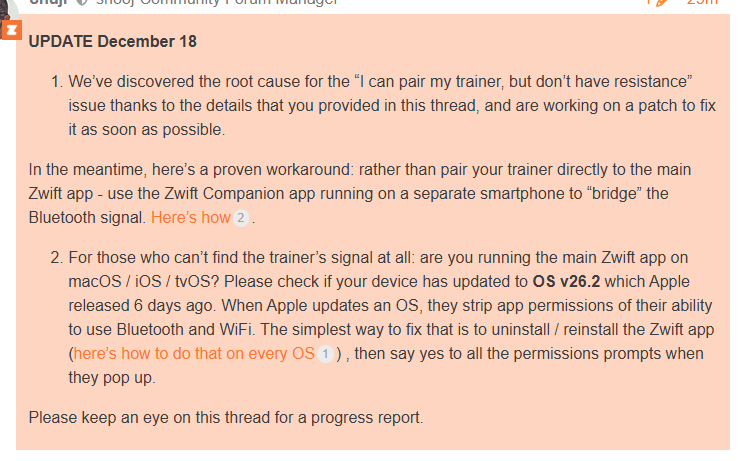
Resistance Bug

Zwifters began reporting resistance issues after installing the v104 release (see comments below for examples from Zwifters). On the morning of December 18, Zwift staff posted the following on this release’s forum thread:

UPDATE (Dec 19, 2025): Zwift has released version 1.104.3 (157245), which fixes the above bug.

Release Notes

Zwift supplied the following additional release notes:

  • Zwifters using Zwift Click v2 can now disable virtual shifting in Zwift Settings under the Hardware tab.
  • Fixed an issue that could potentially cause connection issues when pairing fitness devices using Wahoo Direct Connect (WiFi or Ethernet).
  • Fixed an issue that could cause a saved activity to have an incorrect name in some situations.
  • Fixed an issue that could cause Ride Leader and Sweeper names to be displayed incorrectly in on-screen chat messages if emojis were present in their names.

Discuss this update in Zwift’s forum >

Questions or Comments?

If you spotted any other changes or bugs in the update, please comment below!

Zwift Racing League 2025/26 Round 3 Details: Routes, Rules, Registration + More

Zwift Racing League 2025/26 Round 3 Details: Routes, Rules, Registration + More

Now in its 18th round, Zwift Racing League continues to take racing to the next level on Zwift! Registration is now open for the third round of the 2025/26 season, which begins on January 6.

This page contains everything you need to know about the current ZRL round, and is updated as WTRL announces new details.

Intro to ZRL

Zwift Racing League (ZRL) is team-based racing for all abilities. It’s also the world’s largest virtual cycling competition, with over 30,000 riders of all abilities participating in each of the past two seasons!

Organized by WTRL, this is a team-based points competition spanning multiple weeks, with teams divided into divisions based on time zones and ability. Races take place every Tuesday, and the season is divided into distinct rounds with brief breaks in between.

ZRL is Zwift racing at its highest level. Its unique structure and varied race formats drive serious Zwift racers to show up week after week while providing a place for new racers who jump in and find their first team home.

Key Changes this Round

Zwift + WTRL continously collaborate to modify ZRL’s structure and rules with the aim of engaging as many racers as possible. Heading into this round, the rules have changed regarding team limits.

Riders were previously limited to membership on only two teams, but that limitation is now gone. The new rule says you may race for as many teams as you wish, but you are limited to a maximum of two teams per category within each league.

Examples:

  • ✔️ A rider may race for Green B1, Lime B1, and Emerald B1
  • ✔️ A rider may race for Green B Development, Green B1, and Green A1
  • ✔️ A rider may race for Green B2 and Green B1
  • ✔️ A rider may race for two teams in Green B2
  • ❌ A rider may not race for two Green B2 teams plus a Green B1 team, as all three sit in the same league and category (Green B)

This gives teams and riders more flexibility while ensuring divisions remain fair and rankings remain transparent.

For details on ZRL rules, see the ZRL Rules page >

Routes and Dates

Each ZRL round comprises weekly races which are either scratch races, points races, or team time trials (TTT). Scratch Races and Points Races are both actually points-based in terms of final results, but Points races include intermediate segments while Scratch Race points are all earned at the finish line. TTT winners are the teams who complete the race course fastest, with team time taken from the fourth rider across the line.

Race #1: Neon Shore Loop
January 6, 2026 (TTT)

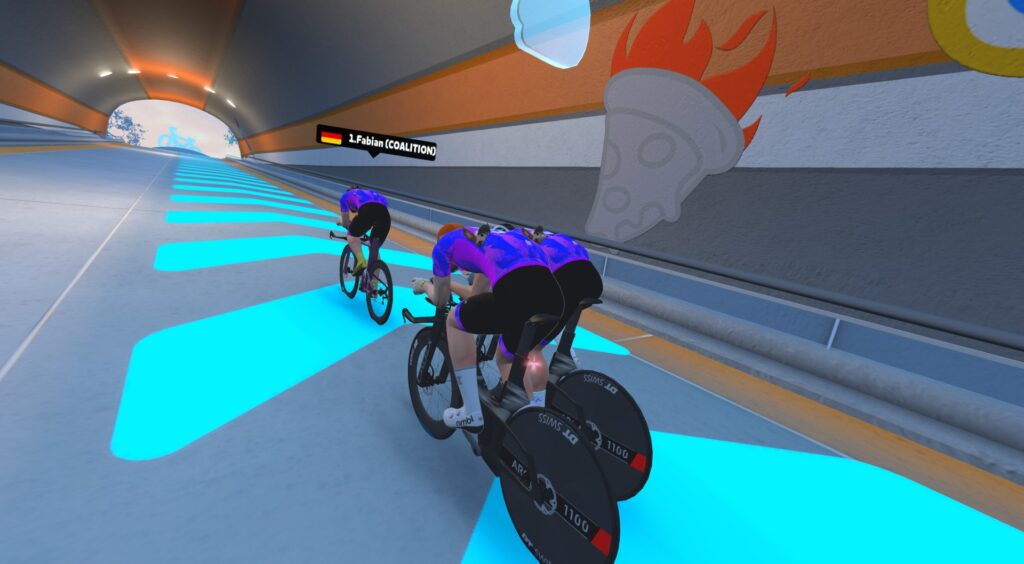
The round begins with a team time trial on a completely new route. This Makuri Islands route isn’t even in game yet, but we’ll be publishing details as soon as they’re available. Until then, please enjoy this press photo from Zwift, which shows how to ride as inefficiently as possible in a TTT:

See our guide for race #1 >

Race #2: 2019 Worlds Harrogate Circuit
January 13, 2026 (Points Race)

The first points race of Round 3 is on the tough Yorkshire circuit, with a KOM and sprint segment on each lap.

See our guide for race #2 >

Race #3: Countryside Tour
January 20, 2026 (Scratch Race)

The longest race of this round includes the challenging dirt Temple KOM on each lap. Will gravel bikes be in play?

See our guide for race #3 >

  • A/B: 3 Laps of Makuri Islands’ Countryside Tour (47.8km, 556m elevation)
  • C/D: 2 Laps of Makuri Islands’ Countryside Tour (31.9km, 371m elevation)
  • PowerUps 🛈 (equal probability at each banner):
    • Feather
    • Draft
    • Aero

Race #4: Roule Ma Poule
January 27, 2026 (TTT)

Our second TTT of Round 3 kicks off with a tough lead-in: the steady climb up the backside of the Petit KOM. Then it’s a flat, fast route until we encounter that climb once more for the finish!

See our guide for race #4 >

Race #5: Cobbled Climbs
February 3, 2026 (Points Race)

Our second points race of Round 3 takes us to Richmond for multiple laps of a punchy course that includes three key climbs on every lap, although only two are points segments.

See our guide for race #5 >

Race #6: London Loop (A/B) + Greatest London Loop (C/D)
February 10, 2026 (Scratch Race)

Round 3 wraps up with scratch races in London. A/B teams are on a different route than C/D teams, but no matter who you are, the big selections will happen on the big climbs. Hup hup!

  • A/B: 2 Laps of London’s London Loop (30.4km, 466m elevation)
  • C/D: 1 Lap of London’s Greatest London Loop (26.2km, 360m elevation)
  • PowerUps 🛈:
    • Feather at Lap Banner
    • Anvil at KOM Banner

Race Timeslots

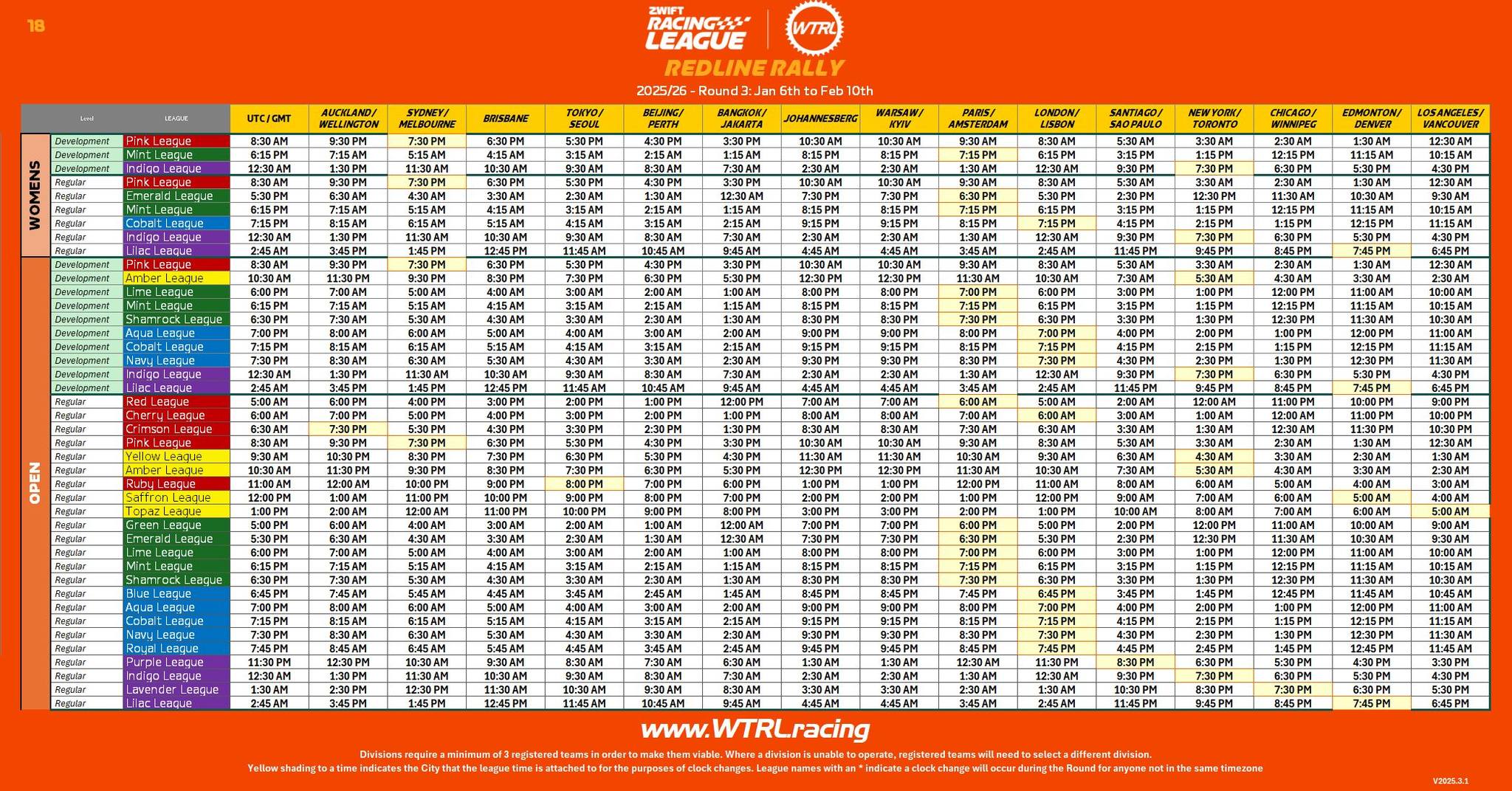
Some divisions and start times are adjusted between rounds. Use the table below to find a time slot that works for your team:

Teams/Registration

Team registration opened December 10, 2025 (go to wtrl.racing/zwift-racing-league/participants/ and click “Register a Team”. Registration closes January 5, 2026 at 00:00 UTC.

ZRL is a team-based competition – you cannot sign up as an individual rider. Teams can have up to 12 racers rostered, but only 6 can race in each event. Teams must have at least 4 riders on their roster, and a rider into as many teams as they’d like, but only a maximum of two teams per league category (see “Key Changes this Round” above).

Want to race, but don’t have a team? Here are seven ways to find a team:

  1. Recruit friends onto a new ZRL team, then sign up your team at wtrl.racing/zwift-racing-league/participants/.
  2. If you’re already a member of a larger Zwift Club, contact a senior Club representative to see if you can join one of your Club’s ZRL teams.
  3. Join an official team-lead ZRL Group Recon Ride (see below) where several teams can be found looking for more riders. These run several times a day, starting two weeks before the first race.
  4. Join the ZRL Facebook Group and post preferred race times/league, Pace Group Category, and any other preferences under the #zrlteamhunt tag where many teams are eagerly waiting.
  5. Reply to one of the #zrlrecruiting posts that teams make in the ZRL Facebook Group if you don’t want to post your own request.
  6. Reach out directly to WTRL and they can match you to a team based on race times, category, and team preferences.
  7. Use the new “WTRL Team Finder” tool once it becomes available at wtrl.racing/zwift-racing-league/teamhunt/.

First-Timer Tips

If this is your first time racing on Zwift, here are a few tips to get you started fast:

  1. You must create a WTRL profile linked to your Zwift account – do so at wtrl.racing/registration
  2. The minimum category you’ll race is determined by your power history on Zwift. See this post for details.
  3. Riders must use a power sensor to transmit power to the game – this would be a smart trainer, smartbike, or power meter. (You’re allowed to race C and D categories with a “classic” trainer and virtual power, but your points are cut in half.)
  4. Heart rate monitors are required. (You’re allowed to race without a HRM, but your points are cut in half.)
  5. Cadence monitors are required.
  6. You’ll want to have at least a few races under your belt before you try to join a team, so you are confident that you’re in the correct category. It causes a lot of hassle if you join a team and are forced to upgrade to a new category mid-round!

Race Recon Events

Overhead view of three cyclists wearing helmets and colorful jerseys riding closely together on a road. The text Zwift Racing League Recon Ride appears to the left.

If you’re unfamiliar with a particular week’s race course, join a ZRL recon ride! These happen multiple times per day and are led by experienced racers who may share route info and racing tips as you ride.

Find a list of upcoming ZRL recon rides at zwift.com/events/tag/zrlrecon >

2025/26 ZRL Dates

  • Round 1: September 16-October 7, 2025
  • Round 2: November 4-December 9, 2025
  • Round 3: January 6-February 10, 2026
  • Round 4: April 7-28, 2026

Questions or Comments?

We recommend checking out WTRL’s Zwift Racing League page for rules, team registration, results, and more. They also have a Help Center with lots of useful info, and their Facebook page is the place to go for discussion of all things ZRL.

You may also share questions or comments below!


Top 5 Zwift Videos: Home Gyms, and Animating Races, and Exoskeletons

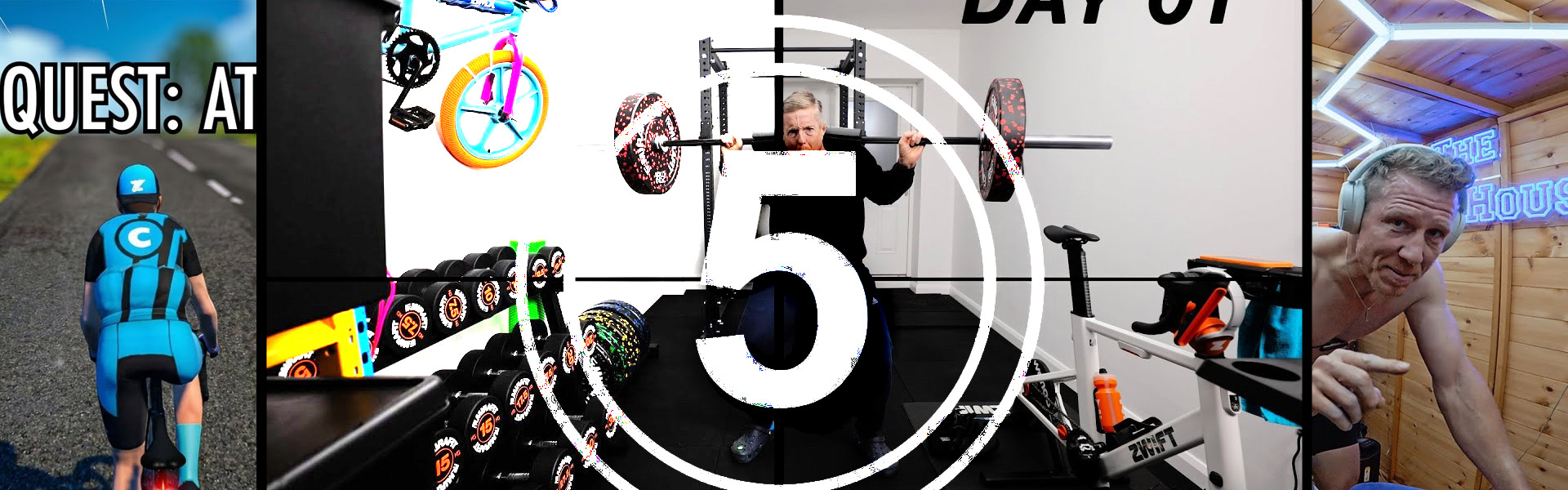
Looking for some inspiration for your own home gym improvements? In this week’s top video, hear from one Zwifter as he shares how he completely transformed his garage into a beautiful home gym.

Also included in this week’s picks are videos about FTP tests, attacking in a Zwift race, and using exoskeletons with indoor cycling.

Ryan Condon shares how he transformed his garage into a home gym.
As Max from The Watt Life starts training for the 2026 season, he tackles an FTP test and shares why everyone should do an FTP test before a training block.
After getting bored of sitting in the pack, Liam Shaw takes a risk and attacks in his latest Zwift race. Can he hold on for the win?
Jessica Strange tackles The Grade for the first time to test her FTP. With the help of some pointers from Ryan Condon, can Jessica set a new FTP?
With the recent launch of exoskeletons enhancing physical activity, many influencers have been putting them to the test in sports like running and cycling. In this video, Road.cc tries to set an Alpe du Zwift PR with the exoskeleton.

Got a Great Zwift Video?

Share the link below and we may feature it in an upcoming post!

Zwift Fondo Series 2025/26 Final Routes Released

80

Zwift Fondo Series 2025/26 Final Routes Released

Zwift’s big fondo events are a popular tradition where thousands of riders push themselves to finish long weekend rides. And while the ZFondo Series took a year off last year, it’s back for the 2025/26 indoor season, with the longest fondo in the series taking place in December during the Rapha Festive 500!

Here are all the details for this year’s ZFondo Series…

Routes and Schedule

The last weekend of each month is designated as a Fondo Weekend, and each month features a different route.

Events are scheduled every three hours on Friday, Saturday, and Sunday during Fondo Weekends.

September 26-28, 2025

  • Route: Bambino Fondo
  • Length: 52.6km (32.7 miles)
  • Elevation: 581m (1906’)

October 24-26, 2025

  • Route: Medio Fondo
  • Length: 73.4km (45.6 miles)
  • Elevation: 1010m (3314’)

November 28-30, 2025

  • Route: Gran Fondo
  • Length: 97.8km (60.8 miles)
  • Elevation: 1196m (3924’)

December 26-28, 2025

January 23-25, 2026

February 20-22, 2026

March 27-29, 2026

  • Route: Gran Fondo 2022
  • Length: 92.7km (57.6 miles)
  • Elevation: 1116m (3661’)

Categorization and RoboPacers

You must choose a category when you sign up, but the category you choose is entirely up to you, and all categories start together and are visible to each other.

The idea is that you’ll choose a category at the approximate pace you plan to ride, making it easy to see and group up with other riders targeting a similar pace. Each category will include a RoboPacer with a beacon, and you can choose to ride with that RoboPacer group or not.

Available categories:

  • A: 4.2 W/kg (RoboPacer: Constance @4.2 W/kg)
  • B: 3.2 W/kg (RoboPacer: Jacques @3.2 W/kg)
  • C: 2.6 W/kg (RoboPacer: Coco @2.6 W/kg)
  • D: 1.8 W/kg (RoboPacer: Miguel @1.8 W/kg)
  • E: 1.5 W/kg (RoboPacer: D Bernie @1.5 W/kg)

1000 XP Bonus + Kit Unlocks

Past fondos have typically featured jersey unlocks, but some of the designs weren’t always a hit. (Does anyone wear the salmon/chocolate 2023 kit?)

So Zwift is switching things up this year by giving a 1000 XP bonus the first time you complete each month’s fondo event.

Read All About Zwift XP, Levels, and Unlocks for Cyclists >

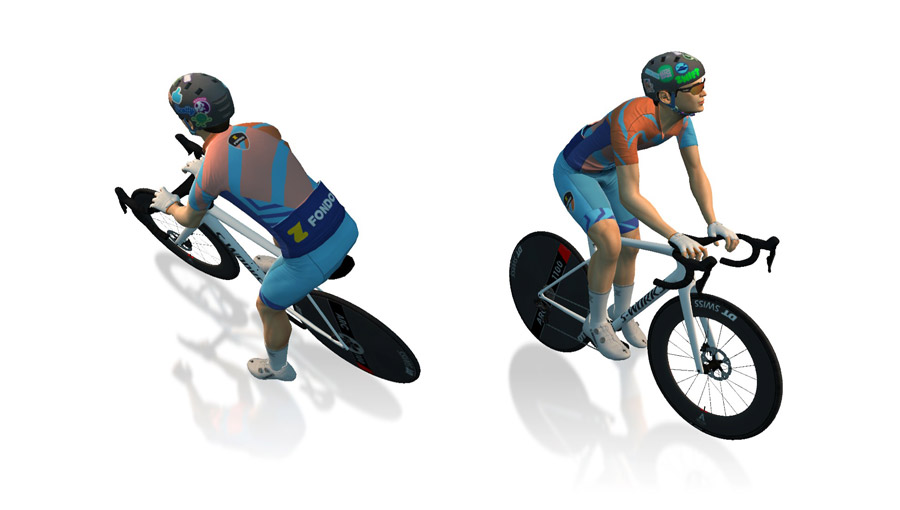
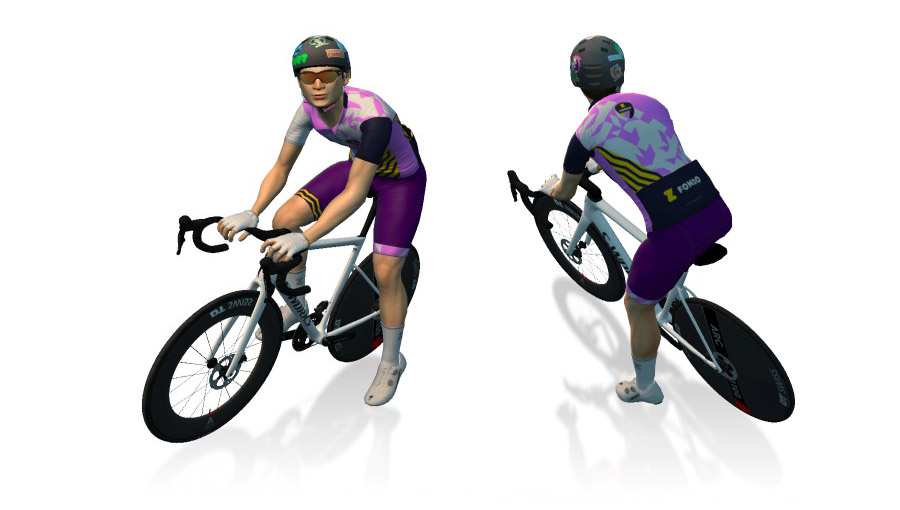
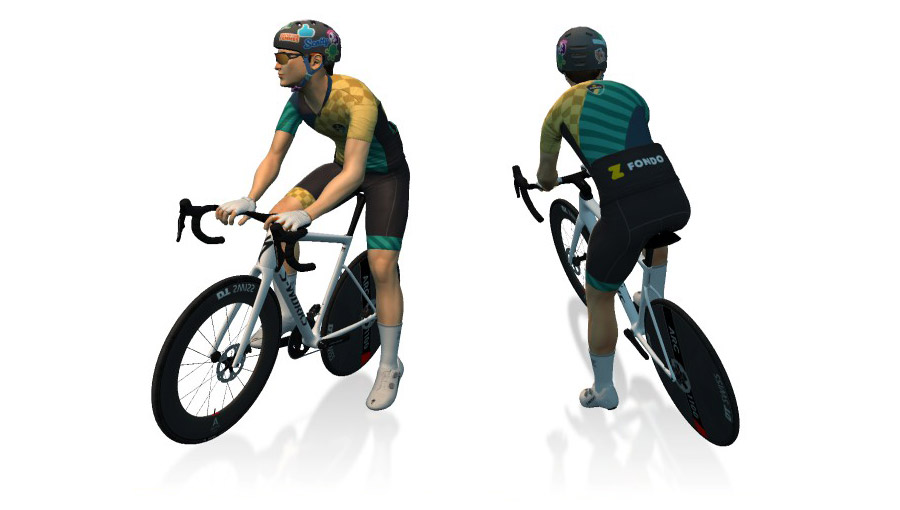
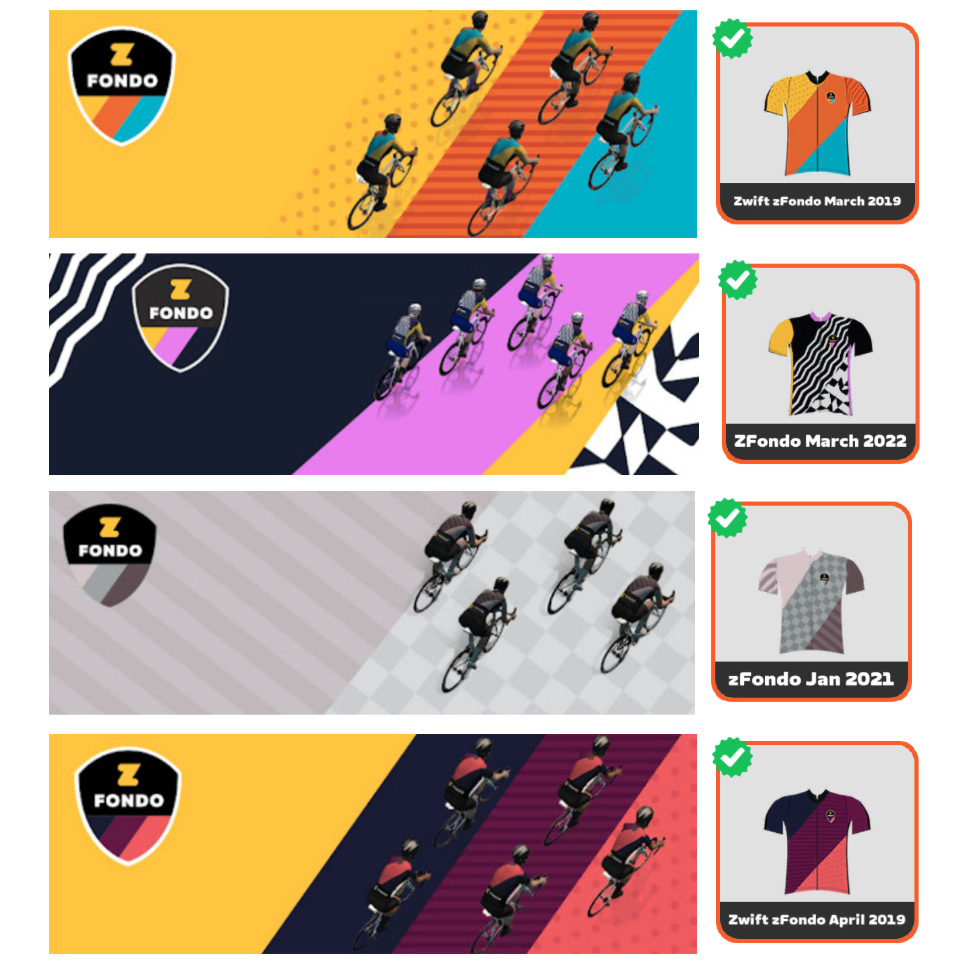
Of course, a fondo wouldn’t be a fondo without a kit unlock. But instead of releasing another set of fondo kits, Zwift is awarding different legacy Zwift Fondo kits each month:

September (ZFondo Medio 2023)

October (ZFondo February 2022)

November (ZFondo November 2020)

Kits for December, January, February, and March:

Is this a race?

Officially, no. But hundreds (possibly thousands) of riders will turn out for each of these popular “fun race” events, and the front of each event will certainly be filled with strong riders going all out.

With so many riders participating, everyone should be able to find a group that suits their desired pace. You do you!

Questions or Comments?

Post below!


Upcoming Events from Flamme Rouge Racing

9

Upcoming Events from Flamme Rouge Racing

Editor’s note: With the new year just around the corner, event organizers on Zwift are already deep into planning 2026 events. Richard from FRR is a key organizer in the Zwift racing space, so I asked him to provide an update on what’s coming next with FRR. See all the details below!

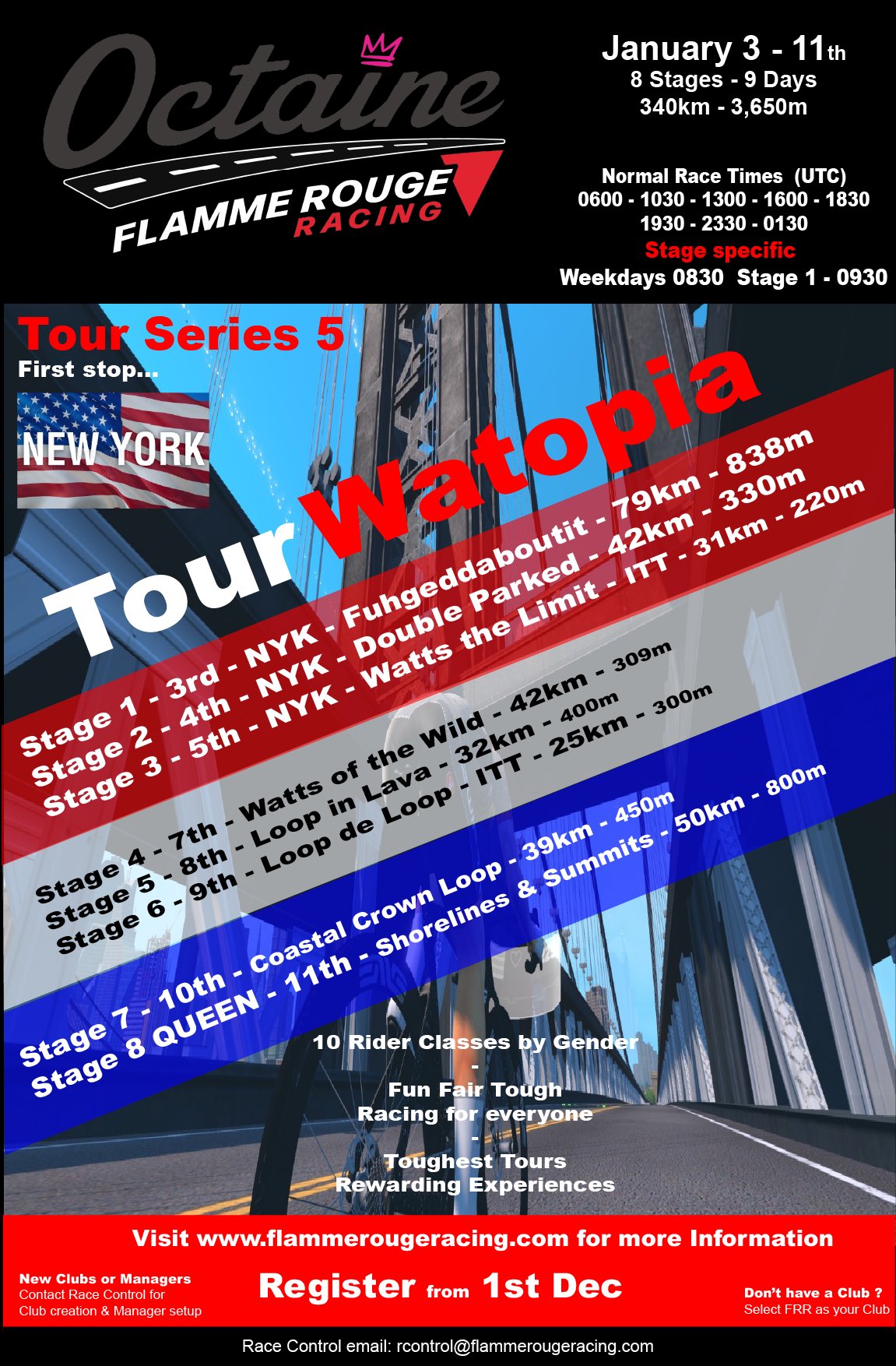
Tour Watopia

Tour Watopia will start our third Tour of the season on January 3rd with an epic first stage to welcome in the New Year. Once completed, you will probably want to  ‘Fuhgeddaboutit’…

The Tour opens with three stages on fresh New York routes before heading over to Watopia to complete the remaining five, which also incorporate new routes to tick off some badges.

The event travels 340km, climbs 3,650m, has 6 points and 2 iTT stages and guarantees one epic week of racing. You can sign up as explained below.

To give a special New Year boost, everyone who completes the first 3 stages will enter our free prize draw! There’ll be at least 10 prizes like FRR Tour T-shirts, store discounts/vouchers, FRR Level Jerseys… just ride and earn your ticket!

Click here for information, and here is the Tour Roadbook

6IX Team Racing

6IX Team racing will start the final round for Series 1 on January 16th, a series of 5 races across three race times APAC (0830UTC) – EUROPE (1830UTC) – US EST (0030UTC). Teams of 5 riders compete weekly to be crowned best in class in the March Finals, with classes defined by vELO rating level.

The feedback and the racing have been great. Just click here to see race clips and what you could be part of in January.

New teams can join up to January 16th and have every chance to make the finals. 

The racing is exciting, fast, and aims to keep the whole team engaged every race.

For more info on format, rules, and how to join, see the 6IX Rules

Tour Triquetra

Tour Triquetra will return on April 25th to deliver the Grandest of Grand Tours with 21 Stages over 3 weeks with just 2 rest days. The parcours will travel across many of our Zwifting worlds to elevate the experience, build the fatigue, test you like never before, and deliver the hardest but most rewarding event organised to date. 

The question is, can you handle it…? 

Not as though you need an incentive to join the best virtual Grand Tour of the year, but every rider who rides the Tour

  • will be eligible to purchase a Triquetra Rockstar Tour T-Shirt
    • complete all 21 Stages and earn the option to buy it at cost
  • all Class Jersey podiums (top 5) will enter a prize draw for some great rewards, with a host of other prizes to be announced for competitors

Over December, we are releasing on the website a Stage each day up to the 24th.

For more info, check out the Tour Schedule 

Club Series & Event Hosting

Team VirtuSlo have partnered with us to bring you their unique New Year Tour which starts December 20th, all on the back of the fabulous Team Fearless Women’s event. 

Want us to host your Club series and have your own space?  Contact Race Control and let’s start the simple process…

Event Schedule

  • Tour Watopia 3: 11th January
  • 6IX Team Racing: 16th January (5 races each Friday)
  • World Tour: 14th-22nd February
  • 6IX Playoffs: March 7th & Final March 14th
  • Tour Triquetra April 25th-May 17th

FRR partnered with Octaine Racing in the Summer to develop a new and exciting brand for the whole community – delivering free merchandise for riders who choose to Subscribe to FRR and support in moving us forward in all directions to improve and enhance what we do.

How To Sign Up

Riders can register throughout events, but the event race links are private, so registration is required at flammerougeracing.com.

To compete, you must meet these minimum requirements for accounts and equipment:

  • Riders must be OPTED IN to share their race data with ZwiftPower from their Zwift Profile Connections
  • Riders must have created and connected a ZwiftPower account – full instructions on this can be found here
  • Riders must have an FRR account to be able to register for an event,  be included in results and to allow Team Managers to select them for a 6IX Club Team – to do this simply follow these instructions:
    • Simply visit the FRR Home page and Login or Register a New account – once in, click on your name to open your Profile options
      • New accounts must first complete their basic Profile Information when they first log in – just select Profile and complete the fields presented not forgetting to SAVE at the end
    • To register for the event click on Event Admin and then select Register from the 3 tabs shown
      • The page details the 3 simple steps to follow to complete event registration
      • Race BIO confirmation is important to us as we look to improve rider responsibility for their virtual profile, since these define how our virtual self competes
  • Riders are advised to have completed at least 3 Zwift race events prior to racing to ensure your vELO rating value is reflective of you as a rider

Once registration is completed you will appear on the Registered list of riders and you will receive a welcome email to confirm along with some helpful details about the event.

You can email FRR race control at [email protected], or join the FRR Discord server.

FRR Socials

Octaine – FRR Partnership


Notable Zwift Events for the Weekend of December 13-14

3

This weekend, we’ve chosen three events to help you earn route badges (and XP bonuses) for tougher routes, plus two very different TT-related events. See our picks below!

✅ Route Badge  ✅ Endurance Challenge  ✅ Unique Event

This event from popular Zwift team THE COALITION is essentially three events in one, designed to help riders of all types have a great day out while riding London’s PRL Full or Half routes. Choose your own adventure! Ride the PRL Full (A group), the PRL Half (B group), or a banded version of the PRL Half (C group).

A and B will start together, while C will start two minutes later. All riders will be able to see each other on course. Read the event description for more info.

Saturday, December 13 @ 1:30pm UTC/8:30am ET/5:30am PT
Sign up at zwift.com/events/view/5214890

✅ Endurance Challenge  ✅ vEveresting  ✅ Crazy

The USMeS squad tells me their last attempt to break the Fuego Flats Reverse TT record was just 4s off the record of 7:34. This event begins with a warmup/lead-in, but once riders hit the segment, the front pack will feature A/A+ riders hitting the line at 55kph/34mph in TT style rotation ~8.5wkg for 1 min.

All riders will be placed on draftable Cadex Tri bikes with the fastest disc wheels. Riders of all abilities are invited to join in the lead-in, then attempt their own PRs.

Saturday, December 13 @ 6:30pm UTC/1:30pm ET/10:30am PT
Sign up at zwift.com/events/view/5215965

✅ Popular  ✅ Race of Truth

Cycling Time Trials (CTT) – the national governing body for time trials in England, Scotland, and Wales – continues to evolve their popular time trial series (read about the launch here).

Saturday is your last chance to complete week 5’s race on Tempus Fugit (12.1 miles, 16m), which is a repeat of the first week’s race. Set a course PB and you’ll earn series points to boost your overall ranking!

Multiple timeslots Saturday, December 13
Sign up at zwift.com/events/tag/cyclingtimetrials

✅ Kit Unlock ✅ Prize Giveaways 

The Feed is holding three longer fondo-style group rides this Saturday on Navig8 (66.1km, 421m), Dust in the Wind (52.5km, 582m), and Sacre Bleu (73.8km, 410m).

Each fondo has a ride leader, with a pace of 2.2-2.8 W/kg. Finish the ride and unlock The Feed kit on Zwift. Each fondo ride also features two prize giveaways – the ride leader will explain how they work!

Three times on Saturday, December 13
Sign up at zwift.com/events/tag/thefeed

✅ Route Badge ✅ Banded ✅ Beginner-Friendly

Join the Zwift Riders Scotland team and tackle some of Zwift’s more difficult routes to earn those route badges! These are banded rides, so you’ll stay with the pack as long as you keep pedaling.

This week they’re on New York’s Fuhgeddaboudit route (79km, 838m).

Saturday, December 13 @ 11am UTC/6am ET/3am PT
Sign up at zwift.com/events/view/5228833

How We Make Our Picks

We choose each weekend’s Notable Events based on a variety of factors including:

  • Is the event unique/innovative in some way?
  • Are celebrities (pro riders, etc) attending/leading?
  • Are signup counts already high, meaning the event is extra-popular?
  • Does the ride include desirable unlocks or prizes?
  • Does the event appeal to ladies on Zwift? (We like to support this under-represented group!)
  • Is it for a good cause?
  • Is it just plain crazy (extra long races, world record attempts, etc)?
  • Is it a long-running, popular weekly event with a dedicated leader who deserves a shout out?

In the end, we want to call attention to events that are extra-special and therefore extra-appealing to Zwifters. If you think your event qualifies, comment below with a link/details and we may just include it in an upcoming post!