Detraining (Never Going Pro Podcast #2)
Catch up with Ken, Shayne, and Chris as they focus on the struggles of returning to fitness after a period of deconditioning. Ken and Chris are surprised to learn from Coach Shayne just how quickly fitness drops for athletes who started from a point of lower conditioning.
We also chat it up about donuts, cafe stops, and le Tour de France!
Show Transcript
Ken: So, you guys like jokes?
Chris: I like jokes.
Ken: Okay, cool. Well I got a joke I’m about to drop on you. So a thief … It’s so bad.
Chris: It took everything inside of me not to click on that link you said do not click on.
Ken: I know, don’t click on the dad jokes link. A thief broke into my house last night looking for money.
Chris: Oh yeah?
Ken: So I got up to join him.
Shayne: What? Wow.
Ken: That’s a classic dad joke.
Chris: Yeah, yeah, that’s a classic dad joke. So it just sort of reflects everything about dads inside riding trainers. Just a bunch of cheap dads cobbling together systems like this is not your peloton photo op when you look at the photos of where these guys are getting it on with their trainers every morning.
Ken: Getting it on with their trainers every morning.
Shayne: Yeah, I get it on with my trainer every morning.
Ken: Yeah, that’s great. All right. Welcome everybody to the Never Going Pro podcast featuring dads inside riding trainers featuring GC Coaching. It’s a podcast about riding bikes and parenthood and trying really, really hard at both. I’m your host Ken the badger [Nowell 00:01:10] and with me is Shane Gaffney owner of GC Coaching and also Chris [Gorney 00:01:15] fellow dirt team mate and our marketing consultant. So let me just take a few minutes to catch up with everybody, see how everyone’s week is going. So guys, how is everyone?
Shayne: Everyone’s good here man.
Ken: Kids good?
Shayne: Chris has a sick one at home.
Chris: Yeah my daughter is a champ until things don’t go her way. Then it’s like two legos that don’t connect the right way. It is the world ending. So no, she’s got a fever. She’s fine. I think she’s smart and realizes that when she’s sick she gets to eat all the cheese crackers and blueberries she wants.
Shayne: Oh, boy, yeah.
Chris: She’s not dumb. But no she’s fine. A sick kid at home is often worse on the parent who is watching said sick kid, than it is for the kid.
Ken: I tell you I never minded it too much when I would call in sick and my daughter, she was the most cuddly thing all day. We would just cuddle up on the couch all day and watch silly shoes and maybe the occasionally mountain bike video. So anyway, how old are your kids guys? I’m sure our audience would like to know.
Chris: That’s great, go ahead Shayne.
Shayne: I have an almost three year old named Finn. He’ll be three in September and I have a five month old, well almost five month old named Grace.
Chris: that’s great, I actually thought your kids were older.
Ken: Yeah five months old already. I remember when you were going on paternity leave there for a little bit.
Shayne: Yeah that was back in February, so that was awhile go.
Chris: Ken, you were there at the birth right? You caught the child?
Ken: I wasn’t so lucky. I was down here in North Carolina. I missed the whole event. How about you Chris, how old are your kids?
Chris: I have kid.
Ken: Kid?
Chris: I have a nearly two month, two month old, way off. Terrible father. Nearly two year old little girl named Charlotte.
Ken: Awesome.
Chris: We call her Charlie.
Ken: Okay.
Chris: We live on Charlotte Street, which was an accident but is not everyone the joke they tell us is if they’re the first people to say it. So that’s our thing now. Oh, Charlotte on Charlotte Street. We’re like yeah that stinks. That’s like dad joke number 11484118910 now or whatever.
Ken: Yeah well I’ve got a little girl. She’s almost six years old. So we kept her for an additional year in a five preschool class. So she’ll be starting Kindergarten here soon. Got a birthday in two weeks and yeah, just living the dream man.
Chris: Hey can we briefly, I know this is a podcast about dads, parents, moms which we’re all equipped to talk about of course. Featuring, well we’ll have moms on here soon and training. But can we talk about the Tour de France?
Ken: We can talk about the Tour de France for a few minutes, assuming everyone’s seen today’s stage. Congratulations to Caleb Ewan his first time in the tour I believe.
Shayne: Yeah, yeah.
Chris: Huge. Inches, inches.
Shayne: That is very unfortunate. I haven’t watched one second of the tour this year.
Chris: That’s because you don’t know anything about cycling.
Shayne: Not too much.
Ken: I mean that’s actually a good question is Shayne, are you a big cycling fan or it’s just work to you these days?
Shayne: I’m a huge cycling fan and yeah it’s just work between GC Coaching, Zwift and then obviously two very young kids. I just don’t have a lot of free time on my hands to watch the tour. So I’m hoping to catch up on it this weekend if I can.
Ken: Cool. Well-
Shayne: There’s this sports gold app and it’s really nice because it has a lot of nice recaps of episodes.
Chris: Well it’s not actually nice. Here’s the thing. Here’s my opinion on that which everyone needs to know. It’s not that it’s good, it’s that this year it sucks slightly less than it has.
Shayne: You mean the app?
Chris: Than in previous years. And so, the app. I mean NBC has got to have money, right? They just need to hire one good app developer who’s hopefully not listening right now. Anyway, every time I put it on my sole goal is to not have the stage ruined.
Ken: The first year they came out with that app I actually sent a message to NBC. It was the year where I was like yeah, as soon as … like most of us can’t watch this until we get off of work if you’re in the United States and I jumped on and saw that on the front page or on the home page Wiggins won the time trial with Froome in a close second and they were one and two and I was like, thanks. Good job.
Chris: Thanks guys. Well hey full confession, I have watched nearly every minute of the tour so far. I realize how boring that is, but what I do is I put it on in the background while I’m working and I listen for the words attack or crash and then I go back over to it and back it up 15 seconds and it is an amazingly soothing way to watch the tour.
Ken: Yeah, that’s true. It is a good way to watch the tour and I did that in year’s past. But being the cheap dad that I am, obviously you’ve heard my sense of humor. I now use a different app called Reddit where I go on the peloton community, ourpeloton and just watch the highlights everyday about an hour after the stage ends. That’s it.
Chris: That’s probably a much better use of your time.
Ken: Yeah I actually get stuff done in July now.
Chris: Yeah actually when we got married we didn’t have a TV for a bunch of years because we just wanted to give that a shot. Then my wife got tired of me being sad every July. So one July I got a surprise gift and we have a TV solely so that I can watch the Tour de France.
Ken: That is awesome.
Chris: Which shows you how awesome my wife is and how unhealthy I am. Cool, well it is a good tour. It’s like a changing of the guard. You’re seeing some guys, some older guys seemingly final performances maybe and then some new guys. A lot of cyclo cross guys that are just monsters.
Ken: Yeah I’m seeing a lot of that. But I think the really exciting thing for me is to see how exciting cross country racing has gotten watching the let’s get France race last week and Andora I guess one or two weeks before that and this woman Kate Courtney if you’re not familiar is just probably the most dominant American cyclist right now and maybe one of the most dominant cyclist in the world.
Chris: She’s a phenom.
Shayne: For sure.
Ken: Yep she is amazing. She came out of the NICA system which is basically a high school mountain bike league and it’s proliferating throughout the entire United States. It’s National Interscholastic Cycling Association. So if you are looking to get involved I’ve been coaching as a NICA coach for a local high school for the last season. It was a very rewarding experience and I just love it.
Chris: That’s why you’re always posting stuff with high school students going mountain biking? Makes a lot more sense now.
Ken: Yes.
Chris: I just thought maybe you didn’t have anybody else to ride with.
Ken: Yeah I don’t just show up at the high school and you know.
Shayne: You guys want to go ride bikes?
Ken: It’s a volunteer position but I love it. I pay to do it. It’s awesome.
Chris: I’m sure they would let you pay.
Ken: Oh, they do. Well cool, so this week, so last week we talked about a couple of topics. I can’t remember the exact questions or I want to say two weeks ago. But the focus question for this week is when you’re training schedule gets derailed by work or family commitments, what is the best way to get back on track? So I know that Shayne has done quite a bit of research on this and he’s about to drop the knowledge on us. So Shayne we’re going to turn it over to the brains of the outfit, hear what you got to say.
Shayne: All right.
Chris: We have research. You did research and have citations, is that right?
Ken: Yes.
Shayne: I do. Yeah I try to make sure I can back up what I can hopefully say.
Chris: One of us should.
Shayne: When I read that question I thought of two forks, I guess one fork. One prong of the fork is to talk about detraining and the other prong of the fork is to talk about how to get yourself back on track again.
Chris: Could we call that detraining and retraining?
Shayne: You could, yeah.
Chris: Or is that just stupid?
Shayne: No, not at all. I would say that’s retraining or getting back into shape again. However you want to say it.
Chris: I like the alliteration.
Shayne: So detraining is essentially you’re losing aerobic, anaerobic sprint, endurance, strength. Basically all the things you’re trying to build up with training you’re slowly and steadily losing that. So long story short is as you detrain you lose your high end performance first and you lose your strength and endurance typically last. So that’s why you may have noticed if you do a Zwift race after a long time off you get completely smoked out the gate but you can go out and ride for a couple hours without too much of an issue.
Chris: Okay just to clarify your high end performance, are we talking our one or three second sprint wattage here or something a little longer?
Ken: That’s a good question.
Shayne: I would say something a little longer. So I would say somewhere between the 30 second to five minute range.
Chris: Hm, okay.
Shayne: You actually maintain your strength and your sprint fairly well, the short sprints like five to ten seconds. But once you start to extend that out into the VO2 max range that’s when you really start to see the differences between the detraining.
Chris: So how would I know I have entered, because I’m always thinking every man terms and things like that. How would I know if I have entered a VO2 max effort when I’m out on the bike so I even know if I have it or don’t have it?
Shayne: So typically VO2 max is something you can sustain for five to eight minutes and by the time you get to that five to eight minutes you are completely smoked. So you literally can’t turn the pedals any further.
Chris: What if that’s everyday I get on my bike and I feel it? Is there a problem? Am I doing something wrong?
Shayne: I don’t think so, no.
Chris: Good.
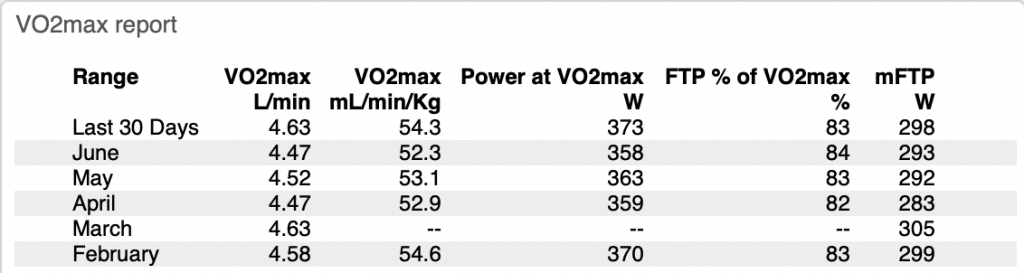
Shayne: Typically you can establish what your VO2 max is in a lab doing a ramp test or you can also use things like WKO software models think your VO2 max is. What your VO2 max is that power, you can sustain that for like I said, five to eight minutes typically depending on your level of training. With the more trained you are, you can sustain it for longer and then vice versa. The less trained you are you sustain it for less. So the big change is in the VO2 max. So VO2 max changes happen because you have decreased blood volume which is essentially your blood plasma, your red blood cells. So you lose your ability to carry your oxygen throughout your body. You also lose your leg strength and your heart can actually shrink in size too, which means the muscles don’t pump as efficiently. You also lose your fat utilization during your training and you become more reliant on carbohydrate which is a big issue because you have a very finite supply of carbohydrate on board and you have practically limited the supply of fat on board.
Shayne: So we train to become … it’s a buzzword to become fat adapted. So we train to ideally increase the amount of fat we use in substrate and then we ideally try to reduce the amount of carbohydrate we use just to maintain it for longer.
Chris: Okay I want you to create me a training manual.
Shayne: Okay.
Ken: Good you just earned another client.
Chris: Hired.
Shayne: You also become less insulin sensitive which means you lose the ability for your muscles to uptake glucose in your bloodstream. It’s like a double-edged sword where you burn more carbohydrate for every pedal stroke, but you also absorb less carbohydrate that you’re intaking.
Chris: Wait, say that again.
Shayne: You become reliant on carbohydrate and then you also reduce your insulin sensitivity which means that your muscle’s ability to uptake glucose into them decreases.
Chris: Oh, so it’s really a two-fold thing. So you can’t get the glucose, which is carbohydrate into your cells.
Shayne: Right.
Chris: But your body is now requiring that you burned more carbohydrate to fuel your efforts. So now it’s like oh, no man your body is basically saying I’m going to burn through these carbohydrates super fast and there’s nothing stored in the tank to keep me going. Okay, okay got it.
Shayne: You got it.
Chris: So donuts is the answer?
Shayne: Donuts is great, yeah. As long as your stomach can tolerate them when you’re going at full gas for sure.
Chris: It’s interesting. As I’ve gotten older my ability to go out and just eat crap food has for sure gone down as it does.
Shayne: Yeah.
Chris: But I think because I’ve both been training on a bike, but also including so many café stops with pastries over the years, that I’ve also been training my body to be able to continue to eat tons of trashy pastries. So I might not be able to go eat fast food anymore, but I can still hammer a ton of donuts without getting a stomachache and I think it’s because of cycling.
Shayne: Sure.
Chris: Which is an amazing joy.
Ken: Yeah that’s good. So I guess Shayne what are your thoughts on fueling with stuff like donuts? Is the fat content too high in them to be really ideal?
Shayne: Yeah the fat content would be too high and it’ll be more-
Chris: Don’t ruin this for me jerk.
Ken: You’re adapted, this doesn’t apply to you.
Shayne: How heavy the food is. The more heavy, the more rich, the more dense the food is the harder it’s going to be for you to digest it. So, that’s why things like easily absorb foods like gels or shoplocks things like that have become popular and also just eating bananas, kind of a more easy to digest foods are popular too. But I think a donut is fine or a pastry is fine or whatever if you’re at a rest stop because it’s something that you’ll enjoy to eat and something that’s going to be absorbed relatively quickly because it’s pretty high in sugar, then I don’t see any problem with it you know? But for a race, probably not good.
Chris: Plus café stops. I know it’s not riding indoors on trainers like we do.
Shayne: For sure, yeah.
Chris: But café stop I think is a crucial part of outdoor cycling and I think everyone’s got their mileage. Ken do you have a mileage minimum you have to ride before you allow yourself to have a café stop?
Ken: Man, no not really. Usually my bike rides being a dad with a tight schedule I rarely get the luxury of doing the café stop. I usually have just enough time to … and for me it’s not road riding anymore. I can tell you a little anecdote about why here in a minute. But I threw my bike in the back of the truck and go to the trail and I ride for as long as I can and then drive back and fortunately I’m close to having some really close single track trails to my house. I’m mainly just a mountain biker or riding on Zwift. I can ride my bike straight to the trail head from here. But yeah, one morning about it was almost two years ago I was out mountain biking. Had just hit a whole bunch of PRs and was segment seeking for Strava and got some top tens and just cruising back through town in a bike lane and somebody pulled out in front of me and sent me over their hood.
Ken: You know ever since that day I just have not had the desire to go out on the road and I’ve only been on the road maybe a half a dozen or ten times since then and that was two years ago.
Shayne: I can’t blame you at all for that one.
Chris: Those are scary things man.
Ken: This is not for anybody, I’m not trying to use scare tactics. That’s just my reality and my risk assessment. I haven’t missed it. Once I got onto Zwift it was so engaging the way dads inside riding trainers or DIRT had set it up with the voice chat and we started creating our own races and it’s such a rich community that it’s very engaging. Then I get my outdoor fix by going out on my mountain bike when I can.
Chris: What a funny ad to the discord, like the target audience. They started this thing and they’ve got it all built around video game chats and all of a sudden thousands and thousands of strangely and awkwardly fit middle aged people all of a sudden get on discord to talk about cycling at five in the morning. I’m sure they’re just sitting in their office going, “I mean okay I don’t know what this is about maybe it’ll make me more money sure.”
Ken: Yeah this is fantastic. Who are these guys? Yeah.
Chris: Yeah seriously.
Ken: No that would be great. So Shayne I was looking under your notes and there’s some really shocking things that I saw that what you mentioned you typically see a fitness decrease two to three times as fast as it is regained in sedentary people?
Shayne: Yeah sedentary people.
Ken: Okay, so tell me a little bit more about that versus somebody like you mentioned Miguel Indurain later in the article and so explain the difference between your couch potato that’s just been riding for the summertime and has gone back to the couch versus Miguel Indurain.
Shayne: Sure. Yeah so I wanted to take two different athletes types because Zwift is very encompassing and hopefully the podcast listeners are too where some athletes are going to be very highly trained and some athletes are going to be more of a summer fair-weather type riders. So the big thing with detraining is the more fitness you have the less the detraining is going to affect you and the slower the decreases are going to be. So this one study I found published by Nolan he took a group of sedentary individuals and he had them do a 13 week training routine and then he separated it out into two groups, one group didn’t do anything for a month and the other group did a decreased amount of exercise for a month. So both groups lost a considerable amount of fitness because I think, I can’t remember the exact number, but it was a 60% decrease in training for the group that still trained. But what was shocking was the group that didn’t do any training after just one week of doing no exercise, all of their response training was abolished completely. So it was almost like they never had never trained before a day in their life.
Chris: Wow that is crazy.
Shayne: Remember we’re talking sedentary. So, if you’re the kind of rider that rides from June to September and then you put your bike away, you’re going to lose all that fitness you’ve gained in about a week or two weeks believe it or not.
Chris: Damn.
Shayne: That’s why it’s really key to, which we’ll get to later, is to keep yourself going ideally all year around doing something. It doesn’t have to be necessarily cycling, it could be cross training, but something that’s going to be cardiovascular demanding for you to do.
Ken: So did you say there was a second group that just trained less, like they lowered their volume down?
Shayne: They trained 60% less than they did during the 13 weeks and they also had decrease in VO2 maxes, things like that. But their diminishes were nowhere near as bad as they were for the group that did one week of nothing at all.
Ken: Gotcha. So the key is just don’t go back to the couch completely, just keep doing something.
Shayne: Exactly. Yeah, especially if you are a sedentary type where you’re getting into things because by the time you get to the 13th, 14th week you’ll have some decent fitness built up. But the fitness is going to be very fleeting where you only have about a week before you lose it all if you don’t do anything at all.
Chris: So essentially if you’re someone who’s relatively fit and staying active in some way then you’ll maintain a decent base is really the terminology we could maybe use?
Shayne: Sure, exactly. The more fit you are and more importantly the longer you’ve been fit the better it’s going to be for your longevity in terms of fitness where you’ll lose fitness a lot slower than the average person that is more sedentary, more sitting for work, things like that.
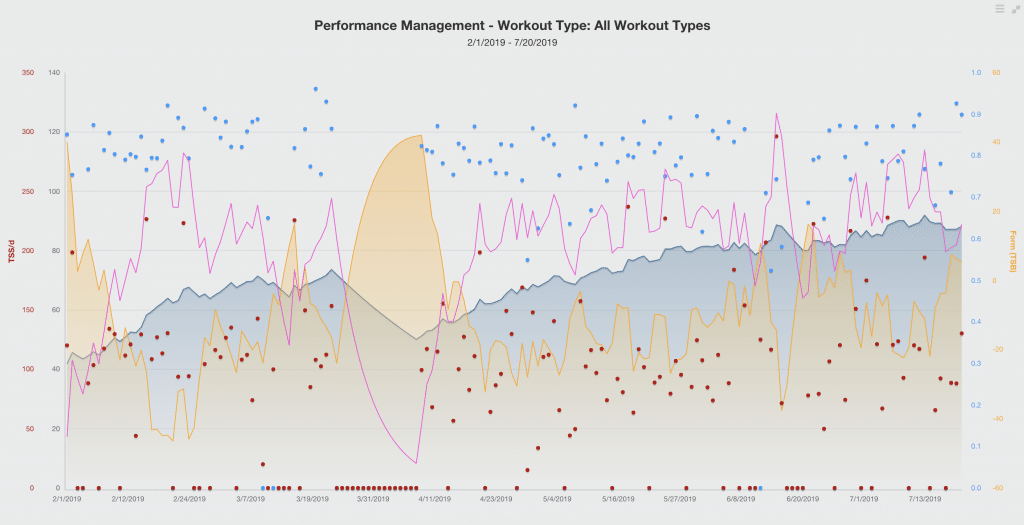
Chris: I tried to pull up some of the graphs you sent us while you were talking but then I quickly gave up because I know absolutely what none of this means. So I mean I feel like we could do a podcast on you describing how to read these graphs, but no one would listen to that.
Shayne: Yeah I don’t want it to be like that either. I want to give the information in a digestible and understandable format. I know when I get into physiology, biology all that stuff because that’s kind of boring.
Chris: Would you say that your description of this study would be like a simple carbohydrate that you could digest easily for quick absorption, not a donut.
Shayne: Not a donut yeah.
Chris: Perhaps.
Shayne: But like I said too, I mean if you like donuts then live life man, enjoy it.
Chris: Okay, I should be clear. I’m using donuts as a cloak wheel, shorthand for pretty much all pastries. But, that’s a different podcast.
Ken: Yeah okay so tell us what happened. Tell us the story about Miguel Indurain, we’re dying to know.
Shayne: So the other side of this coin is an elite athlete and Miguel Indurain is obviously a freak of his time. So just to give you some-
Ken: And for our audience he won the Tour de France five times.
Shayne: Right.
Ken: He’s one of three people that have ever done that.
Chris: Mm-hmm (affirmative). It’s like ’90 or ’91 to ’95 or something like that.
Shayne: Yeah.
Ken: Right, right.
Shayne: So I’m going to give you numbers from testing he did in 1996 and then I’ll compare that to testing he did with this test which was I should know that number. What year that was done. It was 14 years after his retirement. So he’s 46. So let me pause here just so I can get what that year was.
Chris: I also want to share with you because I wanted to pull it up and look at photos, he and I have the same birthday.
Shayne: Oh, you do?
Chris: Miguel Indurain and I have the same birthday, which was yesterday.
Ken: Oh, man that’s awesome.
Shayne: There you go.
Chris: Put that on the fun facts for the podcast.
Shayne: Let me start that over again. So on the other side of that coin you have professional athletes and I found a very interesting study of Miguel Indurain which was produced by [Moochica 00:25:32] I don’t know how you say his last name. Sorry if I’m butchering that. But he compared his testing from 1996 to a testing he did 14 years after his retirement in 2012. So just to give you an idea of the differences. So his VO2 max in 1996 was 80, which is off the scale freakish.
Chris: Sure.
Shayne: His FTP, which this scientist measured it for the onset of black lactate which is about four millimoles was a 505 watts which put his-
Chris: Oh, my god.
Shayne: Which put his-
Chris: So that would be 20 minutes. 20 minutes of that.
Shayne: Well we’ll get into that later, but FTP isn’t necessarily 90% of your 20 minute power, but we can go into that later.
Chris: Sure.
Shayne: So 505 was his FTP, that put his watt per kilo at 6.23.
Chris: Geez.
Shayne: We talked before the carbohydrate to fat reliance. So, his FTP as a percentage of his max power was 88% in ’96 which means he can work 88% up to threshold by burning primarily fat, which is huge.
Chris: Wow.
Shayne: So he can work up to very high zone three tempo zone, almost into low threshold with burning primarily fat or carbohydrate. Then his last minute for his ramp test was 572 watts. So you can tell just an absolute freak.
Chris: That is a freak man.
Shayne: The testing basically said that he did … you know he still rode during the 14 years between the tests and the current test but it was obviously nowhere near what it was before. So the test he did in 2012, his VO2 max went from 80 to a 57, but a 57 is still superior for his age. His FTP went from a 505 to 360 and his watt per kilo went from 6.2 to 3.9. So even with relatively low training, being detrained he’s still a very solid B, if not A racer.
Ken: Right so that would still put him at, you said that was 92 kilos which I believe is about 200, 205 pounds. So he’s not a little dude.
Shayne: No. He was 81 kilos during his test in ’96. So he’s about 11 kilos bigger.
Ken: Wow he’s a big boy.
Chris: So I mean part of that was with him eating some more cheesecake and drinking a little bit more wine between those two times.
Shayne: Sure.
Chris: Wow.
Shayne: The big thing I said was the carbohydrates. So his FTP as a percentage of max power went from 88 to 80% FTP. So now you’re talking 80% FTP that’s when the transition between fat and a carbohydrate starts. So he’s burning primarily fat at 8% less than he was in ’96.
Chris: Gotcha.
Shayne: So just less “fat adapted.” But the point being he didn’t do jack nothing, well he did. I can’t say he did jack nothing, but he did way less training for over 14 years and he’s still a solid B+, A- racer relative to a sedentary individual who does three months of training and they take one week off and they lose everything that they’ve gained.
Ken: Right, right. He was probably training 20, 25 hours a week for a decade.
Shayne: At least. Probably, if not more.
Chris: You know he could still dig and find a gear and just hammer for a few minutes.
Shayne: For sure. Yeah I mean his last minute of the ramp test was still a 450 watts. So there was 572 in ’96.
Chris: That’s just stupid.
Shayne: It was still a 450 in 2012.
Chris: A couple weeks ago I was on a group ride and there were these two older guys whose names I won’t share, but they, wow they were probably both 60 plus, both of them were Olympic medalists in different cycling events from years gone by and holy crap. It’s exactly what you’re talking about. These guys were just leading the train and I mean they were working hard, but even if you didn’t know … I mean if you would have just joined the group and you didn’t know that these guys were Olympians you’d be asking like who the heck are these guys? It was just a different-
Shayne: It’s a different animal.
Chris: It’s just a different level.
Shayne: Yes, absolutely.
Chris: Yeah it’s unbelievable.
Ken: So Shayne let me ask you this, so I’m somewhere in the middle between Al Bundy and Miguel Indurain-
Chris: Yeah just like everybody else.
Ken: … right exactly. So I’m detrained. So let’s say I’ll give you an example. A couple years ago I got the flu and then I got a sinus infection and then I had a reaction to Penicillin it took me out for like a month. What does getting back on track for our typical listener look like?
Shayne: Before we do that let’s talk a little bit about the differences in zero to two weeks, four weeks, nine weeks and 12 weeks. So for a trained athlete the first two weeks he really won’t lose much of anything and if anything, you’ll actually probably absorb and adapt to the training you’ve done before as long as you were coming into that illness or that time off pretty fatigued. So you’re almost using that.
Chris: Almost like a taper?
Shayne: Exactly, almost like a taper.
Ken: Yep.
Shayne: So the biggest changes I see with the research is two to four weeks where VO2 max can decrease anywhere from six to 20% in two to four weeks which is crazy. That’s where you lose all the blood values. You start to lose your ability to carry oxygen, your stroke rate decreases, all those really unfortunate bad things change. So zero to two weeks you’re in the clear. Two to four weeks is where everything really start to cap and go downhill. Then nine plus weeks that’s when you’re talking a 20 to 25% loss in VO2 max.
Chris: Wow.
Shayne: So it’s almost like if you can salvage it within two weeks you’re pretty good and you definitely want to try to salvage it within four weeks. After four weeks you’re going back, not to ground zero like the sedentary group would, but you’re losing about 25% of your aerobic capability at that point. It’s going to take about two to three times the time you were off to rebuild what you lost.
Ken: Wow.
Chris: Wow. That’s depressing.
Shayne: So everybody don’t take a four week break.
Ken: Right, don’t take a four week break by choice. Obviously things happen.
Shayne: Right, sure. Don’t take it by choice if you can predict it. As far as getting back on track, yeah I like to first take a step back and reevaluate how long have you been off for? What were you off for? I had an athlete this year who got the flu in February and he literally wasn’t able to breath deeply until about May. So even though he could train, he really couldn’t dig because the flu attacks your lungs. So he couldn’t breath deeply because he just had scratching in his lungs from the flu. So it depends on what you had going on, why you took that much time off. Then once you do that then come up with a plan to rebuild the fitness that you lost. Again the plan depends upon how long the break was. The biggest issue I see is people try to jump right back into where they were before their time off and that typically can lead to injury or really burnout because if you can’t hit the same numbers you were hitting six weeks ago and you come back and try to do a workout you could do six weeks ago and you fail it over and over and over again, that’s not going to really be great for the psyche and the overall motivation.
Chris: I was going to say I’ve heard it said many times and Ken, you and I were texting back this yesterday or the day before. If you’re trying to ramp back into a training plan maybe been at rest or whatever and you start finding that you’re failing workouts, isn’t the smart thing to do to decrease your percentage and finish well rather than redline it and fail every time. That’s kind of what you’re saying. If you’re entering back into it, maybe you need to say take a long term perspective and say my goal is fitness not just some sort of idle inside my own heart about feeling a certain way or I’m the hard cyclist. But saying actually I want to get stronger the right way, smart.
Shayne: Right.
Chris: And maybe that means riding less hard for awhile.
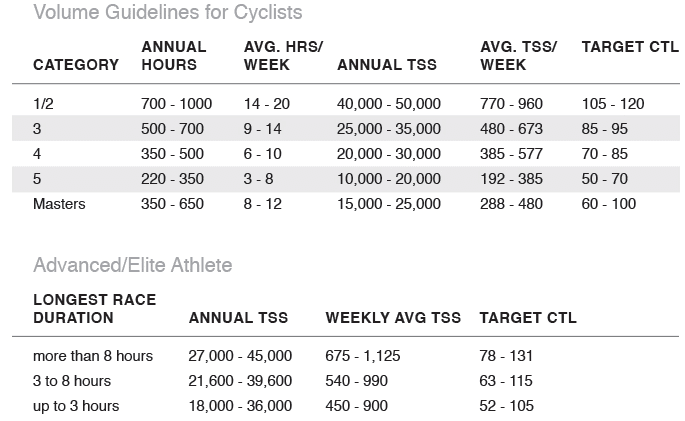
Shayne: Yeah I would agree. Ideally you want to rebuild volume first and then intensity second. But, if you’re time crunched then you’re going to have to do what you have to do. But typically I like to rebuild volume first if I can with my athletes and depending how much time they have available to train and maybe zone two, three for the first couple weeks to a month and then maybe throwing in some sweet spot and then maybe going up into more of a VO2 max type efforts after that. But typically I like to play with the train load based off training stress core or TSS, which we talked about last week. Typically you want a TSS decreased by about 50% of what you could tolerate before. So if you were tolerating 800 TSS per week and you took a month off, I would probably come back around 400 to 500 TSS the first week you come back. I actually did this with Eric [Slain 00:35:38] he was another DIRT member, linked this into show notes too as long with the articles.
Shayne: But he went on a two week holiday and his CTL which is his fitness was an 83 and he came back. He left the week of March 18th. He came back the week of 4-8 and his CTL dropped by 20 points. He was tolerating 700ish TSS per week in March and I started him off at a 530 the first week he came back and then you want to slowly rebuild the CTL that you lost.
Ken: Let’s just give a quick shout out to Eric. He is the founder and I guess editor and chief of Zwift Insider.
Shayne: That’s right, he’s my man.
Ken: An awesome Zwift blog, probably the most popular one. So that’s our guy.
Chris: He’s going to write all kinds of great articles about this podcast.
Shayne: Yeah let’s hope.
Ken: He did. He posted an article about our first one. It was a good article.
Chris: So you were talking about TSS score and these guys they talk all the time about peaking and being in good form and why some guys, they’re saying well if they’re going to ride the Giro they’re not going to ride the tour and all the things like this. Why the Dauphine is so important. Is that a metric of them doing a ramp up and they probably have this all graphed out and mapped out of them trying to peak and then not lose because you said that two week window. So that just starts to overlay a beautiful complexity to these training plans. It’s like wait, even me as a normal guy I can apply some of that to my life too. You’re demystifying it a little bit, which I appreciate.
Shayne: Absolutely. Yeah so typically an athlete will have one or two A races that they’ll want to be in quote, “peak form” for. Typically it’ll be one in the early season, one late season just so you have some time to do a little bit of rebuild and transition in between events. Some athletes just have one event per season that they want to peak for. So like we said last time, when you’re on form you have high fitness and low fatigue. So you want to be overloading the body during the base and build phases to ramp up that CTL or that chronic training load which is your fitness based on training peaks. You want to slowly ramp that up over the course of months and then the last week or two weeks that’s your taper phase where you want to try to maintain the CTL as best you can, but let the fatigue drop off so that your form rise. So high form is again low fatigue and high fitness.
Shayne: So you can do that by planning out an ATP or annual training plan and you can do that by year, you can do that by event, whatever you want to do. But it’ll give you a little bit of a roadmap on how much TSS you want to hit per week and then when your taper will be, when your transition will be. So like we talked last week about planning your yearly versus a weekly. It’s always I think better to plan yearly because you get a better idea where the hard weeks will be, where the easy weeks will be and just get a better idea of where you’ll be for your event that day.
Ken: I can see that being beneficial especially with what I’ve been tackling with structured training programs this year. Some of my goals. So I went on vacation just for a week and just ate terribly, put on like six pounds and had a race. I got back on Friday and had a race on Saturday or maybe on Sunday, but I just felt terrible. I had failed a couple of workouts. I had decided to take my old wheel on trainer to the beach with me and do workouts with a power meter instead of erg mode and it just, I lost my confidence from failing all those workouts. Then coming into that race I just wasn’t in a good head space and just got shellacked. But what I’m hearing is I probably in real life hadn’t lost any fitness. It was just a variety of other factors. Maybe bad sleep, bad eating and getting in my head with losing a few or failing a few workouts and that was a big factor.
Shayne: Yeah I think confidence is definitely an under talked about thing in endurance sport which we can talk about at another podcast too. But having confidence and having motivation and drive is I think as important as having good fitness is.
Chris: well they say bonking is as much between the ears as it is in your legs, so they say, whoever they are.
Ken: I can definitely believe that. A friend of ours did a 100 miler, Jason [Muchler 00:40:31] you may have read about him. He was wounded really badly in action and he found Zwift and it’s been really life changing in a positive way for him. But he had a solo 100 miler and one of our friends pointed out like your head is going to give up before your legs do. He suffered it out and he’s one of your clients, Shayne.
Shayne: He is, yep. He averaged 21.2 miles an hour and did it in four hours and 45 seconds. Sorry, four hours and 45 minutes, excuse me. So yeah he crushed it compared to what he was doing last year which is great. I’m stoked for him.
Ken: Yeah that is pretty amazing. So I think this week what we decided to do is really unpack this question in a lot of detail because it applies to so many of us whereas last week we tried to touch on multiple questions. I think we are starting to run a little bit short on time. I was going to get into some of the DIRT origin story, but we can save that for our next episode and have a little fun with telling the story behind that.
Chris: We’re going to start doing dad stories too, right?
Ken: Yep, we’re going to start doing some dad stories and we’re going to pick out one of our members and profile that person and so we’ll really put a human face on what we have going on with dads inside riding trainers.
Chris: Ken, can we ask for stories from dads?
Ken: For sure.
Chris: Are we allowed to do that?
Ken: We are allowed to do that.
Chris: That’s great.
Ken: As a matter of fact on the indoorspecialist.com you can already read quite a few stories about some of the members of our team. Just fascinating people from around the world and they’re all just like us. They’re all doing the deal, trying to stay fit and balancing life, parenthood, work.
Chris: All of the above.
Ken: You know how it is. All of the above. Well guys it’s been an excellent episode. Thank you both for joining in. Shayne thanks for all the hard work and the research putting into this and Chris Gorney again for his marketing efforts and our logos. We will see you all again in two weeks. So everybody ride on and have a good week and we’ll talk to you soon.
Chris: Perfect, thanks guys.
Shayne: Bye everyone.
About the Podcast
Never Going Pro is a new podcast about riding bikes, being parents… and trying super hard at both. Hosted by Shayne Gaffney, Ken Nowell, and Chris Gorney. See all episodes on Soundcloud. Also available on Sticher and iTunes.
Related Posts
Related Posts