

While Zwift contains 10+ worlds and 200+ routes, only three worlds (and their corresponding routes) are shown on the homescreen when selecting a route to run or ride:
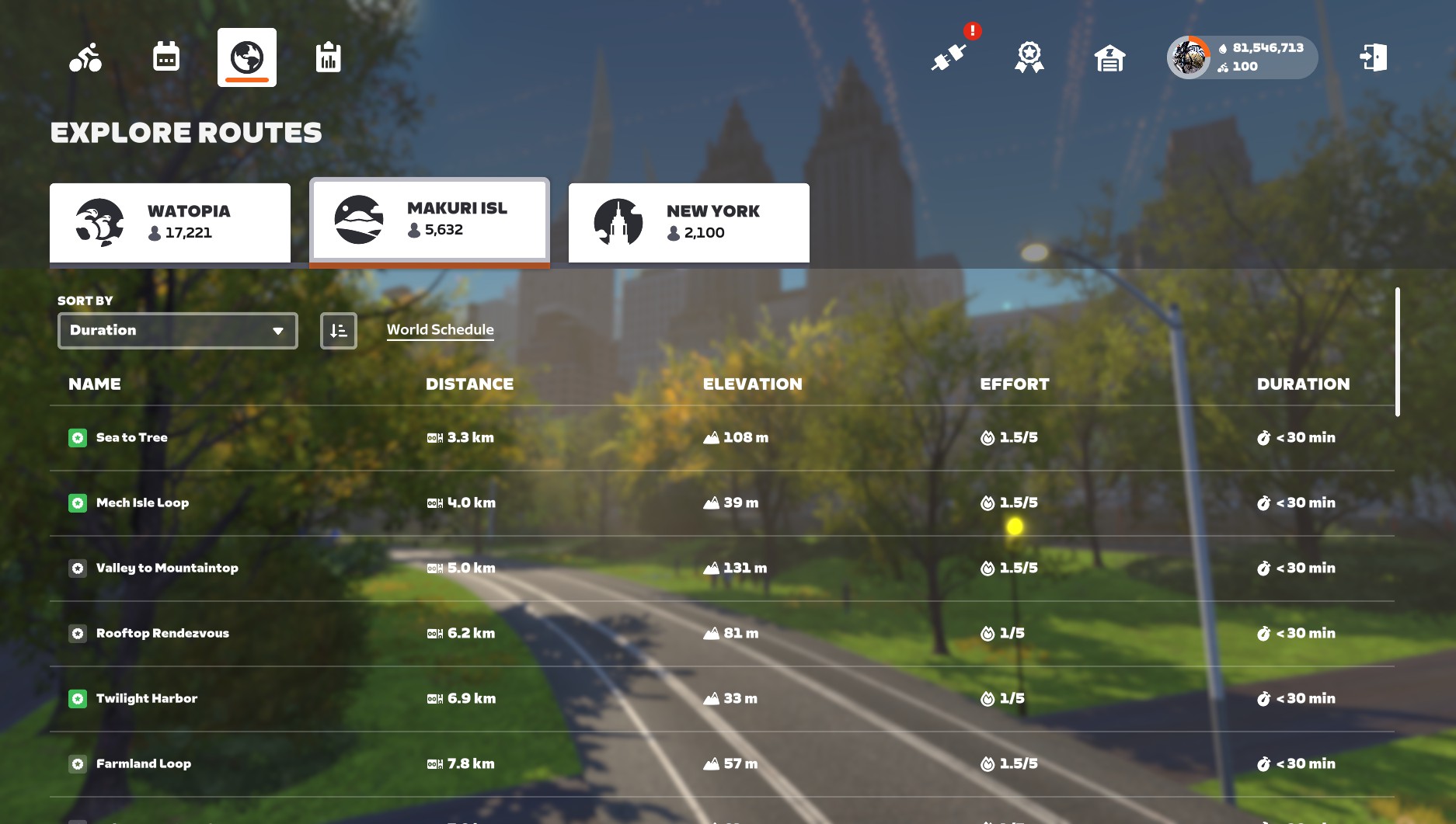
Watopia is always available, and the other two worlds (Makuri Islands and New York in the screenshot above) rotate on a set schedule that changes monthly (see the Zwift course calendar).
Zwift restricts the available worlds to keep roads feeling “busy” since the social side of fitness is part of Zwift’s special sauce. But what if you are more concerned with riding a particular route than having other Zwifters nearby? Maybe you’re chasing route badges, or trying to finish a tough workout, and you have a particular route you’d like to ride that is in a world that isn’t on today’s schedule.
The good news is, it’s pretty easy to access the route you want. Here are four ways to do it…
[adinserter block=”1″]
Method #1: Fake Workouts
This is going to be the easiest method for most people.
Simply choose any workout from the homescreen, click “Start Ride”, and the game will pop up a window asking you to select a world and route. This gives you access to all the free-ridable routes in the 10 open worlds (so no Bologna or Crit City).
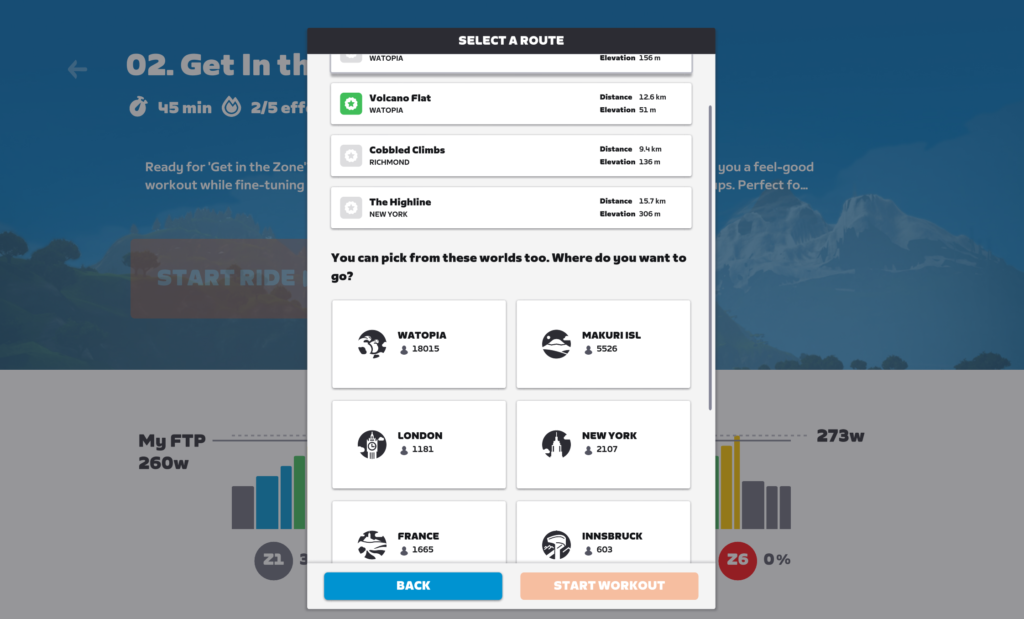
Once you’re on your chosen route, you can get out of your workout by tabbing through the intervals or skipping them using the Companion app. (Tip: if you use this trick regularly, you might consider creating a simple, short, custom workout that is just a minute of free riding, so you don’t even need to skip the interval.)
Method #2: Meetups
Meetups are perhaps the next easiest way to access the 10 open worlds. When you create a Meetup, you select which world and route it’s on, and you have access to all the open worlds and routes, just like the Fake Workouts hack delivers.
There are two hassles with the Meetup method, though:
- You must invite a friend to the Meetup. This has to be someone who follows you. Some people have created second trial Zwift account for just this purpose!
- You must give the Meetup a start time/date. That means you can’t just pop into your desired map… you may need to wait a few minutes.
Learn all about Meetups on Zwift >
[adinserter block=”4″]
Method #3: Club Events
While Clubs are meant to be gathering places for groups of Zwifters, anyone can create a Club and host events from it.
Club events give you access to the same 10 open worlds as the two methods above, but also (somewhat oddly) let you create events on Crit City’s “The Bell Lap” route (but not Downtown Dolphin).
There are two hassles with the Club Events method:
- Creating your Club takes a few minutes: you only have to set your Club up once, but it takes a few minutes to set the various options.
- You must give the event a start time/date. Like Meetups, this means you can’t just pop into your desired map… you may need to wait a few minutes.
Learn how to create Club events on Zwift >
Method #4: <world> Tag Hack
The <world> tag hack is perhaps the most common hack used by Zwifters over the years. Nowadays the ease of the Fake Workouts method has diminished its use, but it still holds a special place in the hearts of many.
So how does it work?
You have a prefs.xml file in your Zwift user directory (which is in your Documents/Zwift directory on PC/Mac). Before starting up Zwift, open this file in a text editor like Wordpad and simply add one of the following tags to force Zwift to place you in your desired world.
To ride Watopia, add: <WORLD>1</WORLD>
To ride Richmond, add: <WORLD>2</WORLD>
To ride London, add:<WORLD>3</WORLD>
To ride New York, add:<WORLD>4</WORLD>
To ride Innsbruck, add: <WORLD>5</WORLD>
To ride Yorkshire, add: <WORLD>7</WORLD>
To ride Makuri Islands, add <WORLD>9</WORLD>
To ride France, add: <WORLD>10</WORLD>
To ride Paris, add: <WORLD>11</WORLD>
To ride Scotland, add: <WORLD>13</WORLD>
This text should go just after the opening <ZWIFT> tag near the top of the file. (If you place it inside of a section like “<DEVICES>” then it will not work.)
Important: Do not insert bogus values into your preferences file! Invalid values will just make Zwift behave unpredictably or even crash. Follow the instructions above carefully and you’ll be safe.
Using Zwift iOS? This method can still be used, but it’s more of a hassle. Here’s how to accomplish this same hack on your iDevice.
Using Apple TV? You’re out of luck when it comes to <world> tag hacking.
Sample
Here is a sample prefs.xml file which forces Zwift to always allow Richmond access (added text is bold):
<ZWIFT>
  <WORLD>2</WORLD>
  <DEVICES>
     <LASTCADENCEDEVICE>720996</LASTCADENCEDEVICE>
     <LASTPOWERDEVICE>720996</LASTPOWERDEVICE>
  </DEVICES>
  <CONFIG>
     <RICHMOND_BRANCH_PREFERENCE>0</RICHMOND_BRANCH_PREFERENCE>
     <BRANCH_PREFERENCE>4</BRANCH_PREFERENCE>
  </CONFIG>
  <WORKOUTS>
     <USE_ERG>1</USE_ERG>
  </WORKOUTS>
</ZWIFT>
Shoutout to ZwiftHacks
If you’d rather not edit your prefs.xml file directly, you can also use the handy ZwiftPref (for MacOS) or Zwift-Preferences (for Windows) tools from ZwiftHacks to accomplish the task via a simple user interface. (These tools let you tweak other Zwift settings as well.)
One Final Caveat
The title of this post says “(Almost) Any Zwift Course” because the methods above only give you access to Zwift’s “open” worlds. Bologna and Crit City are considered event-only worlds, so you can’t hack your way into them using these methods (although Club events will get you into Crit City).
Additionally, the methods above may still not get you into certain “event-only” routes like Watopia’s 2022 Gran Fondo or France’s France Classic Fondo. (Some methods, like Club events, will get you access to certain event-only routes. It may be best to do a bit of experimenting if you have a particular event-only route in mind.)
Questions or Comments?
Share below!



I’ve created my own hack by making a custom workout called “5min warmup” (since I’m going to do that anyway), choose a route and I’m off. It’s literally 5 min of 135 watts that give me 20xp and the rest of the session is mine to do with as I please.
This is brilliant!
Good tip, I’ll do this myself 🙂
If you add 2 seconds per min you’ll get 1 extra xp per min for that extra hackyness.
The worlds hack begs the question: Whatever happened to worlds 6, 8, and 12?
maybe those are Bologna, Crit City and the mountain/gravel bike courses?
Correct, Bill. I believe Gravel Mountain is 12. But you can’t just pop that into the world hack and ride it. Same with 6 and 8…
would love for them to open up the rest of those ‘event only” courses for workouts. Don’t really understand their hesitation given that you can do workouts on 98% of the courses. Why not add in the rest?
Hmm wondering if you could get back to Jarvis Island with “0” That would be fun.
Jarivs is saved somewhere, however is not compatible with the current Zwift system. To my understanding the old Jarvis island was completely coded with algorithms for the placement of everything except for the few buildings. The current worlds are all totally different. So the data of Jarvis is saved in a backup somewhere but that’s about it.
I missed out on Jarvis. Physically saw Jarvis but never road it. I didn’t have smart trainer until Watopia launched, but did have a Zwift beta account and creeped on to see Jarvis without moving. Never saw a point to run Zwift with a speed sensor on the rollers I had at the time. I missed out.
Personally, I would love to see a rebuild of Jarvis with the current code and method. All that really needs to be the same is the road shape and elevation. Could make for a fun crit course with all riders wearing the old Zwift Beta jersey.
they could always remake it.. surely they have 1 guy on work experience they can give him a job 😉
If you just want to ride in France (RGV is less boring visually than Tempus Fugit), just choose second hill offered by Climb Portal in the menu and then ignore the Climb Portal in game. Seems to be the easiest way to access France. In essence by this second climb portal in France you have always access to four worlds.
In a similar vein, the robo pacers always provide access to Makuri.
Correct me if i’m working but i think you can join an event that’s 30+ mins away then join it to free ride to (so that would allow you into bologna and crit city)
Yes – but you can only join events if they’re less than 60 minutes away. So basically, if the event is 30-60 minutes away, you’ll get this prompt, and can just join the world to free ride.
If it’s within 30 minutes, it’ll place you in the pens. Of course, you can always join the actual event pens, then just quit the event whenever you’d like to free ride a world.
A lot of hassle, but if you really want to get to Bologna or Crit City it’s the way!
How does the Method #4: Tag Hack work in practice? Is one of the 2 guest world tabs changed to whatever is entered as or what actually happens?
Also, maybe this is old, but quite a few eons back, zwift changed something so the apps that could select worlds did not work any longer. So that is fixed now?
Thanks =)
Whatever world you force via the hack becomes the first world of the three listed on the route picker screen.
I do the meet up when I need a new route badge. I have OCD badly so I must beat those as soon as possible. I do a meet up with 1 friend, with 5-minute notice. Then I can ride it….I always put in the message badge hunting, so they know I am just “using” them to get on that route.
Works really well. Although with the three new route on the Tour this year I can’t hack though so better not miss them.
Only badge I can’t get without buying a steering device is R. Ridge. I wish there was a work around for achieving that!
Eric do you have an article full of sneaky little hacks about all things Zwift? My favourite is resetting the ‘game’ page on the companion app which also resets the 10 second multiple ride-on timer. It takes about 2 seconds. You can turn a peak Coco group into a thumbs up party in no time!
Christopher, how do you “reset” the ‘game’ page on CA?
This awesome! I love the Scotland map, in particular the Muckle Yin and this means I can ride it anytime I want!
Why not just change the date on your computer? It works on my iPad. I’ve never set it backward or forward more than a few days so I don’t know if it would work further out than that. Doesn’t affect the date or data when it uploads to Strava.
It would be nice for Zwift to allow us to create custom ‘rebel’ routes, then let us save (a few of) them as a “real” Zwift routes (just for our personal use) where we could compete against our ghosts on from past sessions. As an example, I regularly ride the 43 mile route shown in the attached image, but I have to keep track on a ppt file in real-time (on a 2nd PC) my times at every 2.5 mile checkpoint to compare how I am doing against past rides. It would be much easier to just ride against a ‘previous’ or ‘PR’ ghost. This could be a nice add-on feature for Zwift to consider in the future. If storage was an issue, they could limit each member to two or three ‘custom’ courses for ‘ghost-riding’.
Hi, I would like to ask a question, which route is the most profitable in distance and elevation in average time? For example, if I ride for 1 hour, I can get a balanced maximum benefit between harvest distance and elevation, Thank you.
There are some decent balanced routes.
I tend to like loops, so rolling hills in NewYork’s Park Perimeter Loop (9.8k loop with 126 meters elevation) and Gotham Grind (9.3k with 96 meters elevation) routes are pretty fast, but also accumulate elevation. The look of Central Park I think is pretty scenic, so it’s not an ugly route…
I remember reading somewhere that Yorkshire’s Royal Pump Room 8 being optimal in this regard. That’s with a 27.7K loop with 480 meters elevation.
There should be other routes out there…
Wouldn’t it be nice for zwift to combine all the mini worlds (all except Watopia and Makuri Islands) into one, e g. drop them on one pane and interconnect them by roads? This would allow for a whole lot more routes (like start in New York, ride on to Paris, through Scotland, finish in Innsbruck). Imo those mini worlds become quite boring rather quickly.
With the new my list feature in the companion app you can ride anything you want anytime, without the above steps.
Open the app, go to routes. Find the one you want and press the green +. This will add it to your list and the route will now show in the for you section on the homepage. Helpful if you don’t want to do a workout.
Hi Eric,
Seems like another set of routes that you can’t hack into are all the Cols. The shorter ones are a great way to rack up XP relatively quickly.
Cols? I’m guessing this is the Climb Portal, but I don’t see how to get “cols” from that.
Some of the portals are called Col d’ …
That got me curious. I looked it up.
Col is French for mountain pass.
Côte is for slope in the context of a hill (that’s the other common word there.)
Looking up everthing now…
Montée means to climb.
Puy means volcanic hill.
Pla means plateau.
Bealach is Scottish for narrow mountain pass.
Guess one aspect of Zwift is the opportunity to acquire a more international cycling vocabulary. 🤔
I just noticed a far easier way to ride any free-ridable route.
Add it to your wishlist on the companion app, and it will appear on your Zwift Home Screen. And it will be free-ridable, even if the world is not active.
Maybe that should be in the list. It was covered for an article about the upgrade covering the recently added routes.
This could be “method 5”. Or it could be “Method 3A”. It works for the same reason solo club group rides give access to routes.
The absolute simplest way to ride any route in any Zwift world on any day is as follows. Add the route you want on “My List” on the Zwift Companion and then select it on the route page on Zwift.
Can anyone tell me how to ride climb portal anytime?
For Watopia, by default, it’s always in the list.
HOME -> JUST RIDE -> Routes -> WATOPIA
scroll down to the name Climb Portal – XXXXXXXXX for the current climb.
For France, you can World Hack to make FRANCE replace WATOPIA in the above method. Because you change the default for World Hacking.
The above was the old-school way.
The new-school method is simpler. The current climbs are in the top-level JUST RIDE list.
The “Climb Portal” route is the Watopia portal.The “Climb of the Month” is the France portal.
Might want to mention that if using the Prefs.xml hack, check what the worlds are on the zwiftinsider calendar, otherwise Zwift will crash if you put in New York, and New York is already a guest map
You can also just put a route into “My list” in the ZCA. To me, that seems like the easiest way.
Hi folks there is also another way
if you pick a route in the Companion and add it.it then appears in the home section of the main app. Got to be the easiest approach
Just saw this. My post is duplicative. Sorry
And now you can just plop your desired route into Plan in the Companion app and voila… ride any (almost) ride any day of the week. Whatever you have scheduled for the week shows on the home screen of the app.