

Zwift’s Companion app (for iOS and Android) is a useful tool whether you’re on the bike or not, allowing you to (among other things) search for events, interact with clubs, browse routes, and interact with the game and riders in real-time during an active session.
But sometimes it’s a struggle to get the app to “see” your live Zwift session. This is almost always due to network issues on your end: firewalls/permissions, separate networks, etc. That’s why we published an entire post on the topic (see How to Ensure Reliable Companion App Connection when Zwifting).
I recently received a well-illustrated email from a Zwifter explaining how he fixed his Companion connection issue by adjusting a setting on his Apple Macbook (the device he uses to run Zwift). If you’re running Zwift on a Mac or iPad and find yourself struggling to get Companion to see your live session, this may help! Here’s what Jim sent…
I just discovered the fix to my Zwift Companion app not displaying my active riding or the map and I want to share this with you so you might consider including this in ZI. I have noticed that there are A LOT of Zwifters who do not show the iPhone icon in the “Zwifters Nearby” leaderboard:
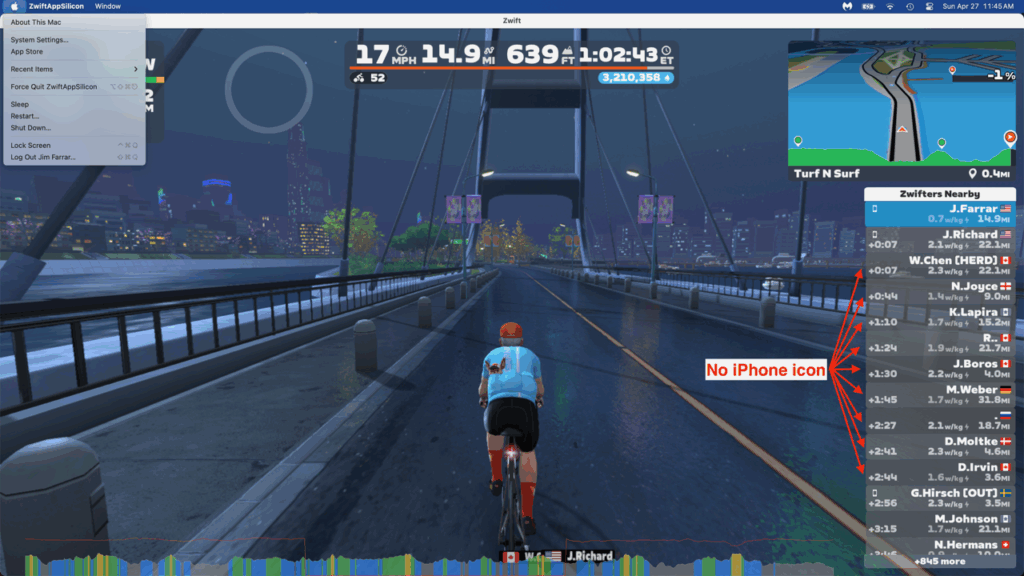
(It could be that a lot of people around me just don’t use the app. But I recall seeing that icon a lot, and now it’s kinda rare, so I thought this might indicate a wider problem.)
My Zwift Companion app stopped displaying the map and my active ride about 6-7 months ago, about the time there was both an Apple OS update followed closely by a Zwift update. Consequently, I felt the sudden inability to see the map and my active ride was somehow related to one of those updates. Not being terribly computer savvy, I could only follow conventional wisdom to fix it: I made sure the laptop which I run Zwift on and the iPhone that has the Companion app were on the same network, I rebooted the app, I deleted the app then reinstalled it, and I rebooted my router. But none of that worked.
Then just this morning I came across a blog post on Apple about apps not having permission to access their user’s network, and though I didn’t think it was related to my problem, I had exhausted all other possibilities many months ago. So I tried this and it fixed the problem!
(Editor’s note: Apple released a new “Local Network Privacy” feature to MacOS in September 2024, and it’s this feature that caused Jim’s connection issue. The instructions below explain how to give the Zwift app permission to interact with other devices on your local network, such as your iPhone…)
I run Zwift on a Mac Air laptop, so these instructions are referring to that platform:
1. Click on the Apple logo in the top, left corner, then click on System Settings.
2. Click on General, then Privacy & Security:
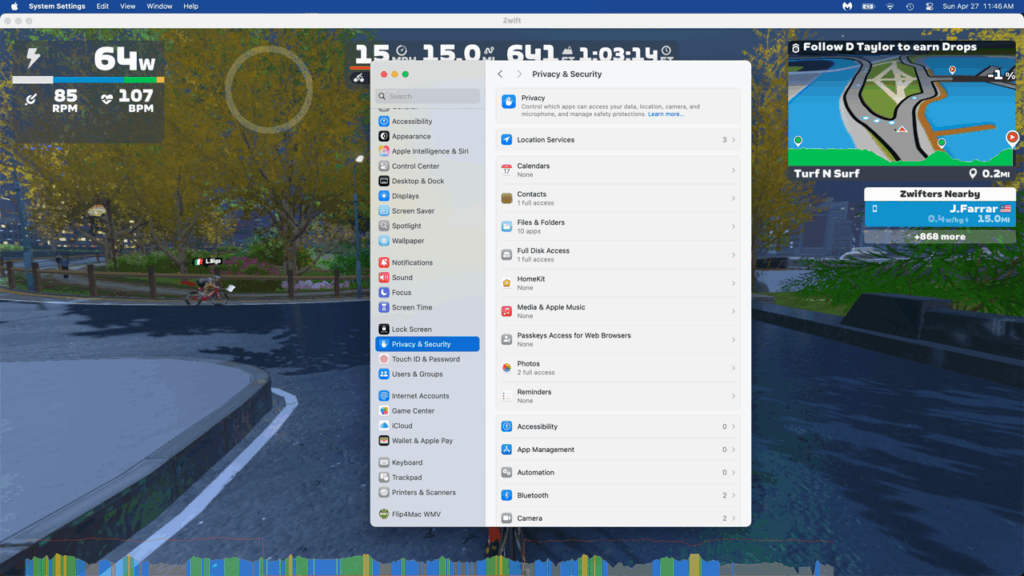
4. Scroll down and click on Local Network:
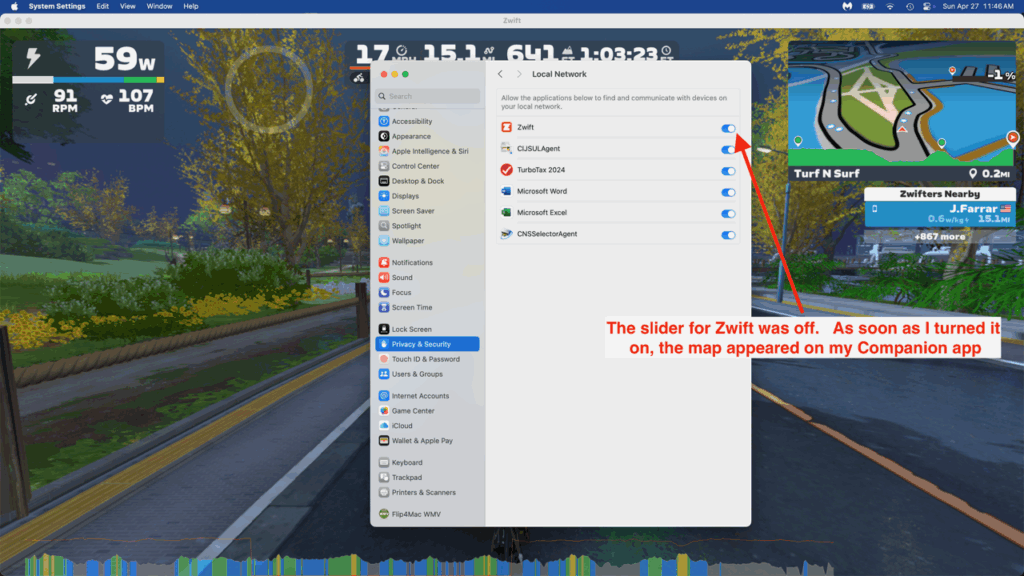
I discovered that all the sliders were off, but as soon as I turned the Zwift slider on, the map popped up on my Companion app. Problem solved!
I have no idea how that slider (or the others) were turned off but I know it’s nothing I did.
Hopefully this fix works for everyone.
Jim Farrar
Telluride, CO
For iPad and iPhone Zwifters
One addendum: the same “Local Network Privacy” feature is active on iPadOS and iOS, so if you run Zwift on an iPad or even an iPhone, you’ll need to give it permission to access devices on your local network in order for the Companion app to connect to your Zwift session.
You should get a prompt asking for this permission when you install Zwift. But if you want to toggle the setting manually, or verify it’s enabled, the setting can be found under Settings, Privacy & Security, Local Network:
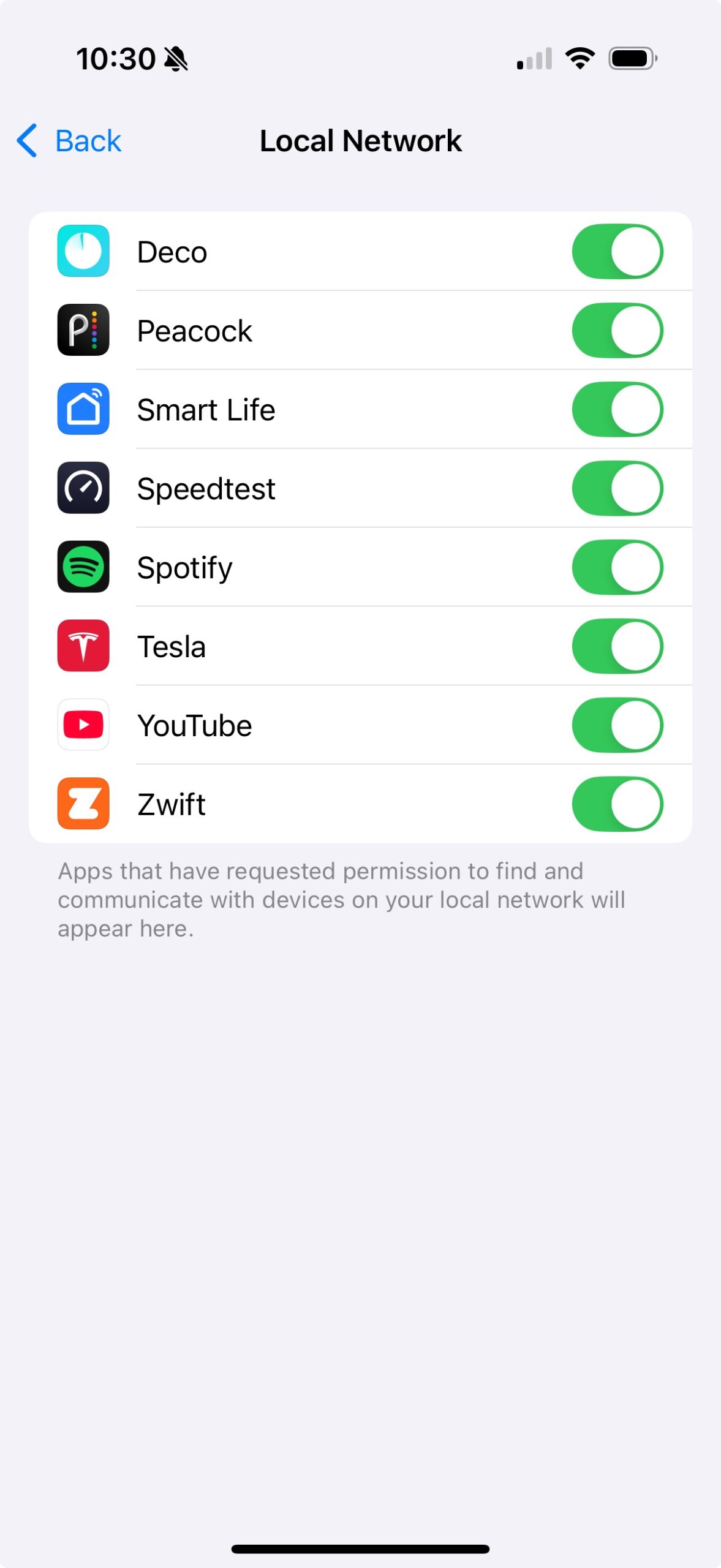
Note: at this time, Apple says Local Network Privacy is not implemented in tvOS. So Apple TV Zwifters don’t need to worry about this setting.
Questions or Comments?
Did this post help you out? Got Companion connection issues that still aren’t solved? Share below?


What’s companion app is more used, the android or the apple version?
FWIW – I had the same issue when the Apple update was released back in September.
I followed the instructions on my MacMini to try to get the Local Network permissions, but Zwift was not in the list to enable it.
I ended up doing a reinstall of Zwift on the MacMini, and there was a pop-up prompt to allow Local Network permissions.
Had the same problem. After reinstalling Zwift, the companion app started working.
Bluestacks no longer works either; an android ‘sim’ on PC. They changed how internet feeds through in some update I want to say last year, and you can no longer run companion alongside on a PC now.
So that may have caused a dropoff as well.
To this day I have yet to see a resolution to this.
I found it quite handy to be able to have companion up on another monitor, alas, stuck with cramped hands instead.
I have had the same issue for months running Zwift on a PC (win 11) and the companion app on an iPhone. Occasionally it would work but mostly it didn’t. The companion app does not appear in the iPhone local network settings and I have uninstalled and reinstalled both the PC Zwift app and the companion app several times.
I have given up and don’t bother with the companion app now, especially as I have discovered you can hit “F3” to give group ride ons. 🙂
Maybe a different problem. On my iPhone since the last Companion update, when I tap on the orange activities tab it only shows activities until May this year. However, if I tap the bottom right screen (More) and I tap on activities, I can see all my recent activities. Bug?
@Eric Schlange you are missing a “i” in iOS in the article title. Some (like me) might confuse Mac OS(X) with the title’s intention. Cheers, and thanks for running Zwift Insider.
No, I mean Mac OS! Which actually is written MacOS, but I thought maybe search engines would find it better this way…
Although I suppose the article does mention iOS, too. But it’s really targeted at MacOS users.
well if we’re going to pedantic, I’m here for it 😉
it’s macOS not MacOS (see for yourself https://en.wikipedia.org/wiki/MacOS)
(and it’s Xcode not XCode or xCode)
Thanks Apple, for your precisely capitalized carefully curated branding
I love a bit of pedantry! 😀Also love that the Wikipedia article has it capitalized incorrectly in the URL.
Thank you, thank you, thank you! Windows + android phone user here, I’ve had this problem all the 3½ years I’ve been on Zwift: Map/game dropping out, workout display freezing on the companion app. I’ve tried all variations of Bluetooth on and off etc. but nothing worked.
Now I’ve switched the phone to aeroplane mode to force it to use WiFi it’s a solid connection. Hallelujah 🙂
Thanks for making an article about this. I have the same problem and I’ve tried for months to fix it. I just followed the steps you outlined and unfortunately both my permissions were allowed so it’s not the same solution. I have emailed Zwift about this but only received generic responses directing me to their general help page. I Zwift a lot so I really hope this gets fix at some point because the Companion App is great! I’ll watch the comments in case anyone else has any suggestions (please share!!)
Is Apple Tv affected?
Thank you so much. I’ve been looking for a solution to this problem for a long time. The checkbox on my mac was turned off. I turned it on and everything worked
Someone got a fix for this on Windows 11 / PC? Can’t figure it out. Thanks.
I have found that whenever the Zwift app (MacOS) is updated the laptop has to be restarted before ZC will connect to the Zwift activity. Always worth a try! I also find that putting the phone (an iPhone) in Aeroplane mode before launching ZC is necessary .
I run into this problem frequently. I have a MacBook and use Companion on my iPhone. I don’t see anything called Local Network on either device. I have also tried everything to see the mini map and basically have given up. Eventually it comes back after months of not working and have no idea why.
Apple TV and iPhone just recently updated. Last night did a ride and the live map just wouldn’t appear on the companion app. I’ve tried uninstalling the companion app. Restarting the modem. Turning everything off and on again. And guess what…. Nothing. Anyone else with this same problem after the recent update?
Thank you! I have had this problem for
over a year, went through the same steps you did, chatted with Zwift so told me
to do what I had already done. This fixed the problem!
Eric, thank you for this post. This is the last day of 2025 and this issue still exists. It appears the vast majority of riders while on Zwift, it would appear, are not showing they’re connected to their Zwift Companion. I’ve not seen my Map on my Companion for a while (also my Companion App., like many others, does not show as connected with Zwift. Just to confirm I tried Jim’s suggestion and it worked but only for that one ride. This appears to be a longstanding widespread issue? Ride On everyone.