World Parkinson’s Day Fun Ride Announced for Tuesday, April 11
Multiple Zwift teams support Parkinson’s Disease research while providing a home for those with Parkinson’s or anyone supporting a person with Parkinson’s. Three of those teams (PD Avengers, Zwifters Against Parkinsons (ZWAP), and the Parkinsons Exercise Group on Zwift (PEGZ)) are collaborating to hold a World Parkinson’s Day Fun Ride on April 11th.
Event Details
The ride is scheduled for 3pm UTC/11am EDT/8am PDT on April 11th, which is World Parkinson’s Day. It will be held on one lap of Watopia’s “The Magnificent 8” for a total ride length of 28.8km with 131m of elevation.
Parkinson’s is the world’s fastest-growing neurological disease with no cure. The only proven method to slow disease progression is intense exercise. So please join us “Parkies” for a fun awareness ride!
If you would like to donate to Parkinson’s research, please donate at MichaelJFox.org.
This week my training plan-related complaint deals with the Companion app’s display of your current training plan.
I already mentioned last week that Companion doesn’t display each workout’s details fully, which is annoying. But that’s just Zwift needing to add more detail to their screen.
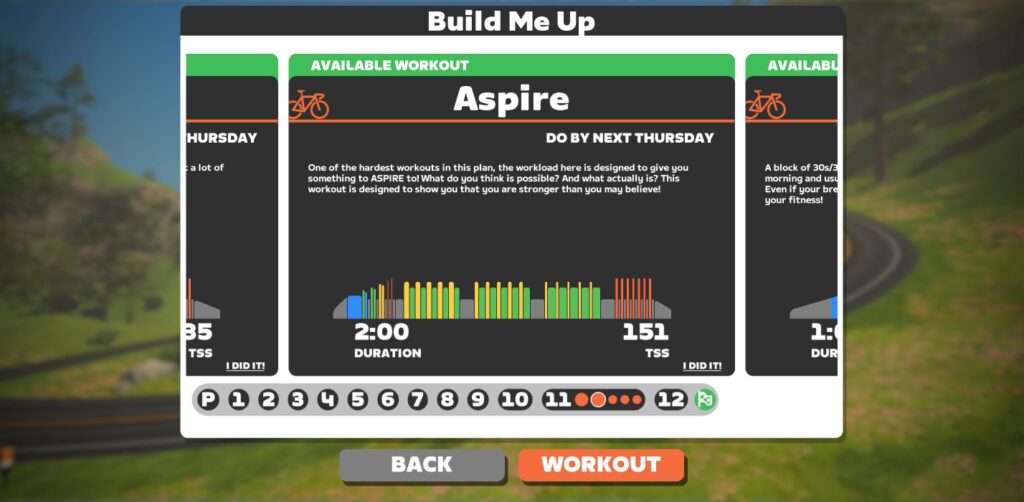
What’s downright goofy/buggy is how Companion displays upcoming workouts on the app’s home screen. Here’s what I saw halfway through week 3:
You can see the home screen displays two workouts, both labeled with “Do by Thu Night”: “Purple Unicorn” and “Escalation”. Clicking brings up the details of my plan, which shows that neither of these workouts is scheduled for my current week. Neither needs to be done by Thursday night. Not this Thursday night, at least.
How does the Companion app decide which workouts to display on the homescreen? Is it the first workouts of the week that haven’t yet been completed? Or are particular workouts flagged as “most important” each week, and it’s showing those?
I don’t know. I just know it doesn’t make sense as it currently works. The home screen should show upcoming workouts in my current week.
Another week, another Unicorn. This week’s “under” portion was a bit lower (265 vs 275W), but the over portion was 1 minute instead of last week’s 30s at 335W. 18x of those hurt!
I had a hard time hitting cadence targets today – specifically the high cadence targets. Legs just didn’t want to spin fast. So I tried to do what I could to hit the targets, but I didn’t stress too much about being precise. I figured hitting the power numbers was more important.
The worst intervals, though, were the 1-minute 335W sections at 60RPM. That’s just too slow for that much power… ouch.
At 1 hour and 45 minutes, this was the longest workout so far in BMU. Made it up to the top of Ventoux.
Since I needed to do workouts on back-to-back days, I picked Amalgam for Monday because it looked like a tougher one than “Ham Sandwich”, which I would do the next day.
What was most intimidating about this workout were the two 10-minute blocks at FTP. Doable? Sure. But I knew they wouldn’t be fun, and I wasn’t sure how that last one would feel, after over an hour of hitting various intervals, including shorter, higher-power efforts.
The first FTP block wasn’t bad, and neither were the 15s hard efforts or the 3x “Shark’s teeth” that followed. But that final FTP block was rough – especially the last 3-4 minutes. Heart rate was well above threshold and I had that lovely nauseated feeling you get when you keep your heart rate up high for a few minutes or more.
I hoped this workout would be the easiest of the week, since yesterday’s was pretty tough. I think I chose wisely. Ham Sandwich has a 10-minute block of sweet spot over/unders, with 3 sets of 30/30s (the “ham”) in between.
The over/unders were work, but quite doable, and the “ham” was also tough but doable. Neither put me on the rivet, although my heart rate was pretty high by the end of the final O/U set.
This 1-hour workout was the next in BMU’s series of weekly sweet spot workouts which I’ve been tackling on Thursdays. Each week we’ve gone longer in the sweet spot zone (90% of FTP, so 290W for me). Last week was 3x 12-minute intervals, this week was 2x 20-minute intervals.
Not a super tough workout overall, which is the beauty of sweet spot workouts – you don’t suffer terribly, and they deliver a lot of training benefit.
What are the benefits? One TrainerRoad article says “Sweet Spot training is effective because it increases your aerobic capacity and muscular endurance, while balancing your ability to do it multiple times per week. Particularly during the Base Phase, you’ll increase the number of capillaries. That means more tiny blood vessels to deliver blood (oxygen & nutrients) to the muscles. You will also increase the strength of your mitochondria. Stronger mitochondria result in higher aerobic performance. You’ll also strengthen your heart, improve fat metabolism, and increase muscular endurance.”
Summing Up Week 3
This week’s workouts were a step up from week 2’s, but you barely see that in the TSS numbers:
Week 1: 274 TSS
Week 2: 343 TSS
Week 3: 363 TSS
TSS doesn’t tell the whole story about the difficulty of particular workouts, of course.
One to Keep, One to Throw Away
I think each week of BMU features a key “cornerstone workout” and another which doesn’t really need to be done, so I thought it might be useful to call those out each week, in case your schedule is tight. For week three, here are my picks:
Key Workout – Yellow Unicorn: lots of over/unders, with the extra-tough 1-minute intervals at 105% of FTP. 105 minutes long, too, so you’re building some endurance.
Throw Away – ?: if I had to pick one to throw away it would be “Ham Sandwich”, but I think all of this week’s workouts were actually pretty solid and useful.
Coming Up Next Week
Week 4 is recovery week! So just three workouts, totaling 3 hours, 15 minutes:
Questions or Comments?
Have you gone through “Build Me Up”? How was your experience? Share below!
This weekend’s notable events feature France Watch the Femmes rides for the Paris-Roubaix Femmes avec Zwift 2023, Easter Zwift celebrations, endurance rides, and a group workout.
This weekend the Paris-Roubaix Femmes avec Zwift takes place. In celebration of Zwift’s partnership with the event, Zwift recently added an event-only course in France. Additionally, Zwift has laid down some extra cobbles in various parts of France to spice things up. Completing this event will also unlock a whole lotta swag! This includes the Watch The Femmes kit, socks, cap, and sunglasses! Sweet!
This event takes place on the France Classic Fondo course. Note: this is the second longest route in Zwift, coming in at 90.7 miles (146 kilometers).
To celebrate Easter, team WKG is taking a pretty cool approach toward group rides on Zwift. Most group rides require riders to stay with the leader at all times. However, in this ride, riders are presented with the following options: take on an Easter egg hunt by seeing how many times you can lap the leader, simply roll with the leader, or go for the KOM every lap with the red beacon. The leader will be holding a pace range of 1-2.5 w/kg throughout the duration of the ride.
This ‘group ride’ takes place over 25 laps of The Bell Lap in Crit City. Depending on which challenge you choose to take on, the duration of the ride will vary. Pretty cool stuff, WKG!
For those looking to start the weekend off strong, this is the perfect group ride. Join the team at SZR for an endurance group ride around the roads of the Makuri Islands. Choose from 3 separate categories, each with its own leader. Organizers ask that riders respect the pace and cooperate to maintain a tight blob.
Each category has its own route: Category C will be taking on The Mega Pretzel in Watopia, Category D will be navigating Watopia’s Waistband, and Category E will be taking on the Magnificent 8 course.
📊 Thee Abundance Project Training Series – Power Interval Ladder
✅ Feel Good Factor
Looking to finish the weekend off strong? The team at A Quick Brown Fox, an organization with the goal of bringing more people of color to the sport of cycling, and Carmichael Training Systems, have partnered up to curate a training program aiming to help riders boost their fitness going into the 2023 racing season. At the end of the series (April 16th), riders will be able to participate in a Zwift race led by Ayesha McGowan, a professional cyclist for Liv Cycling.
This specific workout is focused on VO2, featuring a descending ladder at VO2 power. As riders conquer the workout, they will traverse the Flatland Loop course in the Makuri Islands.
The Sunday Skaal group ride by Vikings Valhalla is easily one of the most popular endurance group rides every weekend. The team at Vikings Valhalla provides a welcoming endurance group ride, featuring two categories and two different routes. Leaders of the ride aim to provide a no-drop experience and highly encourage stronger riders to drop back and help out with those who are struggling off the back.
Both categories C and D will be riding just over 100km. Category C, however, will be on the Eastern Eight course, while Category D is on the Tempus Fugit course. Expect some pretty quick times because of the large groups and fast, fast, courses.
We choose each weekend’s Notable Events based on a variety of factors including:
Is the event unique/innovative in some way?
Are celebrities (pro riders, etc) attending/leading?
Are signup counts already high, meaning the event is extra-popular?
Does the ride include desirable unlocks or prizes?
Does the event appeal to ladies on Zwift? (We like to support this under-represented group!)
Is it for a good cause?
Is it just plain crazy (extra long races, world record attempts, etc)?
Is it a long-running, popular weekly event with a dedicated leader who deserves a shout out?
In the end, we want to call attention to events that are extra-special and therefore extra-appealing to Zwifters. If you think your event qualifies, comment below with a link/details and we may just include it in an upcoming post!
Your Thoughts
Got other events that stand out this weekend? Share below in the comments!
Editor’s note: the following is an update from Michael Hanney, creator of Zwiftalizer, “The log file visualizer for Zwift.” Since 2016, Zwifters have been using Hanney’s creation to analyze framerate performance as well as ANT+, Bluetooth, and network signal quality.
Read below to learn about the site’s latest upgrades, along with a fascinating and technical look at how rider data flows through Zwift’s backend systems.
What’s New?
I have updated Zwiftalizer to visualize network errors in more detail. The format of the network messages in the logs changed sometime near the beginning of 2023, so I had to make an update to report TCP disconnects correctly.
I would like to thank Rich Gammon, who raised a concern about missing data on the Zwift Forums and sponsored the update to keep my coffee habit going, and Rob Pace, who gave me great test cases.
While I was fixing the issue, I also added five new charts. Here’s a summary of the new charts and some background information on how Zwift uses TCP and UDP networking.
Three UDP Charts In Order of Severity
UDP Network Timeouts
Using the UDP networking protocol, the client expects to get data from the server at a certain time interval. A UDP timeout is recorded when the client expected to get data by a certain time but didn’t.
UDP Network Errors
This chart shows failures sending and receiving client data from the server, like your current location and heading. When the game client doesn’t get the data it expects, it will try to predict where everybody is for a short time. A few errors here are not a big deal. When the list of nearby riders goes blank, or you don’t see any other riders, you’ve had too many UDP errors (or timeouts) and the game client has stopped predicting positions.
UDP Network Connection Attempts
UDP doesn’t set up a connection before sending data, so the term “connection” isn’t quite right. The client sends and receives data packets to the destination IP address and port number without waiting for an acknowledgment. The client expects to get UDP datagrams from the server at regular intervals. A connection manager task in the background keeps an eye on the communications. This connection manager attempts to re-establish the UDP communication using an alternative server IP address or port when data isn’t received as expected. This chart plots those attempts.
Three TCP Charts In Order of Severity
TCP Network Timeouts
A TCP network timeout occurs when a connection between the client and server is terminated due to a lack of acknowledgment or response within a given time period.
TCP Network Errors
This chart shows times when TCP networking errors were logged. This includes failures to download route information, upload activity (fit) files, and upload analytics data (API and Curl requests).
TCP Network Disconnects
This chart shows times when the TCP network connection closed because the game client or server didn’t acknowledge receipt of data.
To understand these charts, it’s useful to know how UDP and TCP are different.
UDP (User Datagram Protocol) and TCP (Transmission Control Protocol) are both transport layer protocols used in computer networks, but they have several key differences:
Connection-oriented vs Connectionless: TCP is a connection-oriented protocol, which means it establishes a reliable and ordered connection between the two devices communicating. UDP, on the other hand, is a connectionless protocol, which means that it does not establish any connection between the devices and simply sends the packets.
Reliability: TCP provides reliability by ensuring that all packets are received and in the correct order. In case of packet loss or errors, TCP retransmits the packets until they are received correctly. UDP, on the other hand, provides no such reliability mechanisms and does not guarantee delivery or order of packets.
Flow Control: TCP uses flow control mechanisms to ensure that the sender does not overwhelm the receiver with too many packets at once. UDP does not provide any flow control mechanisms.
Congestion Control: TCP has built-in congestion control mechanisms to ensure the network is not overwhelmed with too much traffic. UDP has no congestion control mechanisms and can flood the network with packets if not properly managed.
Speed: UDP is faster than TCP because it does not have the overhead of establishing a connection, providing reliability mechanisms, flow control, and congestion control. However, this speed advantage comes at the cost of reliability.
Why is UDP used for gameplay?
Real-time player data is sent over UDP because it’s more important to have low latency and delay than to ensure every datagram arrives intact. UDP can send data quickly because it doesn’t have to check for mistakes or send it again. In some ways it’s like a video call, where it’s okay if the picture or sound goes out for a second as long as the call doesn’t drop. On the other hand, a file download can’t lose any data, not even one bit. If it does, the file will be corrupted and unusable. TCP is used for file downloads.
The Zwift game platform makes a lot of effort to compensate for any network delays caused by players being in different parts of the physical world. This is necessary so everyone can share the same sense of time in a single virtual world. Massively multi-player games don’t use local servers with the lowest latency because that’s not how they work. Everyone connects to the same group of servers located on the US West coast (AWS us-west-2 region in The Dalles and Prineville Oregon). To keep these delays as short as possible, the fastest network protocol is used.
What’s happening when all the riders around me disappear?
This is a very complicated topic. I’ll try to explain what’s going on with UDP on both the client and server sides. The Internet and AWS are two of the biggest unknowns here. Zwift can’t change those things, so I won’t talk about them.
Most likely, your device’s network, wifi, or mobile data connection dropped when you suddenly found yourself riding alone. One less likely reason is that the UDP data is being blocked by a firewall. A crowded server in an AWS data center is another possible cause.
Behind the Scenes with Zwift’s Vice President of Engineering
At the AWS re:Invent conference in 2018, I met Roberto Duarte, Vice President of Engineering at Zwift. He told me in great detail how he wrote the back end of the Zwift game system. I had a non-disclosure agreement with Zwift for a few years, but that agreement is now over. For the technical readers, I’d like to tell you what I remember from our conversation. (My memory isn’t the best, and I’m sure a lot has changed in the last five years, so don’t put too much stock in what I say.)
Mike Hanney and Zwift VP of Engineering Roberto Duarte, Las Vegas 2018
The backend of Zwift is made up of many EC2 Linux instances, also known as nodes. I think there’s probably one node for every thousand or so players. Each player object is kept in RAM and stores information sent from the game client over UDP. The player object has its own list of the nearest 100 riders. Five times a second, the list of “riders nearby” is recalculated for each player. Each node in the cluster talks to the other nodes in the cluster from time to time. This is how the global list of everyone online is maintained. (This part uses techniques borrowed from high-frequency trading platforms in finance). If a node goes down, a client that was talking to it will start talking to a new node and the ride will continue, but normally a client would stay connected to the same node for the duration of the activity. Rarely does a node stop working. You will sometimes be moved to a different node. In this case, you might look like you’re riding alone for a moment, but then other riders will come back into view. How long you seem to be alone depends on how much data the client has stored in its buffer. Logins happen over TCP and are handled by different servers. That’s a totally different system that I’m not going to talk about here.
When there are a lot of riders at an event and they are passing each other quickly in both directions, the riders nearby list for each player changes often. This means that each server node has to work harder to move the lists around in memory, update all the other players nearby, and their players nearby, and their players nearby, and so on. This information is sent back to every client every 1/5th of a second. There is a chance that a node might not update everyone’s list of “riders nearby” quickly enough, which could cause riders to disappear and reappear on the client’s list of “riders nearby”, or be out of order occasionally.
The player data is also sent from the client to a game server node every 1/5th of a second. A clock is on both the server node and the game client. The player data object includes both times. To make up for network delays, the game server node adds anywhere from a few tenths of a second to hundreds of milliseconds to the player’s time to make it match the server’s time. In other words, a data packet from a client with a timestamp of “now” is already old by the time it gets to the server. How old it is depends on how far away the client is from the server. The point is that the in-game time is standardized on the server side. This is important for racing and helps explain why the in-game race results and 3rd-party race results don’t always match up. This is because 3rd-party race results are made by intercepting client data from observer nodes that are not the actual game server nodes.
How To See the Packet Delay for Each Rider
The g_bShowPacketDelay variable in the config file can be set to show the packet delay for each rider in the riders nearby list. This is interesting to watch because the entry in the list of riders turns red when the delay gets longer. This probably means that the delay has reached some kind of threshold for what is considered good enough for “real time.” This is just a guess. I haven’t taken any time to unpack the UDP datagrams.
set g_bShowPacketDelay=1
Why did my ride fail to upload?
When an activity doesn’t get uploaded at the end of a workout, this is a problem with the TCP network. TCP networking is used when it’s important that all of the data going to or from the server is sent in one piece. The information still gets broken into smaller chunks for transmission, but the pieces are error checked and retransmitted if any missing bits are detected. That is the biggest difference with TCP compared to UDP. Things like activity files (FIT files) and screenshots must be sent in their entirety.
What can I do to make my network more reliable?
There are several steps you can take to improve your network connection:
First, check that your router’s firewall settings allow all incoming and outgoing TCP traffic on remote ports 443, 3023, and 3025, as well as all incoming and outgoing UDP traffic on remote ports 3022 and 3024.
Use a wired connection instead of wireless to reduce network latency and improve network stability. This could also help your ANT+ or Bluetooth signal, since the 2.4GHz wireless frequency band can cause interference for ANT+, especially channels 7 to 11. Use the 5GHz frequency bands if you have to use Wireless and ANT+.
Prioritize Zwift UDP traffic to the device you use for Zwift by using Quality of Service (QoS) settings in your router. This will ensure that your gaming traffic gets priority access to the available bandwidth. If your router has a QoS setting for streaming video, which other people in your home might be using, give it a lower priority.
Close any unnecessary applications running in the background on your device, such as video and music streaming services, freeing up system resources for the game. These applications can consume significant bandwidth, leading to network congestion and slower performance for Zwift.
If you live-stream your rides, you might want to use a second computer to handle the video streams, and give it lower QoS priority.
You might want to upgrade the hardware on your device, like the main CPU processor. The CPU has to constantly decrypt, unpack, pack, and encrypt network data. I think this is done on the same thread as the rest of the game engine’s processing since the game engine doesn’t appear to use multiple cores.
Finally, if you really think it’s them not you, check the Zwift status page for any outages: status.zwift.com.
It’s coming up on two years since I wrote an article about Leaderboard Jersey hunting, and since then there have been several updates, fixes, and additional “quirks” to Zwift. So here’s an update to that original post, starting with a quick primer on Zwift Jersey Hunting while free riding.
The Basics
Zwift has four types of jerseys you can win while riding. They are the Route (always orange, but different than the Standard Orange Zwift jersey), the Sprint (green, except for special sprint jerseys, and the Marina sprint in France which is Orange), King/Queen of the Mountain (KQOM – red polka dot, except for special KQOM jerseys), and Special (various other jerseys that are associated with Leaderboards). In some worlds, the Route, Sprint, and KQOM jerseys can combine to make more variations – this was covered in the first article.
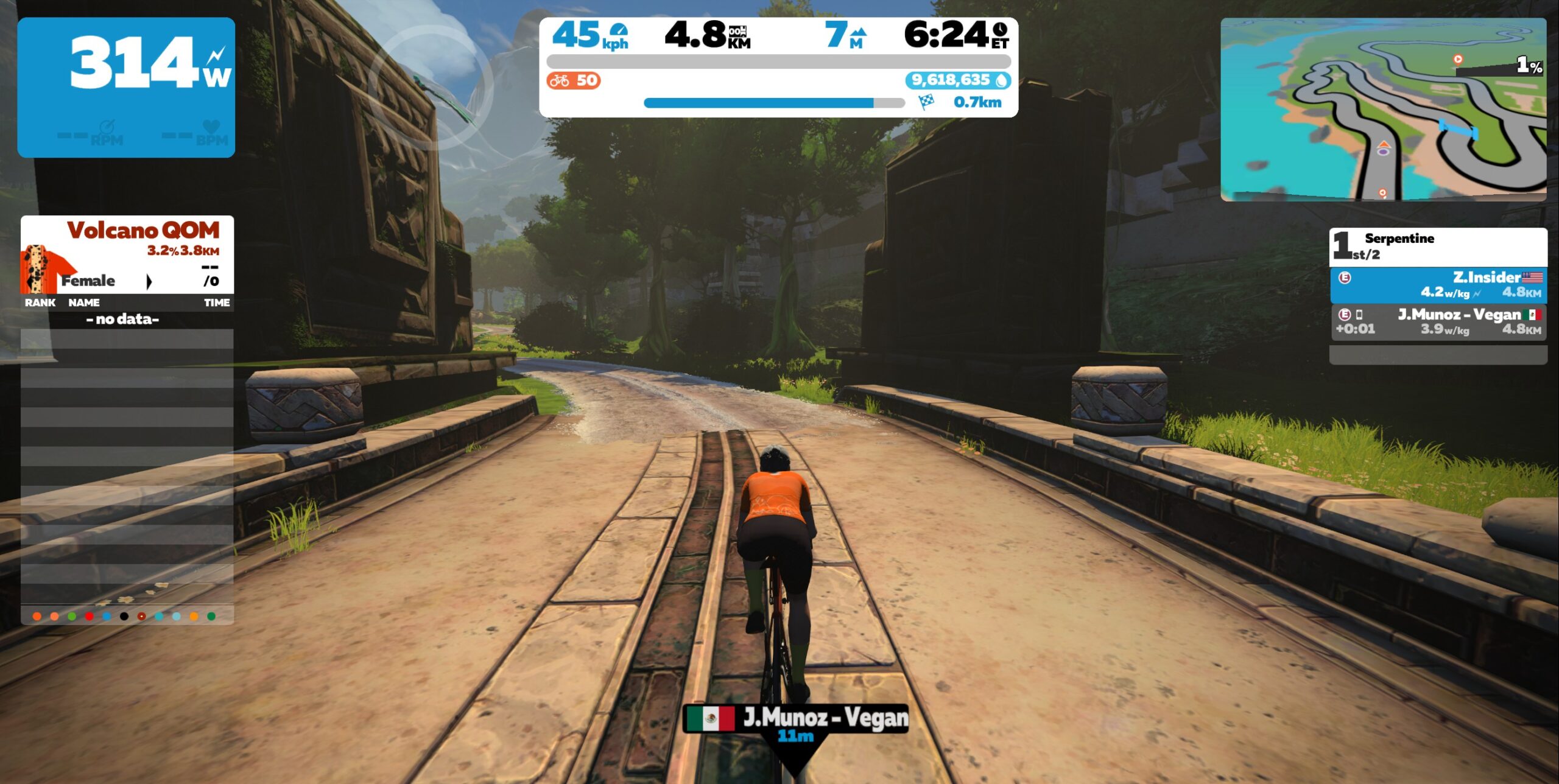
What’s a Leaderboard? Those are a list of the names/times for the previous 60 minutes for specified Zwift segments that were completed by people still Zwifting. There’s one for Overall and one for Female (which you’ll only see if you’re registered as a female). The Leaderboard also cycles to your times for the past 90 days. It’s that list on the left side of the screen – there is a setting to make it always show, which is helpful for jersey hunting. Otherwise, it just appears when you are near the respective Leaderboard segment.
Standard Orange Zwift Jersey (L) vs Zwift Route Jersey (R). Yorkshire Reverse Route Leaderboard on far left with the available Leaderboard dots, and current jersey(s) won on the right (next to the rider’s name).
The little dots at the bottom of the Leaderboard represent the Leaderboards in the Zwift world. Look closely at the screenshot, and you can see a little white dot in the orange dot. That shows you’re viewing the Route Leaderboard. The green dot represents the Sprint and the red dot, the KQOM. If you click either of those, the respective Leaderboard will appear.
The Updates
With the various additions of Scotland, Makuri Islands, etc, there are now 95 different individual jerseys to win (this does not include combined jerseys). That’s up by about 25 from the previous article! The new jerseys came from the various updates to Makuri Islands, the “new” Leg Snapper KQOM to Innsbruck, and the Scotland addition.
Watopia = 16 (Specials for Epic KQOM, Jungle, Alp du Zwift, Fuego Flats, Volcano, and Titans Grove)
France = 10 (Special KQOM for Ven-Top, the same design as Watopia’s Epic KQOM)
Scotland = 9 (see Quirks)
London = 8 (Special KQOM for Keith and Leith Hills)
Innsbruck = 7
Yorkshire = 6
Richmond = 6
NYC = 6
Paris = 4 (no KQOM)
(There’s also a Sprint jersey in Crit City, but we’re focused on free rides, not races.)
Epic and Ven, Titan’s, Volcano, and Alp du Zwift Special Jerseys
In the previous article, I mentioned Richmond was among the “easiest” places to snare a jersey. But with the update that makes the reverse Worlds an official badge route, there’s more competition. (Also of note to this reverse route, it starts you out a little AFTER the start/finish, so it makes sense to do a U-turn back to the line and then another U-turn to get credit for the loop the first time around.)
An update I find very helpful is the HoloReplay – for two reasons. First, some start lines are not prominently shown, and as before, always start your effort at full speed. Having your grey ghost waiting at the start line makes it much easier to see. The second reason is to gauge your effort as you’re trying, to get another visual measure if you’re on pace to beat the best Leaderboard time.
The Fixes
With the Makuri Islands updates, various bugs have been fixed – the automatic turning for the Flatland Route (forward and reverse) works, the Orange jersey can be worn, and the jersey icons next to your name are correct.
The automatic turning for the reverse Innsbruck Route has also been corrected. Before it would turn you left towards the Leg Snapper instead of keeping you straight to the finish line when heading back to the city.
Combined jerseys are still not possible in France or Makuri, so that must be deliberate. Scotland will be covered under “Quirks” – a combined jersey is (kind of) possible.
Winning the top spot for the Broad Street and 23rd Street sprints in Richmond still does not earn a jersey, so that must be deliberate as well. And as mentioned in the previous article, the Volcano lap jersey changed to the Volcano climb jersey some time ago. There’s a Leaderboard for the lap (either direction), but no jersey to go with it.
Lastly, knocking yourself off the Leaderboard no longer happens. (For a few months, while wearing the Leaderboard jersey, if you rode a segment that was slower than the second place rider, your first place time would be discarded and you’d lose the jersey. Yuck.)
The Quirks
There are a few jerseys that you continue to wear no matter which direction you’re going. That’s not a quirk, since there is no corresponding Leaderboard segment that goes the other way. What is odd, is that if you do a U-turn, Zwift will still give you the little warning at the top that “Jerseys Are Tracked Directionally.” Examples are Maruki’s Rooftop KQOM and Railway Sprint, Watopia’s Alp du Zwift, and Innsbruck’s Leg Snapper KQOM.
Scotland has several oddities, which isn’t surprising since it’s relatively new. As described above, the Champion’s Sprint jersey can be worn in either direction. BUT… surprise! The reverse Champion’s Sprint jersey can also be won and worn (in both directions), despite not having a true Leaderboard.
Unfortunately, I didn’t get a screenshot of actually wearing it* (trust me) – but you can see I won it in the jersey icons next to my name and I got credit for it in the post-ride Activities summary. Besides the normal Champion’s Sprint jersey, it also shows a reverse KOM and the reverse Sprint (as indicated by the small black “U-turn” symbols in the jersey icons).
Jersey Icons Showing the Two Sprint Jerseys – Forward and Reverse
*I had already won a KQOM, so I wasn’t initially wearing the phantom reverse Champion’s Sprint jersey (see the next Scotland quirk), until I did a U-turn and it appeared (and I failed to take the screenshot). I then won the forward Champion’s Sprint, and it became moot – I would wear the green jersey in either direction due to the forward win.
I think, but haven’t confirmed, that the phantom reverse sprint starts at the forward Champion’s Sprint start, then after the forward finish does a U-turn, goes to The Clyde Kicker reverse KQOM finish, then another U-turn to get back to the forward Sprint finish again. Basically, an out-back segment that included both the forward Champion Sprint and the reverse Clyde Kicker.
By the way, I won it in a blistering 10 minutes and 38 seconds as I was poking along! Here’s the Activities summary that also confirmed the jersey, which is where I found out my time and tried to trace out the route:
The Phantom Champion’s Reverse Sprint Jersey in Scotland
Another quirk in Scotland is that a KQOM won’t combine with a Route jersey (KQOM > Route and Sprint). From my experience above with the phantom sprint, KQOM and Sprints don’t combine either. (Although I think I saw a combined Sprint/KOM in another Zwift Insider article.) As can be seen in the second screenshot, Sprint and Routes obviously do combine in Scotland.
Scotland with Route, Sprint and KOM not combined (see the won jerseys on the right)Moments later, after I lost the KOM to M.Turpin, the combined Sprint and Route appeared
Innsbruck’s Leg Snapper KQOM also won’t combine with the Sprint (and presumably) the Route jerseys. In fact, unlike Scotland where the KQOM seems to take precedence, the Sprint jersey will override the Leg Snapper (Sprint > KQOM).
It’s been hard to pin down the logic:
In Scotland, Breakaway Brae replaced Loch Loop (KQOM > Route)
In France, Ballon replaced Aqueduc (Sprint > KQOM)
Also in France, Marina remained over Pavé (Sprint (orange) > Sprint (green))
It’s not always the latest Jersey won that is worn, and there also doesn’t seem to be consistency among the worlds for which jersey gets priority. More research to do.
Sprint Jersey immediately replaced the Leg Snapper KOM
A frustrating quirk whose cause(s) I haven’t been able to pin down is randomly not getting credit for certain sprints. This has happened to me more than once on Watopia’s Sprint, the Fuego Flats Sprint, Makuri’s Railway and Village Sprints, and a few others. I complete the sprint and it just doesn’t record anything. It’s never happened on a first try, just on a subsequent attempt. Frustrating.
Another oddity is when trying to extend the 60-minute time duration. I haven’t fully tested this out though. When I’m wearing a Leaderboard Jersey, I’ve tried to extend wearing it by re-riding the segment. If I beat my previous time, all works well. The clock gets reset. But if I don’t beat it, but am still faster than the second place rider, the new time isn’t counted. I time out of the jersey based on the previous time, despite having the (new) fastest time in the previous 60 minutes.
Summary
That’s the latest status of jersey hunting in general. I suspect there are things I’ve missed, so if you know of anything that may be of interest or benefit to others, please put them in the comments.
Meanwhile, I’ll be keeping myself motivated in part by continuing to try to win a jersey on each free ride I do, and winning all of the available jerseys (two to go as of this writing). Happy Zwifting!
Tiny Race Series – April 8 Routes and Last Week’s Results
Last week’s “Flats for Fools” theme was a hit among the sprinters, although pack dynamics 4 helped some breakaway riders make it interesting. (Multiple races saw breakaways staying away to the line!) This week we’re hanging out in Britain for something a bit more devious.
Before we get to that, here are last week’s winners:
A: – B: あや AYA (TMR) C: Carly Graham (CrushPod) D: –
This Week’s Routes: Staying in Britain
Zwift has three different worlds based in Britain: London, Yorkshire, and Scotland. So we decided this week we’d have all 4 Tiny Races take part on the “tiny but mighty” island of Britain!
Approaching City and the Sgurr finishCity and the Sgurr finishApproaching Loch Loop finishLoch Loop finish
Race 1: City and the Sgurr (2.736km, lead-in only, ends atop dirt climb) You’ll want to be warmed up for this! A short lead-in from Glasgow, then it’s straight up the dirt climb with a finish line at the top. Gravel bike highly recommended.
Powerup: Feather 1x
Race 2: Loch Loop (6.2km, ends at entrance to Corkscrew Castle) Racers know this loop well already, but not this finish line. It’s another 1-2 punch with back-to-back short climbs!
Powerup: Draft Boost 2x
Race 3: Queen’s Highway (1 lap – 5.8km) A pitchy little loop with a drawn-out final sprint that’s slightly uphill. This one is all about timing: modulating your power to efficiently maintain momentum on the short climbs, activating your powerup for maximum effectiveness… and where should you start your final sprint?
Powerup: Anvil 1x
Race 4: London Classique Reverse (7.42km, lead-in only, end at Mall banner) Covering only the lead-in from the pens to The Mall Sprint banner, this route is quite flat apart from quick Northumberland Ave climb taking you up to Trafalgar Square.
Zwift displays preliminary race results in game when you cross the line, but points are computed after all four races are finished, with final results on ZwiftPower. (We have to do some data processing on our side to compute results, so if your rankings don’t show up right away, be patient.)
Riders will earn points based on finish position in each of the 4 Tiny Races. The category winner of each week’s series is the rider with the most points across their timezone’s 4 races. Here are the links for each timezone’s results on ZwiftPower:
Tiny Race rules are simple, but still every week 8-10% of registered ZwiftPower racers get disqualified and removed from the final results. Don’t let that be you! Four races, four rules:
You must have a ZwiftPower account, because final results are processed by ZwiftPower (learn how to sign up)
No skipping then returning. These races are meant to be raced as a set of 4. If you need to leave early, that’s fine… but once you miss a race in your hour’s set of 4, don’t come back and race another or you’ll be disqualified from that race since you rested while others were racing! (Example: racing only races 1 and 2 is fine. Racing 1, 2, and 4 is not – you will be DQ from race 4. And if you race 2, 3, and 4, you’ll be DQ from all those races, since you skipped race 1!)
Heart rate monitors are required for podium finishers
ZPower/Virtual power is not allowed. Smart trainer/smart bike or power meter required.
Pack Dynamics v4 Testing Continues
We’ve been using Zwift’s experimental Pack Dynamics v4 since the first weekend in March, and will continue to do so.
Got feedback on PD4 after your Tiny Races? Share it on this forum topic.
Join a Chat & Chill Cooldown
Immediately following each hour’s racing, we’ve scheduled 30-minute “Chat & Chill” events where riders from all categories can spin their legs together and chat about how it all went down. Find them at zwift.com/events/tag/tinyraces.
Zwift Insider Kit Unlock
Finish any of the Tiny Races or a Chat & Chill ride and unlock the Zwift Insider “Ride Smarter//Ride Harder” in-game kit.
Pack Dynamics 4 Is Live: Slower Packs, Less Supertucking, More Breakaways
Pack Dynamics 4 (PD4) has been in development and testing since October 2022, and yesterday Zwift flipped the switch to take it live across the entire game.
What does this mean for Zwifters? Let’s dig in and find out…
The Need for Updated Pack Dynamics
When Zwift began working on PD4, they had these goals in mind (my comments in italics):
Reduce pack speed somewhat for large packs Everyone who races on Zwift knows the large packs move faster than they should, probably because of “churn” on the front (#5) which allows riders to continually slingshot through the draft and into the wind. PD4 should knock the speeds of large packs down just a bit (think 1-2kph).
Make it less punishing if you’re dropped/easier to bridge back up With packs moving at high speeds, it’s nearly impossible to catch back on if you’re dropped. PD4 makes it a bit easier by reducing the pack’s speed (#1) but it also appears Zwift has pulled some other trickery: making the pack’s draft “shadow” extend further behind the group (around 20 meters) before it begins to drop off quickly.
Make breakaways have a slightly better chance of sticking if the attackers work well together Again, just reducing the speed of the large packs (#1) helps this happen. Zwift may have also adjusted small group drafting parameters to give them a bit more advantage when working together.
Reduce the number of bunch sprint finishes in races This logically follows from #3 – if you give breakaways a better chance of sticking, you reduce the number of bunch sprint finishes.
Reduce churn and rider movement in large packs Reducing the forward/backward motion of riders in large packs makes the game look more realistic and reduces the front-of-the-pack churn that helped drive up pack speeds. The idea here is, you shouldn’t move around in the pack (forward or backward) a lot unless you’re changing your power output in order to do so.
Supertuck Changes
You won’t be seeing groups of supertuckers anymore…
Given the goals above, Zwift chose to modify the beloved supertuck in PD4, making it more realistic and in keeping with how we see it used in IRL races (before the UCI outlawed it, at least).
With PD4, the supertuck only kicks in if you are outside of a pack and not drafting. That means no more crazy-fast mobs of supertuckers chasing back attacks on descents. And in fact, it means breakaways have a much bigger advantage on descents than we’ve seen in the past!
Along with PD4’s new supertuck restrictions, the three previous requirements must also be met for the supertuck to activate:
You must be traveling at least ~36MPH (~58km/hr)
The gradient’s decline must be at least -3%
Your power output must be below 11 watts
Solo supertucking is now a key weapon in the attacker’s (or bridger’s) arsenal
Seeing Red?
You may see your power number in the top-left flash red when riding in a group with PD4. The red indicates “autobraking” – the game client slightly slowing your rider as it attempts to predict your intent and keep you from moving forward in the pack when that’s not what you’re looking to do.
In practice, for me at least, the slowing hasn’t been noticeable and has, in fact, kept me where I want to be in the group.
Wrapping It Up
The truth is, going from PD3 to PD4 is a much less noticeable change than when we went from PD2 to PD3. And that’s not a bad thing – it means Zwift is getting closer and closer to the pack physics we all want.
If you don’t race, there’s even more chance you won’t notice the move to PD4. Racers will probably notice the lack of group supertucking quickly, and we can expect the number of breakaways to increase as riders learn they stand a better chance thanks to PD4.
Ultimately, PD4 should lead to more dynamic and realistic racing, so I give it a big thumbs up.
Planned Tests
We plan to do some drafting tests with PD4, to see if it’s changed the numbers. Watch Zwift Insider for news on that front.
Zwift says PD4 shouldn’t change the speeds for solo riders, but we’re running a few tests just to confirm that. If things have changed, you’ll hear from us soon.
The latest Zwift update has been announced and is being released on a per-OS basis. It includes a minor set of new features, but the real excitement is all the behind-the-scenes code updates that open up new feature possibilities in the coming months.
Let’s dig into the details…
Staggered Release, New Possibilities
For the first time that we can remember, Zwift is releasing this update in a “staggered” fashion on a per-OS basis. Shuji in the Zwift forums said “It’s going out to some PC users first, then other platforms will follow.”
Why the staggered release? Here’s what Zwift says:
Zwift has been working on a number of back-end improvements that will open new possibilities for the next evolution of the Zwift game experience. Version 1.34.0 sees much of the code written over the past 9 months added to the public client for the first time.
Due to the scale of this change, the game release will be staggered to minimize the risk of disruption. We will unveil more details on our future plans later in the year.
We love the sound of “new possibilities for the next evolution of the Zwift game experience”! What is Zwift referring to exactly? Watch this space, because Zwift says they’ll be sharing some of what’s coming soon in a media release next week. We’ll write all about it as soon as possible.
Make it less punishing if you’re dropped/easier to bridge back up
Make breakaways have a slightly better chance of sticking if the attackers work well together
Reduce the number of bunch sprint finishes in races
Reduce churn and rider movement in large packs
PD4 has been activated for Zwift Insider Tiny Races since early March, and we’re hearing good reviews. Riders seem to agree that it’s not a very noticeable change – which is probably a good thing.
Zwift says, “Zwifters with banked XP will now see their rider score match their level progress graph position.”
Before this update, riders above level 50 who had banked XP saw a bit of weirdness in the rider score/graph on the game’s pause window. This update cleans it up.
Additionally, riders at level 60 previously weren’t seeing their additional XP on this screen – their rider score simply displayed 750,000, which is the XP needed to hit level 60.
Now the screen displays your actual rider score, although it doesn’t chart your level on the graph, since there are no levels above 60 in Zwift. Yet.
Additionally – for runners – “Rider Score” is now shown as “Runner Score”. It’s the little things.
Auto TT Swap
We’ve all been there… you drop into a RoboPacer ride, only to realize you’re on the TT frame you used in yesterday’s race or workout. This simple new feature alerts you if you’re on a TT frame, and lets you click a button to be placed on Zwift’s default Carbon frame instead.
The Carbon frame isn’t the fastest road frame in Zwift, of course. But it’s much faster than a TT frame in a pack, since it receives the draft benefit. This is a simple solution to a minor but annoying “quality of life” issue. (Word is Zwift co-founder, TT lover, and game creator Jon Mayfield whipped this one up himself!)
Note: this feature is “feature-flagged”, which means it’s included in this release’s code, but Zwift has to flip the switch on the server side to activate it for everyone. It’s not yet enabled for all Zwifters.
More Fixes and Tweaks
A few more fixes were noted in this release:
Fixed an issue that would sometimes cause HoloReplays to fly while on the Alpe.
Fixed an issue that would cause the start time for Time Trial events to appear incorrectly.
Replaced the Time Trial HUD element with the standard race HUD element for all routes while in a Time Trial event.
Fixed an issue that would sometimes cause duplicate race results to be saved when completing a race.
Screenshots taken from the action bar will now save as expected (Android/iOS)
The French Revolution: One Zwifter’s Vision for Expanding Zwift France
As a recreational cyclist with young children and an increasingly demanding work life, Zwift was a saviour to me back in 2018 when I joined up. My brother had moved across the globe to Chicago, another riding friend had moved to Seattle, and I found myself without motivation to be on my bike(s). It’s a common origin story, but over the years Zwift has allowed me to achieve far higher levels of fitness and friendship than I could have imagined or hoped for.
Fast forward to 2020 and I was so excited when Zwift, seemingly within a matter of weeks, announced and then released the France map and proceeded to host the world’s first Virtual Tour de France on Zwift. France is synonymous with cycling, and the Tour de France is iconic not only for the skills and stamina of the riders but equally for the breathtaking scenery as it travels through picturesque regions of France and Europe every year.
Like many, I forgave ZHQ the fairly basic appearance of the France world compared to Watopia when it was released, given how quickly it was put together. It seemed perfectly natural to assume that in time it would blossom into another large-scale map. Recently I started wondering, given Zwift is the title sponsor for Le Tour Femmes avec Zwift and Paris-Roubaix Femmes avec Zwift, is ZHQ ever going to turn its focus back to France and finish what they started? So I decided to jot down some ideas, complete with a mockup map.
1: Mont-Saint-Michel
The iconic island monastery is already depicted in game, so add a bridge just like in real life, and allow for turnaround at the Abbey. Bridge is exactly 1km long in real life, and could make for a challenging timed segment in its own right. A cool feature would be to have the ocean behave as tidal, like how weather changes in other worlds. Ever noticed that it doesn’t rain or get dark in France?
2: River Bypass
Activate existing road artwork in game, allowing bypass route on the southern side of river, avoiding the infamous ‘Les Intestins’ section. It would open up options for new routes and even a criterium-style loop taking in both sides of the river.
3: New Windmill Start Pens
As Watopia grew, new start pens were added to allow easier access to the various ‘zones’ for free riding and racing. An additional start pen near the big windmill could cater to a new proposed Canal River Zone while adding options for Aqueduct Zone routes. Existing road artwork is in game already, and a cool feature could be to have the road split on either side of the big Windmill, with the game deciding if you go left or right side depending on positioning in the pack. Would look spectacular on a mass race or group rides, just like what happens at round-a-bouts in the Tour de France!
4: Canal River Zone
By extending the river from the Aqueduct to link with the river near Mont-Saint-Michel, a new zone can be created allowing for more flat roads which are great for group rides. Add new roads coming off from the Windmill area and either side of the Aqueduct KOM then re-joining near Mont-Saint-Michel. Some of the road artwork is already in game. Include a small Canal Village with bridge over the river, and also a gravel pathway section along the canal/river complete with barges motoring up and down stream. Any number of new route combinations could be created with this relatively small addition section. Also allows for a loop taking on the Aqueduc mini KOM for criterum-style racing.
5: Cote D’Azur – Monaco
Use the eastern coastline on map to recreate the feeling of the French Riviera, riding through various small coastal towns and leading to a Monaco-esque city and marina full of uber-yachts. This area would add some gentle rolling hills and would be an out-and-back style, starting at the top of the first little incline towards Ven-Top at the sharp 90 degree turn.
6: Balcony Roads
In IRL France there are several famous balcony roads comprised of single lanes cut directly into the sides of sheer cliffs. With spectacular views down into the ravines below, it would be a brilliant addition to the France map as another quintessential French experience. Using the area in the centre of the map on the foothills of Mont Ventoux, the existing river network could be extended, or simply create some ravines to add in a gentle climb loop comprised mostly of these spectacular feats of construction. Start and finish near each of the villages on either side of the Pont du Gard Aqueduct.
7: Ventoux via Sault Profile Climb
The Ven-Top route is daunting for many, and perhaps it’s not well-known that there are in fact three routes to the summit of Mont Ventoux in real life. The easiest is via the real-world town of Sault, and with gradients averaging only 5% before joining in at Chalet Reynard, it would open up a more accessible climbing route to the summit or Chalet. Add a route at the bottom area of map, mimicking the profile of Ventoux from Sault. Given the IRL road is relatively straight, it would require editing of some corners via a bit of “cut and paste” to fit neatly within the Zwift France map, but the same incline profile and distance could be kept.
8: Ventoux via Malaucene Profile Climb
The hardest Mont Ventoux ascent is via Malaucene. It is almost identical in distance to the existing Zwift route which mimics the route from Bedoin, but has some even steeper sections for those who love climbing. Add a route to the northern area of Mont Ventoux in game, mimicking the profile of the ascent from Malaucene. This will also require some “cut and paste” creativity to have it fit compactly in the map and match existing mountain range artwork, but the distance and profile could be maintained. Start from the end of the small straight canal road, near the “Needle” of Etretat.
This would allow for completion of the Ventoux road network, creating a true looping course and opening up an epic triple, Des Cingles Du Mont Ventoux. Summiting Ventoux three times in one ride… a truly epic route and worthy of its own jersey perhaps?
I raised this idea on the Zwift Forums back in August 2022, and it gained some visibility, although at the time a Zwift employee confirmed there were no plans for France expansion. Recently, a post on the Zwift Insider Facebook page allowed me to raise this passion project again, and I revisited my original notes to fine-tune some of my ideas.
I am grateful to Eric for the opportunity to share it with you all, and hope that it gets noticed by the right people at Zwift. I am sure there are plenty of other great ideas from the community that could be included in a request/demand/plead to ZHQ for a France upgrade, but if you’d like to upvote my forum post, please do.
Zwift Sport Science – Recruiting for a Remote Cycling Study
Fellow Zwifters, we need your help for a research study that may unlock automatic FTP detection by only wearing a heart rate monitor that records heart rate variability (HRV).
Help the Zwift community benefit from this research in the future by doing a few Zwift workouts from the comfort of your own home. That’s right, it’s a remote study—you don’t even have to visit a lab to help advance science!
What We are Studying
We are studying fractal properties of heart rate variability in relation to exercising power outputs measured by your smart trainer.
What are fractal properties: if you’ve ever sat through Disney’s Frozen or stared deeply into nature while procrastinating at work, chances are you’ve either heard of fractals or at least seen them—albeit, possibly without even knowing it.
Like Disney’s Elsa suggests, “frozen fractals” are seemingly never-ending patterns that can be seen in ice or snow. Similarly, these complex structures also exist in many living things, like a plant, where the shape of a branch may closely resemble the entire tree.
Although these patterns can be hard to spot, it appears that their presence seems to be the rule rather than the exception.
Within the human body, the rhythmic patterns of our heartbeat also exhibit fractal structures and investigation into these patterns, or HRV, may provide a unique opportunity to evaluate human performance!
For example, during exercise, the presence of these fractal structures has been associated with low exercise stress and intensity while the absence of these structures has been associated with the accumulation of fatigue and high exercise intensity.
Getting Involved
Although this sounds exciting, there is a lot to learn before we can use this to guide exercise and evaluate performance. That’s why we need your help!
The University of Calgary is currently recruiting for a remote cycling exercise study! We are looking for 18–65 year old male and female Zwifters who have a training volume of at least 3 hours per week for the past 3 months.
Using Zwift, we can more readily collect cyclists’ data to accelerate our understanding of HRV in sport science. Specifically, this study will work to understand how fractal structures within HRV can be used to detect exercise thresholds, evaluate recovery and durability, and guide high-performance exercise training.
Participation in this study would require you to:
Perform 4 separate exercise sessions remotely on your electronic cycling trainer including:
One 4-min time trial
Two 20-min time trials
One Zwift race
Complete short surveys about the exercise sessions and your cycling experience
Each session will take ~45-75 minutes to complete for a total of ~4 hours of time
To participate you will need:
An active Zwift account
An active Garmin Connect, Suunto, or Polar account
An electronic cycling trainer such as Wahoo Kickr, Tacx Neo, Saris H3, Elite Direto (for more trainers see zwiftinsider.com/smart-trainers-all)
A compatible sport watch or cycling computer that allows for
*Using the Zwift platform, you would be requested to perform the exercise sessions, record both HRV RR-interval and Power Output using your device, and upload this information to your Garmin Connect, Polar, or Suunto account*
If you are interested in participating, please contact Cody van Rassel ([email protected]) to learn more.
This study is being conducted by Dr. Martin MacInnis and has been approved by the University of Calgary’s Conjoint Health Research Ethics Board (REB22-0159)