Planning Comes to Zwift Companion: Schedule Upcoming Zwift Activities

As promised in the latest “This Season on Zwift“, yesterday Zwift released a new planning feature in the Companion app. You’ll need to be on version 3.82.0+ see the feature (download for Apple or Android).

This replaces My List, since it replicates that feature while adding scheduling and additional supported activity types. Let’s jump in and see how it works!

Activities (Currently) Supported

The following Zwift activity types are supported by the planner today:

  • Cycling & Running Events
  • Cycling Workouts
  • Cycling Routes
  • Robopacer Rides
  • Challenge Tasks (i.e. Route of the week)

Right out of the gate, we see the new planner is more robust than My List, which only supported routes and workouts.

Scheduling Activities
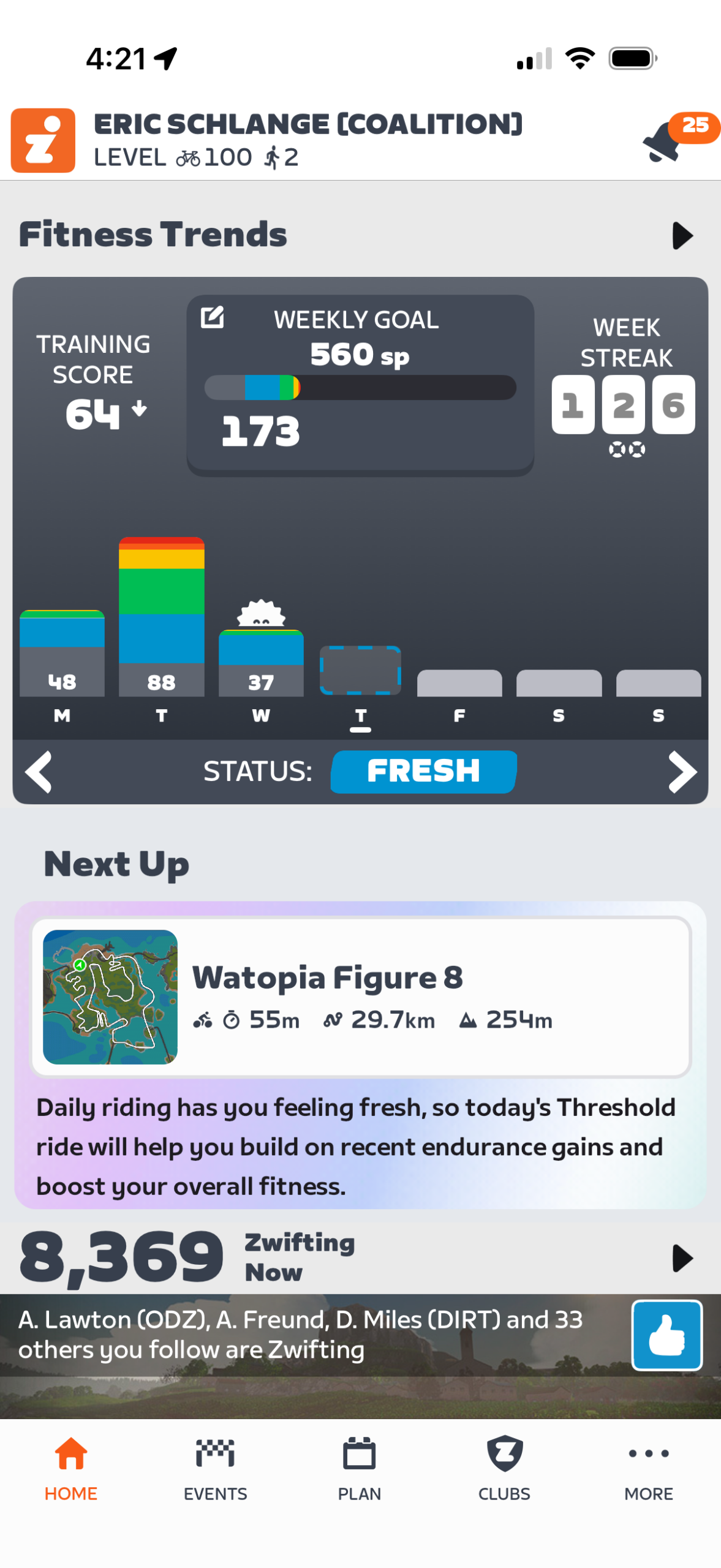
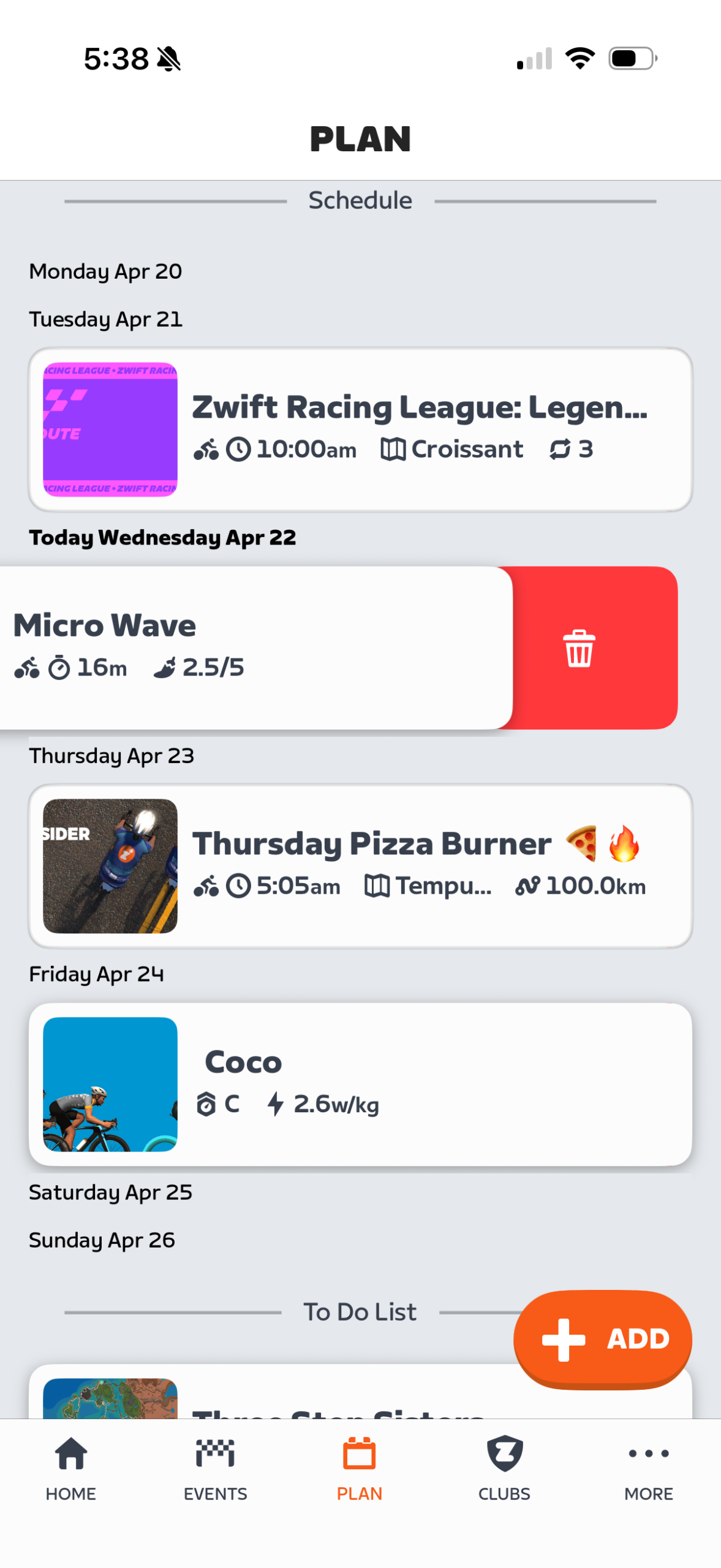
Future days with scheduled activities are indicated by a dashed line in your Fitness Trends chart, while the planner’s main interface lets you easily add, move, or delete planned activities up to a year in advance.

While the new planner supports more types of Zwift activities, the big new feature here is the ability to schedule your activities.

When you sign up for an event, it’s automatically added to your planner’s schedule. Easy peasy.

For the other activity types – workouts, routes, Robopacers, and Challenge Tasks – you can easily add that activity to the planner by tapping the orange “+” or “Add +” button. (These are the same “+” buttons formerly used to populate My List.)

When you tap that button, a popup will gives you the option of scheduling the activity for a particular date. Toggle the “schedule” option to put it on a particular date, or leave it off and just tap “Add” to add the activity to your planner’s “To Do List” without scheduling it for now. (You can easily drag and drop it onto a desired date later.)
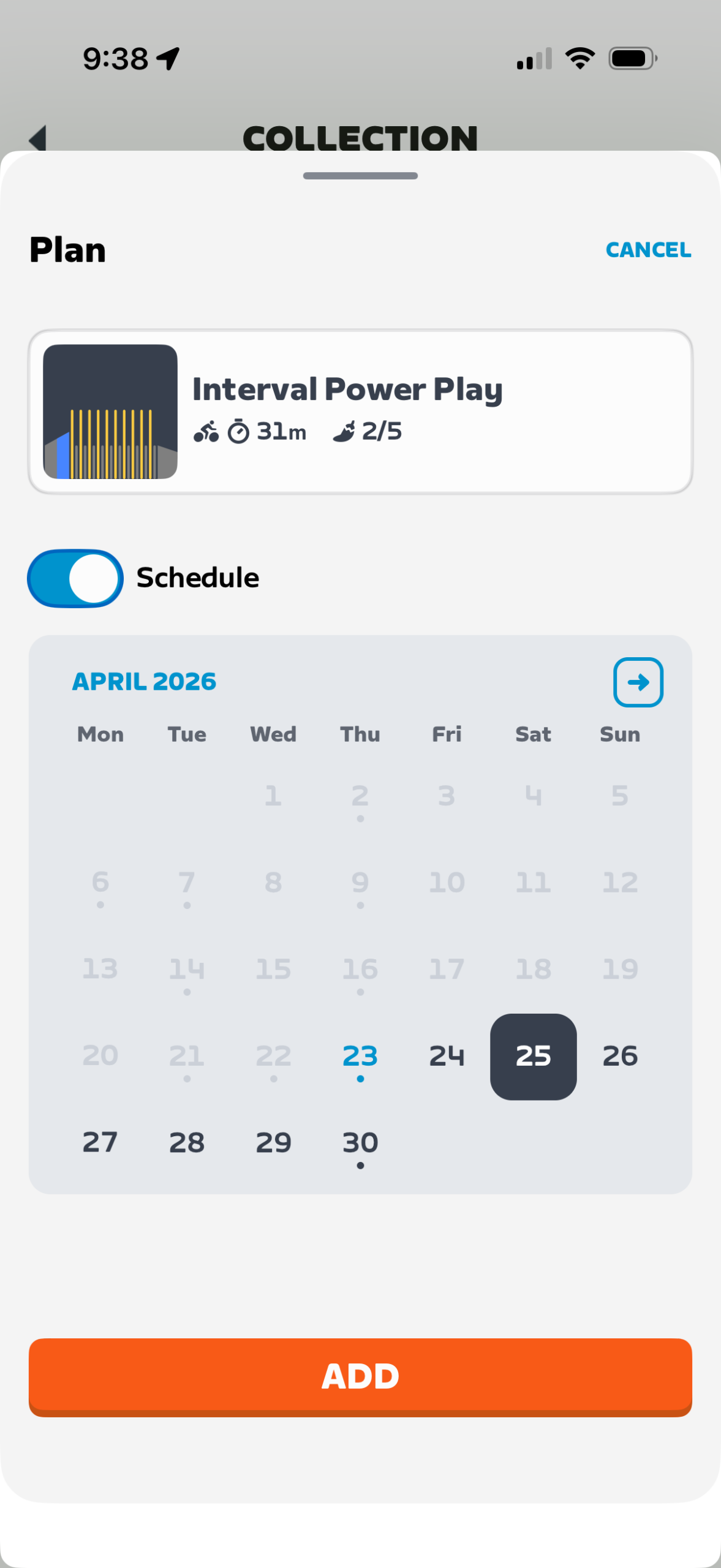
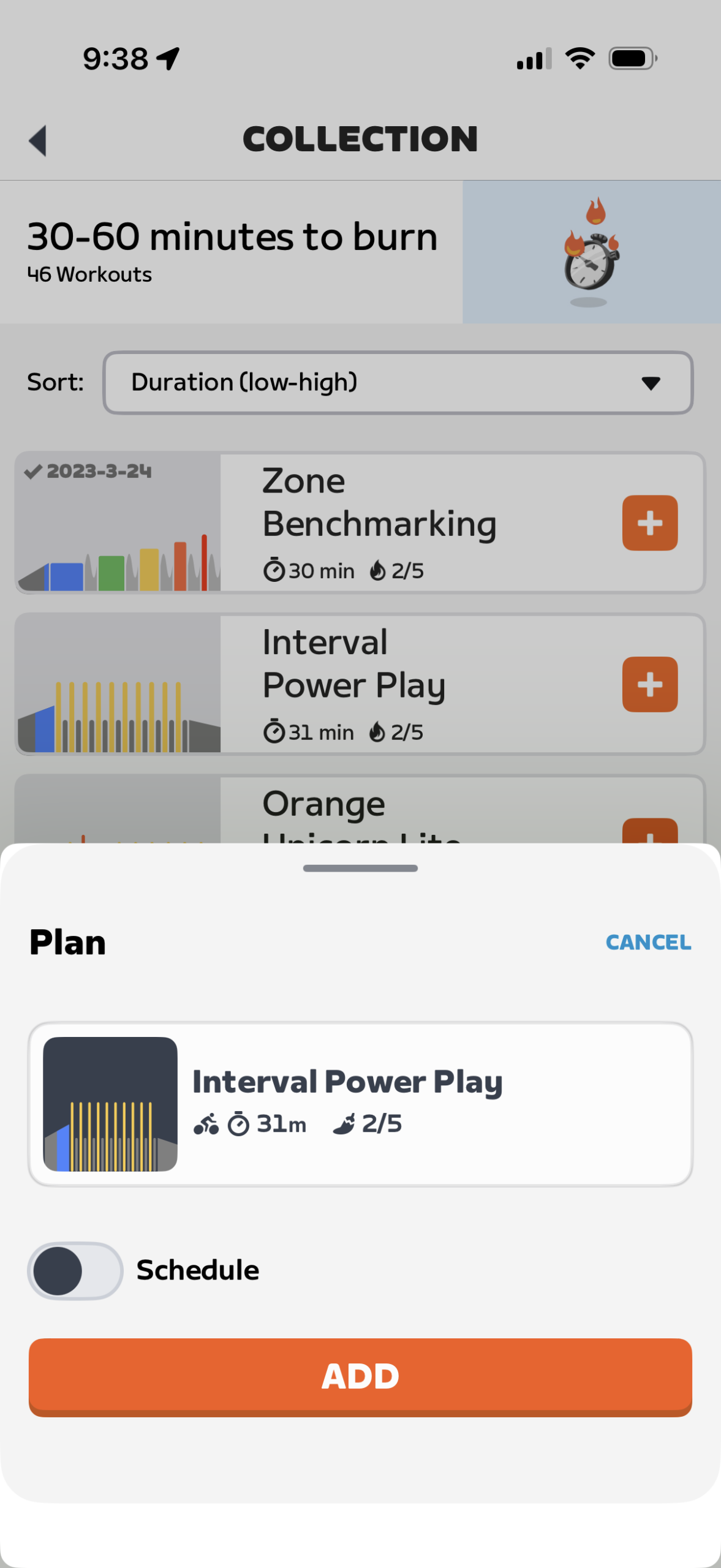
Schedule a workout for a particular date (left), or simply add it to your To Do list without committing to a date (right).

You can schedule activities up to a year in advance, drag and drop to reschedule, and swipe left to delete at any time.

Pro tip: by default, the planner (reached by tapping “Plan” in the app) shows your current week. Tap the right or left arrows in the Fitness Trends graph at the top to move to future or past weeks.

Watch me schedule a ride with Coco in 13 seconds:

Planning Third-Party Workouts

Zwift continues to expand their list of integrated third-party workout providers whose workouts can be scheduled through the provider and automatically brought into Zwift for you to execute on the proper day. In fact, I’ve lost track of which providers are supported at this point, because there are many, and new ones aren’t always announced! (Zwift maintains a list here.)

If your third-party provider is connected to Zwift, your scheduled workout will show up in your planner. You can’t change the scheduled date for the workout in Companion, though – scheduling changes need to be made via the third-party provider.

It’s also worth noting that workouts scheduled through TrainingPeaks are not currently popping into the planner automatically. My guess is this is because TrainingPeaks uses an old, bespoke integration method to talk to Zwift, and that method doesn’t work with the planner.

Bugs & Niggles

Overall, the new planner seems functional and robust, especially considering this is its initial public launch. But of course, there are a few annoyances and bugs you may encounter. Here’s my running list:

  • The Companion app likes to crash when I’m scrolling through the list of workouts, particularly under the “30 minutes to burn” category (but it’s happened under other categories as well).
  • What about Zwift’s own Training Plans? When browsing your enrolled Training Plan’s workouts in Companion, you aren’t able to add those workouts to the new planner. Training Plans seem to have been neglected in Zwift’s latest feature releases (including “Next Up” recommendations and now the Planner), but having an interface to help you plan your execution of these workouts seems like it would be quite helpful.
  • When adding a Robopacer, they all show as “D” pace on the card, even though they show correctly when added to the planner.
  • When I click a past race I completed, I’d like to be taken to the results screen.
  • Even though Zwift mentions “Challenge Tasks (i.e. Route of the week)” as a supported activity type for the planner, I don’t have access to Route or Climb of the week in Companion. Would love to see that added.
  • The game and Companion homescreens aren’t refreshing quickly enough to reflect changes made in the planner. I’ve had to restart Companion or pop into an actual ride and back out to force a refresh.

What next?

Any time Zwift releases a new feature, I like to ponder how it could be improved further, and how the new feature lets us peek into the company’s strategic plan.

First: making it better. Apart from the bugs/niggles listed above, I think one obvious value add would be the ability to schedule outdoor rides. Let me quickly say how long/hard the ride will be, so it shows in my overall planner.

Then here’s the kicker: have that outdoor ride (and everything else in the planner, of course) factor into the “Next Up” personal recommendations.

As a simple example: if I’m planning on riding a big Levi’s Gran Fondo event this weekend, I could add it to my planner, and “Next Up” would help me taper/train smartly for it.

What does the planner release tell us about Zwift’s strategic plan? When viewed alongside the prospect of personalized recommendations going outdoors (as promised in This Season on Zwift), it seems clear that Zwift is working to create a planning and recommendation ecosystem that helps riders train smart and (crucially) use the platform year-round.

Questions or comments?

Check out the Zwift forum thread for more info and discussion, and you can always ask questions or comment below. Got bugs or niggles for me to add to the list above? Share those, too!

Eric Schlange
Eric Schlangehttps://zwiftinsider.com
Eric runs Zwift Insider in the spare time he finds between riding his bike and managing various business interests. He lives in Northern California with his beautiful wife Monica. Follow on Strava

33 COMMENTS

Subscribe
Notify of
guest

33 Comments
Oldest
Newest Most Voted
zwiftercs
zwiftercs
3 months ago

I’m assuming custom built workouts in Zwift won’t be able to be added to the schedule as of now? That would be a nice future feature, however I’m not sure how widespread custom workouts are used.

Marlot | LEQP
Marlot | LEQP
3 months ago
Reply to  zwiftercs

Yeah, that would be nice!!!

Tony Richardson
Tony Richardson
3 months ago

Sadly until Zwift allows activities completed or planned through other virtual platforms in the same way it does now for activities syncing through Garmin It cant be a complete alternative for me.

Jim
Jim
3 months ago

The link for “Zwift maintains a list here” does not work for me. Was wondering if Lecoach.app already connects directly or only via Intervals.icu as a bridge?

lewis mccorvey
lewis mccorvey
3 months ago

Can I just keep keep using My List as is ? I only use it to ride courses on off days . Fav course is RGV in France and ride it when France is not scheduled so not many people on the course . Thats the only way I have used My List . Very simple , no need for al of the planning .

lewis mccorvey
lewis mccorvey
3 months ago
Reply to  Eric Schlange

Thanks Eric

Baffled
Baffled
3 months ago

What is it about the Climb Portal that we can never get a schedule or anything in CA? Also, do the Robopacers show what routes they are on?

Markus
Markus
3 months ago
Reply to  Baffled

Zwiftinsider has schedules posted but you’re right. Companion App would make sense.

Alistair Flack
Alistair Flack
3 months ago

On a slight tangent – but linked to Suggested Workouts…I really really wish Zwift could license even just some of the TrainerRoad magic and give personalised, adaptive workouts. It is such an amazing workout experience, it would be cool for more people to have access to it

bob
bob
3 months ago

In addition to this “plan” feature, I want a refrigerator door pdf for challenges (eg Baseline) or these new plans. I don’t live to be dependent on a smart phone. But i will regularly check my refrigerator door.

Steve
Steve
3 months ago

The crashes when scrolling for workouts are a major issue. Makes it almost impossible to schedule a workout as it just crashes too frequently. Feels like more untested software being released

rgr_24
rgr_24
3 months ago

First of all, I think that for outdoor activities, Zwift should interface with Strava and not with a few devixe partners, 20€/month I pay as I own a Bryton, like those who own a Garmin or other and can upload their outdoor activities, or allows me to pay less, or must give me the same features;

Then it would also be useful to be able to program in addition to the next workouts, also the various companion bikes and wheels, and not necessarily have to access Zwift, in order to program everything comfortably beforehand;

Then I don’t understand why not implement the possibility of exchanging messages between Zwifter…

Steve
Steve
3 months ago

Needs a web browser version. Phone apps are terrible to actually plan calendars. OK for on the fly.

Hendrik
Hendrik
3 months ago
Reply to  Steve

It needs general interoperability using ical or google calendar integration, not just a web version. This feature is a gimmick unless you can see the data in your actual calendar. If I already remember to look into the calendar for my planned workout, then I obviously already know that I need to do a workout…

Jack Gregory
Jack Gregory
3 months ago

I don’t seem to see a new version. How do you tell the version on Zwift Companion anyway? There is no “About …” item. But I still see MyList, so I assume it is not updated. And the app store doesn’t say there is a new one.

Jack Gregory
Jack Gregory
3 months ago
Reply to  Jack Gregory

oh, I found it. Under settings.

Chris
Chris
3 months ago
Reply to  Jack Gregory

I still don’t see this update available in the play store…

Andrew
Andrew
3 months ago

Another big improvement that would help the planner would be if Zwift started to require series organisers to create all the events for that series when adding the first one so that Zwifters could add each stage to their planner, and similarly to get all organisers of regular events to schedule at least 1 month’s worth at a time. Currently most regular events or series of any type only have 1 event scheduled (likely to do with limitations of the current scheduling process that has to be used?) so racers can’t schedule beyond the current week generally

Ole EIchhorn
Ole EIchhorn
3 months ago

This looks pretty cool for a Type A workout / racer / rider.

But I’m a different type, I want to get on my bike, and see where it takes me. The feature I want is a “random route for Ole today” feature. Pick a world. Pick a starting point. Make turns for me. I want to see new things, cool things, and let the time pass while I trick my body into getting a workout. If an hour goes by and I burn 600 calories, yay.

I had hopes for Zwift’s Next Up feature, but it’s too prescriptive. It picks a route at random, and that’s fine but I’ve already ridden every route in Zwift. And Tune just lets me go shorter or longer. How about “flatter” or “climb-yer”? How about “we’ll random generate a world just for you”? 🙂

Andrew
Andrew
3 months ago
Reply to  Ole EIchhorn

Do you have Sauce for Zwift add-add-on? If so I think one of the mods now allows you to use a Route Chauffeur that does all the turns for you on Rebel Routes, I’ve not used it but that’s how I understand it

Eric J
Eric J
2 months ago
Reply to  Ole EIchhorn

Great. That has exactly nothing to do with the Plan function. That has exactly nothing to do with Zwift Insider. Can “we” all just stop posting random thoughts…during which I post a random thought…which could go at the end of 90% of posts on ZI…🤔🙄

Joe Dirt
Joe Dirt
3 months ago

love this, but less AI please

Nestor
Nestor
3 months ago

Where in Menu is Plan? I can add activities to plan, but dont actual see plan

Cyclobrewer
Cyclobrewer
3 months ago

It’s a shame that Training Peaks isn’t supported for the automatic third-party workouts. I guess the only way to do that is to export to Intervals.icu (or other) then get that integration to come in automatically.

It would also be nice to add a “custom” note that you can place on a specific day. Kind of like a placeholder for something that you don’t have an event for yet. That would cover for the lack of custom workouts too.

For a first version it looks promising though!

Will
Will
3 months ago

What would be really useful is to schedule not just the workout, but the route as well. This could mean pairing a workout to either the weekly routes or to a favorite route.

Derek
Derek
2 months ago

the one thing ive noticed is ….. I used the list a lot for workouts that i wanted to complete. When i completed those workouts, they were removed off my list. This is not the case with the plan. once you have completed the worlout you need to manually remove that workout from the plan. I wonder why that is, at is seems as though its a move nbackwards rather than forwards. Anyone else think this is odd ?

Derek
Derek
2 months ago
Reply to  Eric Schlange

so i know the workout is done, and i dont revist the same workout a couple of weeks later. Im not concerned with the group rides, races etc just the workout sessions

Eric J
Eric J
2 months ago
Reply to  Eric Schlange

I routinely get a completed planned activity showing up in Plan via the Up Next aspect of the coding. So the only way for it to go away seems to be for me to remove it from ever having been done. (?) I do 4-5 banded rides as a sweeper and burn my fat, I then (being a moron and wanting to get XP for no real purpose) do Route Of The Week or Climb Of The Week and I schedule those in Plan, and then the dumb thing gives me that later AFTER I HAVE DONE IT days later; might be next day or 3 days. Specific example right now: I did The Full PRL on Tuesday: 1. it is categorically moronic for it to show up in Up Next on Thursday -and- 2. I DON’T WANT TO EVER SEE THE FLIPPIN’ THING EVER AGAIN (given that it is the most ridiculous route in the game, an abomination to logic, and yet something I must do because I am some sort of psychopath.)

Mika Alén
Mika Alén
2 months ago

Fantastic, now I can’t use this for adding routes not done anymore. Adding from routes now creates double/triple copies of the same route so I need to swap between plan and routes. I hope they’ll fix something real instead like the garage.

Get Started on Zwift

Newest Featured Posts

Support This Site

Write a post, shop through us, donate or advertise. Learn more

NEWSLETTER SIGNUP

Zwift tips and news every 2 weeks! Click to subscribe.

More Posts