

Every day, I receive questions from Zwifters. They range from mundane to esoteric, and I try to fire off quick answers as often as possible.
You may say, “Eric, that’s not your job.” And to that I would say: you are correct. Or at least, you were correct back in December 2015 when I launched this site. These days, Zwift Insider actually occupies a significant portion of my work hours – I make some income from this website, and in return I deliver value to Zwift and its community by providing information on all things Zwift. So it actually is my job… sort of.
“Ask Eric” Series Intro
The challenge with one-on-one tech support is, it just doesn’t scale well. So when I get a question that hasn’t been answered with a Zwift Insider (or Zwift Support) post, I’ll usually add it to my ever-growing list of “posts to write” so the next Zwifter with that question can find an answer via a quick Google search.
And that’s my goal with this new “Ask Eric” series. I’ll post answers to real questions from real Zwifters, in hopes that the next Zwifter with that same question can find an answer quickly and easily.
Got a question? Send it to [email protected], and perhaps it’ll show up in an upcoming post. Let’s begin!
Smart Scales not Syncing Weight to Zwift (Fitbit, Withings, Nokia, etc)
Hello Eric,
My profile in Companion Is set to update automatically connected with Healthmate. But it doesn’t work since May 2020 😢 Can you help?
~E.L., Germany
I don’t know about you, E.L, but stepping onto my scale in the morning and knowing that my weight will automatically be sent to my Zwift profile is one of those beautiful small pleasures in life. (This is true, at least, when my weight has decreased from my previous weigh-in.)
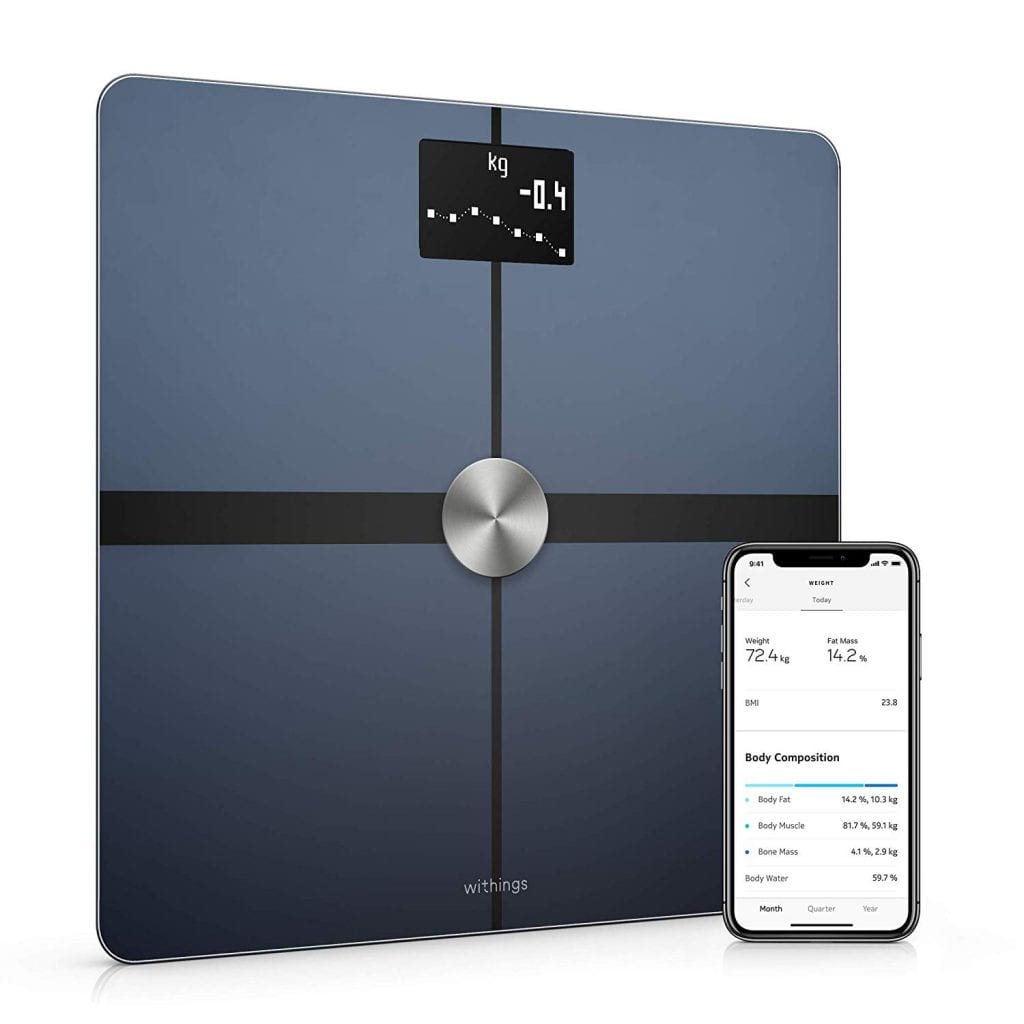
Zwift has had the ability to automatically update your weight from your Withings or Fitbit account since early days – we wrote a post about it back in 2018. But the feature isn’t working anymore – it’s borked.
This problem seems to have begun sometime in May 2020. I noticed it with my amazing Withings Body+ scale around that time, then I began to see threads and questions popping up from others. At first I thought it was an issue with the Withings + Zwift connection – but then I heard that Fitbit users had the same problem. Ah! That’s a clue.
Disconnecting your account in your connections page then reconnecting seems to fix problem… for one sync. Then it stops working again. A second clue!
Here’s the final clue: in the May 28th game update, Zwift made a change to minimum weight restrictions in profiles so minors could set their weight below the previous 45kg limit. My educated guess is, whatever Zwift changed in that update broke weight syncing.
Those reaching out to Zwift support on this issue have received a message which says (quoted from an actual reply):
I’ve checked with our team and they’re working on a fix. While there isn’t a work-around for this issue as of yet, the fix will come from our end, so there’s nothing extra you need to do.
We appreciate your patience and understanding as we continue improving Zwift. Please let us know if there’s anything else that you need assistance with; we’d all be more than happy to help!
Stephen F.
Member Experience Agent
Zwift
I’m sure Stephen would be more helpful if he could – but he’s not a developer, so we’ll keep getting that same reply until Zwift chooses to devote some developer time to fixing the issue.
How do we “run this up the flagpole” at Zwift? Reach out to support, but also, post in this forum thread, and upvote the post so it gets Zwift’s attention. Hopefully, Zwift will get us smart-syncing just in time to log some holiday weight gain.
Unplugging NEO 2T (or other Smart Trainers) When Not In Use
Thrilled with NEO 2T so far, but Facebook report is less than thrilling. Do you unplug when not in use? I do unplug the charger when finished with Zwift; otherwise, I notice Neo power light stays on. I am not sure if this makes a difference, because most people do not unplug phone and computer chargers when not in use. Interesting that NEO can be used without being plugged to charger, and I am not sure how power is created.
~Jim, USA
While the Tacx NEO 2T can work without being plugged in (you just lose the downhill flywheel drive feature), most people use it while plugged into “mains power” (as my Euro/Aussie friends like to say). The power unit isn’t a “charger” – its job isn’t to charge a battery like a cell phone charger. (The NEO doesn’t use a battery – it uses capacitors which retain power generated by your legs in order to power the unit.)
Rather, the NEO’s plug is an “AC adapter”, which means its job is to convert your home’s power into an electrical current that your NEO can happily use. In the case of our original Tacx Neo here in the Zwift Insider Lab, that means the power supply converts our home’s AC current to a 48 volt DC current. This is basically how every smart trainer works, although the adapter’soutput voltage will vary (my Wahoo KICKR ’18 uses a 12 volt AC adapter, for example).
I see no reason to leave smart trainers powered on when not in use – that just wastes electricity, draining power and your bank account like an electrical vampire. Plus, like any digital device, I think a reboot never hurts (and often helps)!
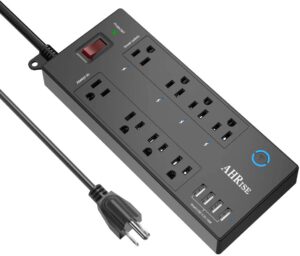
But we’re not neanderthals here – who wants to manually unplug and plug in their trainer? Put it on a power strip that you can easily switch it off, or better yet do what I do and use a wifi-connected smart power strip so you can turn it off and on (along with fans or other accessories) via a simple app on your phone. Here is the current “Amazon’s Choice” smart power strip, which I’m sure would do the job just fine!
Earning Route Badges in Meetups
Hello Eric,
Thanks for such a great site! I’ve used it a lot since we’ve mostly been home for the past few months. I had a question about route badges and meetups. Do you know if you can collect route badges while either on or organizing a meetup? I’m trying to collect all the route badges, but it would be fun to do that with friends if possible. I tried once, but think that I picked the wrong route anyway, so it was a moot point. Thanks for your help!
~Ben, USA

This question pops up regularly, because the only thing Zwifters love more than route badges is route badges with friends!
For those who don’t know: route badges were added to Zwift in October 2019, then expanded in December 2019 to include all free-rideable routes. So you can’t get route badges for event-only routes, but that still leaves 90+ routes with badges (see our master routes list for details).
Ben’s question is, do I still get the badge if you do the route in a Meetup? The answer is: yes! Generally speaking, you unlock the route badge whether you do it in an event, in a Meetup, or just choose the route and free-ride it. The nice thing about badges in Meetups is (thanks to a COVID-inspired Companion app update in April 2020) you can schedule a Meetup on any Zwift map at any time, so you’re not restricted by the guest map rotation schedule.
One word of warning, though: there seems to always be a route or two which isn’t working properly for badge-hunters. Last I checked, Road to Sky didn’t work for Meetups (choose Tour of Fire and Ice instead). And lately I’ve been hearing that riders completing the Four Horsemen route in a free ride aren’t getting the badge. That hurts! To add insult to injury, if you complete a route and don’t get the badge, Zwift support can’t really help you – they don’t have the ability to give you the badge.
But that’s cycling… it’s not for wimps. Rule #5!
Got a Good Question?
Send it to [email protected], or comment below. I’ll reply if I can, and maybe, just maybe, a more complete answer will make its way onto this series of posts so it can help Zwifters in the future.


Please unsubscribe. Requested 3 times now.
We can’t unsubscribe you from browser notifications – only you can do that. Here are instructions for the Chrome browser: https://support.google.com/chrome/answer/3220216
alguien me puede ayudar no me funciona
Uber Pretzel is also not working currently, lots of complaints on the Zwift forums about it and no warning going out to the community not to attempt them until they figure out a fix. Be warned!
Four Horsemen… I’ve done it twice and both times Zwift crashed at exactly 66.0km, so no badge. Lost 2640XP and at least 250,000 drops.
I think first was a group ride (early July) and second was a race earlier this month.
I’m level 37 and this is the only time I recall Zwift crashing.
From your post it sounds like there is no possible way for me to get that badge. The only others I need are Uber pretzel and Full PRL to complete the set.
How do we get Zwift to make their software function in the most basic of ways?
https://forums.zwift.com/t/four-horsemen-crash-at-66-0km-twice/506684
Interesting note on the weight synching from scales. My question is how to make this work for my Garmin scales, have not managed to get this connection.
Zwift HQ, please make fixing auto weight syncing a bug fix on your next release. I’m sure I speak for every Zwifter with a smart scale
I’ve noticed that the Withings API has been getting less stable – I’ve had to write a bunch of additional error handling logic for smartscalesync.com over the past few months. I wouldn’t be surprised that Zwift is dealing with the same issues.
Is it possible to setup a club profile account to manage club meetup invites instead of having separate ride organizers from the club managing mutual followers? If that is possible, that profile would never ride during the meetup but rather just organize the ride. If the organizer doesn’t ride will that cause the meetup to not happen?
Meetups work fine even if the organizer doesn’t show up. So yes, that would work.