

About the “Ask Eric” Series
Solid answers to real questions from real Zwifters. That’s what the “Ask Eric” series is all about. My hope is that the next Zwifter with the same question can find an answer quickly and easily.
Got a question? Send it to [email protected], and perhaps it’ll show up in an upcoming post. Let’s begin!
Trainer Overheating On Steep Climbs
Hi, Eric, thanks for all you do for the Zwift community!
I write to note that one of my riding partners and I both had our watts number freeze near the top of the Mountain 8 route, on the final add-on climb to the tower – albeit on different days. I wonder if others have experienced this. (It unfroze when we stopped and exited and restarted, and I did not experience it on my latest Mountain 8 route ride.)
Thanks,
~D.P. (USA)
This question is tough to answer absolutely, but after emailing you back to get a bit more info, I’m 90% sure I’ve got the right answer. The first (and biggest) clue is that it happened on the Radio Tower climb, which is a punishingly steep grade!
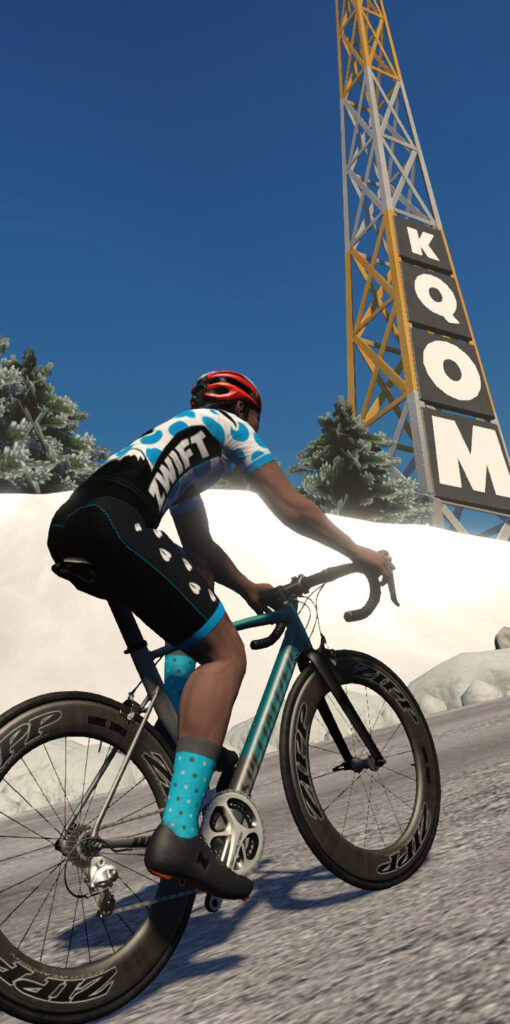
Gradients like this make your trainer work harder than anything else, because you’re asking it to 1) provide heavy brake resistance while 2) the flywheel speed is low. That’s tough for a trainer to do – it’s easier to provide high resistance at high flywheel speeds. So long, hard climbs are one place where you can really see what your trainer is made of, especially if:
- Your trainer difficulty is set higher than Zwift’s default 50%
- You are a heavier rider
- You are pushing high wattage
All three of these factors will increase the braking your trainer will apply to simulate climbs.
The second clue here is that stopping and restarting fixed things… although this could be a fix for a variety of problems.
My hunch? Your trainer overheated. In this case, I know you’re using a Wahoo KICKR trainer. Although I didn’t ask which specific generation, a quick Google search shows plenty of folks have had wacky wattage and resistance issues from overheating KICKRs.
This issue isn’t restricted to the KICKR, either. Far from it! I’ve heard of similar problems with many trainers. Is there a solution? A few, actually:
- Buy your trainer a fan: aim a fan at your trainer to help it stay cool. Lots of Zwifters do this, if their ride includes some significant climbing!
- Reduce trainer difficulty setting: give your poor trainer a break!
- Upgrade your trainer: generally speaking, newer/better trainers will perform better than older/lower-budget units. See our Smart Trainer Index for reviews of top trainers on the market today.
Filtering Events in the Zwift Companion App
Hi Eric,
Is there a workaround to filter events by organiser on the Zwift App: e.g. Haute Route, Etape, etc. Trawling through a long list of events feels a little web 1.0.
Many thanks,
S Morton (Zwift user)
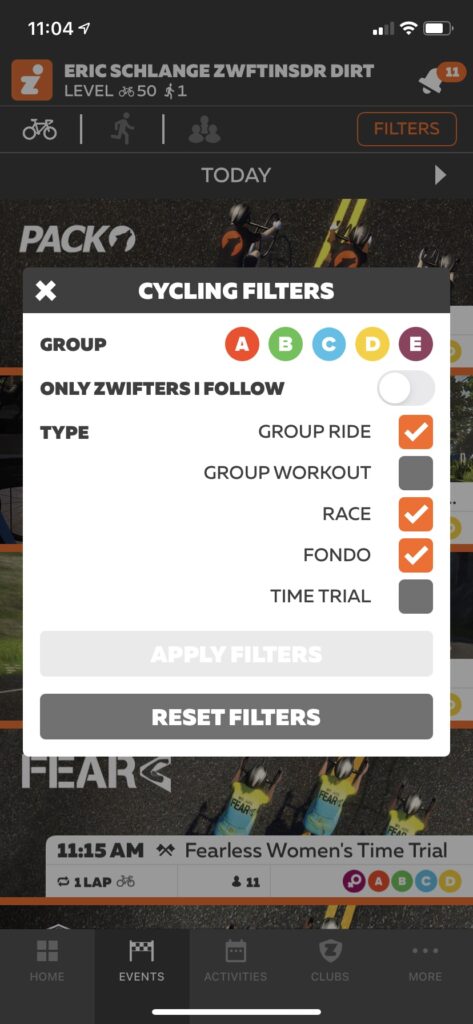
While Zwift has added some very basic filters to Companion in the past year or so, there’s still no way to enter a text string to search, or filter by route, or map, or… you get the idea. I’m sure ZHQ wants to keep the Companion filter tool simple, but I sure would like an “advanced” option!
Fortunately for us, the Zwift community has built some amazing event filter tools. I wrote “6 Tools for Finding Your Perfect Zwift Event” in late 2019, and it still applies today. In that post, we look at 6 different Zwift event tools, and the strengths/weaknesses of each:
- Zwift Companion App
- zwift.com/events
- In-game list
- ZwiftHacks Events
- ZwiftPower
- Alexa “The Jarvis Tree” Skill
My personal favorite is ZwiftHacks’ Events app. Super powerful filtering capabilities, and webmaster Jesper Rosenlund Nielsen is a long-time Zwifter who even listens to and implements some of my ideas, so I’m a big fan.
Broken Routes for Badge Hunters
Hi Eric,
Recently, there was an issue with some of the longer routes (Über and Four Horsemen) not awarding riders badges after they completed the selected the proper route, rode it without dropouts, and didn’t manually turn. I was one of them with Four Horsemen. I only have three route badges left to complete and have been a loyal subscriber for two years. And it wasn’t just me, dozens of comments online of upset Zwifters with the same problem in the week after the last update.
It was extremely disappointing to hear back from tech support that they can’t award retroactively. The message said “can’t”, but really it is “won’t” because it really should be an easy undertaking if someone has proof they completed a route to award it.
I want to continue being a loyal customer, but please understand why this makes it difficult and would discourage me from continuing badge hunting or any other “carrot” that Zwift employs to entice riders’ continued participation.
I love the overall product, but some of the glitchy things are annoying. If Zwift were more willing to make amends and correct them, they’d be easily overlooked.
Thanks,
Aaron Nolan

Oh man… talk about adding insult to injury. I can’t image finishing the Uber Pretzel or Four Horsemen and not getting the badge due to a Zwift bug! Still, one has to appreciate the cruel irony of two of Zwift’s hardest routes being broken for badge hunters. Of course the short routes wouldn’t break… it’ll be the routes that take 4 hours to complete!
Both of those routes are indeed currently broken, in that they are not awarding their route badge to finishers. Zwift knows about the issue, and it sounds like it’ll be fixed in an update coming up very soon (like, probably next week).
As to the question of Zwift Support being able to award route badges… yeah, that’s a frustration I’ve heard before, for sure! And while you’re right, it would be easy for Zwift to code up a little tool that allows support staff to give us a particular badge, I think there are two reasons this hasn’t been done yet:
- Zwift seems to avoid investing developer resources to build tools as workarounds to Zwift bugs. Fair enough, although it seems like there’s often a route or two not giving out badges properly, so this might be worth doing, just to preserve customer goodwill.
- Imagine the influx of requests they would get, and the investigation they would have to do for each complaint. Does the Zwifter send them a Strava activity link, showing the Zwift Insider verified segment completed? What if the user isn’t on Strava? Support would have to pull up their Zwift activity and watch where they rode, comparing that to the actual route they claimed to have completed…
UPDATE (Sept 29, 2020): according to the release notes, the Uber Pretzel and Four Horsemen badge bug was fixed in yesterday’s update.
Got a Good Question?
Send it to [email protected], or comment below. I’ll reply if I can, and maybe, just maybe, a more complete answer will make its way onto this series of posts so it can help Zwifters in the future.


I have just been through the Four Horseman debate with the support team this week after the DBR Suffer fest race suffered this very issue. 3 hours of slogging out for not only no route badge but no race results either. The support didn’t respond for 3 weeks and just said they can’t help. I have replied with my view of the quality of that support experience. A service that is 150% of the cost of Netflix for example should not have this many fundamental issues that they cannot resolve. This system is about gamification of training and if that core functionality fails they are letting customers down at a basic level in my opinion.
Uber Pretzel, no badge.
I don’t have to imagine that. It just happened or me today, after 4.5h solo effort to finish the route. Not ideal…
Overheating trainers are definitely a thing. I had always assumed that it was just a random signal dropout at the most inconvenient time (ie. making a real effort for a particular segment or event), until I dug deeper into the issue. Since pointing a large fan directly at the trainer I haven’t had any issues.
i have had an H3 overheat on the Tower Climb…slogging my 103 KG at 50 rpm and 250 watts…the trainer eased up and would not go above 180 watts until about a third of the way down the mountain. I was in the garage at 85 F with a fan blowing full blast on me…not so much on the trainer.
Wish you had posted this yesterday . . . just finished the 4 horseman and didn’t get the badge :(.
Love your site btw! Has been invaluable to me since I started zwifting in March.
I feel your pain! Zwift flaked out on my 3 times before I got the 4 horseman badge. My wife told me to stop whining about it and just do it again because it was good training for a 70.3 Ironman that would make me faster.
Eric
Your comments on reasons for overbeating and solutions are somewhat incorrect. Ultimately the trainer will produce a resistance wattage matching that generated by the rider. Heavier riders tend to produce more watts where the extra weight is muscle and this for sure a factor. Trainer difficulty does not require the trainer to produce more resistance watts, but does require these watts to be generated at a lower spindle speed. As power = torque x spindle speed this means the trainer must produce more torque (i.e. more braking force). Doing this at low rpm really stresses the trainer. The best solution is to lower trainer difficulty so that the spindle is running at a higher speed. This has zero impact on your speed in Zwift as that is a function of the watts you are producing. The only practical impact of maxing out trainer resistance is that it makes for more gear changes and stresses the trainer. Best to stick with the 50% default as there is no in-game benefit.
I agree with your reasoning above, Frank… but I’m not sure where my reasons/solutions are somewhat incorrect? Can you clarify?
If you are trying to do an vEveresting to get into the Hells 500 hall of fame one of the requirements is that your trainer is at 100% resistance.
Yes that is just because the vEveresting crew don’t understand trainer difficulty. It is like adjusting the gearing you use. I put a 38 cog on back and rode it on 100%. It was same as doing 50% on a 30-32 cog. I’ve tried to explain it to them but they have a weird macho attitude that if it isn’t 100% it isn’t real life. Thankfully trainers can’t go up to 11! Rock on.
I suffered the same disappointment at the end of 3 1/2 hours effort on the Four Horsemen…. frustrating that it’s been a known issue for weeks and they haven’t said anything to prevent people doing the routes until it’s fixed. The answer I got from Zwift (as well as the ‘sorry we can’t add the badge for you’ which I think is a little poor) was that they didn’t have a timescale for a fix yet… so I’m doubtful it will be in this months update.
I am frustrated as well with Zwift not giving credit for rides where their software crashed. I lost a whole lot of elevation toward my Everest Challenge when Zwift crashed in the last batch of bugs on the France Course. I asked for credit for the part of the ride that had been uploaded to Zwift — since they do an upload about every 10 minutes. I was not asking for credit for what was on Strava, or in a .FIT file (which could easily be faked). I just wanted credit for the part they knew I had ridden and could see when I looked at my Activities list on ZWIFT.COM. But — nope — I got the “Technically not possible” message. That is total BS, I am sorry. Try being honest with your subscribers – which they are not.
I totally understand why Zwift won’t manually add badges. That creates support overhead they don’t want to pay for.
But it would be fairly easy for them to display a “no badge for this route right now” message when someone selects a broken route.
Especially for something like Über Pretzel or Four Horsemen that the majority of riders will manually select exactly once: the time they want to get the badge.
I’m one of those who did the Uber without a badge. Once it’s fixed, I’m just going to lower my weight and height to as small as Zwift allows and knock it out. For the KOMs I’ll go and take a water break just before the summit and make sure I don’t steal any jerseys.
What a great idea. I suffered the same fate with Uber Pretzel & have been writing to & fro with Zwift. They’re probably spending as much time conversing with us as they would sorting out our badges & XP. Think I’ll do the same & just take strategic breaks as well. Cheers. Mind you, I’m only 169cm & 64kg anyway so 🤣
No need to take strategic breaks…. Just take the KOM jerseys as it hardly matters – it’s only live results that you’ll effect, and the chance of taking any Strava KOMs is very slim as they’ve been claimed by cheaters doing more than just weight and height doping (zPower users using the ‘wheel off trainer’ cheat or even kicker core users who modify the strain guage).
better still get one of those ant+ bots to ride it for you.
Sure, awarding route badges manually costs money, but actually having to deal with the issue (and not just sending the boilerplate answer using “technical limitations” as the standard bs excuse) would maybe escalate fixing the current bug and, more importantly, highlight the need to communicate the routes (including lead-in, and distance remaining to completion while riding) much more clearly in the UI.
(Disclaimer: I’m currently two France routes short of a complete set and have never had any issues with the badges, so this doesn’t really concern me personally, but it is obvious that the way this feature has been implemented has created many problems.)
I can confirm the overheating with greater than 50% resistance. This happens a lot for me on my Kickr Core. If I do the Radio Tower climb – I cannot go over about 85% resistance without the overheating. If I do to many Alpe de Zwift climbs at 100% resistance and more than about 3.1w/kg consistently (usually the third time up) it will start overheating. I contacted Wahoo and they told me to direct a fan at the flywheel.
This is a concern. What’s the ambient temp of the room when it is overheating? Does it improve with the use of a fan?
Hi Buzz, room temp usually around 16° C. I’ll know how well the direct fan works on the weekend when I do my next multi Alpe de Zwift climbs.
I only had time for three accents of Alpe de Zwift today at 100% resistance setting in Zwift with the small fan. Even so on the second and third accents where I pushed on on the last three sections I could feel the resistance grabbing a bit.
At the top on the third accent The flywheel was dangerous hot to touch – more than 40c Room temp was an air conditioned 16c This is even with me freewheeling the whole way back down and the fan running continuously.
So now I have to find a more powerful fan or reduce the resistance.
I am very worried that the electronics will get damaged by the heat and the Kickr will fail.
I am on my second Kickr Core as it is and there are many people on forums that are on third or forth ones.
Some people will say just turn the resistance setting down in Zwift – it is really a gearing setting anyway but then I am not riding the ratios I use outside for racing and it means my training is not as realistic.
And of course I don’t want my trainer shutting down or breaking in the middle of my vEveresting either!
The Internet forums are full of posts about this problem.
I believe Wahoo is selling products that are not fit for the purpose they are selling them for.
There needs to be ventilation on the outside of the fly wheel and a fan inside which switches on when the temperature is too high.
Can anyone confirm if the Kickr 4 or 5 overheats?
Hi Erik, I was wondering if you’ll create and article if the Four Horseman and Uber Pretzel bugs are fixed. Still have them on my list 😎
They’re supposed to be fixed in the next update, and I’ll certainly mention them being fixed in my standard update post, if the release notes say the fix is included. I may even do a test first to make sure they’re indeed fixed!
According to the release notes for today’s update this issue is fixed for the Four Horsemen and Uber Pretzel route badges…….. who’s gonna try it first???
Update on overheating Wahoo trainers. I have contacted Wahoo support several times and the official line seems to go like this (it looks like they just reply with cut and paste answers from some sort of manual): Place a fan by the fly wheel. If you insist that there is a problem they say that their engineers have done extensive dyno testing and don’t see this problem occurring.
Maybe the test rider weight they simulate is too low so the resistance isn’t hard enough to cause overheating?
They also say that the heat won’t affect the trainer – even though I explained that it trainer will eventually switch off when riding climbs at 100% resistance and that I could repeat the result easily.
I suggested that a thermostat controlled fan should be added to the trainers and they said that they would pass on my feedback. Yeah, I don’t hold out much hope of that happening either.
I also said that they should just do a quick search on the internet and they will find many forum posts talking about this problem.
I’m pretty disappointed in Wahoo, yes I know if my trainer breaks (I’m on my second Core and second Climb as well) inside the warranty period they will replace it but it means filling out all the forms and doing all the procedures and steps and waiting a week or so before another turns up.
Am I supposed to by a second trainer so when the current one breaks I have a back up while waiting for the warranty replacement each time?
If some of the other brands out there had a Climb alternative I would jump ship from Wahoo without hesitation now.
Is there a way to manually add a ride, as you can on Strava, when Zwift freezes?