

The first Zwift update of 2024 begins its phased rollout today. This is a minor update which fixes various bugs and makes some small quality of life changes. See details below…
Drop Shop Adjustments
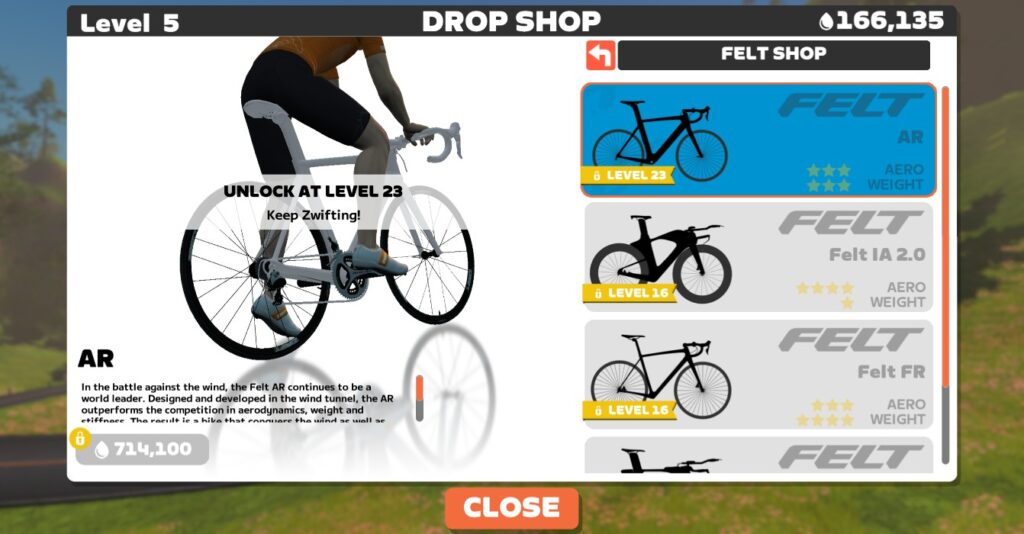
Zwift made a massive set of changes to levels and the Drop Shop in early December, and this update includes a few more changes/adjustments:
- Felt FR frame (down to Level 16): this frame was previously at level 23, but it’s not a top performer, so it makes sense Zwift would have it unlock before the faster Felt AR.
- Felt AR frame (up to Level 23): this frame was previously at level 16, so today’s change makes it harder to get. This is probably how it should have been anyway since the Felt AR is one of the four fastest frames in Zwift!
- Allied Able frame (up to Level 23; down to 550,000 Drops): this frame didn’t get modified in the initial round of Drop Shop changes.
- HED Vanquish RC6 Pro wheelset (up to Level 17; down to 120,000 Drops): this wheelset didn’t get modified in the initial round of Drop Shop changes.
Steering Fix
Zwift’s update notes say, “Fixed an issue that could affect drafting when riding in non-steering events with Play controllers paired.” This issue was probably experienced mostly by Play Controller users racing in Zwift Racing League, where steering/braking were disabled.
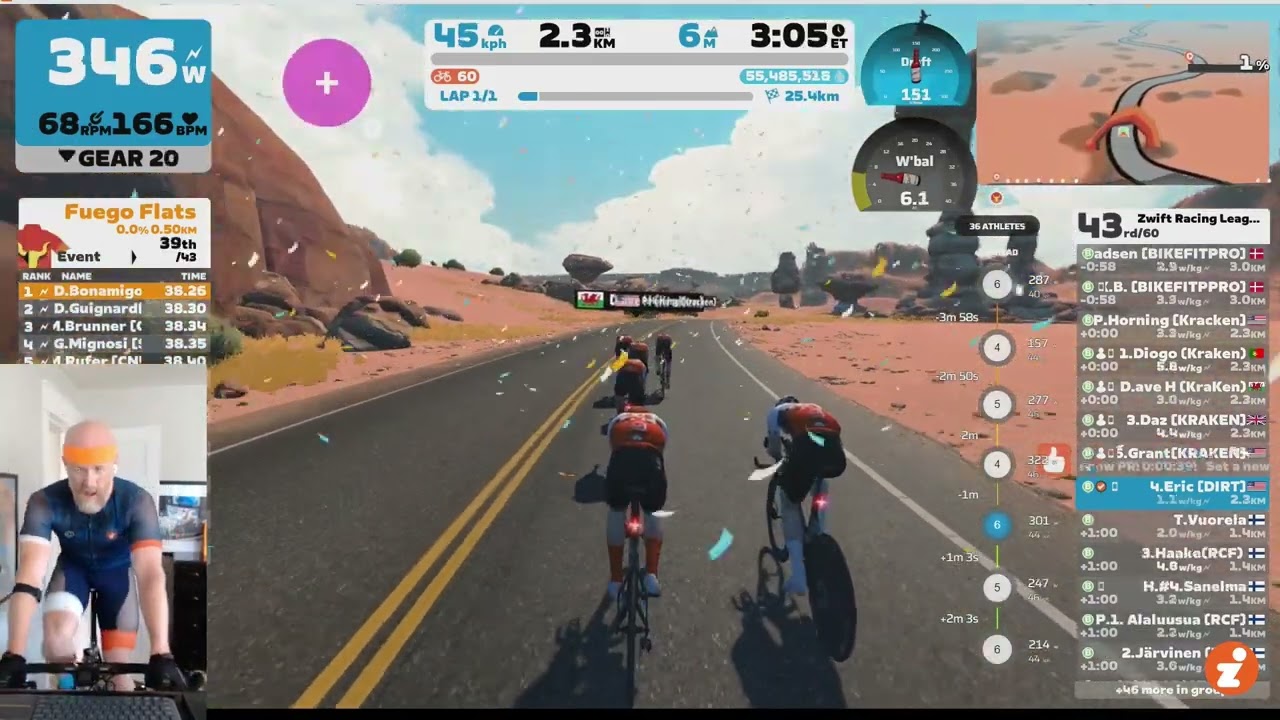
Personally, I’d been racing in ZRL using the Zwift Hub trainer and Play Controllers because I love the feel of virtual shifting. (Easy Ride On bombs and powerups at my fingertips were nice bonuses, too.) But I found my avatar was often poorly positioned (left to right), giving me less than optimal draft benefit. And with steering disabled, I had no way to fix it!
You can see this happen below off and on in a recent ZRL TTT. I even powered off my Play Controllers partway through the race, hoping that would fix things! (It didn’t. So for the next TTT I joined without my Play Controllers paired, and my avatar’s positioning was much better.)
Eventually I found myself on a Zoom call with Nathan Guerra and a Zwift game engineer where we explained and demonstrated the problem. And now… it appears it’s been fixed!
We haven’t been able to test it to confirm – it’s a rather difficult thing to test, since you need to set up a custom event with steering disabled, and have enough riders in the event to test pack positioning. But we’ll know soon enough if it’s fixed, as ZRL fires back up in a couple of weeks.
Streaks Screen Changes
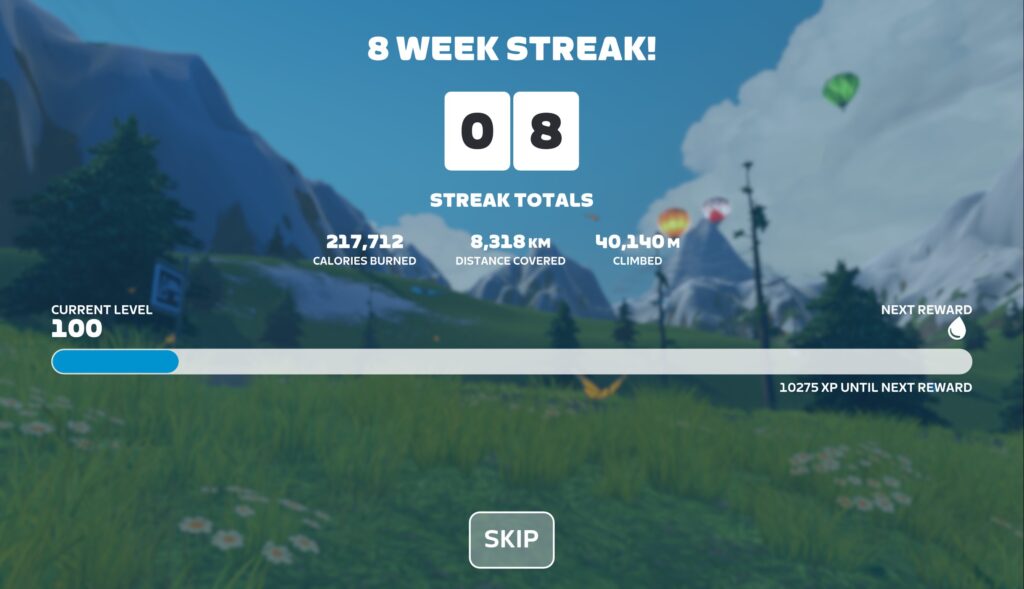
Ride Streaks were introduced in early December, and today’s update fine-tunes the Streak summary screen in two ways:
- Skip button added: press it to quickly skip through the results animations. Skip can also be activated via the Escape (Esc) key on keyboards, “B” button on Zwift Play controllers, and the “Back” button on Apple TV remotes.
- See latest changes: the screen now shows how your accumulated streak stats (distance, calories, elevation climbed) changed as a result of your most recent activity.
Note: some Zwifters, including myself, have reported that some of the accumulated streak stats are not accurate. Specifically, they’re showing lower numbers than they should, given that these numbers should reflect our stats since our week 1 streak began. Zwift knows about this bug and will release a fix soon.
New Apple TV Pairing Wizard
Apple TV users are getting an updated pairing screen that simplifies Bluetooth pairing using the Companion app:
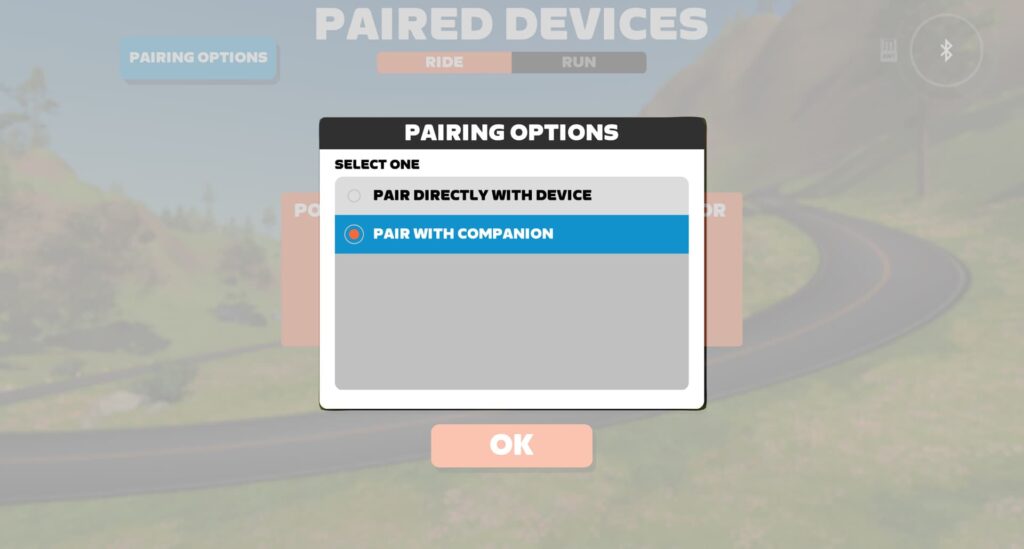
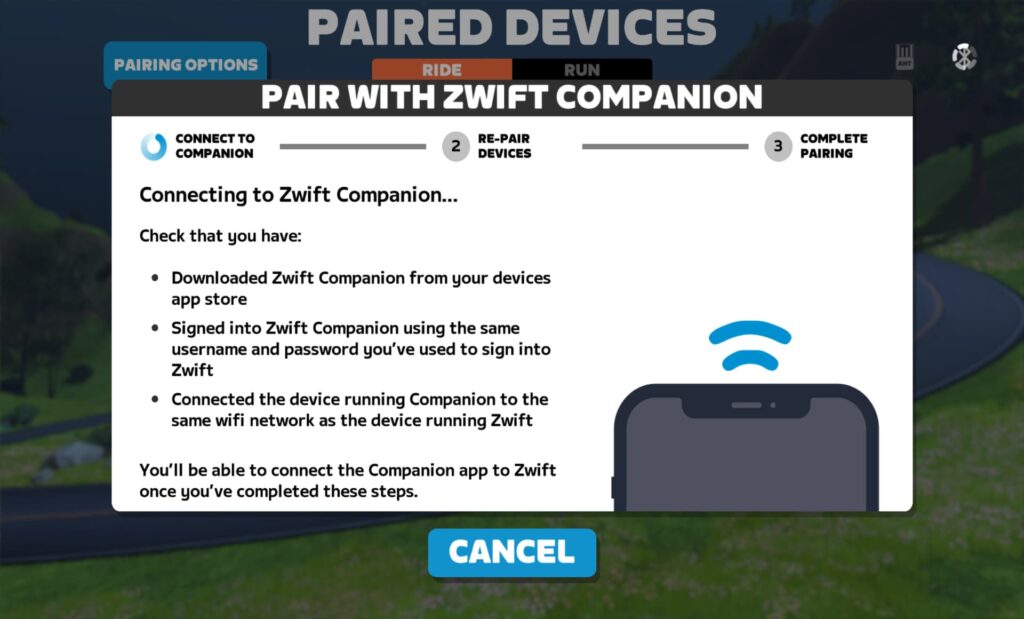
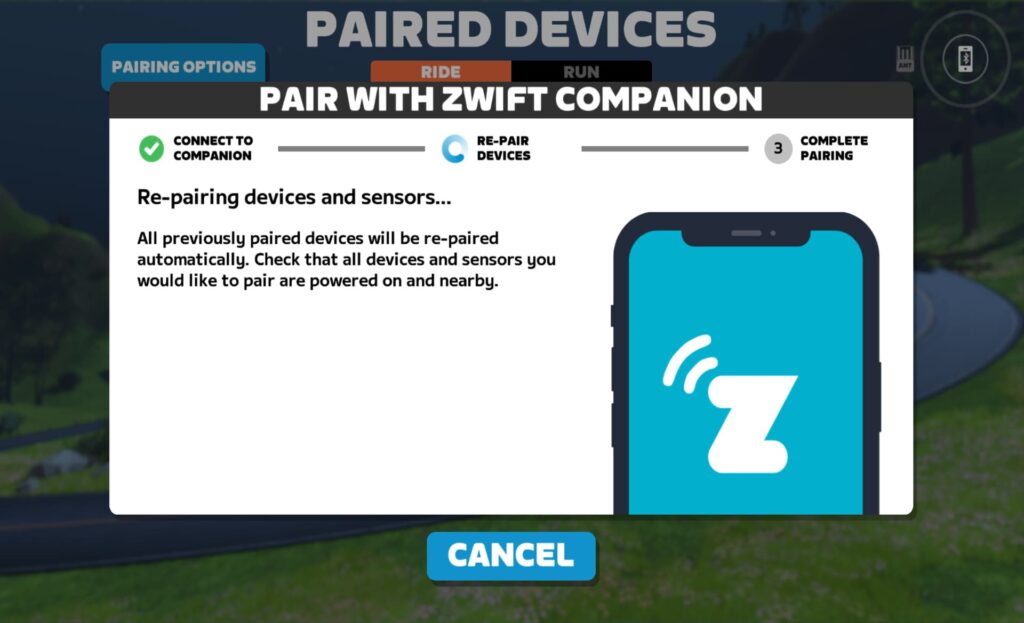
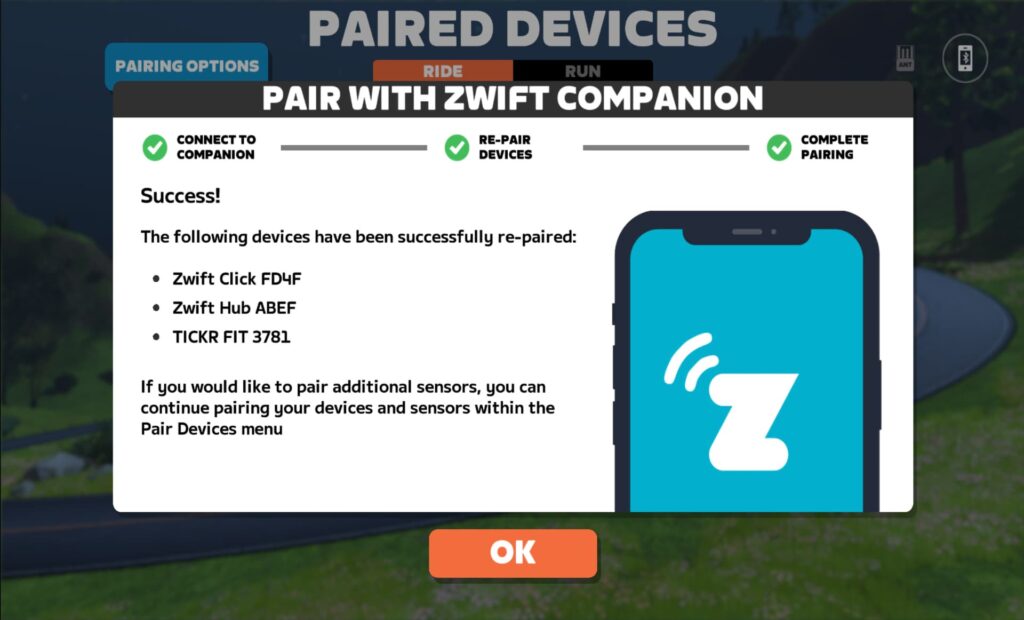
This isn’t specifically a part of the 1.56 update, but we threw it in here since it’s rolling out at the same time.
Read details on this forum topic >
Launcher Update to Version 1.1.11
Zwift says, “Windows and macOS: updated Zwift Launcher to version 1.1.11 with improved error messages and error handling.” This version of the Zwift Launcher was actually released in November, but today’s update forces everyone to update to this version if they haven’t already.
What fixes/changes does version 1.1.11 include?
- A new function takes Zwifters to a specific error code article on support.zwift.com.
- Windows: fixed an issue where the Launcher didn’t retain username/password between sessions for some Zwifters.
- macOS: fixed an error message about not being able to launch Zwift, even though it launched successfully.
Read details on this forum topic >
More Release Notes
Zwift provided notes on additional tweaks and bug fixes in this update:
- Added the ability to dismiss event results from Zwift Companion. This one’s for those of you running Zwift on a device that’s out of reach.
- It is once again possible to mix-and-match the Zwift Buffalo and Zwift Safety bike frames and wheels.
- Power-up tuning and balance adjustments in the Crit City gamified event.
- Fixed an issue where incorrect PowerUps could be granted in Climb Portal routes.
- Adjusted the order of workouts in some workout collections.
- Fixed a potential crash that could occur when using the Teleport feature in the Action Bar.
- Fixed a crash that could occur when riding the Repack Rush route.
- Fixed some items in the Garage showing incorrect unlock level requirements.
- Fixed a potential crash that could occur after logging in to Zwift.
- Fixed a visual issue where Climb Portal difficulty scaling options appeared incorrect when entering Climb Portal while doing a workout.
- Fixed an issue where if you received a second power-up while the first power-up was still active, the second power-up animation was not displayed.
- Fixed an issue where bright lights (e.g. lava, Zwift Concept bike wheels) could spill over to the opposite side of the screen.
- Fixed a potential crash that could occur on the Tour de Zwift Stage 1 Harrogate Circuit route.
- iOS: fixed a crash that could occur when ending a ride before reaching the finish line in an event.
Discuss this release on Zwift’s forum >
Questions or Comments?
If you spotted any other changes or bugs in the update, please comment below!


Ride Streaks screen failure to save….screen locks up and never completed the save. Kristy Gosselin user is my example
Would it be possible to either add the user’s ability to organize their garage – or – at the very least make it so the kits and bike frames organize automatically according to the user’s ‘most used on top’ of those respective garage areas? Thanks so much.
yes that would be useful. I’d like to buy more kit but don’t want to complicate my garage further lol
Yeah this pretty much comes up in the comments at every update. I’m sure it wouldn’t be too difficult to code a way of organising them, but I’m hoping they are listening and will implement it this year.
Excellent idea the jumble of unused stuff is getting in the way.
That discussion is running since 2019 😅 @Terri 😂 https://forums.zwift.com/t/organize-my-garage/163201
go to ZWIFT forums for suggestions, this is not the place
It’s not the place there either as its been ignored for years
Found that steering bug out the hard way in ZRL season one when I had to spend the all the flat parts (not that there were many) of the Harrogate course out with my nose in the wind instead of trying to recover in the draft. I’m not going to say that was the only reason I got dropped (fitness was probably more of a factor), but it didn’t help. A teammate got hit with it the next week in our TTT when he didn’t get any draft when he wasn’t pulling and blew up.
I really like where the Play puts the controls, but I’m definitely going to let you test it out for the first 2-3 weeks of the season before I’m going to believe it’s fixed and try it myself.
Teammates with Kickr Bikes have reported the same issue, so hopefully this fixes it for them too.
Yep. It’s not just Play controllers as I’ve experienced the same in ZRL with an Elite Rizer. I always kept forgetting to disconnect before the race though.
Is there a way to get rid off the streaks?
It makes you go faster to the bext level, please give me a choice for that!
Definitely! I wish we had the ability to somehow “toggle off” the accelerated leveling implemented after the last update and expansion to level 100. I like it better when I feel like I’m earning the levels but I understand that some won’t agree. Therefore, make it optional.
I must admit I’m quite shocked how quickly I’m leveling up now. Previously it felt like a real challenge and achievement to level up. Now I see the car racing across and it just doesn’t feel very special any more.
the last update had an option to turn it off so you wouldnt see it AFAIK
Thanx Dan this morning was the first time I could skip it
Are you trying to catch Bacon 🙂
8300km in 8 weeks!
That was from the test bot’s account. Used it to level up to 100 in a week and get screenshots of all the unlocks!
I guessed it might be 🤣
Look at Ziou Zhang he is doing over 50 hours non stop at this very moment!!!!
he always does this; he/she doesnt log out. I saw once they were at 2500 km
Ridiculous, but if you don’t log off how do they keep cycling? Obvious not cycling pro but cheater pro. I will no longer follow him/her/it.
Since the previous update, has anyone noticed the beacons above pacer bots and ride leaders are hard to see? They’re very dim, grayed out, almost shadow like?
Agree! The pacers/leaders are on stealth mode now! Would appreciate it if the giant column of light came back.
Quiet often unsure if the bot is in front or behind. The light beam used to be very handy.
Yes. I posted about it in the Zwift forums in the post for the last update (v1.55) and was told the fix was supposed to be in this version 1.56. Maybe they’ve fixed it and haven’t documented it. Or maybe they haven’t fixed it yet.
the beacons were back to normal (aka bright/visible) after upgrading to 1.56 this morning.
i find it especially hard with the D bots where the name/distance text on the bubble at the bottom of the screen is white on yellow and very hard to read on my smallish monitor, so get surprised when I fall out of the pack and get the message to slow down or catch up (which is always more tricky and has the potential for overshooting). Maybe I have an old laptop with significant delay, but I can’t be the only one.
The steering one is frustrating. It’s a bug that has appeared and disappeared several times before. Assuming it gets reintroduced on a code branch? It’s most apparent in London and Watopia (roads are wider?).
Previously, it had also impacted me when I turned the steering pairing off before joining an event. I assumed there is a “has steering on, Has steering available, no steering” status somewhere. I searched config files but couldn’t find it. A complete reinstall with the destruction of local files resolved the issue (until you used steering again).
Not a steam release don’t care
At this point a huffy would be a new and exciting addition as opposed to no frames.
When can we get the ability to ‘star’ favorite workouts to easily find them again? I do a workout, often suggested, like it and never can find it again. It would be great to see favorites to easily launch.
Workaround for now is to copy and save as a custom workout in a Favorites folder.
All well and good, but my biggest bugbear is the inability to access settings, garage etc without going into game.
Just put a button on the pairing page to jump to those features without having to go ingame.
It’s been raised many times before but still no improvement🙄
You don’t have to be actively riding to access those things. There are buttons on the homescreen to access settings, garage, achievements, etc. Top right!
Now, if we could access those things from the companion app without opening the game at all. That would be even better!
True but you still need to be in game, I.e. logged on, select ‘just watch’ wait for screen to load to some random view, select ‘Go to me’ then menu and the icons.
Not slick at all!!
isn’t it quicker to click “skip” on the pairing screen, and then you go direct to the home page and can access the garage and settings from the icons on the top right?
I know I’m going to get laughed off the island, but I would love to have just one recumbent bike that folks like me could use as an avatar. On the other hand, I’m assuming that following distances and cdas are different enough that it creates a big headache, so I’ll admit understanding why they would really delay that.
They have hand cycles which are in a recumbent position, so regular recumbent seems reasonable to me!
Hi-racer, Low-racer or tadpole would each need different draft profiles, Zwift could probably use the handcycle as a baseline for the tadpole. I’d also love to see tandems in Zwift
I joined the slowest Robopacer yesterday and was cooking along at a mere 50 watts when I was granted badges for 1000, 1100, and 1200 watts in rapid-fire succession. Any idea what’s up with that???
Longstanding bug I suspect. I had it a year or two back and a friend got it more recently too. I would never have earned those badges properly!
i suppose it might be a blip in the signal being sent to Zwift from turbo (or whatever being ridden) though, rather than a fault with Zwift itself.
Mee too! Even contacted zwift support to get the badges removed, but no luck!
I managed to get the 1000 watt badge when I was getting on my SB20, I kicked the power meter when clipping in. Had to stop the ride and “trash” it
Yep, mine was on the SB20 too.
ssshh, they are hard to get 🙃
My. HRM shows connected but does not shown any bpm
I would really love to have the possibility in the companion app `to start a route. Like in Rouvy companion app. Just scroll to the route you want and tap on start route instead of fiddling with the remote On Apple TV or with Zwift Play
Bring the Big Wheel to the drop shop!
100%!! I would pay big money for that!
Eric (thoughts)… On fixing the Late Start drop in issue (ex.Tour de Zwift). Even though these are “Rides”… We all know some treat them as a Race, and it is annoying that your up there near the front killing yourself for a placing, and all of a sudden a Rider/Riders drop in that are at zero K’s. If you late start, it would be nice to see them dropped in mid-pack or at the back? This is for those of “US” that like looking at Our placings in Zwift Power! 🤔😜😂
I understand the frustration, but… it’s not a race. ZwiftPower doesn’t give you any ranking points, etc. That said, yeah, Zwift could probably improve their late join drop-in calculation!
I like first person view – it would be good if Zwift remembers your preferred view so you don’t need to do the fiddly swap each ride.
Looks like a Castle Crit (Running) badge has been added with this update too.
Another example of Zwiftinsider having privilege normal paying users don’t.
Steering bug has been reported for months but it takes wric to notice and report before it gets looked st.
Woeful
I don’t know if that’s actually true, but if it is… Eric will you please write an article about how women are being harassed through Zwift and how a blocking function would help them feel more comfortable on the platform?
Not just women but men too… I’d love the option to block people. It’s terrible that it isn’t available.
100% Men would use it too and I’m sure there are men out there being harassed in some form or another. I just know of one woman personally, and a few more second-hand, who are dealing with creeps on Zwift with no recourse to do anything about it besides change their name on Zwift so that fewer creeps will find them as quickly. It’s ridiculous.
Any chance making a 2.0 bot a regular thing? Believe I’ve seen him once named Masher I believe. 1.8 sometimes isn’t enough, 2.2 sometimes is too much, need a happy medium!
Thanks,
Jeff
could use different bike to turn a 1.8 bot into a 2.0 bot, switching to MTB would probably do it? Just a thought, your mileage may vary etc
didnt get 20xp/km in workoutmode after the last update. Hope this is fixed too.
You’ve never gotten distance XP in workouts. See https://zwiftinsider.com/xp-for-cycling-workouts/
Can we get solid color jerseys and matching cycling caps in the Drop Shop? I don’t like just the Orange Zwift cycling cap and have the avatar wearing the backwards blue cap. It would be nice to ‘buy’ a Purple, Blue, Green, Yellow, Orange, Red, White, Black or Grey SET so we can match to a bike frame color. There are very few kits earned or otherwise that do well to coordinate with the glove, sock, or headwear colors available. Socks at least provide you with some basic solids… And, It would be nice to have a Permanent Polka-Dot Jersey to match the gloves if you climb so many Ventops or Alpe de Zwifts. I don’t know if any glove option truly matches any jersey option. If so, I haven’t found one I like to put on my Avatar… Another thing regarding large group rides like the Tour de Zwift.. My Avatar can get lost on-screen amongst the dozens of riders that may be next to me.. Can we get something like a Meetup leader arrow, or a special color pattern reversal that only we can see in-game.. everyone else sees everyone else in the ride outfit, but everyone only sees themselves in a tweaked variant of the kit.
So, please make the Drop Shop have Jersey, caps, gloves, socks to purchase in the Crayola 8 pack colors. Every 10 levels, you unlock a new pattern of the primary colors that can be purchased in the Drop Shop.
Honestly, this is the only reason I do rides/tours with equipment unlocks. I could care less about getting new kits (and am not a big fan of large group rides like TdZ or TdW), but I’m constantly hoping to find hats/socks/gloves that better match my team kit than what I’ve got now.
It didn’t fix glitches, just created them, for me. Reinstalled twice. Locks up. Pixelated backgrounds. Missing roads. Terrible. Looking for alternatives. At this subscription price, there is no excuse for this.
Wouldn’t we get better Apple Watch support in Januari?
It’s coming “this winter”: https://zwiftinsider.com/tsoz-pr-winter-2023/
When can I look forward to getting Video-Capture on my iPad (IOS-17) Companion App??
You mean on the Zwift app itself? Companion app doesn’t do video recording, although it has a button to tell the game to record.
If you don’t have that option in game, I’d reach out to Zwift support and ask why.
Since this update (and the re-install of Zwift) my Wahoo Kickr will no longer connect with Zwift via direct internet…it requires bluetooth or ANT+. It is the same for some of my riding buddies.
All this re-jigging of what level is required to be able buy frames and wheels if you have the drops is putting new racers at a significant disadvantage.
More than ever I would like race admins to equip everyone with the same frame and wheels.
Ride your acquired high-performance frames and wheels outside of officially competitive events.
It always seem kind of dumb that if the launcher doesn’t detect a usable internet connection it offers to go to Zwift support…. On the internet. Wonder if they fixed that.
Since the last update v1.56 I’m unable to connect my Garmin HR. Not via phone, laptop nor desktop.