

Zwift version 1.74 begins its phased rollout today. This is a minor update with some visual changes and various bug fixes. See details below…
New Look, Same Dirt
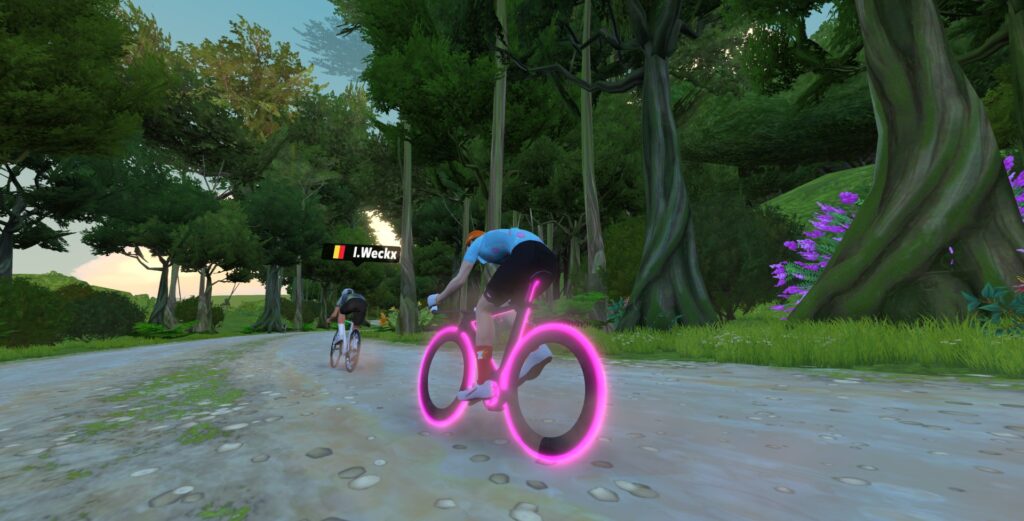
Zwift has been refreshing road surface visuals in recent updates, and this week’s update delivers a new look for dirt. Zwift notes, “There is no change to the performance characteristics of roadways as part of this change.”
Level Locks Removed
To give new Zwifters even more routes to explore, the level-lock gate has been lifted from:
Race Mode HUD Update
Some trainers support a 10Hz “race mode”, but the new HUD was only updating power data every 1 second. This has been fixed, so if you have power display set to “Instant” you’ll see the power number changing as often as Zwift receives new data from your trainer (approximately 10 times per second for most race mode trainers).
In a related update, Zwift says, “The HUD power distribution bar now respects the Power Display setting (Instantaneous or 3-second average).”
No More Empty Paint Cans
This one has bugged us for a while. Various frames in the the Drop Shop, including the hot new Pinarello Dogma F 2024, have been showing a custom color paint slider. But moving the slider does nothing!
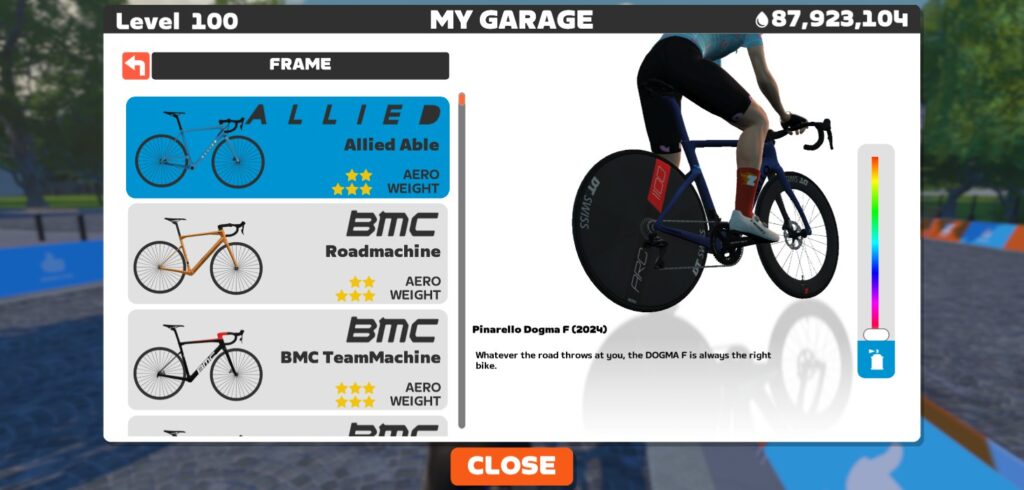
Today’s update fixes this bug on several frames – not by making the color slide functional, but by removing it. We’re still campaigning for the chance to use our Drops to buy unique, customizable bike paint schemes!
More Release Notes
Zwift provided notes on additional tweaks and bug fixes in this update:
- Improved the appearance of tabs in the Settings menu for non-English languages.
- Fixed road flickering on the Glasgow Crit Circuit route in Scotland.
- Fixed an issue in Climb Portal that could cause PR information to be difficult to read for Zwifters with long names.
- Fixed an issue in the post-ride Streaks screen that could display lower XP than expected after earning a ride streak bonus and clicking the Continue button. Note: This was a visual issue; the proper amount of XP was still granted.
- Fixed an issue that could potentially cause Zwifters to go off-route on the Loop de Loop route in Watopia.
- Fixed an issue where the Zwifter level shown in the HUD could disappear after receiving a Ride On.
- When viewing another Zwifter, calorie are no longer shown in the HUD.
Discuss this update in Zwift’s forum >
Questions or Comments?
If you spotted any other changes or bugs in the update, please comment below!


Anyone else not able to upgrade their bikes in the garage (no bike-upgrade challenges appear either) or know when that feature will be released?
Nobody can upgrade their bikes yet – that feature hasn’t been released. Zwift says Q4 2024.
What do you mean by Q4 2024?
Sometime in the 4th quarter of 2024 (so October-December 2024).
So probably January if we’re going by the “summer” release of the updated hud.
Q4 = 4th quarter (of 2024) so Oct/Nov/Dec in the real world. In Zwift’s world though it could mean any time in the next 5 years or not at all.
I wonder if Eric ever puts his head in his hands and just groans, “here come the whiners” as he hits the submit key every time he does a zwift update post. Thanks Eric for doing it despite all the negativity!
He is basically a PR guy, there is no necessity for him to harbor positive or negative sentiments. Things revolve around him.
I would have turned off the comments section, at least for the update posts. At least 🙄
With this update ERG mode doesn’t works well. impossible to do a training. Anyone in the same case ? (Elite direto X)
I feel like the ERG mode is way more intense now. Before the update, I could easily maintain 90rpm, but now I’m sweating buckets trying to keep up.
I have a Direto X, and using erg mode has been pretty bad for a while. It often seems like gradient changes affect the resistance, and it very easily goes into a death spiral. I don’t have this latest update, though. I had just assumed it’s because my trainer is so old and well used.
I keep reporting this and Zwift seems to intentionally not comment on it. It’s been like this for at least a couple of years. I’m on KICKR Bike. Maybe Eric can help push Zwift to fix it. The resistance “bite” gets easier uphill and harder downhill at the same ERG power level. And it is noticeable more at lower cadence. Several Zwifters reported it a few builds ago and I have commented about this problem with each build since. I’m curious as to whether they changed something in 1.74 but history shows me that they don’t. I also do not have the update yet.
If you pick a route like Ventop and do a workout in ERG mode it is much better.
That would be an odd bug indeed, since the trainer is either in ERG or SIM mode… not a mix of both.
My first guess (not to doubt you, of course 🙂 is that it’s in your head. It always feels easier to push high watts on uphills, and harder on descents. That’s why I do hard sustained workouts up the Alpe or Ven-Top, and not on rolling hills or long descents.
My question is: what’s actually different? If the RESISTANCE is actually higher on downhills, you can prove that. Just do a workout with a long interval at, say, 250W. Then ride that interval on a longish climb, followed by a longish descent… and see if your power numbers are the same if you hold the same cadence on each.
Bonus points for dual power recording. Show me the data and I’ll be happy to take it to Zwift!
I’ve had the same bug with two different Wahoo trainers. I experienced with my first Wahoo Kickr V5 trainer and it’s exactly the same with my Kickr Bike. When I do a workout in ERG mode, as the session goes on, the drag in the trainer goes up to the point sometimes where I’m nearly unable to pedal through. The power detected doesn’t increase just the effort on my end. I usually run out of gears on the Kickr Bike and still cannot get on top of the effort to continue. I’ve resorted to going back to SIM mode and I can complete the workout but the power seen by the app is all over the map.
I put a Vector fan pointed directly at the business end of the bike thinking it was overheating to no effect whatsoever. I’ve pinged Wahoo and Zwift about it to no effect so I just ride through in SIM when the effort ramps up.
It probs feels like it gets harder because you get more fatigued mentally and physically as the session goes on. The erg mode doesn’t change. If you feel like you are struggling to hold the erg, get up and sprint for a bit to get the cadence back up, then settle back down to normal cadence.
It is super hard, I know. But that’s the whole point of training 👍
LOL. Nope, I’ve been doing serious training for bicycle racing for about 40 years and I know what it feels like when I’ve exerted myself to the point of failure. This is not that. The trainer is essentially locking up. As soon as I switch to SIM mode during the workout, I have no problem maintaining the required power; in fact, I have a problem going over the power the workout asks for. Thanks for your attempted insight but you’re not correct this time…
do you know when they’re gonna fix the bug on Android and iOS that stops the chest strap from connecting for running? It’s been impossible to connect and run since the 1.73 update.
Hi Rodrigo,
Nothing has changed with this. I am still able to connect equipment the same as I was. Could it be your HR isn’t working?
How do we turn on the bobble head? See Shane Millers video today.
He’s always cooking something in the lama lab.
How old are you?
Go watch his latest post, he spills the beans on how to do it.
People, seriously. Zwift broken on all levels, users screaming like never before and you talk falling bears, numbers on the sky or bobble heads.
“Today’s update fixes this bug on several frames – not by making the color slide functional, but by removing it.” What a fix! Zwift style.
With the last update i had really much dropouts from my kickr core. Is that fixed? I had the problem with ant+, because at the same time i use bluetooth for TR and didn’t had any dropouts. So the dropouts come from ANT+ and zwift together. Before i never had this issue.
Elite Sterzo seems to have packed a sad since the update. It shows as connected but steering doesn’t work. One of my TTT buddies has the same issue. I’m running some basic checks this week but the organisation of how the fault files come up when you search is kinda horrid and I’m starting to feel frustrated. Any other sterzo users experienced a change recently? (as in…a weird one).
Hi geoff,
Not really. Works like a charm for me (on 1.74, unlike some of the previous updates, which – at least temporarily – seemed to introduce major steering issues with Sterzo). Just did the Makuri Pretzel for the second time and gave them a 4/5 star rating when they asked for my steering experience.
Sounds like this update is another version of rearranging the deck chairs on the Titanic. Sure hope we get one that has some real meat soon. Or should that be Zoon?
Well, just weeks ago there were some of the largest changes in zwift history launched and more announced. ride on! =)
Yeah, Zwift announced all kinda stuff. And like the 25 times before when they announced all kinda stuff and followed through with less than half of it, I imagine we’re looking at Zoon once again. So when the second update after the big announcement comes with essentially nothing, my skepticism meter starts to get pegged.
By largest changes you mean adding calories and TSS to the HUD and changing its color?
How do I find events for the challenges that I joined? The challenge that shows up in purple on Zwift
You’re talking about the Cardio Crusher challenge, I believe. There are no events for this – you just do the 5 workouts. See https://zwiftinsider.com/cardio-crusher-challenge/
Piece of cake. It’s not an event, it’s a challenge, and appears prominently on the RIDE home page. All you have to do is select it.
On v1.174 Ride On’s alerts for Zwift Play sems to be broken. I don’t get the alerts.
On my iPad mini, this update has caused the capabilities to swipe to remove the leaderboard from the display and swipe to remove nearby rider information from the display to no longer work. Anyone else notice this?
This issue is now fixed. Zwift was able to resolve it on the sever side.
…and still no Graphics Update for Apple TV 🥱
Minor visual changes ? … I noticed a big change when riding in parts of Neokyo and Watopia’s under water tunnel. All riders disappeared in the darkness. I could only see some other names. Hoping for a quick fix.
Since they were playing with the new HUD, why didn’t they make a draft indicator?
“Fixed an issue that could potentially cause Zwifters to go off-route on the Loop de Loop route in Watopia”
Exactly this happened to me yesterday (9/23/24) in a race (quite frustrating, I had just put in a big effort on the KOM, and 3 of us were sailing away with +10…. until they turned right at the bypass… and I did not).
It looks like these patch notes were posted on the 17th, in which case the issue is definitely not fixed.
The working theory is that it is resolved in the latest version, but people on mobile devices might have updates turned off so are still running an earlier version.
If you’re definitely on 1.74.0 it’d be worth letting zwift support know.
when are they going to fix the bug where I can’t go faster?
At 71 I can’t hit the watts anymore to make my avatar get into sprint mode so is it possible to make some allowance for age ?