
Zwift version 1.106 begins its phased rollout today. This is a minor update containing mostly bug fixes, but it also coincides with a broader rollout of the Personalized Recommendations feature. See details below…
Personalized Recommendations Rollout
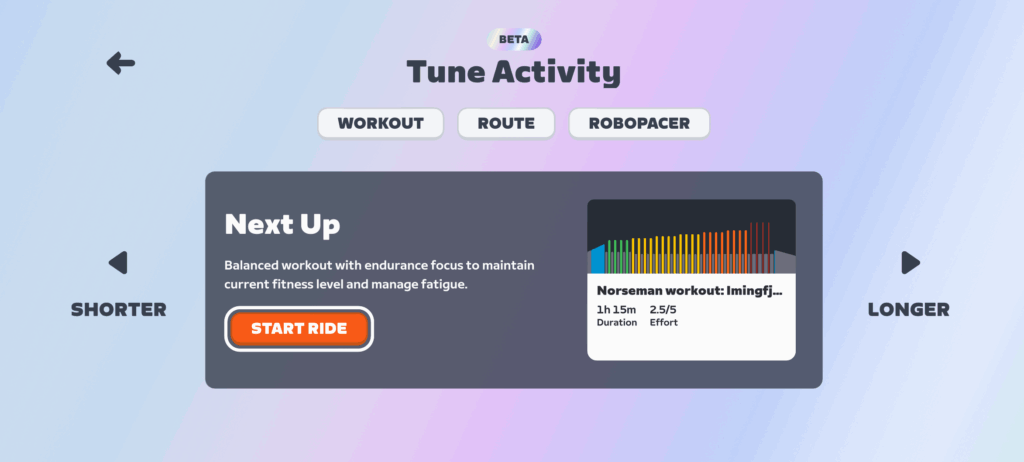
Zwift rolled out the initial beta version of Personalized Recommendations to a small cohort in early November. This exciting new feature looks at your Zwift activities and any outdoor rides (if you’ve connected your Garmin, Wahoo, or Karoo account), then recommends a session for the day based on your habits, fitness, freshness, and in-game content.
Since the initial beta release, Zwift has made important changes to dial in (and dial up) features and functionality based on feedback and metrics. Personally, I’ve seen it evolve from a “5 out of 10” feature to, let’s say, a 7 out of 10. There are plenty of improvements still to be made, and lots of untapped potential, but it works quite well at this point.
So Zwift is doing a “Full English Rollout” of Personalized Recommendations this week. No, the feature isn’t being bundled with black pudding and baked beans. But if you have English set as your in-game language, you’ll see Personalized Recommendations on your homescreen by the end of the week. (As of Monday, January 26, approximately 30% of English users had the feature enabled.)
Not an English speaker? Zwift says Personalized Recommendations should be released for all other supported languages by the end of February. They’re just taking some extra time to make sure the translations are accurate.
Pairing Screen Changes
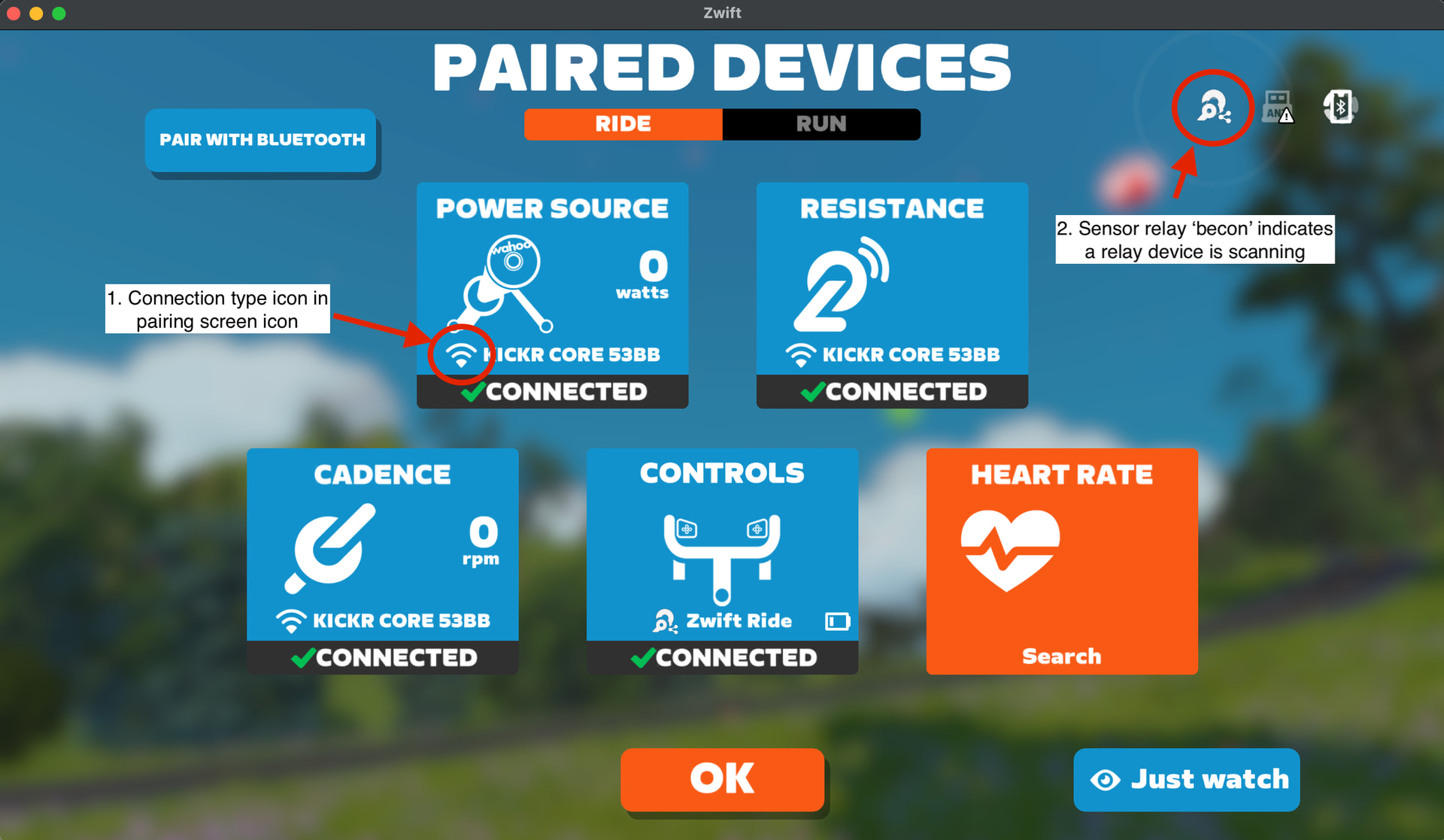
Today’s release includes some updates to the pairing screen UI. Icons now indicate how your devices are connected to Zwift: WiFi, Ethernet, Bluetooth, ANT+, or Sensor Relay (through a trainer).
More Missing Socks
Zwift’s release notes say, “Fixed an issue that could potentially cause cycling socks to be at their minimum height, or missing. Seems we caught the triathlon bug.”
We reported that Zwift had stolen socks in the previous update, and since then, an inordinate number of sockless avatars have been spotted on Zwift’s roads. Does this update fix the problem? Well, maybe. But it makes things worse before it makes them better.
I had adjusted my socks back to roadie height after the v105 release took them away. But once today’s v106 release was installed, my socks were, once again, missing:
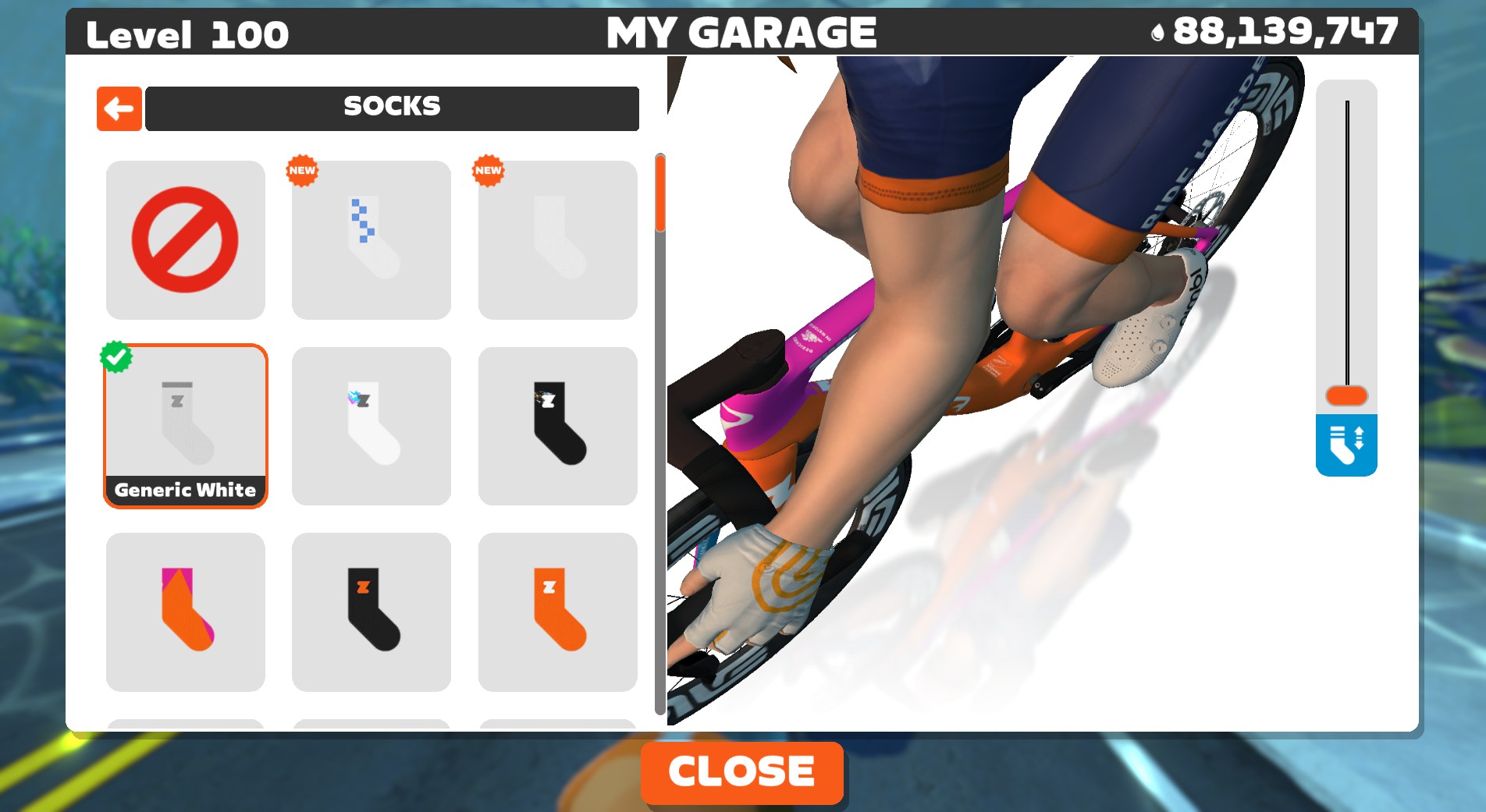
Zwift assures me that this is known behavior, and once you fix your socks in v106 they’ll be fixed for good. But I say fool me once, shame on you. Fool me twice…
New RoboPacer (Sofia) and Expanded RoboPacer Routes
There are two late additions to Zwift’s release notes for this update, both related to RoboPacers:
- Introducing Sophia! Our 10th RoboPacer rides at 0.8 w/kg, ideal for new and lower-FTP Zwifters.
- Expanded the route rotation for RoboPacers to include more pacer-friendly routes from our recent map expansions.
Read all the details in our dedicated post: Zwift Adds “Sofia” RoboPacer and Modifies RoboPacer Route Schedule.
Release Notes
Zwift supplied the following additional release notes:
- The Empire Elevation route in New York is now available for free rides and meet-ups. Go get that badge!
- Minor refinements to draft indicator behavior.
- Fixed an issue that could make workout arch pulses difficult to see.
- Fixed an issue that could cause Tour de Zwift reward previews to display incorrectly when a handcycle is equipped.
- Improved readability of bike frame description text in the Garage.
- Various visual improvements in Richmond and New York.
- Apple TV: Fixed a crash that could potentially occur in the Pairing screen.
- Windows: Fixed a crash that could potentially occur when saving or discarding an activity.
Discuss this update in Zwift’s forum >
Questions or Comments?
If you spotted any other changes or bugs in the update, please comment below!

I see Veloviewer leaderboards have been updated to include the new routes including the one mentioned above which is great. There is an issue with the “Richmond Rollercoaster” route as it includes the lead in which it probably shouldn’t as other routes don’t. Plus the biggest issue is that it starts in the Pens.
I’ve got a request in to change the segment on Veloviewer to just the flat lap (after the lead-in).
Sure it’s inconsistent with the rest of them but the lead in is the whole point of that route. It’d be a very boring rollercoaster without it
Excellent.
I have quite a few routes that aren’t picked up as completed on Veloviewr/Strava. Is there, could there be, a list of the ones that don’t work properly?
They all work correctly and I have credit for 292 out of 293 the only exception is the new one mentored in this article as its not available to me to ride just yet.
You may find that you rode the route after the segment was created\changed as Strava won’t match the segment automatically after you uploaded the ride like it does on outdoor rides. I have a spreadsheet so I know when I set a PB on every route so if a segment changes I either delete and re-upload my ride to Strava or crop the ride by removing a couple of data points and then I get matched against the new\updated segment.
You also need to refresh the Veloviewer leader boards when new routes are added or when you set a PB so it re-reads your efforts from Strava.
The sock fix is the biggest one. Can’t have anyone thinking I’m tri.
Now can they also fix my socks-sliding-down problem in real life?
Socks?!? Just submit and join the Tri Collective.
Saying that, I’m now retired from the collective due to a new knee. I have joined the Sandal Collective. Where socks are most definitely banned on pain of death!
I learned something from Zwift support on this: Your own view of your own avatar changes (obviously) when you adjust your socks in game (or other kit), BUT if other riders change their socks (or kit) they will see themselves with the new socks/kit, but you will/may still see them as when you entered that world/course/event. That is apparently because other riders are loaded at the start of your ride, but not necessarily updated during your ride. So this explains why there are seemingly weird comments in group rides that almost implies zwifting in parallel universes. #zwiftscience =)
Yup. It’s a caching/performance thing. Zwift doesn’t want to have to query their servers too often to find out the current state of the clothing and bike setup for every rider around you. So they cache that info.
This is why you can join a TT race on a mountain bike, then swap to the proper bike in the pens, and many participants will still see you on the mountain bike for the race. It’s fun. 😂
We’ll take the black pudding Eric, but you can keep your ‘merican baked beans. You’re welcome 😀
I do wish there was a bot at 2.6, something right at the top end of Cat D to help with build to Cat C!
It doesn’t help with the drop bonuses, but if I’m itching to do a pace that isn’t available, loading Tempus or some other flat route and making a custom workout with however long I want to ride set to that w/kg or wattage works. If you time it right you can end up leap frogging with a robo pacer or two as well.
Ride the next one or two down and adjust effort with a slow bike. Don’t forget that you can ride the gravel/mountain bikes to slow you down a lot.
ride just a bit lower pacer with a gravel bike. Waalaaaa. Oh wait, I was supposed to keep this as a secret. So shush, don’t tell anybody I said this, very hush hush top secret.
The Personalized Recommendations Rollout showed up on my screen yesterday. Not for me. I hope we will be able to turn it off. I’m sure it will be a great addition for others. Enjoy, have fun and Ride On.
I don’t like the Personalized Recommendations feature. I see it on Zwift at the top and in Companion app at the top. For me is recommended pre-race workouts.
But I don’t race and I don’t do workouts. Why is did not a setting that you can turn off?
Given the fascination with minimum sock height I’m guessing zwift is trying to get the UCI e-Sports world’s back on the platform 😉
This winter I decided that I wanted to extend my endurance from 1 hour rides to 2 hour rides over about three to six months. I was also able to increase the days I was able to ride from Saturday only to Thursday, Friday and sometimes Saturday. I prefer free-rides over workouts. I average about 1.5 W/kg.
Is the new “Personalized Recommendations” feature something that could help me extend my endurance from 1 to 2 hours over those days?
Can it suggest longer free-rides each day/week/month?
Will it look back over my history and suggest that I have an easy week (a short 30 minute ride for the entire week for example) after increasing my weekly ride time from 3 hours to 4.5 hours over the last four weeks?
Am I asking too much?
Am I better off managing this myself?
Are the Zwift workouts set to achieve your goals? Oh wait, MO ONE KNOWS WTH THEY ARE…and who cares.
IMHO ignore it all and add 10% per week which is old school valid and doable by anyone.
Week 0 – 60 min
Week 1 – 66 min
Week 2 – 72 min
Week 3 – 78 min
… in 10 weeks you are doing 2 hours
No need to over-think it.
It is fine to ride a bike inside or outside and just enjoy it.
Thanks for the suggestion. I’ve been enjoying just riding outside for +25 years. Many miles, many hours and well into my third decade on my current frame.
I built my endurance up from nothing special to four hour rides in 12 weeks using the Gran Fondo training plan in the game.
Thanks for the suggestion. I’ve been looking for “what next” once I complete the three routes of stage 6 of the Tour de Zwift.
Can they fix the resistance dropout issues that some riders have been having since December. The sock hight issue is visually distressing but an issue that can cause physical injuries should be a priority I would have thought.
AMEN…I hate this issue.
so occasionally my resistance will increase and my virtual shifting I’ll have to drop down a few “gears”. is this what you are talking about? the other day i was riding and it suddenly became very hard. i had to drop down about 5 gears, then it gradually went back to normal. that was the first time I’ve had that happen. the virtual gears getting harder by one or two gears happens more regularly and only will go away with a restart of the game and connections.
It seems to manifest itself slightly differently on different trainersextreme end people get zero resistance when in erg mode others like myself get micro resistance dropouts/changes that my knees are hatting as you can’t anticipate them
This new version seems to finally “fix” getting XP for recorded sessions that occur at the same time as the Zwift ride itself. I always record on my Garmin Edge to keep that data in Garmin, since Garmin doesn’t incorporate Zwift data as well as its own data.
I guess I don’t get the free bonus after every ride anymore.
I would love to know the technical implementation of how they were able to deduplicate these sessions, since they are going to have different timestamps and durations. Perhaps they created a heuristic that analyzes a power fingerprint and deduplicates based on a certain percentage match? It seems especially tricky for races since the start time and measured outputs start so much later if I record my entire warmup and race as a single session on the Garmin Edge.
What data are you missing?since minimum 2 years export to garmin works fine. All needed data for garmin included.
I use my Edge to record my power meter pedal data. This gives me left and right specific data which Zwift isn’t able to do.
It all depends on what you want out of your rides and races.
Andi, not only is it the amount of data, it is the specific data points and the quality of the data collected – and how that affects all of my metrics.
I am not completely sure, but I assume Zwift is only sending a workout summary to Garmin, so the dataset for a single ride is incomplete. Whereas my native Edge workout will be a full FIT file created by and analyzed by Garmin in Garmin Connect. Garmin is able to use this data to accurately update my training load, body battery, among a vast array of other metrics – it isn’t able to do the same with a workout summary from Zwift.
This doesn’t even take into account that a Zwift ride isn’t even the full picture anyway. When I race, I warm up in the pens, and that 20 minutes of riding would be completely lost since Zwift doesn’t track anything in the start pens. On race days, I have about 40 minutes of activity measured on Zwift, but an hour on my Garmin. Or if I split my rides between different world, my single Edge ride would be split into multiple Zwift activities, which is not an accurate representation of my training history.
I use Zwift for the fun. I use Garmin for the data. I still like them to talk to one another because I like my actual outdoor rides to be in Zwift, but I don’t need the Zwift data in my Garmin history.
Your assumption is incorrect, Zwift sends full fit files to Garmin Connect. You’d see that if you checked the imported activity.
That’s great news! I don’t have my accounts connected for this reason but if it’s been fixed I’ll connect them for the outdoor rides again.
Can anyone official confirm this too? (nothing personal Nick!) I’d be interested in the technical side on this too 🧐
I checked ZC app today and it looks like I ended up getting those extra XP for the “outdoor ride”, but it happened sometime later. It wasn’t a delayed sync, because I checked immediately after my Garmin synced and the external ride was in my personal feed immediately.
So, sorry Ronald, this bug still doesn’t seem to be fixed. It does seem like a very tricky problem to find a solution for, and in my own application I develop I have just figured this will be a limitation that I will unlikely overcome.
After a few days of watching this, it seems like the change for this version isn’t that they stopped awarding XP for concurrent rides, but rather just to not award XP while a game session is still active.
I always stop the activity on my Garmin head unit before stopping the activity on Zwift. Previously, this would result in an XP award on screen as soon as the Garmin ride synced to my Zwift account. Now, I can still see the Garmin ride in my Zwift account (on ZCA) immediately, but the Fitness Trends section doesn’t show the happy sun XP award icon for that activity until later.
It seems Zwift has likely just created a delayed job to award the XP later instead of it occuring while the game session still has the chance of being active.
Eric, do you know of a way or a future option to turn off the “tune”? Not a fan of it honestly. Long way to go before its really usable. I find it very inaccurate.
Is there an option to remove the “Next Up” from Zwift Companion?
Actually, I’d like to remove the “Challenges” block too……
Still no Windows on ARM support. What does the roadmap look like with X2 devices starting to ship soon
When are they going to add lap power to workouts?
the only thing zwift really needs is to add remembered login credentials for multiple users. that’s it.
We can dream
You can use multiple macOS or Windows account to easily fix that problem.
Then you have to log out/in to Windows. It’s not an improvement.
@Eric Schlange how do I get rid of the “continue reading” button that has started popping up when I scroll down on your excellent site
Hmmm… that’s not from my site, as far as I know. Do you have a weird plugin/malware on your machine? Can you email me a screenshot of what you’re seeing? (Eric@zwiftinsider.com)
sure will do
Hmmm… well, that’s either a rogue ad breaking the rules from our ad network, or it’s malware/adware on your side. What device are you using? iPhone? Something else?
Does it only happen when you see that specific ad, the real estate one?
@Eric Schlange I’ve been seeing the same “Continue Reading” button. It happens just after different ads and in multiple places and pages. I used Windows 11 / Chrome browser in Incognito mode just now, and the “Continue Reading” doesn’t happen. I have an anti-virus, anti-malware, etc. program that runs nightly with no reports of any problems on my Windows laptop.
Ah, interesting! Thanks for letting me know. It’s got to be a “rogue ad” then. Sometimes ads get into these ad networks that break the guidelines/rules that are in place. We then need to block them and report them.
My guess is, these ads will be gone soon, if they aren’t already. But please do feel free to email me screenshots if you see them. That helps us find them and shut them down!
I am note sure if it’s update related, but as of today I get no HR from my Core sensor. The app indicates the HR is connected and I can also connect the same HR to Zwift fine. Just no HR when it goes through the Core sensor.
I’ve had this issue for the last 2-3 updates, I think. I’ll reach out to Zwift and see if they know…
Wha device are you running Zwift on, Troy?
And what trainer and HRM are you using?
PC with Bluetooth on board for all sensors
Kickr Core
Clickr 2
Garmin cadence sensor (current model)
Garmin Pro dual HRM (almost new)
Core 2 sensor
All this has been working fine for some time now using ANT+ connection to Core sensor. Of note I have a headwind but I don’t know what it uses to connect to the HRM.
Same here since Zwift 1.105 over the Kickr Core 2 Bridge with Wahoo Trackr… No HR, works fine over direct Bluetooth connection!
Samsung Galaxy S24…
Matthais – are you saying you’re running Zwift on your phone (Samsung Galaxy)?
Zwift just told me they’ve identified an issue on Windows with this, but if you’re seeing it on your phone… it’s a bigger issue.
Eric, It’s a shame that Zwift doesn’t do more for the Club Ladder, for example with a better FanView. The brilliant Club Ladder format is perfectly suited for getting fans excited and following along. I’d also love it if you would cover the Club Ladder again, especially to attract more teams – particularly from APAC -and to make this fantastic format more popular overall….:-)
I’d love to give the Club ladder more focus, as it’s an incredible format. But I’m not involved in it currently, so sort of out of the loop. Would happily publish a post someon me else puts together about it!
why is everyone so up in arms about socks? I’m not a triathlete, but i prefer to wear socks at the ankle. wearing them up to my calf while riding feels weird to me. Does this make ME weird? lol
Sorry to say this, but yes. Yes it does. 😜
(Downvotes welcome, but I hope everyone knows I’m joking about this being a serious issue. I think it’s a hilarious bug, and the fact that Zwift can’t seem to fix it after many years is the best part!)
I know you are joking but joking about these rules is part of the problem: joking about them normalizes them and solidifies their place in cycling culture which makes it is less welcoming sport, and cycling already has a gatekeeping problem. We want to welcome people to cycling, not make it seem like some kind of clique-y in-crowd only place where people are judged for the most minor things. Please promote more inclusive rules like Phil Gaimon’s new rules https://philgaimon.com/the-new-rules-of-cycling-aka-philuminati/ that begin “Rule #1: Everyone riding a bike and being safe and having fun is doing it right.”
Really love the fact that they finally merged all the tiny worlds into one -real-life world! oww wait!
But do really appreciate they finally completed Fiji..
Velodrome..
Gravel mountain.
uhmm, new wheelsets! yes new wheelsets wohooo!
Stop complaining. At least we finally got new levels.
Hmm Empire Elevation still showing up as Event Only on my companion app after updating.
That’s because they haven’t updated Companion app yet. You updated your game version (so it’s available there now), but Companion still needs an update. It’s goofy, I know… but that’s how it works.
Can you turn off the recommended feature?
Not currently.
Updated zwift to this/the latest version, have English language settings enabled – always have. But I do not get the recommendations? Anyone with the same issue?
They aren’t rolled out to everyone (in English) yet. Should be by the end of the week, as noted above.
Heh – I’ve been playing around with ANT+ boosters, cables, etc as I really struggled with Bluetooth…
first time I logged in with the new update all the connections showed up as Bluetooth! So it’s been running fine for months, possibly years on Bluetooth all along 🤦♂️
Would this new update affect my Bluetooth connectivity? I rode early on 1/27 and this morning nothing worked. It says im connected by my avatar just sits there I’m on an old Kickr Core and pair through my windows laptop.
Since this is pie in the sky yapping: I’d like to see anything that forces people to engage in the game. I ride on literally everyone I pass or am passed by and I get back 10% at most. Da’hell is you people doin’ while you pedal…
I will take further downvotes – 63W of pacer is teats on a boar. I’m the King of Average and I tried today and simply cannot even move the pedal “unloaded” and get there. WTH?
So if I change my default language to something other than English, I can avoid these useless “Next Up” recommendations for slightly longer?
Have the recommendation, but wasn’t able to find it from within my ride, so didn’t work well for me. I’ve done a few of the training plans, but I started a workout during a ride recently, and it just annoyed me, so I had to skip each segment and just get on with my ride.
not sure I will make much use of it.
An option to turn the Personalized Recommendations off would be nice. I have no use for that at all.
It’s a completely pointless addition if you do anything other than riding.. I’m always ‘Fresh’ even when training hard but it never counts any other exercise other than riding so just pointless.. please let us turn it off…
Windows arm compatibility?
Looks like there’s a new update but no post about it here. 🙂 1.07
https://zwiftinsider.com/update-1-107-158475/
it just isn’t a “featured” post, so it left the homepage pretty quickly. Suppose I should feature it, for consistency.
Thanks! Normally I guess I see it because I check it every other day! 🙂