

Zwift version 1.105 begins its phased rollout today. This is a minor update containing mostly bug fixes, although it does include a homescreen UI upgrade that will (hopefully) be rolled out elsewhere in game to better inform Zwifters. See details below…
KICKR CORE 2 Bridging Upgrade
Announced with this week’s release is a feature Wahoo actually rolled out last week, allowing Zwift Ride controllers and Click v2 controllers to be bridged through Wahoo’s KICKR CORE 2 trainer.
According to Zwift, this was done to “improve Bluetooth connectivity and to work around the Apple TV Bluetooth connection limit.”
Read all about this firmware update >
Mouseover Route Profiles
Zwift says, “On the home screen, you may see a gradient profile on route cards when hovered/focused. This feature will be rolled out slowly.”
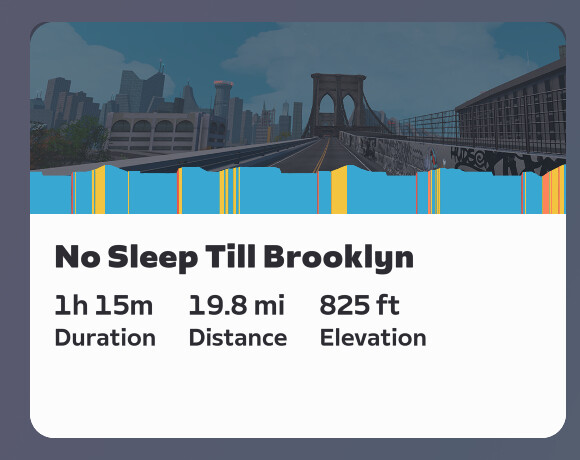
This looks like a helpful and welcome change, although it isn’t live for me yet. I especially appreciate the gradient color-coding, which is a nice upgrade from the one-color route profiles used elsewhere in the game.
Now I’m going to do the most Zwifter thing ever, and complain about a feature before it’s even released.
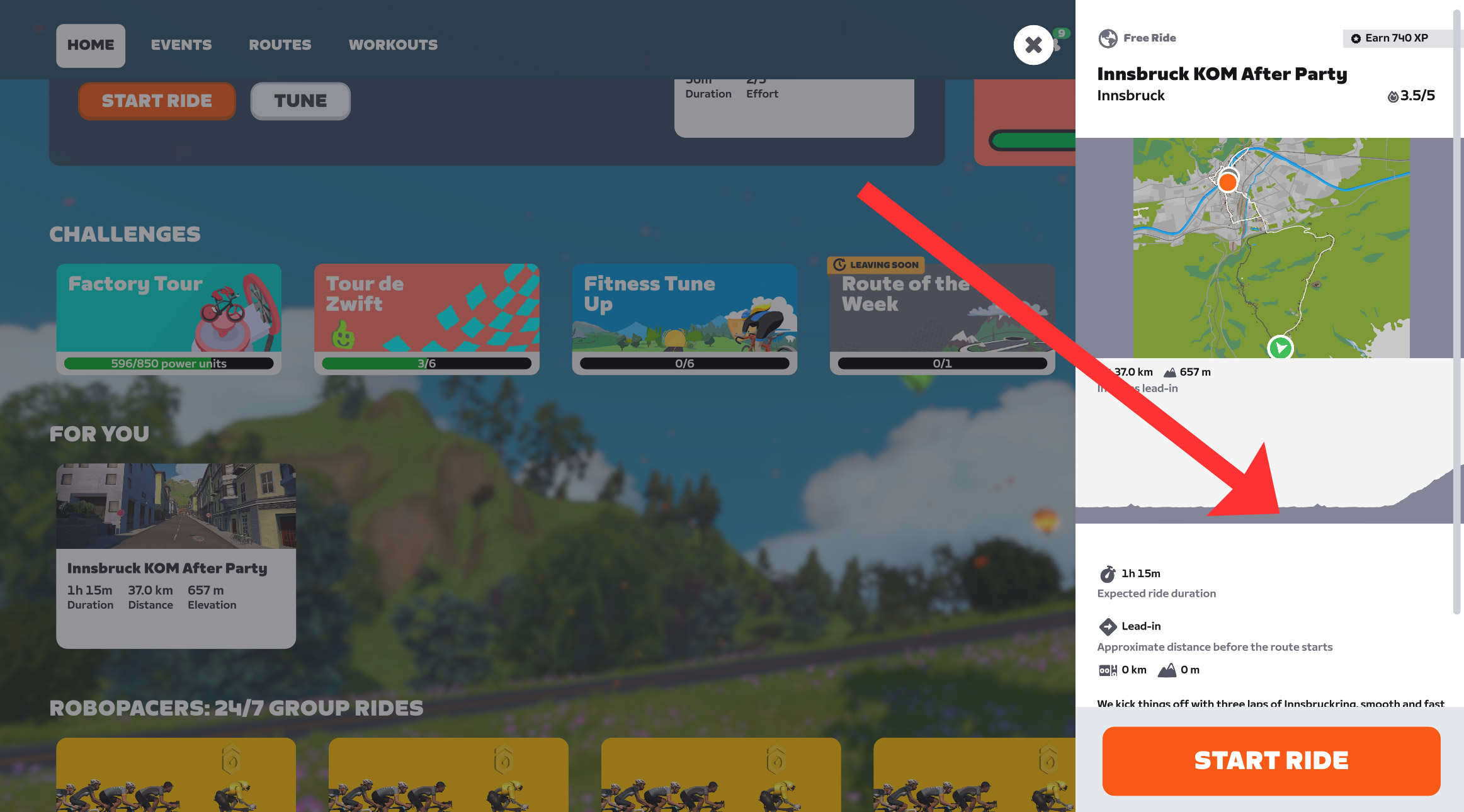
Yes, the route profile on hover is a good upgrade nobody will complain about. But Zwift should show this color code the route profile sidebar as well:
And much more importantly, this profile should be available on event cards and in the event sidebar:
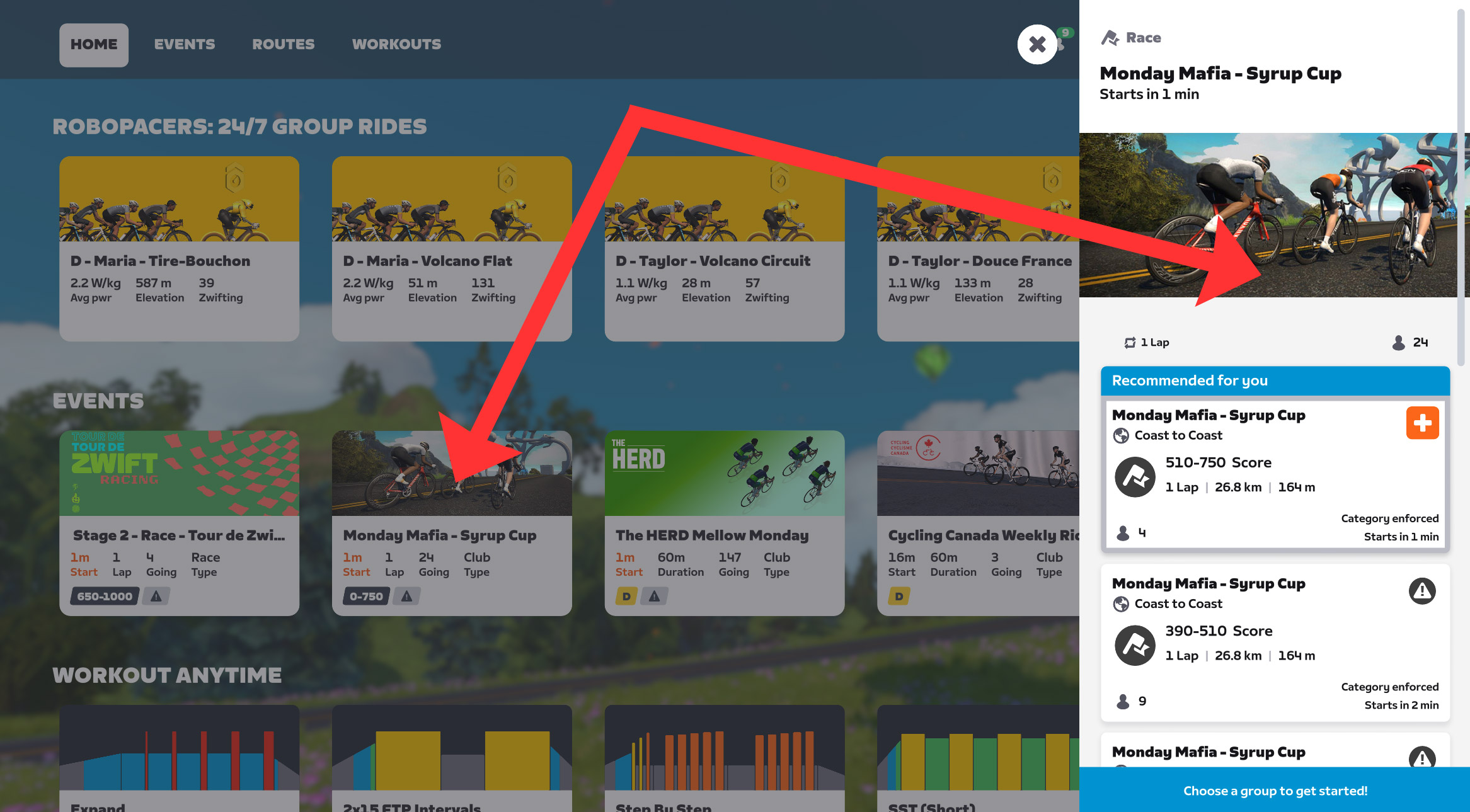
Notice: the event cards don’t even say which route the event is on. That’s saved for the sidebar, which helpfully shows the route name, number of laps, total distance, and total elevation. But even the sidebar displays no route map and no route profile.
This is all fine, as long as you know the route. But there are now over 300 routes in Zwift. The game needs to do a better job of telling riders what they’re signing up for. Hopefully, this new “mouseover profile” feature is a step in that direction.
The Triathlete Bug
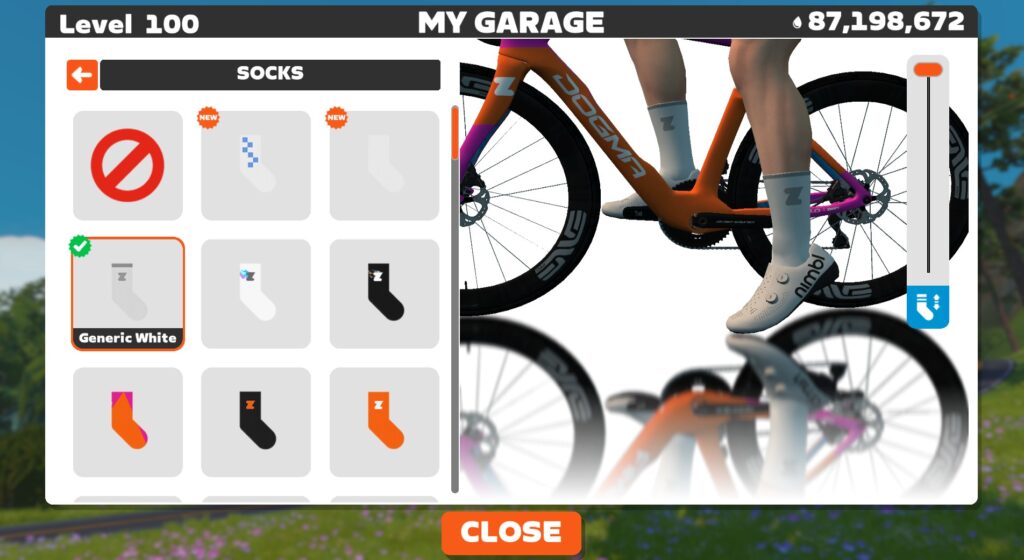
It’s been years since this last happened: many Zwifters are reporting that this update has stolen our socks:
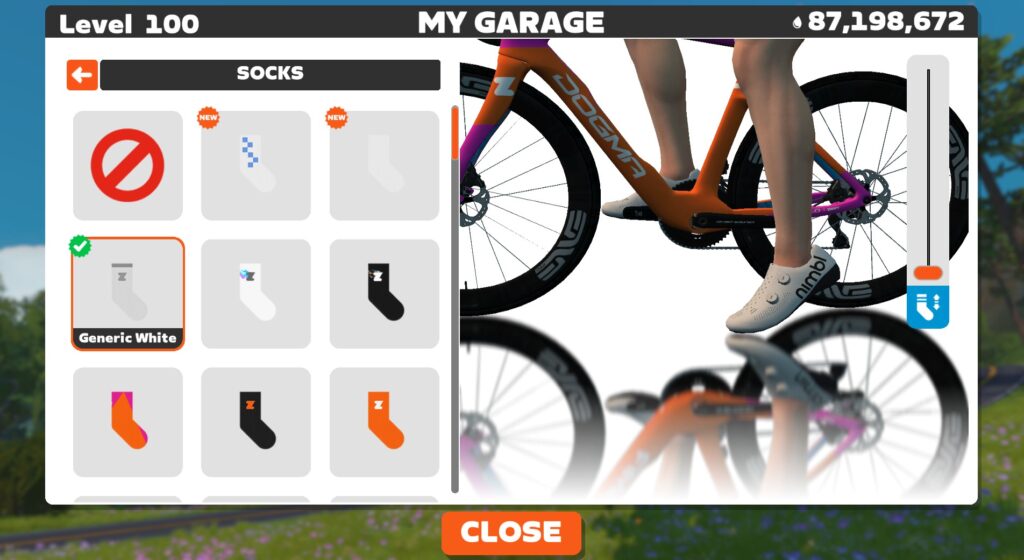
What’s actually happened is, our socks have all been set to the lowest possible height, making us all look like triathletes. Very sneaky, Zwift. But we aren’t falling for it! Move the slider up, and you’ll be a roadie once again:
Release Notes
Zwift supplied the following additional release notes:
- Fixed an issue where some ANT+ devices could have a blank name in the Pairing screen.
- Fixed an issue with extra lanes in New York on Central Park roads; Scotty at NYC DOT corrected the issue.
- For races with event cooldowns enabled, fixed an issue where race rank could be incorrectly positioned on the Zwifter’s avatar on some devices.
- Running: Improved the appearance of time input fields in Public Profile settings.
- In group events, if a Ride Leader or Ride Sweeper have unsupported characters or emojis in their name, their event chat messages in the HUD will be shown as sent by “Ride Leader” or “Ride Sweeper”.
- Android: Improved Bluetooth connection reliability for Zwifters on Android 15 and newer.
Discuss this update in Zwift’s forum >
Questions or Comments?
If you spotted any other changes or bugs in the update, please comment below!


@Eric Schlange do you know anything about a new powerup? I ask this, because in my team yesterday’s ladder race, we were surprise by the use of it. It’s image looks like the Citorën logo, 2 chevrons. I red this update and did not see anything about it, that’s why I ask.
That’s the boost powerup, which gives you a speed boost. I don’t know much more about it, but I’ll see if I can get details and add it to the main powerups page here on ZI.
We have it in our ladder race tonight and there is no info to be found on any Zwift page. No idea what it does, how long it does things and if you can use it in the final sprint.
I dont like these Mario Kart power ups to begin with in races, certainly not when you get them randomly, but to not have any info on it is very bad on Zwifts part.
I heard it was an accidental activation. It was nice if you had the power up but not so good when on the receiving end. I’d hope that everyone would get equal boosts throughout the race
Had it mine ladder race yesterday. It boosts your speed for a few seconds. You can get up to 3 speed boosts in one PU. In my opinion the worst invention ever since races will be won by the rider with most boost PUs in the sprint.
Yeah just finished mine and it was a disaster. The team with the most Boost powerups won and that wasnt us. Its just not fair when your opponent cruises away with two powerups at once and you get a feather.
Zwift has put a lot of useless things into the game, but this has to be one of the stupidiest.
It was a config error by the Ladder organizers, as I understand it. Not sure Zwift is to blame in this case.
The Ride w/James group ride had these a coupla months ago when the new New York roads were introduced. They’re fun in a group ride and I imagine incredibly stupid in a competitive race. We all had fun hitting them on the escalators and the sprints but if I saw them in a race, I would drop out (and I never drop out of a race).
Sounds like the weekend fun thing Zwift started with some time ago. Think gamification overload. I would hope we don not see that in “regular” events and races.
I signed the last two weeks in for the Zwift TT Club Events and in both there was the boost PU. Especially in the one yesterday, I got 2 when I lift oft, but loosing one of them when approaching the startline. That was very confusing! Didn’t like this kind of PU 🙁
I hear that Syrup Cup has been a fun event 😉 Thanks for the insight on the update.
Thought you would like that, J.D. 😀
Sorry I didn’t get a post out about the series… was drinking from the firehose. If you do another round, send me the details!
Hey Eric ! As usual thanks for your amazing work.
Im riding a Zwift ride with a brand new Tacx Neo2T and a Zwift Cog.
Im experiencing a lot of lag on the gradient change. Meaning that the gradient change supposed to arrive when the hill goes upward actually arrives 3-4 secondes before or after the hill.
Thats a real pain when im racing !
Do you know if that is a known problem at Zwift and if they’re working on a fix ?
ThX !
Don’t know if that’s a known problem… I’ve had that happen a few times in my life on Zwift, but never as a regular thing… and it definitely shouldn’t happen with a top-end trainer like the Neo 2T.
Here’s what I would do: try Zwifting using a different device. Like if you’re on Apple TV, try running Zwift on your phone, or on a laptop. See if it happens there. This will tell you if it’s your trainer and it happens all the time, or if it’s Zwift on a particular device…
I received new Zwift controllers, but they don’t work either. I sent an email to Garmin, but they say it’s not the Tacx Neo 2T because the resistance works when the virtual controllers are disabled (which is true). So it’s a Zwift issue.
Interesting. I’d reach out to Zwift support then, and also check the Zwift forums to see if others have had the same issue.
Is it just me or apple tv missing the weekly run distance/time on the saving screen
For me it’s the second day that not all the distance i’ve ridden is saved. I’m also running Zwift on Apple TV. I also noticed that the map freezes in the companion app on my IPad. Any one else also having these issues. Last week everything worked fine.
I wish they’d fix the running distance from the start pens bug, where you have to run 300-500m out of the pens before the distance starts counting
Since they are doing this, then they should just add another indicator to tell us if we have already done a route or not. It is already available in game, so why not use the same indicator everywhere else. This makes planning future routes easier (eg: when trying to decide between routes while browsing through events in my clubs on companion app, it can get difficult to remember which routes I have already done).
Literally every time I sign up for an event I come straight to this site to check the elevation profile because it’s not clear in the homescreen UI. Looking forward to this change and hopeful to see it come to every event!
Hey Eric,
I realize it must be a chore to keep all routes updated, but I don’t think your own archives lives up to the critique you have of zwift. Not that they need to, you not obliged to have stuff like that. But the parcours and profiles of many of the routes here are missing a lot of relevant info on climbs. All the best, N
I mean… I link to the Strava segments. Show Veloviewer profiles. Link to a detailed page for every timed sprint and KOM. What is it you’re wanting? Are you talking about how some routes don’t have the profile image from ZwiftHub?
Ah, glad old Teddy Roosevelt already helped define this exact situation decades ago, so no one here has to do more legwork: “Complaining about a problem without proposing a solution is called whining.” Stop whining and do better, N.
Weird bug after the update today – it turned my avatar into a triathlete by resetting the sock height slider to zero. I changed it back to max height but will need to see whether it now stays there on my next ride.
Same with me! I actually forgot to add that to the notes above… even took screenshots for it. Added now.
Upgraded yesterday, socks indeed down, pulled them up but today they are again down. Maybe they ones I use are too worn 🙂
So they fixed a roll out bug but left this one 🙂
Any update on the rollout of AI: Personalized recommendations? Id love to be part of the test team.
I have been using Apple TV 4K (2nd Generation), and the in-game sound (startup music or world noise) isn’t working. I only get sound from are chimes/notifications. Is there a workaround for this?
If we are asking for feature releases, here is simple one: disable the drafting power up when banded ride is selected. They can do it for the drafting bar (does not show on banded ride), not sure why they can’t do it for a banded ride.
Did the Fitness Tune-up disappear from any one else’s zwift start screen?
It’ll be back… maybe tomorrow. Zwift decided to roll back v105 due to a bug, but said they should have a fix rolling out tomorrow.
it is back.
each of the 3? updates have affected my kickr one performance
very hard to spin up to usual cruising cadence and power
unplugging power from the trainer seems to fix it but each of the updates and roll backs have caused this problem
is this update hidden/not automatic? I live on the U.S. west coast. as of 0700 thurs, 15 jan, no update available.
Still waiting for atv voice to text echo/ duplication issue very annoying for me and others 😜
Is it me or news jerseys ?
The update also had some backend stuff dealing with outdoor runs – I got a nice surprise (accidental) bunch of XP bonuses on my ride yesterday. Zwift HQ confirmed outdoor running support is coming soon and they are already backfilling activities:
https://forums.zwift.com/t/game-update-v-1-105-january-2026/662576/31?u=_optimistic_prominen
So, reading this, the suggestion is that virtual shifting can be undertaken via the direct connection, however, I have a ln Elite Justo, with gateway (direct connection) and virtual shifting won’t work, as searches state the shifting and trainer need to be on the same Bluetooth connection. Seems to defeat the object of a direct/wired connection. Trainer is connected via gateway and controllers direct to Apple TV. Any workaround or suggestion that this can be resolved
This update has caused major connection issues for my zwift play! Has anyone else had success rolling back to the earlier version? (So many uninstalls and reinstalls, and zwift support is being TERRIBLE, I’ve been waiting 3 days after being promised a support person after AI, and they just started me all over again in the queue.) (I can sometimes link through my phone- but then my HRM won’t connect, which I need for ZRL tonight!)
Hi @Eric Schlange how do I update iOS on iPad please? It is still showing an old version. Maybe something to do with Apple approval…?
It’s possible the update isn’t in the iOS store yet, as Zwift pulled it, then issued a new one, etc. Here are instructions for updating though: https://zwiftinsider.com/update-zwift/ (same as updating any other iOS app…)
Thanks Eric, no option to update so looks like it’s not available yet.
I would really like it if, on the game and the mobile app, we could have a place to see which events our friends are participating in.
Version 1.105.3 Build 158083 installed on iMac in the UK. Haven’t tried it yet
The aock issue, solution doesn’t work for the lightning socks. There is no slider to pull the socks up.
Try switching to a sock that DOES have the slider. Adjust it there, then go back to the Lightning socks. I THINK that’ll fix it.