
Zwift version 1.102 begins its phased rollout today. For most Zwifters, this is a minor update that includes a new NYC route, a wheelset fix, and various bugfixes. But some Zwifters will begin seeing Personalized Recommendations as Zwift begins testing this new feature. Read on for details!
New Big Apple Route(s)
On the heels of the recent New York map expansion, today Zwift releases yet another new route: Times Square Circuit. This route includes an achievement badge for both riders and runners.
Shimano DURA-ACE C36 Fix
Zwift’s release notes include this line: “Updated the performance of the Dura-Ace C36 wheels to better match real-world performance.”
In version 1.101, Zwift removed the Shimano DURA-ACE C40 wheels from the Drop Shop, replacing them with the newer and (supposedly) lighter C36 wheels. There was just one problem: the game showed the new C36 wheels as rated 1 star for weight, meaning they were quite heavy!
Today’s release fixes this problem, and the wheels now show a 4-star weight rating. Watch for a post later today detailing their performance, which looks very strong considering they are unlocked at level 6 and cost only 150,000 Drops. These may just be the climbing/all-around wheels beginners are looking for…
New Level Up Celebrations
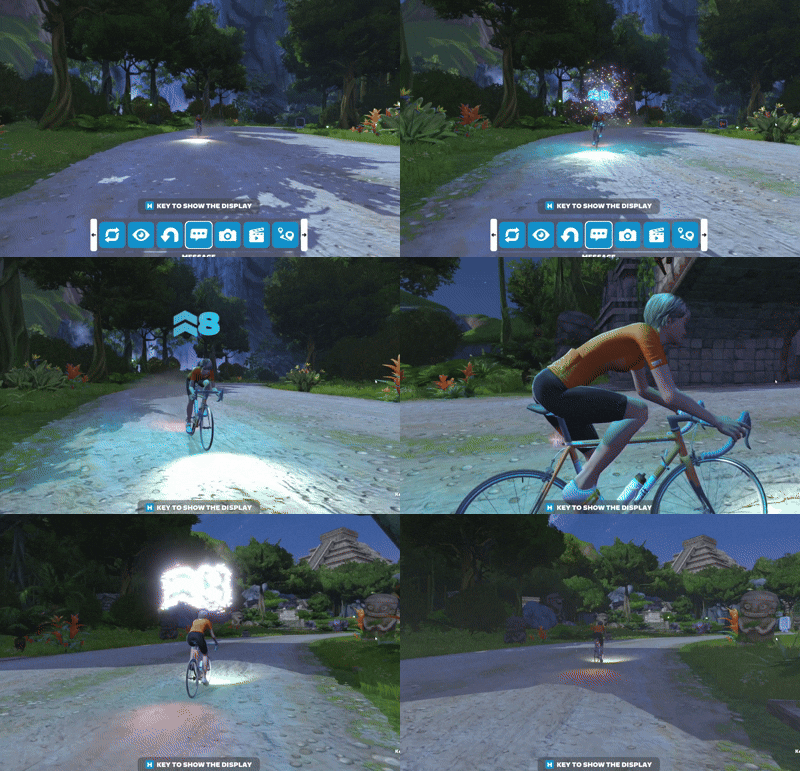
A new on-screen celebration happens whenever a Zwifter levels up. You’ll even see it when those around you reach a new level! See the forum announcement >
To learn more about levels in Zwift, read All About Zwift XP, Levels, and Unlocks for Cyclists >
Apple M5 & A19 Visual Upgrades
Users of the newest Apple devices rejoice: today’s update includes two items that may pertain to you!
- macOS: The Ultra graphics profile is now enabled for devices with Apple M5 chips.
- iOS: Improved visual quality for devices with Apple A19 and M5 chips.
Apple’s M5 chip powers the new 14-inch MacBook Pro, iPad Pro, and Apple Vision Pro. The A19 chip powers the iPhone 17.
Personalized Recommendations
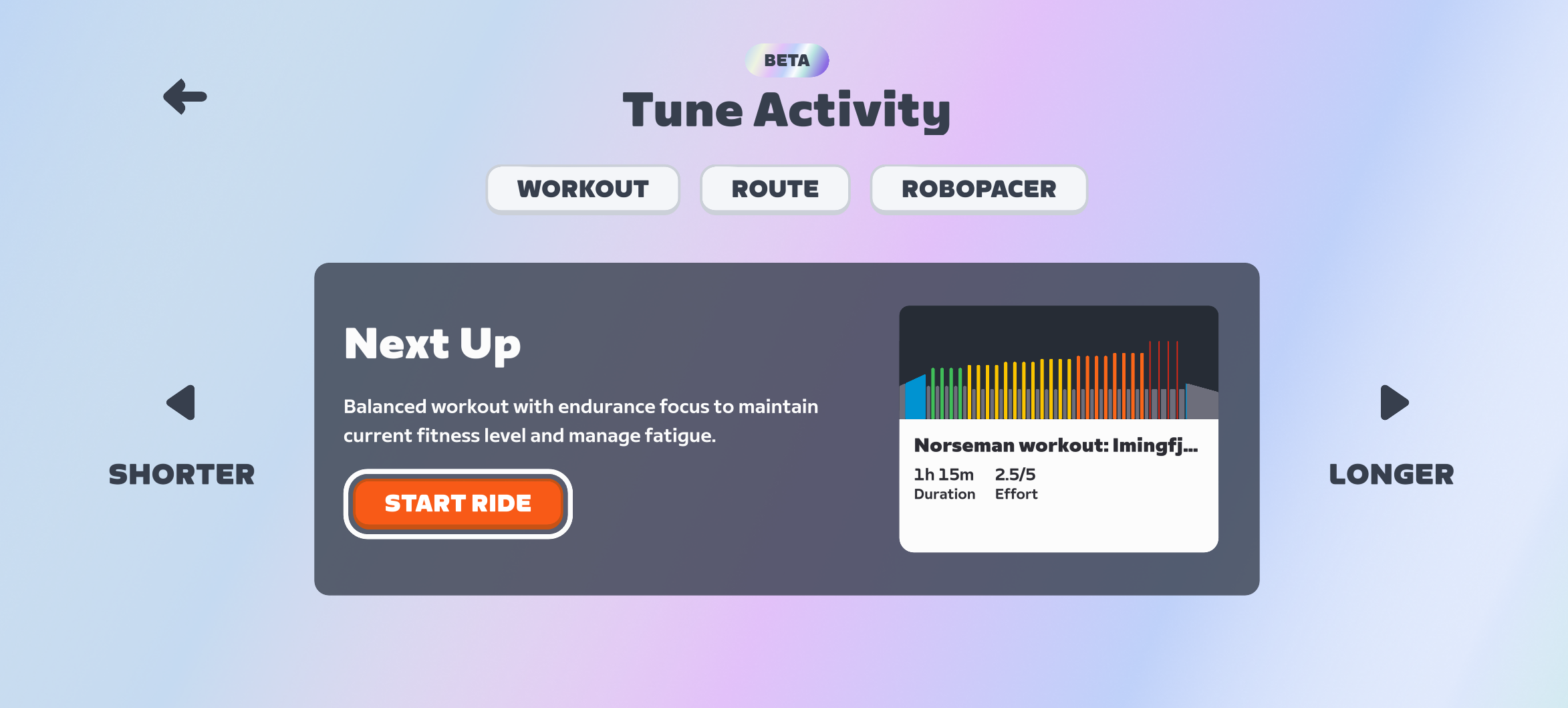
Zwift promised this feature would begin launching in November, and they stuck to the plan. Today’s update includes Personalized Recommendations, but the feature is only being enabled for a select cohort of Zwifters because Zwift wants to gather feedback and fine-tune the recommendation engine before releasing it to a larger audience.
Due to this limited rollout, Zwift didn’t include Personalized Recommendations in the release notes.
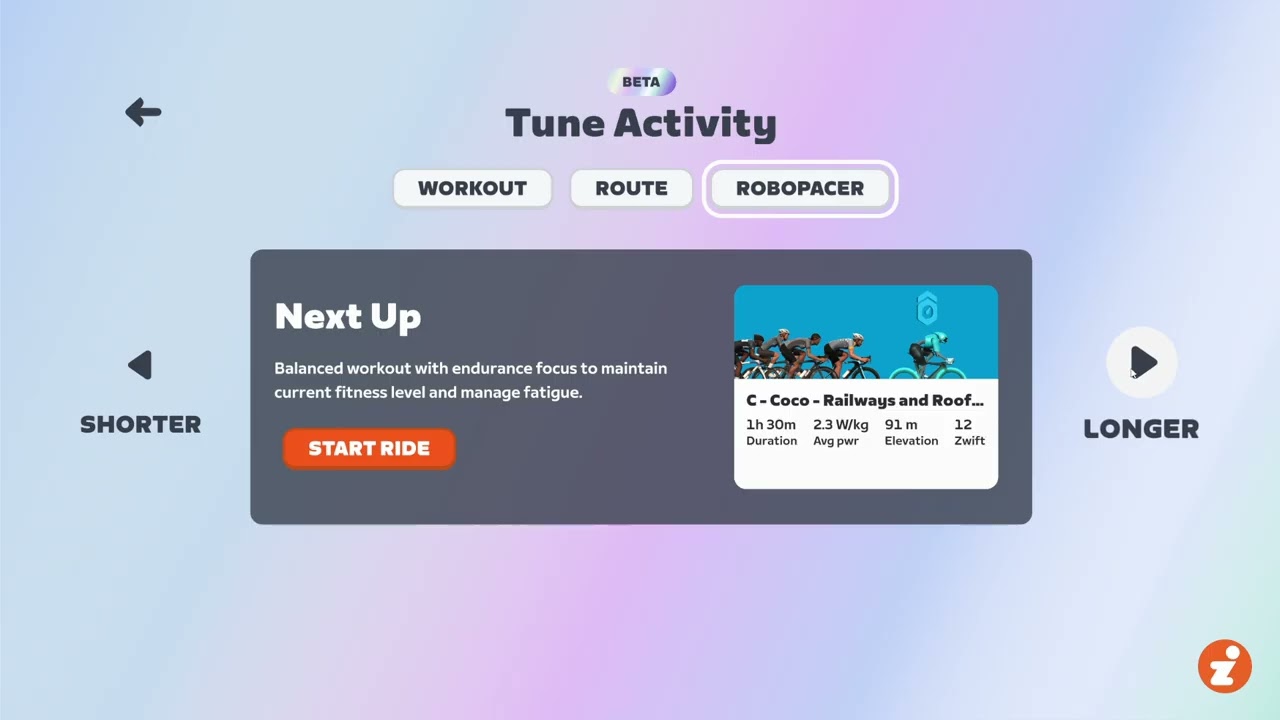
How does it all work? The Personalized Recommendations engine looks at your Zwift activities as well as any outdoor rides if you’ve connected your Garmin, Wahoo, or Karoo account. It then recommends a session for the day based on your habits, fitness, and freshness. These recommendations can be made shorter or longer, and you can choose between a workout, a route, and a RoboPacer. (Zwift tells me event recommendations will come in time.)
While the backend engine is, I’m sure, quite complex, the front-end interface is simple and easy to use. See for yourself:
Watch this space for more details as this feature begins rolling out!
Learn more and share feedback on this Zwift forum thread >
More Release Notes
Zwift provided notes on additional tweaks and bug fixes in this update:
- Fixed an issue that could potentially show an incorrect starting location for activities published to Strava.
- Fixed an issue that could potentially calculate incorrect Stress Points (SP) when sitting idle in Zwift during an activity.
- Fixed an issue that could cause heart rate monitors to get stuck in a Connecting state when paired via Kickr Bridge.
- Fixed an issue that could potentially cause fitness devices connected via Wi-Fi to disconnect immediately after selection.
- Zwift Unlocked Tour: Fixed an issue that could cause the route lead-in distance to not count toward the total distance metric shown in the HUD.
- Zwift Unlocked Tour: Fixed an issue that could cause the remaining distance shown below the mini-map to not match the event route distance.
- Various visual improvements throughout New York.
- macOS: Fixed an issue that could cause fullscreen mode to not take effect.
- Android: Improved fitness device connection reliability for devices with Unisoc Bluetooth chipsets (e.g. Samsung Tab A8, Lenovo M10).
- General stability improvements.
Discuss this update in Zwift’s forum >
Questions or Comments?
If you spotted any other changes or bugs in the update, please comment below!

I hope nobody uses an iPhone to ride on zwift.
Additionally – unlocked-days are over, right?!
I use an iPhone, and it works just fine.
Really? But you can barely tell any differences on such a small screen😳
But you can connect it to a tv with the correct cable.
Or use AirPlay.
Ah ok, that makes sense, wasn’t aware of that!👍
What’s the problem with using an iPhone?
When I travel for work, rather than not Zwift for the week, I take a pair of Garmin Rally pedals, some bike grease and a wrench to the gym. I remove the pedals on the gym spin bike and install the Rally pedals then run Zwift on my iPhone. I usually only do pace group rides this way but occasionally jump in to races – but it’s way harder racing without gears and automatic trainer resistance than on the home trainer!
TLDR: I use an iphone to ride on Zwift when not at home.
Thanks for sharing, that’s a pretty clever travel setup. I’ve got Favero duals myself.
Quick question: when you’re holding a steady pace on the spin bike with the Rally pedals, does it feel similar to riding with trainer difficulty at 0%? I’m assuming it gives that same flat-road, no-gradient feel, but curious what it’s like for you.
I can’t claim benefit for thinking of doing it. After I got assigned to a project that required me to travel regularly, I found a google hit where someone had done this. I did a tour of gyms near the project to inspect their bikes. Only found one with bikes where the pedals would fit and they were happy to allow me to swap pedals out. Joined the gym on a free trial initially to test the concept before committing to a membership. It gets quite sweaty so I bought a Jisulife neck fan (which is better than nothing but is unreliable as it annoying turns itself off for no apparent reason – must figure out a better portable fan option).
It is a bit like 0% trainer difficulty but, the main thing is not having gears. I have to tweak the manual resistance on the spin bike – especially when coming to a hill – to emulate changing gears to be able to stay with the pack. That’s the problem when I try racing as it’s a bit imprecise and delayed so I can’t instantly respond to attacks.
I mainly save any racing I do at the gym for TTT. It must look funny to the other gym users when I turn up, remove/install pedals, put on a neck fan, balance my phone between the handlebars and then start talking to my teammates on Discord as we coordinate the TTT changeovers!
The achievement badge was available for Times Square Circuit Run and available during the Zwift Unlocked events. I received it on 6 November.
The personalized recommendations feature looks interesting. I’m looking forward to trying it, especially considering that my Garmin data goes into Zwift.
Any idea when the new levels are getting added or the system revamped? I’ve just hit 99 and would love to get to 100 before they move the goalposts again!
Don’t worry. They haven’t “moved the goal posts” in two years and don’t seem inclined to do so anytime soon. Get used to being stuck at level 100. I’ve been there 21 months and 63 circles of level 100 purgatory. And lots of folks have done more circles than that.
I’m in the same boat
is there a lap counter for level 100? =)
Unfortunately I have that personality type that needs to keep count, so that’s what I have been doing. I’m sure I would be less aggravated if I were the type of person to whom numbers didn’t matter.
Counting is fine =) I was just curious if you knew of any tool that counted automagically because I would also be very interested to know!
No, but I got bored and went back and counted. I’ve refilled my progress bar 28 times since they stopped adding levels. Eric Min said on yesterday’s Thanksgiving ride that new levels were coming very soon, though, so it shouldn’t be more than a year.
They should do something similar to Prestige Mode in Call of Duty 4, where you “prestiged” and lost everything, got knocked down to level 1, but got a special icon. Maybe you could keep all of your challenge unlocks, purchases, and kits, but everything else is gone.
Do Level 100 zwifters get the new Level Up Celebration when they go through 100 for the n+1 time? That would be nice.
It would be good if the game threw up a “At Level 100, +50000 Drop Points!” on screen celebration banner for us veteran users, and to let others know as well! I’m a recent Level 100 grad after putting in 8 years (seasonal) on Zwift, and having the goalposts moved 3 times. I’m sure I cannot be the only one who has noticed that XP has been cheapened up in order to maintain user engagement?!? I cried wolf when they had to fix the level curve the last time when they made it too easy. Hopefully the next solution to the maximum level issue won’t be so hackneyed, and with consideration for the long term.
On Companion app, this new route is showing up as event only
It isn’t showing up as event-only on my app. Perhaps it was fixed in a recent update?
Did they fix the meet up issue with riders getting stuck at the corner before the glass road on the lead in to the bridge on the new NY routes?
I am definitely curious to see if level 100 people will keep getting level 100 celebrations over their head each time they refill it. Im approaching level 90 and it will be cool to see the new animations.
Zwift already confirmed: They do not.
I’m level 100 and refilled today. No celebration. Disappointed!
Level 100 for a long time. Very annoying to see “1000 xp until next reward” when there are no rewards after level 100. Zwift doesn’t seem interested in their most loyal fans. How hard is it to make a few jerseys for more levels??
I really don’t understand why Zwift keeps this arbitrary level cap. They could simply make progression exponentially harder. They can even leave the cap at Level 100; just make it so challenging that even the most dedicated riders would need years to reach it. Or raise it to Level 200, whatever…
But offering nothing for the most loyal users feels a bit underwhelming.
I’m only Level 60, but knowing I’ll eventually hit a hard stop at Level 100 already reduces my motivation to keep pushing toward it.
I mean a lot of video games have caps unfortunately. I remember being a kid and being really bummed out that my Venusaur capped at level 100. I know zwift will release another batch of levels sometime in the future but yeah for a lifelong journey like fitness it is sad to see caps. But maybe we arent meant to focus on the xp.
zwift on mac stopped to see ant+ hr meter and else
on iphone works
I still cannot get the Companion app on my iPhone to work with my new M4 Macbook Air Laptop. Had no issues when using my iPad pro for the last 20 months. Any detailed help would be appreciated. Thanks
You may need to reinstall. Try this for now. Option: click on the app and find the .app file to open the game. It will open Zwift through the terminal.
Pretty stoked to be part of the beta testing for the personalized workout recommendations!
Do you know how the testers where chosen?
Please hookup my account for testing.
Help! Went on the Home Screen on an i-pad and the Free Ride icon was missing. I couldn’t access the range of free ride options available.
how do you update ?
Here ya go: https://zwiftinsider.com/update-zwift/
I don’t have any training recommendations available, but today, after my activity, I saw a summary.
The layout of “Achievements” has also changed.
What happens when the 2026 apple tv gets the A19 chip, as expected? do apple tv users of zwift get Ultra graphics?
@Eric Schlange ,
is there a way to get on the Zwift beta tester list? Is there a waiting list?
I do lot of testing for work anyway, at least Zwift would be something I would be inetrested to test properly, not just because it is in my job description:))
Regards,
Angela