
Zwift version 1.104 begins its phased rollout today, the last game update for 2025. This release includes the long-awaited draft indicator, 6 new route badges, the official rollout of a new Progress Report end-of-activity screen, and some much-needed adjustments to New York’s escalators! Read on for details…
New Draft Indicator
Not included in the original release notes (Zwift loves to bury the lede) is today’s release of the long-awaited draft indicator. Yep, you read that right! Here’s what it looks like:
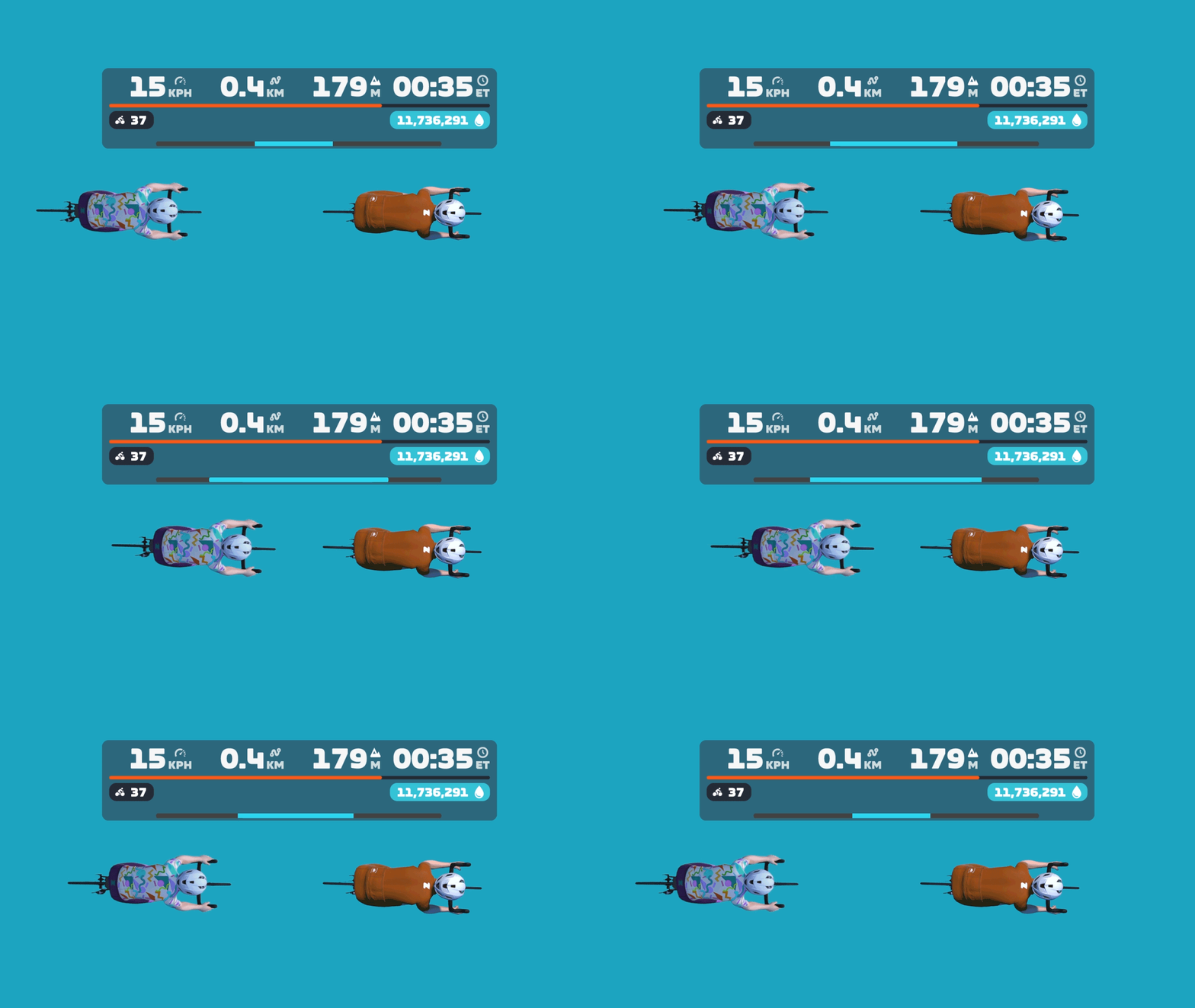
Zwift says, “The long-awaited Draft Indicator is finally here! The new bar at the bottom of the HUD center keystone will show you when you are receiving a draft benefit, the longer the bar the greater the draft benefit – use the Draft Powerup to get max draft benefit! Details are on this thread.”
New Progress Report Screen
Zwift has been rolling out the new “Progress Report” screen over the past few weeks, with approximately 50% of Zwifters already seeing it before today’s update. But they’ve included the screen in today’s release notes, since it hadn’t been included previously.
Zwift says, “A new Progress Report screen is now available at the end of every cycling activity and shows career progress, fitness trends, and performance data. The new Progress Report replaces the previous Streaks screen, and includes all information previously featured in the Streaks screen.”
Here’s a look at the old Streaks screen, and the new Progress Report:
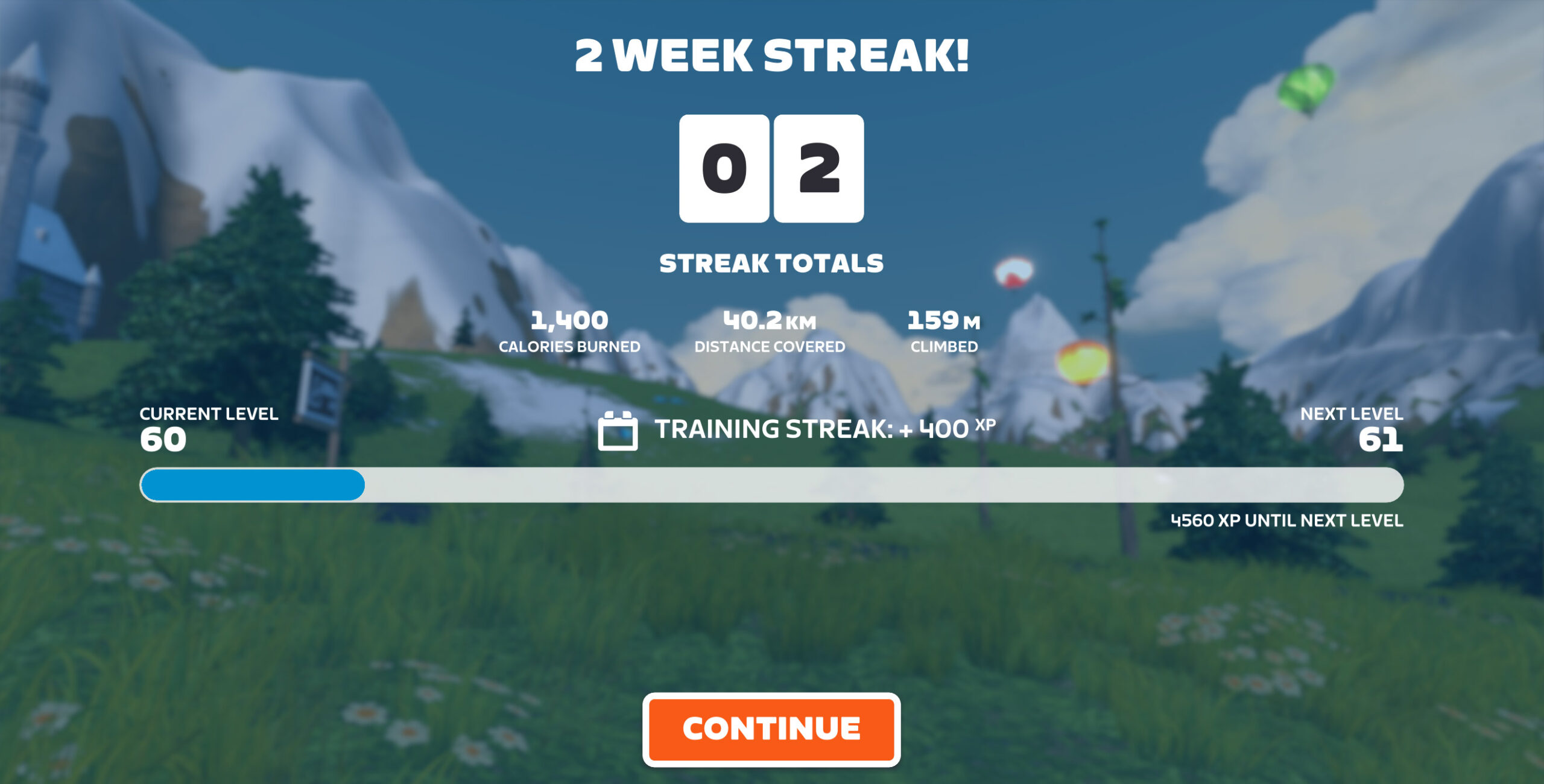
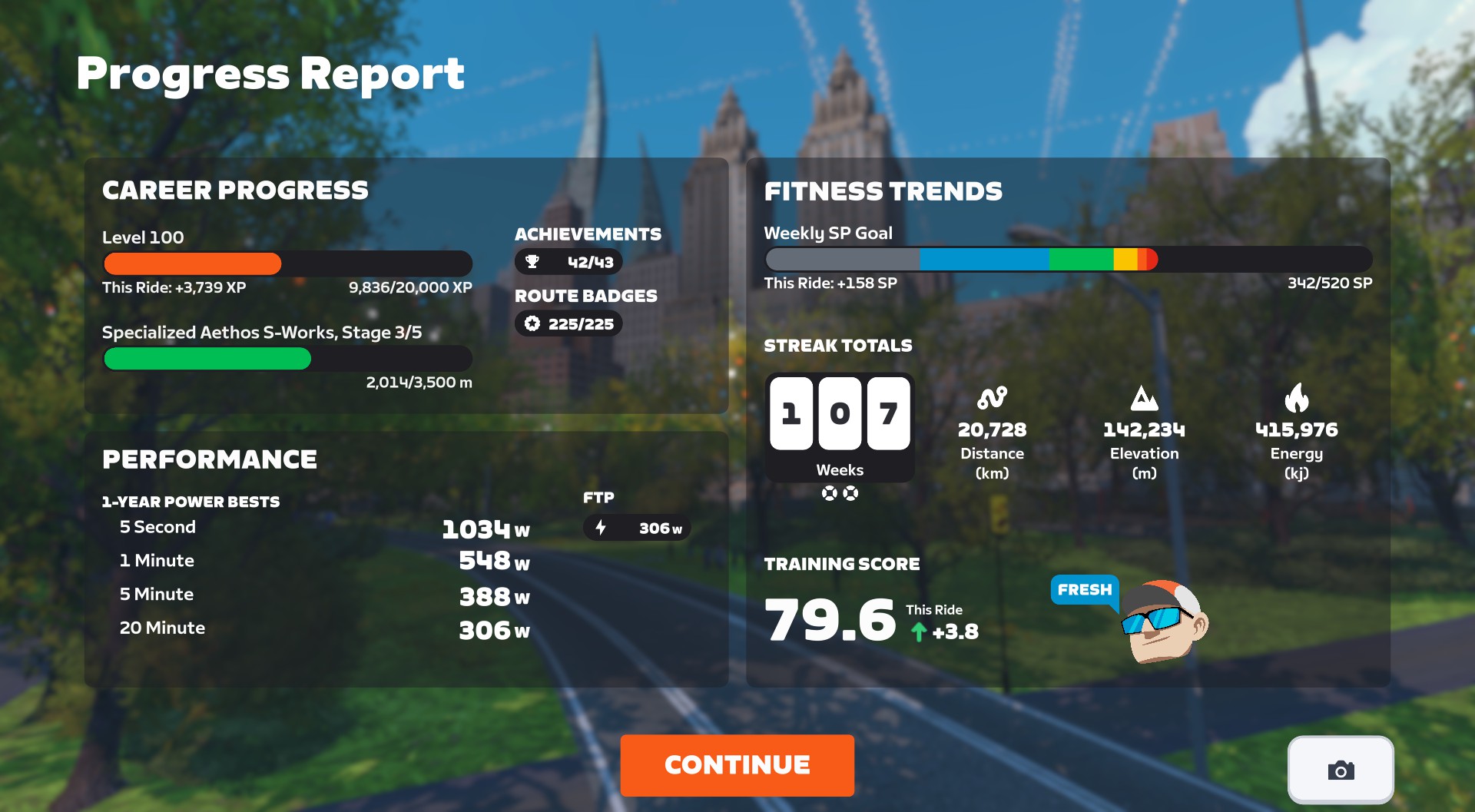
I think Zwifters will be universally happy with this change, as the new Progress Report contains a lot of helpful info, including:
- Career Progress
- Current level, plus how close you are to the next level, and how much progress you made in this activity
- Upgrade status of bike frame, plus how close you are to the next upgrade, and how much progress you made in this activity
- Performance
- 1-Year Power Bests, including indicators if you set a new PB in this activity
- Current FTP
- Current Race Score
- Fitness Trends
- Weekly goal progress
- Streak totals (Streak count plus Streak distance, elevation, energy, and number of Streak Savers available)
- Current Training Score, including change delta from this activity
- Training Status
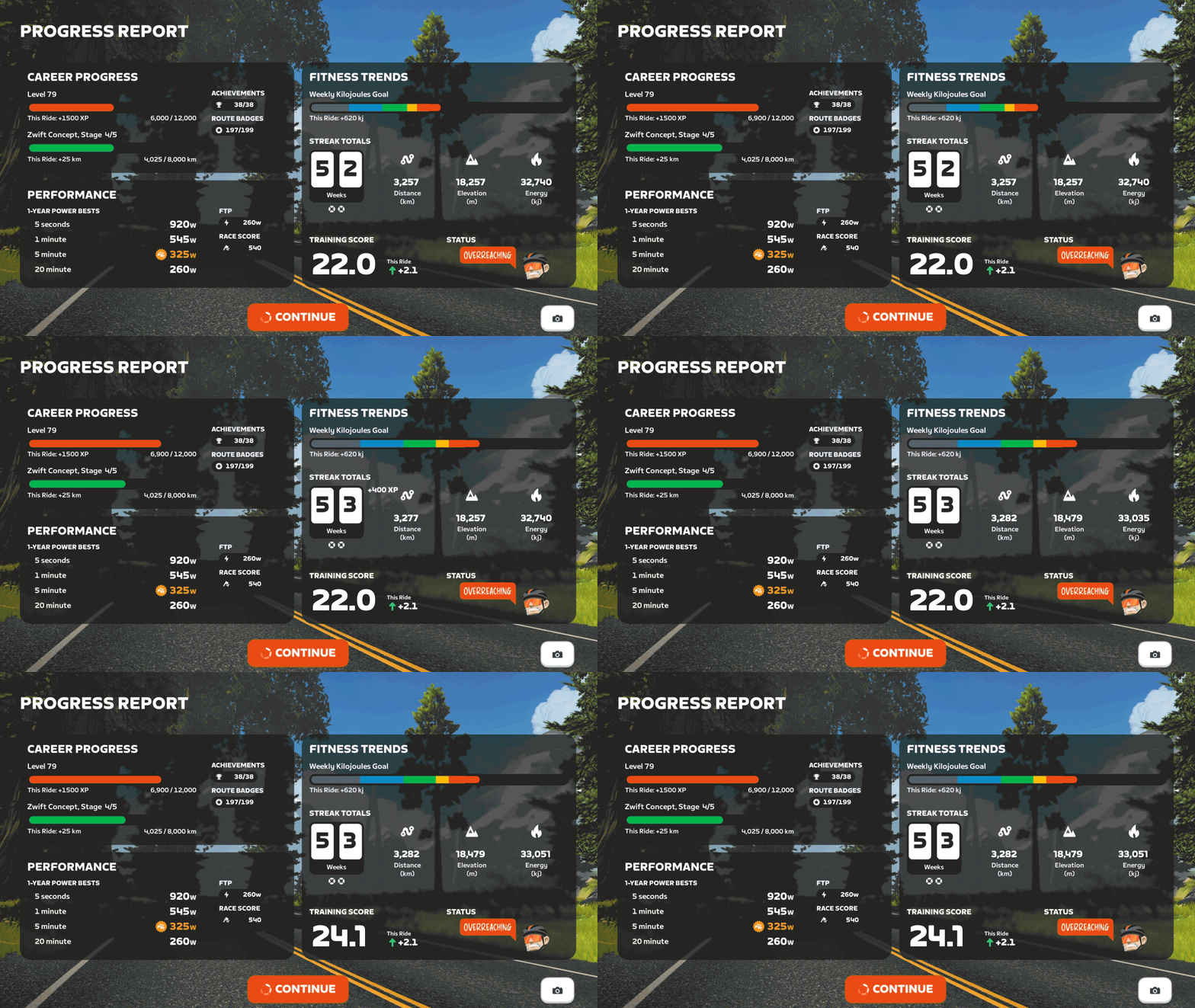
The screen even includes a button you can click to snap a screenshot. Nice!
Discuss the new Progress Report on Zwift’s forum >
New Route Badges
Six routes that were previously event-only are now available for free rides and meetups. Go get those badges!
- No Sleep Till Brooklyn (New York)
- Richmond Rollercoaster (Richmond)
- Innsbruck KOM After Party (Innsbruck)
- Yorkshire Double Loop (Yorkshire)
- Southern Coast Cruise (Watopia)
- Jarvis Seaside Sprint (Watopia)
Escalator Adjustments
Two of the release notes were related to the escalators on New York‘s newer roads:
- Reduced the effort required to ride up the escalators in New York.
- Improved the New York escalators to better balance the boost effect across riders of different weights.
After some testing, we can confirm that Zwift made two changes to the escalators to address complaints from Zwifters. First, they “reduced the effort,” which means they reduced the gradient feel of the escalators. To be precise, we’ll only feel 25% of the actual gradient. So while the escalators are around 20% in terms of physical pitch, Zwift will only send 5% to your trainer, and that’s only if your trainer difficulty is set at 100%.
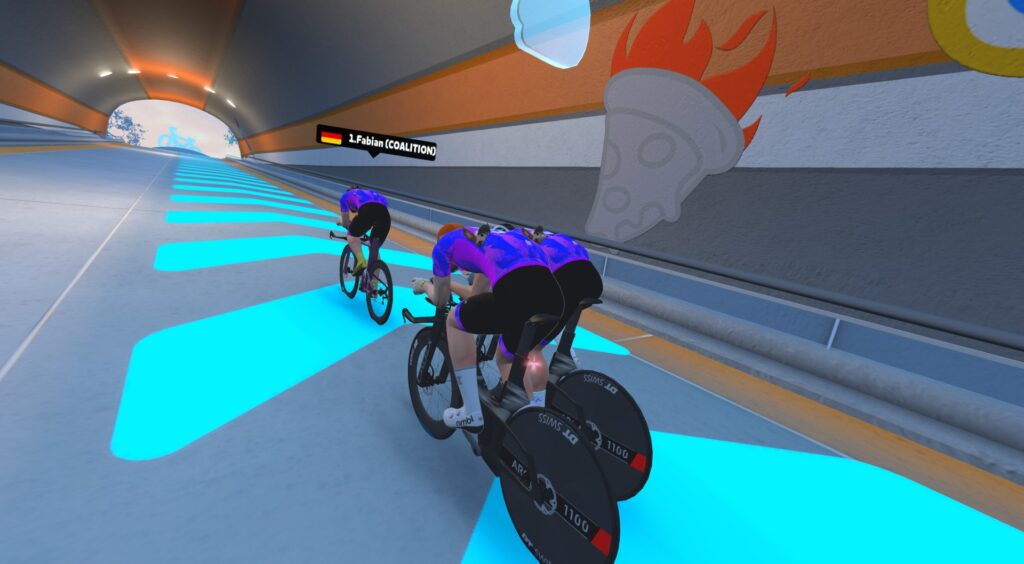
This will make the escalators a bit more fun to ride, since it won’t feel like you’re “hitting a wall” when you encounter the short, sharp ramps.
Secondly, Zwift has changed the power “boost” given to help riders up the escalators. Prior to this change, Zwift provided a flat power boost to all riders up the escalators (Zwifters estimated it to be ~1,200W). This gave lighter riders a distinct advantage, so this update changes the boost to be more watts-per-kilo based, meaning riders of varying weights will more naturally match each other’s speeds up the escalators.
I tested the updated escalators, and they appear to be working quite nicely now. But give them a try yourself, and share what you think in the comments below!
Resistance Bug
Zwifters began reporting resistance issues after installing the v104 release (see comments below for examples from Zwifters). On the morning of December 18, Zwift staff posted the following on this release’s forum thread:
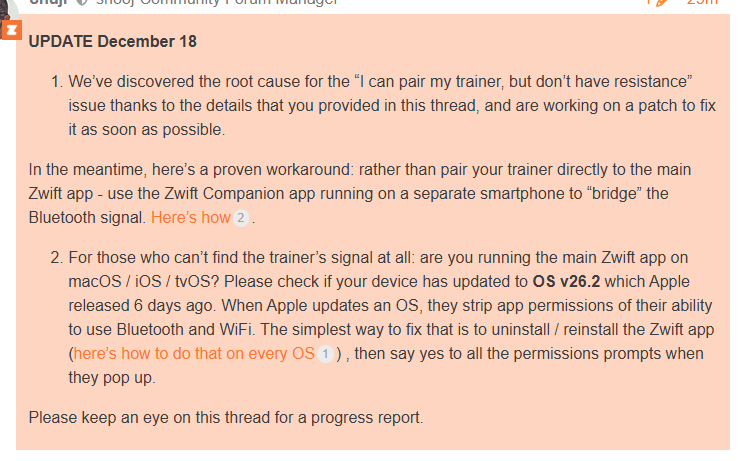
UPDATE (Dec 19, 2025): Zwift has released version 1.104.3 (157245), which fixes the above bug.
Release Notes
Zwift supplied the following additional release notes:
- Zwifters using Zwift Click v2 can now disable virtual shifting in Zwift Settings under the Hardware tab.
- Fixed an issue that could potentially cause connection issues when pairing fitness devices using Wahoo Direct Connect (WiFi or Ethernet).
- Fixed an issue that could cause a saved activity to have an incorrect name in some situations.
- Fixed an issue that could cause Ride Leader and Sweeper names to be displayed incorrectly in on-screen chat messages if emojis were present in their names.
Discuss this update in Zwift’s forum >
Questions or Comments?
If you spotted any other changes or bugs in the update, please comment below!

The new progress report is excellent. It just stays on the screen long enough for me to read everything. The screenshot is a nice little touch too. 👍
Agreed about it being a good screen, but I’d prefer that we got to choose when to leave the screen, rather than it disappearing after a set time. Maybe I read more slowly than you after a hard session!
I’ve found that if I move the cursor on the screen, the countdown stops. At least with me on a Windows laptop.
cheers, I’ll try that
You’re not alone Tony, I barely have time to look around more than a few lines before it disappears. Not sure why the timer on Continue is necessary. Or at least they could add a ‘Stay On Screen’ button.
Just touch/click on the screen and the timer goes away.
Ah! That explains why I was sometimes getting completely smoked up the elevators by other riders in my group without them putting in any power surge. It was so much harder to keep up with the light-weights than the unassisted London escalator, which seemed backwards. Glad it’s fixed.
I’m a fellow heavy rider, and yeah, it was super frustrating to be putting out 1000 watts and still get absolutely demolished up the escalators. I had sworn off the NYC map until it got fixed, so I’ll have to go check them out again and see if its worth giving it a second chance.
Phew! currently on level 99 and hope to get to 100 before the inevitable increase…..
Any word on timing for the level change?
Nope.
Wish they’d consider a prestige option once at 100, reset to level 1 but get a unique badge (like the verified rider tick) a different badge for each prestige level
What level change? 😶 (On level 91)
Looking forward to not getting dropped like a hot potato on those escalators… still wish they didn’t exist!
I wonder if the “connection issue” bug fix is related to the weird experience I had this morning. Riding with Coco in Yorkshire, i had a couple of times when all riders other than Coco disappeared from the screen, and then Coco would race ahead (I’d have to do 4w/kg+ to even hope to stay with her), then Coco would disappear. I got a “connection lost” message in the top left of the screen, but it was still recording my wattage and everything else correctly so I was still connected to Zwift. After a short wait, I would do a teleport to rejoin Coco and all the other riders were back as well. Happened 3 times and my drops multiplier reset each time. Very weird.
All of Russia has this problem. Just use a vpn.
The problem will disappear.
That is not a bug. It is a network connectivity problem.
i like the new progress report, but not the elevator change. The elevators used to be an interesting tactical challenge for races, not anymore (disclaimer: I’m a lightweight rider….)
ha ha, so by “tactical challenge” you mean “tactical challenge for others”, or “tactical advantage for me”??! 😂 I like your honesty.
“interesting tactical challenge” is an interesting euphemism for “basically a cheat code for lighter riders.” (disclaimer: I’m an 108.8 KG rider sick of getting dusted while busting hard up those things).
Heaven forbid that a light weight rider should hold any advantage over a heavier rider. Currently for same watts per kilo the heavy rider is faster on the flats, a little faster on the climbs, and much faster on the descents. Just look at the results for a time trial to see how fair it is to the light riders. The one place really light riders have an advantage is when their total watts aren’t high enough to force upgrade to the next category. When the race ends on a hill they do well, assuming they don’t get dropped on a descent.
stop crying
Well … that’s how physics works. You assume that maintaining the same w/kg is as easy for heavy riders as it is for light riders which is not. So yes a heavy rider has an advantage on the flats but a lightweight has an advantage on the climbs.
Paul, you do realize that raw power is far more important than power to weight ratios when it comes to speed/steady state efforts on flat terrain right?
You’re missing the most important part.
Draft Indicator! Finally!
Draft indicator? Where?
see the link to the Zwift forum discussion of the update, which provides the details. Very positive development
Oh geeze. Once again Zwift buried the lede, and didn’t put that into the release notes until a few minutes ago. I’ll add a reference above!
The draft indicator is not what is really needed (and certainly not as useful as what is available from sauce). The riders in the pack are in the draft pedaling hard just to ride into the back of the riders in front of them. Those wasted watts are what we really need in an indicator. Maybe if the fraction of wasted watts was shown in a different color in the draft indicator we could figure out what was going on. There are riders in the pack using 10-15% less power than the others, all because they aren’t riding into the riders in front of them.
I like the new indicator, it’s a nice improvement, but you are not wrong about the wasted Watts. Personally I am OK with having some element of skill involved in drafting. My goal is to be better at it than the people around me, without any indicator telling people exactly what is lost or gained.
Report,routes available, draft meter, losing the ‘close the gap’ message, escalator fix.
This is a very nice update!
I wish the progress in current challenge had been added but otherwise a very nice summary.
Have they actually fixed the direct connect / wifi issue? I think this is the third release in a row where it’s been fixed……fingers crossed
I don’t think so, no. It just got worse. Yesterday, wanted to start my ride as a group leader, but my avatar was staying “sur place” because of no signal at all on my kickr bike. When is Zwift going to start to test their updates decently prior to releasing? Grrr… Connection was great with the previous update, but not this one. On the contrary with the release notes. I hope you have more luck than me.
„…up the escalators (Zwifters estimated it to be ~1,200W).“
Should be „…up the escalators (Zwifters estimated it to be ~200W).“ or was it really 1.200W additionally?
Really 1200 watts. 100kg+ riders getting to above 20kph from a standing start on a 20% gradient.
The very high watts is why it felt like it didn’t really matter what you did on the climb, your own power was a much smaller component.
1200W, Jerichos. Really.
The new draft indicator is huge – have I been living under a rock or is this a big surprise? It’s sleek, gets rid of the annoying “close the gap” message, and most importantly, it’s something a lot of people have asked for. I’m sure there’ll be kinks to work out, but it’s an amazing feature to sign off the year with.
I have a T-shirt with the words “close the gap” in that exact font and graphic. What should I do with it now? 🙂
Its worth more now as its Retro.
Did I miss memo? Some Scottys seem to be riding higher in the jersey pocket than others.My Scotty’s teeth don’t show but other Scottys have toothy grins.
I think the longer your ride streak, the more of Scotty you see. I removed it. The additional CdA was causing havoc with my aero 😉
I’ll start by saying sorry for my negativity
Another Update and still no new Levels, they have added some good things but I’ll get the 6 new Badges/Routes done in a week or two and go back to being unmotivated to ride Zwift. Rouvy is looking good, at least it wouldbe something new and different.
According to Eric Min, new Levels are coming, but Zwift has taught me not to hold my breath as it will end badly. If only I could do the same thing with my monthly Zwift subscription fees, “hay Eric, my Zwift payment is coming… maybe I’ll pay when we get new Levels”, I think we’d both be waiting a while
Do you do group rides or races? If not, give them a shot. For me it’s the social side of Zwift that’s so awesome.
Agreed – see you on a Volt ride sometime soon Matt!
Definitely Tony!! I’m leading on Christmas morning! See you there?
As someone who has been level 100 for ages now, I think it is pretty unlikely new levels are in the near future. The stats suggest a very small number of active riders have even reached the max level, so new levels would benefit a very small (albeit seemingly quite dedicated) number of people. That said, there are still dozens of QoL improvements that would impact far more riders irrespective of level, so I am all for that.
I think with the upgrades and (the soon-to-be-completed, personally) factory tour challenge, there are some carrots to be chased still for higher level riders. Let’s be honest, as a level 100 rider myself, I am not expecting special treatment to get me to stick around – I am clearly an avid user already. Zwift needs to attract and sustain riders of all types, levels, and experience, which is helped significantly by QoL improvements and not more levels they are already actively grinding out.
We are a tiny community in Zwift. More levels will come! 🙂
I think it was in the last Eric Min ride he said there was a 50/50 chance that new levels would arrive before the person who asked the question hit level 100, and that was early jan I think. It was mentioned on this site somewhere I believe.
Good to know! It seems that aside from making “fresh” cosmetic rewards for the levels, actually expanding the level cap is probably pretty trivial. I have come to be satisfied with the few chase-able goals remaining in Zwift for me and just use it as a convenient exercise platform. It took long enough to get this most recent challenge!
By early next year, I suspect I will have maxed out all the bikes I personally targeted, so maybe I will go back to routes. Across the entire population using Zwift, I am sure most people have plenty yet to chase! If levels remain among those carrots, that is great! 🙂
Well said.
Personally I fail to see the attraction of further levels – it’s not as if you get any in game benefit. I certainly get my motivation from other aspects of the platform – levelling up is just something that happens. But I appreciate that everyone is different.
I quite enjoy Rouvy as a diversion from Zwift and it has many upsides. That said, I’m lvl 99 on Zwift after 8 years and it took me 6 months to max out the lvls on Rouvy. If a long-term challenge is what you’re looking for, it might not be your best choice.
Wow! That’s super impressive – In the two years since Rouvy levels 80 to 100 were added, RouvyAnalyzer shows 59 people have reached level 100 ,only 459 have gone beyond level 90 . In under 6 months as well, wow!
Has anyone noticed that this update appears to have added a “pause” button to the companion app in workout mode, right next to where the ERG indicator…was??. Its missing. No option to turn on ERG in the action menu either. It almost looks like my trainer (a Stages SB20) has suddenly become incompatable? Help…anyone?
I’m having the same issue.
After the update I’m having issues with the ERG mode. Everything was fine until my last ride (Sunday 14th of December). Today I got on the bike and although it said ERG was switched on both in the app as on the web version, it didn’t catch up with my training program while I kept the requested cadence. Anyone else with this issue?
I’m having the same issue as well after the latest update. ERG on – but issue to sync with the cadence target. For now, I need to shift the gear manually to meet the cadence – power target. Before, the ERG / Trainer will adjust the cadence – power acordingly without the need to shift the gear.
I thought i’m having an issue with ERG (enable / disable issue) but ERG seems working. It disable automatically as I stop pedalling and re-enable back when I pedal steadily.
Using Window 11 with Magene T300 trainer
Connectivity: Bluetooth
I have the same Issue. Switching from bluetooth to ANT+ is a workaround for me. But now the steering isn’t working anymore
Tacx Neo Bike and Windows 11 PC
Got zwift update on Windows now have no trainer resistance
Like it’s stuck in erg
I’m having a similar issue, but on Mac. There’s no trainer resistance at all when I also connect my power meter pedals (which I prefer to use since my trainer’s power is horribly inaccurate). If I don’t connect the pedals and just use the trainer, resistance works as expected.
Up until this update, resistance with the power meter pedals worked as expected.
Same issue. I troubleshooted for quite a while. Windows 11 and I am having zero change in resistance whenever I start up any incline. I thought it was my trainer (wahoo Kickr 4) but I started a ride inside the wahoo app and everything worked fine. Bummer for today. Only really commenting so others see the issue!!!! Let’s get this one fixed, Zwift.
I’ve been fighting my Kickr V4 for hours over this issue, and nice to see it may not be my actual hardware here.
Make sure you raise the issue directly to Zwift by contacting support and describing the problem – I’m guessing they prioritize fixing these issues if they’re reported by a bunch of people! (And I’m eager to see this fixed asap!!)
Update includes change to how badges/achievements are now displayed. Cycling only badges under cycling, Run only badges under running. No joint totals anymore, a fairly regular Forum request from non runners.
They already enabled that last week, so it’s not technically in this release.
No game update last week. I still see the old method of displaying all badges when cycling and running on those devices not yet updated to latest game version. IMO technically in this game update ? [unless you are writing about the Progress Report which is not what I am referring to ]
That is correct, there was no game update last week, but I saw this change in the previous version of zwift last week. I guess they enabled it early for some people? You can search the comments of this site to see other people reporting this. (I’m talking about the badges.)
It’s also buggy for running – for the Extra Credit achievements under running, it says I have 10/10 but only shows two actual badges
I did a ladder race yesterday, and the powerup that was available was a shost. I’m sure that I still got the draft indicator when i was behind a ghosted rider.
As it should be. Ghosts are invisible, but still have bodies. So you should be able to draft off them, right? (Things I never thought I’d be discussing in the context of cycling…)
Took me 15 minutes last night to figure out what the draft indicator was (I was rolling very hard with limited brainpower), but it’s SUCH a welcome feature. Might be handy to put some sort of helpful visual icon next to it, though, so others don’t have to wonder what it is. Not everyone reads release notes.
15 minutes, that long? I’m surprised you managed to write this text. It took me about 20-30 seconds to recognize that it was a draft indicator.
I’ve never really understood why people want a draft indicator, especially if you don’t have the ability to move your avatar around to get to the optimum position. Isn’t it obvious that if you’re directly behind, your getting a decent draft, alongside is none, and in between those is some degree of draft. That said, I think the way it has been presented on screen is decent and means you don’t specifically have to look for it as it’s obvious enough in your peripheral vision.
Latest update today installed now have no resistance in any gear, uninstalled zwift app and re-installed no difference, anybody any idea, i connect via Bluetooth never had an issue before (windows 11)
You are not the only one. Try connecting via phone. It works for me.
tried that does not connect, even loaded zwift on my android phone but massed that up as well, phone would not shutdown plus other issues, uninstalled zwift phone now back to normal, this update needs rolling back
Same here, but ANT+ works for me on Win11. It’s only a workaround. I hope they’ll fix this soon.
Reverting back to my old Ant+ dongle did NOT work for me. No resistance changes on gradients. Windows PC with Direto XR. Complete Zwift reinstall, several re-pairings, reboot, etc. Nothing worked.
Then I installed MyWhoosh, and it worked fine. 🙁
I am a volunteer club ride leader and will need to call for backup until this is fixed.
same problem!
I am having connectivity issues since the update. Specifically, I am connected but the trainer isnt adjusting the resistance so my power is always lower than it should be for the given workout. Also, I am not able to calibrate via spindown, it is stuck on waiting for device… screen. I was able to pair the trainer through my phone and it works okay. I hope this is something that will be addressed soon. I am running Win11, and Flux S on my laptop which has BT built in.
I have the Same issue. In ERG the Résistance does Not Change. Also in Hills the resistance ist Always the Same and Power than IT normally was. Cant do my Work Out.
This update changed rolling resistance or aero or something for me… I have to ride 2 or 3 gears higher than usual for the same wattage. I used to be able to ride in 34-15 at ~90-95 RPM and make ~120-130 watts. Now I need to use 34-13 or 34-12 for the same results. I’m on a Kickr Bike V1 connected with bluetooth, and I confirmed that the bike’s gear profile hasn’t changed (50-34 with 11-28T cassette, same as it’s always been). Anyone else have the same issue?
Yes. It seems there a few of us in the comments qho experience lack of resistance in ERG dince the update.
I’m not getting a total lack of resistance though.. it still increases and decreases with the gradient, there’s just less resistance across the board.
Yeah, I am not able to get to 200W without spinning like crazy. And that is Z2 for me
I’ve got the exact same issue on a v5
These are some sweet little adds. Now if only we could favorite routes! I remain hesitant to complete all routes in order to keep Tempus Fugit easily found in the ever-growing list of routes within Watopia.
Asking here since it was broken before, but did they fix the automated TT->road swap issue from before? There was a time where joining a group ride after a TT one (workout for me usually) led to the correct swap to my most recent road bike used. Eventually that just totally broke (it would not swap at all), but it then would swap to the basic Zwift road frame. How strange!
I have been upgrading the Specialized Halo recently, so not swapping needed, but this was a great addition/idea that always seemed to fall short of expectations maybe just due to some poor interactions with people’s garages.
We just tried to ride after getting the update. Both had no power displayed, no elapsed time & doing a banded ride we weren’t in the band. Tried several times to quit & rejoin, got out of & back into game, restarted computers, cycled router. Nothing worked. Same happened when trying to do a free ride, which means nothing happened.
Same as a few others below – no ERG mode in a workout despite it saying it’s on. Restarted everything and still it working. Frustrating.
same problem!
Spotted some more new badges today –
Empire Elevation
Kaze Kicker
Hudson Hustle
Cobbled Crown
Peaky Pave
The Epiloch
I’m sure the way of showing badges was fine in the early days of Zwift but I’d love to have the ability to see the badges in list form with options on how to order them.
Those were added in the previous update… but none of the routes are usable yet. Sounds like they may be planned for Zwift Games in a few months, but until then I’ll work on getting Strava segments and route detail pages created!
Still in favor of Sauce’s draft feature. Much easier to glance at an “analog” style gauge placed where ever I wish on my screen versus a thin line that expands horizontally buried in my POV.
The new progress screen has a lot of information, but generally after a zwift ride the last thing I want to do is sit around where my zwift screen is and look at the information. I want to go and sit in a more comfortable location, after changing, etc, and then look over the various stats. So it would be nice if this screen could be shown say on the my.zwift.com website afterwards or something like that.
@Eric Schlange Seems they have split the achievement badges between cycling and running as well.
Already mentioned in these comments, and already mentioned that this started last week.
I’m sorry, I did look through and didn’t spot it. The achievements only changed for me tonight after the update, I checked yesterday and it was still the old style for me.
I noticed that I was using harder gears on my wahoo kickr for the same results before the update. Do I have to reset the wahoo or change the setting in zwift to return to what I had before.
Hey Eric, any thoughts about testing the effects of the aerodynamic based powerups (the aero boost and the draft boost) on the draft indicator? I was wondering on a Giant group endurance ride tonight if when using that kind of powerup if it will actually affect the real-time reading of a rider’s draft indicator. That might be a good question to ask the Zwift developers!
Already tested it with the Draft Boost – see video at https://zwiftinsider.com/draft-indicator/
Aero boost doesn’t change the draft indicator at all…
Have you heard anything about SB20 bikes no longer being supported by Zwift? There seems to be difficulty assigning mine as a controllable bike for resistance since the update. I can assign it as a speed sensor. Weird.
General problem for various bikes. Not only SB20.
Did spend more than an hour yesterday, nothing helped. Can’t go back to older version of the app and am stuck now.
So it’s not on the bike, it’s on the app. “luckily enough”…
same problem!
When I have a large TV, the draft indicator is too high for the avatar. It should be at the bottom of the screen.
Vandaag deze nieuwe update gehad. Probleem nu is dat mijn smartrainer geen weerstand aanpassing heeft!
This update version 1.104 (15667) needs to be rolled back to previous, it has caused me major issues with my Tacx Neo Bike uable to use it at all now for zwift, please get this version rolled back or i will have to find altenative platform and cancel zwift.
Anyone else on a KICKR Core have erg not engage? Says its on but it isn’t- doesn’t hold a consistent power in a workout
same problem! erg not working
The latest update has messed up the resistance on my Saris H3 trainer, it didn’t respond to the change in gradient on a ride this morning, it was perfectly fine 5 days ago. I’m hearing others are finding the same?
same problem!
previous version worked great, after this update resistance not working on my trainer!
I have the draft indicator but for some reason don’t have the new progress screen or access to the new badges. Any ideas why this may be?
My guess is you aren’t on version 1.104 yet.
For everyone experiencing resistance issues, it appears Zwift has found the cause, figured out a fix, and are working to roll out a patch ASAP. I added info to the post above, but here’s a link to the forum post from Shuji where you can read details: https://forums.zwift.com/t/game-update-v-1-104-december-2025/660561/120?u=shooj
update on my issue with version 1.104 (156617) on Tacx Neo Bike Smart, have tried everthing to resolve issue with no success, problem :- No resistance and no ERG working, wasted whole day trying to resolve when i new all along it was the update, Not Happy|
I’ve just recently had to submit a ticket to Zwift support. When on the home screen and trying to do the challenge of the week or the big apple rides, I can’t select them. The previous version of Zwift I was able to select it, but the latest update doesn’t allow me to select it. I tried the same thing on iOS. The challenges were selectable on the previous version, but are now unavailable when updating to the latest version. This update seems to have a lot of bugs, including trainer, resistance issues.
I could have sworn, I got the badges for southern coast cruise and Jarvis island seaside loop when we did them in ZRL. Now they are showing as not done, anyone else seeing the same?
Same here.
No, I don’t think so. I specifically have these recorded in my spreadsheet as completed and got the strava segment but there was no badge. And this is not the first time they’ve introduced a route without a badge (in the current badge focused era), and then later added badge for.
Now if they would update the companion app so I can see the new route additions that would be awesome. All in good time I guess.
Same request here. I want to add them to My List so I can check em off!
In the New York add on there is a park with a zebra crossing. Waiting to cross is a man with a Labrador. It doesn’t seem right to keep riding. The cyclists should wait for them to cross. It is only a little thing. I stopped, the labrador seems friendly.
When you write an article about new update of Zwift, why don’t tell the new number of the application of Apple TV, which is the most popular!
The version number on AppleTV is the same as the version number everywhere else. So I’m already doing what you asked… 😉
Latest version is 1.104.3 (157245). I see that on PC, iOS, and AppleTV, to name a few…
Like many people the update has caused me issues. I run Zwift on AppleTV and use companion app to allow multiple Bluetooth connections. It was seamless before the latest update, auto connected and everything was good but now once I select connect via phone for pairing it reverts to connect via Bluetooth and greys out phone option and cannot find any devices.
I’m on version 1.104.3 and have tried running ca on Android phone and ipad but have same problem on both. I also deleted app on ATV and reinstalled but no change, so frustrating.