

About the “Ask Eric” Series
Solid answers to real questions from real Zwifters. That’s what the “Ask Eric” series is all about. My hope is that the next Zwifter with the same question can find an answer quickly and easily.
Got a question? Send it to [email protected], and perhaps it’ll show up in an upcoming post. Let’s begin!
How do I learn about Zwift race routes (distance, elevation, etc) before an event?
Hi Eric,
Just wanted to find out if I go on to a ride or a race on the top right hand side off the screen, how do I look at the distance and elevation before I enter the race or ride. Enjoy zwifting like crazy is the best thing that could happen to my family.
Thanks again,
C. Hoffmann
Understanding your race course is one of the easiest things you can do that pays off in a big way. This is true with outdoor bike racing, and it’s true on Zwift!
There are lots of ways to learn about a particular event’s route, but it’s not as straightforward as it could be. Here are a few tips:
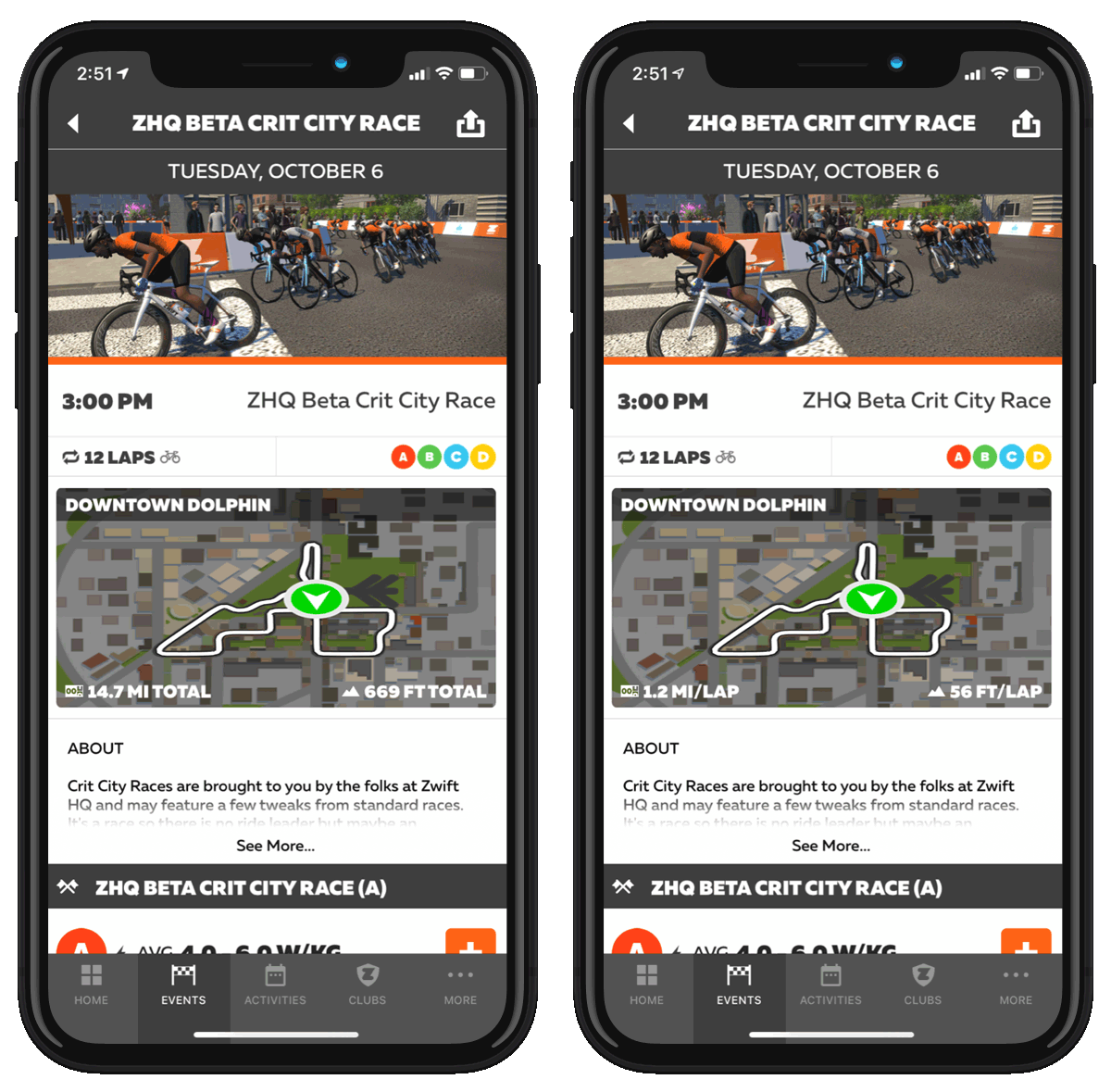
- Don’t just sign up for an event from within the game’s join screen. All you can see there is the event’s title and categories – you have no idea what route it’s on, how long it is, etc! Instead, use the Companion mobile app, which at least tells you the route’s name, distance, and elevation.
- Want more details on the route? Zwift Insider has it! We’ve got the web’s most detailed pages for every route on Zwift. If you just Google something like “Watopia Figure 8” our page will probably be the first one that comes up… or you can find the route on our master routes list.
- Pro tip: in Companion, if you tap the map of the route, it will change to show you the per-lap distance and climbing (see image at right).
There’s a lot to learn when you first start racing on Zwift – but don’t get overwhelmed. The more you race, the more you’ll learn the routes. You might even consider trying to race just a small number of particular routes, so you can learn them well. Good luck!
How to choose the correct Zwift racing category
Eric,
There is a lack of information as to what it means to be a category X racer. The w/kg rules are easy to read but understanding just how to get that w/kg number is a little under specified. For instance is the weight measured with or without clothing. With or without bike shoes? How about the helmet ? . Is the ftp 95% of my best 20 minute effort in the last 90 days? What if my outdoor ftp is different than my indoor ftp? Is it 95 % of my best 20 minute effort as visible to zwift power? Is it 95 % of my best 20 minute effort in a zwift race, ride, meetup? Is it 100% of my best 1 hour effort?
It seems that if you pass the zwift power sniff test you are good to go.
An article/discussion on best practices in this area would be greatly appreciated.
Thanks,
Paul
This is a great question to ask, Paul, as it’s something that stumps a lot of new Zwift racers. Here are a few key points to understand:
- Since categories are mostly based on w/kg, you should start by knowing your body weight in kilograms. Zwift’s official rules state that you should “Use your real height & weight, as measured in socks, shorts and jersey within 24 hours of each event.” These rules don’t actually apply to all of Zwift racing, though – just the highest-level Zwift races. Personally, I weigh myself first thing every morning, pretty close to buck-naked, and that’s the weight I use on Zwift – because there is no clear rule about what “accurate” weight is, I figure this is quite good enough.
- Next comes your power number. I would simply base this on what my current FTP is – from my most recent test, or my most recent power personal best. I would base it on indoor tests, not outdoor, since that varies for many people.
- Now here’s the rub: you have to make sure your FTP w/kg places you in the same (or higher) category ZwiftPower does, because if you race at a category lower than ZwiftPower assigns to you, you’ll be removed from the final results. ZwiftPower determines your category based on your three best 20-minute power results from race events in the last 90 days. FTP is calculated as 95% of that 20-minute power, so if you had three races which averaged out to 4.1 W/kg, you would qualify as a B since 4.1 * .95 = 3.9 W/kg FTP. Here are the W/kg and pure-wattage cutoffs ZwiftPower uses to determine your category:
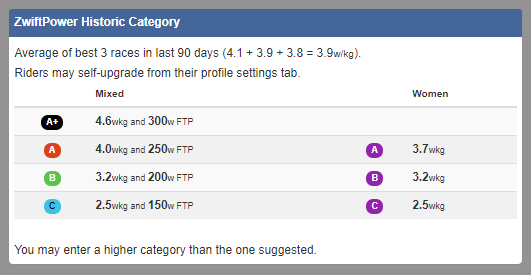
The simplest advice is to start in a category estimated by your weight and FTP. Then after that first race, just make sure your weight is accurate in Zwift, and race in the category ZwiftPower assigns to you! This way, you never have to worry about doing the math – ZwiftPower handles that for you.
Is there a way to spectate Zwift races?
Hi Eric,
Is there a way to spectate races? I know you can just click to watch a rider freeriding a route, but what about watching them in a race that isn’t being livestreamed somewhere? Thanks for the help!
Sincerely,
E.F.
Sigh. I really wish I had better news for you, but there’s no easy way to watch another Zwifter in a race. Seems a bit silly, right? Especially with Zwift races becoming more high-profile, and top teams wanting to have a team car/DS who can watch the action and provide guidance to racers.
You can do it, but it’s more hassle than it should be. Basically, you have to pretend to join the same race as your friend… then click to watch them while your avatar sits in the start pens. In fact, I used this technique to watch my buddy Sam do his first-ever Zwift race just yesterday! Here’s how I did it:
- Sign up for the same event as your friend (same category, too)
- Sign into Zwift and join the event start pens, as if you’re going to be racing
- When the race begins, just click through the rider list until you find your friend. Now you’re watching the race from their perspective
You can even open Zwift Companion and send your friend private messages during the race – super handy if you’re trying to help a newbie racer.
And in case you’re wondering – Sam did very well in his first race. He joined the Cs in a mixed-category race, but he didn’t blow himself up trying to hang with the As and Bs at the start. He hung with the main pack of Cs for most of the race, before blowing up in spectacular fashion just like most of us did on first race (or in my case, my first 20 races…) He nearly blacked out before climbing off the bike and texting me, “Laying in my sweat on cool faux wood floor with fan blasting me… haven’t worked that hard since college – feels so good… and bad.”
Got a Good Question?
Send it to [email protected], or comment below. I’ll reply if I can, and maybe, just maybe, a more complete answer will make its way onto this series of posts so it can help Zwifters in the future.

