
Zwift version 1.93 begins its phased rollout today. This is a significant update, adding a new HUD panel, additional HUD metrics, and fixing an irksome streak bug. Read on for details…
4 New HUD Metrics
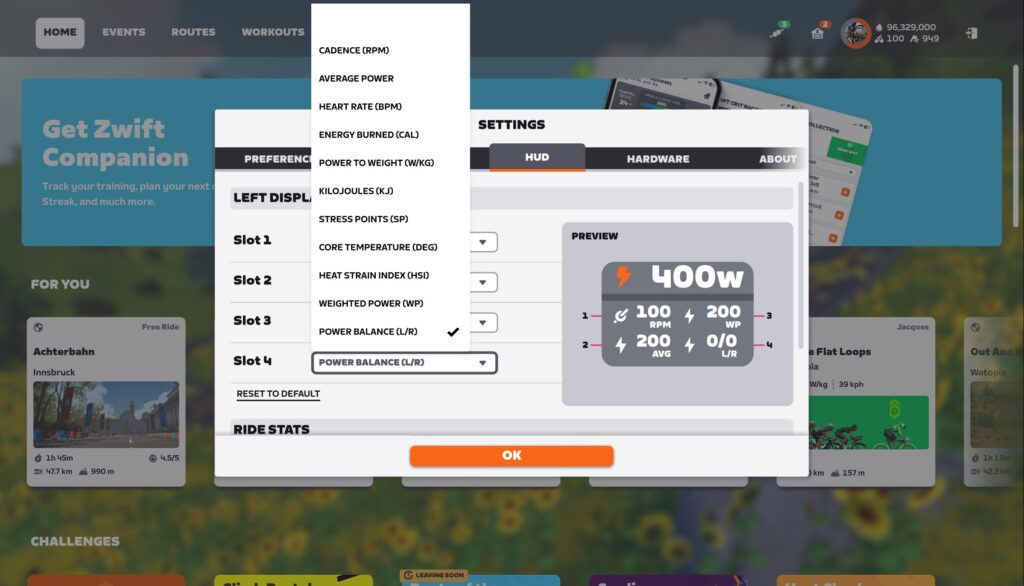
This update adds 4 new metrics to the in-game HUD:
- CORE Temperature*
- Heat Strain Index (HSI)*
- Weighted Power (WP)
- Left/Right Power Balance (see note below)
* the CORE Temperature and Heat Strain Index (HSI) metrics require a CORE sensor. Connect your CORE sensor to your HRM using the CORE app, then the CORE sensor will show up as pairable in the Heart Rate box on the pairing screen. (We published a post 2 years ago about using the original CORE sensor for heat training on Zwift, and a lot has changed since then! Watch for an upcoming post about heat training on Zwift using CORE.)
Two additional metrics, Average W/kg and Average Speed, will be added very soon. They were initially included in this week’s release, but a bug was found in final testing.
Setting Up Left/Right Power Balance
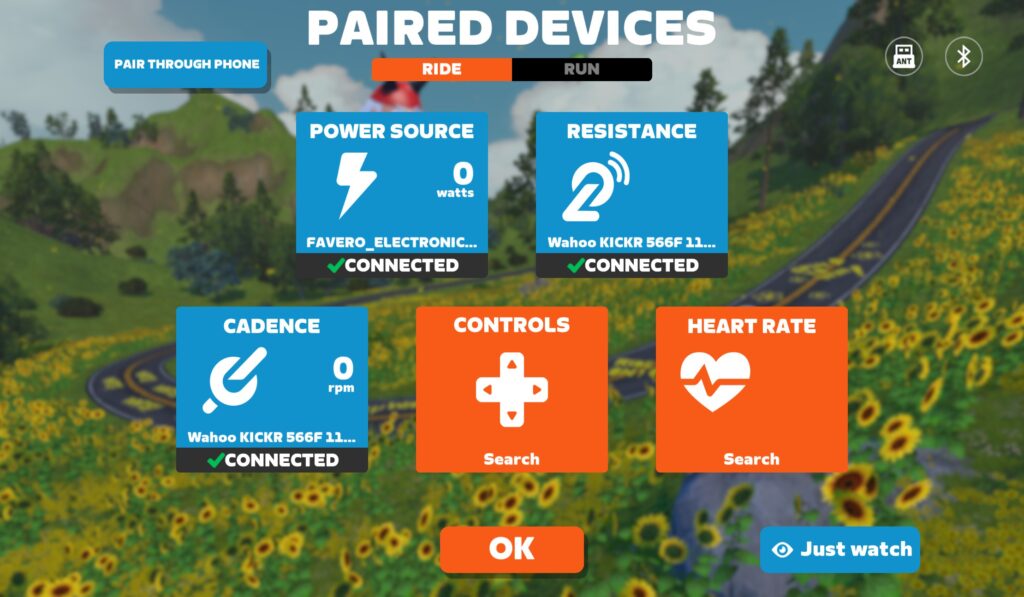
For L/R Balance to work in the HUD, you’ll need to pair a device as your “power” source which transmits Left and Right power via Bluetooth (ANT is not currently supported). Here’s what that looks like (here I have Favero Assioma pedals paired as power source, and my Wahoo KICKR paired for resistance and cadence):
New Ride Stats Panel
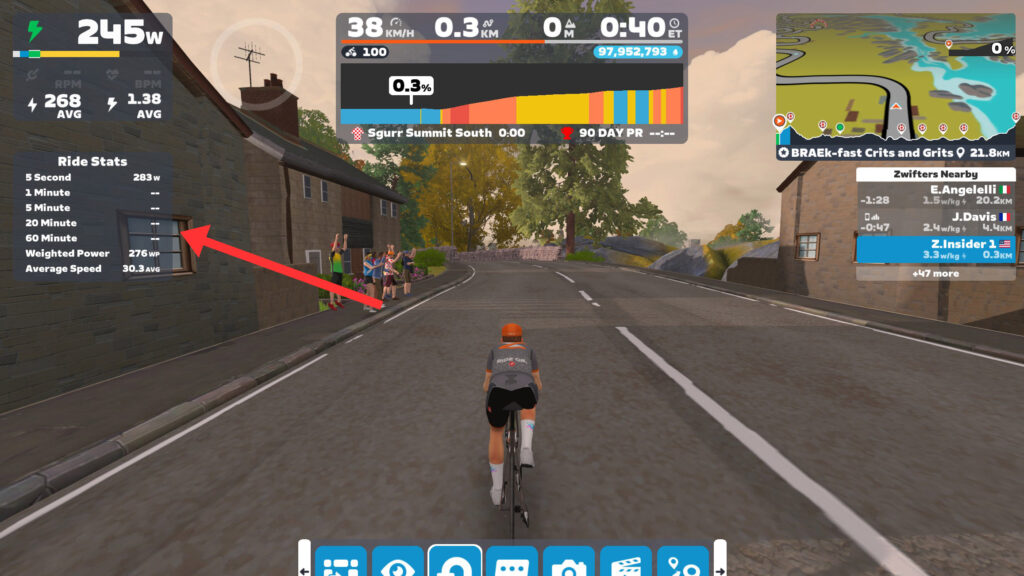
A new Ride Stats panel has been added on the left, showing your Critical Power across five standard time windows:
- 5 seconds
- 1 minute
- 5 minutes
- 20 minutes
- 60 minutes
“Critical Power” in this context is the maximum average power you achieved across a given time interval.
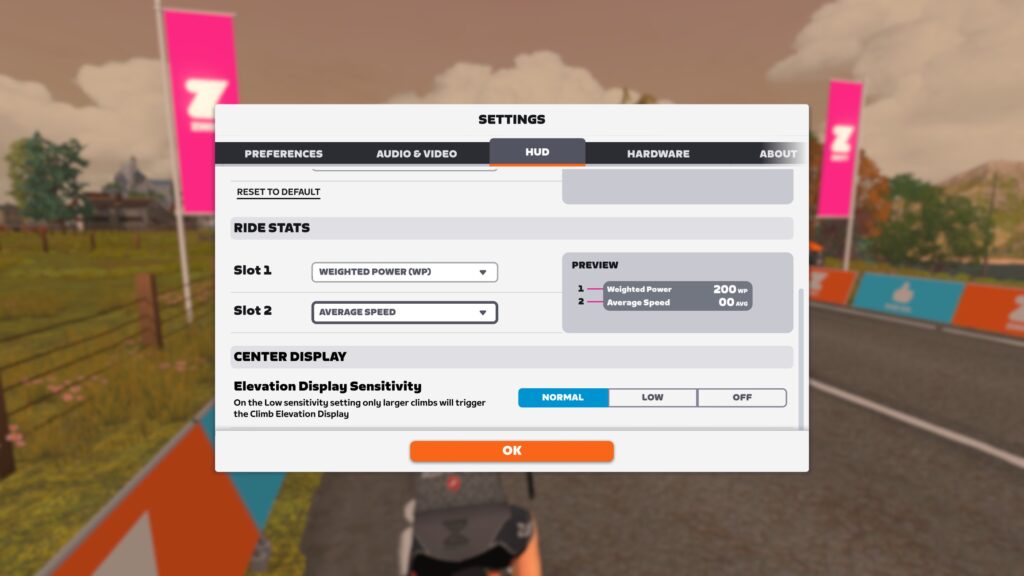
The panel also includes two additional metric slots, which you can configure under Settings>HUD to show any of the 11 available metrics:
By default, the new Ride Stats panel won’t show while you ride. Click the “Toggle Side Display” button in the action bar to swap between showing segment leaderboards and the Ride Stats panel. (We’d love to see Zwift saving our preference here, so we don’t have to toggle the Ride Stats panel every time we ride.)
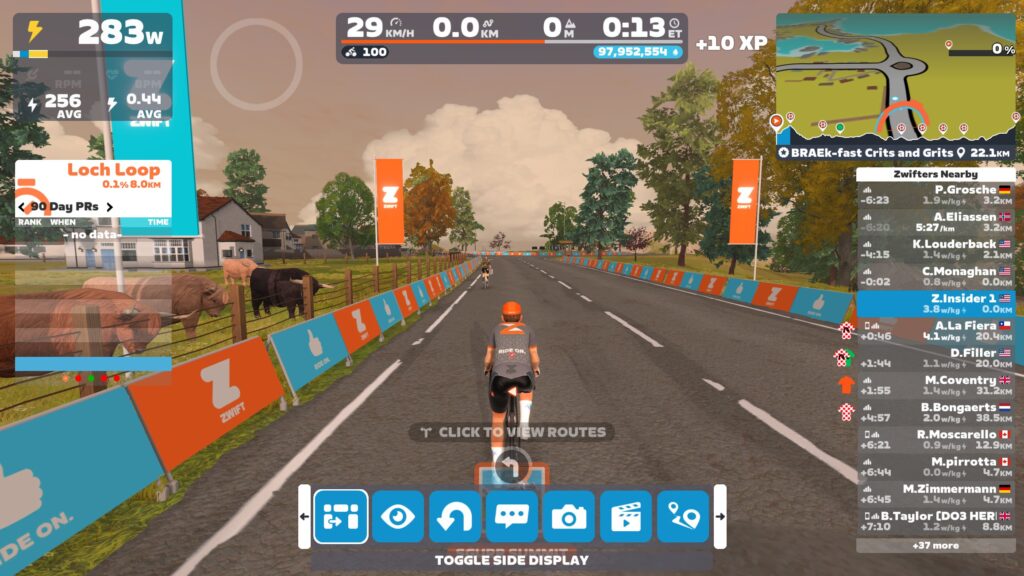
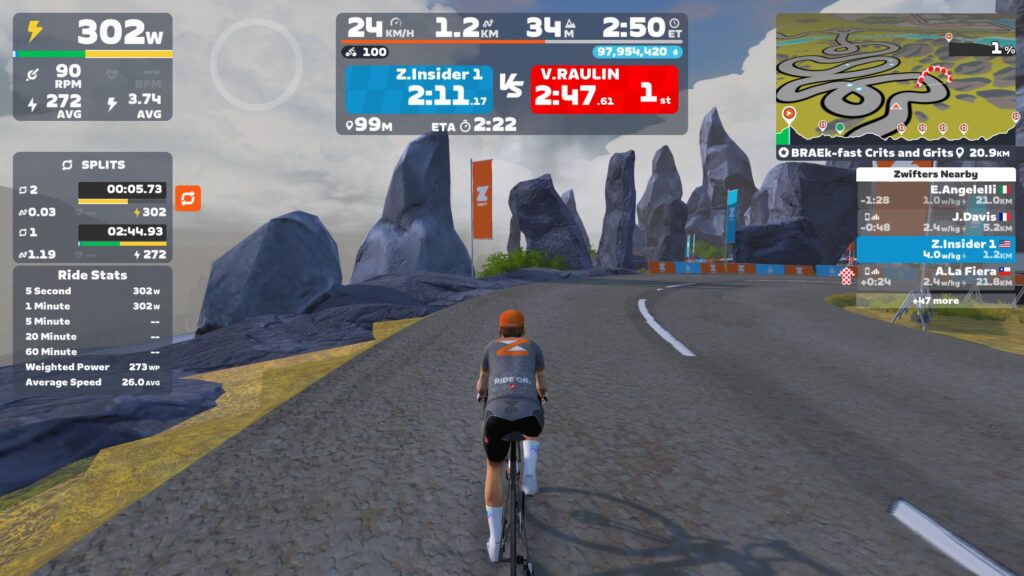
As shown above, if you trigger a split during your ride, this will pop in just above the Ride Stats panel.
Route Badge Indicator
A route badge icon has been added to the minimap, making it easy to know whether you’ve earned the route badge for the currently selected route:
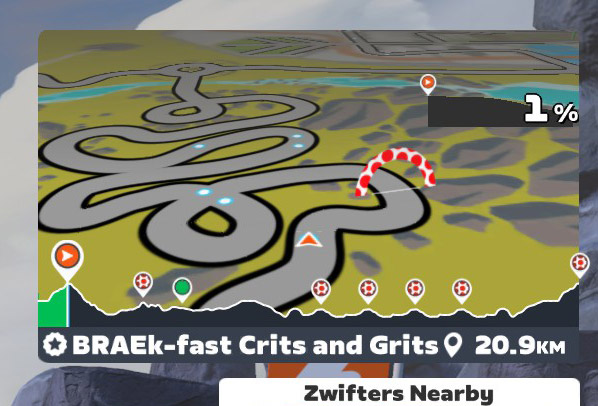
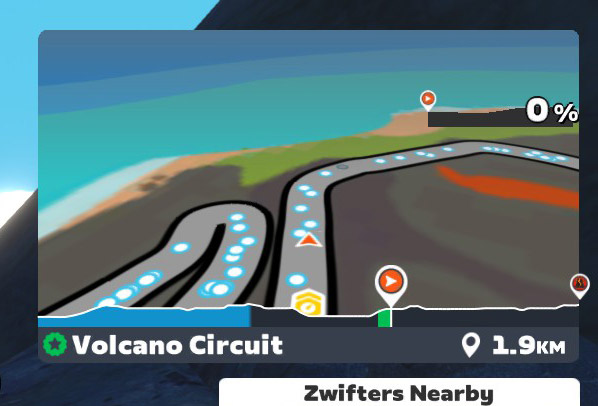
The white icon indicates that you have not yet earned the route badge, and the green icon indicates that you have already earned the route badge.
If a route does not have an accompanying badge, this icon will not be shown.
Outdoor Ride Streak Bug (Not) Fixed
Zwift started importing outdoor rides from Garmin and Wahoo back in April, but there was an odd bug: if your first ride of the week was an outdoor ride that was imported into Zwift, you wouldn’t get your streak extension XP bonus, even if you rode on Zwift later in the week!
Zwift’s update notes say this bug is now squashed, but in our tests, the bug persists. Zwift updated us on July 22 to say the issue should be finally resolved in the next update release.
New Routes?
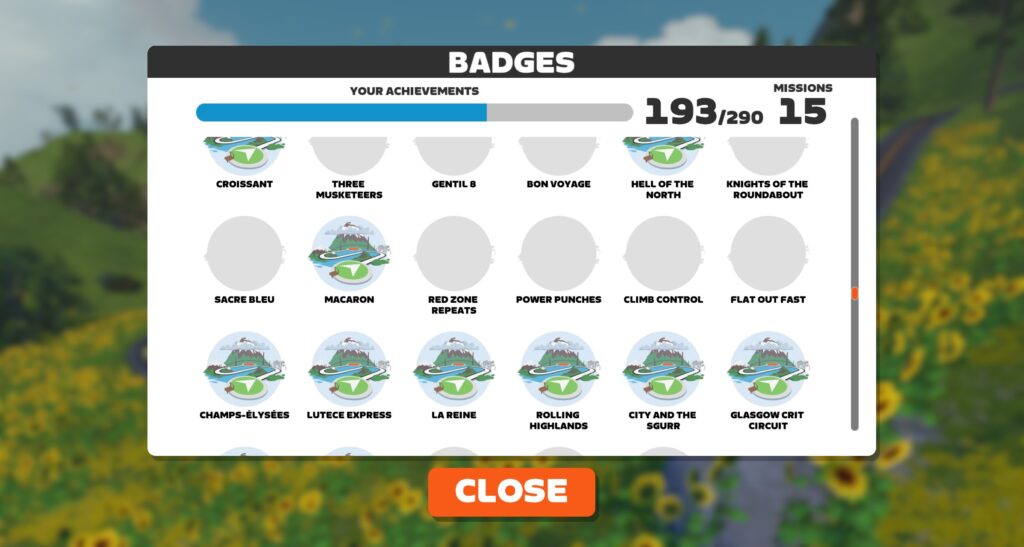
Four new cycling route badges showed up unannounced in this update:
- Red Zone Repeats
- Power Punches
- Climb Control
- Flat Out Fast
Presumably, these are new routes that will be soon be available in Zwift. Watch this space!
(Also, a “Rapide Run” route and badge showed up for runners.)
Release Notes
Zwift provided notes on additional tweaks and bug fixes in this update:
- For the Americans: Fixed an issue that could cause Climb Portal cards in the Home Screen to only show distance in metric units.
- Fixed an issue that could cause Zwifters to get stuck on the Tour Of Tewit Well route in Yorkshire if riding at low power levels.
- Android: Improved the appearance of workout arches.
- iOS: Fixed a crash that could occur when taking screenshots in rapid succession.
- Mac: Fixed an issue that could cause the background of the top-left HUD section to be transparent.
- Mac, Apple TV: Stability improvements.
Discuss this update in Zwift’s forum >
Questions or Comments?
If you spotted any other changes or bugs in the update, please comment below!




CORE support finally!
Yes, that’s great and I got it working on todays ride. Does anyone know if and how you can get the core data along with the fit-file that is exported from zwift
I’ll talk about this more in an upcoming post, but basically I only see the CORE data on the Intervals.icu platform. Strava doesn’t show it, and in fact strips it out (so if you’re pulling your ride data from Strava to another platform, you’ll lose CORE data). And I don’t see it in XERT, either.
In the end, I’ve found that using the CORE app is the only effective way to track heat adaptation. Having it in the HUD is nice during the ride, but if you want to track your overall heat training, you need something that works across multiple activities, which the CORE app does.
You can download your Zwift fit files by logging into your account at zwift.com, going to the activity, and clicking the gear…
Thank you. I found out to download the fit file directly from Zwift and can see in the data that it does have some core data. But importing to various platforms like strava, garmin and xert shows nothing. I have written to Xert asking for them to show the data if possible..
TrainingPeaks / WKO5 will display and manage your CORE data as well.
Plus GoldenCheatah.
“We’d love to see Zwift saving our preference here, so we don’t have to toggle the Ride Stats panel every time we ride.”
We’d also love to see Zwift save the sort order of routes if we make a change.
I’d like to know how many requests there were for the route completion indicator in the mini map.
+1 for saving sort order!
Would also like to have an option to show the Ride Stats, but have the leaderboards come up over them as would normally be the case
Currently it’s either/or, would be much better to have the option for both
Very happy to see Zwift continue to upgrade the HUD.
They’ve done a great job with it!!
However, I’m puzzled why draft numbers aren’t an option.
They are obviously available to those on Sauce.
And I’d think the average Zwifter, or at least those who race, would value draft numbers.
Eric, am I in the minority on this, or is there a reason draft numbers aren’t an option yet?
I know Zwift is working on concepts for some sort of drafting UI. I believe the issue is, they don’t want to just provide a number in the HUD (what would that number be, anyway?). They want some sort of visual indicator that’s more intuitive… I think.
Thanks for letting me know!
I’d be happy with the number like they get on Sauce, but can understand why they don’t want drafting numbers can look wonky (100+) depending on the speed.
And an intuitive visual representation would be great if they do it.
You can’t quantify drafting in real life.
I’ve always thought Zwift should only display metrics you could display on your head unit out on the road.
Drafting in game is a skill that has to be learned, like in real life.
In real life, you get real-time feedback about the draft from the feel of the air on your skin as you move in and out of the draft, the sound of the air, as well as the much more tangible feel of power to speed differences. This needs some representation in the virtual world. A dial could do it (like on Sauce), a color gradient, a flutter of clothes, etc.
I’d love to experience what it’s like for Zwift to ramp up trainer resistance a bit when I’m “in the wind” versus in the draft. I’m not sure if that would feel realistic or not, but it sure seems like it would help. I wrote about this…. 6 years ago? https://zwiftinsider.com/feeling-the-draft/
I proposed this concept on the Zwift forum quite some time ago. While the drafting feature has been incorporated into Pack Dynamics, its effect is limited to avatar movement, not the actual resistance felt on the pedals. As a result, riders at the front, in the middle, or at the back of the group all face the same power demands. To enhance the realism and tactical depth of racing, the system should reduce pedal resistance for riders inside the pack, while those leading at the front should accurately experience the increased load from wind exposure.
I believe that RGT did this.
Also completely pointless when most riders just BS their weight because most North Americans are on the tubby side.
Hey, I resemble that remark.
% of max possible draft would work perfectly.. 100% when completely in the middle of the bunch as an example. Doesnt get more intuitive than that in my opinion. They could then expand that with watt saved from draft as an extra option.
In Sauce it’s displayed as number of Watts saved, or “W Savings”
Sauce is no better than a random number generator.
The number in sauce and pedal game (provided by Zwift data) is a bit of a joke. Sometimes it shows the draft generating hundreds of watts… Pretty useless in its current form..
But the savings can actually be 100’s of watts at high speeds.
Yes exactly…. Rediculous….
I support that idea, the sauce saved watts is not the best thing to look at. Basically an indicator that simply changes to indicate levels from no draft up to maximum draft (requires 2+ riders in front of you) would be adequate.
Rouvy already has this—and has for some time now. It’s just a one word display of “poor,” “good,” “great,” or “perfect” along with the specific number of watts you’re picking up. Knowing that the problem has a solution is half the battle.
I’m confused on the Streaks – and the note on this is confusing.
“You still have to ride on Zwift to extend your streak – outdoor rides don’t extend your Zwift streak. But at least now “Your first Zwift indoor ride after an external activity earlier in the week will now show the streak screen and grant the XP bonus.”
Outdoor rides have counted for streaks and for XP. At least my 39 week streak says it has at least. Are you saying it wasn’t supposed to or it’s changed now and doesn’t count? It’s clear as mud from the post.
Q: Do outdoor rides count towards my ride streak?
A: Yes! With an active Zwift subscription, your cycling activities over 2 kilometers, or 1.25 miles, completed with a Garmin or Wahoo device are counted in Zwift—you’ll even earn XP!
Good catch. I corrected the language above so it’s accurate.
WIth my first ride of the week usually being my commute to work I’ve lost a couple of thousands XP until I figured that out! 😂
ZHQ release notes indicate you need to pair a *device* capable of transmitting L/R data. Your post says you need a *power meter* capable of doing so. Can you clarify?
Any device that transmits L/R power via standard Bluetooth protocols should work. I tweaked the text above.
Sweet. Been waiting for this feature for a while so I can calibrate my left-only outdoor-only PM. Looking forward to getting some data from it.
doesn’t work with the Tacx bike. Can you ask your contacts at ZHQ to get it together?
So, do the newish Elite trainers do this? L/R balance is supposedly available in eg. Elite’s E-training app.
Turns out your wording was correct the first time. Only works with power meters as primary. What a useless implementation.
Is their any update on fixing the virtual gearing display for Wattbikes?
Haven’t heard anything. Have you asked Wattbike?
Mine displays properly never had in issue
If you have a Wattbike Atom, you should get the gear display. If you have a Wattbike Proton, that feature is not available.
I have a Proton and it is a bit frustrating that the gear isn’t displayed. My workaround is to run the wattbike app on my phone in slit screen with the Zwift companion app (75/25 split). Then I can see the gear in the wattbike app as I am riding in Zwift. Not brilliant, but better than nothing.
Do the fields from the CORE sensor get written to the fit file so I can see them in Intervals.icu?
They do! But something to beware of: if you’re sending your Zwift ride to Strava, then Strava pops over to Intervals.icu, Strava strips out the CORE data in the file! So you won’t see it, unless you’re uploading straight from Zwift to intervals.icu.
That’s good to know, we should all open tickets with Strava and beg them to do something with the CORE data, or at the very least allow it to pass through.
How do you see those core sense data. I export to strava and xert directly, but can’t see the data there. And where do you see the data on zwift or get hold of the original fit file to check? Thanks
It should be added you must use Bluetooth for left/right balance
Added. Thanks!
A suggestion for Zwift: would be nice to toggle between current ride stats and best past 90 day ride stats (sort of like PRs on sprints, mount climbs, etc.). It would be nice to see where your critical power across those 5 times are stacking up against a recent (90 day) personal best.
Seems like they are so close to dual recording power. I hope we get that eventually, though with the cancellation of the elite events, perhaps it just dropped down the priority list.
It’s definitely being worked on. In fact, they had folks testing a beta version months ago.
When I heard about R/L balance as well, that was where my first thought went. If organizers think that the trainer is a better source for race data (harder to fake) and require that, L/R balance is really most useful for racers if they allow native dual recording. Of course, there are probably 10x as many people doing workouts on Zwift as racing, so maybe, just because I and everyone I zwift with race, they’re not thinking about this in terms of racers.
There has been a bug since the initial fitness trend incorporation… garmin (maybe also wahoo?) saved rides get uploaded and so your ride for the day is doubled and you must delete to be accurate. Explanation: currently zwift when connected to garmin will save to the garmin connect and garmin will save another ride based on its internal metrics and time ridden which is then uploaded to CA… users then have to delete that from the CA or gets counted essentially twice. Need to fix that somehow
I know Zwift has said they’re working on some de-duping code. Until then… why not just skip recording on your Garmin?
I’m a sucker for badges and the better metrics that come off the garmin (really the metrics as I do multiple sports and so need them integrated)
What cycling metrics are you getting when recording on your Garmin that you don’t get from just uploading the Zwift activity to Garmin connect? (I’m not a Garmin guy, so I’m genuinely curious…)
IIRC it’s not so much cycling data as fitness data (on Garmins own metrics) that don’t get written if you’re not connecting a Garmin device to power etc. So if you’re looking for overall fitness/training readiness across running /swimming/cycling then you need to be able to record it as if it’s an activity on your Garmin device. As per my above post, you can do this without actually dual saving activities once you’ve connected your Garmin to power/cadence & use it as a heart rate monitor.
Core data, the new tymewear data, L/R power data (and on my bike that supports it all the torque efficiency data), ambient temp data. I also actually have control of the data I show… zwift hud customizations don’t work during workout mode…. so if I do a workout in free ride, I can’t actually see basic things like lap NP / lap HR
Another one I just thought of. Post ride report (RPE, 1-5 feeling). If you record this on garmin it pushes to trainingpeaks, garmin, intervals.icu, etc… Without this, you need to manually input into multiple platforms… and it’s not included in zwift!
I wouldn’t skip recording on Garmin, at least for races, since I want the dual record. Set the trainer as primary source and pedals as the secondary source, since this is the general recommendation for races requiring a dual record…
But, then “cycling metrics” in Zwift and Garmin are both messed up, and I don’t get the L/R balance in Zwift but only on the head unit.
I guess it will stay like that until Zwift manages to implement a dual record function and figures out how to handle the two measurements properly.
Who records on Garmin anymore? Most of Garmin’s metrics are now considered from a Zwift activity, no need to dual record unless you just like the better HUD on your Garmin.
If you run as well as cycle then you’ll want both activities in Garmin so it takes account of all your training for its overall fitness metrics/training status etc
I record the ride on my Garmin Forerunner (connected to my bike’s power meter/cadence sensor), but then don’t save it. The ride comes across from Zwift into Garmin Connect with all the Garmin-related data included, but with no need to save the ride from my Forerunner there’s no duplication. Got to be honest, I have no idea why this works, but it does
Hey John, this is long outdated. Garmin has been using Zwift activities for the ftiness metrics/training status for more than two years. I used to dual record as well for this reason, but you don’t need to anymore.
Same here. Running is recorded on my Garmin Fenix, outdoor rides are recorded on my Garmin Edge, Zwift rides are recorded in Zwift only – all appear in the Garmin app (and Strava for that matter) so that they present a complete picture of my fitness.
Yep, it’s awesome that Garmin implemented updating their metrics from Zwift rides so we don’t have to dual record anymore.
Thanks but for some reason that never worked for me, some of the data was always missing….must have been doing something wrong
When was the last time you tried? What data was missing?
I double record, and there is still reason to do so. Zwift activities do not capture Intensity Minutes when the data is transferred to Garmin Connect. From what I’ve read, a Garmin device must be in the mix somewhere for that data to be captured. I did not have to double record in the past when I used to connect my Garmin watch to Zwift for heart rate data, but of course watch data is not as accurate as chest strap. So I switched from my watch to a chest strap (it’s not a Garmin one) and get Intensity Minutes that way.
Also, Zwift did not have L/R balance data at all until now, and I wanted to have that data to monitor my pedaling efficiency. I’ve been double recording to capture that data for years now. I haven’t seen Zwift’s new L/R feature in action yet, but I’m assuming it doesn’t capture torque effectiveness and pedal smoothness.
True on Intensity Minutes. If you use a Garmin HRM-Pro (and possibly other Garmin straps), it does Intensity Minutes with Zwift.
I dual record on a Forerunner with heart rate strap, deleting the Zwift files from Garmin Connect and then deleting the Garmin files from Zwift – Garmin’s activity tracking for body battery works better when recording an activity on the Garmin, but the better reason is that recording on the watch allows my Garmin and later intervals.icu to account for time spinning in the race pens, where Zwift doesn’t record anything during those times.
Thanks for the update Eric! How do we pair the CORE sensor? At one time I heard it was going to be under the HR menu?
Guess I should have included that info above!
Connect your CORE sensor to your HRM using the CORE app, then the CORE sensor will show up as pairable in the Heart Rate box on the pairing screen.
Are they going to add Draft %? They hunted at this when they first started the hid refresh but no mention since.
See comments above…
So, it appears the garmin tacx neo t2 transmits left/right data, but only through ant and someone posted above that it needs to be done via Bluetooth. I’m currently using a Mac mini so using BT for all my comm. Guessing this means I’m out of luck on the l/r readings? Thanks!
That would be really odd if the NEO only transmits L/R data via ANT and not Bluetooth. But I don’t have a 2T here to test, so I can’t confirm…
But yes, L/R power only works via Bluetooth.
Still hunting non-marketing actual-function info on what the Neo (non-T)2 should be doing in terms of L/R transmission, but so far mine is definitely not sending L/R to Zwift despite being fully paired via BT. (It’s all up to date on firmwares as well.)
It does not register in Zwift, at least not my Neo Bike paired via BLE. Strange, as I did double register with my Garmin watch and L/R was recorded. I wrote to Support and they seem to have no idea on what happens with Tacx, hopefully there will be some fixing later ahead.
Hi Guys,
tried it both through bluetooth and ANT+, no L\R Balance was shown on Zwift from my Neo 2t.
@Alex: if there is a reply from the support, I’d appreciate a quick update here. I will also try to get in touch with the German support team, maybe they have got an idea what needs to be done.
I hope they’ll finally fix the units which are written wrong since ever.
“KM/H” -> “km/h” and “m” instead of “M”. For distances to other riders they use “m” correctly although.
“w/kg” and “w” -> “W/kg” and “W”.
These things are officially standardized and writing them wrong triggers my inner monk. Sorry. I hoped that they have some people with technical background. At least they are kind of simulating physics.
Yes, I know. It has been even worse before with “kph”.
Also “WP” as the unit for Weighted Power in the Ride Stats panel – the unit should be “W”.
What is Weighted Power? Is is just the zwift name for Normalized Power?
No, weighted power and normalized power are two different measurements (and they’re different from just plain ol’ average power, too). This page explains the difference: https://www.aonesportscoaching.com/post/decoding-cycling-power-metrics but doesn’t provide the actual formulas.
Technically you are right Eric, but in many fitness tracking systems the terms are being used interchangeably as metric that provides power average with heavier weight given to the higher efforts.
Normalized power is a metric that’s specifically defined by Dr. Coggan with its own formula, but for all intents and purposes we can say they are virtually the same thing when it comes to interpretation.
Great!!! A way to lose the leaderboards. I love it.
Do wonder how that will work on the Alpe, Ven-Top and Climb Portal though.
how does the core sensor support work? I don’t see a field to add it?
What about other sensors (tymewear)?
Connect your CORE sensor to your HRM using the CORE app, then the CORE sensor will show up as pairable in the Heart Rate box on the pairing screen.
thank you! I’m not seeing it in the ANT list. bluetooth support only?
lots of exciting updates. I wonder if native dual power recording is in planning.
Sad to see that the Core data not available in the HUD for running.
Ah, that’s disappointing, a lot of my heat training is on the treadmill. Zwift running feels like abandonware sometimes.
Well, the good news is that although you can’t see the CORE metrics in the HUD while running, they’ll still get written to the fit file, so you can see the data in Intervals.icu if you connect your account to Zwift.
Still no average speed on the HUD though.
As mentioned above… it’s coming very soon. Was disabled in this update due to a late-discovered bug…
Avg speed is a really complicated math problem
I am using Apple TV and average speed is not an option in the dropdown menu. Hmm?
It shouldn’t be… Zwift hasn’t released it yet.
Mine updated to 1.93 yesterday. I see everything else referred to in the article.
average w/kg and average speed had bugs and so were withdrawn from this update. Says above that they will be added soon.
The one thing I would like Zwift to implement is on the Power graph page displayed after you save a ride.
Could they have click buttons every 5 minutes or so.
Using the mouse I can never get 20 min power. It always stops a few seconds either side. Just clicking on the 20 button would be a bit better. 👍
Zwift workouts and HUD: Is there a way to not have workout segments over the top of the left HUD, hence erasing additional fields not available in the central HUD like, Core temp, Ave Power etc, ? It seems like Zwift works are now treated like the the middle child 🙄
Also 4 new badges i see: red zone replays etc
Ah, good catch! Added this to the notes above.
There’s actually a fifth one I found… a running route: Rapide Run. Just added it https://zwiftinsider.com/route/rapide-run/
This route is currently available in game to run. The 4 cycling badges… I don’t see those routes in game yet. But I’ll add them to my master routes list once I can get details!
Rapide has been available since April, I figured you didn’t have it in your list since it was a run only, and we all know that there are no runners on Zwift 😈
Can you remove the estimated times for “run only” routes, the only people I’ve seen who can hit those marks are sitting next to their treadmills (yes, we have “bots” in running)
The routes are in Companion app.
Red Zone Repeats is in Makuri Islands.
Climb Control, Flat Out Fast and Power Punches are in Watopia.
Lost my squirrel with the last update hoped it will be back with this one but no there is no squirrel in my pocket 😭
I assume you still have your streak? If so, has the setting defaulted back to whatever the non-squirrel setting is? (I know the squirrel setting is “Fun” but forget what the normal default is called).
Oh i check this thanks mate yes i have a near 50 streak
That was the problem thx very much
Has the “CLOSE THE GAP” message been removed…..?
New routes aren’t in France. Searching Routes shows “Climb Control” “Power Punches” and “Flat Out Fast” in Watopia, “Red Zone Repeats” in Markuri Islands.
All those courses are also “Event Only” currently
Wish these were available in club event or meetup route options, but doesn’t seem to be the case! (Which also appears to be a limitation of some other older routes.)
I’ve done 2 activities using the Core sensor, it doesn’t record TrainingPeak, WKO5, or Garmin Connect, and I updated the sensor firmware, although I don’t think that will help.
Saw an announcement today from CORE that TrainingPeaks now supports CORE data.
So I have my Wattbike Atom gen 2 as power source and have added left right power balance in the new HUD metric. When I ride the new HUD box doesn’t appear, BUT the left right balance data is showing in my Garmin data after the virtual ride. I’m on PC.
Hey Eric,
Thanks for continuing to decode Zwift for us! A question: Why do you use your Kickr bike for cadence instead of the Favero Assiomas?
A small clarification for other Favero Assioma users. You leave the Assiomas set to unified channel “Compatibility” mode. At first I thought I should choose separate channels.
Hi David,
I typically don’t pair my Assiomas to Zwift at all… I just use them to dual record on a separate head unit when I want to dual record. The screenshot about was just a sample to show how you could pair things in order to get L/R power. If I was using the Assiomas for power in Zwift, I’d pair them for cadence too, since they’re more accurate than the KICKR when it comes to cadence.
The L/R Balance could also be measured by the speed gradient of the pedal rotation. In this case, it wouldn’t be necessary to buy additional tools for my Wahoo KICKR Bike. I’m just a leisure rider in the winter months. Is there any option?
Will the 5sec, 1’ etc be displayed during races eventually? Did a TTT and Dadurday race and couldn’t pull that up on the screen during the races. Only seen it on group rides where I’m not concerned about those metrics.
How do I switch off the annoying repeated message that my equipment does not support automatic shifting. Several times in an hour is a bit overdone, is n’t it?
I haven’t seen this message, and I’m sure several times per hour isn’t the intended behavior. Maybe reach out to Zwift support?
Why does Zwift display new undocumented badges before anyone knows how to obtain them? Why can’t everything be in place in a single release? It would save us from a lot of unnecessary confusion and speculation.