
Zwift version 1.90 begins its phased rollout today. It includes the much-requested Splits feature, along with some visual tweaks and bug fixes. Read on for details…
New Splits Feature
Zwifters have long requested the ability to trigger laps/splits in game, allowing us to record our own custom interval data while riding in Zwift. Cycling head units have long offered this functionality, so many riders are already familiar with the concept of a “lap button” you can click so the head unit will display data for your current “lap”, including average power, length of time, and speed/distance.
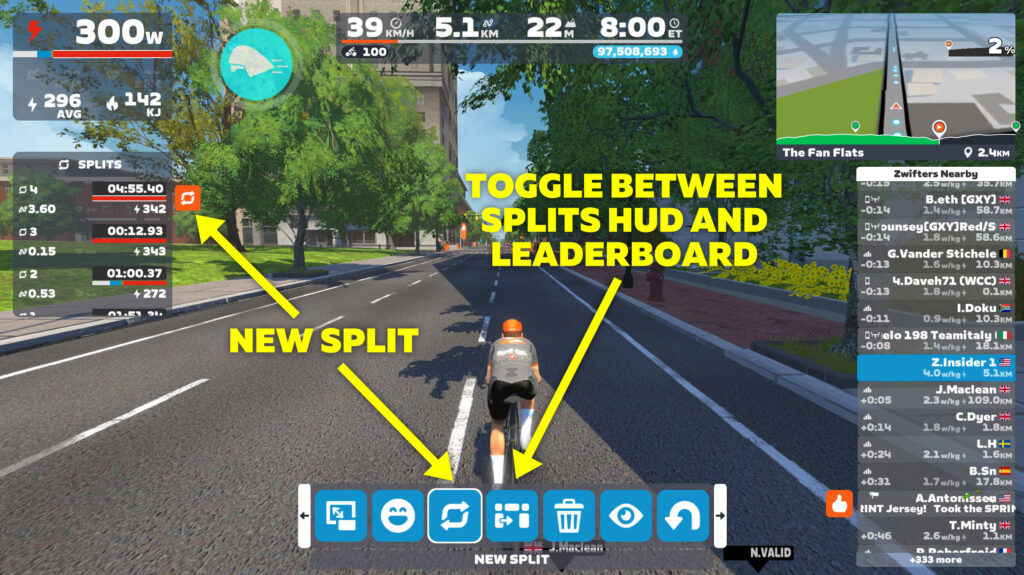
You can trigger a new split in several different ways.
- Click the “New Split” button in the Action Bar (which is also in the Companion app)
- Click the on-screen lap button in the Splits HUD (on all platforms except AppleTV)
- Use the tab key on your keyboard (this will not work in a workout, however, as this is the shortcut for skipping the interval)
- If you own the Zwift Ride you can configure the left drop button to trigger a new split:

The new Splits HUD displays the time, distance, average power, and average heart rate of each split. It also shows a color-coded power zone duration bar that functions just like the bar at the top-left below your power number, except it’s only showing power durations for each specific interval.
Once you’ve triggered a split, you’ll have access to another new “Toggle Side Display” button in the Action Bar next to the New Split button. This swaps the side display between the Splits HUD and the Leaderboard.
Splits data is written to your FIT file, so it can be displayed later on in other platforms like Strava, Garmin, Intervals.icu, etc.
Note: structured workouts will trigger a ”lap” for each interval block, as they always have. To view these splits after your workout, press the Toggle Side Display button in the Action Bar.
Here’s a quick video walkthrough of how it works in game:
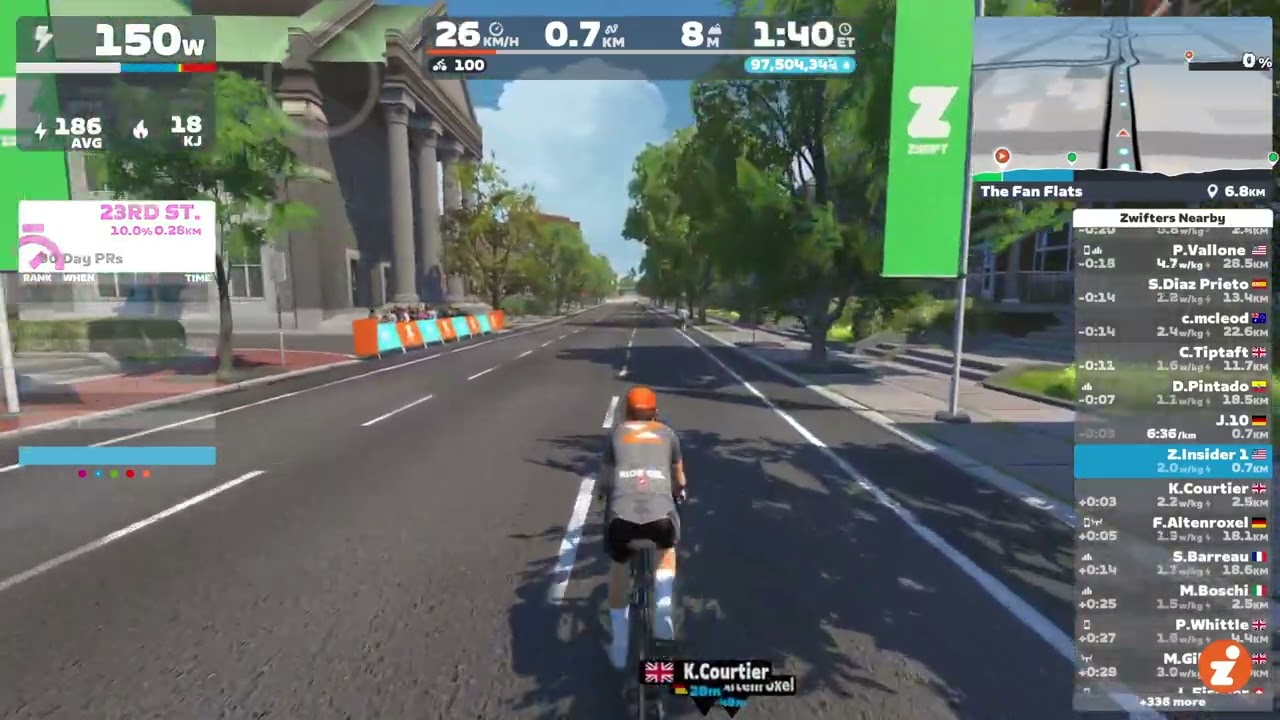
There are a few minor UI bugs that Zwift still needs to iron out, including the list of splits not scrolling to the top when you click away from that list, and some typesetting being a bit misaligned, especially in non-English languages.
But the functionality is in place and working well, as far as we can see. Let’s do the splits!
Updated Lighting Effects
If you’ve noticed snazzier lighting effects during your recent Zwift sessions, you’re not hallucinating. Here’s a quick video screenshot recorded in Watopia on version 1.90:
Zwift has been experimenting with improved lighting effects lately, and while they haven’t mentioned it in any of the update notes, more and more Zwifters are starting to notice lighting changes. Our guess is that Zwift is rolling out the updated lighting to specific groups of users on certain types of hardware.
More Release Notes
Zwift provided notes on additional tweaks and bug fixes in this update:
- Improved the appearance of flat routes in the mini-map route profile.
- Fixed an issue that could cause the mini-map elevation profile to be stuck at the start of some routes.
- Fixed an issue that caused the Leaderboard visibility setting to behave as if it were set to “Auto” when the “Always” setting was selected.
- Fixed gaps in the roadway on the Douce France route in France.
- Fixed an issue that could cause the roadway to flicker in some sections on the R.G.V. route in France.
- iOS: Stability improvements.
Discuss this update in Zwift’s forum >
Questions or Comments?
If you spotted any other changes or bugs in the update, please comment below!


There is a very niche bug at the moment related to Ultra graphics settings. Nothing is wrong until you ride through a finish line, at which point you will 100% experience a game crash.
I wonder if this is caused by user segmentation for this graphical update. I have both the crash and the light effects on my main account. If I use trial accounts on the same device, I don’t have either.
That’s interesting, because I run my PC on ultra and I haven’t had any crashing issues.
Zwift has the ticket open and confirmed it’s a “handful” of users. They don’t know what the cause is. I can ride through finish lines on other accounts or devices, just not this specific combination.
I run my laptop on ultra setting, no problem here.
I have also had crashes 2 consecutive days (1.89) and I have also had the updated lighting effects. (PC ultra win10 + 4K TV).
Im not on ultra settings but also had a crash on the finish line after the update
An image in the game release notes on the Zwift forums shows HR (presumably average) being displayed in the splits HUD as well but your image doesn’t.
Ah, yeah that makes sense. I didn’t have HR hooked up…
What! You beast – surely your bot has a heart!,
Love the information provided.
Pretty Awesome ! And Yes I was one that has been waiting for this… It will be really nice to see when you are doing a 1/2/3/4/5 etc Minute Effort, and can see your Power Output for that time… The other thing that they maybe could add down the Road, is seeing, being able to see those Splits in your Re-Cap Bar at the end of Your Ride, or Workout ?
Are the splits available for runners?
There’s already a km split HUD element… but no, this update doesn’t add a custom Splits tool for runners.
Am struggling to think of a scenario where I would use the split functionality! Appreciate it will be useful for some though.
same. will never use it. i would like them to allow more races to be scheduled, instead of the 2 same events ALL week!
You need a better imagination.
It would be very useful in a race, for example:
1) helps/motivates you to hold a certain wattage up a long climb – I’m all over the place on these.
2) motivates you to achieve a PB if you’re close – I don’t find out until after the race if I was
3) keeps you on your target pace you during an attack
4) keeps you on pace when doing a pull in a TTT
I also like Eric’s suggestion of doing your own timed training on a casual/group ride.
It’s may not do much for recreational Zwifts, but I’m very excited about this.
Nice to see Zwift getting to things like this!
I like to do my vo2-max interval sessions in the climb portal. I will use the splits to time and live-track the effort (avg. power and hr) for each interval.
If only they made an automated split config,
like split at 1km, 2km, 5km – this way, without pressing any buttons you could follow your pace in the race or ride.
Can you use Zwift play for the splits feature?
No, only the Zwift Ride controllers. Because they have an extra button on the drop that the Plays don’t have.
Would be good if we could have a setting where we can map buttons for this sort of thing. For example the ‘up’ button on the plays is never used for anything whilst riding – why couldn’t a tap or double tap of the up button be used for a split?
Where can I find the settings to change the Zwift ride controller drop buttons?
To clarify, it is still not possible to see avg watts/HR during each interval in workout mode?
By the wording it sounds like the Split functionality is not available during a workout, but becomes visible after?
Other platforms offer this directly on their HUD and it is really useful, especially on the longer efforts during a workout. Seems like a missed opportunity.
Do you know when we get the HUD update to display L/R power?
Is there any way to config. those splits to run Automatically?
Like at each 5km or each 1km?
Splits. A feature I’ve never used and likely never will
Cyclists are the kings/queens of needing endless features and data that somehow seem important to them
Thanks for the useful comment.
Splits and intervals are basically the same thing. You use that feature every time you do a structured workout.
If you never do workouts, that’s perfectly fine and splits probably aren’t for you. In that case you’re just a different type of cyclist.
@Eric Schlange, I suspected an eye or memory problem in myself 😉
While the brake lights (rear) have been around for a long time the front lights have not …. I remembered 😉
One thought was that maybe only the ‘Halo’ bikes have this front lighting (I’ve been upgrading the Espada for a few days now).
But what’s worse, I made the connection between the moment the “front/rear” lighting comes on and …. intense problem in the ‘OBS’-in terms of ‘skipped frames due to encoder delays’.
As soon as the bike lighting is switched on – the streaming starts to frame :/
I did not change any “Zwift/OBS” settings. – so here the correlation is obvious.
Examples:
https://www.youtu.be/7rWGY05ZyHk
https://youtu.be/2gsQaiDmPCQ
https://youtu.be/live/HE0Um3pT7gk
This problem definitely occurs on Zwift version v1.89 – 1.90 I haven’t tested yet.
Someone will say, you have too weak a graphics card (RTX3060Ti) – probably not the pinnacle of technology, but until a few days ago there was no ‘problem’ and when you turn on a small thing, it would seem, in the form of a bike light it causes a massive choking of the graphics card.
Cheers
Artur
Any news on the core body temp support? I’d like to get this data out to Garmin/strava, without using my bike computer in zwift.
I know it’s coming! I have a Zoom call with CORE in about 2 hours, in fact. But I don’t know the exact date.
That would be so nice to have. I mean heat training and indoor riding are kinda made for each other
Any word on the new data fields from your call?
ETA sounds like end of June.
Steering on wattbike.
Tried the new split feature tonight. Despite checking at the start of the ride how I could access the splits via the Ride controllers I completely forgot until 15k in. It worked well and could be a nice feature over a long ride. I would like to see an option to set it to automatic based on desired distance say every 5 or 10k. Would also be useful if you could see metres climbed over that split so you could judge how differenent your split was to a previous if doing a hilly route.
Love to be able to use this as currently ‘course/lap’ time, as avg power etc are only available if matches a Strava segment (which you do immense work on) but thats a whole lot of ‘spending time on screens’ after the fact where some of us can get ‘sucked in.’ (A friend once told me 😉
People often logout of a ride immediately after to capture the ride effort itself (among other reasons) but this would allow that without leaving the course (or double recording).
If it’s basically the end of my riding I enjoy cooling down where I am (partly to avoid the risk of finding myself riding longer than I have time for (!) … ‘clipping out’ can be the hardest part!
As others have mentioned being able to toggle on different auto-split/laps would be useful. I have my bike computer when doing various riding ‘outside’ automatically capturing 10 minute splits which often I appreciate having later without overthinking things while riding.
In game variations on that like ‘course lap’ split as automatic option would eventually be nice, too.
Is there a keyboard shortcut for the ‘toggle side display’ switch?
Anyone else having an issue after this update on Android tablet? Can’t get my Kickr Core to pair. Just cycles between connected/disconnected. Was fine before the update. Tried all the usual fixes for connectivity issues and in touch with Zwift helpdesk but no resolution yet. No issues on iPhone…
I’m having the same problem after the update on myDell laptop. Also was fine before the update. Have no problems with any previous update.
Yes, Android tablet. Can’t maintain connection in free-rides but works fine for erg workouts. Works fine on my android phone. Only became a problem after the latest update.
Still No Pd5 Fix And zwift hq just ignores anyone saying it’s a problem sad
My rtx3060 is at 100% in the menu screen before i enter watopia
Loving the new headlight effect