

Early this week I joined other Club Jarvis members to test yet another Zwift FutureWorks feature. Called the “Sights and Sounds Tour”, and the basic idea is that all on-screen HUD elements are removed, so you can enjoy a screen full of Watopian visuals. It was a fun experience, and I want to share some thoughts about it! But first…
FutureWorks Update
But let’s take a step back and review where we’re at with Zwift’s FutureWorks features. If you recall, Club Jarvis was spun up in late March 2020 as a way for veteran Zwifters to test Zwift’s new FutureWorks features. (It may sound strange, but the first FutureWorks feature Club Jarvis members tested was Club Jarvis itself!) Although the Clubs feature set is fairly basic, it seems to be functional and stable. A month and a half later, it’s still the only club in Zwift – but hopefully other clubs will get onboarded soon.
A few weeks after Clubs launched, I hopped into the first-ever “members-only” event, where a slew of long-time Zwifters went for an social spin around Sand and Sequoias while cracking jokes on Discord and chatting about new game features. This test of a “club-only” event seemed to go quite nicely.
Then early this month, I took part in yet another Club Jarvis members-only event: a Crit City race testing the new FutureWorks “boost mode” feature. That was a blast!
So we already had three FutureWorks “modules” released to Club Jarvis: Clubs, Members-Only Events, and Boost Mode. Now we have a fourth!
Sights and Sounds
The event description said:
Experience the sights and sounds of Watopia in this experimental, bare bones Zwift ride. No timers, no watts, no text at all… just pure Zwift.
This ride will be automatically led by Jarvis the Bear who will be rolling at a solid 2.5w/kg. You can choose to hang around with Jarvis or do your own thing.
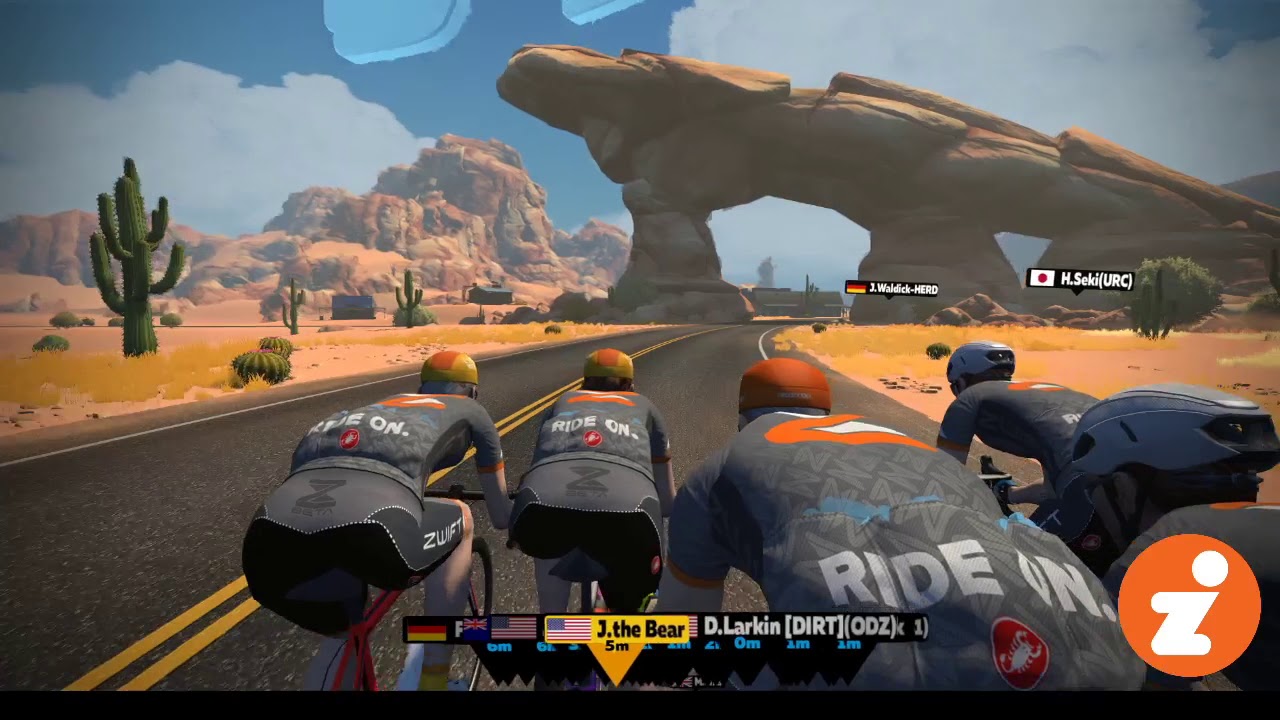
So there were actually two interesting things happening on this ride. First, we have the bare bones “experimental” mode. While we were in the start pens, the standard message box was on the right. But once the ride began, all HUD elements disappeared, and the only text we ever saw on the screen was rider names above avatars.
Here’s a video of my first Sand and Sequoias lap on this ride, so you can experience it for yourself:
Get Your Own Tour
You may not realize it, but if you’re on a Mac or PC, it’s quite easy to set your Zwift game to function without any HUD elements. It’s a hack we covered over three years ago, in fact! You can also use the ZwiftHacks ZwiftPreferenes tool to enable the minimal UI feature – MacOS users can use the ZwiftPref tool.
I’m not sure if Zwift is doing anything beyond just enabling the “Minimal UI” preference setting for these events. One thing I did notice is that it seemed like the visual quality was a bit better on this Club Jarvis ride – the graphics on the backs of riders’ jerseys were sharp even when I was close up, where typically they start to look a little low-res on my normal Zwifting setup.
What Was It Like?
Riding in “Sights and Sounds” mode was more engaging in some ways – more like a real club ride, where I felt I had to pay attention to the riders around me, and I could see more of the scenery. (Did you know there are ruins on top of the desert start/finish rock arch?) We were all in the same Zwift Beta kit, which made it hard to pick out riders from the bunch. I think a race in this mode would be really interesting, as long as riders could wear their own kit!
I found myself getting picky about the sounds I was hearing – it seemed like the rolling road noise and dings from the UI were overpowering. I wanted to be surrounded by nature sounds, and maybe some sounds of other riders. So while the visuals were quite nice, I think I would opt to listen to music in my earbuds until Zwift upgrades their soundscape.
Messaging was interesting – I could hit “M” and type a message on screen, but it only showed up if people were looking at messages on Companion – which many riders were doing. I found myself wanting to make a quick comment here or there, but not doing it because it felt like nobody would see it.
Overall, I’d say Sight and Sounds mode is a nice option for event organizers, and could make for some really interesting “stripped down” racing. Other Club Jarvis riders who participated in this event had very positive things to say as well, so my guess is we’ll see this as an optional event mode in the future.
Jarvis the Robo-Bear
The second feature of this ride was Jarvis the Bear. He had actually made an appearance in our first Club Jarvis event but in this ride he was the official leader, complete with some auto-scripted messaging before the ride began.
As promised, he held 2.5 w/kg steady for the whole ride. That meant he hung with our main pack until we hit the redwoods, at which point many riders (including myself) bumped up our wattage on the climbs, and Jarvis quickly got dropped.
Is this a useful feature for Zwift events? I could see how a constant wattage beacon would be handy for flat rides. I’m not sure if would work on hilly routes, unless Zwift builds a feature to algorithmically scale Jarvis’ efforts on climbs.
For example: ride leaders could enter the wattage range for the ride (say, 2.5-3 w/kg). Jarvis would hold the lower end on flats, then on climbs his effort would scale up in proportion to the incline. So he might only bump it up to 2.6 w/kg on a 2% rise, but 3.0 w/kg on a 10%+ rise. It could make for a really challenging pacer-bot session if done right!
Zwifters have been asking for pacerbots for years – more specifically, they’ve been wanting a pacerbot of their own best efforts, so they could race themselves. Jarvis may just be the beginning of such a bot.
Your Comments
What do you think of these FutureWorks features? Have you been able to try them yourself? Comment below!


I did the Crit race with the boosting and found it quite an interesting addition only I had to activate it via my laptop which was a stretch from the bike. Would have been easier on the companion app on my phone which I have attached to the bars for normal rides. I usually get it all running and don’t touch the laptop throughout. I have tried a wireless keyboard but it was a distraction from the cycling so abandoned the idea.
Boost mode can be controlled via Companion!
Didn’t show up on my (android) app but maybe I’ll need to look harder. Thanks
The Javis-the-roboBear feature is appealing. Not that it has to be a “cloned” avatar–it could just be a small visual “carrot”–but such a feature could be handy if you were doing a workout or time trial in which you wanted to meet a certain goal. I think Garmin has a “virtual training partner.” I often do time trials on Zwift, really, to track my own personal fitness than actually racing; but if there was a wattage- or time-goal beacon to chase–or stay ahead of–the motivation might go up more and keep the self-doubt a little more silent.
Did you still get Drops, XP and Powerups?
I assume so, but I actually didn’t look to check!
Interesting news on the Jarvis Robo-Bear Eric. As you say, something like this has been requested for ages – certainly something i’m very excited about seeing.
If you could set up your own robo-bear, or join one already on course riding at your required wattage, it would be fantastic, especially for those times where there are no group rides to suit (which seems to happen me a lot). Other options such as racing against your own PR on a course would also be good – I guess once the basics are there, it would be easy enough to add different options as to how the robo-bear functions.
One new idea I had this week was the use of a robo-bear, or pack of robo-bears in training. I find structured workouts to be quite boring, and also find i’m able to push my limits much harder in Zwift races/rides as i’m fully engaged and maybe thinking less about the effort!
Imagine a scenario where you could select a workout, then in order to complete it – all you have to do is keep up with the robo-bear (or robo-bear peloton).
ERG would be off, it would be like a race – the only difference being the pace would be dictated by your chosen workout. To my mind, it has the advantages of the thrill of a Zwift ride/race and the efficiency of a smart workout, so that you don’t overdo it.
Just a thought…
Something like a Race Scenario Simulator!
And there are levels to clear and take on different types of race strategies!
Interested in Sight and sounds function 🙌Also in Jarvis as pacekeeper 🙃
My only problem is with minimal UI jack currently,is that one loses the ability to turn in game (even via Companion app it doesn’t work)🤷♂️ I hope the Sight and sounds functionality solves that…
Given the code, hack exists to remove HUD, why can’t they just update the UI to allow it to be toggled on and off? (applet user here)
A question that people have been asking for years….
Expanding on your comments around the Jarvis bear.
I’ve thought about something like this for a while with regard to races and lead ins.
I realize that everyone is “used to” the full gas effort when zwift races start, but for the sake of realism, what if races with lead ins (they all have at least the starting pens), a beacon is set at the lowest wattage for the group (2.5 for C), until the start, just like a neutral start on a real race.
You’d have to set an artificial start line that rolled with the beacon (something like this already occurs for workouts), but keep it more like the starting pen line, and have it roll with the beacon.
If the beacon had to stay once started, you could always set it at three times the high end (3.2 * 3 = 9.6 for C) and kill the draft.
Taking it a step further, change the graphics and make the beacon look like a car like in any mass start, neutral start race I’ve ever been in. Then when the neutral was released, the car would speed away at three times the high end of the group.
No cars in game please maybe a derny bike like track cycling but preferably a special Tron bike. Love the idea though as you can get out the back even before the start at present.
Derny bike would be class.
Yes, this would be great!
Wow they added a hideUI = true to their code. Such pioneers /s… Meanwhile racing is still broken beyond belief.
This seems like a great idea, especially if I can have the normal UI components on the Companion App. I’d still like a middle ground option, keeping many of the UI components, but making them smaller so I can see more scenery.
I am beyond excited to see this feature come to zwift. So much of the screen is taken up with numbers. It should be configurable. I love the clean look
Agreed! Especially when you’re running it on a big screen TV like I do… the HUD could be reduced to about 25% of its size and still work fine.
How about turning with MINIMAL UI hack? Any way to achive this? Neither Companion app nor on screen turns while using the hack 🙁
I wonder if the inability to turn was a function of the minimal UI or the fact these two events were on a defined route?
Just to clarify : I wasn’t experiencing “unable to turn” while riding Sight and sounds of Watopia beta test rides. I used the MINIMAL UI hack via manually editing the prefs.xml. I’ll try today Zwift Preferences Windows program, and tryin to pre-select world/route. If that works, I’ll let you know here,and in Zwift Hacks Fb group. Hopefully “Zoon” it’ll doesn’t matter, as we will be able to turn on and off UI and keep turning function by default (or keep the set course) 🙂
I used zwift preferences for the first time yesterday after reading this article. It’s so nice to see everything. I did the Achterbahn route in Innsbruck without a problem after selecting it in ZP, the turns all worked automatically like it does with the UI visible. I didn’t see any pop-ups during the ride when I got a badge, levelled up or when I’d gone the required distance so I made sure to ride 50km instead of the 47km the route is listed as. Everything showed up as normal in the activity after the ride. I couldn’t access the menu during the ride to change the trainer difficulty since I don’t know any of the keyboard shortcuts, nor do I have a keyboard plugged into my zwift computer.
I really enjoyed the minimal/no onscreen UI. Virtually all the usual data is on the companion app. The only two item missing that I would like to see are 1) current grade%; and 2) who’s giving me RideOns.
Both of those items could be incorporated into the companion app with little effort and thus allow the UI to remain completely clean
Toggling each part would be great on the HUD – so performance stuff like power/HR/ etc; navigation; social etc. I don’t think I could be trusted in a Crit without any data – I’d be chasing sandbaggers for the first lap …
hey, is there a photo of the bear?!
It’s not a real bear. 🙁 Just an avatar named “Jarvis the Bear”.
This is very disappointing!
Right? It would be fun to see Jarvis the bear as a bear on a small bike as a beacon 😀
Touching on Jarvis ROBO first, If you have a large group and the bear starts at 2.5 wkg lets say. Those that late joined (with less than a minute left before leaving the pens) will be pushing 3.2 to 3.5 to make it to the beacon in 2ish minutes (in bigger events). That is my rough guess anyway from from being at the back and the leader goes out at a static “ride advertised pace”…The way I see to combat this for the first 5 minutes “a no drop ride rubber band mechanic” Then after that the rubber band is lost and you must keep the wattage needed.
Stripping the screen of any information is nice for a some and perhaps in a race scenario, but as this is a training/social pipeline…..I fail to see what or how this benefits many riders except in a race scenario and even then it takes some of the fun out of it. There is nothing like having messages fly up tormenting you or you tormenting others with a fun jab at people with racing banter.
Then “The new UI 2020” should have a toggle built into it to enable disable this feature anyway. It seems as though there is a bit too much over thinking to some areas of the game that should be no brainers. Well at least that is how I would of seen the new UI having toggles for things a rider doesnt want to see.
Love it, hope there is a way to bring this to ATV.
Just from watching a bit of your video I would totally agree that “Sights and Sounds” should not be just about the sights – and I would prefer pure “natural” ambient sounds, too. In my opinion, even the road noise is too loud. The “Ride on!” shouts are a nice touch compared to the ringing – but for riders like you receiving a ride on every second they would not work either. Maybe a smaller icon in a corner of the screen would also do it?
I think, after a little fine tuning, this could well end up as a feature like in various computer games where you may change between various UIs from “full” to “minimal”.
Agree – toggle game sounds/vol separately to effects. The ride on chimes and road noise were very annoying in Eric’s clip. Ruined the nature sounds in the Grove etc
I think the calculation is exponential of n! for the number of rideons that can be given within a group of n riders? But 38 minutes of straight rideons in a bunch of some 20 riders sounds too much ? Was giving more than one rideon per ride allowed?
I just did the Sights & Sounds ride and enjoyed the experience. It was nice to focus on what I was doing vs. what everyone else was doing. I was able to keep the recovery pace I wanted without having FOMO when watching everyone else’s data. Scenery was great, but I agree the sounds need some work. I ended up turning on my music half way thru.
This awesome Sounds & Sights feature ride is spoiled by the irritating sound of the ride-on’s. That should be muted.
I really don’t understand why the “robo bear” self or PR pacer (or whatever you want to call it) isn’t a standard feature already? It would clearly be one of the most popular features instantly. Users could race themselves, or friends pr’s, or for some real fun, have a crack at seeing how long they could hang onto the wheel of a famous pro ride.
It’s not really a sights and sounds mode with the continued annoyance of name bars everywhere, sometimes flooding the screen. It’s the same issue in photo mode when you remove the UI.
Having a special event type where they turn off the HUD is a silly workaround solution to a problem that would simply be solved by having a customisable UI. Which everyone has been asking for years. While they’re at it add the option to hide those annoying username tags.
Want me to be honest? I am very disappointed with Zwift: after the huge money boost last year and the various announcements like “now we can hire a lot of people” or “we are developing tools to create new roads much faster” the things I have seen during this winter season were a remake of Richmond, a few new bikes and nothing else. I am not a racer, I am just a rider that wants to train but I started looking to other SW like Rouvy because it starts to get booring seeing always the same things/roads (am a lvl 49 Zwifter). At least one team should work on things that are much requested instead of launching features that nobody wants (Like how often did you try steering????).
Keep in mind priorities changed the second covid hit. Definitely had an impact on the direction.
Forget which episode of zwiftcast it was, but they interviewed some zwift guy and they said “last time to introduce new updates is when there is so much demand”.
In other words the short term focus switched to ensuring the game worked and shelved other developments.
Hi Eric, agree with the sounds part…the ride on drops need to disappear also to make it more immersive. The rolling road noise is ok I think, but they could turn it down a bit?
It seems like this is headed towards a “Workout” Jarvis or “Trainer/Coach” Jarvis. So keeping the same workouts (including self created) having a toggle box for a Trainer Jarvis would be interesting. You could set Jarvis to change with workout. Also since there is already a feature for you to adjust your relative % then you should be able to correlate the Jarvis % to match. That way it is in-game adjustable from your companion app. Important since you may wish to change to a harder workout or start out harder and ease off later. Would be embarrassing to get dropped by your own virtual trainer 😉 . Prediction is within 6-month time frame.
Also disappointed the leader was not an actual bear… 🐻
How about the menu button on The front page instead of having to choose a ride then menu. That would ‘ve nice.
I’m surprised Zwift is confident that highlighting their sound effects would be of interest – I’ve already noted in their forums that their sound design is overly simple. There’s no variation in the sound of road texture, no variation in the sound of wind noise, no variation in the sound of bikes, no sound of free wheeling, no cool sound for the Tron bike, no distinction between the sound of climbing wheels and aero deep dish wheels, etc…their sound landscape is advanced as an end of year high school project.
I would prefer they fix the Fence before adding anything else for group rides since group rides disengrate without the fence.