

IRONMAN® has rolled out their “IRONMAN Virtual Club” platform, and this weekend is their first event: the IRONMAN VR1. Here’s a look at how this virtual competition works, and how to best complete it on Zwift.
How IRONMAN Virtual Racing Works
The IRONMAN Virtual Club is designed to let you “Train, compete, and celebrate your achievements with a global community of fellow athletes no matter where you are.” Once you join the Virtual Club you can sign up for different events and compete with other athletes around the globe as you complete workouts on your own time, using the platform and devices of your choice.
A good comparison here is Strava Challenges, which riders or runners compete across a particular date range for a total distance or elevation goal. IRONMAN Virtual Club events are similar, although they span fewer days and may combine a mix of running and riding. Just like a Strava Challenge, you’ll receive a badge upon completing the IRONMAN event.
Once you link your fitness tracking app (Strava, Garmin Connect, etc) to your Virtual Club account and register for an event, your activities begin counting toward that event.
IRONMAN VR1: The First Virtual IRONMAN Race
Tomorrow is the start of IRONMAN VR1 – a virtual race in which competitors must run 5km, bike 90km, and run 21km between 6pm GMT on Friday, April 3 and 11:59pm GMT on April 5.
These events could be completed outdoors. They could also be completed indoors on virtual platforms including (of course) Zwift!
Signing Up
Without going into intricate detail, here’s the signup process to join IRONMAN VR1:
- Create an account at ironmanvirtualclub.com
- Connect your tracking app(s) to that account (Strava, Garmin Connect, etc)
- Register for IRONMAN VR1 through the “Register Now” link on the VR1 homepage. This will get you a bib number.
- Return to the VR1 Homepage and click “Sign Up” to enter your bib number and join that event.
Note: registration is free, although the system is clearly set up in a way that would allow IRONMAN to charge for future events. Over 5100 athletes are registered for VR1 at the time of this post.
Tackling IRONMAN VR1 On Zwift
If you’re wanting to complete any part of VR1 on Zwift, make sure your Strava account (or whatever fitness app you’ve linked to your IRONMAN Virtual Club account) is connected to your Zwift account. This can be done at my.zwift.com under My Profile>Connections.
To finish IRONMAN VR1 you need to complete two runs and one ride:
- Run 5km
- Ride 90km
- Run 21km
It appears the order of the activities doesn’t matter – you could do the ride first then both runs, etc. They just need to be done between 6pm GMT on Friday, April 3 and 11:59pm GMT on April 5.
There isn’t much strategy involved with the running portion, beyond standard running strategy! But let’s talk about the ride. Or more specifically: how do you turn in your fastest 90km ride on Zwift?
Choosing the Best Zwift Route
Your fastest time will be found riding on the flattest virtual tarmac. Zwift’s flattest routes are:
- Watopia’s Tempus Fugit
- Watopia’s Tick Tock
- Richmond’s The Fan Flats
- London’s Greater London Flat
- London’s Classique or Classique Reverse
There are other flattish routes on Zwift which would be decently fast, but these are the flattest and fastest.
Event Selection
Boost your speed even more by joining a draft-enabled Zwift event (or even better, a double drafting event) on a flat course with other riders of similar ability. This gives you the benefit of a strong group draft, giving you the same speed with ~30% less power.
Zwift’s own event search tools don’t let you filter rides based on length, hilliness, or drafting setup. We recommend ZwiftHacks’ or ZwiftPower’s event search tools for the job.
Example: from ZwiftPower’s homepage click “Filter”, then choose “Flat”. This brings up all the flatter rides. You can filter additionally by length, double draft, and more.
IMPORTANT: if you choose to do this 90km ride in an event, and your event is less than 90km, you will have to keep riding once the event ends, to complete the 90km distance in one activity. So plan for that! Whatever you ride before the event won’t count, since it is uploaded automatically by Zwift as a separate effort.
Bike and Wheel Selection
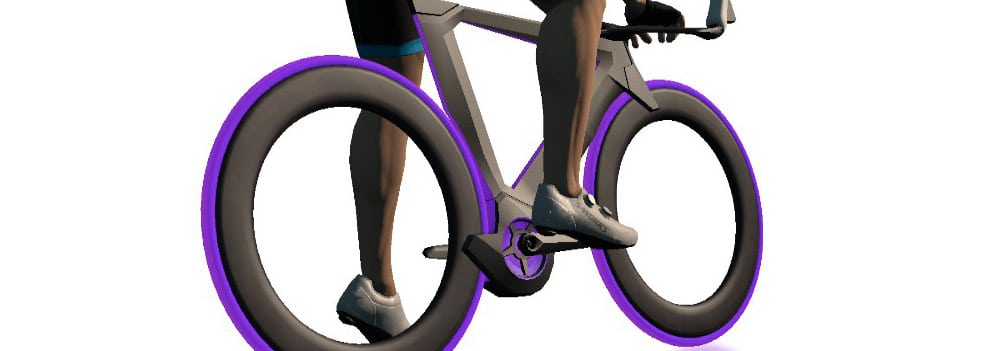
Since your effort will be on a flat route, choose the most aero in-game bike and wheels you’ve got. Unless you’re riding this as a TT (see below), you’ll want a frame from our fastest frames list (see frame ranking charts for a complete comparison).
And whether it’s a TT or not, you’ll want a wheelset from our fastest wheels list (see wheel ranking charts for a complete comparison).
Riding a TT?
If you’re a purist and want to ride the event on a time trial bike (which doesn’t draft other riders), just pick the best frame you can get from our fastest TT frames list (see TT frame ranking charts for a complete comparison).
Free Riding: TT or Drafting?
If you’re not riding this as an event, you’ll probably wonder: what’s faster in a free ride: a TT bike or a standard road bike that lets you draft?
The answer is: it depends. It depends on how many other riders are on the road!
Luckily, with the crazy numbers we’re seeing on Zwift lately, you can rest assured that riding a standard road bike will give you the fastest time, because you’ll be able to get a lot of drafting done on flat routes.
Exact Distance
IRONMAN’s instructions say “… make sure that you complete the exact distances specified, as your ranking is determined by your time and distance recorded on your GPS tracking device.”
As confirmed by double-checking with IRONMAN support, your ranking will be based on your overall activity time, even if your activity is well over the required distance. This seems a bit odd – it would make more sense to take the time from your initial 90km if your activity is longer than 90km. But according to support, they don’t have that ability. Therefore, you should make sure your ride is at least 90km long, but not much longer!
Questions or Comments?
Share below! And if you complete IRONMAN VR1, please share your experience!


Another potentially useful website for course selection is ZwiftHub (https://zwifthub.com/). I stumbled across it via Reddit and have only played around on it for a few minutes, but ZwiftHub allows you to filter by distance and elevation (and other criteria). I thought it looked interesting, so I figured I’d mention it.
Unfortunately IM VS platform sees activities taken from Zwift as “manually added” and it allows you only one a day
Hi Luca,
how do you connect your IM VC account? Strava / Garmin Connect?
I am wondering if i can upload my Zwift activity via Garmin Connect (as I normally do) and hopefully this will count against the IM VR1… Any idea if this can work?
BR,
Michael
I upload from Zwift to Garmin Connect to IM VC, maybe Strava works better. It’s made for Smart Trainer, Smart treadmill but It’s a dumb platform …
Hi. So if I ran this morning 12km on Zwift you think I can t run the first 5km of Ironman vr1 challenge on the same day? Thank you
this is what happens to me
Luca it works! I ran the 5km on zwift, my second run of the day on zwift, and the progression bar is now at 33%. I just have strava connected with IM virtual club. Hope it helps!
that sounds promising!
i just clocked in 90.2km bike ride on zwift just a little after 6pm GMT. zwift uploaded the activity to strava. im vc pulled the data from strava and the activity is shown in the feed as “indoor cycling”. in this feed i can only see the duration of the activity. under my im vc profile i find the total distance, where my ride was considered properly. however progress bar is not updated after my ride. it still says 0% 🙁 lets see what happens..
Same with me mate
Luca I just received an email from IM and they said they had some issues with bike uploads on the platform but they should have fixed it! It works with me, hope it ll work for everybody else!
Today i got also reply by im. Same explanation. A bug in updating the progress bar. After checking again it was updaten 🙂
Wish I’d known about this a few weeks ago. Nowhere near run fit atm (not run since last year). 21k after no running for a while is prob not a good idea.
Hi Eric, big fan, thanks for all the tips and tricks. Quick question, my IM VC account displays my Zwift rides (via Strava’s confection) on the dashboard as “indoor rides”. The challenge: “Ventum Challenge 1: Mix It Up” does not seem to pick it up. Is it because the challenge is listed as a “Bike” and requires you to be outside? Or is something glitchy? Run challenges seem to work perfectly. Thanks for your insight!
Hi Chris,
No idea! The conditions for that event don’t say anything about it only applying to outdoor rides–and I doubt they would do that anyway, given that this whole program really targets indoor training. Perhaps reach out to them?
I’m seeing the same thing using GC to push to the Ironman VC. I don’t think it’s really seeing my 90 minute ride as counting toward that Ventum challenge.
Hi Kurt – I have an idea that might not work, but I am curious. Can you go into GarminConnect and edit the activity? Change the activity type from Virtual Ride to Bike Indoors and see if it works. The reason I think there is a chance it might work is that I need to do this in order to get my zwift rides to show up in MyFitnessPal.
Hi! Same exact problem. Yesterday after registering in the ventum challenge 1 i rode on zwift for 71 minutes, i see the activity in my dashboard but it seems it doesn t count for the challenge, i m still at 0%
Same, just did a 5k as part of the IM weekend and the activity is listed but has not contributed to the race 😔
did you run on zwift? did you upload via strava?
Well this doesn’t work with Haute Route Watopia this weekend, I can’t handle all this virtual racing in one weekend!
I just carried on to 90km after the Stage 3 🙂
Can someone confirm whether the complete activity time for the bike ride counts towards this challenge or only the first 90k time. I’m planning on doing the “we zwift flanders” mega pretzel event on Sunday and I don’t think I can handle another 90k on the bike then
I don’t know. I actually emailed Ironman about it but haven’t heard back. I want to know if I have to stop and save my watch at the certain distance and then start again to complete a workout if it is longer……..
Why do they call it VR when it’s not VR…
Confusing, eh?
It’s “virtual race”. Not “virtual reality”.
Here is the email response from Ironman:
Thank you for racing with us this weekend.
You only want to complete and record the required distance. If you record and input an 8 K, the system will register that you completed the 5K because you covered the required distances. But the system will also reflect time it took you to complete the 8 K. We do not have the ability to only pull part of the record. If you want the most accurate time, you should only record the required distance.
Please let me know if you have any other questions. Good luck and have fun!
Great, thanks for the clarity!
Just looked at my Zwift ride today within the Ironman VR Dashboard (Zwift -> Garmin – > Ironman VR) and the activity shows as ‘Activity entered manually’. Also only the duration is showing and no distance. I don’t think you can therefore have a qualifying ride for any Ironman VR events or challenges if there’s no distance imported for the activity.
Anyone managed to get distance across from Zwift to IRonman VR via Garmin?
I know Garmin to Ironman VR works ok as I did an outdoor run earlier and the distance went across fine.
Mark, I don’t know if this will work but it’s worth a try. In GarminConnect can you try editing the type of the activity from Virtual Ride to Bike Indoors?
Thanks Lauren- yes I can edit in GarminConnect, however it doesn’t push it to Ironman VR again and refreshing there doesn’t pull in a refresh of the activity. I even tried deleting the activity from Ironman VR but it doesn’t refresh it back again 🙁
Now, what I did notice is that if you click on the little cog wheel above your profile picture in the dashboard, you can see more details on the activities imported and in there it does display the distance for Zwift rides (just not on the main dashboard page).
Mark, for me also only duration shows up. but i did the activity upload via strava. however i find under my IM VC avatar/profile a total distance, where my ride was considered 🙂
Just did a 5K as part of the VR IM event, synched over from Strava and shows in the run in the dashboard, but has not been added to the event?
Hi there. I just completed 90km ride on zwift and the VR1 web site shows my result (distance and time) however the progression bar is still ZERO… any thoughts?
same here 🙂 did you also upload via strava or did you use garmin?
i used both options garmin and strava, however progression bar is stack at ZERO 🤷
hehe, same as mine 🙂 i wrote an email to ironman. lets see what they say. i will let you know.
However total distance looks ok..
As others are saying, my Zwift miles don’t contain distance, so I don’t think it will count for the challenge. I upload to Strava via Zwift and Garmin. Zwift records as “Indoor Cycling”, with only time and no distance. Garmin is detected as “Cycling”, as a duplicate activity and not counted, though with an incorrect distance (because the distance needs to come from Zwift – Garmin and Zwift distances will never match)
This is fantastic! Thanks for taking the time to highlight the important details. It made signing up really simple. Now, I just need to complete the events 🙂
[Solved]
I had pretty much the same issue as many here. By using zwift ->, activity did not count because I had done a test of about 10 minutes. Later, a ride of 90km. So my ride did not count because IM VR only accepts one “manually enter per day”.
So i deleted everything and entered today a manual ride in Garmin Connect with the same data from yesterday and it is now working. It is not the way I wanted, but if the system is dumb enough to have issues like this, than you have to work your way. For those initialing, use Strava for IM VR.
I did the bike leg this morning on Zwift, but simultaneously recorded it on my Garmin as an Outdoor Ride, with GPS turned off so that it would get my distance based on the speed sensor in my trainer. I just synced and the ride appeared on my Ironman VR dashboard with the correct distance, and the progress bar was updated.
Now, all that I have left is a half marathon tomorrow… 😬
I registered for the Vr Iron man on Thursday 2nd April, synched my strava & Garmin app and my activities will not upload to my IM dashboard since I started on Friday? Can someone please help!
Quote from Sport Heroes FAQ:
“In order to compete for and earn rewards and additional benefits, race activity realized outside must be validated by a GPS and Heart Rate device and uploaded to the platform upon completion (GPS doesn’t apply if you are using a treadmill or home trainer, as long it is connected to a tracker).”
Has anyone tried completing the event without HRM? I’ve signed up for VR2 and don’t usually use HRM.. wonder if it still valid?
I was looking for just this information:
EXACT DISTANCEIRONMAN’s instructions say “… make sure that you complete the exact distances specified, as your ranking is determined by your time and distance recorded on your GPS tracking device.”
As confirmed by double-checking with IRONMAN support, your ranking will be based on your overall activity time, even if your activity is well over the required distance. This seems a bit odd – it would make more sense to take the time from your initial 90km if your activity is longer than 90km. But according to support, they don’t have that ability. Therefore, you should make sure your ride is at least 90km long, but not much longer!
If I ever give one of these a go then i will need to remember to warm up in a separate activity, exit Zwift, and then start a new Zwift ride and go for it.
If you run twice in one day which will it take?
Susan, i understood it will take the first effort that matches..
Hello, anyone knows how to manually upload garmin data to IM VR? Bike results are not showing up in IM VR dashboard, all synced.
Thanks
I have an older kurt kinetic trainer that doesn’t seem to be picking up with my garmin 735xt watch. It says no sensors detected but if I go through the kinetic app i see my mileage. What’s the best way to get my indoor cycling mileage recorded/transferred to the dashboard