
Over the past few weeks, Zwift has rolled out an important, powerful set of fitness tracking and reporting features. These tools expand the activity data Zwift consumes, allowing us to feed our outdoor rides into the platform for the first time ever. This, in turn, enables Zwift to build a more accurate profile of our current fitness to help us train smarter.
Let’s dive into Zwift’s new Fitness Tracker and all the moving parts that make it function…
Outdoors… On Zwift?
You may be wondering why would I even want Zwift to track my outdoor riding? It’s a fair question, especially if you see Zwift as simply an indoor cycling platform.
The big reason Zwift needs to track your riding outdoors as well as indoors is so Zwift can put together an accurate, current profile of your fitness. Zwift wants to help its users choose appropriate workouts, but they can’t do that unless they know a person’s training load. How fresh are their legs? How fit are they overall?
Secondly, on a customer retention level, tracking outdoor riding (and letting outdoor rides extend our week streak and earn XP) is a smart move from Zwift. It won’t change the minds of every “winter-only Zwifter”, but it will surely convince a few to keep their monthly subscription going.
Eric Min, Zwift’s CEO, has said for years that Zwift’s goal is to get more people more active more often. Tracking outdoor rides falls perfectly in line with this goal, helping Zwift better position itself as a year-round fitness platform.
Connecting Garmin/Wahoo to Zwift
Getting your outdoor rides into Zwift is easy, assuming you’re recording those rides on a head unit/app from Wahoo or Garmin. All you need to do is connect your Zwift account to your Wahoo and/or Garmin account.
You can do this via the Companion app under Settings>Connections, or by logging into your account at zwift.com and going to Account>Connections.
Wahoo requires a simple login to your Wahoo account, and if you already had Wahoo connected, there’s nothing more you need to do.
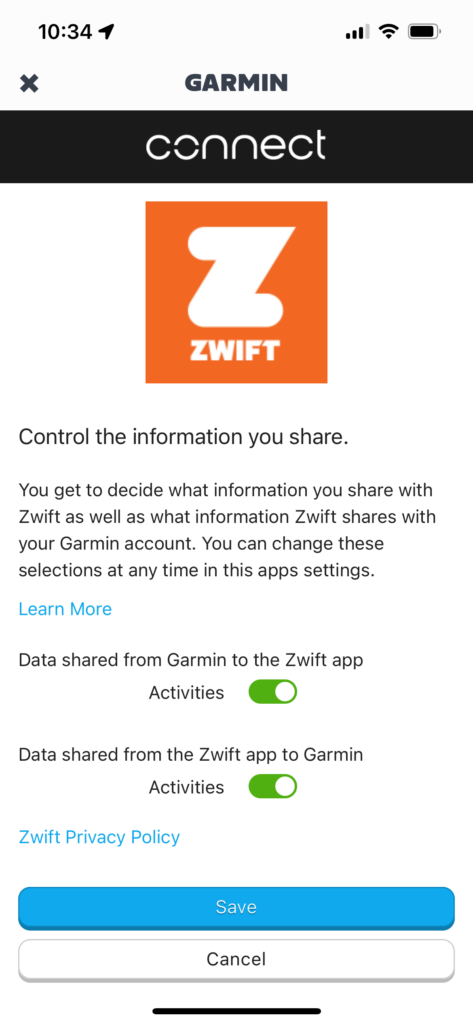
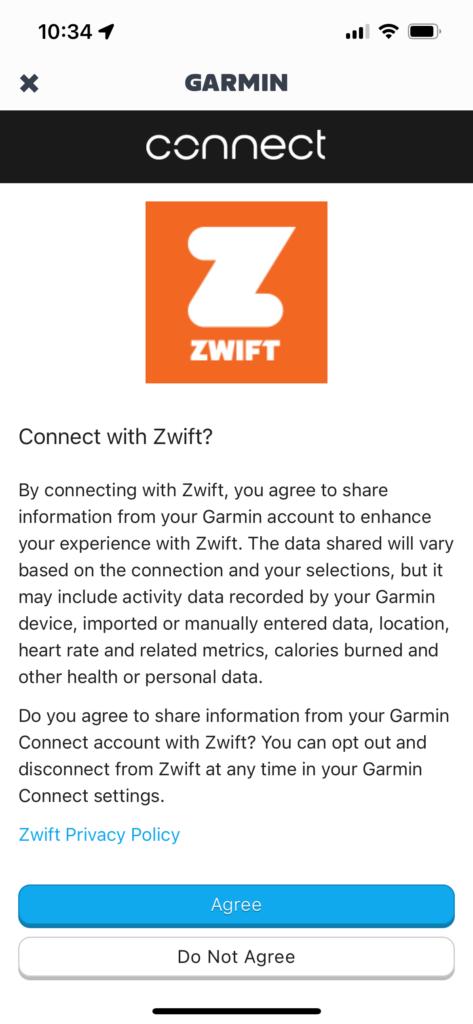
Garmin will require a reconnection even if you already had your Garmin account connected, because there’s a new level of permission you need to authorize so Garmin can send data to Zwift. (Previously, you could only authorize Zwift sending data to Garmin.)
Simply enable both toggles, click “Save”, then “Agree” on the next screen:
Zwift tells me that when you first connect your Wahoo account, it should import the last 90 days of activities into Zwift. Garmin should import the last 30 days of activities. It may take up to a week for old activities to show up on Zwift.
Fitness Tracking
The Companion app has a new section at the top of the homepage that Zwift has dubbed the Fitness Tracker:
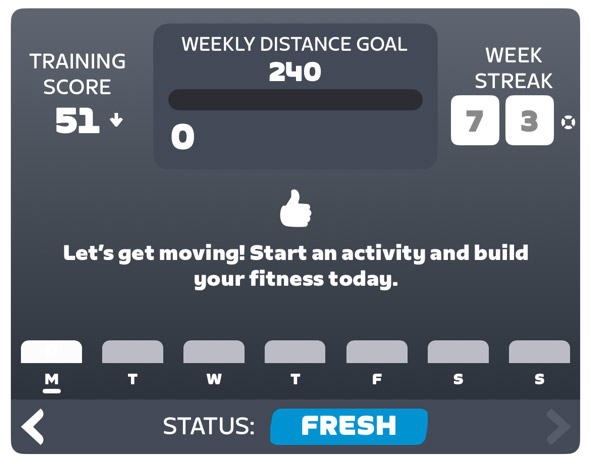
That screenshot is a bit boring, though, since it was taken on Monday morning when I haven’t ridden yet! Scrolling back a few weeks, you can get a better idea of what the Fitness Tracker shows:
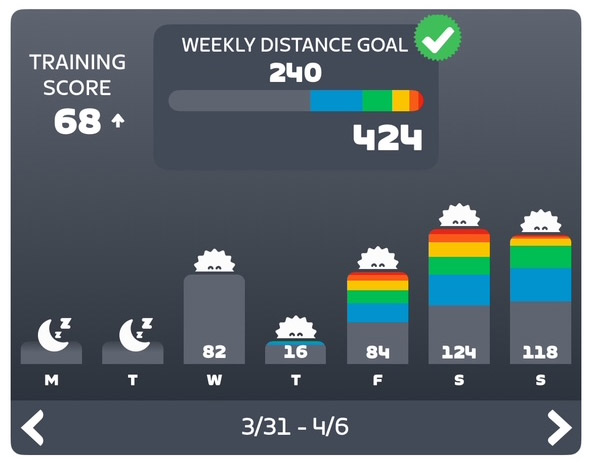
There’s a lot of information packed into this little box, including:
- Training Score: Zwift’s version of chronic training load (CTL), a commonly-used metric that summarizes the amount of training you’ve been doing. Your Training Score is the weighted average of daily Stress Points over the past 42 days, which means if you rode at your FTP for 1 hour every day (which equals 100 Stress Points on the day) for 42 days, your Training Score would be 100. (In practice, most riders who train regularly are probably in the ~60-80 range for Training Score). Read more about Stress Points >
- Training Status: this is only shown when viewing the current week, so in the first screenshot, you can see my status is “Fresh”. Training Status is determined by comparing your long-term fitness (over 42 days) and short-term fatigue (over 7 days) to place you in one of these categories:
- Ready: New to training.
- Fresh: Active and ready for challenges.
- Productive: Consistently challenging yourself and recovering well.
- Overreaching: Training heavily.
- Detraining: Loss of fitness due to reduced training.
- Weekly Goal Progress: the top-center section shows your weekly goal (which can be based on Time, Distance, Calories, Stress points, or Kilojoules) and your progress toward that goal. You can tap to easily modify your goal as well (more on this below).
- Daily Activity Summary: each day’s activities are summarized with a few visuals. First, you have a color bar chart showing how much relative time you spent in each power zone (learn about Zwift’s power zone colors here). You’ll see a sun at the top if the day includes an outdoor ride that earned XP (touch a day and it will expand a bit to show how many XP you earned on the day). Lastly, each day shows how that day moved you toward your selected goal (time, distance, Stress Points, etc).
- Weekly Activity Zone Summary: At the top-center, in the goals section, is a bar showing the amount of relative time you’ve spent in each power zone.
- Current Week Streak: when viewing your current week, your Week Streak is shown on the right.
- Streak Savers: if you’ve earned any Streak Savers, these are shown next to your Week Streak on the right.
Recommendation #1: Set an Accurate FTP
It’s worth noting here that your Training Score and Status are computed based on your daily Stress Points, and those Stress Points are calculated based on your FTP setting in Zwift. If your FTP isn’t set accurately, your Training Score and Status won’t be accurate, either. Zwift will automatically detect FTP increases based on an internal algorithm, but you might consider taking an FTP test or even setting your FTP manually in game to ensure it’s accurate.
Related: “How (and Why) to Take an FTP Test on Zwift” >
Recommendation #2: Use a Power Meter Outdoors
When it comes to fitness tracking of any sort, your data out will only be as good as the data coming in. Now that Zwift is tracking your outdoor rides, you might consider purchasing a power meter for your outdoor bike if you don’t already have one, because otherwise, Zwift will infer power based on other ride metrics, leading to inaccuracies (see: Strava’s power estimates).
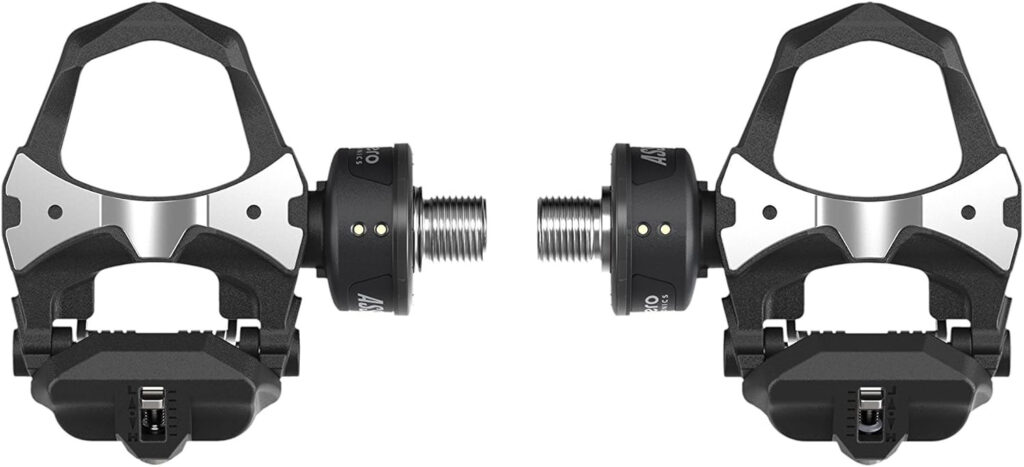
Looking for a power meter recommendation? For most road riders, I recommend the Favero Assioma pedals. They’re generally the most respected in the industry, they’re more affordable than the competition, and easy to install (unlock crank or spider-based power meters).
Buy them on Amazon >
Read my Favero Assioma Duo review >
Goal Tracking
This big fitness tracking release includes an expansion of what used to be very limited goal-setting/tracking capabilities in the Companion app. The app used to support only basic weekly time or distance goals, but now supports the weekly goals based on:
- Time
- Distance (KM/Miles)
- Calories (kCal)
- Stress points (SP)
- Kilojoules
Pro tip: as you change your goal between one of these 5 metrics, you’ll see the daily summaries changing to show your progress using your chosen metric. Even if you don’t change your overall goal, this little hack is a cool way to see your weekly efforts through different lenses.
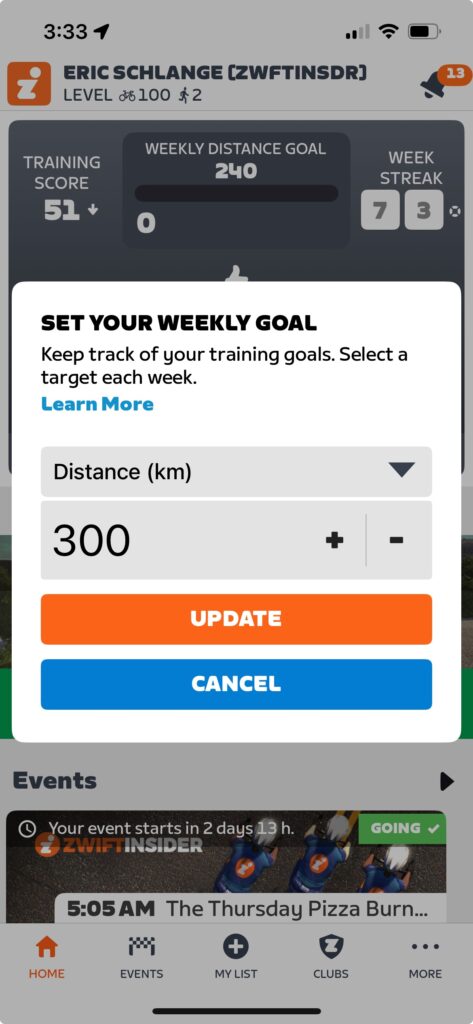
Additionally, now that Zwift can see your outdoor rides, your goals can be based on what you want to accomplish overall in your weekly cycling, instead of what you think you’ll accomplish on Zwift. (It always felt clunky in the past to have a weekly Zwift time or distance goal, especially when the weather changed and your ratio of indoor to outdoor riding changed with it.)
As before, the in-game ride report will show your goal progress at the end of each ride, and you’ll get a notification in game if you hit your goal while riding on Zwift.
Level Up, Outside
Apart from better tracking of our fitness, this new functionality from Zwift also means we can continue to level up while riding outside.
Outside rides now earn 5XP for each kilometer, up to a maximum of 200KM/1000XP per ride. Yes, this is significantly less than the 20XP per km you earn for Zwifting. But it’s still something.
Related: “All About Zwift XP, Levels, and Unlocks for Cyclists” >
There are a few details worth mentioning here:
- You won’t get XP for past activities that are imported when you first connect to Wahoo/Garmin, but they will be imported and count toward your fitness tracking.
- You don’t earn Drops while riding outside.
- Time/distance/elevation accumulated outdoors will not apply to in-game bike upgrades.
- Only paying subscribers earn XP from outdoor rides.
- You will not earn your 300/400/500XP week streak extension bonus for an outdoor ride. But the first Zwift ride you finish for the week will award you that XP bonus. (So if you want the week streak XP bonuses, ride on Zwift at least once a week.)
What’s Next?
This is just the initial launch of fitness tracking on Zwift, and they’ve assured me that there is more to come.
First, while these new features only apply to cycling right now, Zwift says they’ll be rolling out support for running later this year.
Second, support for importing activities from Hammerhead is coming this summer. Zwift says other platforms may be added (DC Rainmaker mentions Polar/Suunto/COROS/Apple as the likely candidates). Why doesn’t Zwift just import activities from Strava, you may ask? Zwift isn’t saying, but my guess is that Strava’s API terms of service changes over the past year made Zwift nervous. On top of that, this move into outdoor ride tracking is a move into Strava’s territory, so Zwift may be steering clear for that reason as well.
Third, duplicate activities are a concern for some users based on their current setup (which devices/services they use to record which activities). Zwift says automatic de-duplication is coming soon, but for now you can delete activities manually if you’d like, using the Companion app. We also know Zwift has been testing in-game dual recording, which would eliminate the need to record your power data on a head unit (something that could lead to more duplicate activities).
Fourth, “Smart Goals” are coming, where the game will automatically recommend a goal based on your current fitness, to help you get started. Great for beginners.
Fitness Trends
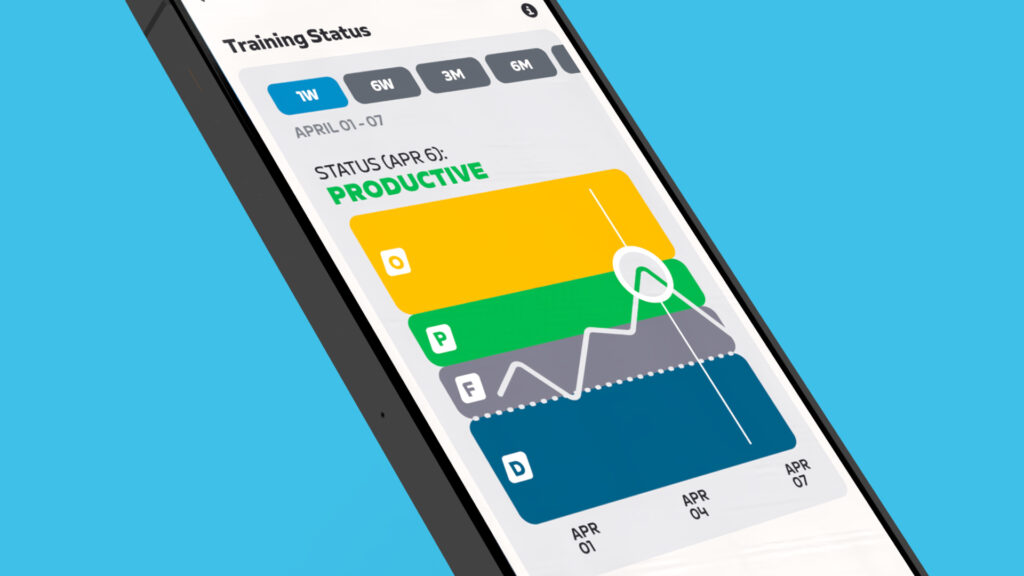
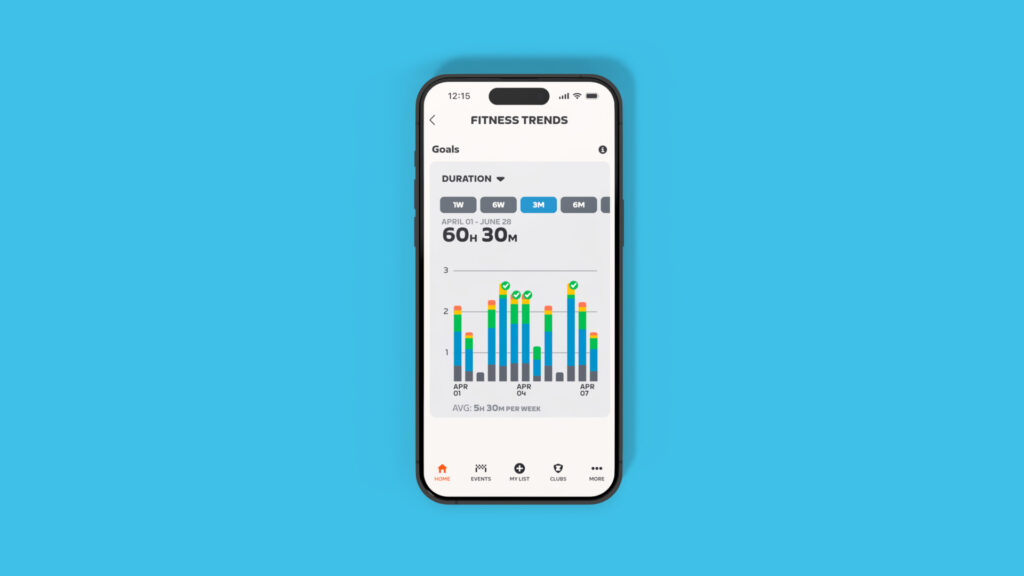
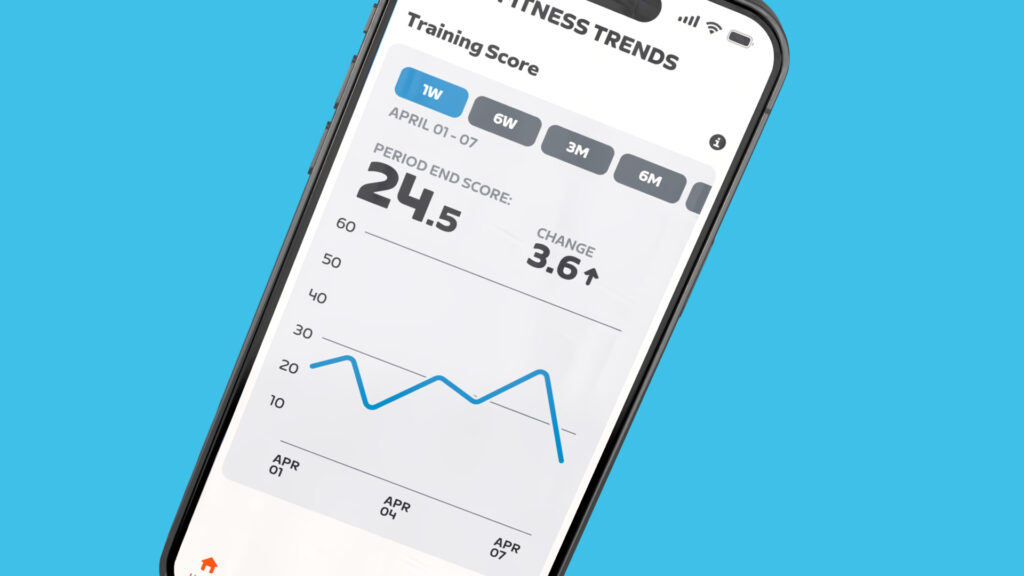
Lastly, Zwift knows we don’t just want a snapshot of data… we want charts! So they have promised a “fitness trends” feature, and even delivered screenshots of it:
What else?
The items above are what we know Zwift is working on. But what else could these fitness tracking changes lead to? The answer is: so much.
You may not realize this, but solo structured workouts are the most popular activity done on Zwift. At Zwift Community Live, Zwift staffers shared the following activity stats from the last 30 days on Zwift:
- 2.2M free rides
- 2.3M solo structured workouts completed
- 632K group rides
- 483K Robopacer rides
- 282K races
- 106K climb portal rides
That’s a bit wild when you think about it, especially considering the popularity of Robopacers and all the focus Zwift puts on events.
Given Zwifters’ obvious interest in structured training, I believe the holy grail for Zwift would be some sort of AI-based coaching built into the app, not unlike third parties such as TrainerRoad, XERT, and FasCat currently offer.
Imagine if you could set some simple goals (“I want to perform better in Zwift races” or “I want to lose some weight”) and the app could recommend daily activities for you based on your training history, including outdoor rides. For extra credit, Zwift could recommend more than just boring ol’ structured workouts. What about a race or group ride that fits the bill?
So many possibilities.
Questions or Comments?
What do you think of Zwift taking in our outdoor rides and delivering fitness tracking? What sort of functionality would you like to see Zwift build on top of these new capabilities? Share your thoughts below, along with any questions you may have about these new features…


So close… come on Zwift. Count *at least* that elevation gain towards Everest. It’s just silly not to. A great many riders use Zwift for winter training. They will STILL PAY, but they aren’t going to give up outdoor riding. We’re putting in the work, reward us as we reward you with real $$
Dang, 10 downvotes. I guess I don’t understand this community lol
Now to 21 downvotes. I often don’t understand why reasonable opinions get so slammed on here sometimes, especially with nobody chiming in to explain why they feel that way. Maybe it’s a mob mentality thing.
Seems like a reasonable suggestion to me.
The status displayed sure felt like it was mocking me the other day. Completed a ventoux PR the day before, only to be told my status should be FRESH. Sure, sure, …
Mine has only read as ‘Fresh’ so far, doesn’t matter if I’ve had a rest day, done a workout, a race or 3 hours outside.
Sanem rude everyday, still fresh!
I have had productive after a 4 hour ride (outdoor)
I’ve been off any proper training for 5 weeks, only doing physio rehab exercises and a couple of easy spins, and no running at all. I had manually reduced my FTP to 100 so that it would automatically increase within Zwift as I regain fitness, instead of sticking with my pre-injury FTP. Then this morning I rode for an hour at c.2w/kg with the power chart pretty much all in red due to my artificially low FTP. And that single ride has given me a “productive” status. In the circumstances, I had expected my status would be “overreaching” instead.
Yeah… training status isn’t based on just what you did yesterday, though. It’s based on your fitness and fatigue levels, which are built over several days.
You can look up how it all works on Google (Zwift uses the same training stress balance model used by others like Strava, Intervals.icu, etc so the details are out there!)
I record my weight in the Garmin Connect app, I use smart scales to do this every morning, I know how much my weight varies from day to day, I have entered an average weight for my Zwift weight, if Zwift pulled this data from Garmin Connect it would be accurate for every ride.
Can your smart scale also sync to Fitbit? If yes, you’re sorted because Zwift can pull your weight from Fitbit. You can get a free account at Fitbit to do this (ie don’t need to purchase a Fitbit device). If your scale doesn’t sync to Fitbit, perhaps you can use https://www.fitnesssyncer.com/ which can read your weight from Garmin and write it to Fitbit. Good luck!
Thanks for the tip Todd, I got my weight into Fitbit via myfitness app, then to Zwift from Fitbit, a convoluted way, but it works.
Thanks
I emailed with Zwift support for Withings smart scale support which has been broken for years. They said if people talk about it in the forums, it is more likely to get fixed.
Any news about the Core integration?
Haven’t heard of any release dates yet, no.
My indoor rides on zwift, and my outdoor rides on a Garmin headunit each sync to Strava – it’s then on Strava where all my indoor and outdoor ride data comes together (along with any other notes I wish to add). For what it’s worth I then automatically sync all rides from Strava into a local archive on golden cheetah, but that’s another discussion…
The main question is if I approve the Garmin rides to go into Zwift, would Zwift then also send those to Strava (thus inappropriately duplicating those outdoor rides in Strava?)
I have a similar question.
No, they don’t report as duplicate rides on Strava. I can confirm that.
Shouldn’t be an issue. Platforms typically don’t send out (to a third party) activities they received in (from a third party). You can imagine that would result in a lot of messy endless loops.
So Zwift will ingest an activity from Garmin, but not send that activity out to Strava.
I would love to know why Strava isn’t included in companies it syncs with. Any insight?
I wrote my thoughts above… see if you can find ’em. 😀
I’ve been reading your thoughts for years! Mark me embarrassed.
With Strava excluded as a source, those of us without a headunit are SOL. It would be great if the Companion app could be used to record those outdoor rides directly!
The Wahoo app can record rides via GPS. I’ve never used it for such, but I assume you could record your ride on your phone in your pocket, not unlike Strava, and it would work just fine popping over to Zwift.
Will you look at that… last time I tried with the Wahoo app I gave up at the screen that says “please pair a sensor to begin recording”. But it looks like you can indeed get past that screen and record GPS directly!
So create a wahoo account instead of my Strava account, connect it to zwift and use it outdoors to enable my phone to be my head unit? (Sorry, total newbie to all of this)
Yup, that should work.
Awesome, thanks to all!
Always good to have ‘more’…but…I’d like the option to turn it off! Reason being – unless it acknowledges all the other activities I record on Garmin (running, weight training*, walking etc), then it’s going to be misleading, especially if tied into workout recommendations.
Trainerroad do a cracking job now in this regard, factoring in tons of different activity types and their ML system adjusts your scheduled training accordingly!
* I mean, once a month still counts for something, right? 😉
Yes – I agree. Is there a way to turn this off? I use other programs for my “total fitness” tracking. I don’t want outdoor rides on Zwift. Can it be turned off?
I guess not allowing your Garmin/Wahoo to share to Zwift would do the trick
Sorry — I realize wasn’t clear — I mean turn the whole fitness tracker box off on top of the Zwift Companion front screen. Maybe have a way to customize the front screen.
Yes, that would be great. I think I preferred the old format as it presented the data I wanted more clearly and with less clutter. The new format looks more designed from an artistic standpoint but makes it harder to find what you want.
Strava has done the same with the way that activities are now displayed when you click into them.
If Zwift also make the “segments” more easy to see, like per activity if you have a PR. I will immediately ditch Strava
The work (kj) stat in zwift doesn’t match Strava for the same outdoor ride. I think zwift must be using wtd avg power instead of straight avg power for the calculation which is wrong and overstates work. Stats match if ride is virtual on zwift.
I have another thought into this integration: there have been people who train outside and do easy rides on Zwift and then race so their FTP numbers aren’t always legit. I could see this being a way to true up some sandbaggers, but the smart ones will just not sync it
That should be much less of a problem with racing score now. Seed is based on 5 minute power and that’s much more likely to become accurate after a few races done seriously. Plus of course if you’re underseeded you’ll win your races, also increasing your racing score.
Is it possible for Hammerhead users to manually upload rides while we wait for more automagic support?
Do outdoor rides in increase our duration, elevation, and distance stats in our Zwift profile?
No.
Ah good, I like to keep my Zwift numbers separate.
Hello there, I don’t know why I never get xp for new outside activity, and I’m subscribe.
Do you need powermeter or heart rate monitor outside ?
Also, I’ve always heard that average power are different indoors and outdoors for same person, could that distort the analysis from Zwift?
You just need to pair up your Wahoo or Garmin account, then record your outdoor ride on Wahoo or Garmin. That’s it! No power meter required, although that WILL make your data more accurate.
Thank you for your answer Eric, Garmin is already pair and the outside activity is display on Companion app, just no xp, I’ll try to reboot it.
Having fully read,comprehended and opted out of zwift privacy policy, that’s a big negatory.
As I understand it, your outdoor activities can NOT be seen by other Zwifters.
They are not visible to other players.
I wish I could get ride-ons while riding outdoors 😃
I didn’t realize structured workouts were so popular on Zwift compared to all the other types of riding. And the real numbers are likely even higher due to people like me who still do their TrainerRoad workouts on a separate device so they can free ride. I really enjoy teleporting around to various RoboPacer groups during my workout, something I can’t do if I’m using Zwift’s built-in workout.
Until they take all efforts (not just cycling) into account, this «Training score» and «Training status» are just worthless. Last week I skied for 29.5 hours and cycled for 7 minutes. Training score was 36 based on those 7 minutes of data 😂
Obviously, both Garmin, Strava and intervals will have some more meaningful measures of this. Although intervals and Garmin struggle with handling of duplicates.
The only platform I have seen that can handle multi-sport is Training Peaks. Garmin has never credited any of my Zwift rides as more than base training. Strava–ha! Never seen anything on there to make me think it is more than a social platform.
Looks like no plans to integrate with Coospo or MapMyRide. These are not popular enough or some technical reason?
I have noticed a certain inconsistency and “breaking of the rules” in terms of the streak and the XP bonus for it.
Well, every week at the next level of the streak I was receiving ‘500XP’ as intended.
This Monday, I did an outdoor ride and upon completion, the time and XP earned for the outdoor activity (920XP) was displayed in ‘Comapnion’. The weekly pass was increased by one. But the ‘500XP’ bonus was not added.
Last night I did a workout (2 in the InsideOut series – by the way, I too was met, like many other athletes, with the odd failure to count this workout as part of the cycle – it only “fixed” this morning) indoor on Zwift and after completing it, the weekly pass screen with stats did not display.
All in all this makes sense after all I had an outdoor activity on Monday and there the ‘streak was included’.
Except that neither Monday nor Wednesday gave a ‘500XP’ bonus for continuing the streak.
@Eric Schlange if you could find the time and have the opportunity to communicate with ZHQ – would you ask them if this is intentional on their part or just an oversight and it will be rectified so that the “500XP” bonus is awarded on the first activity of the next activity week for both outdoor and indoor?
regards
Artur
Zwift tells me:
“The 500xp bonus is for your first ride on Zwift in the week, so if you only ride outside during a week you wouldn’t get that in-game bonus.”
If I have understood correctly they are saying that ‘if you have an outside activity during the week then there is no bonus’.
But if I do an activity in ‘Zwift’ the next day (but during the week) then this bonus is still not there either (this was the case for me).
I wonder how it will be the following week assuming I perform the first activity in ‘Zwift’ (not outdoor) – will it be 500XP or …. 300XP? 😀
I appreciate your commitment and support Eric.
Outdoor rides keep your streak alive, but you don’t get the streak XP bonus unless you ride inside that week.
So yes, you’ll get 500xp the following week, even if you do a whole week of outdoor riding.
I have experienced the same issue. I did an outdoor ride on Monday and Tuesday this week and a Zwift ride today, but I did not get the bonus XP after the Zwift ride as I should have. My current streak is 29 weeks.
When it says “282K races” does this mean 282k events or 282k rides across all races. The other numbers specify rides which is more obvious.
if it’s 282k rides then it explains why Zwift don’t put too much effort into developing this side more as it’s really a small part of what people use for Zwift
Been doing a lot of outdoor running, but that doesn’t seem to count… only outdoor bike rides do. So fitness level metric in zwift is kinda worthless imo
I am curious about this; Eric, do you know if Zwift has any plans to correlate Zwift Run with Garmin so that outdoor runs would also assist with leveling up? Thanks in advance–appreciate your insight! @Eric Schlange
As mentioned above:
”First, while these new features only apply to cycling right now, Zwift says they’ll be rolling out support for running later this year.”
That’s all I know!
And there was me thinking that I might start to level up my running profile, without ever actually using Zwift for running!
But in all seriousness, if the objective is to track total fitness, they should try to add running as soon as possible. The majority of my fitness training comes from running rather than cycling, as does my residual tiredness!
I achieved level 95 yesterday due to an outdoor ride, but then never got the level 95 kit. Tried logging in and out of Zwift a couple times, still no level95 kit. So if I level up while riding outdoors from now on I just won’t get whatever that unlock is… I’ll at last have to make sure I an indoors for level 100.
This is resolved, I got the kit unlock on the following indoor ride after doing 1km, I got the kit unlock banner along with the usual 20XP.
When will you add Hammerhead/Karoo?
Hi
talking group rides outside
when there is only one Garmin and one power meter for group as the cost is a factor
will zwift allow group tracking for outside rides
If I enable this through my Garmin account but decide it’s not for me, how do I then undo the changes, so I’m back to how things were before?
You can always disconnect your Garmin account from your Zwift account.
I wonder if the structured solo workout stat is overinflated. I love Zwift because of racing. When I race I do two structured workouts to warm up and cool down. I ONLY do those two workouts because I want to race, but looking naively at the stats it wrongly looks like I love structured workouts twice as much as racing (at a ration of 2 to 1). When I do structured workouts not connected directly to a race I still do it because I want to improve in racing.
Remember when zwift came out with some stats on the levels of zwifters and then a week later they were “ooops, those were totally wrong”? So the stats could just be wrong.
Ehh, this Zwift 😉
I observed a kind of certain bug in ‘Companion’ yesterday.
Well, this morning I performed a small activity from the Zwift level.
In the afternoon I managed to carve out time and go out.
‘Companion’ pulled the activity nicely from “GarminConnect” (so far) with one exception:
– no ‘sunshine’ or XP bonus on this day 😀
The time was counted correctly, the training load too, but the ‘XP’ no longer counted :))
@Eric Schlange, have you encountered such an occurrence?
I’d like to see training geared toward one’s age, as well. I’m 59, and I push myself– quite hard at times. Is this ok? Isn’t it ok? What about recovery time? Simply basing training upon an FTP isn’t as clear cut as it sounds. There is a huge difference with a twenty-something just starting out at a 238 FTP and it’s another thing altogether for a 59-year old clinging to that same FTP and chasing VO2max.
I’m willing to pay for Zwift over the Northern Summer if they award drops since now it is the main currency in the game. Not interested in the XP.
So my recent two outdoor rides did not sync – Garmin to Zwift. I un-linked them and re-linked them. lets see if that make a difference. Any to upload a recent ride to Zwift?
Just got the new Wahoo Roam 3 and now it’s no longer syncing to the Zwift fitness tracker.
It’s summer now Zwift. Where is the Hammerhead integration please?
Summer begins June 20th. 😃
Hmmm, couple of points with this:
On the plus side, my ZCA training score has increased considerably!
Other than not losing my streak when I’m away from home and on an actual IRL cycling holiday for a couple of weeks, I’m struggling to see any benefit to me from this, although maybe I now get 25xp per KM ridden (20XP from Zwift + 5XP for the same ride in Garmin)…
*this was working from Zwift rides synced with Garmin for a long time but this stopped working a few months ago
So I did a couple outdoor rides this weekend. Yesterday’s 121km ride awarded 705xp, 100xp more than the simple 5/km. Weird but I’ll take it! XP from today’s ride mathed out just fine. Is there some kind of extra bonus for longer rides?
No bonus I know of…
You should also add Hammerhead, as its user community is growing especially thanks to the new K3. Do you forecast this addition as well?
I’m not Zwift… I just write about Zwift. But yes, Hammerhead is in the works. (One slowdown was Hammerhead needing to build out their own API so their system could talk to Zwift…)
I leveled up because of any outside ride, but that meant I never received the 50,000 drops when jumping up a level 😪 hopefully Zwift support can help
All sorted by Zwift very promptly
Why Coros is not integrate?
My outdoor rides won’t connect to zwift? I approved wahoo, and my wahoo Element app has the most recent ride, but it’s not transferring to companion. 🤔