
All About Erg Mode in Zwift Workouts

If you’re new to indoor bike training, Erg mode can be confusing. What exactly is it, anyway? And when should you use it? Here’s a full explanation…

What Is Erg Mode?
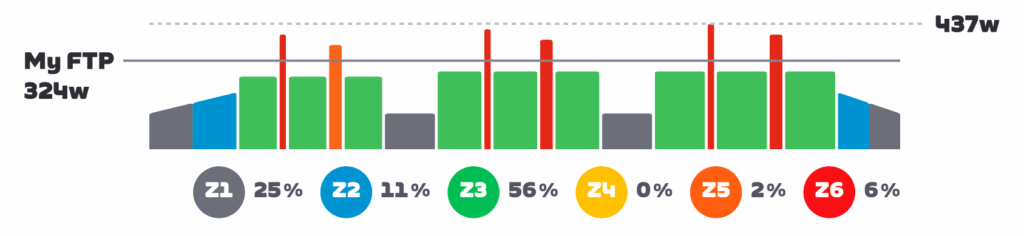
Smart trainers run in different modes which determine how much resistance they apply while you ride. The two most common modes are ERG and Sim.

Sim mode is simulator mode. This is the mode used in all Zwift activities except for structured workouts. In Sim mode, the controlling software (Zwift) sends parameters such as rider weight, air density, Crr, and gradient to your trainer. The smart trainer then tries to replicate the “feel” of that virtual ride environment through its resistance on your drivetrain.
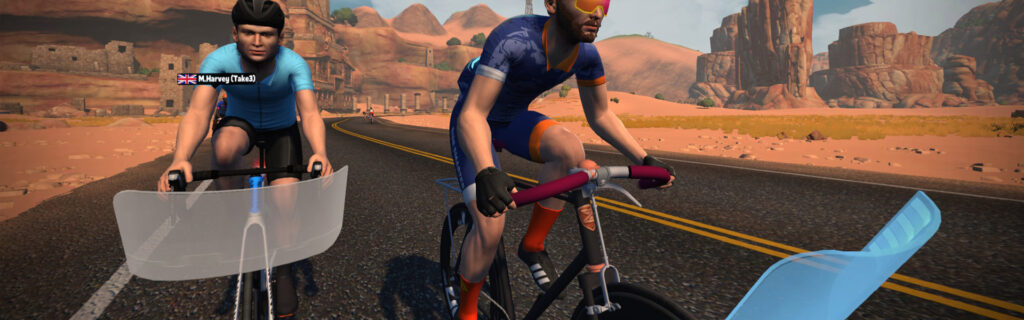
Erg mode is completely different. In Erg mode, your trainer’s job is to help you maintain a specific wattage. “Erg” comes from Greek “Ergasía” which means “work,” because Erg mode literally forces you to work at a particular level.

Example:

  • Your Zwift workout interval wants you to hold 200 watts for 10 minutes
  • If you are spinning at a cadence of 90 and putting out 200 watts, then slow your cadence to 60, your trainer will increase resistance so you are still holding 200 watts even though you are pedaling slower.
  • If you are spinning at a cadence of 90 and putting out 200 watts, then increase your cadence to 110, your trainer will decrease resistance so you are still holding 200 watts even though you are pedaling faster.

Erg mode simplifies your workout so your only job is to manage your cadence. You don’t need to worry about shifting (although it is certainly allowed), or whether you are hitting your wattage target. You just need to keep your cadence where you want it, and the trainer will make sure you’re hitting the target power.

When Should I Use Erg Mode?

Erg mode is enabled by default if you begin a workout while using a smart trainer in Zwift. And you should leave it that way, for workouts where you want to maintain specific power levels for designated intervals without needing to focus on holding accurate power.

Some riders (and/or coaches) prefer to do structured training with Erg mode disabled so they can learn to hit and hold steady power targets without help from the trainer. This is a valid point, particularly for time trialists.

I’ve been asked if Erg mode should be used in races. First of all, this would be a little challenging to implement given Zwift’s event functionality. But even if you could do it, why would you? Racing requires constantly adjusting your effort to stay with the pack, attack on punchy climbs, ease off on descents, etc. Erg mode was not made for on-the-fly adjustments.

That said: you could use Erg mode in a race by pairing your smart trainer to your head unit and controlling it in Erg mode there. (You wouldn’t pair anything for “resistance” in Zwift.) This may be interesting in a flat TT race, where you want to hold a target wattage for certain amounts of time.

How to Disable and Enable Erg Mode in Zwift

You can disable and enable Erg mode from the workout browser screen by toggling the “Use Erg Mode” button. But you won’t see this option if you simply choose your workout from the workout collections when Zwift starts up.

You can also turn it on or off during your workout via the action bar, which is reachable by clicking the up arrow, or clicking your mouse near the bottom-middle of your screen, or swiping up from the bottom of the screen. This will bring up the action bar which includes a button for turning Erg on and off (see below).

Additionally, the Companion app has the same button to toggle ERG on and off during your workout.

What Gear Should I Use?

Note: if you’re on virtual shifting with the Zwift Cog, this section doesn’t apply to you.

While Erg mode will work in any gear on your bike with no shifting required, riders sometimes wonder which gearing is best. There is no clear “right answer” for everyone, but here are a few things to consider:

  • If you want to work on climbing, train in a climbing gear (small ring on the front). This will reduce your trainer’s flywheel speed, mimicking the feel of a low-speed climbing effort where your muscles aren’t able to “coast” as long at the top and bottom of each pedal stroke.
  • Train what you race. If you’re training for a particular type of outdoor race, use a gear that mimics the pedal inertia you’ll be experiencing during the race. So a flat TT might use the big ring and one of your smaller cogs in back (high inertia), while a hill climb race might use the small ring and a big cog in back (low inertia).
  • If you ride a lot of ERG workouts, you might consider varying your gearing in order to wear your cassette more evenly. If 90% of your riding is in the same gear, you’ll wear out your cassette prematurely.
  • Chain line is always a consideration. Although your trainer and bike may allow it, having a bad chain line will increase drivetrain wear and wattage loss. So if you’re in your big ring in front, try to stay out of your easiest gears in back. And if you’re in your little ring in front, stay out of your hardest gears in back. Try to keep that chain line as straight as possible.
  • The lower your trainer’s inertia, the faster it can change resistance between intervals. If your trainer is slow to respond, and/or you’re doing very short intervals, you might consider shifting to the small ring to help your trainer respond more quickly to resistance changes.
  • Noise may also be an issue with certain trainer setups. An easier gear (small ring in front) should reduce your overall spinning and thus the overall noise level.
  • Shifting is OK: there are times when shifting at the start of certain intervals may make sense. Read this post for more thoughts on this topic >

For more info on the muscle recruitment side of things, check out this video from our favorite Aussie Lama:
Wahoo Kickr ERG Mode - Does Gear Selection Matter?

The Spiral of Death

If you understand how Erg mode works, you’ll understand what we mean by the “Spiral of Death.” This torturous event happens when you are in Erg mode, attempting to hold a particular wattage, then your legs get tired and your cadence slows. To keep hitting the wattage target, your trainer will then increase the resistance (see examples above).

Your cadence will slow even more due to this increased resistance, which means the trainer will pile on more resistance… until you come to a grinding halt.

Feeling the spiral of death beginning? Ramp up your power a bit while shifting to an easier gear so you can raise your cadence. If you’re out of gears, the only way out of the spiral is to push harder, increasing your cadence so the trainer reduces its resistance.

Erg Mode FAQ

What is Erg mode power smoothing, and should I use it?

This feature is included and enabled by default on some popular smart trainers, including those from Wahoo. It essentially smooths out the power data sent from the trainer to Zwift, so your structured workout graphs look very clean. Some riders like the clean lines of smoothed ERG workouts, while others prefer the more “accurate” and jagged graphs with smoothing turned off. Read more about Erg mode power smoothing >

How is resistance controlled during a “free ride” section in an ERG workout?

Some workouts, including 20-minute FTP tests and certain sprint workouts, include “free ride” sections where you can hold whatever wattage you’d like. In Erg mode, free ride sections feel like you’re on a flat road, with resistance not changing to match in game gradients or have you hit a particular power target. To change resistance in free ride mode, you’ll need to shift gears.

Questions or Comments?

Still confused about Erg mode? Got some insights to share? Comment below!

Eric Schlange
Eric Schlangehttps://zwiftinsider.com
Eric runs Zwift Insider in the spare time he finds between riding his bike and managing various business interests. He lives in Northern California with his beautiful wife Monica. Follow on Strava

15 COMMENTS

Subscribe
Notify of
guest

15 Comments
Oldest
Newest Most Voted
David Savage
David Savage
10 months ago

One key use of shifting during erg mode is I’ll go a couple cogs harder and get out of the saddle for 10-15 seconds in the middle of some long endurance efforts to shake out the legs or give the seat a little break, which lets the trainer resistance change as little as possible even while my cadence and torque are changing.

Bernhard
Bernhard
10 months ago

I don’t know if I’m the only one. But when I ride a workout, the watts feel easier riding a climb, then riding a descent. I don’t know if this is a mental thing or real (riding a Kickr Bike V1).

Greg Rajkovic
Greg Rajkovic
10 months ago
Reply to  Bernhard

Some areas do this in the routes on Zwift for some reason, like the part before Les Intestines on RGV and The Esses in Watopia, it is definitely noticeable and has been discussed off and on, in the Zwift forums by various people over the years. You can reduce the feeling of this by increasing your cadence.

Last edited 10 months ago by Greg Rajkovic
Greg Rajkovic
Greg Rajkovic
10 months ago
Reply to  Eric Schlange

It’s definitely not as many times while I’m doing an ERG workout, I’ll block the Zwift window in part to avoid the evil coach narrative.

The weird thing is that I’ve been through the logs time and time again to see how this could be impacted – it happens in certain parts of certain worlds. If you hold your cadence around 90rpm, it is less noticeable, but there is a bit of a “bump” to overcome in either direction otherwise, to get back to target cadence. I shared videos of this when I had video screenshots enabled with my KICKR BIKE (V1 at the time, now V2) “pushing back” more at the same cadence which required me to either slow my cadence or focus on speeding my cadence back up via iCloud on the Zwift forums a while ago. The power “target” doesn’t change, but the base resistance at those points does.

And what’s even more amusing is that it still happens whether you disconnect Resistance in Zwift (or slide Trainer Difficulty to OFF) and set the Target Power using the Wahoo App externally during those parts of those routes.

I have a tendency to notice it more with more “tired legs” and even as a general rule of ERG operation, it is easier for me to target higher cadence at higher power levels than lower power levels – that is to say, this issue occurs in these parts of these routes, where uphill parts feel “easier” and downhills feel “harder” at lower power levels rather than higher power levels, and it inherently lower cadences than higher ones to start. For me, that’s around the 100-150W range where the pushback or “ease” versus gradient becomes more noticeable, whereas going at these at 250-300W, the effect of the “pushback” on downhills or “ease” on uphill parts is barely noticeable.

Here’s a long thread about it on Zwift Forums:
Easier going uphill in ERG mode,harder downhill – Bugs and Support – Zwift Forums

Another thread about it:
Harder to pedal downhill – General Discussion – Zwift Forums

Another thread about it:
ERG Mode Flat, Uphill & Downhill – The Archives / Archived: Tips and Troubleshooting – Zwift Forums

Note that these threads span from 2018 through present.

There are lots of discussion threads on Reddit over the course of time about it, as well.

Greg Rajkovic
Greg Rajkovic
10 months ago

On Wahoo trainers, as I often do on KICKR BIKE V2, you can also slide “Trainer Difficulty” down to 0 – Off (must be 0 – Off) on Zwift and then set “Target Power” in the Wahoo app without having to manually disconnect “Resistance” in Zwift. It will hold the ERG base resistance value until changed in the Wahoo app, or until Zwift updates the parameter in SIM mode, which requires Trainer Difficulty to be a value higher than 0.

I actually did this quite a bit during the bike upgrades. Just set ERG power target, spin for hours on Tempus Fugit and periodically check in on Zwift while otherwise keeping myself entertained.

Sometimes, if I’m feeling fresh after a workout on Zwift, I’ll set my after party to whatever the workout power average was, and ride through until I’m done.

I’ll often set target power while riding banded “Keep Everyone Together” rides so I can push more or less, depending on what I’m feeling in that moment.

I enjoy using ERG mode quite a bit. Thanks for sharing the information for others, Eric.

Last edited 10 months ago by Greg Rajkovic
Colin
Colin
10 months ago
Reply to  Greg Rajkovic

I don’t understand why you change the trainer difficulty. It would be easier to just not enable the trainer on the pairing screen which is what I do, it’s far quicker and easier.

i do think the Wahoo app is underrated and i use it all the time with ZWift

Greg Rajkovic
Greg Rajkovic
10 months ago
Reply to  Colin

Leaving Resistance connected still shows gear display, and if you want to restore your base resistance on the fly, you can slide Trainer Difficulty back up and then SIM Mode takes over again without having to go through the pairing screen again.

I find sliding Trainer Difficulty to Off to require significantly fewer steps of interaction than to disconnect Resistance and reconnect it when I’m done, especially since the base configuration of the game is left alone, there is nothing additional to search for if I want to go back into SIM Mode.

I have the Wahoo App open all the time to control the Headwind fan, and leave it on the Controls page so that the app state doesn’t reset each time I navigate out of it (an iPhone thing). I often quickly switch from SIM to ERG mode and back by simply sliding Trainer Difficulty from 100 to Off and back with one mouse flick. All I have to do for ERG to take over is to set Target Power to something different than what’s currently displayed on the Wahoo App.

It doesn’t get simpler than that. Well, it could, if Zwift would put this feature into the app during free riding like TrainingPeaks Virtual does… you can set your target power directly in the screen on that app.

F.Schaack
F.Schaack
10 months ago

I think it would be nice to have ERG mode also available in the start grid of a race for warm up.

Colin
Colin
10 months ago
Reply to  F.Schaack

You can if you use a third party app to control ERG mode.

joel
joel
10 months ago

when i try to do workouts on zwift lately my Apple TV crashes everytime!! I can do pace partner or free rides but NOT workouts….which forum can help me best for this please 🙂

Martial
Martial
10 months ago

No,no, no, do not advise to use ERG mode it TTT, this is not something allowed in Zwift races! 🙏

J. Hoffmann
J. Hoffmann
6 months ago

I am not able to turn off ERG mode on my computer, but only if the companion app. Perhaps this is how it has been working under the Zwift platform lately?

Duncan
Duncan
6 months ago
Reply to  J. Hoffmann

I experienced that. It messed up one of the Fitness Tune Up workouts

Shaun
Shaun
4 months ago

I have an athlete who can (in ERG mode) hold around 225W for 2 x 16 minute intervals (with minimal recovery of 2-3 mins). However, when she tries to do FTP tests she is finding it super tough to hold that wattage for more than a couple of minutes and drops to hold around 190/200W. What might be the reasons for this? Thanks

Get Started on Zwift

Newest Featured Posts

Support This Site

Write a post, shop through us, donate or advertise. Learn more

NEWSLETTER SIGNUP

Zwift tips and news every 2 weeks! Click to subscribe.

More Posts