

Over the years, much has been said about Apple TV’s annoying Bluetooth connection limit. While the world at large doesn’t seem too concerned with Apple’s silly limitation, it has caused no end of headaches for Zwifters, since it lets us connect only two devices via Bluetooth to Apple TV. And we’ve got lots of devices!
The limitation means you can directly connect, say, your smart trainer and heart rate monitor (HRM). This is surely the most common setup for Apple TV users today. But in the old days, before cadence was built into smart trainers, it meant you might only connect your cadence monitor and trainer. A rather limited setup!
Zwift’s Play Controllers are getting more popular, too, including the new controllers that ship with the Zwift Ride smart frame. These controllers use another Bluetooth connection (or two), making the Apple TV connection limit a popular topic of conversation once again.
Let’s look at workarounds for the connection limit, including one I haven’t seen discussed much among Zwifters.
Workarounds
Apple TV is a hugely popular device for running Zwift, so Zwifters have used workarounds to the 2-device limit ever since Zwift first launched on Apple TV in November 2017. Those workarounds include:
- Connecting through Zwift Companion: this is a big reason why the Companion app exists. It allows you to connect all the devices you’d like through the Companion app running on your phone, instead of connecting them directly to a connection-limited Apple TV. While many Apple TV users use the Companion app in this way, unfortunately, for various reasons, it doesn’t work reliably for some (read this post for tips on getting a reliable Companion connection).
- Pairing HRM to your smart trainer: some trainers (including Zwift Hub, Magene T600, Elite’s Justo 2, Avanti, Suito, Direto XR, TrueKinetix TrueTrainer, and the new JetBlack Victory) can be paired with a HRM. The trainer then rebroadcasts the HRM data as part of the trainer’s data stream, letting you get trainer and HRM data with just one Bluetooth connection.
- Using a Bluetooth aggregator: devices like North Pole Engineering‘s CÔRD or WYÛR can aggregate multiple Bluetooth devices into one connection, but challenges include a lack of availability and (last we checked) incompatibility with Zwift’s Play Controllers.
Play and Click Controller Connection Note
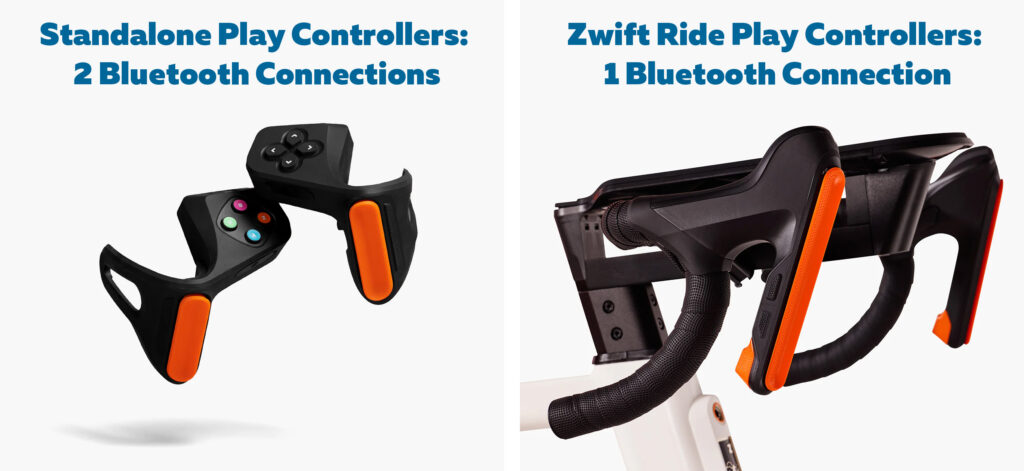
It’s important to note that Zwift’s standalone Play Controllers, which can be added to anyone’s drop bars, require one Bluetooth connection apiece, for a total of two connections used. That means they max out the Apple TV’s limit, without connecting anything else!
The Play Controllers that ship with the Zwift Ride smart frame, however, are combined into just one Bluetooth channel, so they use just one Bluetooth connection on Apple TV.
The Click v2 controllers also use just one Bluetooth connection on Apple TV.
The Networkaround
Now we get to the point of this article. One thing I haven’t seen discussed in the Zwift community is how, if you connect your smart trainer to Zwift via a network connection (hardwired or WiFi), it doesn’t count as one of Apple TV’s Bluetooth connections! Here’s a quick video walk-through to prove it works:
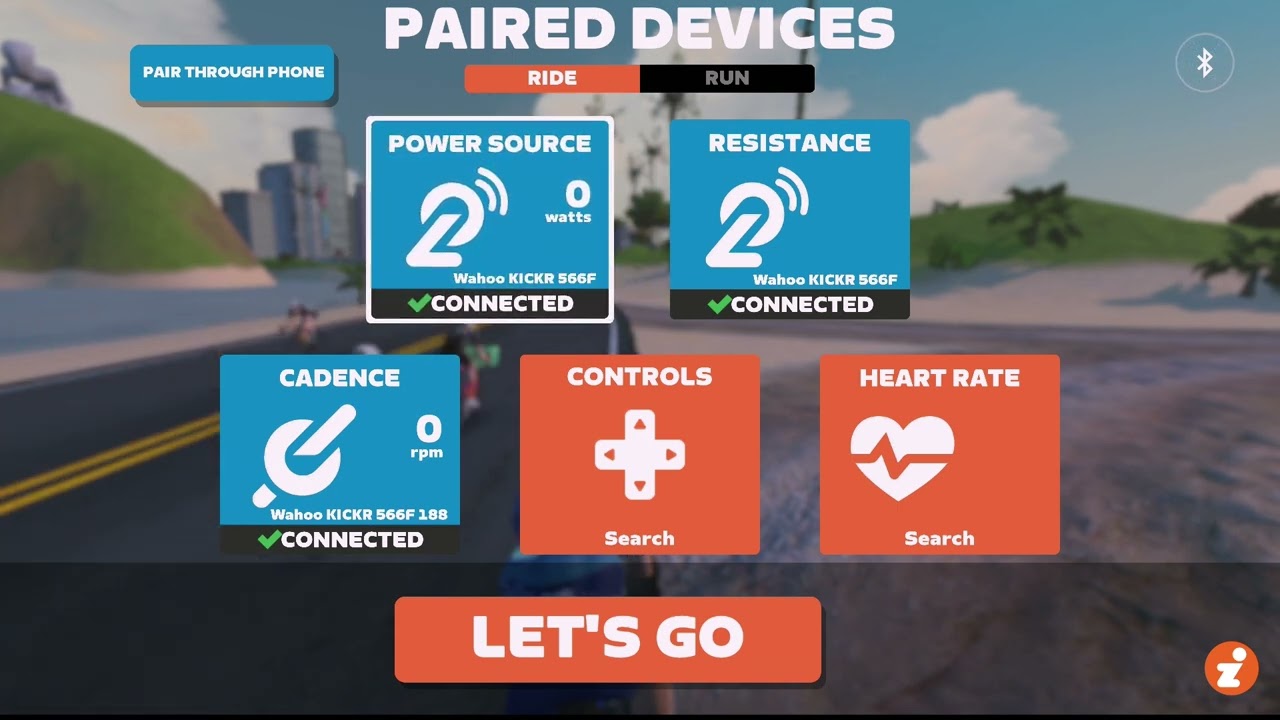
This demonstration was done using a Wahoo KICKR v6, but it works the same with any network-connected smart trainer. That list includes (and this may not be an exhaustive list):
- Wahoo KICKR v6, Move, Bike 2, Bike Pro, and Core 2
- Any Wahoo device compatible with the Direct Connect adapter (including KICKR v5, ROLLR, Bike Shift)
- Elite Justo 2
- Elite Avanti
- Tacx NEO 3M
- JetBlack Victory
- TrueKinetix TrueTrainer and TrueBike
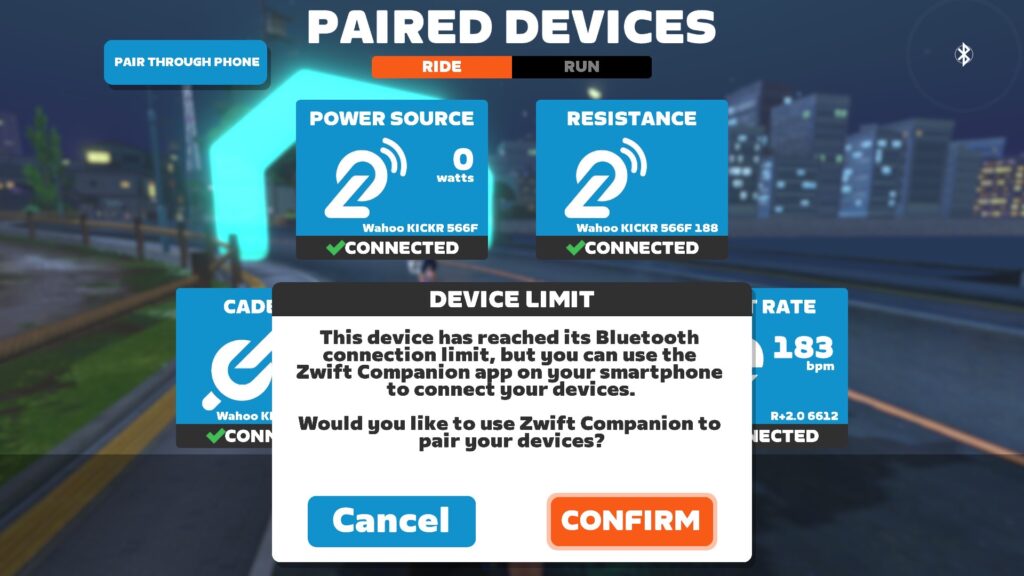
If you try to connect any of these trainers using their Bluetooth profile, you’ll get this Device Limit popup once you try to connect a third device:
But if you connect using your smart trainer’s network connection, like this:
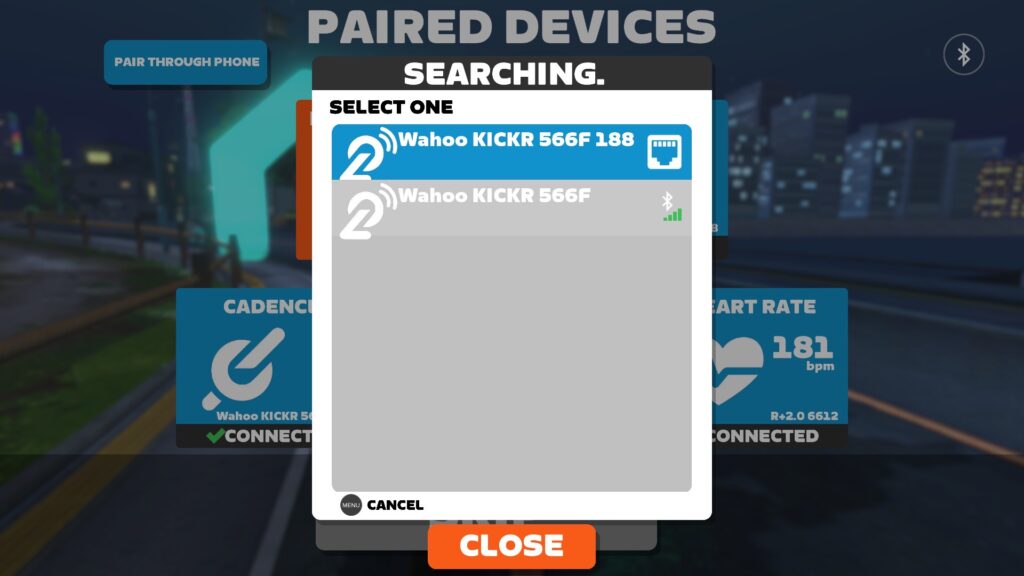
You’ll be able to connect your Zwift Ride Play controllers, HRM, and smart trainer all directly to Apple TV:
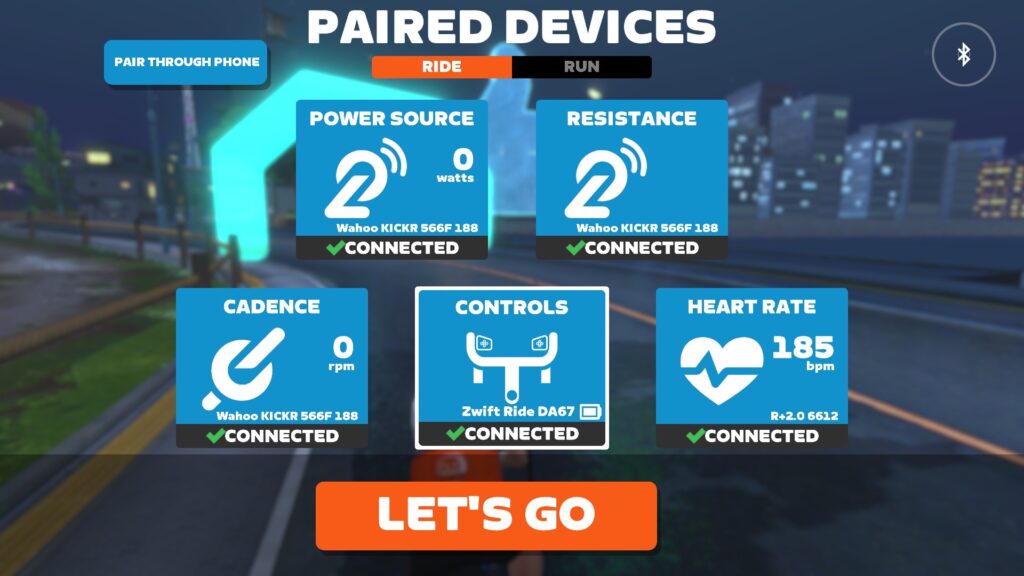
Other connection combinations are possible, of course. For example, if you have a network-connected smart trainer that acts as a bridge for your HRM, you could connect your smart trainer (with HRM signal included) plus Zwift’s standalone Play Controllers directly to Apple TV.
Questions or Comments?
Share below!



Companion app only option with apple TV, wattbike and zwift controllers!
i don’t understand… why wireless? Trainers typically sit in one place and the computer (whatever) is typically close by. So why not USB? At least as an option – that probably will give you the fastest and most responsive connection.
The Zwift Play controllers need to plug into USB to charge batteries. Why doesn’t it deliver signals through it as well?
OK… off my soapbox now.
Well… having them plug in via USB wouldn’t help Apple TV users anyway. Apple TV doesn’t have a USB plug.
Presumably because these things were borne out of riding outside and ant+ was created by Garmin to connect devices like power meters, hrm and so on to their cycling computers.
Bluetooth came later because smartphones had bluetooth and not ant, but two obvious application for a smartphone are navigation and replacing your garmin cycling computer – so people wanted to connect those power meters, HRM etc to their phone.
Actually it turned out that phones weren’t really the best device for this for a few reasons (battery life etc) and so the cycling computer survived as a thing, but not without a ton of bluetooth fitness devices and bluetooth protocols being created.
At that point a turbo trainer was a roller with a flywheel. Once the idea to make the trainer smart so you could control the resistance from an application became a thing the standard for connecting devices to bike computers and phones were already bluetooth and ant – and that I suspect is why the trainers connect with bluetooth and ant too.
Rather than the more typical way a controller or peripheral connects to a PC game (although note that wireless mice, keyboards and controllers are very common as well) – most of the sim racing stuff is usb because it was borne out of PC gaming not out of fitness apps and cycling computers.
And now they’ve really got to support bluetooth and ant because that’s what all the apps support, and adding yet another option is just increasing the costs and complexity.
The companion app makes it pretty much moot anyway – and, if you’ve got a USB nearby (or ethernet) you can reasonably cheaply and easily give the companion app a better wifi signal if that’s flakey.
But yeah, someone could create a smart trainer or bike that only worked over USB and just wait out the 3-5 years for zwift to make it compatible – noting that zwift have lost the plot now and think they’re competing in the hardware business – so that means unless they have a trainer that connects via USB they’re not going to rush to add it. Look how they haven’t bothered to make the virtual gearing available for other apps or added stuff to show the virtual gears for other smart bikes.
Really the virtual cycling space needs a good software solution from a company who sees themselves as a software company and hires a capable developers. That would let manufacturers add features like USB or whatever else and know that support would be quickly added.
But there’s no point a manufacturer innovating rapidly in this space because Zwift haven’t managed to create a usable HUD in 10 years.
Any chance the Zwift Play controllers will get a firmware update so they only take up a single connection? I bought the Play Controllers right at launch before I realized that the Apple TV limit would be an issue. The controllers are gathering dust.
This would be a great update. Lack of having this is the main reason why I sacrifice full control with the Play controllers (and the companion app) versus a more stable connection, but only virtual shifting capabilities with the Zwift Click.
Another issue – the North Pole Engineering‘s CÔRD or WYÛR are listed as out of stock and have been for sometime. If Apple would simply increase the bluetooth connections from two to three, things would be much easier.
Have never understood why Zwift doesn’t make its own “apple Tv”/ mini PC or even leverage games consoles to provide standard architecture to develop for, and with a the connection both wired and wireless that one could need. Would happily replace Apple TV with one even for a small extra cost. Much more useful than trying to build a bike @
Thanks for this update Eric. I currently use the Zwift Hub paired with a HR monitor for one BT connection and added in the Zwift Click device for virtual shifting as my 2nd BT connection using Apple TV and my road bike setup. This works as a suitable alternative for situations where I don’t want to use the Companion app for connectivity, which is almost always. I presume I would be able to do the same thing if I upgraded to the new Zwift Ride bike connected to my Zwift hub since the Zwift Ride bike only utilizes one BT connection for all controls (steering, virtual shifting and in game action/menu selections). Is that correct ?
That is correct.
Pretty sure the main reason why people don’t talk much about the WiFi option is that only a super small percentage of users own one of the compatible trainers.
I’ve done the HR through the companion app for a while but the number of dropouts was insanely high. Now I’m back to what I did before getting the AppleTV: Zwift on the iPad, streaming on the AppleTV.
Upsi, streaming on the TV of course.
This sounds like it could be a great solution. I will try later with an iPhone and Apple TV. Using the iPhone to connect everything and using AirPlay to stream the iPhone to the Apple TV.
Tried this with Apple Screen Mirroring. It does work. However the visual quality wasn’t great and the aspect ratio of my phone is wider than my TV. I’ll stick to the companion app.
You can do this already WITHOUT any additional HARDWARE and with ANY BIKE or TREADMILL with the QZ App! More info https://robertoviola.cloud/2023/10/18/breaking-free-how-qz-expands-apple-tvs-bluetooth-limitations-for-a-seamless-fitness-experience/
Mmm…. Interesting app but not sure it tackles the topic ie as a Bluetooth virtual hub and certainly doesn’t seem to also integrate Zwift-Play connections etc 🤔
yes it does! https://www.youtube.com/watch?v=X3Q2WjbqMJo
Well in that case…
😅👍🤣
@zwiftinsider, can you test this option? It looks as another great solution.
Direct Connect still requires it to be connected via Bluetooth per manual, so not sure why that’s listed as an option.
It’s listed as an option because it works. 😀
I believe DirCon (and connections over WiFi) use the Bluetooth protocol to talk to the trainer… that is, Zwift is sending commands in that “language”. But it’s not an actual Bluetooth connection in terms of what Apple TV sees.
I understand it works, but how if it needs a bluetooth connection? That’s the part I don’t understand.
I disabled Bluetooth on my Samsung Tab S9+, I was still able to connect to the Trainer over the network, it was able to connect to all the sensors on the trainer and read the stats, without bluetooth!
I have been using apple tv, trainer, hr monitor and zwift play for a while now. The random disconnects used to be awful. The solution I found was using ethernet over power (my atv was connected via wireless before).
With a tplink connector I havent had ANY issues. I even had a random disconnect the otherday, turned out the plug had worked itself loose and I was back on wireless.
This drove me crazy for a good couple of months so hope it helps someone else!
Thanks for the info, Eric!
Just waiting for my new Zwift Ride setup to arrive (upgrading from a wattbike).
I think I’m right in saying that the Kickr Core doesn’t have wireless connectivity? Presumably I’ll have to continue with the ZC app for now 😔
you can use qz in the middle to have wifi metrics to zwift on apple tv! removing the limitations of the apple tv!
What is qz? Looking for an option with my Zwift ride and kickr core.
Never mind I figured it out
KICKR Core doesn’t have WiFi, correct.
You can always use the Companion app to connect everything… that works great for lots of people. I’ve done it a million times!
WYUR was a game changer for me after 18 months of Apple TV misery (I had a Mac before that which was straightforward). However, I’ve now boycotted Zwift due to price increase and am using Wahoo with no problems.
That is super helpful!
Hi. Apologies for starting this thread again, but after going though all the comments and recommendations, I still cannot connect my HRM. I recently bought a Wahoo kicker core zwift one trainer, so now I need an extra connection for the klic’r. I run the zwift app on a ATV box and then use my phone for the companion app. When I open the the zwift app on the ATV, I have two options to connect. One being “Connect with Bluetooth” and the other, “Connect through phone”. The first option does not work as it does not pick up the power source. The second option works, but then I cannot connect the HRM due to BT connection limitations, even if I disable the cadence. I don’t want to use any other apps, I as feel that there must be an easier way.