

Zwift version 1.108 begins its phased rollout today. This is a minor update, but there are a few new Climb Portals included that we’ll get to ride in the coming months, plus changes to Coffee Stops which regular users will want to know about. See details below…
New Climb Portals
Although not mentioned in the release notes, today’s update includes three new climbs for the Climb Portal. These are the first climbs added to the library since April 2025!
All three are short Belgian climbs known for their inclusion in iconic sprint classics. My guess is we’ll see these on the Climb Portal calendar for April 2026:
| Name | Length | Elevation Gain | Gradient |
| Paterberg | 0.4km | 45m | 11.9% |
| Koppenberg | 0.6km | 63m | 10.8% |
| Mur de Huy | 1.3km | 124m | 9.8% |
In case you’re wondering: yes, these are very short climbs! Look how close together the 10 arches are on the Paterberg:
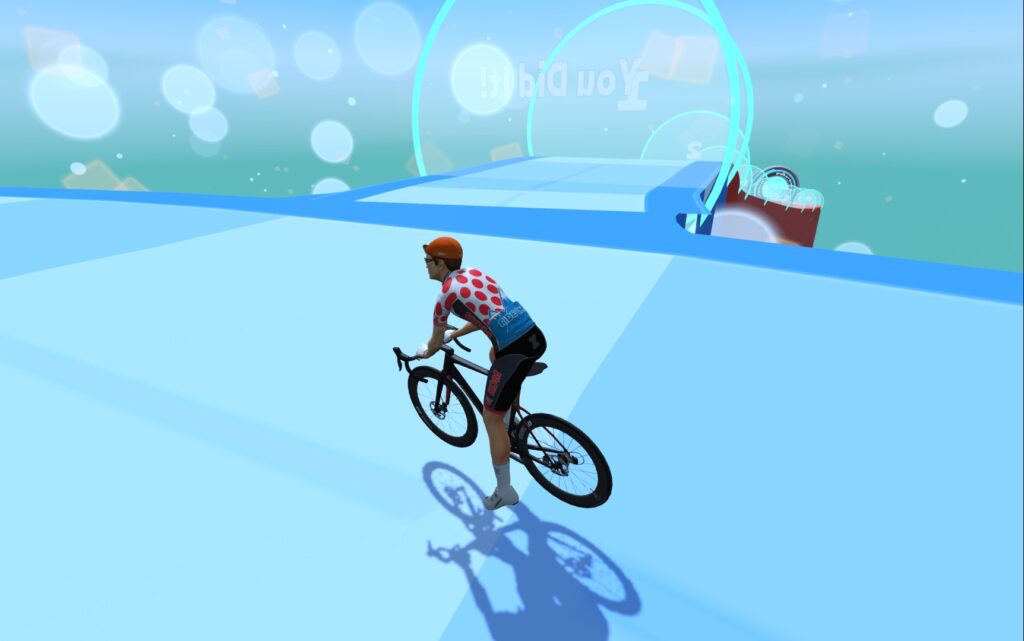
The Paterberg is now the shortest climb in the library, with the Koppenberg 2nd-shortest and Mur de Huy 4th.
Coffee Stop Fixes/Changes
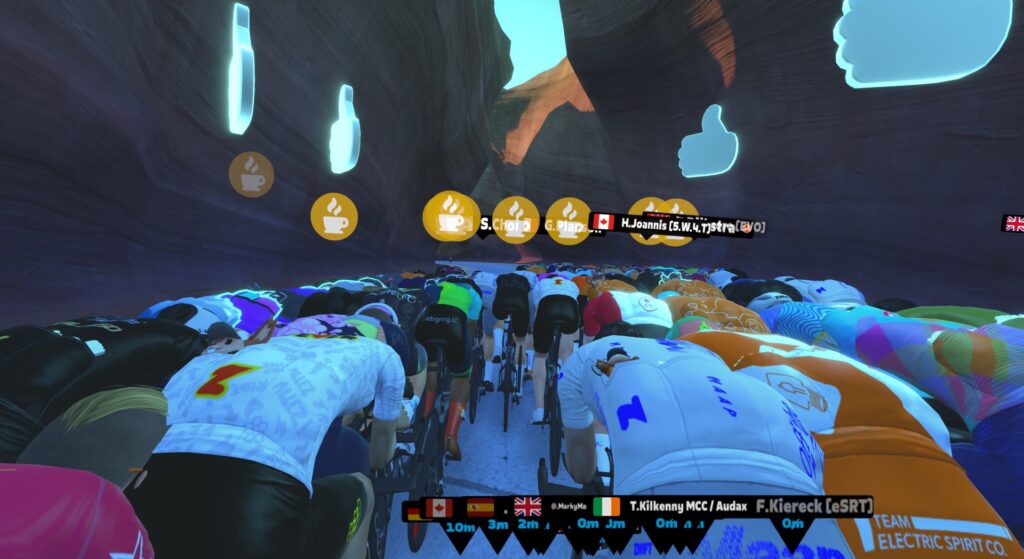
Today’s release, as well as the previous update, contains several changes and fixes for Zwift’s Coffee Stop feature, effectively making it “Coffee Stop v2”. Here’s the full list of what has changed…
Bug Fixes
- Game v1.107: Fixed issues where Coffee Stop was permanently greyed out throughout the activity, but was supposed to be available. (This happened when users jumped from a workout to an event through the ‘join event’ pop-up.)
- Game v1.108: Fixed issues where towing abruptly stopped, and shouldn’t have:
- When triggered before the final 5km of a distance-based event, or the final 15 minutes of a time-based event. Where towing used to abruptly stop when you hit 5km or 15 minutes to go, it will now continue through the end of the Coffee Stop timer.
- When finishing the cooldown portion of an event, the activity automatically transitions into a free ride. If you triggered your Coffee Stop during the cooldown, towing used to suddenly stop right when the cooldown ended and the free ride began. It will now continue through the end of the Coffee Stop timer.
- Your momentum and selected route will now continue after an intersection if your “tow truck” turns onto a different route.
What’s New
- Earlier Availability: The 3-minute Coffee Stop is now available starting at the 5-minute mark, instead of 30 minutes into the ride. It will be available at the 5-minute mark even if you use the 30-second Coffee Stop in those first 5 minutes. (Hurray!)
- Hover Tooltips: If the Coffee Stop icon is greyed out/disabled, hovering over it will now display the reason.
- Activity Reset Logic: Coffee Stop timers and availability are now correctly reset whenever switching between different activity types where Coffee Stops are allowed (i.e. non-competitive group rides, and rides that don’t involve a structured workout), or returning to the Home Screen.
Note: These behaviors remain unchanged:
- Coffee Stop is disabled in all competitive events and structured workouts.
- Full 3-minute Coffee Stops regenerate 30 minutes after the previous one ended.
- You need at least one other Zwifter nearby headed in the same direction.
Windows Folder Relocation
In late-breaking news not mentioned in the release notes, today (February 24) Zwift flipped the switch to begin rolling out a folder change for Windows users.
Zwift files (logs, .FIT files, workouts, prefs.xml, and more) have always been written to \Documents\Zwift on Windows machines, but after this change, they will be written to \Users\AppData\Local\Zwift\ (or whatever folder is designated for %LocalAppData% on your Windows PC). This is being done to better follow Windows standards and to reduce errors caused when cloud storage tools like OneDrive interact with active Zwift files (e.g., error z117).
The folder relocation happens automatically in the background. Once it happens, new activities are written to the new folder, while old activities remain in the old folder.
You will need Zwift Launcher v1.1.15+ and Zwift game v1.107+ installed in order for the change to take place. Check your versions by right-clicking the Zwift logo in your system tray. As of February 24, the change has been activated for a small percentage of users. It should be rolled out to everyone in the coming weeks.
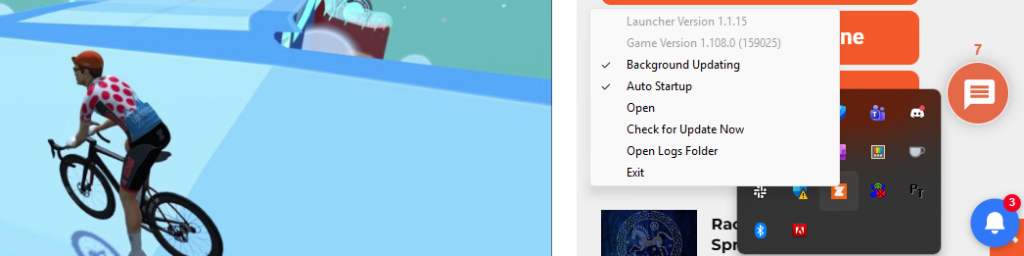
Zwift will force a launcher update in the next month or so, but if you want to update now, download Zwift at zwift.com/downloads and run the installer. (Please note: Updating your Launcher version won’t force the folder change, but it increases your chances of seeing it kick in on your system sooner.)
If you aren’t experiencing any errors running Zwift on Windows, then simply letting the Zwift app do its thing automatically is probably the easiest and smartest move. The folder change should happen with zero intervention on your part sometime in the next month.
See the Launcher v1.1.15 thread for more info >
Revised Strava Activity Descriptions
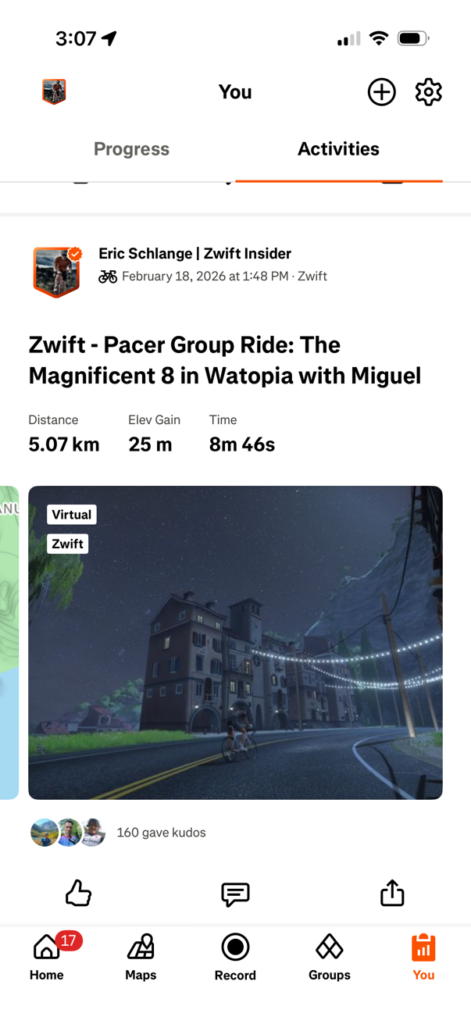
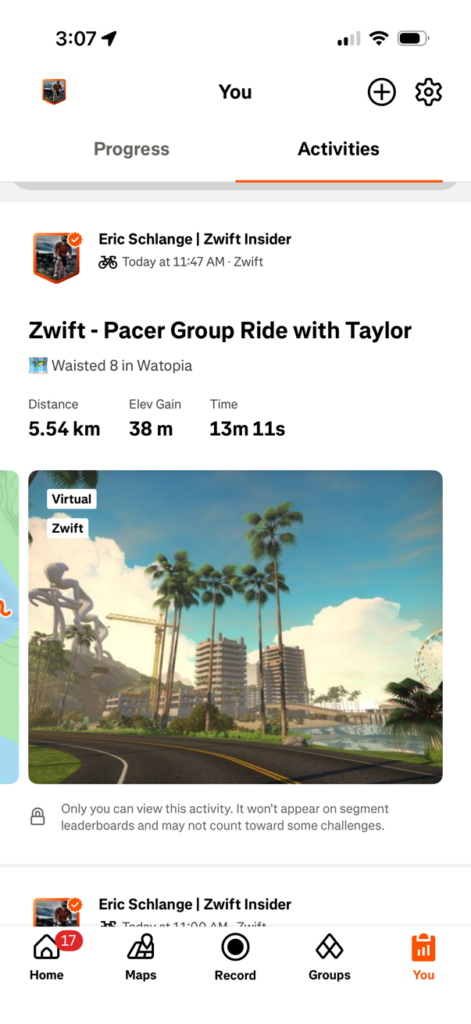
Zwift says, “We’ve simplified how Zwift activities appear on Strava by shortening activity titles and moving the route and world into the description. This change applies only to events, workouts, and RoboPacer rides.”
Here are shots of a Robopacer ride before and after this change. Nice change!
Computrainer Connection Fix
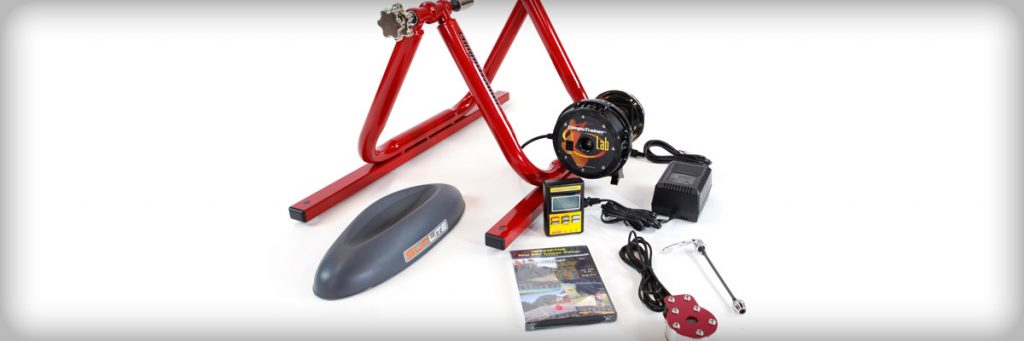
Racermate earned legend status years ago in the indoor cycling community due to their bombproof CompuTrainers. And even though Racermate closed up shop in 2017 (after 40 years making trainers!), there are still a number of Zwifters rolling CompuTrainers.
Unfortunately, back in January, Windows released a driver update for Win10 users that broke Zwift’s connection to CompuTrainer devices. (Or was it a Zwift update that caused the issue? Read the 120+ comment thread and decide.) Whatever the cause, today’s update includes a fix. Zwift says, “Windows: Improved an issue that could cause CompuTrainer devices to not appear in the Pairing screen after a recent Windows Update driver update.”
Release Notes
Zwift supplied the following additional release notes:
- Fixed an issue that could cause the Goal Met notification banner to incorrectly appear in-game.
- Fixed an issue that could cause the level-up visual effect to display the wrong level.
- Fixed an issue that could cause level-up notifications to not appear in the Zwifters Nearby list when riding in Climb Portal.
- Fixed an issue that could cause Apple Watch to appear as “UNKNOWN DEVICE” in the Pairing Screen.
- Fixed an issue that could cause workout arches to render incorrectly in the Watopia volcano.
- Fixed an issue that could cause minor visual discrepancies between the Race Score shown in the Zwift post-ride progress report vs. Zwift Companion. This only affected the display of Race Score – the underlying values were unaffected.
Discuss this update in Zwift’s forum >
Questions or Comments?
If you spotted any other changes or bugs in the update, please comment below!


It would be cool if they would add (or make it configurable) to the Strava description also the number of XP collected or if a new lvl was achieved or any bonus collected in events.
Those short climb gate intervals are hilarious.
The strava title and description updates are definitely an improvement!
Were all the “coffee stops greyed out when they shouldn’t” bugs believed to be fixed? Just this week myself and a friend riding together on a TDZ event never had our coffee stop available. Neither of us came from a workout into the event. This unavailable coffee stop inconsistency has been a bug for years for me.
Isn’t that because it’s a race and not a group ride?
We were in the group rides this weekend. Riders around us were using coffee stops.
I absolutely love the fact this has two down votes.
Listen guys and gals coffee stop is part of the game. Sign up for the race that doesn’t have a coffee stop, do tge route in a free ride or get over your “in the spirit” BS and just ride your ride.
Not sure if there are outstanding bugs Zwift knows about, but if you’re still experiencing it after v108 is installed… report it to support!
I experienced this in a lot of the TdZ group rides. I’d get the countdown to when it was going to be available, and then go back after the countdown and it was grayed out as if I had used it (I hadn’t) and then people around me would use theirs. Sometimes, it was after I’d already used one coffee stop earlier in a ride, so I thought we were only allowed one, but other times, I didn’t use one at all and still had it grayed out.
I wouldn’t mind having a button to drop coffee riders when they hang on me riding solo on the portal. In group settings sure, but on a solo ride it is disconcerting when you are doing a self-run workout or training ride with this motionless rider looming behind you.
I was going to say the same thing, except not specific to the portal: I’d like a button to drop a “Coffee Stop” rider and the rider would float back to the next rider behind.
I’ve always thought the Coffee Stops are a wee bit annoying. They are often used to get a free ride up a climb during quasi-competitive, non-racing, group rides like fondos and other organized events with a ranked outcome. It is like someone motor doping to hang on through a strategic part of a ride. I admit to doing that once or twice myself, and I don’t feel good about it! I have used them to stay with a bot while I need to use the bathroom, but even in that case, coasting to a stop and then rejoining the bot only loses out on the drop multiplier for a while – a minor consequence that is in line with not riding for a few minutes. If they were only available once an hour, they would be a wee bit less annoying, but still accommodate a bit of wee.
Agreed about the Coffee Guys that deploy the Coffee Button when going up a Climb, or at any moment that “They” think will gain them an Advantage… I have always felt that is “On Them” … If it is what “They” feel they need to do, than so be it… I too could Care Less, and just shows Me their Mindset when they do so 🤔🙄😂
I wonder if the “fixed level up animation” means they fixed it so it actually shows LVL100 instead of LVL99, like I got when I hit level 100 a few weeks ago? I was amused and not terribly surprised as it seemed pretty on brand for Zwift’s quality control.
I would also like the anmiation when you hit level 100 for the 2nd, 3rd, n-th time. That is still an achievement worthy of an animation even though there are no more levels – yet!
10 Arches in 400m. At 50% with a TT bike this might be the best way to get XP.
If you’re really fast you might still skip one. We will have to test it.
But not on a TT Bike right ? Dont you always get XP there ?
Hi Eric, so I guess we aren’t getting new levels by the end of February
Is there any word from Zwift HQ as to when they plan on releasing new levels ?
When Eric Min said 50% chance by Christmas, he didn’t specify what year
Anyone on Mac no longer seeing routes as being complete and the Achievements page sits on a loading spinner? I see it on two Macs that updated to the newest version.
I’m on Windows and all of my routes show as incomplete on the Routes tab. The Achievements page also spins indefinitely.
My launcher is 1.1.14 but that doesn’t seem like it should matter. I can’t imagine this stuff is stored locally?
Thanks for confirming. Android companion app shows completed routes so the data is still there…somewhere. 🙂
Someone reported this on the support forums, along with a host of other bugs. Hopefully it’s being addressed.
I just logged in on my Mac and routes are there. ;shrug;
Definitely not stored locally! My guess is there’s an issue with the server connection necessary to load up our achievements. I’ve just reported it to Zwift via internal channels, in case they didn’t already know about it…
Apple TV still on 1.107.0 because update isn’t available yet but all route completion and badges are also gone for me and my son.
Again a minor update? Is Zwift running out of inspiration? New Levels? New roads? Real new climbs instead of the portals?because that’s a lazy way to build some climbs
The NYC expansion wasn’t that long ago.
unfortunately NYC expansion is not something some of us longer for. It is city map. Some of us hates city maps. Usually I do not attend rides when they are in NYC even if I am frequent visitor of that ride. Though older NYC could be acceptable at times, however, that new NYC expansion is rather failure to me.
Just because it was an expansion doesn’t mean it was meaningful.
Brother, it is so monotonous because EVERY SINGLE ROUTE is a different version of the same loop.
32kms is huge on paper but it did not make NYC better by any degree
I like city maps and I liked the NYC map, but the NYC expansion missed the mark for me. The new park area seems generic, unable to distinguish it from other park settings in zwift. The subways are boring and lame graphics (and I’m someone who didn’t have a problem with zwift graphics). The brick subway is the only one that is okay. The two bridge KOMs are actually okay. But the rest is just kind of nothing? It seems like they trapped themselves with deciding to have the gps coords of Prospect park line up in real life and had to fill in random stuff in between? The times square portion is a huge fail. Compare it to Neokyo to see that they could have done so much better but just completely fumbled it by putting it up in the air and feeling completely removed from the interesting aspects of urban NYC. The NYC map has less positive association in my mind after the expansion then it did before.
I don’t like the NYC expansion either but credit where credit is due. Zwift did a recent expansion. I wish they’d add another UCI Worlds circuit map. They did three and then stopped.
Was really hoping for some new levels. Seems pretty straightforward to add more. Been stuck at Level 100 a LONG time. I guess Zwift thinks Level 100 Zwifters aren’t going anywhere so they don’t care.
This morning, I did a run & this evening I did a ride, my weekly streak bonus of 500 XP was credited to my run and not my ride, this has never happened before. In addition, I leveled up the Zwift Aero during my ride and waited until after I finished the route to do the upgrade. When I did so, I did not get credit for the additional 20 km I had ridden after the bike upgraded. Also, never happened before. I emailed Zwift support to let them know, but just an FYI for everyone else to check your accounts and upgrades if this might affect you.
The change in Strava naming is very bad. It removes the ability in strava to easily search my Activities by name of route. I can’t imagine ever searching by rides with Migual, but I often want to search all rides on a route.
You can manually change the name of the ride if that is something you value
Totally Agree. I was very happy when they added the more detailed descriptions.
Have you even tried the search after the change? Why all this negativity?
The Strava search still finds rides when searching for the route name.
I don’t know if I’m the only one who experiences this, but, now that Sand and Sequoias has re-enterred the pace partner rotation, on the rollers through Titan’s Grove, the hill display on the screen ends up being 50-100 m ahead of where I am. The gradient display and resistance I feel match the hills I see on the screen (and what are shown on the minimap), but the hill display on the top center of the screen always shows me going down a roller when I’m still going up (especially bad on the first few rollers right after descending the K/QoM).
Like the image will show me going down but the gradient says I’m still at 5% going up and that’s what I see on the main screen and what I feel in my pedals.
Does anyone else see that?
I keep hoping we’ll get an update to fix it.
Are these short routes going to get pulled again because they match other climb strava segment like happened before?
Are these climb portals going to get pulled again like happened before because they were matching other strava segments for other climbs due to the shortness?
Can they just get rid of the coffee stop? They have the teleport function and it gets annoying when people drop Coffee stops with the robo pacers or up a climb… there should be an option to “drop” the rider being towed if you don’t want them attached to you.
Yep, when not in the group ride or race. A rider should have option to drop somebody using coffee stop. If I am not in the middle of interval I just usually stop when somebody uses coffee stop during free ride .
This. Had a nice quiet ride by myself and then got stuck with a Coffee leech uphill for what felt like far more than 3 minutes. Tried to stop, but so did the leech… (I guess next time I’ll stop till their coffee break runs out, lol)
I think the coffee stop is useful but used (abused) unfairly in some of the more competitive group rides ( which we all know are unofficial races😉). With that being said, as an aging rider who has to pee often and forgets to turn on the fans on occasion, I’ve often wished I could use a short “break” without getting dropped, even in real races. But I hate taking the break because I feel I’m cheating. How do we reconcile fairness but allow practicality? Would it be a solution to allow the coffee break, different lengths maybe for different events, but at the return of the break your weight is bumped up 10% on uphills or drag increases for DH and flats, for the same duration as the break you took? A quick “fan” break or a longer “rest” break would have to be worked for later. Thoughts?
Or just disable coffee stop for uphills. When you are riding closer to uphill (lets say e.g. x% or more for xx meters), coffee stop icon shows you how long stop is available until uphill starts.
This might cause that on very hilly roads you’re not able to get coffee stop at all.
Competitive group rides? Does it list Competitive in the description? You either race (no coffee stop) or you take what the group gives.
Remember on Zwift, everyone rides like it’s always a race.
Ruins periodized training plans. But you have no choice, you must always make every event a race. To Hell with your training plan.
Then there are those folks that want to hang around the yellow beacon. Tried crashing into them, but I passed right through them.
Makes me mad enough to run through the red fence and get summarily dropped. I guess that’s superior to hanging around the yellow beacon.
(intention sarcasm)
Competitive group rides, Tour de ____ are all perfect examples of why mass start is the way forward. Line up go as hard or as easy as you want. Boom category bickering done.
Races are races. Group rides are for you to go as hard or as easy as you want. You can call them an unofficial race for you but you can’t force everyone else to treat them as a race and declare the coffee stop use an abuse or penalise someone for using them. Personally, I’ve not used a coffee stop myself (was tempted when I forgot to grab my drink from the fridge, but it was too early in the ride and the fridge was only two seconds away so I could hop off & on bike without being completely dropped by all the groups). I have never understood why some riders get upset about others using them in a group ride when it doesn’t impact you in anyway if someone needs a coffee stop. Can only be that someone else’s group ride is a race in your head. That being the case, why not just enter a race?
They must be upset that the rider using the coffee stop is not getting as much out of the ride as they would if they didn’t use the coffee stop.
Not sure if this was covered or if it’s only me, but I was doing one of the new New York routes the other day and my bike literally zipped up the (19%) tunnel ramps with little effort, almost as if they were flat. Resistance didn’t change and speed was consistent with flat surface. Has happened on other rides too on that map the last several days. Maybe I’ve been secretly upgraded to a motorcycle!
Yeah, we covered several updates back. Zwift gives you a speed boost on those ramps, AND doesn’t change the gradient feel. So they’re quite easy to ride.
Hi Eric. I’m trying really hard not to be negative, but I read most of your website comments and hear Zwift subscribers asking for famous challenging climbs to be added to the portal. And they give us 3 speed bumps…… do you think they listen to their customers? I’m not convinced they do.
Nooooooo. Changing the Strava description is terrible!! I Search it all the time for when I did routes or worlds. Bring it back!!!
One more thing updated in the game that isn’t highlighted here: Mystery Spinner locations throughout Watopia in preparation for the return of the Big Spin in mid-March! One of the admins noted this preview in the Zwift Forum thread linked above.
Yeah, I was asked not to mention them yet, so I held off. Big Spin post coming out tomorrow with some info, though… then a detailed Mystery Spinners post on Monday once I’m able to test them out!
I got the Atomic Cruiser at the top of Epic KOM! Tried at least 30 times during the Big Spin event to get it and did not, so that is a nice surprise.😀
I would like a button that makes coffee stop abusers avatars self-combust eg those used whenever we hit an incline..😡
LOL, now I want to find you riding and purposely coffee stop you every 30 minutes.
Lol. I tried using one after the top of the climbso it would be on the descent instead. Didn’t want to annoy you. But, then it didn’t work. Apparently, it breaks over a certain speed, so it kind of HAS to be used on a climb.
When new levelz!?
Zwift is lucky Rouvy kinda sucks
Personally, I find the Strava naming change annoying. It is/was very useful as a ride leader to quickly see which route I used for the last few instances of a ride by searching for that ride and then seeing the route names in the titles. Now I’d either have to go into each ride after the fact and copy/paste the route into the title, or open each ride individually to see the description… Not great from where I’m standing.
I would welcome if they added some logic preventing riders abusing coffee stops in orde to be dragged up a climb by a stronger rider. Had it too often in the past that someone coffee stopped right before I passed them on a climb
So what? Does it affect your training effect or group ride?
I’m not happy that the coffee break is eliminated on banded rides, which have been deemed a group workout. On long group rides, a coffee break is needed and short of asking the whole group to stop, you will lose the group. I encourage Zwift to reconsider this decision
Huh. I never realized coffee stop was disabled on banded rides. Has that always been the case? Seems odd.
The coffee stop was just eliminated with this latest update. So, my system has not updated yet, but as soon as you update, then it’s taken away. When you read the article on your site, it says the coffee break is not available on group workouts. But, banded rides were just changed and are now categorized as group workouts and they weren’t before. Maybe they can change it. A banded ride is not really a group workout, it’s more like a social workout. Thx for any help.
Seems to be more specifically reported on banded meetups than in group rides. Worth looking into?
OMG new climbs! I’m shocked!
Woohoo! Apple Watch fix!
I’ve had Zwift crash on me three times in the last 10 days. Where is the best place to raise this? I’m a PC user
Wow! I didn’t realize so many Coffee Stop haters??? Glad you guys don’t ride any IRL group rides in my area. My friends and I will all stop when anyone needs a nature break, refill water, etc. Zwift’s Coffee Stops are the virtual equivalent; you can’t really coordinate everyone stopping. If you don’t like the concept, then don’t do group rides; stick to races.
That said, I will agree that Coffee Stops on free rides don’t really make sense. IRL, you just stop when you need. You can do that in Zwift, without a Coffee Stop.
Group Rides, and Meet-Ups, rubberband or not, need Coffee Stops. Free rides do not.
And guess what…. Paterberg showing up on my Strava climb of Bealach na Ba so that climb portal climb will probably suffer the same fate as Cauberg.
Although my POV is that it’s a Strava problem and Zwift shouldn’t care about it.
I mentioned this above last week. It’s silly that a random zwift user can spot this problem ahead of time but no one on the zwift staff thinks of this.
Not really, unless Zwift’s test environment is hooked up to Strava’s test environment, but that’s not logical as they’re different companies. So the only way to notice is by running Zwift’s test and loading the ride to the live Strava site.
In this case : doing runs on every single climb portal and validating on the Strava side whether those rides yield any undesired segment registrations. Rides they can do with bots, that isn’t the problem, but then checking strava and removing those rides afterwards is a ton of work.
Besides it’s a Strava problem. They should be the one fixing it, but they don’t appear to give a shit. It’s probably somewhere in the segment detection, where they likely look at the opening x meters to match it. They should probably on match also check the final x meters to ensure both the beginning and ending of a segment match. But hey, that’s just speculation, I don’t know their internal systems.
You said “the only way to notice is by running Zwift’s test and loading the ride to the live Strava site” This is completely false because I noticed it as a potential issue without doing any of that! And there is a date stamped comment above proving that. And I said that very fact in the comment you are replying to.
It may be a strava problem, but zwift pulled climb portals because of this problem, that leaves unhappy users who feel bait and switched, so it is a zwift problem if they are going to pull them because of this.
And I wouldn’t be so sure that it is a strava problem. Strava needs to have some lee-way in their segment matching algorithm because of poor quality GPS. So if zwift is going to create short climb portals that use roughly the same GPS coords then they those segments are going to double match like this and zwift should be aware and place the portals to avoid this.
Those three new climbs will give one the perspective of a ball being driven through croquet wickets. The only thing missing is giant mallet giving assistance after passing though each wicket. That and actual collisions of bicycles.
The good thing (or perhaps bad thing) is that anyone can now quickly accomplish the Zwift badge: Legs of Steel.
“Revised Strava Activity Descriptions” This thing still doesn’t work for me… Strava still shows the old naming [and yes I’m on the latest software version of every app 😉 ]