

Zwift version 1.101 begins its phased rollout today. It included an unannounced Drop Shop addition, home screen UI updates, and power PRs added to the Ride Report screen. Read on for details!
Brompton P Line Added to Drop Shop
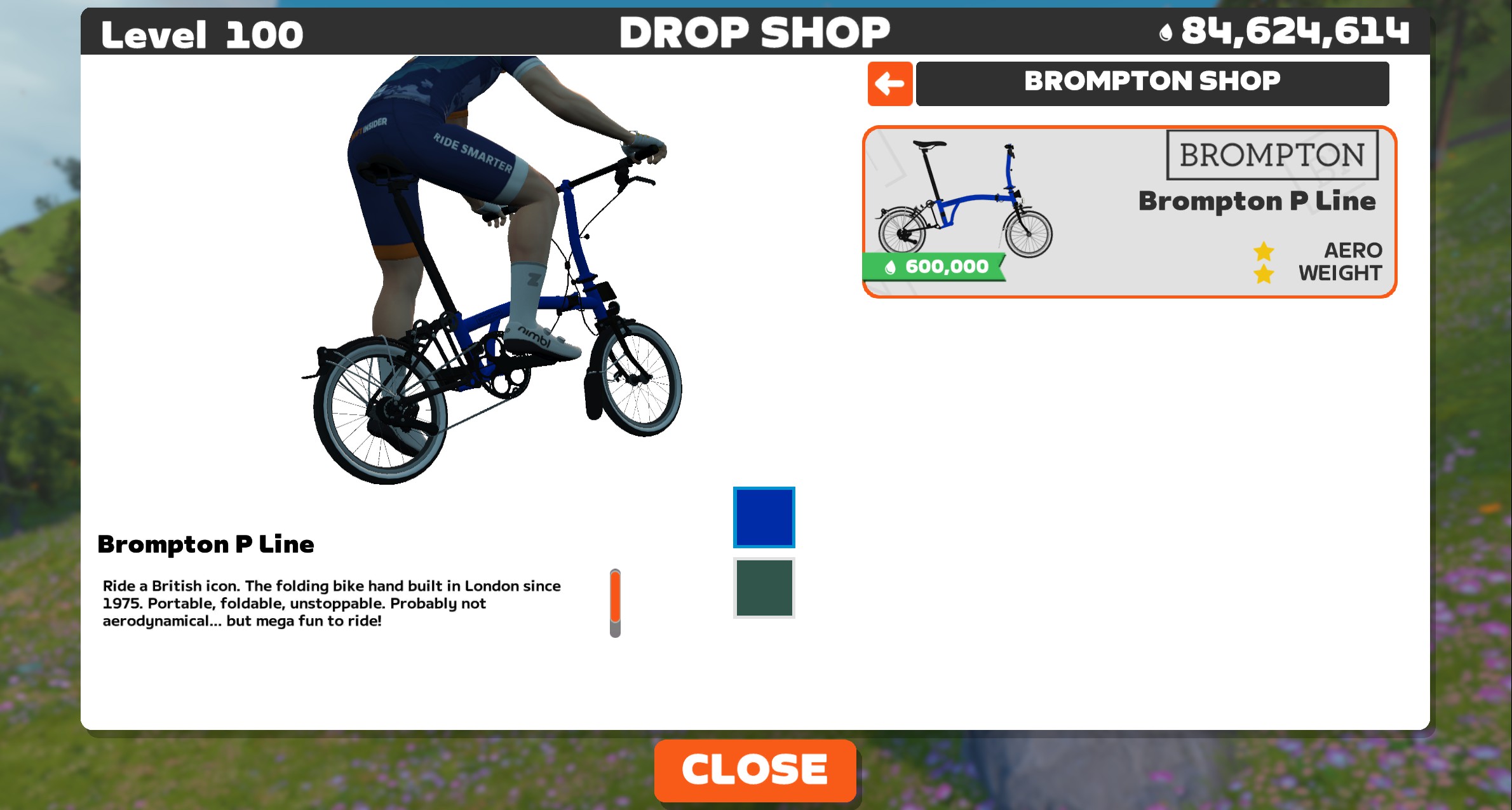
Not included in the release notes, but available in this release nonetheless: it’s the Brompton P Line! Brompton sells several models: an A, C, G, P, and T Line. The P line is a lighter, performance-oriented titanium and steel build.
The P Line is available to Level 10+ riders for 600,000 Drops. Curious how it performs? Read All About the New Brompton P Line Bike on Zwift.
This bike was added to the game because Zwift is hosting a “Virtual Brompton World Championships” the week of November 17-23. Watch for more details here on Zwift Insider this week!
Activity Card Updates
With today’s update, Zwift is beginning a phased rollout over the next few weeks that introduces updated Activity Cards on the Zwift Home Screen. Compare the old and new cards below:
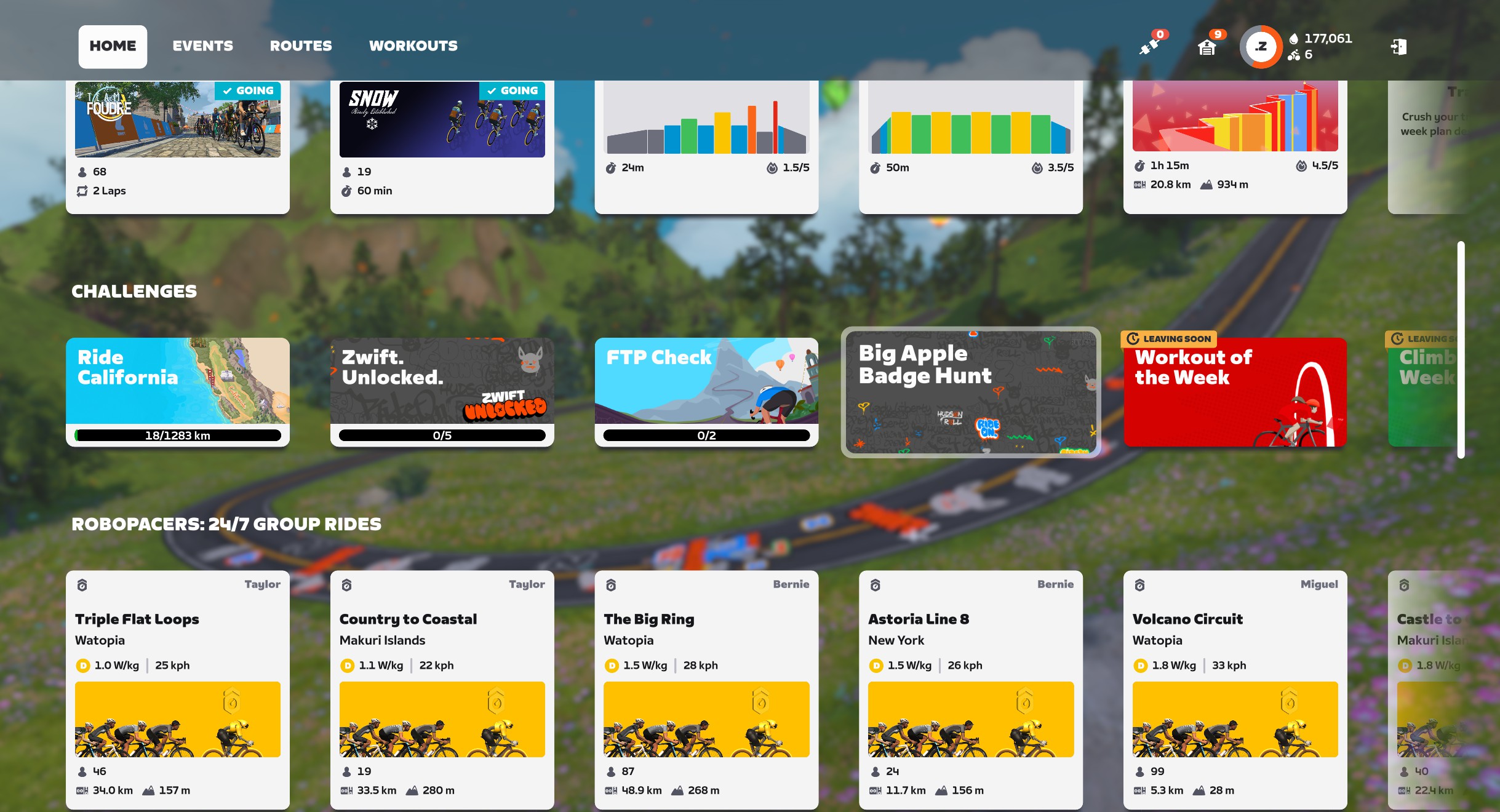

You can see the new cards are wider and shorter than the old ones. The actual information they contain hasn’t really changed, though, and we’d still love to see more info than a simple lap count on lapped events. Hopefully Zwift will continue to improve this layout as they roll out the new cards in the coming weeks.
Power PR Highlights
If you set a new power best during your ride, this will now be listed in the Ride Report screen:
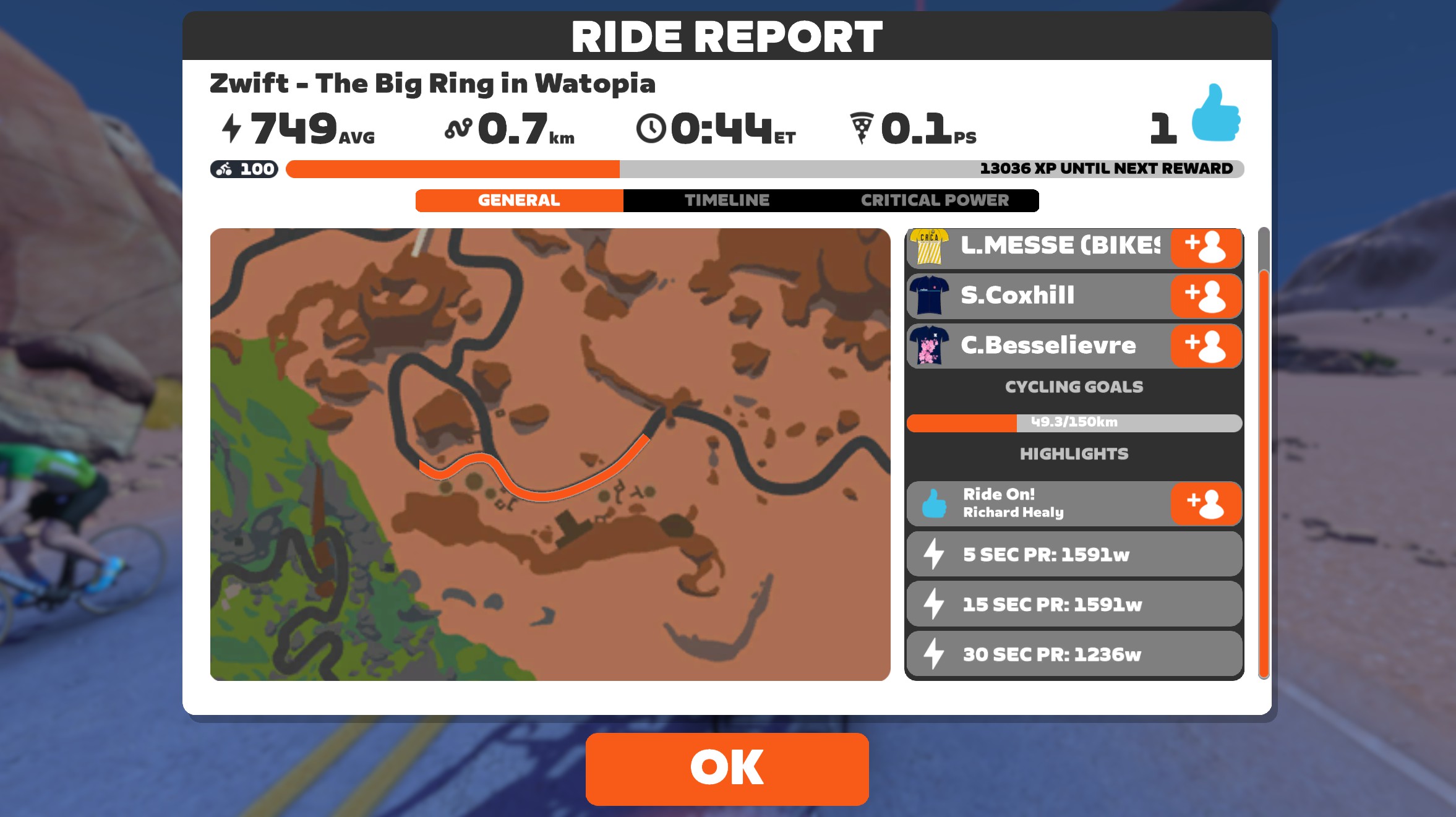
While some of Zwift’s PR tracking is based on your past 90 days, I’m told these power highlights are for all-time power PRs. I assume power PRs tracked are for the same intervals as we see in our online profiles at zwift.com, which display 90-day bests for 5 sec, 15 sec, 30 sec, 1 min, 3 min, 5 min, 10 min, 12 min, 15 min, 20 min, 30 min, and 40 min power.
“Join a Zwifter” Relocated
Join a Zwifter has moved from one of many cards on the Home Screen into the top navigation:
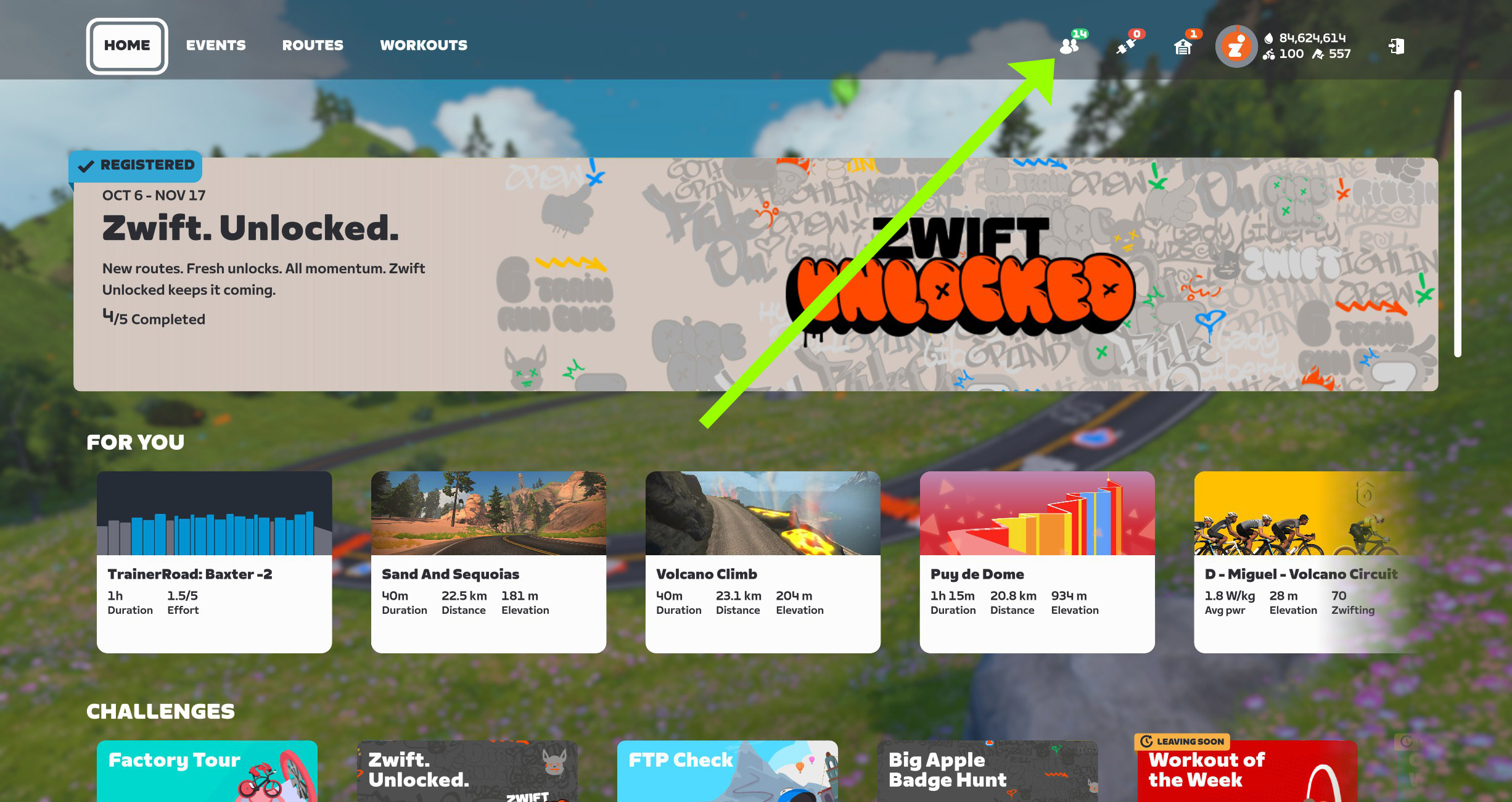
This lets us see at a glance how many friends are riding, then click to see details and actually join a rider.
Shimano DURA-ACE C36
With this release, Zwift removes the Shimano DURA-ACE C40 wheels from the Drop Shop, replacing them with the newer and (supposedly) lighter C36 wheels:
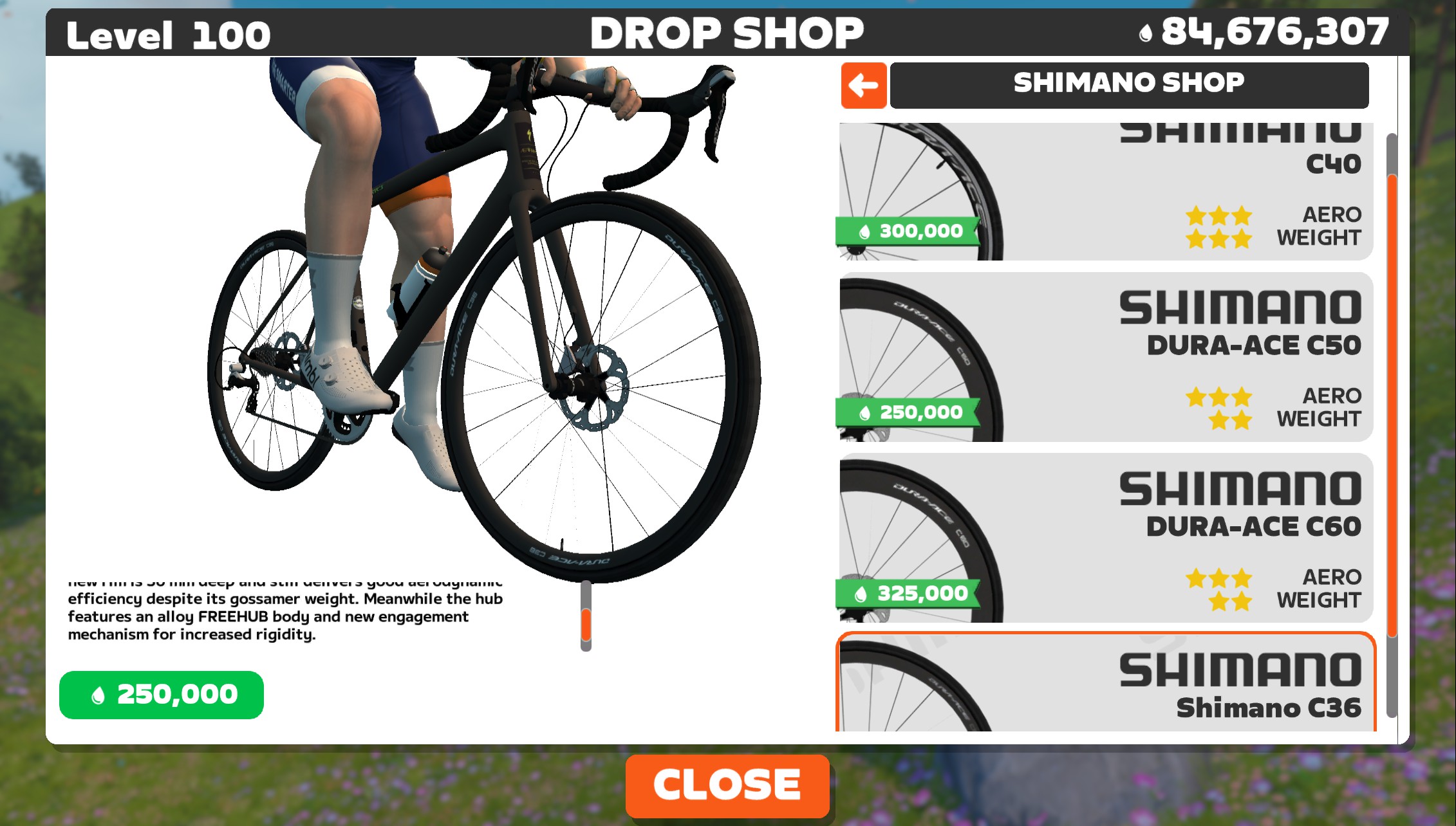
There’s one problem, though: the game is showing the new C36 wheels as rated 1 star for weight! Assuming that was a misconfiguration, I reached out to Zwift. They confirmed it will be fixed in the next release, two weeks from now.
Once I’ve got my virtual fingers on the newly-lightened wheels, I’ll run speed tests and publish the results.
Note: Like other Drop Shop removals, this change means if you already own the C40 wheels, they’ll stay in your garage. But you won’t be able to purchase the C40 wheels once you’ve installed Zwift v1.101. Which isn’t a big deal, considering they aren’t top performers.
Related: Wheel Ranking Charts >
New Route Badges
Zwift has added route achievement badges to two event-only routes:
The odd part is, they didn’t announce this change… and they didn’t change the routes from event-only to free rideable.
Talking to internal contacts, it sounds like the plan was to make these routes free rideable, but that switch hasn’t been flipped yet. My guess is, it’ll happen soon.
More Release Notes
Zwift provided notes on additional tweaks and bug fixes in this update:
- Fixed an issue that could cause devices to alternate between Connected and Connecting statuses in the Pairing Screen when connected via Wahoo Direct Connect (Wi-Fi or Ethernet).
- Fixed an issue that could cause HoloReplays to not appear in the Zwifters Nearby list.
- Fixed an issue where the Volcano Jersey and PR symbol was shown as a white square in the center HUD.
Discuss this update in Zwift’s forum >
Questions or Comments?
If you spotted any other changes or bugs in the update, please comment below!


The Wahoo Direct Connect (WIFI) has been a nightmare for me. Got the new Kickr Bike Pro and already had an issue while riding. Did change to bluetooth connection until this is solved.
But thanks for sharing another great release 🙂
Hows the Kickr pro Torben?
It’s amazing. I have been using a Tacx Neo Bike for 2½ years and it was a brick of a bike, but with so many issues I’ve fixed, so after 45.000+ km I wanted a new one and did test the Pro and v2 in a store. The Pro just got a much better cockpit riding and the responses while racing …..omg – instantly watts. Only issue is the connection dropout, else – my new love of my life 😅
I had the same Pairing Screen symptom with the WiFi connection on my JetBlack Victory, but I was able to simply continue into the game and ride without issue (still using the WiFi).
Same here
Is the annoying resonance sound around 75 rpm, which V1 and V2 does have, fixed on the Pro?
No idea since I haven’t had one of those. But there’s resonance sounds that increase with the RPM, but I just turn up the volume. Even racing and on Discord it isn’t an issue for me or other in the chat. But it’s like on above 80 RPM the resonance get less louder
Any sign of AI update?
No signs, but I know Zwift is working on their recommendation engine and we’ll see some limited rollouts soon.
That ‘new’ join a zwifter is a great change.
The “leaving soon” badge on weekly challenges makes me irrationally upset.
I would love to “silence” challenges
The only way to silence the challenge is to master it.
I wonder how many update they need to make before those emojis start showing up on my screen. I have all the recent updates but still no emojis on screen…
The new changes to the cards removed 3 pieces of information that now require clicking into the card to see – Map, Total Distance & Speed. Why make things less intuitive? 🙄
Yes it’s a step backwards very disappointing as it was ok and didn’t need changing unlike some other things such as a draft meter.
Yeah, I don’t get it. World, distance, speed, etc. Makes no sense.
Agree, I usually like what Zwift does as far as updates but this kinda sucks TBH. Huge step back IMO.
For the Brompton races, is it beneficial to buy now and upgrade it to level 5 for the race events?
I was actually wondering if the Brompton allows wheel changes, such as a mini set of lightning wheels. Surely I can’t be the only inquiring mind who wants to know.
according to https://zwiftinsider.com/brompton-p-line/ that’s a no (for now)
second this! @Eric Schlange please check! =)
When are they going to fix all of the timing bugs that now exist in the NYC world since the release of the new roads? Or the finish line location bug on the Stay Puft route?
and I thought it was my fault when my avatar suddenly u-turned half mile from the finish line. also, the NYC KOM glas road is not visible when approaching/leaving Central Park.
Yeah, that nearly tripped me up this morning but I managed to stay in front to the line. Barely…
I was riding next to a zwifter that was about 1,5 minutes behind me according to the timing #staypuft
In the upper right-hand corner, what does the number to the right of the double-flag icon represent?
Your racing score.
Race score
DUH! Thanks, everyone.
Zwift’s rate of drop shop item spec misconfigurations is astonishing. Why is it so difficult for them to set the performance variables correctly?
I’d like to have the ability to see my badges as text in a list that can be ordered, not unlike routes are listed on the Home Screen.
1591 Watts for 15 seconds – That’s impressive!
That screen is from our test bot account. 😀
They still haven’t figgered out how to turn the name flags off in a group ride. Very disappointing…
This update did nothing to fix the direct connect issue. Now my Kickr Bike v2 won’t connect AT ALL with direct connect. In other words, the supposed “fix” made things worse. For me at least.
Hey Eric,
Not part of this update but someone said on Reddit the Mavic Cosmic Ultimate wheels are now unlocked at lvl 18. I wonder if Zwift has changed some other wheels unlock lvls.
Thanks! Checking with Zwift on other changes, so hopefully I don’t have to go through and confirm manually… 😀
Also 2 new routebadges Eric: Ricmond Rollercoaster and Innsbruck KOM Afterparty
Odd that Zwift wouldn’t announce this! How did you find out about these, Rein?
Contacts in Zwift tell me these routes were supposed to become free rideable in this update, but for whatever reason they aren’t yet. Anyway, added a note above, and put the badge XP into the routes’ detail pages. Thanks!
The average speeds have been removed from the Robopacer cards. I think I fundamentally disagree with this. I like to know approximately how many miles I’ll get if I’m doing a one, two, or three hour ride with them.
Exactly, especially when hunting down those 100km challenges in Strava.
second this!
anyone else get mega jebaited at the end of a route with the distance changing up on them in the final few hundred meters?
Don’t want to be to critical but….
It seems Zwift is regularly putting a lot of developers time in novelties like the Brompton bike, but forgets to pay attention to the development of the basic and fundemental part of the Zwift game.
I like the Bompton, and like the idea of the virtual Brompton race, but so many updates bring glimmers and don’t adress the (big) longstanding issues and that’s a shame.
Balance is difficult. There has been a huge number of big changes, additions and improvements lately though, but bugs and issues will always be a moving target, aka “part of the game” =) #staypositive
Do they even need developer time to add Brompton? It’s just art + a few basic config values for the bike.
But I don’t really see the point, is there anything different about a virtual Brompton race then if they put everyone on tron bikes (other then the silly visual)? If there was some unique aspect that Bromptons brought okay, but I haven’t heard anything like that.
I would imagine Zwift get paid for the Brompton launch, events, branding etc in game ?
Zwift doesn’t do paid partnerships in game, as far as I know. They just set up mutually beneficial situations where both parties are helping the other. That’s always been their approach, surprising as it may seem!
Have they fixed ” echo” issue when using voice to txt using apple remote
I have raised a ticket think it’s a known issue?
Cheers Eric
Did they remove the ability to join a ride with a pro? I don’t see the new icon for “Join a Zwifter” or whatever, which would make sense if it was only friends in game as I have 0, but not if you can still join a pro.
It’s still there, under the same Join a Zwifter as your friends show up on. Of course, you’ll only see pros if they’re actively riding…
Are you sure? It doesn’t show on 2 different computers, and I’d be hard pressed to say there have been 0 riders the several times I’ve checked. It’s just the pairing button, the garage button, then the user button.
Edit: Just checked on my phone, which hasn’t gotten the update, and there’s people riding, but no button on PC.
If you aren’t seeing the button, then you don’t have the latest update installed, and/or Zwift hasn’t flipped the switch for everyone yet. In that case, you should still see the “Join a Zwifter” card on the homepage in its usual spot, though, I would think…
“Fixed an issue that could cause devices to alternate between Connected and Connecting statuses in the Pairing Screen when connected via Wahoo Direct Connect (Wi-Fi or Ethernet).”
Still doesn´t work with KickrBike v2. Actually it´s worse now 🙁
Not entirely sure it’s related to the update, but tonight was my first ride after the update and I had some weird power issues about 30 mins into my ride. I was stuck at 132w for a few minutes, then power reading went in and out, worked fine for a minute or so, flatlined again at 199w for about 30 seconds, then was fine again. Had a few weird sensations with virtual shifting too. On a Kickr Core. Will see if the issue persists tomorrow and try and diagnose if it’s a Zwift or Kickr thing.
I really enjoy you website and the wealth of information on Zwift and Zwift related.
My problem is that I usually browse using my phone. While doing this your ads are constantly reloading in different sizes. This moves my screen up or down and I have to scroll to find my place. Sometimes it’s so bad I can’t tell if I need to scroll up or down.
I understand that you need ads, but there has to be a way to keep them from constantly changing the size.
I appreciate this feedback, Eric. I’ve noticed the same, and it annoys me. I will reach out to the company. I work with for ads and see if we can get the experience improved.
Has anyone else on a Wattbike (v1) had an issue since the 1.101 update? Specifically with regards to resistance not adjusting on gradients? Some searches have mentioned the connection should be “Controllable Trainer” instead of Power Source on the connections screen, however a part of me suspects that Zwift’s software update is the cause of the issue. Should I just ‘wait it out’ for the fix?
Not on a Wattbike, but you absolutely have to pair it was both the power source the “Resistance” (not called “controllable trainer” anymore.)
Thank you, all seems ok now. Keep up the good work.
Is anyone else noticing bugs in the post-ride maps? Now they start elsewhere then draw a straight line to where I actually started then trace my route. Numbers and distances are fine, but map us messed up on Zwift and Strava.
KICKRBIKE 2, Direct Connect. It still doesn’t work well on v1.101
Concerning “Event Only” routes: I am unable to create group rides for my club using “Event Only” routes, yet I see other clubs have that ability. What are the requirements for a club to be able to create events using “Event Only” routes.
New activity cards are not good at all. If it’s not broken why would it need fixing?