

Big news today from Zwift: they’ve launched Zwift Play, the first dedicated game controllers designed specifically for Zwift.
We’ll be talking in much more detail about Zwift Play in future posts, but today we’re covering the basics of what the controllers do, why they’re needed, how they’re set up and used… and where you can order yourself a pair (at a big discount)!
Zwift Play Functionality: The Basics
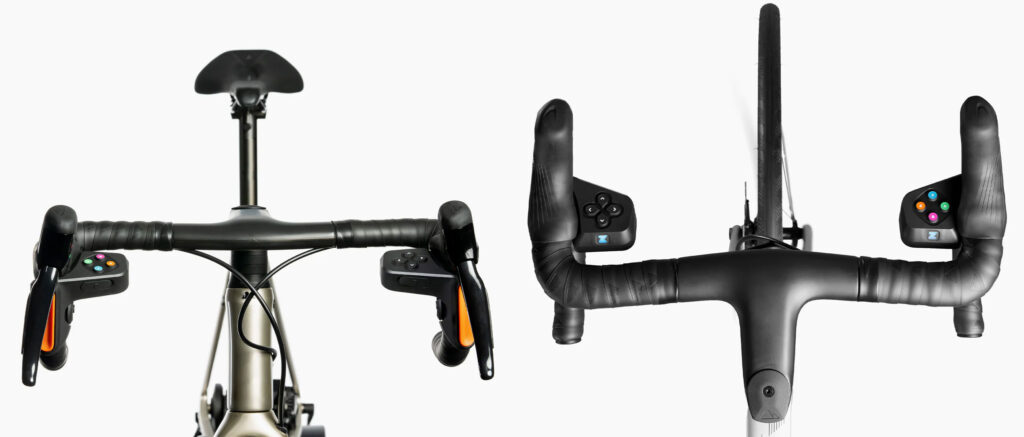
Zwift says, “Zwift Play aims to unlock the benefits of game interaction for more Zwifters by placing full control at their fingertips.” What exactly does that mean? The following actions are all controllable by Play:
- Move between and selecting UI elements, including the revamped Action Bar
- Turn left and right
- Brake
- U-Turn
- Navigate intersections
- Change minimap view
- Return a Ride On
- Give a Ride On bomb
- Use Powerup
- Flip to look-back camera for 5s
- Decrease intensity
- Increase intensity
- Skip workout block
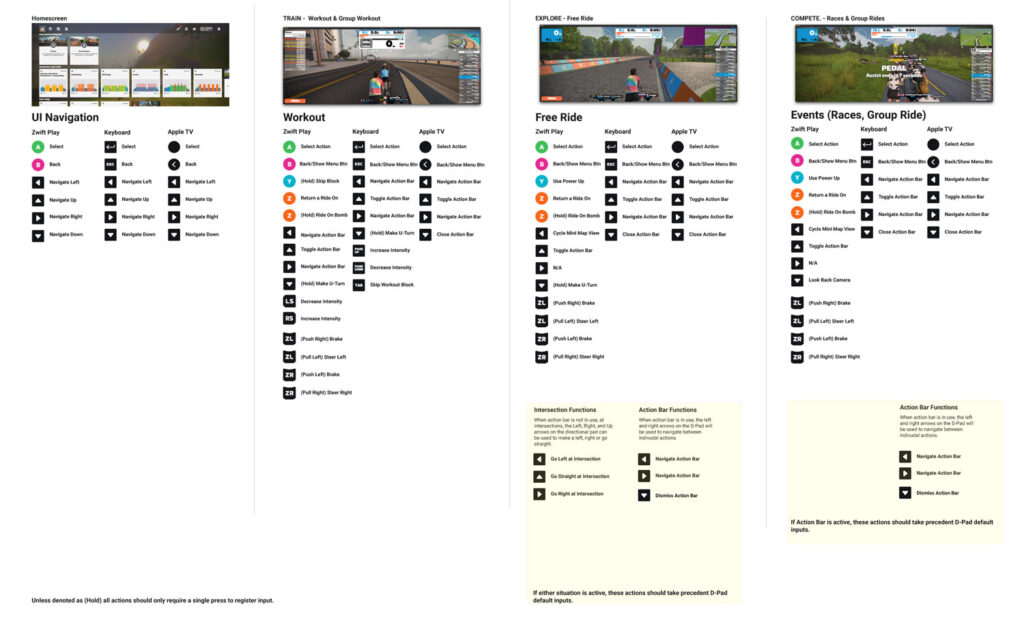
If you’re looking for precise details on what each Zwift Play button does at any given time on Zwift, click below for a detailed PDF comparing Zwift Play functionality to existing keyboard and AppleTV controls:
Why a Zwift Controller?
Some Zwifters use the Companion app while in the game. Others may interact using a keyboard, AppleTV remote, or the touch screen on their Zwifting device.
However you choose to control the game, Zwift’s user metrics show that making it easier for Zwifters to interact with the game and each other increases the length and frequency of activities. In fact, Zwift says Companion users are on Zwift 2-3x more per month than those who don’t use the app!
Zwift Play places game control at your fingertips, so you don’t have to take your hands off the bars to activate a powerup, navigate an intersection, drop a Ride On Bomb, etc. Additionally, Zwift Play brings new functionality to your handlebars – the ability to steer and brake in game!
Setup and Pairing
Zwift Play consists of two controllers – a left and a right. They are made to fit standard road bike “drop” handlebars, and quickly attach securely using silicone straps. (Zwift partnered with a chain of bike shops in London to test the Play controller’s fit on hundreds of bikes, so you can rest assured they’ll fit your bike as long as it uses drop bars.)
A rechargeable battery (claimed 20-hour life) powers each wireless controller, and both controllers can be charged easily and simultaneously using the included USB Y-cable.
Each controller is paired to the game separately under the “Steering” section of the pairing screen:
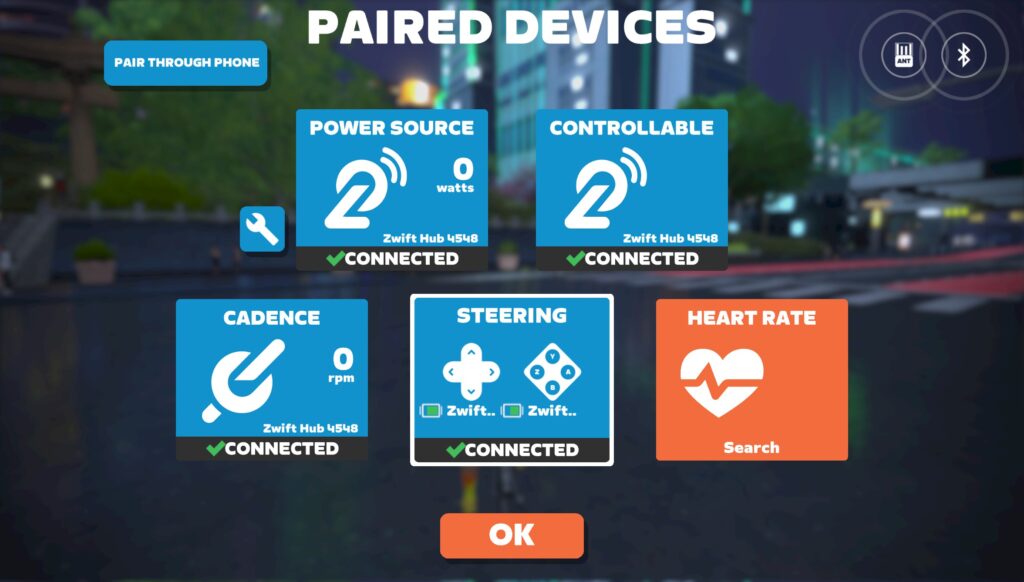
Note: due to Bluetooth connection limits, AppleTV users must pair Zwift Play controllers and other Bluetooth devices through the Companion app.
The Play Experience
In unboxing and setting up the Zwift Play controllers, it quickly becomes clear that Zwift has put many hours and dollars into this product. Their design is sturdy yet refined, with a sealed button design made to withstand the sweaty rigors of Zwifting.
Both controllers feature orange paddles that deliver steering and braking functionality. Rock the paddle inwards to brake and pull out to steer. Simple. It’s a different sort of steering and braking input than we’ve seen before, but it becomes intuitive very quickly.
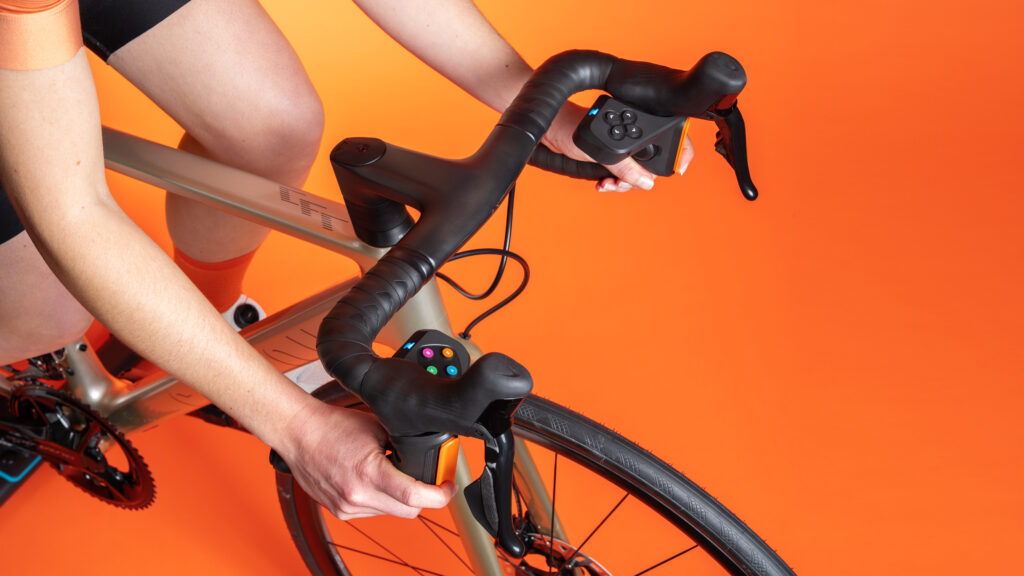
Zwift recently made all events steering-enabled by default, so if you have Play controllers they’ll be usable in all events and free-ride activities. The new Repack Rush route also launched this week, and it is clearly designed as a playground for Zwift Play users. Get ready to nail the apex of those turns!
Whether you typically interact with Zwift via the Companion app, a keyboard, or some other method, if you’re anything like us you’ll quickly find that the Play controllers can handle most (if not all) necessary game interactions very smoothly, all within reach of your hands on the hoods. This isn’t just another steering device; it’s a hardware-driven reinvention of the Zwift experience.
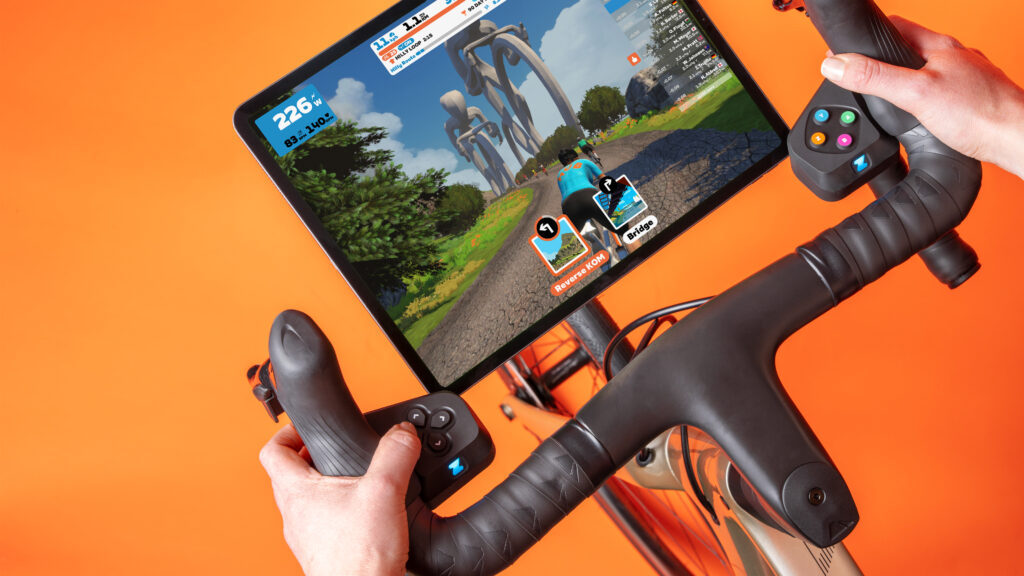
Zwift emphasized to us that they have purposely launched Play during the low-traffic months, and consider this the “beta testing phase” for the Play controllers. While the controllers are already very functional, Zwift is looking for community input on current features and future functionality.
On a recent media call, Zwift co-founder Jon Mayfield said this about the future of Zwift Play: “Community feedback will guide where we go – but indoor cycling will certainly get more interesting from here on out.”
On Sale at Zwift.com
Zwift Play is being sold at a discounted price of $99/£99/€99 for a limited time. The planned MSRP will be $149/£149/€149.
The controllers are available for purchase in the United States, United Kingdom, and the European Union starting today at zwift.com/play.
Questions or Comments?
Post below!


99 quid for a couple of buttons?? What a rip off. You can buy really good Xbox/PS5/switch controllers for 20 quid.
20 quid….maybe if its madcatz
that might be the case but those controllers will not work for Zwift, so n/a
Having an Apple TV, anything to take the place of the remote is more than welcome!! Look forward to trying the easier controls. As far as Repack Rush.. tried it once. That was more than enough and hope Zwift doesn’t put any more effort into that kind of stuff.
Absolutely. These have been a long time coming.
I love the addition of steering to the game but I’m not sure why you would want to brake.
TTT to maintain position and to make sure you’re not stuck at the front before a sprint. Done that more times than I’d like to admit. lol
The TTT issue was my immediate thought.
With Robopacers, often wish I can break when I surge too far ahead, especially downhill. Same thing during group rides, when we may want to slow down for someone ASAP to avoid breaching the fence.
The SB20 has brakes that increase the resistance when pedalling.
A great tool for sprints, holding power through rolling sections and helps to hit the short, high power bursts when in ERG mode.
Very handy but I doubt these controllers do the same function.
But if these Zwift brakes actually braked your avatar, bike swaps during races would become much easier and quicker.
My guess is Zwift will be adding “autobraking” to sharper corners (think Alpe du Zwift descent, certain Crit City corners, etc). They could set it up so you could brake manually have manage your speed more advantageously than the game’s autobraking…
Right. There’s also a kind of autobraking in PD4 when moving forward in a blob and I remember a demo of auto braking over on PCMR (maybe ZwiftHype?).
Auto-braking seems like a complete waste of development effort.
Yeah, adding rain storms to the worlds was a waste of development time as well.
when it rains they should have changed it so the resistance is a bit higher, like when you’re on dirt, they could do the same for rain on the road & made it more than cosmetic effect.
I do hope so. Decending in zwift currently feels the least realistic scenario…where the heavy riders hurtle around corners…with little effort…at speeds that would make cornering in the real world impossible. Autobraking would remove this bias…and smart skill driven braking driven braking would be most advantageous of all…that feels closer to reality where decending is a skill…not a matter of mass. Bring on the brakes!
How’s about making my £2300 Wattbike V2 actually work with steering using the various buttons it already has? The Wattbike was sold as a ‘Zwift supported bike’ yet it can’t support this function which is absolutely ludicrous.
The fact they now release this crappy add on and expect me to pay more money is a proper kick in the teeth, or should that be a Burrito in face?
Poor show Zwift.
Ditto my Neobike. It’s another smack in the face from Zwift.
Do they allow you to type replies in the chat?
No, since there’s no keyboard.
Word – Zwiftendo Zii
‘Zwift say that Companion users are on Zwift 2 to 3 times more than non users’
What a stupid, irrelevant statement.
Apple users are 5 times more likely to use iOS than non Apple users.
Meat eaters will eat meat more times than vegetarians.
I’ve got plenty more.
Maybe I should work for Zwift?
you missed a crucially important part of the comparison. Companion + Zwift users are heavier users than Zwift solo (that is Zwift with no companion) Your comparisons are therefore completely meaningless. Think about it.
Thought about it before posting, thinking about it now whilst replying…
Not meaningless at all…Companion users are naturally more invested in Zwift. They enjoy the platform enough to want to interact so are, of course, more inclined to get on and use Zwift.
The non Companion users…meh, they aren’t that fussed and shock horror, they tend not to use Zwift as much.
This was my thought exactly. I think Zwift has the direction of causation reversed.
People get into using the Companion app *because* they are heavy Zwift users.
IMHO the companion app isn’t going to make anyone into a heavy Zwifter.
The core of the Zwift experience is smooth peddling and exercise, a few bells and whistles more or less are not that important by comparison.
I personally have never cared about and never wanted “steering or braking”. Not having to do any of that was exactly the draw of Zwift to start with. If I want to steer and brake I’ll take my bike outside.
100%
That’s why I got a Zwift: exercise, wattage + HR . Being able to author my own training plans. Zwift on one monitor and Youtube on the other monitor. I don’t have the space or the inclination to stare at a tiny phone screen so Companion isn’t even on the radar. But I’m on Zwift 7-8 hrs/week.
The original poster has a point. Zwift seems to have gotten the causation wrong here (or at the very least have assumed that correlation is causation check out https://en.wikipedia.org/wiki/Correlation_does_not_imply_causation ). People who zwift a lot are much more likely to download install and use zwift companion. But does using the companion app make them zwift more? Or are they already hardcore zwifters so they know about and use all things zwift? My opinion is that on the balance it is not the companion app that is making people zwift more (sure there are some counterexamples, I’m talking about the balance on the whole).
I assume they mean non-Companion users who use Zwift without Zwift Companion?
However: there’s also the group for whom ZC no longer interacts with any Zwift activity due to some strange combination of iPhone/Mac software. These people might be interested. This issue has been around for months without a fix and I’m amazed that Zwiftinsider hasn’t been all over this hugely annoying bug.
Completely agree. I think the one you forgot was that people who choose heart-healthy foods are less likely to have heart-related illnesses. I agree with the user in the other article .. this is really starting to feel like a jump the shark moment for Zwift.
Today, at 1630hrs on the 14th June, £99 is 125$ and 115€…just saying
Welcome to the real world, international currency has always worked like that.
Sad that it’s available for US but not for Canada….not sure why.
Because Zwift only currently sells in the US, UK, and EU. Same as the Zwift Hub…
That doesn’t really answer the original posters question or help them… Canadians can get other brand trainers besides zwift hub, but there’s only one place to get this new zwift accessory, so this definitely does change the situation. So zwift should figure something out here for people.
that’s because we are a 2nd rate country run by lefties – ok, i’m just bitter because i hsve campy with thumb shifters
Not hard to work around, I live in Australia and have one on the way
You live here in Australia and have one on the way? Please share how, would be much appreciated.
Any idea if this will turn on/off and change the time setting on the fence for ride leaders? I’d buy it just for that functionality.
Haven’t tried that, but my guess is it would work just fine, since you can use the buttons to bounce around various menu items.
As an Event Leader who uses Apple TV, that’s a blessed relief.
Time settings cant be changed during an event. This won’t help
Let’s go!
If you grip the handlebar by riding on the hoods, will this be in the way?
Nope.
Another FU to Canada
What are the others?
No Zwift Hub shipped or sold in Canada
blame canada!
Canada doesn’t even have electricity yet, do they?
Yes, only to Canada, on purpose. Fun fact, there are 195 countries in the world, give or take.
Canadian store portal closed in 2021? Solution: Order and ship to a US address (friend or mailbox). That’s how I got my Zwift RunPod during their 50% off sale this past Winter. Agreed, it is very inconvenient.
As an Xbox user, my head is currently imploding with the B A Z Y buttons. I’ve ordered one though as I’m sick of not having the option to steer with a Kickr Climb.
Zwift needs to support 3rd party controllers. We have Ant+ and Bluetooth FTMS to allow apps like Zwift to connect to our trainers and smart bikes. A standards-based method is needed for game controllers. Do the math Zwift. Multi-vendor controller support will drive significantly more revenue from monthly subscriptions than the small amount of money you’ll get selling an expensive proprietary device.
Zwift reality check: You are not Apple. Please don’t act like Apple.
But who wants to use an Xbox controller while Zwifting? A huge part of what makes Play cool is that it’s integrated into your handlebars.
I don’t mean traditional game controllers. I am describing controllers and remote buttons that can be made by any vendor. Lots of smart bikes and trainers already have programmable buttons. Use them via Ant+/BT. We can all look forward to $20 controllers available from China in a few weeks once open standard support is offered.
We don’t need a Zwift “Walled Garden” for bike app controllers. Let hardware vendors build them. That’s the best deal for consumers.
Maybe… but Zwift is such a small market… do you think Chinese hardware vendors would put in the work to develop a controller that works for Zwift?
I think they have much bigger fish to fry.
Zwift IS saying they plan to open up the protocol so other controllers could be built.
It’s a small market but big enough for Wahoo/Tacx/Stages to sell dedicated indoor bikes, and as the owner of a Neo Smart Bike I’d have loved to see Zwift integration for the buttons I already have at my fingertips. So I probably won’t invest £99 on this on principle.
lts an unwelcome trend in the sector to be honest, Wahoo RGT recently launched steering but only provided integration for Kickr. You might say that’s an obvious move, but I’d been riding indoors on RGT & Zwift and owned a Neo Smart Bike long before Wahoo bought RGT & Zwift launched their own trainers. So it looks like I’m now on an unsupported product on Zwift also, which does not encourage loyalty in any way.
I tend to agree. There are plenty of published projects where people make Bluetooth keyboard emulators for gaming. Open source all the way please.its nice to have a choice.
Exactly. I bought a programmable three key keyboard and put front facing camera, rear camera and power up on it. Tied it to my bars so I can reach it from any position and it’s easy to take off when I ride outside. $8 lol
Maybe ‘Hack/Bodge’ will feature set-ups of third-party controllers in a future episode of the GCN Show 😉
If you live in the few countries Zwift ship to. Only the US/UK and some European countries can get these. A lot of Zwift customers missing out. Third party options might be all we have. Just can’t understand why shipping to most of the rest of the world is not an option for Zwift.
Back when Zwift first announced the hardware division (Now you see it. Now you don’t. Now, uhhh?) I suggested that Zwift produce a dedicated controller with a keyboard for Apple TV. Apple allows 3rd Party ATV controller/remotes. Their reply at the time was that Apple wouldn’t approve.
Like the stages bike. It already has buttons ready to be used and Zwift has the rights to use them.
Hi Eric, quick question, on Atv we are disadvantaged in a race that requires a bike change (ZRL for example) so will braking help?
I suppose it’ll help you get to the spot where you can swap faster, sure.
Thank you for Sharing Eric!
Just one quick question. I saw that it mentions that Apple TV users will have to pair to Bluetooth but I didn’t see anything about Android compatibility (I’m assuming that it will be fine but you never know). Do you have any confirmation from anyone that they work on Android?
Yeah, they work on Android.
🇨🇦 C👋A👏N👏A👏D👏A. Why is Zwift the only online vendor on earth that doesn’t ship to Canada?
Looks like the orange brake buttons covers a lot of the drop down handlebar. Is it room to get a good grip when sprinting? Seems like they will totally cover Di2 sprint shifters as well.
Depends on where you grab to sprint, I guess. I just measured, and it leaves exactly 6″ of the end of the bar free on my setup. That free space is where I’d typically grip when I sprint in the drops anyway, so I haven’t felt like they’re in the way.
Ok I see, you know if they will fit over sprint shifters like these?
The clearance between the inside of the controller and the handlebar needs to be at least a centimeter or so 🙂
I don’t think so, Eivind.
“Return a Ride On”
That’s a “finally”. Is there an easy way to do that now?
Oh well. Too bad I don’t have drop bars.
This is huge!
If they’re in the nearby rider list there should be a thumb you can click with your mouse, this controller sounds a lot easier
Find them with your mouse, only to have the button move or disappear before you can get to it.
Interesting position on these buttons. But it’s a bit groupset specific don’t you think? I mean it’s right where the campag thumb shifters are supposes to be so where was the full spectrum testing and user specification for those who use campagnolo.
Well done zwift… Well done..
Sure, it’s groupset specific… but according to Zwift, these fit something like 97.5% of road bikes tested.
The only “major” groupset with an issue is Campy that includes a thumbshifter. But that’s a small group of riders compared to SRAM/Shimano, isn’t it?
darn. so i guess this Campy user can save his $99 for a little bit longer.
all 10 campy users…..
These controllers don’t look like they will work on a watt bike atom as it appears it will cover the gear change buttons any thoughts or feed back on this
Correct, Zwift says they won’t fit on the Wattbike Atom’s hoods.
Wondering the same for the Stages SB20 – think it might impinge on the lower of the 3 hood buttons, but may clear the upper 2, hopefully….
Ah, had missed the “Stages bike buttons compromise optimal positioning” bit on the product page details. Not sure how much of a compromise is too much, not much in the way of detail.
Tim I have an SB20 and I think these will fit fine if you move the sprint shift buttons to the top of the handlebars. Don’t think they will affect the three little buttons at all.
Thanks Mark, that might be worth a go – especially as i’d much prefer having ‘climbing shifters’ anyway… if I get some time, i’ll try it. Cheers
For those of us that can’t use or get these (have a SB20 and live in Canada) do you think some of the functionality will be enabled via the companion app? Most interested in the turn, look back and brake features.
This is great news from Zwift as my Wattbike lacks that functionality. Looking forward to giving the controllers a good workout.
but apparently won’t fit the Wattbike (see replies above)
I’m excited about the easy menu access and controls but not sure if I’ll like steering at all. Is it possible to use the controller but keep steering disabled?
It is not. But Zwift says if you don’t input steering via Play, it’ll autosteer for you basically like steering isn’t enabled.
Ah that’s great, thank you Eric!
Not compatible with:
According to https://eu.zwift.com/products/zwift-play
Luckily the smart bikes co-branded with Zwift support have a bunch of buttons that can easily be used in place of this…oh :/
So basically won’t work with all the smart bikes that already have buttons that Zwift won’t get the finger out and support properly. Feels like an Fyou to me.
Can you use them and a sterzo at the same time?
there would be a pairing conflict, so 1 or the other.
Any idea if you can still use the Steerzo to steer instead of the play controller? I.E. can I steer with Steerzo and still have the other benefits of Play?
This is the key question. Sterzo seems like a much more realistic steering experience, but all the other control buttons on the Play are very useful, especially with an Apple TV.
there would be a pairing conflict, so 1 or the other.
I have both and I agree with you. I would like to use my Sterzo to steer, It is more natural, and the buttons of Play controller at the same time. I think It is just a software develop. Into menú setup we could decide steer with.
If Zwift truly “aims to unlock the benefits of game interaction for more Zwifters by placing full control at their fingertips” they would add this functionality to keyboards. These controllers may be more convenient for some, yet those with dozens of unused buttons on keyboards are missing out.
I was mildly interested reading the post, thought they could be pretty handy.
Then I seen the price.
It’s not even April Fools day.
I know prices have gone mad in the bike industry, but this is pretty pathetic.
I wonder if some of the buttons are assignable. So, for example, to use as a PTT on Discord.
Can’t order from Canada 🤔
Despite it fitting “something like 97.5%”* (* per Eric Schlange) of bikes, it’s intriguing that there are quite a number that these devices don’t fit. Also intriguing that they seem to have not been made to be flexible enough (or modular) to be adaptable to different styles of bikes/ handlebars – even something as simple as people are suggesting; Campy equipped bikes. And also rather disappointing that they’ve not been made equally flexible enough to be adaptable to work on handcycles – probably the riders who could use them most since their hands/arm are rather busy moving the bike forward and therefore can’t really faff around with a keyboard or tablet – at least no where near as readily as those who can still sprint while holding a coffee in one hand and a donut in the other. This, despite the desire to be inclusive by adding the handcycle (which, and not to be negative, still doesn’t have a Tron alternative, cant use different wheels, has no kneeler version, and worst of all, still has a default camera position** that is horrific in packs (or with any rider following you) since you’re constantly seeing the insides of other riders faces or giving them virtual colonoscopies). Sure, handcyclist are a niche group on Zwift, but why not make a more modular system that’s more adaptable to EVERYONE.
** Yes, I could change the view but I’m usually busy pedaling with my arms and the default one is the only one that doesn’t make me motion sick.
Ordered, thought I’d give them a try. I use the companion app whenever I zwift, so this just feels like a natural progression.
I wish you could assign a button as a “push-to-talk” microphone control for Discord. That would be really helpful.
They don’t ship outside of US (99 USD), Great Britain (99 GBP) and EU (99 EUR).
So, for example, if you live in Norway, Switzerland, Canada, Australia, New Zealand, South Africa or Japan, there’s no option.
They don’t exist in the list of countries when you go to the checkout.
Same story if you want to order Zwift Hub or anything else from their shop!
So…I guess we’ll just have to stick to the Companion app.
Here in Australia I find that a simple walk outside puts this issue in perspective.
Oh dear. Of all the things we needed on Zwift. This wasn’t it. Mario kart here we come.
Hi Eric, is the Zwift Play compatible with the Kickr Bike 1.0 ? And does it make sense to invest 99€ for it in your opinion ? I only see the option for manual braking as the one big difference/advantage, or ?
Yes, they fit perfectly onto the KICKR bike (any version).
If you don’t have easy access to a keyboard+mouse, these would make it much easier to get around the game than something like the AppleTV remote or having to hop off the bike to reach your laptop…
But I think that will disable the Kickr Bike’s steering/buttons as the Play controller will take priority via BT steering connection, yes? Correct me if I’m wrong.
What about Canada?
As an Apple TV user this means I will have to use the companion app to sync everything. My concern is sometime the companion app drops connection during rides and that would cause issues
Can you control the drone cam with it? Only reason id consider moving away from using unified remote really
Not at this time, sadly.
So… everything that I can currently do on the companion app 😂😂
Except braking and steering. Oh, and returning a Ride On. And you can do it while staying on the hoods…
I’ve gaffer taped my phone to my hoods. I think we all know who the real winner is here 😄
For sure you, David. For sure YOU!
Great idea, but very pricey. 😕😕.
For those who live in Canada, can you not order a load of these to an address in Buffalo, then get someone to drive them over the border n post to you.?? 🤔
Great idea! I assume you live in Buffalo and are offering to do this for free?
so can you pair this, your heart rate monitor AND your trainer on Apple TV? I thought you could only pair two devices? or did i miss something?
On Apple TV you’ll need to pair this using the Companion as a bridge.
As I write this I am just finishing the most bonkers-ly abysmal customer service chat I could imagine with Zwift.
I started off asking if I could order this online but provide a US shipping address – my mother-in-law lives just across the border. Most companies let you order from anywhere and just provide a shipping address to the US…
It devolved into plain hostility towards me wanting to do this, and suggestions that I couldn’t even make a second account marked as the US, and I should have a friend down there do it for me?! (Why not just VPN..?)
My mind is blown with how atrocious their customer service has become. Maybe it always was and I just had the fortune to not need to interact with them?
…ultimately, why does Zwift hate Canada – and other countries?
To add more hilarity, I just somehow managed to place the order by adding it to my cart not logged in, going through the checkout and somehow it magically logged me in and let me place the order to my US address, with a billing address in Canada.
…everything the customer service agent told me ended up being false, and a waste of time.
Zwift just confirmed my order to be in their system and placed correctly. So to other Canadians – you can order!
I’m almost never an early adopter for any kind of tech (I’m a big fan of letting people sort out the bugs and then buy it much cheaper later on), but this is really tempting at the discounted price. This solves a vast majority of my annoyances with my current setup…
The thing I’d be concerned about is spending the money (like with a Steerzo) and have limited ability to actually use it. I did see that the article mentioned it’s enabled for all events but how long will that last? Same with repack, which was the only route of its kind; will there be more added?
To me, these are appealing but the $99 spend and the bummer use of the Steerzo, I’m leaning toward a pass.
Eric, to clarify, do the controllers by themselves take up 2 Bluetooth spots on ATV or only one (so that they are possible to use without Companion provided one isn’t wearing a HRM)? I’m assuming 2 because they appear to be separate. Thanks!
i just looked through all the images on DCRainmaker and found my own answer. I can see from the connection screen image that each side is definitely its own connection so that mean 2 connections for just controllers. Thanks again for the all your great articles and reviews.
I think the play controllers are a great addition to the Zwift in game platform.
However they are not available in Australia?
When can I buy them from Australia?
It is a shame that they don’t send to Norway, but to all other country in Europe.
Eric, have you done any testing to see how much faster 2 laps of Tempus Fugit is with steering than without? Are we getting to a point where you are going to be seriously disadvantaged if you don’t have something like this in the game?
Haven’t tested Tempus, but I tested Crit City back in the day when the Sterzo was released.
Here’s the test I did: two laps of the Downtown Dolphin route at 250 watts steady, with no other riders on course. One lap without steering, one lap with steering.
That’s quite a lot actually. Bring back the PetaZ 66 lap race!