

Last week’s announcement of upcoming features from Zwift included lots of welcome in-game updates. But it also included two key Club-related features coming to the Companion app! Let’s dig into what Zwift is promising, and what it means for Club members and admins…
Keep Everyone Together
Zwift has had “Keep Everyone Together” (aka “rubberbanding”) capabilities for years. (In a rubberbanded ride, all participants stay together, regardless of their power output, as long as they pedal.)
Rubberbanding was first used in group workouts, then expanded to Meetups and made available as a custom, by-request setting for group rides.
Zwift’s code for keeping riders together hasn’t always worked optimally, though. First, group workouts feel super slow for stronger riders. Secondly, and perhaps a bigger issue, a longtime bug has led to Meetups sometimes getting stuck at unrealistically high speeds, which is why you see Strava climb segments topped by riders holding over 45kph doing very low power (see Box Hill, for example).

The great news is, Zwift has been working to improve their algorithm for keeping riders together, and it appears they’re ready to roll that out. This should greatly improve the experience for group workouts, Meetups, and banded group rides.
This update will add a “Keep Everyone Together” toggle to the event settings screen when creating/editing Club events. Zwift says this “makes it easier to spend time with friends and socialize while you pedal, even if your group has a wide span of fitness levels.”
Notification Customization
The addition of Clubs to Zwift was very welcome, but without any ability to dial in your Club notifications, being a member of more than one Club can be frustrating.
If you’re a member of a large Club (like Zwift Insider’s, the largest on Zwift!) as well as one or more smaller Clubs, you probably want to see notifications from your small Club, but not the much busier large Club. The problem is, right now Companion only lets you turn off notifications for all Clubs, instead of specific ones.
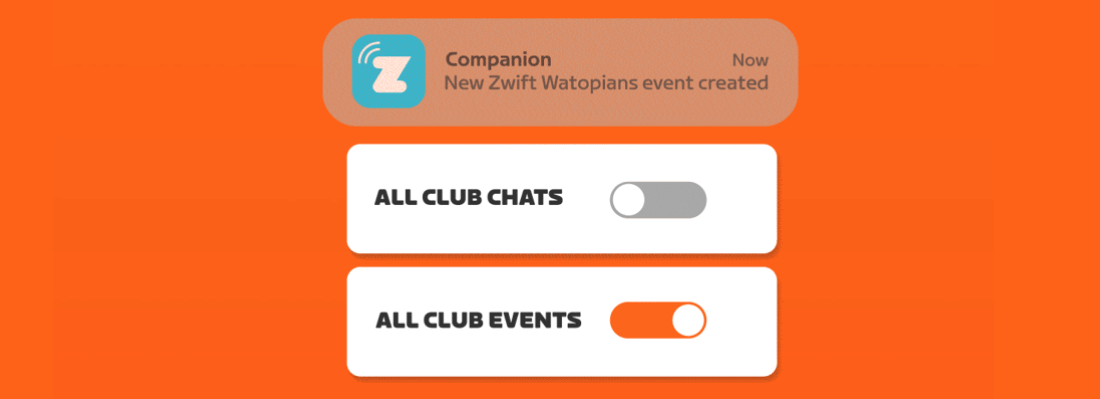
That will all change when this feature rolls out, as it lets you toggle chat and event creation notifications on a per-Club basis. Easy peasy!
Availability Date
Zwift is saying these Club upgrades will ship “this summer.” My guess is we’ll see it sooner rather than later – probably in the next major Companion update.
A Few More Ideas…
It’s good to see Zwift rolling out some helpful Club upgrades. Of course, I’ve got a few more I’d love to see! Here are three basic chatroom enhancements my Club members would use today:
- Member tagging: let me tag other Club members and customize my notifications so I’m only notified of Club messages where I’m tagged.
- Clickable URLs: let me insert clickable URLs into chat messages.
- Profile links: let me click on a member’s name or profile pic in chat to be taken to their profile (this one drives me a bit crazy).
Questions or Comments?
What do you think of these Club updates, and what additional Club feature enhancements would you like to see next? Post below!



Hey Eric, this is off topic but do you know if Zwift has any plans to display the route % grade information to the current Companion app info screen during a ride. Would really help out people with older televisions with less screen formatting.
Thanks
No plans that I know of.
knowing percent of elevation ahead of time would be nice.
So rubber banding has actually been available in club events this whole time, but you could only access that setting, plus a bunch of others, on desktop. Stumbled onto this by accident a while back.
Attached a pic, hopefully it works…
This wasn’t always available to all clubs though… only those with web access to edit their events. Just the older, larger clubs basically. (That may be different now, not sure.)
Plus, it used the old keep together algo, which isn’t great.
My guess is the new algo is now in game, though, so if you set that setting on web, it’ll work well. Hmmm…. maybe worth trying!
That’s just from a club I set up with some IRL friends, so my guess is that it works with any club. There are some hoops to jump through (or ride through?) to access those settings though, not intuitive at all. Making it all accessible in the app will be a welcome change!
Mike, How do you access those settings i can’t find club stuff anywhere on windows desktop version. Would be greate to be able to do now rather than waiting for the update, by which time probably won’t be doing many club rides as will be outside with the same group. thx
Is there any plan to recognise a rubberbanding event like another kind of virtual racing, so it do not mess up Strava segment times. Becuase is a bit unrealistic that in my case I have a Personal Best in the Hilly KOM one and a half minutes faster than any other attempt, just because it was set in a ruberbanding workout at the Thriatlon ZA. Is my faster time, but the average power is 80 W less than my best effort in “normal” circumstances.
Maybe adjust the privacy or leaderboard settings of that one Strava ride?
Just wondered if anyone had heard anything about when the Clubs Keep Together setting might be available in the Companion app please?
Also wondering if anyone has heard anything about when the Clubs Keep Together setting might be available in the Companion app? The Zwift announcement seemed to indicate it would be available from April. Am I missing something?
I am setting up a new club and want to do weekly workouts using the club feature but really need the “Keep together” option to be available to make the whole thing work. I have seen several posts about this but I don’t yet see the option in the Companion app when setting up club rides or workouts – any ideas when this might arrive?
Has this new companion update happened yet? I don’t see the option of toggling to “keep-everyone-together” mode when I make a group ride in my Clubs section.
The option is still not available in the Companion app.
Thats a shame. Keep together would really be a game changer on club rides. Is there any indication as to when if at all this setting may be released? From what I have gathered it seems like it is really only the toggle now thats missing, and all the techology is already present in game.
Also is there any way to access the web based edit page for club events by entering the URL directly or something? I neither have the “Manage my Events” nor the “Edit” button in the event detail page folks have mentioned worked for them.
And always wanted to say Thank You for all the great content and insight you provide @Eric Schlange
I’ve reached out to Zwift to ask about this…
Hello, did you happen to hear back from zwift as to when this will be available?
thank you
The update finally arrived and the option is available now.
Ahhh thanks mate! Will update the app now 👌🏻
Summer has come and gone, where is the rubberbanding for club events?
Hi Eric, any update for this feature or do you know why it hasn’t been released? Our club (Christian Cycling dot org) would really like to take advantage of this. I have reached out to Zwift tech support but they haven’t provided any help other then telling me it’s not available. I was thinking this feature was available to larger clubs, is there anyone within the Zwift organization I could contact for this?
Thank you for your help
Jeff
It seems my club can’t find the “Keep Everyone Together” option for club events and we have to fall back on a Meetup. The only problem with that is it is very tedious to invite people and they must be followers. Any thoughts?
The only thought I have is this: Come on Zwift, get this done already! Meetups are a massive pain the ass to create when you have 10+ riders. The announcement was done in April that club events would have the “keep everyone together” option. I was excited to come back to Zwift in the fall/winter (now) and I am very disappointed they made the announcement and didn’t follow thru on the execution.
Any news on the Keep everyone together option for Club Events?
Its available now with the companion-update.
Just released! Although it’s not working for me yet… https://forums.zwift.com/t/zwift-companion-v3-53-november-2023/616444
I set up a Club Ride via the app and select “keep everyone together” option. I pick a route and noticed that no one is able to bring a workout to this club ride. When you set up a Meet Up outside of the club, the rider has an option to bring a workout. Any reason why a club ride doesn’t allow this function or is there a hack I’m overlooking?
Because you can create actual group workouts in your Club, instead of doing the hacky thing in Meetups. See https://zwiftinsider.com/club-workouts-released/
ok- interesting and sad…many in our club enjoy the Club Ride but still want to bring their workout file vs. use the one supplied by Zwift. The hacky thing in Meet Up is popular with our club members.
Thank you,
Mitch