
New AppleTV Remote Now Supported in Zwift

Here’s the update of the month that Zwift didn’t tell us about – unofficial support for the new AppleTV remote!
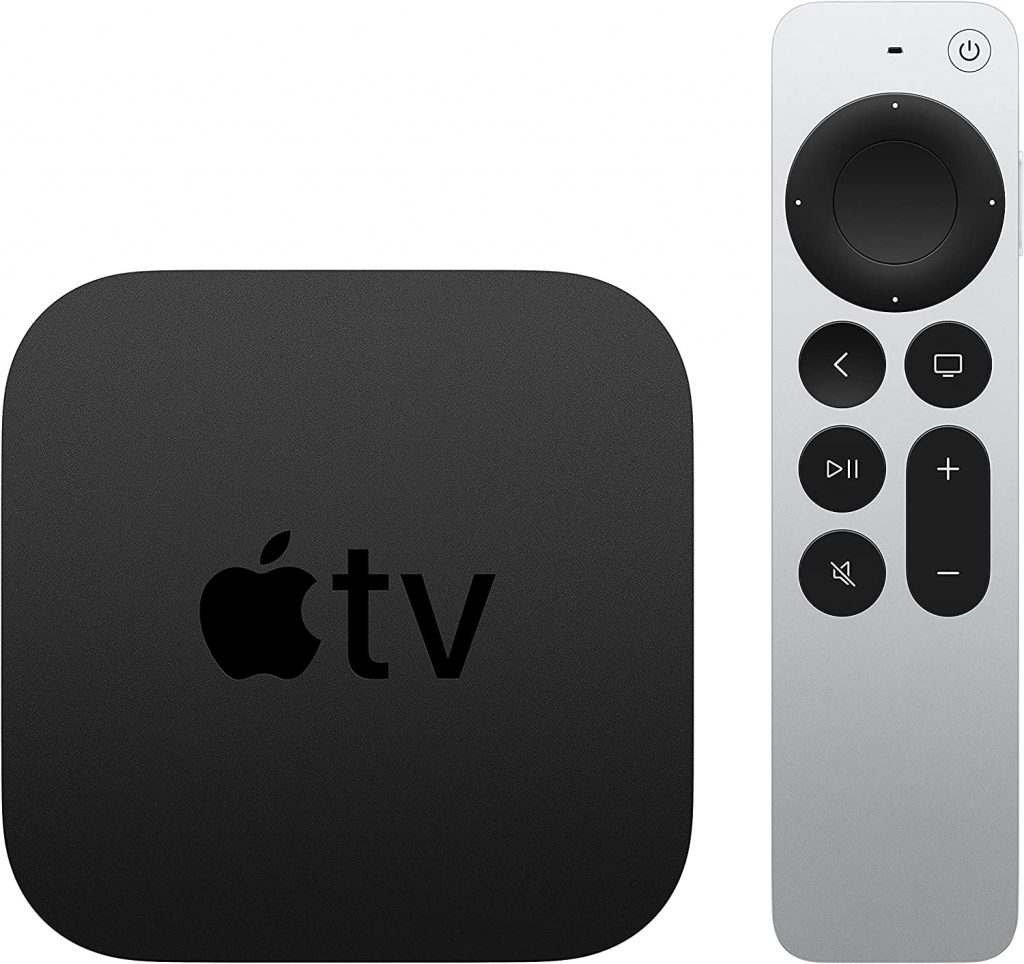
Apple TV 4k 2021

The second-generation AppleTV 4k was released in April 2021, and many Zwifters picked one up hoping for an improved Zwifting experience. Specifically, the old AppleTV remote is legendary among Zwifters for being a big pain to use with its swiping motion – but the new AppleTV remote has click navigation along with swiping ability.

Unfortunately, Zwift didn’t update its AppleTV app to support the new remote… until this week’s release! While the official update notes don’t mention enhanced AppleTV remote support, things have definitely changed for the better.

Why wasn’t this oft-requested feature mentioned in the update notes? Probably because Zwift hasn’t fully rolled out support for the new remote. It works well on certain screens, but not so great on other screens. It specifically works well in these instances:

  • Getting into the game, selecting a world
  • In-game menu/settings
  • In-game action bar
  • Exiting and saving your activiy

Watch our favorite Aussie Lama deliver a full rundown of the new AppleTV remote on the current version of Zwift:

ZWIFT Update: New AppleTV Remote Now Supported! [AppleTV4K 2021 Remote]

Questions or Comments?

Post below!

Eric Schlange
Eric Schlangehttps://zwiftinsider.com
Eric runs Zwift Insider in the spare time he finds between riding his bike and managing various business interests. He lives in Northern California with his beautiful wife Monica. Follow on Strava

28 COMMENTS

Subscribe
Notify of
guest

28 Comments
Oldest
Newest Most Voted
Russ
Russ
4 years ago

Only the new remote? 🙁

nardix
nardix
4 years ago

aThanks for the news. I watched Gplama video and I am not impressed with the new functionality of the aTV remote. Navigation is still messy, slow and illogical. A better way would be to enable touch commands via the apple companion.

Zoltan
Zoltan
4 years ago
Reply to  nardix

Agree. Still far from being good. I would even say this is not better.

Alex
Alex
4 years ago

Definitely got significantly less bad. Still doesn’t feel really intuitive though but as long as it doesn’t take me 5 minutes to start a workout like it did before the update, I am OK with it.

Didn’t even know about the problems when I got the new AppleTV and at first thought I was just too stupid to use the remote the right way in game.

Steven
Steven
4 years ago
Reply to  Alex

For the life of me I can’t figure out how to select a workout with the AppleTV remote at all. I have to use the phone app and mirror the screen.

Eric
Eric
4 years ago
Reply to  Steven

Were you able to resolve this? I just got started with Zwift and regret getting an (old, used v4) Apple TV because I can’t figure out how to select either a workout or event other than the one at the top of the list. There is a remote-shaped dent in the wall of my garage…

Aristos
Aristos
4 years ago

What about the graphic quality? Is that still the same as the previous ATV version?

Steve
Steve
4 years ago
Reply to  Aristos

Well this article is only about the remote control, which is nothing to do with graphics

Paul
Paul
4 years ago

Also works for other 3rd party IR all in one remotes

Dee
Dee
4 years ago

Since the most recent Zwift update, I have not been able to pair my smart trainer using the companion app. I connect through companion so that I can connect my HR monitor, smart trainer and my power meter. Since I updated my smart trainer remains in pairing mode and will not pair, which means no ERG. If I connect without using the companion app then I can only connect 2 items, because the remote takes one of the three connection points on the Apple TV. So I end up connecting my smart trainer and power meter but can’t connect my HR monitor. Is there a solution to this? Does it have something to do with the apple tv remote upgrade in Zwift?

Andrew Linquist
Andrew Linquist
4 years ago

Unfortunately this new navigation doesn’t work in the bike changing/selection portion of their menus – one of the places an AppleTv user really needs a fast and precise remote mid race. If one turns the remote to Click Only in AppleTvs settings, you can change your bike at all. It must be done with the slider function which is wildly unpredictable and inaccurate.

Otherwise it is slightly better but fairly slow in its reaction time in certain menus, particularly the user login screen.

Andrew Linquist
Andrew Linquist
4 years ago

I intended to say “cannot change your bike at all.”

Tiago Cardoso
Tiago Cardoso
4 years ago

DC Rainmaker pointed out the first version of Zwift for Apple TV 4K wasn’t using the real power of the A12 Bionic chip. Does this update brings improvements to graphics and general performance?

Victor
Victor
4 years ago

Thank goodness!

John
John
4 years ago

Has anyone tried using a third-party ApplecTV remote like the one from Function to see if it works as well? Sure would make choosing custom workouts easier.

Richard
Richard
4 years ago

Is it possible to use the new remote with the first generation Apple TV 4K. Would be cheaper to buy a new remote than a new Apple TV!

Steve
Steve
4 years ago
Reply to  Richard

No

Carl
Carl
4 years ago

Still absolutely rubbish. Frankly disgusted that Zwift can’t properly support Apple TV. It takes up to 20 mins to successfully select the workout I want. Get a grip Zwift

David Kindler
David Kindler
4 years ago

Like many others, I keep waiting for Zwift to fix the software to work with the new Apple remote. Spent 10 minutes scrolling up/down trying to select a ride in the list… does the scrolling past desired choice work any better using an iphone as a remote? Zwift — please HELP!!!

Alan Jolly
Alan Jolly
4 years ago

For the last few months my 4th gen HD ATV remote has been a nightmare. It takes about 4 attempts to login and if I access the in game menu, I perform a U turn when I exit

Bruce
Bruce
4 years ago

Grrr. I have an Apple TV 4k, and had a black remote control, which does. got a new silver one, but I can’t select a course, or a pace partner with this. very frustrating. Grrrrrr!

Bruce
Bruce
4 years ago
Reply to  Bruce

sorry, the black remote died, not does

Andy
Andy
4 years ago

I just can’t get the scroll function to work on a new 2021 Apple TV with silver remote and so therefore can’t select a route or a race partner – please help!

David
David
4 years ago
Reply to  Andy

Zwift hasn’t fixed this yet I keep waiting too.

David
David
4 years ago
Reply to  David

Note the comment above. “Remote shaped dent in garage wall” 🙁

David
David
4 years ago

We’ll, Zwift didn’t really make the new remote compatible. Second level menus don’t work. I tried it and found I needed 2 remotes. The new one for top level menus and the old one for second tier menus. Hmmm. I wouldn’t hype this as an improvement. I bought the new remote and had to return it since ultimately useless for Zwift. Seems that no Zwift staff actually tested their software. I love Zwift but this is entirely out of character-embarrassingly so !

Kevin Azmoudeh
Kevin Azmoudeh
4 years ago

My laptop is outdated and won’t work anymore. I am using my iPhone to zwift. I have an of cycleup . Can I get Apple TV and use m existing setup?

Cathy Smith
Cathy Smith
4 years ago

Just got the Apple TV 4k yesterday for my birthday and it’s still janky. I’ve been using Zwift from my iphone 11 Pro (mirrored to HD TV through 2nd Gen apple tv). The phone is so much easier!! With Apple TV, you can’t do screen captures (although you can on companion) or give ride ons to the people near you on the “on-screen” rider list. The “Nearby Riders” on the companion app are not the same as what you see on screen (all out of order and constantly sorting). These couple things are annoying and I’m sure I’ll discover more but I’m hoping for at least a less glitchy experience than what I got on my
iphone.

Get Started on Zwift

Newest Featured Posts

Support This Site

Write a post, shop through us, donate or advertise. Learn more

NEWSLETTER SIGNUP

Zwift tips and news every 2 weeks! Click to subscribe.

More Posts