
About Zwift’s Upcoming Action Bar Update

In mid-April Zwift announced a pile of new features coming to the platform. I’ve covered almost every one in detail, but today I’m wrapping up this series of posts by digging into the new Action Bar Zwift is planning to roll out.

While Zwift isn’t telling us everything about the new Action Bar, they’re telling us enough to give us a good idea of what will be changing. Here are the details…

Action Bar Intro

Zwift’s Action Bar has been a useful part of the in-game interface for years. It’s hidden when not in use, but you can make it pop up in a variety of ways:

  • Hit the up arrow on your keyboard
  • Click on the lower-middle part of the screen with your mouse
  • Tap on the lower-middle part of your screen if you have a touchscreen device
  • Swipe up on your AppleTV remote

The action bar is also available in the Companion app, but oddly enough it’s not the same action bar as you see in game. It contains some different buttons than the in-game bar, and the buttons are in a different order.

[adinserter block=”4″]

About the New Action Bar

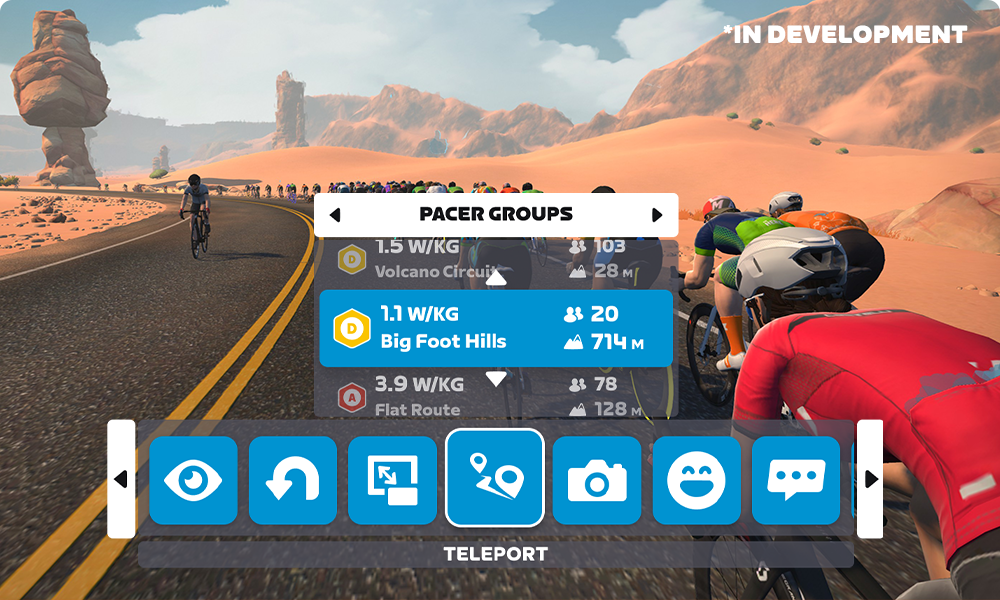
The new Action Bar will be reachable in the same way as before, but its layout and available functions will change substantially. Zwift will be introducing new Action Bar buttons, re-ordering these buttons, and (for the first time ever) placing submenus under some of the main buttons.

Main buttons and their submenus will include:

  • Actions: give a Ride On*, change the camera angle, or make a u-turn
  • Emotes: Ride On, elbow flick, toast, and wave
  • Rider teleport: choose a rider or RoboPacer (read more)

Zwifters will also be able to access Coffee Stop from the Action Bar and perform existing Action Bar functions like changing the camera angle, turning on HUDless mode, and recording a video snippet.

*In their press release about this feature Zwift includes “give a Ride On*” in the Actions menu, but also includes the “Ride On” emote. We’re hoping this means Zwift is adding a new shortcut to easily return a Ride On.

Here’s a sample of the new action bar, taken from Zwift’s publicity images for the new Rider Teleport feature:
Release Date

Zwift is saying the updated action bar is coming “this summer”. Our guess is you’ll see it released in May or June, with additional refinements/modifications following.

Questions or Comments?

Post below!

Eric Schlange
Eric Schlangehttps://zwiftinsider.com
Eric runs Zwift Insider in the spare time he finds between riding his bike and managing various business interests. He lives in Northern California with his beautiful wife Monica. Follow on Strava

34 COMMENTS

Subscribe
Notify of
guest

34 Comments
Oldest
Newest Most Voted
Ingemar
Ingemar
3 years ago

Looking forward to the Teleport feature!

TheGregadon
TheGregadon
3 years ago

Teleport feature completely devalues the 100 likes badge. I had to ride around jumping on different pacing groups under my own steam to get that bad boy.

Ima Beast
Ima Beast
3 years ago
Reply to  TheGregadon

You don’t need to RoboPacer hop to get this badge. I got mine on the BMTR 100mi ride. I got it before 70 miles even, you just have to have patience and an extra few hours on a Sunday.

Alex
Alex
3 years ago
Reply to  TheGregadon

You could already get there relatively easily by just not ending your Zwift session between rides.

If anything the Robopacer feature devalued it because that gave people a non-event option to get a lot of them in a very short time.

sarto
sarto
3 years ago
Reply to  TheGregadon

the 100 ride on badge had value? you live in world separate from mine

Tim
Tim
3 years ago
Reply to  sarto

Different people value different things in life. Can you let people different from yourself exist in the same world as yourself? Or do you only want people exactly like you around?

Neil Owens
Neil Owens
3 years ago
Reply to  Tim

They’ve got a point though!

Tim
Tim
3 years ago
Reply to  Neil Owens

What point? The badge had no value? I value my 100 ride on badge because it took quite a bit of work (physical work, effort, endurance) and time to get it. I’ve been around since when Watopia only had one route and I only managed to get the 100 ride ons badge this winter. So it was harder to get then 150 or so other badges and took 7+ years. Seems like sarto just wanted to put others down, and make himself feel/seem superior and frame it as some shallow “wanting to be liked” or popularity contest, when it actually requires a bit of physical effort and endurance and persistance to get. So that’s why I pushed back.

CouchTo1200K
CouchTo1200K
3 years ago
Reply to  TheGregadon

You could already get 100 Ride Ons easily by riding with Coco on a national holiday for about 60 minutes.

John
John
3 years ago

Has the video snippet been rolled out yet . If yes . I’m still waiting for that .

Thor
Thor
3 years ago
Reply to  John

It is, but only on iOS devices so far

noXskuses
noXskuses
3 years ago

I can see this being a nightmare to navigate using the Apple TV remote.

Fillis
Fillis
3 years ago
Reply to  noXskuses

Companion will be really useful in this case for us on TV. But it should work even with the old TV Remote. Zwift should take care of clicking and not be able to move up and down as well as left and right at the same time. One click to open Teleport -> left and right to choose friends / RoboPacers -> click to choose -> up and down to choose specific RoboPacer click and it will teleport you.
But if you could change it in any direction, it will be mess. I hate it on the main screen. Changing RoboPacers, looking at the courses, looking at the position of the Pacers and in a matter of seconds, I’m swiping another submenu with workouts.

Miguel Vitório
Miguel Vitório
3 years ago

Very nice…!!!

Lezek
Lezek
3 years ago

Arrow down Key for both navigating through the menu and making an U-turn? Could leed to some unfinished route badges…

Eric
Eric
3 years ago
Reply to  Lezek

Already happens occasionally with camera panning.

My old recommendation is if you’re so gassed you can’t manage the buttons, well, you probably should just focus on riding!

John Conant
John Conant
3 years ago
Reply to  Eric

On my setup I’m limited to the mouse in Windows… which is harder than it looks by the end of a hard ride. More keystroke options would be useful, please. 🙂

John Conant
John Conant
3 years ago
Reply to  Lezek

Also the “U” key does u-turns.

Ruffin
Ruffin
3 years ago

We’re hoping this means Zwift is adding a new shortcut to easily return a Ride On.”

Yes please. I probably spray more ride ons with the app into oncoming traffic than I get, but when I do get one, I want to return the favor… which seems nearly impossible while I’m biking.

Ima Beast
Ima Beast
3 years ago
Reply to  Ruffin

I believe that if you use the Ride On Bomb feature directly after receiving one, it will automatically give one to that person who gave it to you if you haven’t already given them one. I’m not 100% sure but I have noticed that in RoboPacer groups when I get a ride on and then use the Ride On Bomb, the option to manually give one to the person disappears.

Ben
Ben
3 years ago
Hopefully the new action bar is more user-friendly for us with apple tv
Mike
Mike
3 years ago

Is the action bar on companion app going to be reconfigured such that there will be zero left to right scrolling?

Matthew
Matthew
3 years ago

Would love to see an option for an emote that encourages your group to work together to catch (or stay away from) another pack in a race.

John Conant
John Conant
3 years ago
Reply to  Matthew

Probably very difficult to code even with the new pd4 pack dynamics, but it’s an excellent idea, Matthew!

Stopherson
Stopherson
3 years ago
Reply to  Matthew

I do feel a bit like the Black Mirror monkey with the limited shouting available. “Hammer time” means go faster, “I’m toast” means slower. Then there is the enigmatic bell…like a car horn? Or simple bicyclist greeting?

John Conant
John Conant
3 years ago

Hi Eric! 🙂
Pros:
1. Teleport and Coffee Stop features both look very useful!
Requests:
2. I’m still waiting for / hoping for a keyboard key to mimic the “Back to Me” rectangle, after clicking on & kuo’ing other riders.
3. Hoping for the Android and Windows versions of the new video record replay now under MacOS.

John Conant
John Conant
3 years ago
Reply to  John Conant

…kudo’ing…

Rodrigo
Rodrigo
3 years ago

What’s happened with the background graphics on the 1.34 version? It is looking like 420p. Horrible!! The number’s sharpness is awful and the scenario remembers the ’80s videogame. I’m using the Mac version.

Steve Magnetti
Steve Magnetti
3 years ago

Can we change up the rides, and worlds that the pacer groups ride?

Revnige
Revnige
3 years ago

How come in the new Companion update you can’t skip forward through a training rep or toggle a training session effort level up or down? If you hit a patch you’re too knackered to finish (45 secs at 500?) You basically come to a standstill til you have a break or switch off ERG). Or if you want to fast track the last stage or two due to need to finish early you fail to complete that day’s training.

Rob
Rob
3 years ago

Love it! Came back in from the outdoors mid summer to try this out, teleported onto a robo-pacer with my bezzie’ really looking forward to meeting friends easily!, great feature.

Lloyd Wood
Lloyd Wood
2 years ago

Just focus on riding

Get Started on Zwift

Newest Featured Posts

Support This Site

Write a post, shop through us, donate or advertise. Learn more

NEWSLETTER SIGNUP

Zwift tips and news every 2 weeks! Click to subscribe.

More Posts