

Smart trainers aren’t the only way to get on Zwift, but they’re the best way. A smart trainer lets you feel resistance changes as you ride up and down hills in Zwift’s virtual worlds. This makes zwifting immersive and helps you train for the challenge of hard outdoor climbs.
Additionally, most smart trainers detect both power output (wattage) and cadence, sending these training metrics to Zwift so you can ride, race, and train your very best.
There’s no debating that a high-quality smart trainer is essential if you’re seeking an immersive and enjoyable Zwift experience. But which one should you buy? We’re here to help!
What Not To Worry About
Let’s start with some good news: smart trainers have come a long way in the past ~6 years. Current models all communicate via both ANT+ and Bluetooth, ensuring compatibility with whatever device you’re using for Zwift.
Additionally, as long as you follow the instructions, any smart trainer you get will be accurate and powerful enough to deliver an immersive and effective Zwift riding/training/racing experience.
Two Trainer Types
While we have 100+ trainers in our Smart Trainer Index, there are just two* types of smart trainers: wheel-on and direct-drive. It’s important to understand the differences:
- Wheel-on: the lower-priced option, you don’t need to remove your back wheel for these trainers. Your bike mounts to the trainer by clamping onto your rear axle ends, and the trainer’s resistance roller presses against your back tire. Wahoo’s KICKR Snap is a very popular wheel-on trainer.
- Direct-drive: these trainers replace your back wheel, so the trainer includes a cassette and your rear axle runs through the heart of the trainer. Wahoo’s KICKR is the most popular direct-drive trainer on the market today.
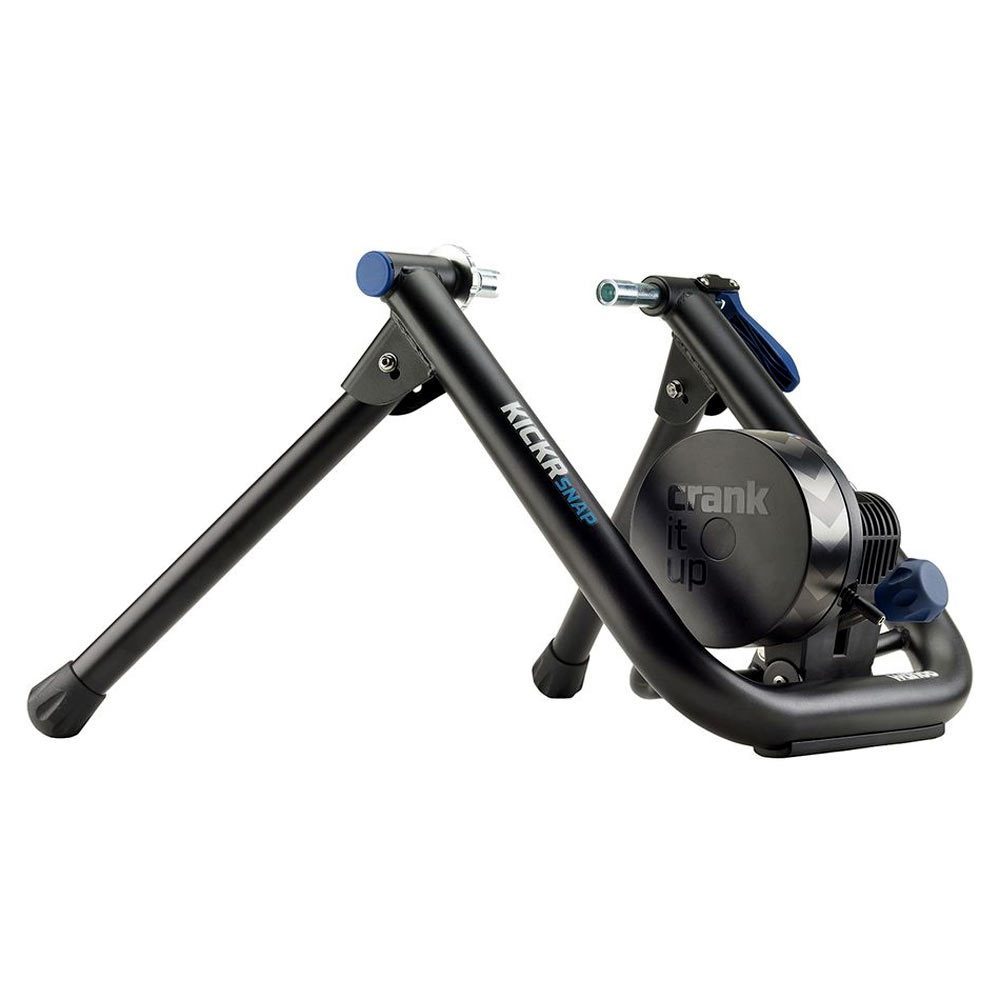
Wheel-on Wahoo KICKR Snap 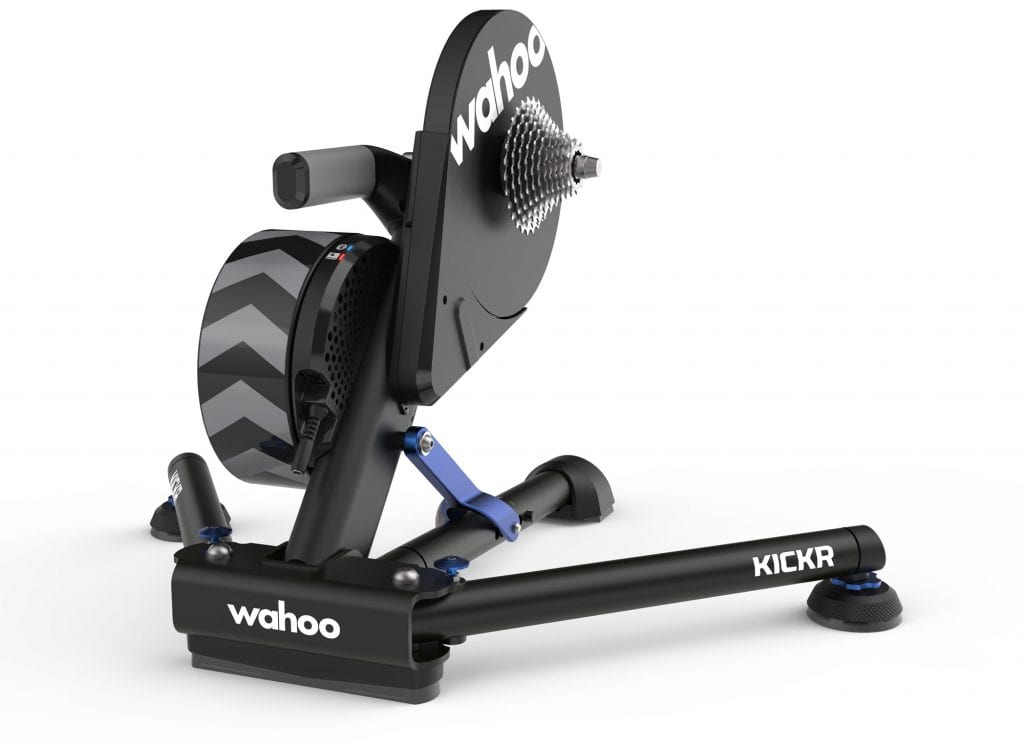
Direct-drive WAHOO KICKR
*Smart bikes, if included in this discussion, would constitute a third type of smart trainer.
Each type of trainer has its own strengths and weaknesses.
Wheel-on trainers are typically easier to pop your bike in and out of, since you don’t have to remove your back wheel or fumble with your chain/rear derailleur in order to attach your bike to the trainer. This is one consideration, especially if you have only one bike and plan to mix your indoor and outdoor riding.
That said, wheel-on trainers are the lower-priced option for good reason! They suffer from two key problems: power inaccuracy and poor road feel. Power is often inaccurate because it depends on proper calibration, which easily gets messed up if your tire pressure changes or your swap bikes. And wheel-on trainers don’t mimic the feel of riding outdoors very well, because they lack the inertia provided by the flywheels in direct-drive trainers.
Direct-drive trainers provide a much more realistic road feel thanks to their flywheels, and they’re generally much quieter than wheel-on trainers because there is no tire rubbing against a resistance roller. Since power is measured internally without involving the wackiness of inflatable, temperature-sensitive tires, your wattage numbers will be much more stable and accurate from ride to ride.
This premium experience and accuracy come at a cost, though – most popular direct-drive trainers cost at least twice what their wheel-on alternatives do.
Wheel-On Trainers
- Affordable
- Easy bike mounting
- Lightweight and foldable
Direct-Drive Trainers
- Accurate power
- Realistic road feel
- Quiet
Let’s dig more into the qualities of various trainers, so you can find the best smart trainer for your situation!
Price Points
Popular, reputable smart trainers on the market today range in price from $370 to $1400. On the low end of this scale you’ll find wheel-on trainers like the Tacx Flow Smart, while on the upper end you have premium direct-drive trainers like the Tacx NEO 2T.
We break our Smart Trainer recommendations into three budget tiers:
- Wheel On ($300-$500)
- Budget Direct-Drive ($750-$900)
- Premium Direct Drive ($950+)
Accuracy
Power accuracy is typically stated as a percentage range such as “+-5%”. This means that, at 100 watts, the trainer may overstate power by as much as 5 watts and still be within spec. Or at 300 watts, it may understate power by as much as 15 watts.
5% may not sound like a lot, but it’s significant when you’re talking about tough training intervals or Zwift racing.
That said, the real power accuracy problems come when your trainer isn’t calibrated properly. This is a common occurrence with wheel-on trainers, since they rely on consistent tire pressure and temperature for accurate power readings. If you calibrate at one tire pressure and/or temperature, then ride at a different pressure or temperature, your power may be much less accurate than the specs state.
Direct-drive trainers, on the other hand, are usually accurate within +-2%. And they only need to be calibrated every few months, or if they’re moved and not handled carefully. The two most popular trainers (Wahoo KICKR and Tacx NEO) don’t need any calibration at all!
Maximum Wattage and Slope
Besides accuracy, there are two additional key specs worth noting when doing your smart trainer shopping: Max Wattage and Max Incline.
Max Wattage is the maximum number of watts the resistance unit (or “brake”) can produce. It’s a measurement of how hard the trainer can push against you, and this becomes a factor on sprints and steep climbs.
Max Incline is the maximum climb gradient the trainer can simulate. If you think about it, this is obviously linked directly to Max Wattage, since they’re both just talking about how much resistance the trainer can produce.
There’s a lot we could say on this topic, but let’s keep it simple:
- The heavier you are, the more Max Wattage/Incline you’ll need
- The stronger you are, the more Max Wattage/Incline you’ll need
- Direct-drive trainers generally provide higher Max Wattage/Incline than Wheel-on trainers
- More expensive trainers have stronger resistance units, resulting in higher Max Wattage/Incline
For more on this topic, read “How Much Trainer Resistance Do You Really Need?”
Portability and Storage
Does your Zwift setup have its own dedicated space, or are you setting it up and tearing it down between sessions?
With their small or non-existent flywheels, wheel-on trainers are generally lighter and thus more portable than their direct-drive counterparts. Example: the Wahoo KICKR weighs 21kg while the wheel-on Tacx Flow Smart only weighs 9.4kg.
Wheel-on trainers have legs that easily fold back for storage in tight spaces. Most direct-drive trainers fold as well, but many are awkward to lift and move due to their heavier weight. (The Tacx NEO is a good example of this: it folds up, but is difficult to carry because of its 21.5kg weight and awkward shape.)
There are heavier wheel-on trainers: the Wahoo KICKR Snap weighs a hefty 17.2kg thanks to its flywheel. And some direct-drive trainers are quite portable: the Elite Suito folds up into a very narrow package and weighs only 14.5kg. So be sure to pay attention to trainer weight and footprint, if portability and storage are important for you.
Bike Mounting/Compatibility
Determining whether a given trainer will work with a given bike can be a little daunting due to the wide variety of cassettes, tires, axles, and frame shapes on the market today. The good news is, most smart trainers will play nicely with most bikes. But here’s what you should keep in mind for each type of trainer.
Wheel-On Trainers
- Tires: a normal road bike tire will usually work just fine on a wheel-on trainer. Knobby mountain bike tires will be super noisy, and probably not terribly accurate. The best tire is an actual trainer tire, but then you can’t just pop your bike off and ride it outdoors!
- Axle: wheel-on trainers generally play nicely with quick-release axles, although you may need to swap your bike’s quick-release with the one shipped with your trainer so it will mount securely. Got thru-axle? You’ll probably need an adapter kit – make sure your trainer has one available.
Direct-Drive Trainers
- Axle: most trainers include adapters so they’re compatible with popular quick release and thru axle standards. Read the specs to make sure.
- Cassette: does your trainer ship with a cassette, or do you need to purchase and mount one? How many gears does your bike use? A 10-speed bike will work with an 11-speed cassette (it just won’t shift to one of the gears) but a 9 speed (or less) will not, and neither will a 12-speed, since the spacing between cogs is different. If you’re on anything other than a 10 or 11 speed you’ll definitely need to purchase a cassette for your direct-drive trainer.
- Frame: most frames will mount on any popular direct-drive trainer, but certain frames have extra-narrow chainstays or seat stays which may rub the trainer’s body.
Road Feel
You’ll hear Zwifters talk about a trainer’s “road feel”. What exactly is this?
When we ride outside, our muscles engage mainly on the vertical portions of the pedal stroke. As your feet travel across the horizontal portions of the stroke they’re mostly “coasting” – taking advantage of the inertia you’ve built up.
Higher-quality trainers try to simulate this inertia by using flywheels – sometimes a real flywheel, sometimes a virtual one. Cheaper wheel-on trainers often have tiny flywheels, while more expensive direct-drive trainers have larger flywheels.
When it comes to realistic road feel, direct-drive trainers win the contest, hands down.
Note: the Tacx NEO has a feature named “Road Feel” which allows it to simulate various road surfaces by “jittering” the resistance so you feel the surface through your chain. This is different from the “road feel” discussed above.
Customer Support
Before you invest hundreds of dollars in a trainer, it’s a good idea to make sure you’ll receive quality customer support if you ever need it. Our Smart Trainer Index includes over a thousand reviews from actual trainer owners, and many talk about the level of support they’ve received.
Be sure to do your research! That super-cheap trainer from Alibaba may be tempting, but you’ll probably regret the decision if anything ever goes wrong and you need support from the manufacturer.
Top-Rated Smart Trainers
Hopefully you’ve made your choice between wheel-on or direct-drive by now. But you may still be deciding which trainer to buy.
We’ve created simple lists of the top 2-4 trainers in each of three categories. Click for our picks:
Top Wheel-On Smart Trainers
Top Budget Direct-Drive Smart Trainers
Top Premium Direct Drive Smart Trainers
A Note About Availability
Smart trainers have been in short supply since Covid lockdowns began in March 2020 and sales spiked to record highs. Retailers are still having a hard time keeping trainers in stock, and the most popular trainers often sell out within hours of restocking. This is especially true in the UK and Europe.
We’ve been maintaining a list of available smart trainers at major US retailers for several months now, updating it twice daily so you can easily see which of our top-rated trainers are in stock and where. The list is constantly changing, but every one of our top picks is usually available from one retailer or another on a given day. Most of these stores will ship to Canada and overseas.
See available smart trainers >
Questions or Comments
Share below!


Thanks for this Eric – I’ve been looking for a guide to “what makes a direct drive better than a wheel-on trainer” and it’s great to see this, even if it came when I already have a Kickr Core on order!! 😉
I’m looking forward to seeing the difference between the Kickr and my Tacx Smart Flow because I’ve spent a year with the cheapest wheel-on responsive trainer there is and I’ve felt totally immersed in Zwift and absolutely loved it.
What I think is essential is to get a responsive trainer – which simulates hills – and I steer people away from speed sensors or non-responsive smart trainers.
To save money when starting on Zwift, I got my second-hand Smart Flow on Facebook marketplace for £110 ($150) and in the past couple of months I’ve seen them as cheap as £70 ($95). This was the ideal “starter option” for me until I realised I wanted to upgrade to a direct drive, which hopefully gives better accuracy & feel.
My first year on Zwift was with a Tacx Vortex (basically same as the Flow). It’s a great way to start on Zwift, since it’s affordable and responsive. But after going to a KICKR I could never go back!
Having made two warranty returns in less than one year, my advice would be to stay well clear of Tacx. Two friends have also returned theirs under warranty. That’s three Neo2 T and a Flux dead in less than a year.
What problem did you have with your equipment?
I’ve got 2300 km and 40k meters on my Neo 2T without so much as a squeak.
I have had to reboot it a couple of times. But other than that I don’t even think about it.
I bought a Tacx Neo in 2016 and I still use it today. I have not had any issues with it using it every winter season for the last 5 years
What’s most important to me is: how did the warranty process go? As long as a company stands behind their products and honors their warranty, I’m not too fussed about a broken trainer.
That’s true for someone who uses a trainer under warranty and replaces it every year or so. For others who can’t afford to replace every year, once out of warranty reliability is really important.
While Direct-Drive trainers give you a better riding experience, an advantage of a Wheel-on Trainer is when you have multiple bikes with different cassette types (11 speed, 10 speed, etc) that you want to use on the same trainer. It is far easier to put the rear wheel on the trainer than having to try to switch cassettes on a direct drive trainer each time you want to use it for a different bike.
I have a Direct-Drive trainer and my wife wanted to use it also after seeing me use it. Due to size differences of bikes we could not just use 1 bike. I had a 10 speed cassette on my bike and she had a 11 speed. Constantly switching out the cassettes when ever we wanted to change bikes was a huge pain. Had I realized this when I bought it, I may have opted for a Wheel-on trainer.
10 and 11-speed can work without swapping the cassette – you just may need to tweak the barrel adjuster a bit.
I agree that a wheel-on makes it easy to swap bikes, BUT you’ll have to recalibrate every time you swap. That’s almost as much pain as swapping cassettes. 😂
The problem with the barrel adjuster solution is that you need to adjust it back when riding outside using your wheel with it’s native cassette. When you have a spouse who doesn’t know (or want to know) how to perform fine tune adjustments, it will always be on you to do that. However this situation did provide me with the excuse to upgrade the component set on my bike to Shimano Ultregra so we are both on 11 speed cassettes now.😊
Getting back to your comment, why would you need to recalibrate your wheel-on trainer every time you put a different bike on it? I don’t do that with my direct-drive trainer when swapping bikes and I never notice any differences in performance or feel. I do re-calibrate it every now and then, but definitely not every time I swap bikes since that is several times a week.
Because ever tire is different. It’s possible that the tires on the two bikes would match enough that they would provide basically the same resistance against the roller, but it’s also quite possible they wouldn’t, and your power accuracy would be poor.
Wheel-on accuracy is significantly impacted by changes in tire temperature and pressure. Calibrate cold? It’ll read high. Calibrate at high PSI, then ride a week later without refilling to that same PSI? It’ll read high…
I can support that observation Eric. As user of a wheel on non-interactive trainer I check calibration weekly and before any race as I have found that small decreases in pressure do impact the power output and noise! Fortunately it’s not a big or difficult job to check calibration or adjust but it is something to be more aware of with wheel on types.
Another point you don’t mention is that they are susceptible to tyre slip when doing hard sprints which can be frustrating especially when going for the line at the end of a hard fought race. And perversely, the higher the resistance you set on the trainer, the worse the slip is as the torque at the back wheel is greater than the friction coefficient and resistance torque of the roller. Setting at low resistance seems the best way to get high sprint wattage.
As usual, great article 👍
Your observation is valid if you race or require dead-on watts recording. While I am a avid cyclist, I use Zwift solely as an off season fitness tool. When the weather is good, I ride outside. I don’t race and do mostly group rides and workouts. Having good watts reporting is important for workouts since ERG mode locks you in to your workout segments using your FTP. However If I am a few watts off in either direction, it doesn’t bother me. My wife uses Zwift strictly as a cardio workout since she doesn’t want to go back to the gym due to Covid. You need to take into account how you use your trainer. This was the point that I was making about how an on-wheel trainer may actually be better based on how you ride in Zwift and the type and number of bikes using the trainer.
Sure, everyone has different priorities. Keep in mind, though, we’re not talking about just a few watts here. I did a race early in my Zwift days after calibrating with a cold tire on my Vortex, and my FTP jumped 30 watts. 😀
Maybe worth mentioning that there are now smart rollers as well (both InsideRide and Elite make them). They may be a niche product, but could be an interesting option for some.
Calibration question! Maybe someone can help. I have a Tacx Vortex wheel-on smart trainer and noticed when pairing with Zwift, calibration is only possible if paired via ANT+/FE-C, but not via Bluetooth.
Why is this? Is it something in Zwift software? A limitation of Bluetooth communication technology? Any help would be appreciated! Thanks!
Bonus points: Why is calibration not required for the expensive wheel on trainers?
There’s added issue of device compatibility… I used to run Zwift on my phone, a Moto X4 and it had terrible BT signal stability, so connection from my Tacx Vortex would drop and I had to reboot the entire device to get it to connect again. This happened once during a TdZ event, so imagine my frustration… but once I upgraded to using AppleTV and at times my new Pixel 4a, I never had such BT issues with the Vortex Smart again.
Drafting question – I understand that Turbo trainers don’t work with drafting during group rides? So does that mean that only wheel on trainers will benefit from drafting?
are you confusing “TT” with TT frames, which do not benefit from the draft within Zwift?
if riding a road bike in Zwift you will benefit from drafting. You can tell that is the case as your avatar sits up and uses the hoods when drafting, but tucks down when pushing into the wind.