

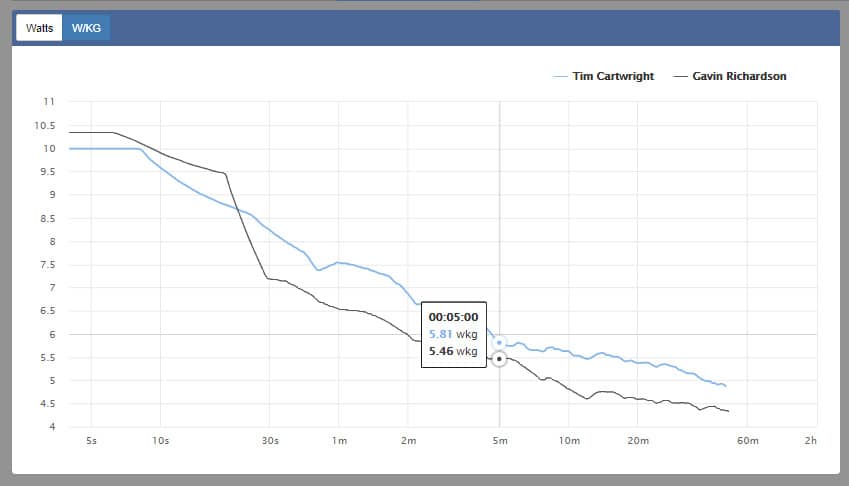
ZwiftPower has just rolled out a new feature allowing Zwifters to view the critical power curves of themselves and other riders. Here is an example from today’s KISS Sunday Night Race showing the power curves of winner Tim Cartwright and 5th place finisher Gavin Richardson.
How To Use It
Click the small green pie chart next to a rider’s name in the race results to switch to power curve view. You can then click the icon on multiple riders to compare their power curves for that event.
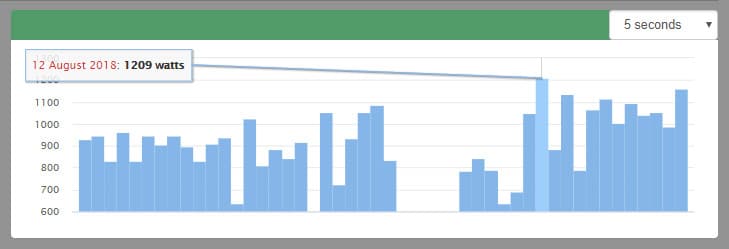
Want to see critical power history for a particular rider (including yourself)? It is now visible on the rider’s main profile screen. Here are top racer Greg Leo’s 5 second power numbers, for example. No wonder this guy finishes so fast!
Still Processing
Crunching all this data takes a lot of processing power, and James Hodges at ZwiftPower tells me it will take about a week to process the 200,000 efforts available in Zwift’s data history. Newer events will be processed first, so please be patient if you’re wanting to see older event data.
How Does This Help?
Your critical power curve helps you understand your strengths and weaknesses, and these become especially apparent when you compare your curve to others in a race. As a simplified example: if you’re able to hang with the pack until the end but always get dusted in the finishing sprint, chances are your 20 minute power is strong but your 5 second power is low in comparison to your opponents. While part of your power profile is genetically-influenced, you can always train to improve areas of weakness.
More importantly, knowing your critical power numbers for key intervals is the basis of most modern cycling training plans. And while critical power is available via other tools (Strava premium, for example) having it available free in ZwiftPower is pretty darn cool, since it gives us the numbers we need for our training while making it easy to assess other riders and evaluate our performance for a particular event.
Interested in training with power? Here are two books I highly recommend:
[amazon_link asins=’1934030554′ template=’ProductAd’ store=’zwif-20′ marketplace=’US’ link_id=’2a7bcd00-e097-11e8-a662-b51ec320abde’][amazon_link asins=’1937715825′ template=’ProductAd’ store=’zwif-20′ marketplace=’US’ link_id=’c2013476-e07e-11e8-ac8d-f15dc346b003′]


recommended books? I don’t see them , sorry.
Hi Eric,
Here in France I follow your insights with great pleasure.
As I am doing max power exercices I found that there are no more ^power readings fir power above 600w. Is there a way to get the readings (power range and time spent in the range) appart from looking at the charts?
Many ythanks.
Yves
I would use a third-party app like Training Peaks, Strava, etc to get more data. Zwift has basic data available, but more specialized apps give you a lot more info.
Hi Eric,
Can you help ? I often look at other riders at the end of a race to see how they did etc. But on Zwiftpower it doesn’t show the icon next my name and a-lot of other riders. My zwiftcompanion is set to deffault public. I can also view the graphs etc if i go on my zwift profile, if i haven’t been dropped out etc. Many thanks Des