

Zwift version 1.113 begins its phased rollout today. The update adds configurable fields to the workout HUD, plus three new Van Rysel bikes and two Swiss Side wheelsets to the Drop Shop. See details below…
Configurable Fields Added to Workout HUD
As requested by Zwifters and promised in the latest This Season on Zwift, four configurable data fields have been added to the central workout HUD element, allowing you to choose which performance metrics you’d like front and center.
Configure these fields by going to Settings>HUD and selecting “Workouts” at the top. This lets you modify the setup for the HUD that only shows during structured workouts:
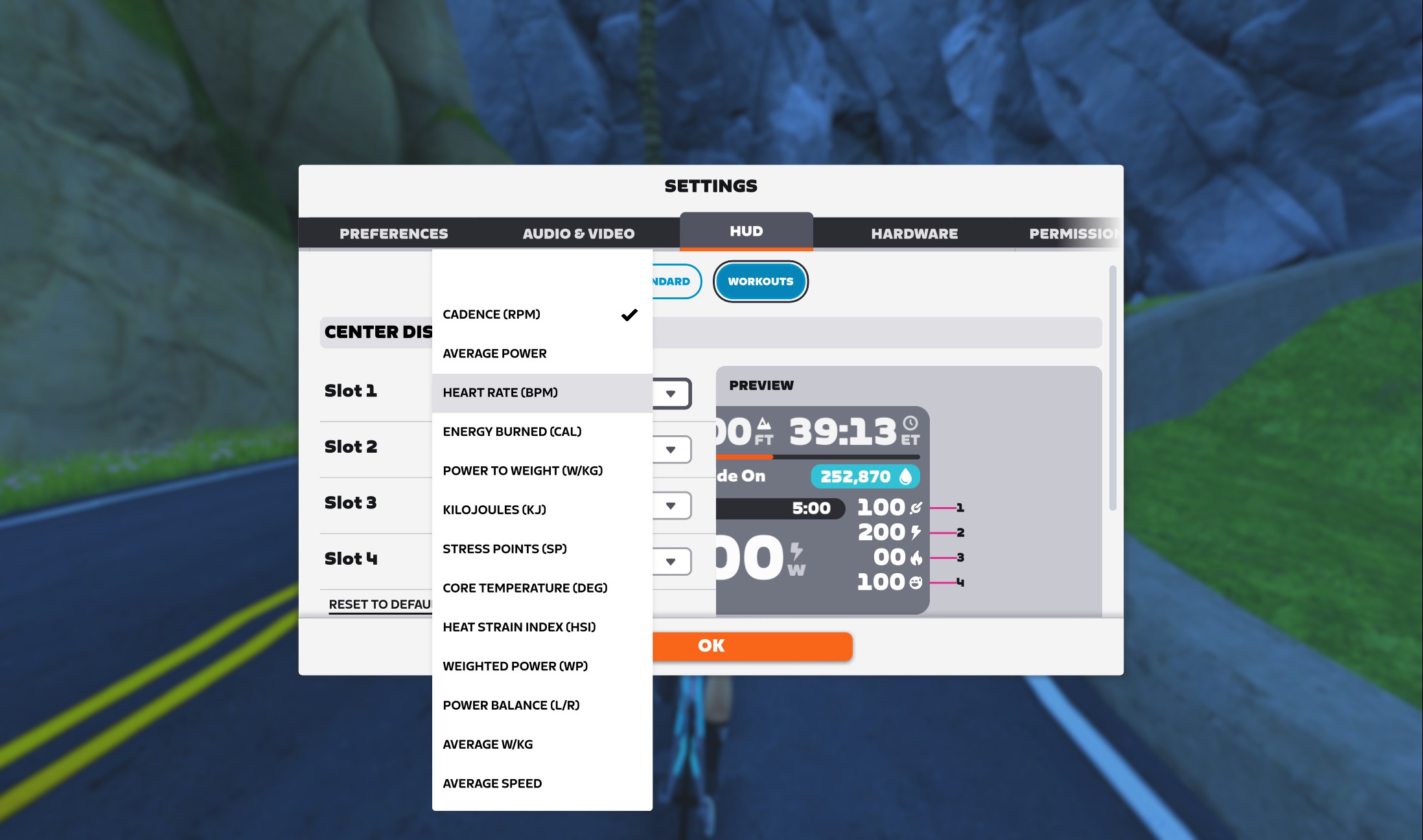
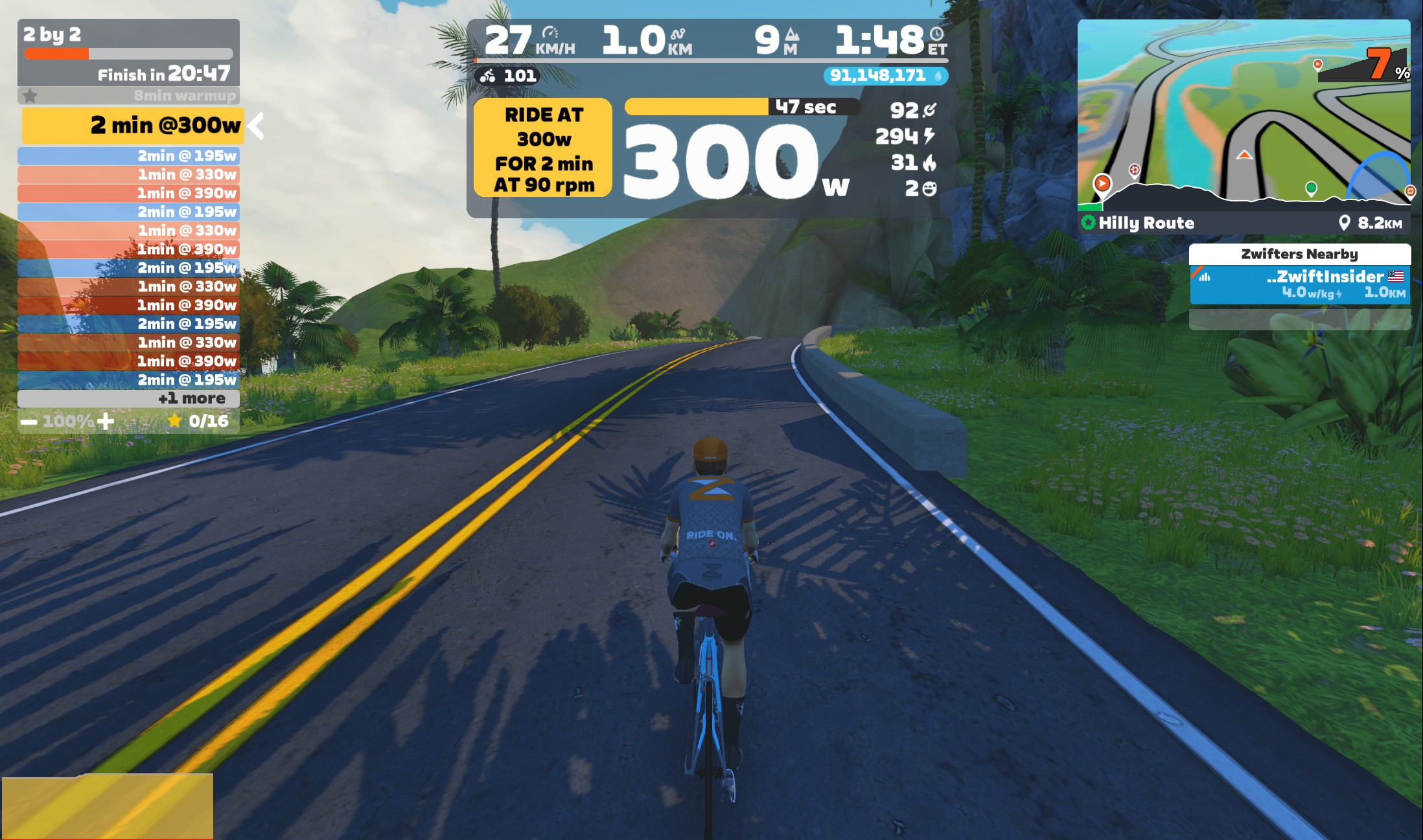
The prior central workout HUD showed heart rate and cadence. With the new design, those two fields have been replaced by four slots, and you can choose what’s in each slot from these currently available metrics:
- Cadence (RPM)
- Average Power
- Heart Rate (BPM)
- Energy Burned (CAL)
- Power to Weight (W/kg)
- Kilojoules (KJ)
- Stress Points (SP)
- Core Temperature (Deg)
- Heat Stress Index (HSI)
- Weighted Power (WP)
- Power Balance (L/R)
- Average W/kg
- Average Speed
There’s more coming to this feature. Zwift says, “We plan on adding metrics that show power, HR, or cadence for the current interval in an upcoming release.”
New Van Rysel Bikes and Swiss Side Wheels
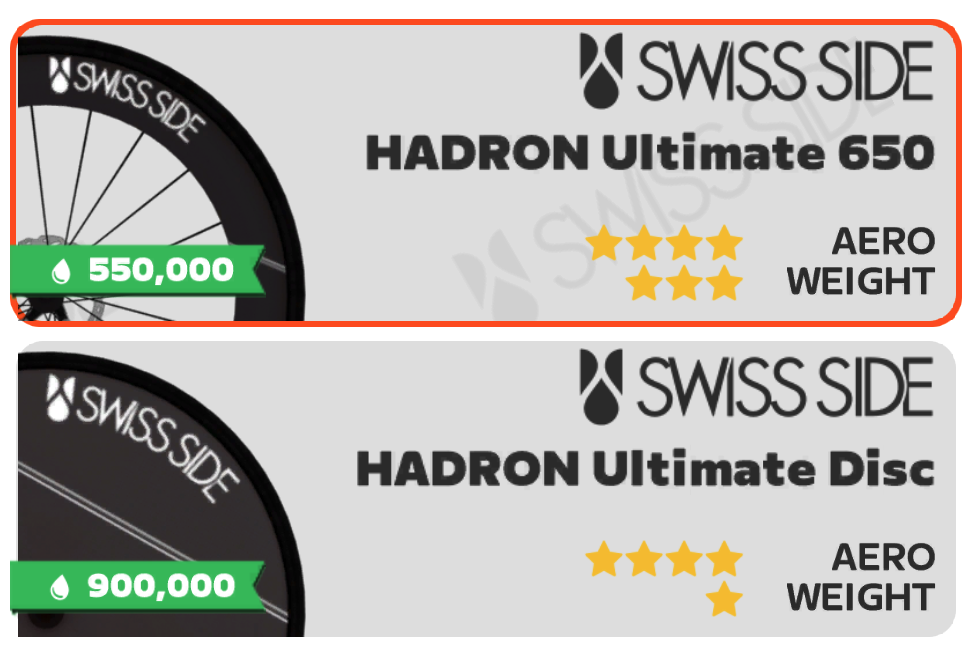
Zwift has added three new bikes from Van Rysel to the Drop Shop, along with two wheelsets from Swiss Side:
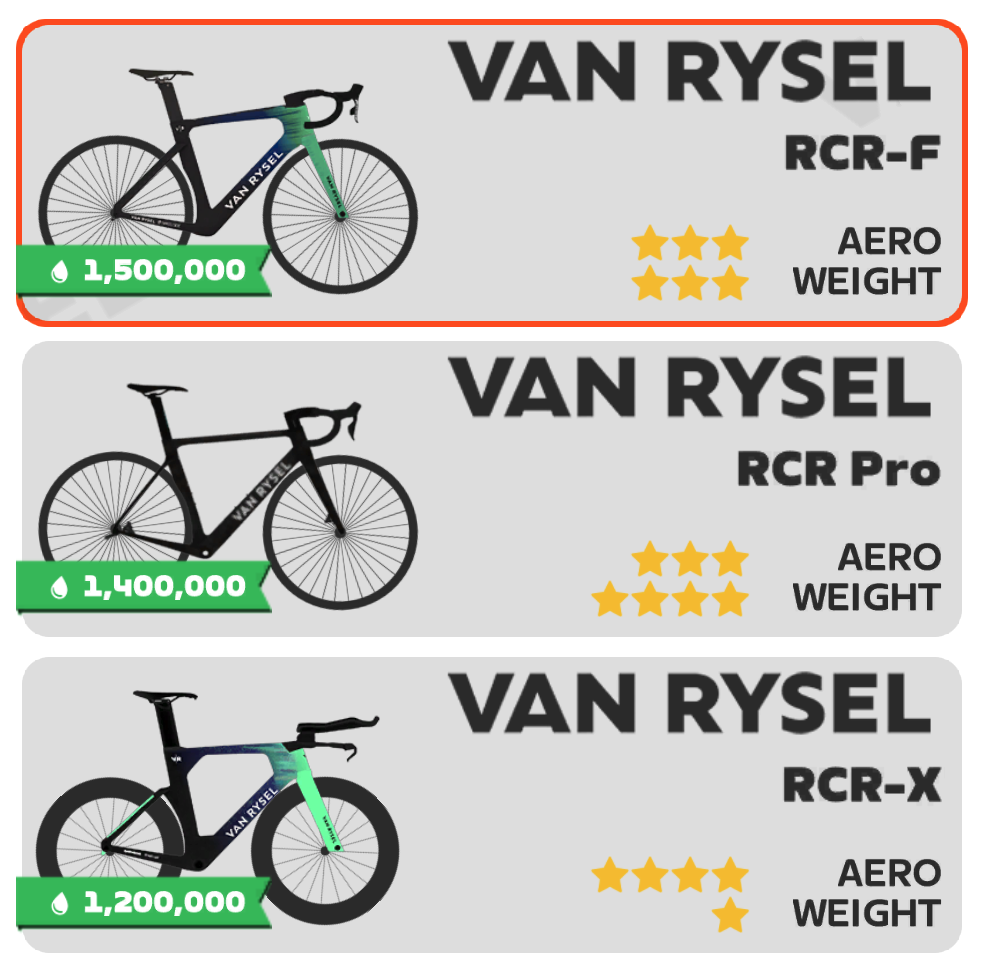
- Van Rysel RCR-F (Aero: ⭐⭐⭐, Weight: ⭐⭐⭐) – Requires Level 35+ and 1,500,000 Drops
- Van Rysel RCR Pro (Aero: ⭐⭐⭐, Weight: ⭐⭐⭐⭐) – Requires Level 21+ and 1,400,000 Drops
- Van Rysel RCR-X (Aero: ⭐⭐⭐⭐, Weight: ⭐) – Requires Level 40+ and 1,200,000 Drops
- Swiss Side HADRON Ultimate 650 (Aero: ⭐⭐⭐⭐, Weight: ⭐⭐⭐) – Requires Level 28+ and 550,000 Drops
- Swiss Side HADRON Ultimate 850/Disc (Aero: ⭐⭐⭐⭐, Weight: ⭐) – Requires Level 39+ and 900,000 Drops
We’re working on testing the new frames and wheelsets, and will release posts with performance details this week. Early indications are that the Van Rysel frames won’t beat any of the current top performers, while the Swiss Side wheels essentially match the DT Swiss ARC 1100 DICUT 65 and the ARC 1100 DICUT 85/Disc wheels (top performers in their categories) while costing a bit less and being available one level lower.
Removed From the Drop Shop
Although it isn’t in the release notes, the following were removed from the Drop Shop in this update:
- Frames
- Wheels
- FFWD RYOT55
- Giant SLR 0
- Novatec R4
- Mavic Cosmic Pro Carbon SL UST
- Mavic Cosmic CXR60c: This is the only item on this list whose performance is notable. See their inclusion on Fastest Aero Bike Frames and Wheels at Each Zwift Level.
- Mavic Cosmic Ultimate UST
If you already own one of these items, it will remain in your garage. But it cannot be purchased from the Drop Shop once you’ve updated to game version 1.113.
Release Notes
Zwift supplied the following additional release notes (our added notes are in italics):
- Improved connection reliability for trainers connected via Wi-Fi and Ethernet. On mobile platforms like iOS and Android, this improves connection reliability when temporarily switching to other apps.
- Corrected the weight of the Specialized Tarmac SL8 bike frame: a few updates ago, a bug was introduced that made the Tarmac SL8 (not the S-Works version) a bit lighter than it had previously been. It is now back to its original weight.
- Apple TV: Performance and stability improvements.
Discuss this update in Zwift’s forum >
Questions or Comments?
If you spotted any other changes or bugs in the update, please comment below!


It’s back to its original weight. It was lighter for a minute there.
Oh ! Thank you LeCheffre
The workout HUD configuration is a nice add. I still want to be able to turn off the HR/Power graph at the bottom of the screen for workouts though. Like you can on other rides/non-workouts.
You can toggle the HR/Power graph in workouts just like free rides. Hit “G” on your keyboard, or use the graph button on the action bar…
WHAT?! Is this new? I swear that wasn’t allowed before. Either way, thanks 🙃
its been like that from the very beginning of time
I so wish this was the case, but the “G” and “H” hotkeys are disabled in workout mode. Sadly they always have been. The graph button also does not appear in the action bar in workout mode. I just double checked to be sure and they still don’t work. If you hit “H” you get a pop up that says “cannot toggle display in this activity”
I can confirm that at least a month ago it was not possible to turn off the Heart rate graph while in workout mode on Windows version of Zwift.
Just checked and confirmed it myself. Seems like an odd thing to force us to have on screen. I’ve asked Zwift if it was done on purpose.
Corrected the weight of the Specialized Tarmac SL8 bike frame. – Does this effect the performance?
A few updates ago, a bug was introduced that made the Tarmac SL8 a bit lighter than it had previously been. It is now back to its original weight.
Which way did the sl8 get its weight “corrected”?
A few updates ago, a bug was introduced that made the Tarmac SL8 a bit lighter than it had previously been. It is now back to its original weight.
Too bad that the worse RCR-F has a nicer paintjob than the better RCR Pro …
I get that not every frame has to be meta-defining but these bikes do not move the needle at all. No excuse to introduce new frames that get dunked on by the Aeroad which is available all the way back at level 10.
Where’s the new Madone? S5? Colnagos? Noah Fast? Foil? Addict? Etc etc.
As for the wheels..ok. Similar or possibly ever so slightly better performance available cheaper and at an earlier level. What’s not to like I guess?
A large part of me would be happy of the tier defined the bike’s performance, not individual metrics. It would lead to more variation in bike choice.
Agree, I’d much rather the bike performance be more balanced. Just make everything with the same star rating have the same performance, and people can choose whatever their favourite is.
It wouldn’t as people are looking to get Halo bikes so for a lot of people having brands like this is pointless as they have no Halo bike so what’s the point in getting them.
Brand loyalty!
If only we can get Badges for the Climb Portal now!
Badges? We don’t need no stinkin’ badges!
Does Zwift still need to turn on the WO Hud? I have the update but I don’t have a workout toggle at the top of my Hud menu in the settings.
Would be happy if Zwift would put in the dropshop if a frame is Entry, Midrange or High End. As far as I know there is no way to see that now, besides just buying the frame and see how far you have to ride it before the first upgrade.
Or you read the test results from Eric on ZwiftInsider. Number one place to be to read all about frames, wheels, routes, races and more on Zwift!
Would be great if we could select to remove “ZWIFTERS NEARBY” side bar. I really don’t care who’s near me when in workout mode and want to just be looking at relevant on screen data. Cheers Insider, love your work. Ride On!
You can swipe it off the screen on iPad/iOS and Android. On PC, hit “H” to hide the HUD entirely.
Cheers Eric for the tip. I’m running pc and clearing the entire hub doesn’t make much sence when you need graphics of workout on screen and not just app. Seems like a terrible feature to have all or nothing and not customisable 👍🏼
I’ll miss the Specialized Diverge.i bought one IRL after my Pinarello was nicked.Great bike and it had the spring version of the FutureShock.
Wonder why it was dropped.
Dropped because the newer Diverge 4 was added a few weeks ago.
Zwift says 18 new bikes and 13 new wheelsets upcoming. I count 8+7 released so far. In your opinion, what could be the remaining 10+6?
I’m at level 35, Anticipating whether to go with the current top performance ones or waiting for the new releases.😬
Wait till you get to level 40 and get the SL8 S Works , and unless you can push 300 watts even with that bike at level 5 upgrade the time difference is small in a race, but for yourself in training it shows .
True. I’m a lot less watts. Better to train to increase my watts than to worry about the gear!
HSI = heat stress Index, instead of heat straight index? (New hud metrics)
Fixed!
I’m running my Zwift on macOS Tahoe 26.5 (MBPro), and my app still running the old version, no updates so far for version 1.113 🙁 Can’t check out the bikes and wheels, and can’t participate the new challenges :(Zwift Update Version 1.113Zwift Update Version 1.113
@eric: Just a minor change, but Zwift changed the progress bar a bit. Its now separated from the “Ride at” bar, when doing a workout.
i don’t care for the new workout hub. I do like that it has a drafting indicator at the bottom, but now the cadence and heart rate numbers are too small, as are the wattage/cadence instructions.
I’m in the same boat. I run Zwift on my phone, and now the power target, HR and cadence are too small to easily readable. It would be nice to have an option to go back to the old style they work on a design that plays well with both phones and 55-in TVs
Used the upgrade for the first time today, and the incline button in the companion app no longer functions during a workout, erg seems to function OK. My kickr climb still works on a ride.
Not sure if this is is a coincidence,
Any clue what the Apple TV performance improvements are?
So better frame for fewer drops and available at a lower level, and better wheels for fewer drops also at a lower level? How many are getting the more expensive, heavier and less aero items?
I’ve noticed the last few weeks I get a weird glitch occasionally while riding where the camera perspective starts to change similar to when you hit some of those spots on routes where it does the zoom out and my resistance drops but it snaps back to normal within a second – not sure if anyone else has reported this?
Eric are there any further details on this?
I’ve had to stop connecting with companion app as it couldn’t handle all the connections to the game and would drop out mid ride. I’m hoping this update fixes it and I can reconnect my HR monitor through the companion app.
Thanks legend.
So the average power shows the average power for the entire workout, not the step you are on? That’s pretty useless?
Is there a “return ride-on” or a ride-on bomb hotkey? Both of those would be very nice to have.
F3 does a Ride On bomb.
I skimmed that and initially read it as “F bomb”.
Dropping F Bombs is only for people who don’t give Ride Ons.