

Have you ever wished you could see your watts per kilogram more easily as you’re riding?
With the Zwift Companion app and this tip from Shane Miller, you can. It turns out that just a simple action will switch the Companion app’s power display between watts and w/kg. Check out this video to find out how!
Swift Zwift Tip: Display W/KG in the Zwift Companion App
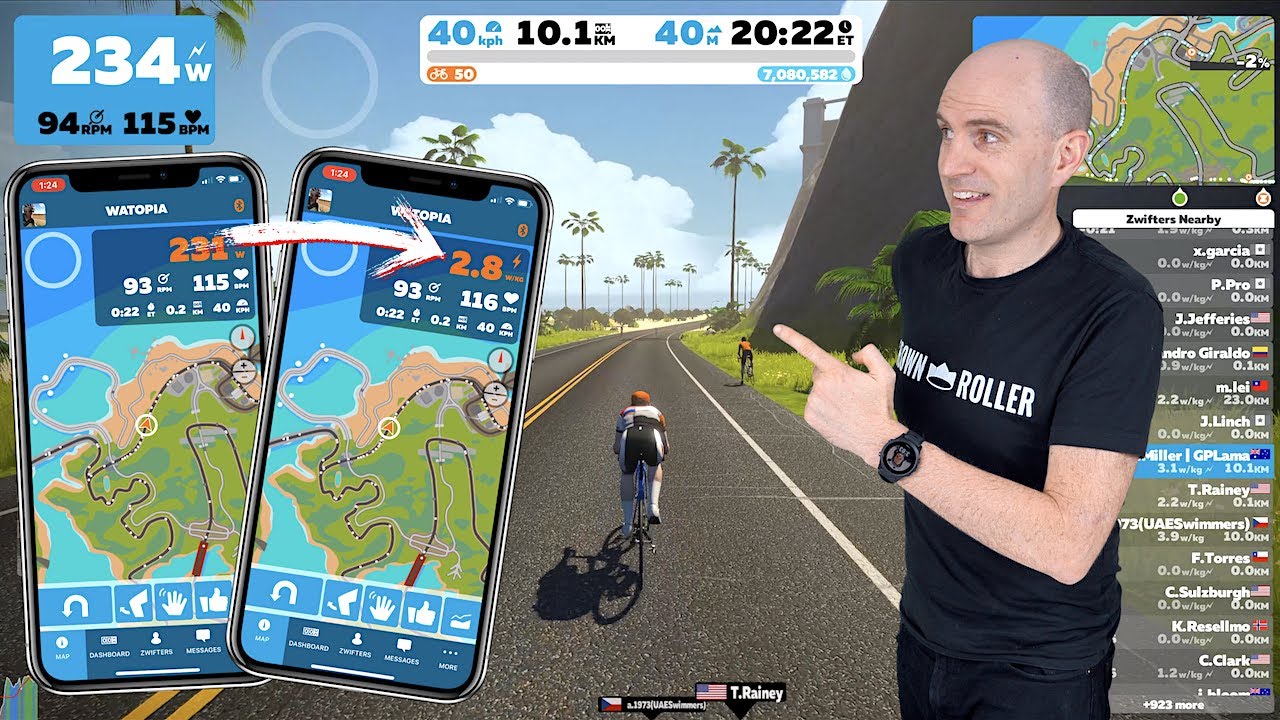
Now you don’t have to strain to see your w/kg below your name in the rider list! It’s easily visible right on your mobile device with Zwift Companion. And once you change the setting, it will stay that way until you change it back.
We can see this being useful when you want to stay on pace in a group ride or hold the same w/kg as someone else on a climb.


We need this in the app too, not just companion
Wish you could get avg w/kg and other avg stats as well while riding. Or have I missed a way that you can already?
Bringing up the menu on rides will show you your average watts and average HR. Not quite w/kg but if you’re good at math you can get a quick estimate from that number.
You can get more details via this by doing a “fake exit” but it requires a few more clicks: https://zwiftinsider.com/fake-exit-hack/
It would be nicer if average watts/speed/wpkg was directly visible in the UI, but whaddayagonnado when Zwift makes UI improvements on Zwift Time (aka just before the heat death of the universe).
Hook up a Garmin 😉
I’d love to see W/Kg in the dashboard view!
For those who don’t want to watch the video, just tap on the watts number on the map view in the companion app to change it to w/kg.
Thanks.
“We can see this being useful when you want to stay on pace in a group ride or hold the same w/kg as someone else on a climb” OR when someone wants to make sure they don’t exceed the max. w/kg for the cat. of the race their in. I’ll bet most riders who use this will use it to cheat in events. Don’t get me wrong its a nice option to have, but me thinks it will make it a lot easier to keep the w/kg just below the DQ for those who need to podium at all costs
In a group ride, if you’re obsessing about your own W/kg instead of your position relative to the ride leader then, IMHO, you’ve got the wrong approach. Variables such as rider weight, in or out of draft, bike and wheel choice and reading and anticipating the gradient are what matters. And do not fall off the back going over the top of a climb.
A 50kg solo rider is never going to catch a 100kg leader in a pack of 100 on the flat if both are sticking to the W/kg target. Just pay attention to the yellow beacon. So long as the beacon is sticking to target pace it is the job of everyone else to stick to the beacon, not bitch about the pace being off spec because they’ve got poor Zwift skills or are lighter than the leader.
I wish you could see heart rate zones while riding.
How do I stop getting all of these inane insider updates? You’re freakin’ killing me! I’m gonna get busted at work because I logged in on break and now I keep getting #$%#@ update messages every 4 seconds!!!!! Effin’ spamware!!!!!!!!!!!!!!!!! Thanks a bunch!
Hi I’ve just started using Zwift and the Companion App – during a training workout today about 3/4 of the way through the Companion App “froze” and the data did not update even though the desktop screen continued to show data updates and ERG mode remained functional ?