

As I mentioned in our post earlier today (Free Zwift Plus For All Ends Today – Here Are Your Options), Zwift has added an “Apple tax” to the Apple App Store pricing of the new Zwift Plus subscription tier. This means any Zwifter who upgrades to the Zwift Plus tier and pays through the App Store will be paying a higher monthly price than Zwifters who manage their subscription directly through Zwift.
Apple Subs ≠ Zwift.com Web Subs
Ever since Zwift became available on iOS in 2017, Zwifters have had the option of managing their subscription directly through Apple’s native App Store. This makes account management simple on iOS, but it may also make things confusing, since Zwift can build subscription features into their own account management portal that Apple doesn’t support in the App Store.
This is why Apple subscribers don’t have access to the promo codes, annual plans, or membership pausing that Zwift.com web subscribers have.
While Apple takes a 30% commission from first-year subscriber fees through the App Store (15% commission if you’ve been a subscriber for over 1 year), Zwift has always charged the same price whether you pay through the App Store or Zwift.com. But that changed with the rollout of Zwift Plus! App Store subscribers who upgrade to the Zwift Plus tier are charged an additional $6/£5.50/€6 per month compared to subscribers who upgrade to Zwift Plus and pay via Zwift.com.
(Note: The idea of charging an “Apple tax” isn’t new – YouTube and Meta are already doing it. And you can rest assured any company that isn’t explicitly charging a higher price for App Store subscribers has built those “platform costs” into their overall pricing.)
To be clear, here is how Zwift subscriptions are now priced in Zwift’s three main regions:
Zwift.com Web Pricing*
| Monthly | Yearly | |||
| Region | Zwift | Zwift+ | Zwift | Zwift+ |
| US | $19.99 | $29.99 | $199.99 | $299.99 |
| UK | £17.99 | £26.99 | £26.99 | £269.99 |
| EU | €19,99 | €29,99 | €199,99 | €299,99 |
*A more complete web pricing table is available on this Zwift support page
Apple App Store Pricing*
| Monthly | Yearly | |||
| Region | Zwift | Zwift+ | Zwift | Zwift+ |
| US | $19.99 | $35.99 | n/a | n/a |
| UK | £17.99 | £32.49 | n/a | n/a |
| EU | €19,99 | €35,99 | n/a | n/a |
*Apple bills in your local currency, so this table doesn’t cover all pricing for all Zwifters
As you can see from the tables above, Zwift Plus subscribers pay a premium through the App Store and don’t have access to discounted annual subscriptions.
Why Apple?
So why would anyone pay through the App Store instead of via Zwift.com? I’d say simplicity is probably the main reason. If you install Zwift on your iOS device, you are prompted with this screen:
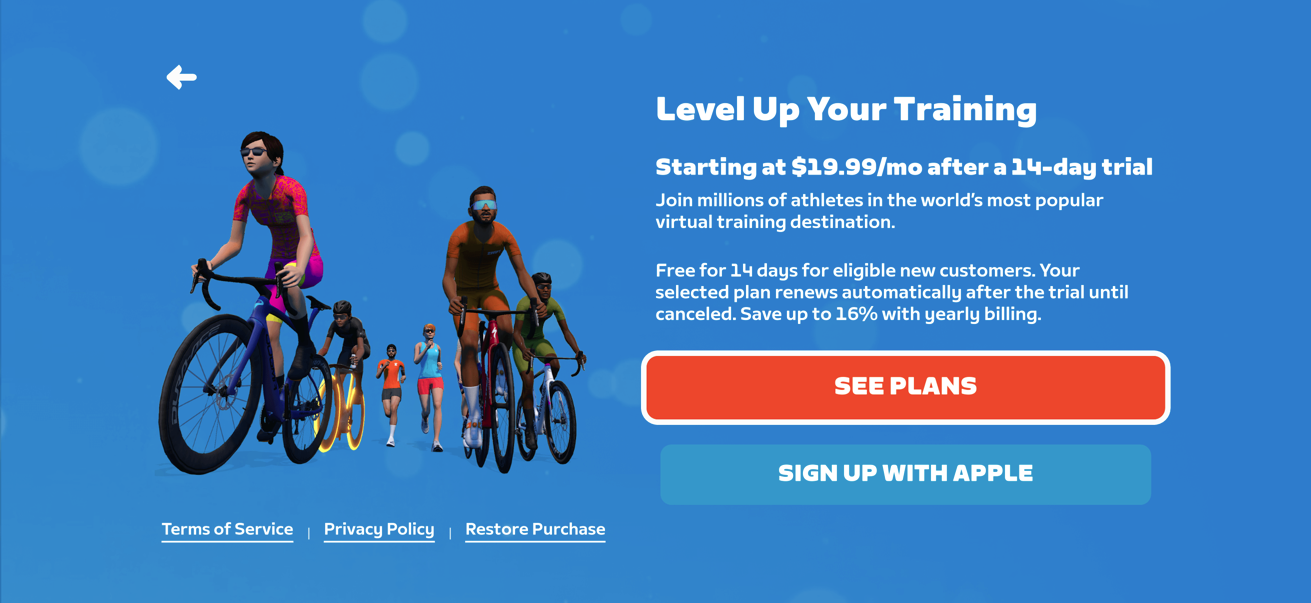
The top button takes you to Zwift.com, where you have to sign into your account, navigate a few screens, and enter your payment info to activate your subscription. The lower button pops up a simple one-click button to start your subscription through the App Store. Which would you choose?
(Additionally, it’s a rare new Zwifter who would do the research needed to learn that App Store subscribers don’t have access to the same account options – particularly annual subscriptions and account pausing – that Zwift.com web subscribers do. And of course, most App Store subscribers probably don’t understand that 30% of their monthly fees go straight into Apple’s coffers instead of funding Zwift’s further development.)
Should you switch?
If you’re a monthly subscriber who wants to upgrade to Zwift Plus, switching from App Store to Zwift.com web payments is a no-brainer. It saves you money every month and gives you access to more subscription options.
If you’re a monthly subscriber sticking with the standard Zwift subscription, there is no monetary motivation to swap your account management from Apple to Zwift. But it may still be worth doing, for three reasons:
- Annual subscription access: Paying through Zwift.com gives you the option of annual billing, which is priced to essentially give you 2 free months each year.
- Account pause access: Zwift.com subscribers can pause their account for up to 90 days, possibly saving some money when you know you’ll be unable to use Zwift for a while.
- Pay Zwift, not Apple: By my estimation, Zwift pays Apple $700,000-$900,000 in subscription commissions every month. (No, that is not a typo.) If all of those subscribers moved to Zwift.com web payments, that cost would drop to around $120,000 (based on a 3% credit card processing fee estimate). Of course, we don’t know what Zwift would do with that windfall. But it at least opens up the possibility of further/faster platform development.
Switching from Apple App Store to Zwift.com Web Payments
So how do you switch your Zwift.com subscription from Apple’s App Store to Zwift.com’s web payment?
The process is simple, but also more hassle than it should be:
- Cancel your Zwift subscription via Apple (on iOS go to Settings>Subscriptions, tap Zwift, then “Cancel Subscription”)
- On the first day you want to ride on Zwift after your Apple subscription expires, sign into your account at Zwift.com and activate your account by setting up direct payments through Zwift. (You can pay your monthly fee via credit card, Paypal, or Apple Pay.)
Given how much Zwift sends to Apple in subscription fees each month, I think Zwift should find a way to streamline the migration of subscribers from the App Store to Zwift.com. (Of course, Zwift is restricted in many ways by Apple’s terms of service, which is why Epic Games’ legal battles against Apple are ongoing.) Until then, subscribers will need to follow the process above.
Your Thoughts
This turned into a longer post than I’d planned. But the Apple vs Zwift.com subscriptions topic is something I’ve never really unpacked in a Zwift Insider post before, so hopefully this answers any questions on this topic! If it doesn’t… or if you have comments… please share below. Ride on.

