
Zwift version 1.98 begins its phased rollout today. This is a minor update that brings emoji support to in-game chat and rider names, along with a few other tweaks. Read on for details…
In-Game Emoji Support 🚴
Emojis have always worked when reading messages in the Companion app, but they didn’t show up in game. That changes with this week’s update, which will show emojis in messages and Zwifter’s names. How many emojis can you put in a message? A lot.
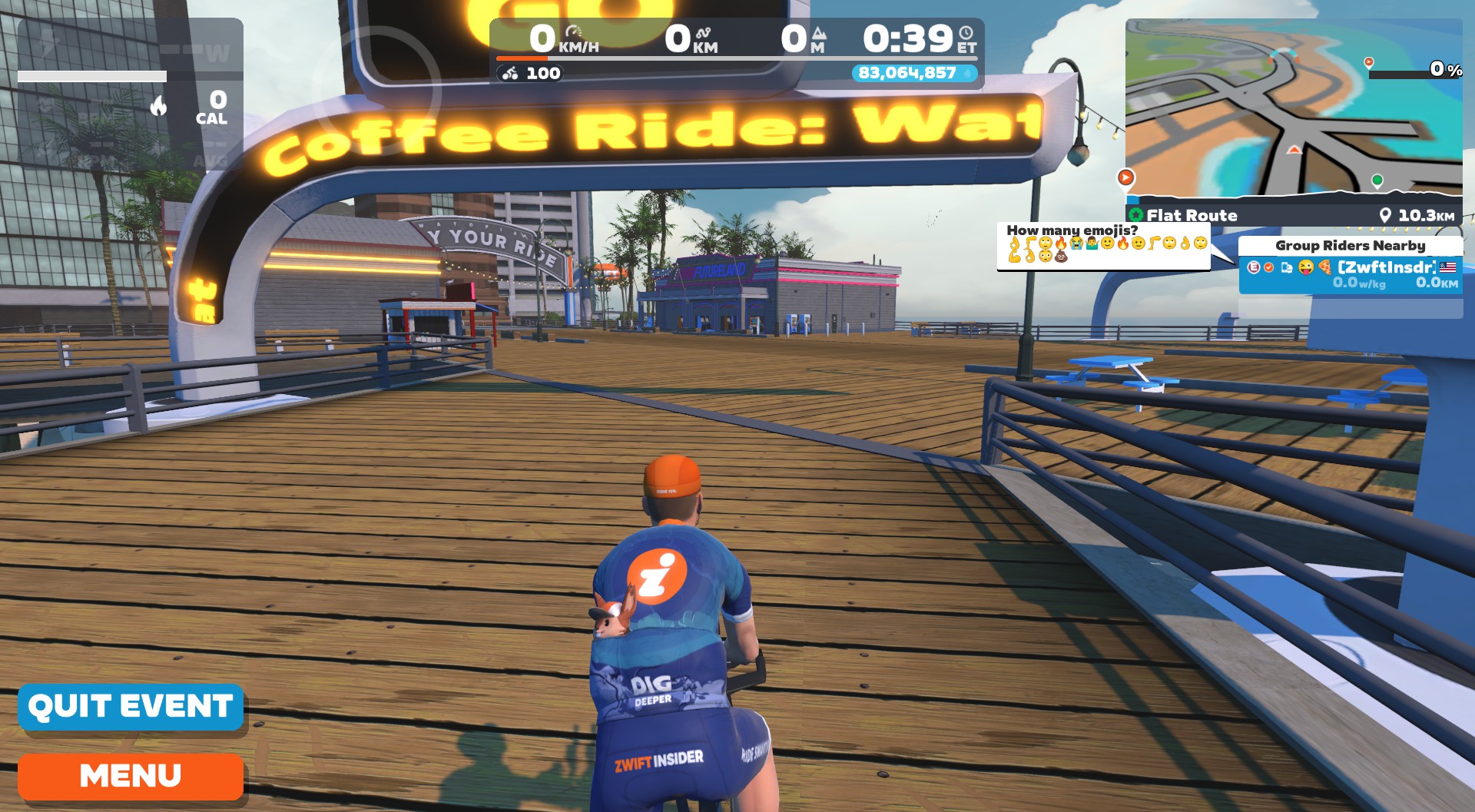
But only up to two emojis will be displayed in your surname (the first two you use).
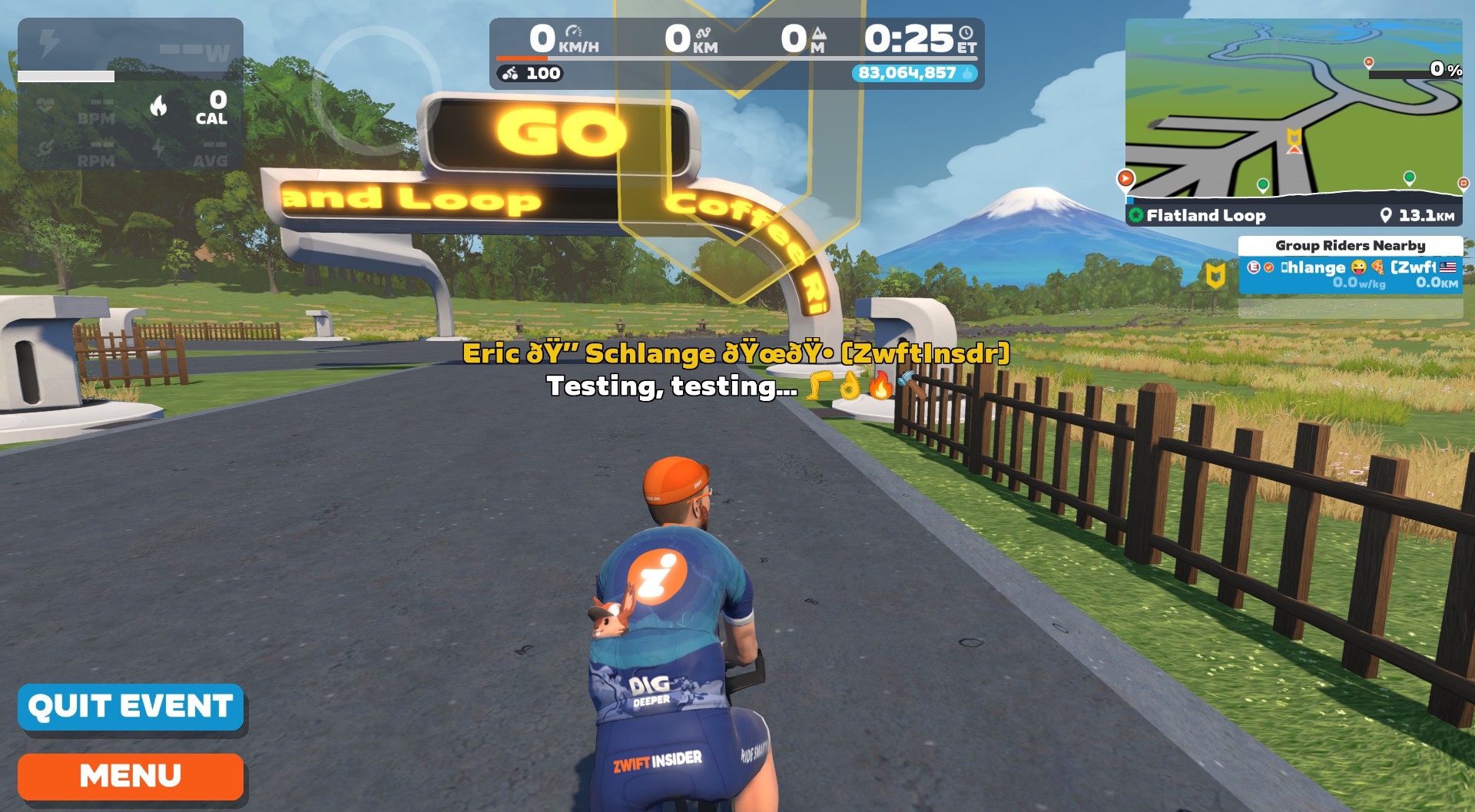
Ride leader’s names aren’t displaying emojis correctly yet, but we assume this will get fixed soon:
Leaderboard
After completing a timed segment, your leaderboard ranking is now shown in the center HUD.
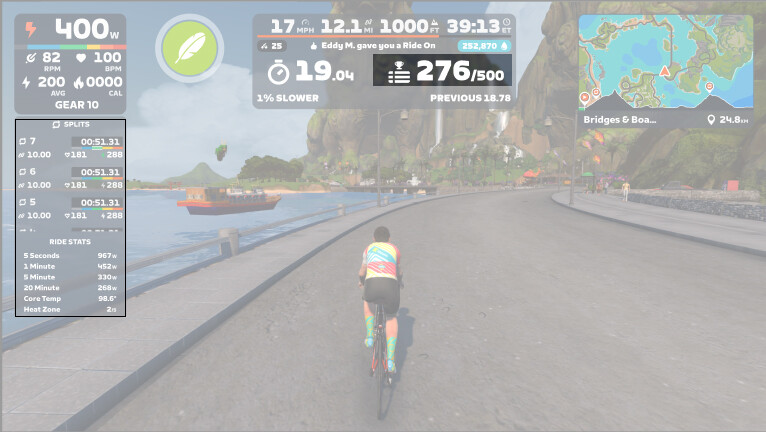
This is particularly helpful if you have swapped out the leaderboard on the side HUD for the ride stats panel that was added in July.
New Routes Incoming
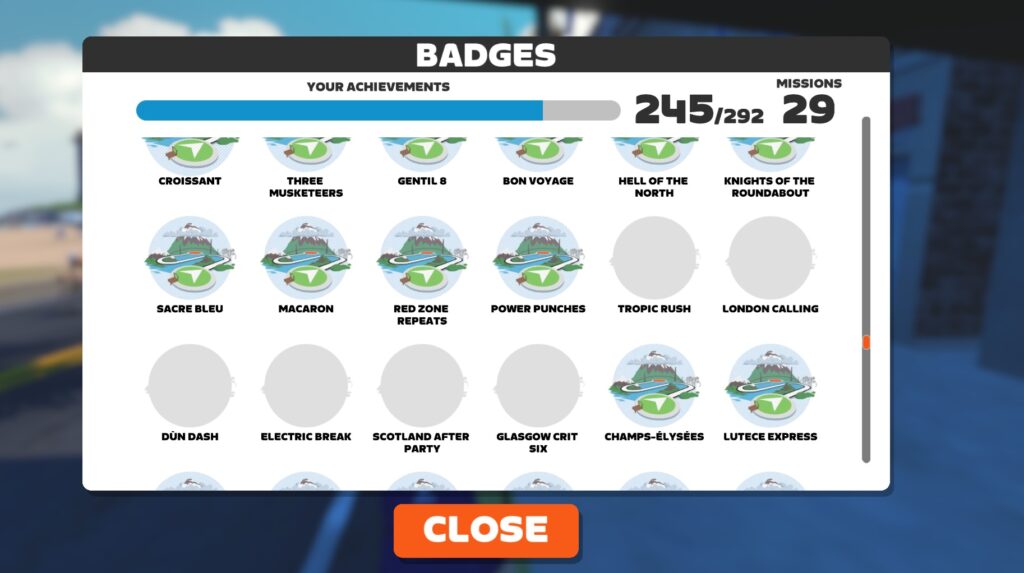
Keen-eyed reader Rein reports 6 new cycling route badges showing up:
- Tropical Rush
- London Calling
- Dun Dash
- Electric Break
- Scotland After Party
- Glasgow Crit Six
We assume these routes will be unveiled in an upcoming event series, perhaps “Zwift Unlocked” which runs from October 6-November 16 and is said to feature new routes.
Release Notes
Zwift provided notes on additional tweaks and bug fixes in this update:
- Fixed an issue where Zwift Companion and Zwift Game could potentially show different streak week numbers.
- Fixed an issue that could cause workout arch lighting to appear on the roadway without a corresponding workout arch.
- Fixed an issue where TT bikes could potentially automatically steer toward draft in free rides (where drafting provides no benefit); TT bikes now only seek draft in TTT events.
Discuss this update in Zwift’s forum >
Questions or Comments?
If you spotted any other changes or bugs in the update, please comment below!



Ride leader’s names *aren’t* displaying emojis correctly yet, but we assume this will get fixed soon:
Fixed!
Glad to hear the TT draft steering issue has been fixed!
Can you turn off the ride leaderboard in center HUD? I am always in the bottom half and that info is meaningless to me.
Even when I’m in the top 10, the info is meaningless to me. I’ve actually gotten to the point that I disable the HUD on 90% of my riding, using Sauce to see what I want, without all the stuff that Zwift thinks I want (and some rather annoying chats)
I don’t think so. But it only shows there temporarily.
Hey Zwift admins, how about *not* pushing upgrades on big ZRL days.
I think they only do this to people that think Zwift Insider is a Zwift-run forum …
LOL.
Thumbs down on the whole emoji thing.
Been on the request list for literally forever; it’s far more frustrating to see empty responses on screen and thus forced to have to look at Companion app to see what emojis were sent.
don’t you mean, 👎 on the whole emoji thing?
👍
👍
I 💯 agree with you and that is a winning comment🏆
🙏
The emoji I wanted to use wasn’t in the list…
It would be sick if they showed how much XP and drops you gained when you end a ride.
….or it might make you sick when you have a long way to save up for that next big thing 😮
I was just at 156 drops after buying the Aeroad 2024!
Apple TV hasn’t got 1.97.2 yet. Did they pull it considering the connection issues reported and just jump to 1.98?
I would still like a keyboard / hotkey shortcut to toggle/swap the leaderboard and ride stats panel without having to go into the settings menu.
Would also like the option to have the stats panel on until you get to a point where a leaderboard triggers, at which point the stats screen becomes one of the screens in rotation on the leaderboards (along with the top 15, your position and recent efforts)
✌️👍😳😁😍😘💬🫵💪🤹🐯🐿️🦇🐤🐥🐸🕷️🍄🌳🥞🍗🍿🍩🍺🥤🌅🌉🚓🚖🛵⚓🚁🕓🌚🌝🌈🔥💧🎗️🎈🎯🎱🧶🖼️🧤👢🎛️📠🔦✂️⚒️🏹🪒🛒♿♉♀️🔱<3:-\:-D
Just liking Emoji. 😁 😁 👍
Quality post as always Vlad 😉🤣
Emojis in messages is fine. Not so sure if I like emojis in names..
I’ll take emojis in names over 5 team names making it 50 characters or religion or politics 🙅
It would be much better to see the developers allowing a fully customizable screen,the ability to toggle items on/off, than silly emoji nonsense used by a tiny percentage of the userbase.
Yeah. Off/on or XY location of an element doesn’t seem but a few days to code, but what do I know. A constant fight I have had with developers of a specialized software I had to use for 25 years: if it is a checkbox to turn it off/on then please just code for 30 seconds and put in the checkbox. i.e. I hate all the dings and blue thumbs in a Robopacer ride so I have to do a couple easy hacks to remove that instead of a checkbox of 30 seconds.
I’m assuming emojis in names came along with fixing the various bugs in getting names with non-ASCII characters to show up correctly. (Proper unicode support is generally the fix for both issues.) So while the emoji is the “shiny new feature” for most people (or “obnoxious new feature”), handling people’s actual names correctly is the real feature.
https://forums.zwift.com/t/utf-8-letters-in-chat-for-non-english-languages-please/14989/59
I feel like the badgehunter, but again 6 new badges found Eric: tropical rush, london calling e.g.
But my badgecount jumped from 284 to 292, so maybe running also?
Huh… weird. I don’t see any new badges on my end. Can you send a screenshot or a full list?
Send you a mail @news somehow screenshot posting works not.
My companion app is not showing the ride while I am doing it,as the games did previously. All the history is correct.
Did you turn off bluetooth in your phone? (ask me how I know).
I have tried turning the Bluetooth off turning my mobile data off and deleting and reinstalling, restarted the router
Still no success.
Please advise.
With much appreciation.
Thank you for your response!
Is it just my imagination or did the device pairing screen change in the Zwift app?
Yes, that got changed in the previous update.
This new pairing screen can’t seem to find my trainer. It’s a computrainer with a hard wire connection. Was working fine until this update. Do you know if this will be fixed or if zwift has stopped accepting computrainers?
Did you click “All” instead of recommended?
Yes, I did. It then just searches without finding anything.
I’d reach out to Zwift support then to see what’s up.
What I would love to see with names is the ability to change how they are displayed on your device. I would much rather see people’s complete first name and initial for last name than the backwards version we have now.
Also another update that would be nice in regards to names, give us the option to turn them on or off above avatar heads. I really don’t want to see them or more Importantly I don’t want them blocking my veiw while I am tail gunning….
In crowded groups there are definitely too many name tags that show up!
We are getting awfully close to release candidate 2.0. Wondering if this will be the opportunity for some significant changes, including what has been teased and more?
They are just gonna do 1.98, 1.99, 1.100, 1.101…
I will hold out hope the new routes are more creative than let’s say Deca Dash or Full PRL🙄
Shoot, Zwift is right now scrambling to find replacements for their planned routes Double Dash, Triple Dash, Hexa Dash, and Octo Dash.
Hi Eric, long time reader first time poster. Do you know if Zwift HQ has given any thought to creating levels for climbing (vertical metres) or potentially making levels ups both requiring distance and also vertical metres. Cheers
I’ve never heard them discuss that concept, no.