The latest Zwift update is now available on all platforms: Mac, PC, Android, iOS, and AppleTV.
Not sure if your Zwift install is up-to-date? Here’s how to check >
This update includes new bikes, TT tweaks, the arrival of the kicking fence, and various other tweaks and fixes. Here are the details…
[adinserter block=”4″]
New Bike Frames


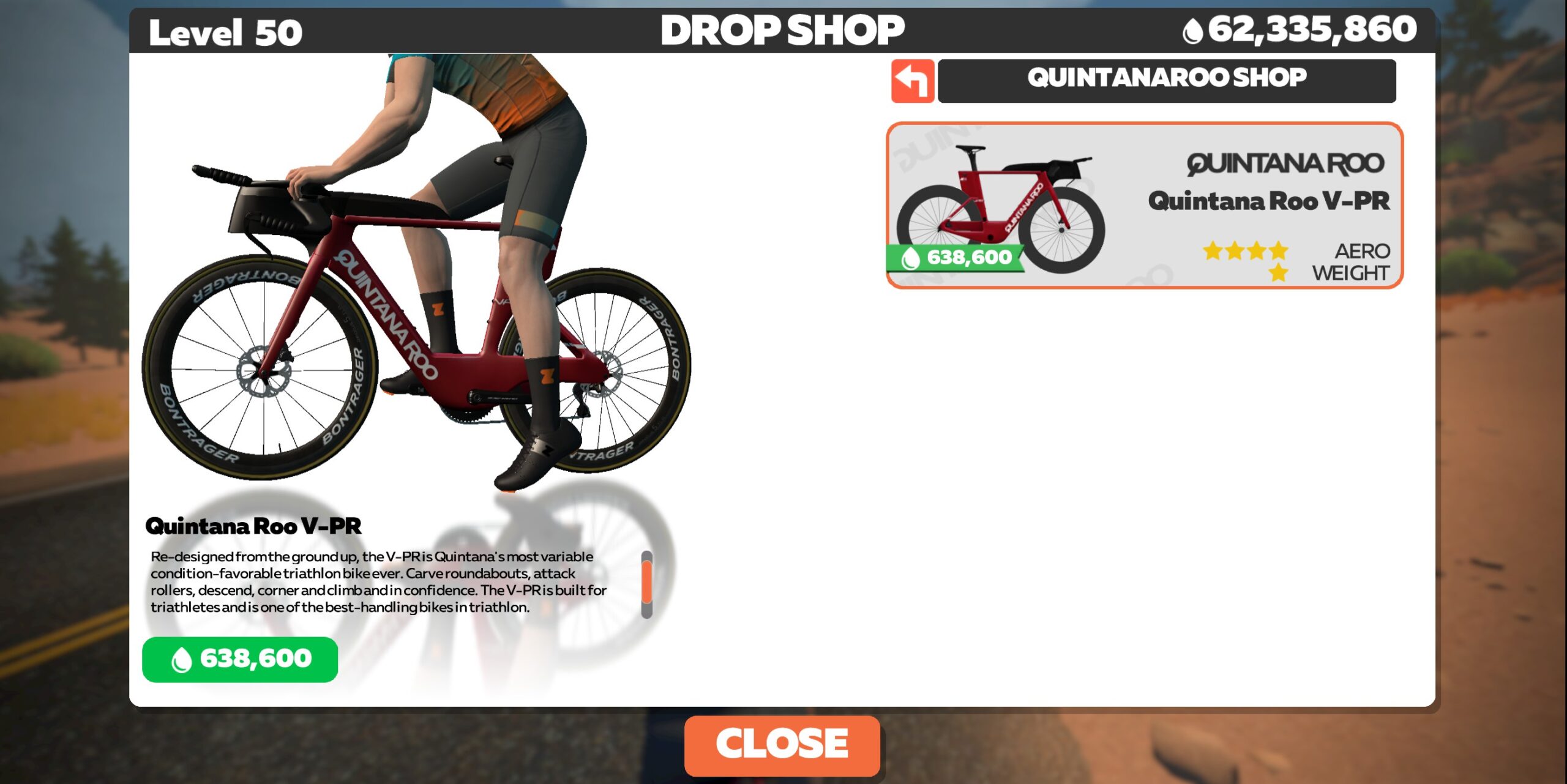
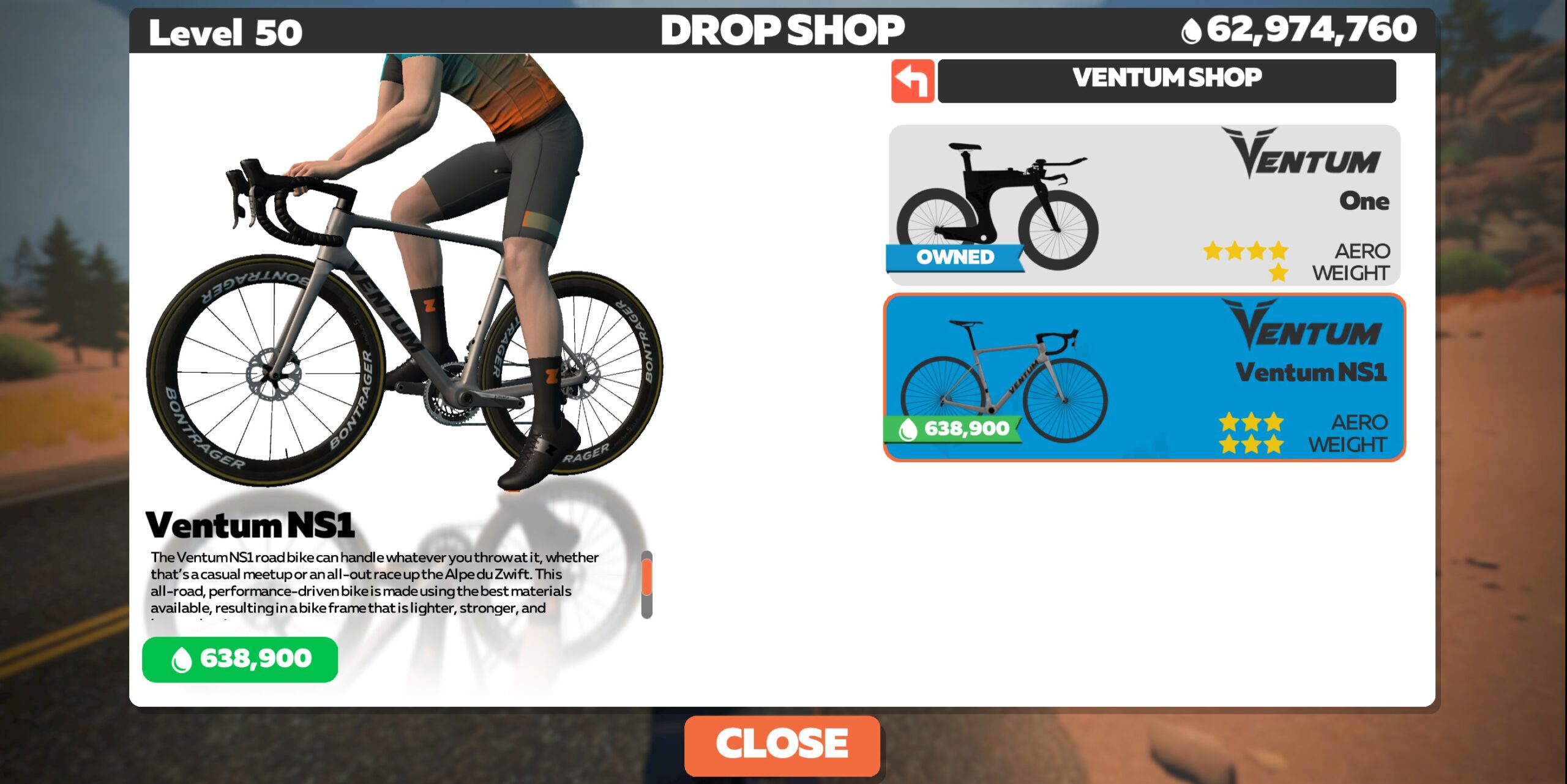
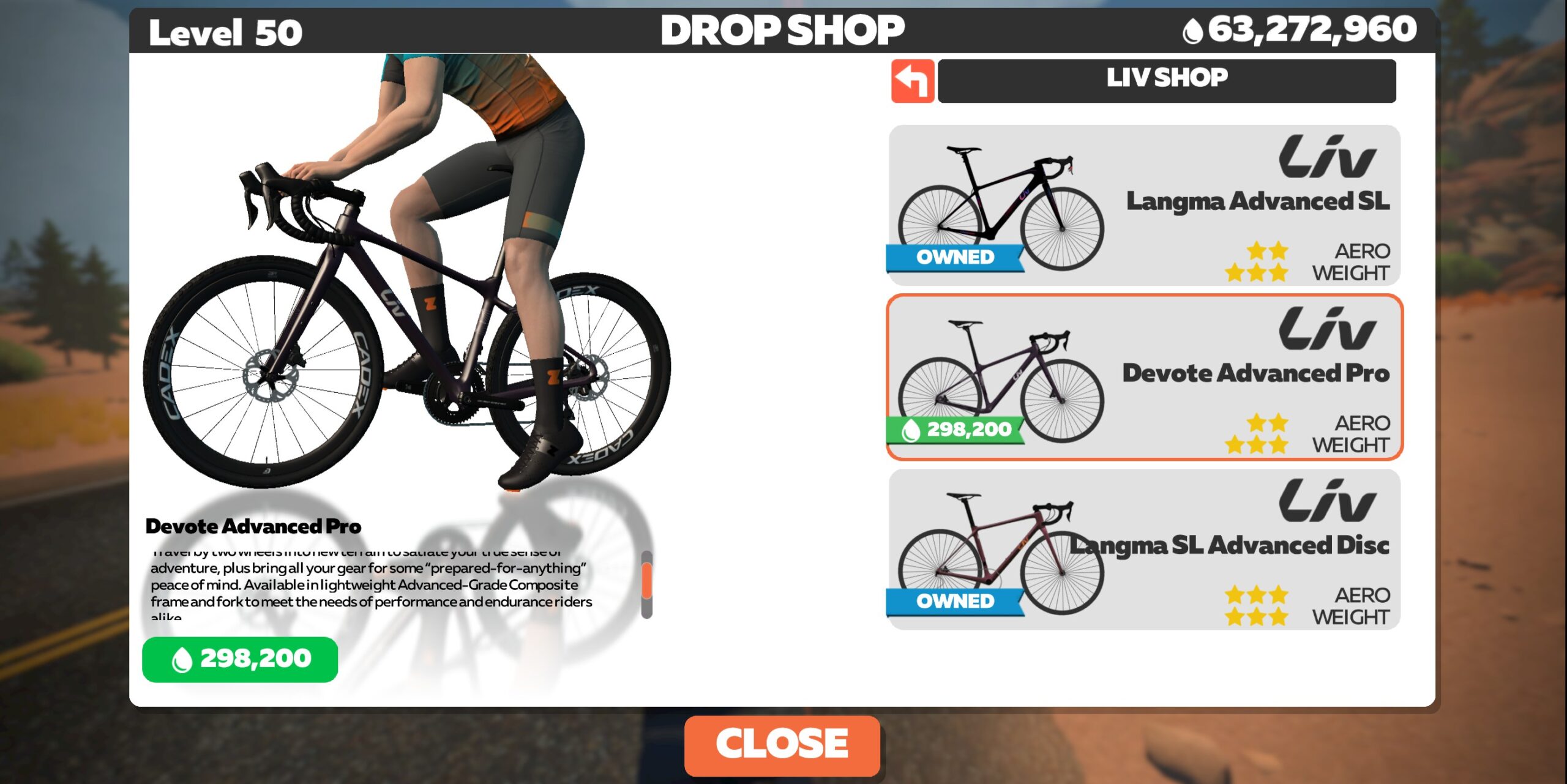
Four new frames have been added to the Drop Shop:
- Ventum NS1 (Road): 638,900 Drops, Level 15+ required, rated 3 stars for aero, 3 for weight
- Quintana Roo V-PR (TT): 638,600 Drops, Level 16+ required, rated 4 stars for aero, 1 for weight
- Giant Revolt Advanced Pro (Gravel): 298,200 Drops, Level 14+ required, rated 2 stars for aero, 3 for weight
- Liv Devote Advanced Pro (Gravel): 298,200 Drops, Level 14+ required, rated 2 stars for aero, 3 for weight
While none of these new frames look to be top performers, we’re testing them now and will publish results when available.
Homescreen Tweaks and Rollout Notes
Zwift’s notes for this update mention that “multiple fixes and tweaks were made to the new homescreen.”
Zwift has rolled out the homescreen to all PC and Mac users at this point, and has begun rolling it out to iOS and Android. AppleTV’s status is unknown.
Some users have asked why the homescreen rollout has taken so long (going on 6 months since it first rolled out to initial PC and Mac users). While we agree that the rollout has taken much too long, we can also confirm that Zwift has a list of bug fixes and improvements they’re working through on the new homescreen UI. They rolled it out to an initial audience iOS and Android users and received a lot of feedback from that initial small rollout. Our guess is they’re focused on improving the iOS and Android experience before rolling it out further.
As for the much-requested “Ride with” feature, a recent forum post says “This iteration of the new home screen lacks the ‘Ride with…’ feature for the time being. We are actively working on bringing it back for all OS platforms so you can join another Zwifter as on the legacy home screen. We thank you in advance for your patience.”
“Share to Club” Dropdown
A new dropdown menu added to the End Ride screen allows you to attach your activity to a particular Club:

“Sharing” your ride with a Club essentially tags that Club in the activity, giving the Club “credit” for the activity. So what’s the point?
While this feature isn’t currently live, initial early iterations of Clubs included a leaderboard/tracker showing total Club miles ridden, etc. We expect that feature to return, and we hope it includes more advanced metrics to give Club owners better insight into their members’ activities, and perhaps stir up a bit of competition between Clubs.
Pace Partner Change: No More Color Changing
According to James Bailey at ZHQ, Pace Partners will no longer change color when their power numbers dynamically shift on gradients.
The Pace Partners joining dialog on the homescreen will also show consistent colors, although it still shows their power numbers in real-time, instead of their “standard” power. This will be fixed in a future update, so you’ll be able to easily see all the Pace Partners and their typical power output.
Ride Leader Fence: Now With More Kick!
We reported on this last week, but today’s update includes further improvements to the ride leader fence. According to Zwift, they’ve made “the ‘kick’ feature now usable on all routes and available for use in events that want it.”
Today’s update includes improvements to how the fence appears when you approach intersections. These improvements, incidentally, will also carry over to the arches used in structured workouts.
[adinserter block=”1″]
TT Improvements
Time trial event reminders “now show time until your personal start time rather than time until the event starts.” So instead of joining the start pens then waiting around for your time to start, you can ride longer in your warmup before joining the start pen. Excellent!
Zwift tells us this is just the start of additional improvements to the TT and TTT experience. That’s great to hear!
Phased Rollout: 90-Day PRs
Based on a fresh forum post from Flint at ZHQ, we now know that Zwift is moving from displaying 30-day segment PRs to 90-day. This is a phased rollout, so not everyone will see it right away.
Bug Fixes and Misc Improvements
Here’s Zwift’s list of fixes and improvements included in this update, with notes in italic from us:
- Fixed a bug that caused Zwifters to earn half stars for short intervals in a workout. Is there anything worse than finishing an interval properly, but only earning half a star?
- Fixed issue with critical power curve display after doing a workout.
- Fixed issue where intersection arrow buttons on Zwift Companion would flicker for a moment at each intersection.
- Fixed an issue when showing remaining distance for a given lap in a lap based event on Greatest London Flat route.
- Runners will now have workouts listed on the new home screen.
- “View entire plan” link added back to “Next Up” training plan popup.
- Workouts of the week for upcoming weeks added.
See notes on this update release in the Zwift forum >
Questions or Comments?
If you spotted any other changes or bugs in the update, please comment below!
Thanks Eric, any more news on the gravel route or any other potential new roads/routes?
Still no gear selection indicator for Wahoo Kickr bikes as there is for Wattbikes and as there is on RGT (even well before acquired by RGT). Frustrating. Any known reasons for this beyond possibly holding back a hardware competitor that shouldn’t be an issue now Zwift hardware canned right?
Wahoo owns sufferfest and RGT, so Zwift is competition on the software side.
Not being funny but why do you need an on-screen indicator. Nice to have I guess but the kickr bike has one built in. I don’t have an issue with a quick look down if I need to check what gear I’m in and generally work off effort anyway. I’d rather Zwift concentrate on all the other things needed than something like this.
Nor for the Stages SB20, which doesn’t have one on the bike, only on their app, so you can either have your phone showing your gears or showing ZC. (I don’t really care what gear I’m in most of the time, but it’d be nice for a handful of workouts that I do without erg mode — swapping back to “the same gear” for each work segment without having to remember how many times I shifted down during the rest break would be nice.)
So much new things in the last month! What would all Zwift-employees do every day? #sarcasm
They’re busy selling subscriptions.
Actually they’re much more likely to be occupied with fixing all the bugs.
Guessing the devote and revolt frames will test about the same with time results.
Finishing a workout properly, getting a whole star, but not being awarded anything like the xp expected?
Is that in a Group Workout? XP is on distance, and Group Workouts are always kept together so you are artificially slowed down. More useful would be fixing that you don’t get a star at all when you go over the interval target power goal (e.g. turning off ERG for sprint intervals, means you always go over the power suggested in the workout, even if the interval is designed to be a full gas effort…)
No, this is on an individual workout, where the xp is linked to various things (time, interval type), but not distance.
Noticed that a 4-minute (4 reps) 15 sec on, 45 sec off interval suddenly gave a whopping 8 XP after being correct for years and years. Was awarded a full star, and rightly so. Other intervals appear to be correct. Anyone else have this issue?
That’s exactly the kind oft thing I’m talking about … I switched erg smoothing off and I don’t know if it’s related to that or not, but as I’m getting a full star …
Happy 2nd birthday to France and Paris. You haven’t changed a bit…….
France is such a beautiful map. Limited but gorgeous.
….yet another totally uninspiring update! Fortunately, living in the northern hemisphere, it’s summertime and most of my riding is now done in the great outdoors. Here’s hoping that by the time I regularly return to Zwift in November, that I have lot’s of exciting features and new roads to ride… although I shan’t hold my breath.
I just took a nice after-work ride outside. I was deciding between Zwifting and riding outside, and there just wasn’t anything pulling me towards Zwifting. Plus, there were 36 miles of new roads!
Are we due for a new world?
I sure hope nope. But new tarmac on the current worlds would be cool (France and Makuri specifically).
It seems like James Bailey has done more work on the pace partners in the last month than the rest of the Zwift staff have done on the entire game!
Haha yes, but I like the big offer of different paces and routes 🤗 … the bots are like perfect group rides because they HOLD the advertised pace, you can hop on&off 24/7 and the drop-multiplier holds the group together 😎 … so no “fence-kickout vs fliers” needed 😉
Zwift could have mitigated a lot of angst over the home screen by giving users the option to switch between new and old for some period of time before retiring the old home screen. It would have managed user disappointment over ride-with, among other things. They could have had metrics telling them how many people tried the new and switched back to old.
That would have been a great idea, methinks!
Anytime a tech company changes a functional layout to a less functional tile-based one, it’s to sell ad space. Allowing users the choice of switching back to a different layout, even temporarily, would mean a less predictable audience for advertisers.
That could happen, but I don’t see any ads on the screen so it doesn’t matter yet. They could still allow switching for now, and it would tell them if they’re succeeding. They could even survey the people who switch to learn why. IMO this is just a not very professional rollout.
When completely redoing a UI, it’s not always easy to keep the old and have the new. One thing you don’t want, is old code hanging around longer than it should.
If they used a whole new underlying framework for the new UI, then it could be a pain to also keep the old. Best to just get rid of stuff (think Windows, and how long they kept old code in their OS for so long)
As for letting users choose which UI they want to use and collect metrics on it, I’d be willing to be that most would choose the old one, not because it’s better, but because of familiarity. People don’t like change.
This why they slowly roll it out instead of all at once, so they can try to see how the new one is doing, and tweaking it before everyone gets it.
Have the badge descriptions been removed? No description on my game when I hover the mouse pointer!!
I’m still seeing them over here on Windows.
I’ve experienced that recently too, on a PC.
I have just downloaded the latest version and now have no sound?
I can create a Club with lvl 14 now. Its very boring because when i host a clubevent i see only my clubmembers in game. This ja boring when your Club has only 4 members. Then its cooler to do a normal meetup. There i can see all users in the world.
Every update tends to make my Zwift Companion app not connect to my iPad.
Re: New Bikes:
It’s fairly sad that the basic reaction to any new bike is “Is it one of the VERY BEST? No? Okay, whatevs…”
That goes to the lack of effort toward creating a nice distribution of bike traits for the drop shop. We should be looking at real options to pick between. There should be a nice range of traits, filling out the list. Instead we’ve got basically-identical gravel bikes coming by the fistful, despite the lack of routes that even favor them.
(Shrug.) I think of them as a sort of “skins” thing, without tons of meaning, now.
I completely agree. The very fact that Zwiftinsider’s “best at n level” exist is a confirmation of this fact. It feels like for the vast majority of use cases there’s simply no reason to use anything other than the “best” bike/wheel combo in a given scenario. I was very confused about the gravel bikes the other day. I thought I’d make use of those new frames in the jungle before realizing that they’re awful there compared to the MTBs, making them virtually useless until Zwift adds more of that new gravel they tested in ToW.
Even as a skin, who really cares, you know? I don’t know for other people, but I never even look at the bike because of the camera angle I use.
One last thing that really puts the nail in the coffin of the differences between bikes and wheel sets in Zwift is the awful UI of the drop shop. Have you ever tried finding anything in there? First, it’s obviously impossible without websites like Zwiftinsider to even know the actual differences between the items, but also it’s extremely frustrating to use the shop. There’s no way to sort anything (by name, cost, type, etc.) and no details provided on anything. I started in Zwift last year, have over 2 million drops now and no plan on spending them any time soon because I just don’t see the point.
Personally I’m a bit contrarian, so for lots of non-race rides I choose an odd combination of frame and wheelset. Up the Alpe on a TT bike!
These should be meaningful choices that are enjoyable to pick through, though… and all that, I do on Zwift Insider and not really Zwift itself. :-0
imagine a roulette feature, where everyone got a random setup on the start line – and cant change it
Eric, I’m curious where you got the information that the new homescreen rollout has been completed for Mac and PC users. I’m a Windows 10 PC user and I still haven’t received the new homescreen layout. I’ve even written to Zwift Support (which I have unfortunately found to be a huge waste of time) about it and still don’t have a date or commitment to when it might, if ever, occur.
I run all of the Zwift updates and am on the current version.
Same here, but my Mac, which is the main Zwift computer, has been running the new homescreen for months. As long as Zwift doesn’t crash, and dropouts are minimalized, I am happy; the new homescreen is small potatoes in comparison.
Interesting. I got my info from Zwift – they told me the Mac and PC rollout was finished! 🤷♂️
Nope, still not there as of this moment.
They keep adding bikes…. Any option yet for REMOVING bikes (and wheels, socks, gloves, etc.) from the garage? On the pace partners: it would be good to change the chevron for the D group, so people could switch bot when they cross one, if they were able to recognize which bot is which (given that the names are meaningless) given that they all yellow. E.g. Zwift could include a number in the chevron, or use a different coloring pattern or colors)
The names give it all away. Both first and last start with the letter of the power cat they run at.. I think they also already run different colours (again using the standard cat colour set).
I cancelled my subscription months ago because of the lack of new roads, but I assume we will see new roads for the Tour de France. If we don’t, then we’ll know that Zwift has serious problems.
Need more roads in France like RGV
Another update today and it was a complete disaster taking 20 minutes to install on my 11th gen i7 with 16GB. Even though I was 15 minutes early to a race, I ended up having to forfeit because of this ridiculous install that added what ? New roads to ride on? Nope. And Zwift wants to compete against Peloton? No chance.
I don’t care how long it takes. I’ll ride a dumb trainer while staring at the wall before I ever ride a Peloton. No real cyclist would ever consider one. They are only for spin class dorks and non cyclists.
Did I miss the option of a default setting for the “share to club” function? If not, that would be a nice thing to add. Especially as I’m member of only one club it bothers me to always have to use a drop down menu to just select it after every ride…
Completely agree! I’ve actually been talking to ZHQ about this. They definitely need some sort of default option, even if it’s just saving the last selection you made in the dropdown.
But there are other issues with that dropdown currently. I choose my Zwift Insider Club every time I ride, but none of my rides are showing up under my Club yet. Weird, because it seems to be working for others? Who knows. Zwift is on it… I’m sure the feature will get tightened up soon.
After reading your comment I checked back. Same issue, definitely not all activities allocated to the selected club. Yes, let’s wait for the fix 😉
Since this update my PC version crashes when I finish my workout and now my Companion app shows power numbers like “12” when it’s actually 120 and hr of single digits….
Rode in the Watch The Femmes group ride this morning on my Wattbike Atom and, despite the fact I was changing gear and noticing the difference, there was no read out on the screen showing me which gear I’d selected. I wondered if it was just that group ride so, after finishing, I went to another route and same thing – the read out top left showing the gear I am in has gone. Glitch for me or is this now a thing?
Since the update (101145) my TrainingPeaks workout are no longer loading to Zwift. I have tried multiple times to unlink and relink through the connction page. Am I missing something? Is there a hack?
I haven’t heard of this being an issue. Have you reached out to Zwift support?