

If there’s anything my time on Zwift has taught me, it’s that trying to pedal while juggling a keyboard and mouse is awkward. A while back, I picked up a Stream Deck hoping for a better way to interact with Zwift, and I haven’t looked back since.
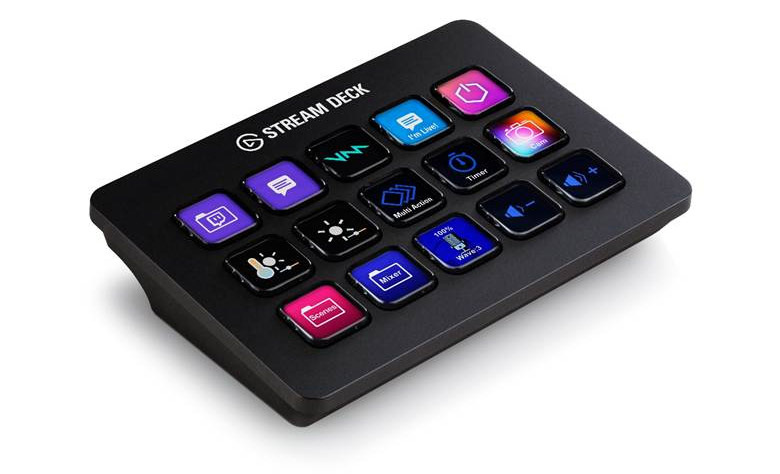
For the unfamiliar, the Elgato Stream Deck is a customizable set of programmable macro buttons that comes in several sizes. Since adding it to my setup, my keyboard and mouse have been collecting dust. It’s been a game-changer for convenience, immersion, and overall enjoyment.
What’s Wrong With the Usual Setup
As a frequent racer, group rider, and occasional ride leader, there’s always a lot happening during a ride. For what the Companion App does, it does well, but it doesn’t do much. Keyboard shortcuts help a bit but are still limited. And using a mouse or trackball? Forget it. Unless you’re willing to stop pedaling, you’re not clicking anything.
That just covers Zwift. If you’re also managing music, voice chat, or other apps, you can quickly find yourself off the back.
For me, the Stream Deck solved all of these problems. It gives me control of Zwift and every other app I need from one interface, all at the push of a button… or several. Between its built-in functionality and the add-ons available through the Elgato Marketplace, the possibilities are practically endless.
Making Zwift Control Effortless
Before diving into the cool functionality I’ve uncovered, I want to give a quick shout-out to a few developers whose tools have been key to my setup:
- Justin Mayfield – Creator of Sauce for Zwift, which delivers more live ride data than you ever thought you needed (read Zwift Insider post covering S4Z)
- Jesper Nielson – Creator of zwift-hotkeys and zwift-login, handy utilities for automatic login and extra keyboard shortcuts.
- Michael Kosmatka – Creator of the Zwift Stream Deck profile on the Elgato Marketplace.
While I’ve done some fun customization with my deck, it’s people like this who have the real skills and are providing genuine benefits to the Zwift community.
With that out of the way, here are the controls I’ve found most useful:
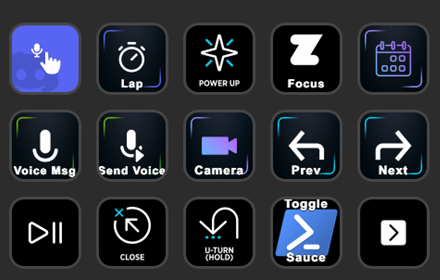
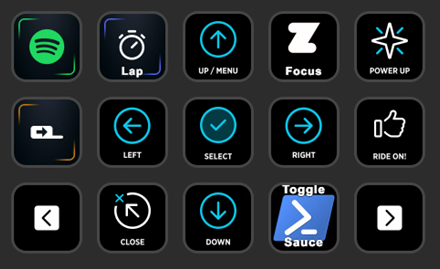
- Ride Controls – Directional arrows, select, back, Ride On (including a continuous “Ride On bomb”), powerup, U-turn, skip workout block, and a camera toggle for TTT events.
- Communications – Push-to-talk for Discord (no more heavy breathing into the mic), Spotify controls, and in-game chat using voice input.
- Ride Leader Controls – Announcements at the start of a ride, a random dad-joke generator, and route info pulled dynamically from the Sauce API.
- Sauce Controls – Lap button, toggle windows on/off, and change profiles.
- System Controls – Launch Zwift (one button starts all apps and logs in), shut down PC, reload apps, and access my audio mixer so I can play music during team events without drowning out voice chat.
Below are a few screenshots of how I have my primary pages configured. It’s not perfect, a bit of a mess of subfolders, but with time and muscle memory, I’ve made it work. For something that works well right out of the box, the Zwift Stream Deck profile (linked above) is an excellent starting point that will get you 95% of the way there.
My primary Stream Deck pages:
I’m sure there’s still plenty of potential I haven’t unlocked yet. The Sauce API is easy to work with and opens up tons of possibilities. With a few simple scripts, it’s possible to pull in and use ride data creatively, something I’d like to spend more time exploring.
As great as it is, there are still a few things the Stream Deck can’t quite handle. Pressing buttons within the Zwift interface is… well, a bit meh. There aren’t hotkeys for common actions like joining events or ending a ride, which I’ve tried to work around with macros, with limited success. I’ve mostly resigned to navigating the UI manually.
There’s also no steering, shifting, or braking like the Zwift Click or Play controllers offer. While the deck wouldn’t be ideal for those functions, it would definitely be a neat alternative.
Why I Can’t Ride Without It Now
After more than a year of using it full-time as my only way to control Zwift, I don’t think there’s any going back. Once I fine-tuned my layout and built the exact functions I needed, the experience just clicked. Now everything feels natural… smooth, consistent, and ready for any kind of ride.
The biggest difference is how it lets me stay focused on the ride instead of fumbling for the right key. It doesn’t necessarily make me faster, but it does make Zwift feel more immersive, like I’ve found a hidden upgrade most people overlook. At this point, it’s as essential to my setup as my trainer or fan.
Going Beyond the Basics
Even after all this time, I’m still finding new ways the Stream Deck could evolve with Zwift. I haven’t yet tried Pedal Games, an add-on that ties gameplay elements to ride data, but there’s a lot of potential there. Being able to trigger in-game actions or mini-game events directly from the Stream Deck could make for a fun and interactive experience. It’s on my list to explore when I have some tinkering time.
That said, the Stream Deck isn’t exactly cheap. Between the hardware cost, time investment, and a bit of technical know-how, it’s not for everyone. If you’re curious but hesitant to spend the money, there are a few alternatives worth considering:
- Stream Deck Mobile – Elgato’s app version gives you nearly all the same functionality on your phone or tablet. It’s freemium, and the free tier is great for testing.
- Touch Portal or Deckboard – Software alternatives for phones or tablets that offer similar customization, often for free or a small one-time cost.
- Alternative hardware decks – Off-brand macro pads can offer much of the same functionality. They’re a bit more DIY but great if you want physical buttons on a budget.
No matter which route you take, the key is finding something that reduces friction between you and the ride. There are plenty of approaches depending on your setup, budget, and how much you like to experiment.
Final Thoughts from the Pain Cave
Looking back, this little project has become one of my favorite tweaks to my Zwift setup. What started as curiosity has turned into something I now use every single ride without even thinking about it. The Stream Deck might not make me faster, but it makes every session smoother, more immersive, and more fun.
It’s not a perfect solution, and it’s definitely not the cheapest, but for anyone who enjoys tinkering, automating, or just personalizing their indoor setup, it’s hard to beat. The best part is that it grows with you: whether you’re just using it to launch Zwift or diving deep into APIs and scripting, there’s always something new to try.
Anything that helps you spend less time fiddling with menus and more time riding is a win. And for me, that’s exactly what this setup delivers.
What About You?
Do you use Stream Deck with Zwift? What are your favorite features? Got questions? Comment below!

