

Today, Zwift announced an update to the game’s route time estimates. While past estimates were universal across all riders and rounded to the nearest 30 minutes, the new estimates are more precise and based on your individual FTP.
Comparing Estimates
I checked route estimates for a 75kg rider at various in-game FTP settings. Here are the new time estimates supplied by Zwift, along with our ZIMetrics time estimates:
| Zwift 2 w/kg FTP | Zwift 3 w/kg FTP | Zwift 4 w/kg FTP | ZI 2 w/kg | ZI 3 w/kg | ZI 4 w/kg | |
| Tempus Fugit | 45m | 35m | 30m | 32m | 28m | 25m |
| Road to Sky | 2h | 1h 15m | 1h | 1h 40m | 1h 9m | 55m |
| Three Sisters | 3h | 2h 30 m | 1h 45m | 1h 58m | 1m 32m | 1h 22m |
Without spending hours digging deep into the new route estimation algorithm, it would appear Zwift is estimating route completion times based on riders holding around 75% of FTP for the duration of the ride.
(It’s entirely possible that Zwift’s algorithm is much more complex than this, though. Since the estimates are rounded, it’s hard to pin down exactly what’s happening behind the scenes.)
FTP Setting, Restart Required
If you’ve never set your FTP in game, you may want to double-check to make sure it’s accurate so your route time estimates will be accurate. Do this by going to “My Profile” and changing the “FTP” field:
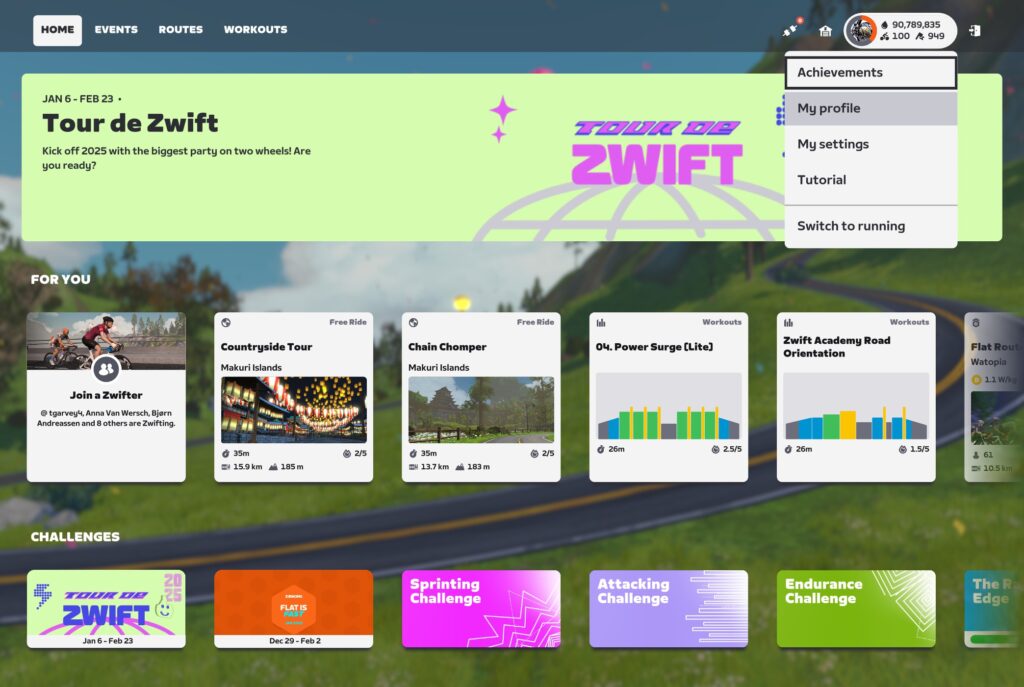
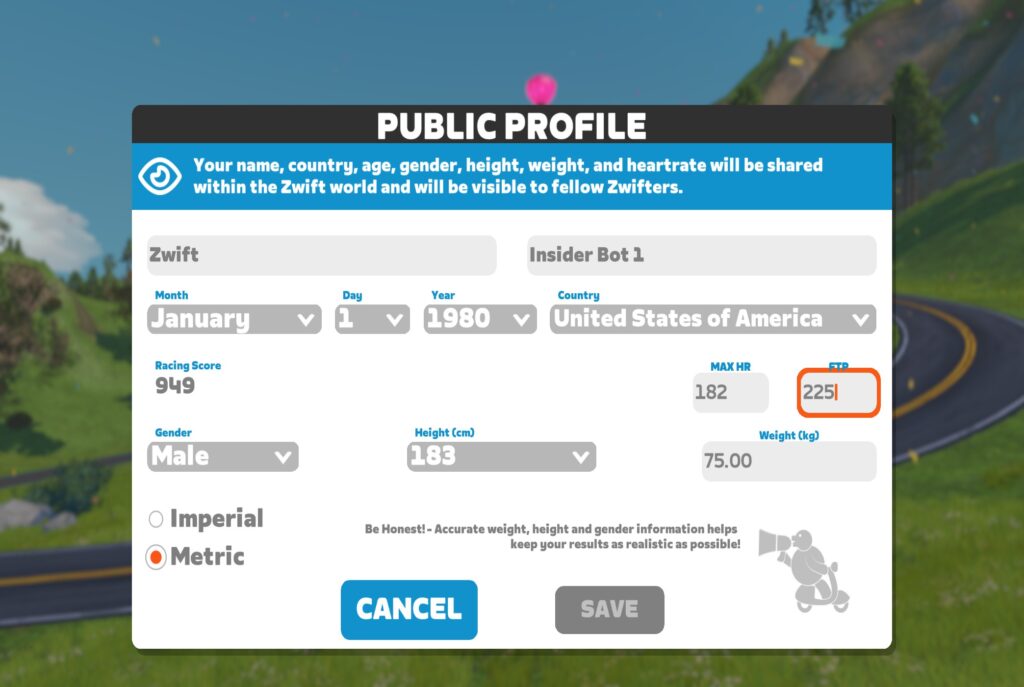
Don’t know your FTP? It’s worth noting that, thanks to a recent update, the game now auto-detects your FTP using any effort in the 8-60 minute range. So you can do an actual FTP test to estimate your FTP, or simply go out and smash a maximal effort for 8-60 minutes and let the game estimate your FTP based on that effort.
(Pro tip: set your FTP unrealistically low in your profile before doing an FTP test/effort, to make sure the game detects an increase and sets your FTP automatically).
It appears that the game needs to be restarted in order for your route time estimates to be updated after your FTP setting changes.
Rounding
The new time estimates get more rounded the longer they go. That means 5-minute rounding if the estimate is 60 minutes or less, 15-minute rounding for 1-2 hour estimates, and rounding to the nearest 30-minutes for 2+ hour estimates.
Questions or Comments?
What do you think of Zwift’s new personalized time estimates? Share your thoughts below!


I’m amazed that this update isn’t getting more fanfare. We can now schedule our solo and group rides with a much higher level of certainty!
Surely you know how fast you ride in Zwift and can make an educated guess to how long it will take to complete a route
True, but it’s great to have that number tailored to your own personal ability, rather than trying to guess. Sometimes it’s tricky to know how an elevation etc will impact you, especially to beginners new to the routes, and even more so to the longer routes where you’re not sure you’ll have time to fit it into a schedule.
Sure, but even for someone like me who has been riding on Zwift for 10 years, it is still helpful to glance at a new route and approximate how much time I can expect to need to fulfill the route.
Agreed. The old estimates were virtually useless (and often blatantly wrong). This is a game changer. It is fairly easy to make a rough estimate for flat routes, but a long route with multiple hills can be much harder to predict.
This will be a very useful update.
So, to confirm, I reset my FTP to 100, get on my fastest bike on the flatest course and just hammer it for 10 mins for Zwift to give me a new FTP.
That’s a lot easier than going up Oh No Hill. 😁
Yes, except the speed of your bike doesn’t matter. All that matters is your power output, and how long you hammer for! Good luck.
so actually, there is an advantage to doing it on an uphill course, as many people (myself included) find it psychologically easier to maintain high watts going uphill vs the flat
That isn’t psychological. It is a real physical effect. It is due to the nature of climbing loads (static – unchanging with speed) vs. wind resistance loads (dynamic – changing dramatically with speed). The static loading makes it much easier to find a good gear and make increases and decreases to your power output by increasing and decreasing your cadence. It doesn’t work the same way on flat roads, where increasing your cadence results in a small increase in speed, but a major increase in the resistance force.
good to know that it is not just that I am too weak-willed to keep the hammer down on the flat!
Just 32 XP on Tour de Watopia. Hoped for the 64…
Tour de Watopia is so last year
This is an awesome change. I’m looking forward to taking advantage of this as I plan my future route selections and non-selections.
I like it and always wondered why they didn’t do something like this. Although to be honest, I wonder if it wouldn’t be even more useful to essentially look at where Rider completion times lie on a percentile basis, and estimated that way. People don’t just ride at 75% of ftp, some of us are in various types of recovery and are riding at 50% FTP; other hammerheads are channeling Dylan Johnson’s alter ego and riding around at 90% all the time.
For that you can use ZwifterBikes.web.app, as it will estimate your completion time based on the Power you plan to push on the ride (and weight, height etc), not what you potentially could push if you’re in the mood…
If it was using 75% as an estimate, the Zwift 4 W/kg should match the ZI 3 W/kg. The Zwift estimate is a bit slower, so probably something closer to 65%/70%. Great update regardless.
It looks like zwift is assuming a solo ride without drafting, whereas your estimates assume drafting.
With a quick check of Strava records (why can’t you easily search Zwift activities?) it looks like I’ve done Three Sisters once at an average 2.4W/Kg (roughly) for 1h50. That’s pretty much in line with the ZIMetrics above. Only a sample of 1, but I’d rather have something more personalised than current baseline stock ‘guess’. Useful to save having to dip into Strava to see how long a route might take.
Just saying approximate times for 2, 3 and 4w/kg would be more useful as your not necessarily going to ride at the same percentage of ftp. Or you might be planning a group ride etc. Never bother looking at the zwift times. Have used the zwift insider route guide times for above w/kg for as long as they have been there
This is a useful update for my planning purposes. When I ride I usually plan in blocks of 30 minutes, between that and two hours. This will greatly help me quickly select a route. Cheers, ZHQ!
Why do I learn about Zwift changes from Zwift Insider and not officially from Zwift? Where do they officially share this information? I’m subscribed to their newsletter, and it should include such updates, not just push their store promotions.
They announced it in their forum. Link in first sentence of this post…
Finally
Now we just need TSS! I used your time estimates to make myself a spreadsheet that includes TSS estimates for each w/kg. It’s especially useful for planning purposes in Training Peaks. I know what TSS I need to hit for the week and can choose a route and average pace accordingly.
TSS is a trademark (of Training Peaks, I think), so you will find it renamed as ‘Stress Points’ (SP) in your Zwift ride summary. Whether that is a 1:1 relationship I have no idea.
Do you know where to find that? I’m interested to see how closely it tracks to TSS. I checked my activity feed and Zwiftpower and it didn’t jump out at me!
It seems that this update hasn’t been applied to the companion app. I did stage 5 of TdZ (Richmond – Libby Hill After Party). Zwift gave me an estimate of 75 minutes (158 FTP) and my final time was 74 minutes. So pretty accurate. However the companion app just shows 90+ minutes for the duration.
This improvement is fantastic! Very grateful.😍