
Have you ever clicked to join a Pace Partner, only to find yourself in the middle of a climb with cold legs? The. Worst.
Zwift’s August update included a totally revamped interface for joining Pace Partners from the new homescreen. The separate tiles for each Pace Partner let you easily see the current pace, approximate group size, and route for each bot.
But there’s one additional upgrade Zwift made to Pace Partner joining which wasn’t mentioned in the update notes: current Pace Partner location!
Where’s the Bot?
Simply click any of the Pace Partner tiles for a sidebar showing details of the route currently being covered:
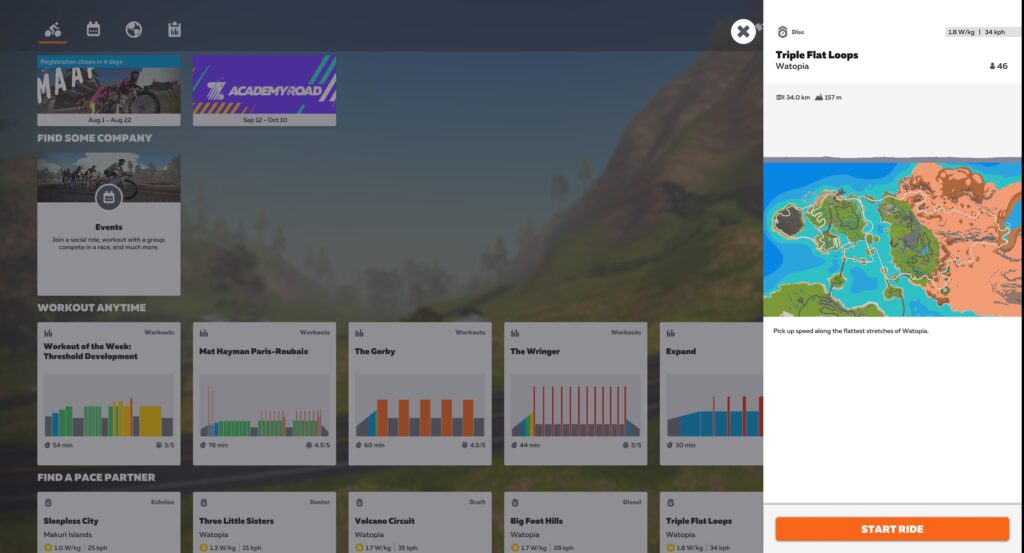
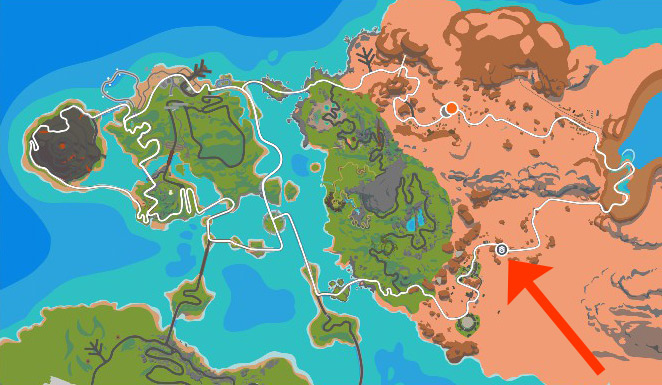
If you look closely at the map, you’ll see a small grey circle with a Pace Partner beacon. This is the current location of the Pace Partner!
New Homescreen Rollout Timing
On a related note: Zwift tells us the new homescreen is quickly rolling out to iOS and Android platforms, with plans to roll out to AppleTV in September. So if you don’t have it yet, you should soon.
Questions or Comments?
Share below!

The only problem with that is at my age its hard enough to see the map let alone the grey circle and that’s with my glasses on as well. 😊
There have been huge improvement to the pace partners.. But what we really need is the ability to join them when you are in the game. So I could do a warm up prior to joining rather than having to quit the game and join.
This sort of functionality is being looked at by ZHQ. I’m not saying they’ll ever release it, but I know they’re seriously looking at it!
Hoping for the ability to warm up with Diesel, then do a direct jump to a faster PP
Best you can hope to do is join the route they are on and get pedaling then either so the opposite direction or put along the same way so they catch up to you …
If they wanted to mitigate they could just give you more assist duration with it gradually decreasing to nothing after five minutes… Though I see this being exploited by some for free distance as I had to remove some followers that would connect to me when I was on alpe de zwift then coast down and keep joining back … After one guy did it for the fifth time I was like …ok to heck with that
Longer assist duration is something I’ve been calling for since I joined Zwift in January. There’s nothing worse than wanting to ride with Brevit, but having to do a warmup first.
Make that the second worst thing…the worst is having to hop off the bike to help the kids/take a phone call/answer the door and then never being able to find the pace partner again…
I’m pretty sure I would have to get off the bike to be able to see that grey dot, on my 55″ TV yet. Luckily I use Apple TV so it’s a moot point!
I appreciate the idea, though I’d rather be able to pre-select a pace partner, as for an event, and then “Join now” after my warmup on whatever course.
Not sure I’ve joined and NOT spawned on a climb with cold legs in the past couple of months. The Zwift gods hate me.
Great except for Apple TV users you get zip!😡
Be careful what you wish for. There’s no guarantee that the new UI will be an unmitigated improvement for Apple TV. Chances are pretty good that it will be a mixed bag.
Still waiting on them to let me choose my bike&wheels before joining pace partner, so that I don’t join with gravel bike when I need my road bike.
You can do that on the new Homescreen. Click on the Icon for the garage, select your bike and then join a pacepartner.
I’m on windows and still don’t have new UI. When will that finish rolling out?
That’s weird. You should have it already.
Same here, but have had it on my primary machine (Mac mini) for a long time.
This is great. I sometimes ride with a race partner at a higher level than I am at, and then try to hang on as long as I can. When I cannot anymore I turn around, take a breather and try to catch it later again. But it is difficult to do, so now knowing where it is, will make this a lot easier!
I can only see that version on my laptop which is not capable of running Zwift. I run my zwift game on apple TV. I can see race partners, which course they are on but not where they are and it scrolls through a list of pacers and courses. This is not an option for many.
The PP’s could do with a +/- 10% watts feature so riders can boost or decrease their in-game watts by up to 10%. Those that want a harder workout can drop their watts so they have to work harder. Those in danger of getting dropped i.e. like me on longer climbs, can boost their in-game watts to help stay in touch and avoid having to exit & rejoin the ride. Those that like things as they are don’t change a thing. Would go some way to address all those people asking for an infinite number of PP’s.
The PP location information would be much more useful if it showed you where they are on the route profile (above the map). I don’t always know where the hills are on the route, and I also don’t particularly care where the the PP is on the route, except in relation to the hills.
That’s a great point, Paul. I’ve shared your comment with ZHQ.
Honestly I never look or care where the Bot is. When I join which ever PP I know I have the power to stay with it in the flats or the uphill sections.
For the price this is crap… zwift needs to stop worrying about real cycling and focus on the costumers paying their bills… the app is low grade…. you need to hire someone from activition to show you how to things get done.
Who’s “you” in this comment?
It would be nice if the companion app map showed the colored dots of the pace partners. So you could join them ad hoc
Any thoughts on them fixing the event joining section of the homescreen? Some events don’t say the course in the description, and its not listed anyway as far as I can see. I would like to have the map available of the event course. A nice-to-have would be the profile to see how hilly it is.
I am not sure how much of an improvement this is, let alone that it doesn’t work on aTV, where it takes a few minutes to select the PP you want. It would be more useful if Z introduced different colors (or added a symbol) to the chevron on top of the multitude of D partners, do we’d know which one we are crossing if we want yo join them on the fly.
i have a question: how i can choose a different pace partner if is not showed? i see just few pace partner and all D sometimes some C, but i would choose an A or a B is it possible?
You need to scroll the list of Pace Partners to the right, Maurizio. They’re all listed there!
Thx Eric, i need the keyboard to do that?
No. A mouse works on a computer. Or your finger if using iPhone/iPad… or AppleTV remote…
Hi, can I achieve route batches by joining a pace partner? Also the batch for 25 volcano circuit laps?
Why are the bots still not wearing helmets?
I think that should be mandatperiod on avatars as well as bots!
Safety First!
I run Zwift on my Android phone and can’t find how to join a pace partner. Is it even possible from mobile version of Zwift?
when I login I only see the lower category pace partners…using a Macbook pro to access Zwift. Why can’t I see all of them?
You need to scroll right! Click and drag…