
Yesterday, Zwift rolled out a much-requested upgrade to the Fitness Trends feature, adding running as a second activity type. This means that, effective immediately, your Zwift runs and outdoor runs will count toward Fitness Metrics, Week Streaks, and (optionally) Weekly Goals. Read on for details…
Fitness Trends + Running
Everyone’s Fitness Trends now include Zwift running activities back to January 2025, as well as outdoor runs tracked on Garmin or Wahoo. Runs show up as pink bars in the weekly Fitness Trends chart in the Companion app:
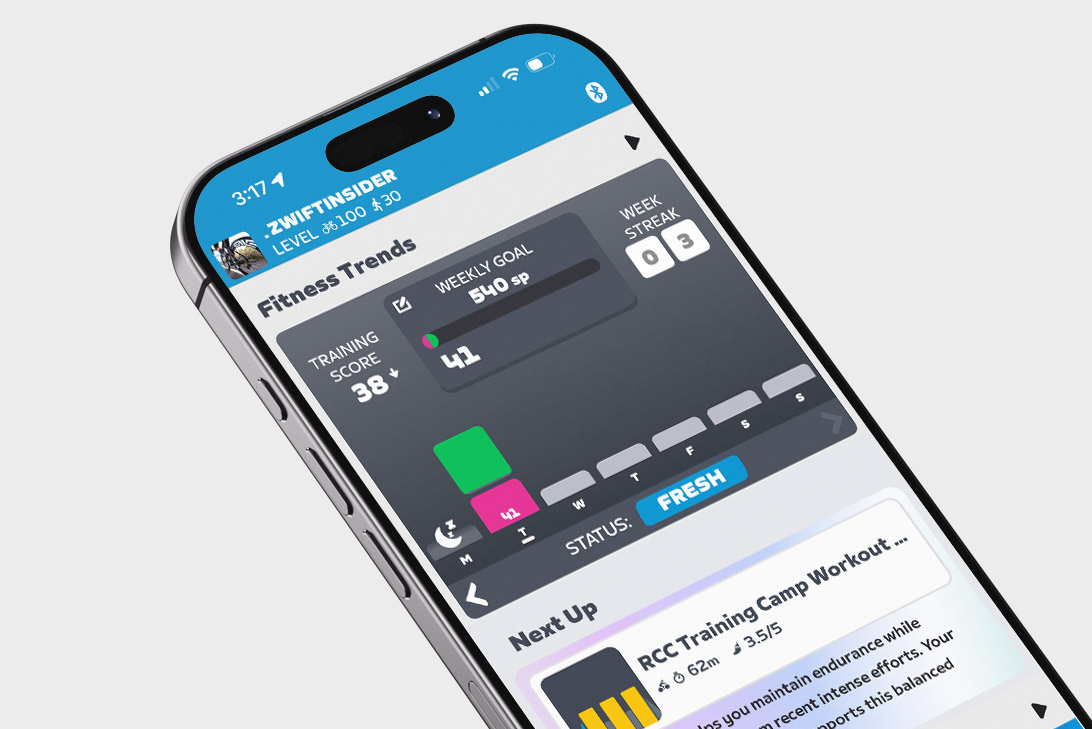
(Not seeing it? You need to be running Zwift Companion version 3.78 or later, so you may need to force the update from your app store.)
This means your current Training Score is now a combination of Stress Points (SP) accumulated via riding and running. If you’re an athlete whose primary training consists of riding and running, your Training Status (Fresh, Overreaching, etc.) should now be more accurate, whereas it was previously understated.
Related: All About Zwift’s Fitness Trends Metrics: Training Score, Training Status, Stress Points, and More
How Zwift Calculates Stress Points (SP) For Running
Zwift uses industry-standard algorithms to compute SP for your virtual and outdoor runs:
- If your run includes heart rate data, this is used to calculate the SP for that activity based on the hrTSS formula.
- If an outdoor run lacks heart rate data, Zwift uses the RPE (Rate of Perceived Exertion) from that activity as synced from Garmin or Wahoo to estimate SP using the method shown here.
- For Zwift activities without heart rate data, SP is calculated with a default RPE of 5 using the method shown here.
Importing Outdoor Runs (History, XP, De-Duping)
Many runners track their outdoor runs using a Garmin watch. If you haven’t yet connected your Garmin account to Zwift, you’ll want to do so, as it allows those outdoor rides to automatically sync to your Zwift account!
To do so, go to Settings>Connections in the Companion app. You can also do it via the web by signing into your account at zwift.com, then going to Connections. Tap on Garmin, walk through connecting your account, and you’ll be all set.
The past 90 days of runs are “backfilled” into Zwift’s Fitness Trends system when you connect your Garmin or Wahoo account. If you connected Garmin or Wahoo back in April when the Fitness Tracker was first released, that means you’ll have your outdoor runs stored in Zwift’s system going back to early 2025. If you connect it to today, it will backfill 90 days (approximately November 10, 2025).
Outdoor runs, like outdoor rides, now earn in-game XP. Outdoor runs earn 8 XP/km, which is 1/5 the rate of XP earned for Zwift runs (40 XP/km).
Some runners who dual-record their Zwift runs on a Garmin watch are already reporting duplicate entries in their Zwift activity lists. There’s a bug in the system currently where runs flagged as virtual runs are still being imported from Garmin to Zwift – this should be fixed soon. Zwift is also working on implementing further de-duping for rides and runs, but have shared no additional info at this time. For now, my best advice is to use Companion to manually delete duplicate activities from your Zwift activities feed to maintain accurate Fitness Trends.
More Running Platforms?
Zwift currently supports syncing outdoor rides and runs from Garmin. Garmin is, of course, a popular platform for tracking outdoor runs, since Garmin’s watches and fitness tracking ecosystem are mature and feature-rich. Zwift also supports Wahoo and Hammerhead, who are less popular with runners, although their phone apps can be used for tracking runs.
The community of runners on Zwift is already asking for integration with additional popular run-tracking platforms, namely Suunto and Coros. Hopefully Zwift is working with these (and other?) partners to broaden their outdoor activity tracking ecosystem.
Weekly Goals + Running
You can now choose to include running activities in your Weekly Goal. Do this by tapping the “Weekly Goal” box in the Fitness Trends window of the Companion app:
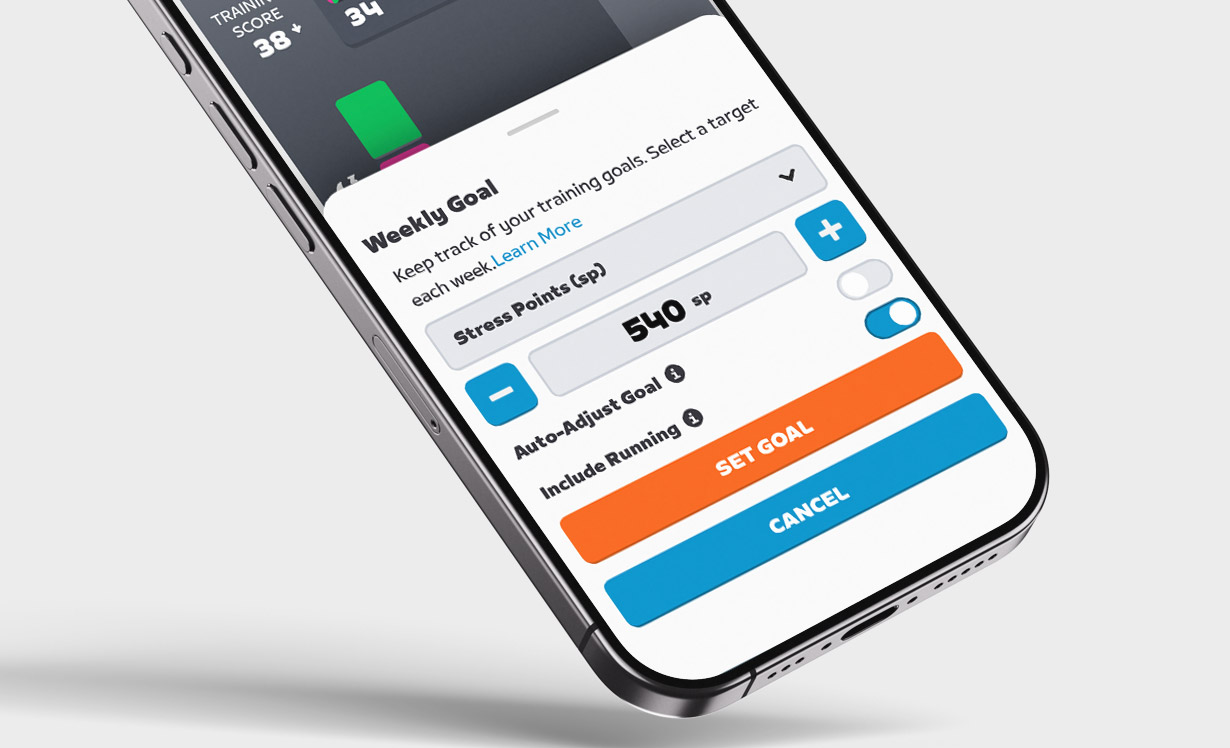
Weekly Goals can be set based on Distance, Kilojoules, Stress Points, Calories, or Time.
Zwift says, “…if the Include Running toggle is on, goals will be a single overarching target covering both running and cycling rather than sport-specific. Expect this to evolve over time.” So it sounds like Zwift is planning to let us set Weekly Ride goals separately from Weekly Run goals in the future.
Week Streaks + Running
One last bit of news re: running on Zwift. Beginning at midnight on Monday, February 16 (2026), Week Streaks can now be extended by logging a run!
Questions or Comments?
Share below! You might also want to check the official announcement thread on Zwift’s forum.


Would it take runs recorded on Strava? Have a Amazfit which current isn’t supported but does sync to Strava.
No, Zwift doesn’t currently import rides/runs from Strava. I’m sure there are multiple reasons why, including Strava’s restrictions on processing user data from Strava activities…
Fair enough. I’ve found a way……
Do tell. I have an Amazfit watch also. edit – I see your answer below
This is great news!
“Zwift also supports Wahoo and Hammerhead, who are less popular with runners, although their phone apps can be used for tracking runs.”
I asked about using the Wahoo App for running, and if it would pull those activities into Zwift and Shuji said “No”.
Other sources in Zwift tell me “yes”. The question is, who’s going to test this to confirm either way? 😀
Thanks for the tip ! Running 3.78 on Android.
I’ve linked my Garmin account and do see my runs in the companion app, with no details though, just a “sun” icon and the length of the run, should I be seeing something else ? Also I don’t have the “include running” in the Weekly Goals.
I don’t see the runs in the list of activities either for some reason.
I’m happy to report that the Virtual Rides I also log on my Garmin aren’t shown in Zwift.
This is great news but it appears it also uploaded all of my “walks” from Garmin, i.e. dog walks- which adds a significant number of hours in my case. Was that also intentional? I also don’t see the option in companion to de-select runs (or in this case, walks) from the weekly goal.
I’m also getting walks counted, but at my age I’m happy to have those included in the total 🙂
right, I don’t think I mind the extra data. If it’s intentional I may simply adjust my weekly goal to accommodate this.
If you go into your Companion App and in Fitness Trends touch the “Weekly Goal” box there is a chose now to turn OFF runs. However, it still allows Garmin to send ‘walks’! 🙁
I did that, in fact it was unchecked by default not to include “runs” but it is not excluding the walks so all those hours are being counted towards my weekly goal. I’m fine with it including the data for fitness trends and whatever but really want to be able to exclude from my weekly goal so I can focus on my ride goals and not have it watered down with time spent on dog walks.
Sorry, correct on the walks still be counted in the weekly goal regardless if unchecking to include “runs”. I hope Zwift can modify so walks are also excluded. Seems silly to be able to exclude runs from weekly goal but not the walks that are also coming through. 🙁
I have 3.78.2 no running info showed up .
This is great but I would love power support. Even my chest HR strap is unreliable on the treadmill and wrist, forget about it. I understand the difficulty with run power measurement and each company’s algorithm being totally different, but kept internally and not compared to other Zwift runners it could be very useful for load tracking. (That and I’d no longer need to dual record to get my Stryd power to Intervals…)
FOR THOSE WITHOUT A GARMIN/WAHOO. I’VE FOUND A WAY……
Download Garmin connect and add your runs manually. If you use a different watch/app, you’ll have all the stats on there, so it matters not. You just need the time and distance for it to count.
Thanks for the tip. I normally “dual” record my outdoor runs (Zwift is running of my footpod on my phone while my watch records for Strava). A couple of days ago the battery of the footpod went dry and it took me a couple of days until I managed to get it replaced which meant that there were a couple of runs which didn’t get recorded into Zwift. I managed to use your method to get them into Zwift but it doesn’t look like this method gives the XP … I was hoping to re-coup at least some of the XP I missed out on. It does make sense to me though as it would be way to easy to game the system this way.
The implementation of this is faulty as mine is set not to include running totals but Zwift is taking my walks (I don’t run ever!) and including them nevertheless.
If you set it not to include Running as part of your weekly goals, that doesn’t change whether Zwift is reading in your runs and using it to track Fitness Trends.
Weekly Goals and Fitness Trends are two different (but related) things. You can’t stop runs from importing into Fitness Trends…
I think it might be faulty because even if we deselect to include runs, the weekly goal is still including walks as part of the weekly goal. I don’t care if the dog walks are included in fitness trends and whatever but would really like to exclude it from my weekly goal so I can focus that on my riding and not have the hours spent walking my dog watering this down. In other words, it would be good if the weekly goal option to NOT include running would also then exclude walking activities which it is not currently doing.
Will the weekly streaks be extended if cycling membership is paused and the free run membership is being used to run?
No
Are we now getting XP for outside runs?
Yes. 8XP/km.
Hi everyone! Has anyone figured out a way to import outdoor cycling rides into Zwift without using Garmin or Wahoo? Here in Brazil, Garmin and Wahoo devices are often too expensive for a large part of the cycling community, so most of us end up using entry-level GPS computers like iGPSPORT. Also, power meters are still not common among amateur cyclists it’s a technology we’re only starting to adopt, and many of us are waiting for prices to come down. Any tips or workarounds would be greatly appreciated!
My solution:
1) Install Wahoo App on phone. Pair that with Zwift.
2) Record activity using preferred device/app
3) Download FIT file from recording app
4) Upload FIT file to Wahoo
5) Should automatically sync to Zwift
It does but it doesn’t seem to give XP from what I can tell.
This is very cool! I do run commutes with my Coros Pace3 so hope it gets supported soon.
I run often, but I’ve never run on Zwift. Today’s run outside apparently gave XP, but the kilometers don’t show up in the running statistics on Zwift.🤔
Seems my dog walks are being pulled into the app
A glitch in the system is that although Zwift allows me to turn off running, it is still recording my casual walks in the park. I personally want Garmin to keep my walk data, but I do not want the datato sent to Zwift. Zwift Support says I’d have to delete walk… oh well….
So I should not posted while riding 🙂 After I signed out of Zwift I went to my laptop & saw the comment about manually posting walks. Not ideal, but doable. Thanks
Is there any way to turn this feature off or disable? I use my Garmin when doing my dog walks, 4 or more miles, five or more times per week, so these are not actually running miles.
Does anyone know what the minimum run distance is to maintain Streak? I believe minimum Ride is 2km?
Haven’t tested to confirm, but Zwift tells me it’s 0.8km/0.5 miles.
Thanks Eric
How would one get your “Walk” activities to stop loading from Garmin? I definitely don’t want to add my twice-daily commute to and from work to my fitness metrics in the game, even if I am moving at a pretty great pace to make it in on time!
This is a bug Zwift will be fixing. Until the, you’ll need to delete them from your Zwift activities list.
They add this before run power … 🤦♂️
That IS a little odd feeling, isn’t it? They must be seeing that there are just very few runners using power…
For those who run (and those who cycle.. so everyone here, I guess), I’d recommend downloading the Adidas Running app. If you sync this with your Strava, it may pull the data from Strava and push it to Zwift Companion, which I just discovered is listed as a connection. This could be a workaround for those without a Wahoo/Garmin.
On another note, having this app sync with your Strava account accumulates points, which can help you enter raffles/draws, redeem discount vouchers, and get free subscriptions via Adidas. Worth checking out IMO. You accumulate points by both outdoor runs and rides (not indoor).
Should this pull runs that are recorded on an Apple Watch (using either the Workout or Strava app) and synced to Garmin using RunGap?
I doubt it.
Typically services like Garmin and Wahoo don’t pass through activities that were loaded via a third party. This is done to avoid endless looping of activity syncing between services.
So you need to create/record the activity of Wahoo or Garmin in order for those services to send those activities out via their API.
This is frustrating because all of my runs/walks are recorded via Strava on an Apple Watch, and they also populate my Element workout history page as an activity where I can see all the data, but don’t push to Zwift.
Does extending the streak via running still give bonus xp? If so, would it be for running or riding (assuming running)?
Hm.. I run ultra 50 km, and Zwift get me only 8 hp, it’s bug?
And! Zwift get me 24 hp for hiking! Wtf?
I feel that running on Zwift is becoming the even poorer cousin than it used to be, this year there’s not even any kind of recognition for completing the Tour runs. I’m sure in previous years there was a tracker, like on the cycling home screen and on the companion app, this year I’ve no way of knowing if I’ve done all the runs without going through my activities. How hard can it be to have the same home screen tile as the cycling? I pay for Zwift as I ride and run but really feel the running is so neglected. Been stuck on level 30 for years, didn’t even get a well done or any ‘kit’ for getting to level 30.. nothing happened lol… very poor..come on Zwift..
I hear you or in other words: I’m not mad just very disappointed. I think the tracker is less relevant now though as zwift has retired mission badges … which in my view was a bad decision. You still got the TdZ kit but you didn’t have to work very hard for it: just one event.
I have the required companion app but it doesn’t give me the option to to add running to my goal.
also it never back dated any running Data as was reported. It has started adding recent runs ok.
Ify first activity of the week is a run do I get my xp bonus on that or my first ride of the week or jas the bonus scheme neen scrapped
Bonus scheme has definitely not been scrapped. I’m “pretty sure” that the bonus XP goes to the running if that’s the first activity of the week. I know my xp at the beginning of the week very precisely as I got a new level 2km in. My new xp is now what I ran since then +500xp.
I was just going to post about it – my first activity this week was a run and I’m pretty sure I got the bonus 500XP for running and not cycling. It’s a a shame as I’ve been max running level for a while and am currently level 94 cycling.
These calculations aren’t very useful until it includes all activities. I’ve skied about 10 hours yesterday and today but it tells me I’m “fresh” since I’m not doing anything. What if it could pull energy use, HR etc from all sorts of activities to get an idea of the training load? Kilometers aren’t particularly useful since it’s very dependent on the activity type, but energy use would be more comparable.
Maybe I missed this, so as far as streaks, it doesn’t matter if it’s running or cycling? Like if you want to extend your streak for cycling you can do an outdoor run or zwift run? I guess I always thought the streak was streaks for “cycling” then a separate one maybe for “running” (since I don’t do running on zwift unsure what’s on there, do you get a scotty in your shirt running?)
It’s an activity streak, basically. Ride or run. Put the pocket Scotty is only for riders.