

Table of Contents
Zwift’s Fitness Metrics, initially released in April of 2025, help to answer common questions from endurance athletes: “How am I doing? Can I train more? Should I train less? What’s my potential?”
But if you’re new to riding or running, these metrics may be a bit confusing. So we’re here to help!
If you aren’t sure how to use Zwift’s Fitness Metrics, or what they’re even telling you, read on…
Riders: It Starts with FTP
As a cyclist, if you want your Training Score to be accurate in Zwift, you must have your FTP (functional threshold power) value set accurately in your profile.
What is “FTP”? It is the wattage you can stay below and sustain for longer durations, while going above it causes fatigue to set in very quickly. Most riders, if they put in a steady but maximal effort on fresh legs, can hold their FTP for 40-60 minutes.
Your Training Score is directly based on the Stress Points accumulated with each ride, and Stress Points are calculated from your FTP (see below).
So if your FTP isn’t accurate, your Stress Points won’t be, either, which means your Training Score won’t be accurate.
FTP is also used to calculate power targets in ERG workouts – for example, a VO2 interval may have you ride at 110% of FTP for 4-minute intervals. So you’ll want an accurate FTP value if you’re doing structured workouts on Zwift as well.
Zwift will automatically estimate your FTP based on your power bests as you ride or race in the game. But if you want a more accurate FTP value, I recommend taking an FTP test.
Related: How (and Why) to Take an FTP Test on Zwift >
Stress Points, aka “TSS”
For Riders
Once your FTP is set accurately, the Stress Points (SP) calculated for each ride will be accurate. SP is just a Zwifty name for TSS, an industry-standard metric developed by TrainingPeaks that combines both time and intensity into one number indicating how much stress a particular workout puts on your body.
Related: All about TSS (Stress Points) in Zwift >
You don’t need to know how SP are calculated to use them, although this post has the formula if you’re curious. To give you some idea of typical SP ranges, an easy 1-hour recovery ride may be around 40-50 SP, while a 1-hour race will be closer to 90-100 SP, and a 3-hour endurance ride may be more like 150-180 SP.
If you’re syncing outdoor rides to Zwift, but don’t have a power meter on your outdoor bike, Zwift will do its best to estimate your SP for the ride, much like Strava estimates your power even on rides without power data. If you want your training metrics to be truly dialed in, though, maybe it’s time to get a power meter on your outdoor bike?
I recommend the Favero Assioma pedals. They’re the most respected in the industry, more affordable than most, and easy to install (unlike crank or spider-based power meters).
Buy them on Amazon >
Read my Favero Assioma Duo review >
For Runners
Zwift uses industry-standard algorithms to compute SP for runs:
- If your run includes heart rate data, this is used to calculate the SP for that activity based on the hrTSS formula.
- If an outdoor run lacks heart rate data, Zwift uses the RPE (Rate of Perceived Exertion) from that activity as synced from Garmin or Wahoo to estimate SP using the method shown here.
- For Zwift activities without heart rate data, SP is calculated with a default RPE of 5 using the method shown here.
Seeing SP in Zwift
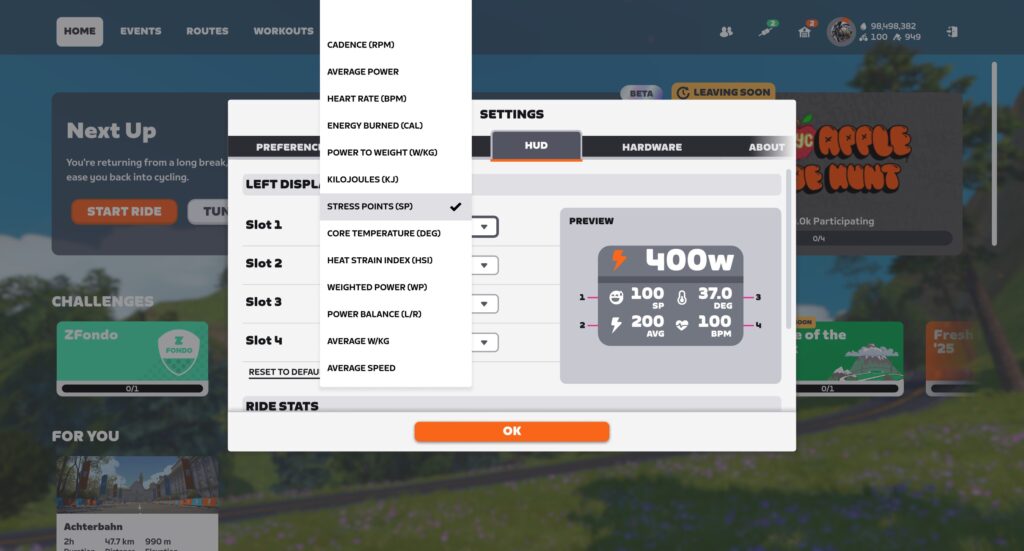
You can show SP in real-time in Zwift’s HUD by selecting it for one of the display metrics via Menu>Settings>HUD:
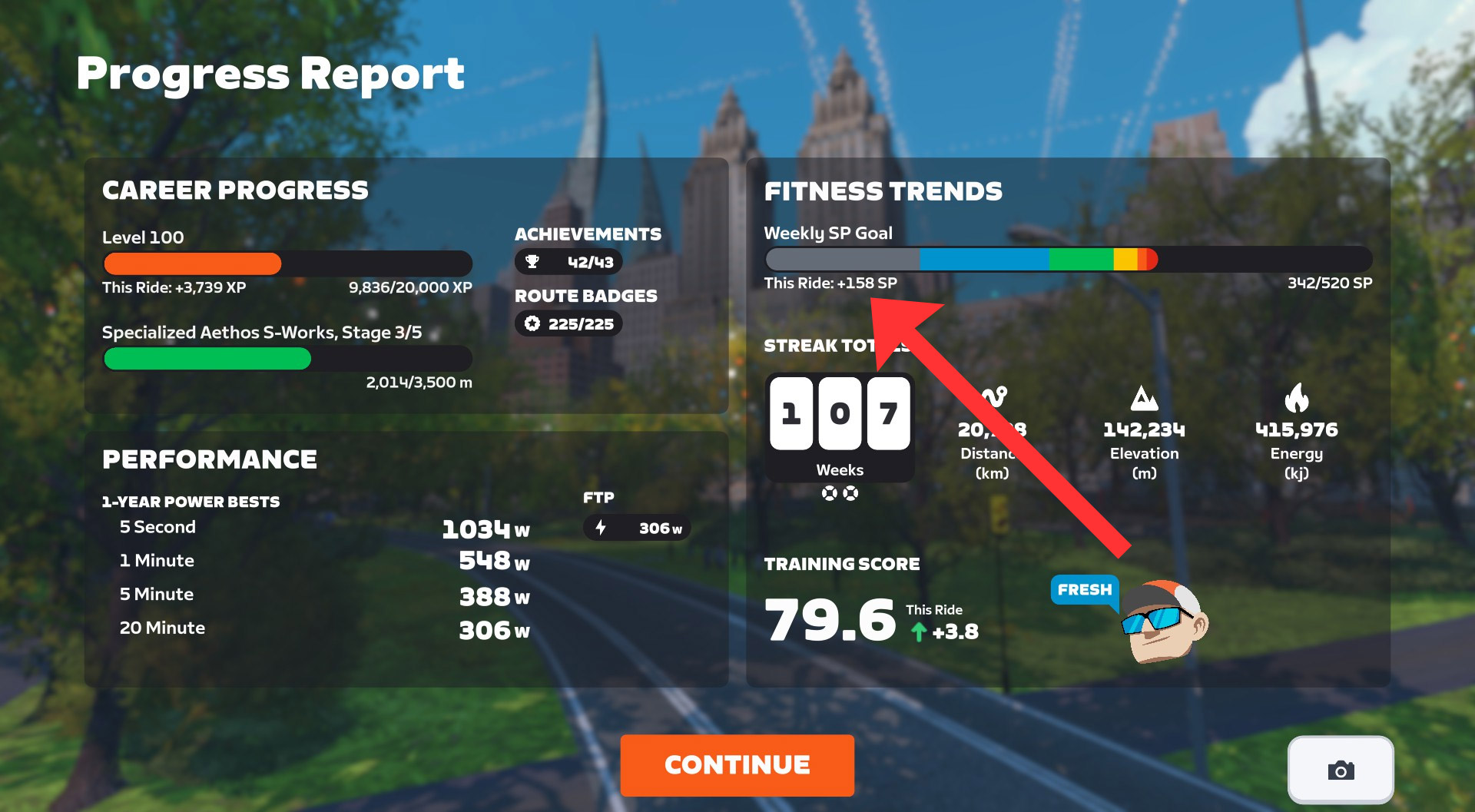
SP are also shown on the Ride/Run Report when completing an activity, and on the Progress Report screen if you’ve set a fitness goal based on SP:

Outdoor Activities
If you do any outdoor riding or running (and most of us do), you’ll want to get that data into Zwift’s system. Otherwise, your Fitness Metrics won’t be accurate, since they won’t include your outdoor efforts!
You’ll need to record your outdoor session on a device such as a bike computer (aka “head unit”), smart watch, or even your phone. I’m partial to Wahoo’s bike computers, but Zwift supports importing outdoor rides from Garmin, Wahoo, and Hammerhead accounts.
Learn how to connect Garmin or Wahoo to Zwift >
Learn how to connect Hammerhead to Zwift >
Training Score
Your Training Score in Zwift is the 42-day exponentially weighted moving average of your training load. What does that mean in simple terms? It means your Training Score is an average of your daily SP, weighted so recent sessions affect the score more than older ones. Note that “Training Score” is more often called “Fitness” in other apps, or “Chronic Training Load/CTL” in TrainingPeaks.
This comment from ZI reader R. Chung (yes, that Chung) unpacks how Training Score is calculated: “The ‘42-day exponentially weighted moving average’ (and the 7-day version) don’t mean they’re an average over the previous 42 days. That’s a common misconception. It means the exponential decay rate is 1/42 days = 2.38% per day (and the 7-day decay rate is 1/7 = 14.28% per day). The 2.38% decay rate means about three-eighths of the TSS from a ride is still around after 42 days, not zero.”
You can see your current Training Score in the Companion app at the top-left of the Fitness Trends box:

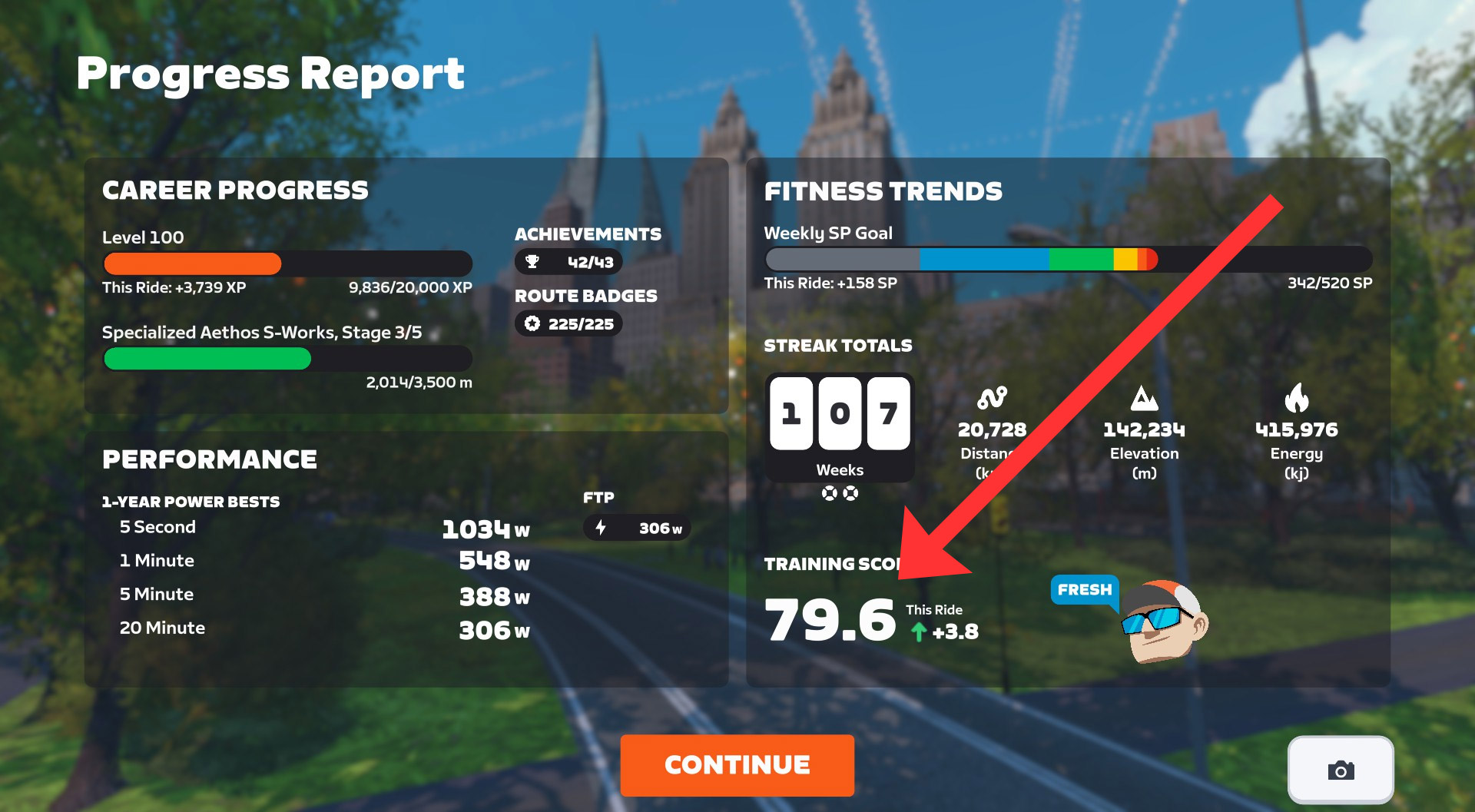
It is also shown on the Progress Report screen, along with a value showing how much your session changed the score:
Training Status
Your Training Status is also displayed in the Companion app and Progress Report. It will place you in one of the following categories:
- Overreaching: avoid staying here long, or you may become over-trained
- Productive: gaining fitness
- Fresh: fit and ready to race
- Detraining: losing fitness
- Ready: new to training, not enough data to categorize you
Zwift Training Status is based on a metric that other apps call “Form” or “Freshness”. This is calculated as your current Training Score minus your current Fatigue. (Fatigue is calculated similarly to Training Score, except it’s only a 7-day exponentially weighted moving average of your training load instead of 42-day.)
Since Zwift likes to keep metrics simple, they don’t display this Form/Freshness value. Instead, they simply chart it in the Companion app under “Fitness Trends”, so you can see where you’re trending:

How To Use It
So that’s how all of Zwift’s Fitness Metrics work. But how do you actually use them?
In some ways, that’s a very individual question, and thus impossible for me to answer. A qualified coach could look at your data and give you some really helpful insights, though!
But there are some general principles, and some obvious use cases, which apply to just about everyone.
First: it’s worth mentioning that your Zwift Training Status is not an indicator of how well you may feel on a given day. If you’re anything like me, Zwift may often say you’re “fresh,” but your legs disagree! That’s OK. Training Status summarizes overall Training Stress Balance (TSB), giving a sort of zoomed-out view of your current freshness, which may not match how you feel on the day.
If your Training Status is “Overreaching”, you’ll want to ease up soon. The great Joe Friel says, “…if you spend much time here you will create great fatigue and are flirting with extreme overreaching that would likely become overtraining if continued for too long.” Typically, you’ll automatically ease up training at this phase, because the body simply can’t keep overreaching. But be careful if you find yourself here.
Zwift’s Fitness Metrics are just a Zwifty (that is, simpler and more colorful) version of the commonly-used Performance Management Chart seen in coaching plans on TrainingPeaks and other platforms. These charts show the detailed results of periodized training plans, where athletes typically go through sections of training in the “productive” zone, take a recovery week to enter the “fresh zone,” then start another block of training. Often, these training plans are structured with a target event in mind, and athletes will taper their training in the week or two leading up to it.
You may not have a coach or the expertise to structure a full training plan, but you can use Zwift’s Fitness Metrics to help determine an effective training load for your situation. The metrics won’t tell you which workout to do each day, but they’ll help you manage your overall training load. And that’s half of the battle! While it’s good to know which specific workouts will help you most, so much of endurance training is about building up a training load. Getting on the bike. Running the planned distance. Putting in the work. Consistency.
So put in the effort to get into the productive zone, then take a week off after 3-4 productive weeks. And if you get into overreaching, don’t panic. But also, don’t keep digging that hole deeper!
Those are just a few tips and thoughts, but training management is a huge topic with plenty of rabbit holes. So I’ll leave it here for now.
What’s Next?
More Activities from More Devices
Zwift’s Fitness Metrics do a great job of delivering a simple, easy-to-understand view of your fitness trends… if most or all of your training syncs into Zwift’s ecosystem. That means most or all of your training needs to be cycling and/or running, and it all has to be recorded on Garmin/Wahoo/Hammerhead so it syncs into Zwift.
If you are a Zwifter who does substantial training outside of cycling and running (triathletes, for example), or you record your runs on, say, an Apple or Coros watch, Fitness Trends won’t reflect your training accurately. Not yet.
So what many Zwifters want is for Zwift to expand its ecosystem so a broader list of activities (swimming, cross-country skiing, etc) can be pulled in, from a broader set of devices.
Something Bigger
Lastly, it’s worth mentioning that these metrics are just one part of the more robust training platform Zwift is building. You can see the pieces coming together: first, third-party workout syncing brought all the big training plan providers to the table. Then revamped automatic FTP detection made it easier to set your power zones. Next, Zwift added outdoor rides and began computing training metrics. Then run activities were added to the mix!
To what end? We don’t know for sure, but Zwift recently released Personalized Recommendations, and there’s much, much more that could be done in this space…
Questions or Comments?
Did this post help you better understand and utilize Zwift’s Fitness Metrics? Still got questions? Comments? Share below!


It feels like zwift is trying to make the platform an all-in-one solution, but then oversimplify features to the point that they’re not longer useful. Either you have trainingpeaks and use the much more complete PMC or you likely don’t know what this chart actually represents and it’s not really that useful. Surely the ‘Up Next’ feature is already taking freshness into account, so why present an incomplete chart to the user?
I will continue to use another platform that has all the numbers, so this is a wasted feature for me. For those who aren’t interested in the data this is just another squiggly line.
Perhaps there are more users who fall in the middle? I just want them to add more tools for event organizers.
I am sure some people were waiting for this and are excited for these features. To me, ZFTP is a negative as it is very often not my real ftp. Many Zwifters find the ‘personal recommendations’ very poor and there isn’t a way to turn them off. Training score too has no value to me. I liked A B C D more than the numbers of race score. The good old days…
So if you do ANY form of exercise other than riding a bike, Zwift’s training status has no way to account for that. Seems like a bit of a problem.
Intervals.icu already does this infinitely better.
Meanwhile, I’ve been stuck on level 100 for months, still no ability to set up a basic points race, no velodrome. These features have been requested hundreds (thousands?) of times in the Zwift Forums for almost a decade now.
Zwift’s answer is to roll out AI slop and a broken training status indicator.
Running is also included in Fitness Metrics…
from Tuesday, March 3, it no longer includes running activities (synchronization with Garmin)
Last week:
Intervals.icu is my primary training platform. It is great.
I have Strava for purely social aspects, it has no value-add for training.
I subscribe to TrainingPeaks Premium. That platform is great for all of the triathlete-specific stuff, and TrainingPeaks Virtual (from a software perspective) is included, and is far more capable training software (from a technological development perspective) than Zwift, though less “engaging” for people who are lured by the gaming/social aspects Zwift offers, despite
the relatively limited technical functionality.
If I had to pick two things to keep out of several, it would be Intervals.icu and TrainingPeaks Premium.
Intervals.icu is world-class for analytics. If you use Apple, Intervals Companion by Spencer McEwen is phenomenal. I’m in his TestFlight beta branch for it.
I agree with everything you said, except the loaded context word “luring”. Many people specifically find value to the social features of Zwift. For me, it helps motivate me to show up. I would do less training without a group.
For me, using something else, there would be much better metrics collected on significantly less riding.
I used to do scheduled things in Zwift often when I was doing a lot of group events as part of routine. I do solo stuff on it more, and often shut off the Show Group Chat function, but Zwift has largely been a “make sure I’m up and moving by 5AM” daily thing more than anything else. It got me started on the indoor training parts which I would have never done with another platform first. It reminds me that I was a gamer before I was a cyclist.
I use bikes as my transportation vehicle and ride 20-30 hours a week outside, in addition to what I do online. What Zwift and the other platforms offer for me most fundamentally is the ability to push more power in a safer environment than I would outside, because there is an increase in risk with an increase of speed.
It is not an issue so much with hills, but those aren’t everywhere, and accordingly I’m mellow in the flats, and get significantly less training effect riding in real-life flats than I do going up. Zwift (and other virtual riding) lets me do that flat-fast push without risking safety in increasing stopping distance outside.
I live in a hilly area east of Seattle, Washington, US, but a lot of the cycling destination cities for me are along the former rail trail, which is very flat, but devoid of cars, but not pedestrians, eBikes, scooters and enthusiastic wildlife in inconvenient spots suddenly.
Much of my time on Zwift now is spent in ERG Mode. I sometimes join banded rides with my friends in Phoenix Rising and Bikealicious or Ride With James, and set the Trainer Control power level for my KICKR BIKE V2 with the Wahoo app. That’s a fun feature. I wish Zwift would let us do that directly in the game like TrainingPeaks Virual does – set the Target Power with the Zwift App, allowing it to override the Zwift Simulation mode, without setting a workout in the ZwiftApp.
I slide Trainer Difficulty to 0, then launch the Wahoo app on my phone to set the target power during banded group rides or when free riding routes when I’m badge hunting solo.
These metrics are largely useless for users who rely on devices like Polar or Coros for their outdoor activities (devices that are widely used by runners).
I do cycling workouts on Zwift, but my main sport is running. For me, these metrics are completely irrelevant and can even be misleading for users who are not comfortable interpreting performance data, as the information provided is clearly incomplete.
Either offer a comprehensive and reliable set of metrics, or it would be better to leave this kind of analysis to dedicated platforms such as intervals.icu.
Fully agree, I don’t see my rollerskiing sessions on Zwift because they’re recorded by Polar (side note: Garmin does not have rollerskiing profiles). These sessions are not easy so they do influence what I should do the day after.
Another big problem in my opinion is strength training. “Everyone” recommends it for cyclists. But it does not show up as very straining on heart rate monitors and there are no sensors that measure this otherwise.
If Zwift wants to be really usesful, it needs to a) allow loading external recordings (Fit files or similar) and count them for their fitness metrics (don’t need them to count towards streaks, that’s just a gimmick), plus do something meaningful with those strength sessions – that might require manual input like RPE.
I wish this supported Apple Health runs. I use Garmin for my cycling computer and Wahoo for my indoor training ecosystem. Apple Health/Apple Watch is used for everything else.
It is a shame that I don’t think I could have my outdoor runs count, on account of this limitation. It’s great to have the treadmill stuff in Zwift, though!
Does anyone know if I record on my Apple Watch, it then syncs with Wahoo should it then sync with Zwift? My two runs this week have not synced with Zwift. Do I need to record using Garmin, Wahoo or Hammerhead only?
Yeah. The activity has to be initially recorded/saved directly on Garmin/Wahoo/Hammerhead. It can’t arrive there via a sync from another platform.
Impressive streak number peeking out there Eric!
Whoop whoop!
I like looking at the info and watching as my training evolves but I wonder why my Zwift Power FTP doesn’t match my Zwift FTP?
Zwift Power shows your zFTP, which is an automatically calculated metric from Zwift. That’s a different value than the FTP attached to your profile, which you can modify any time you’d like.
Confusing, I know.
I don’t run but do walk daily, in addition to cycling on Zwift. I have an Amazfit watch that syncs with TrainingPeaks (the free version). I can export the fit files to Garmin Connect (also free) which are then synced with Zwift. Yes, it’s a manual process but it’s another nerdy thing I do. 🙂
playing catchup to Training Peaks,gotcha. When they add you guys are going to love the cruise control. Just think they may even add the ability to upload your .gpx files and ride the full length of the course you upload,so you train on the course before race day. I am doing that already for less than $9 a month, and don’t get me started on zen mode.