

Having taken part in Zwift races regularly during lockdown, I found myself frustrated by the need to take my hands off the shifters every time I wanted to activate a powerup. I was also having issues with sweaty hands not being particularly effective at interacting with phone touchscreens, so started looking for a solution. After a few failed attempts with various Bluetooth devices, I came across this article.
It seemed a good starting point, and after a couple of helpful emails began working on my own code and way of attaching it to the bars to put the controller within easy reach. Having found myself with a controller that had five buttons, rather than the initially planned one, I started thinking what else could be done.
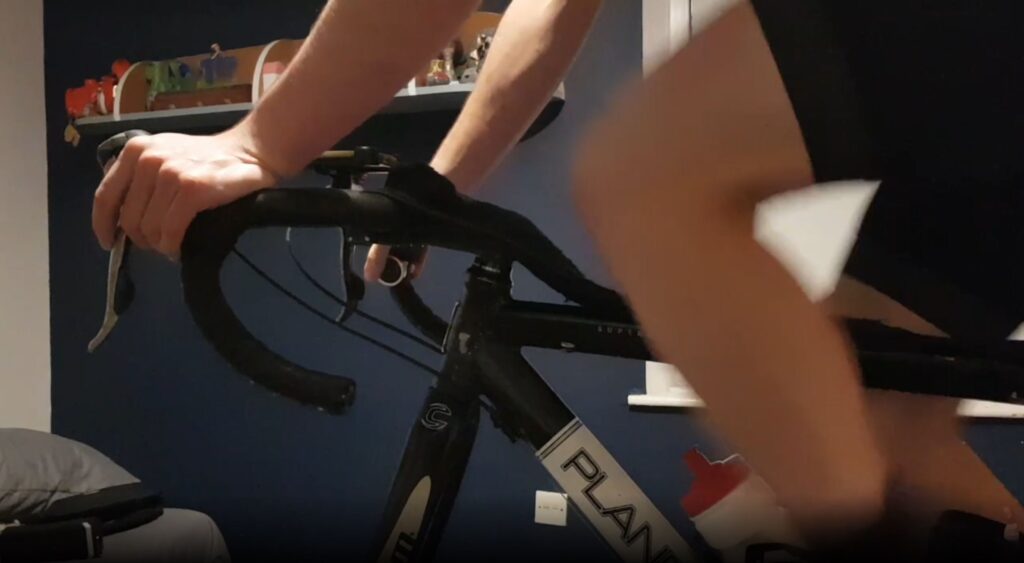
I had been riding the WTRL Team Time Trial Series for several months at this point, and the Bluetooth controller offered a number of applications to improve our team’s performance by changing camera angles to help me and my team stay in the wheels, as well as communicate more effectively via elbow flicks and Discord‘s Push to Talk voice chat function. The videos below show you how to make and set up the controller.
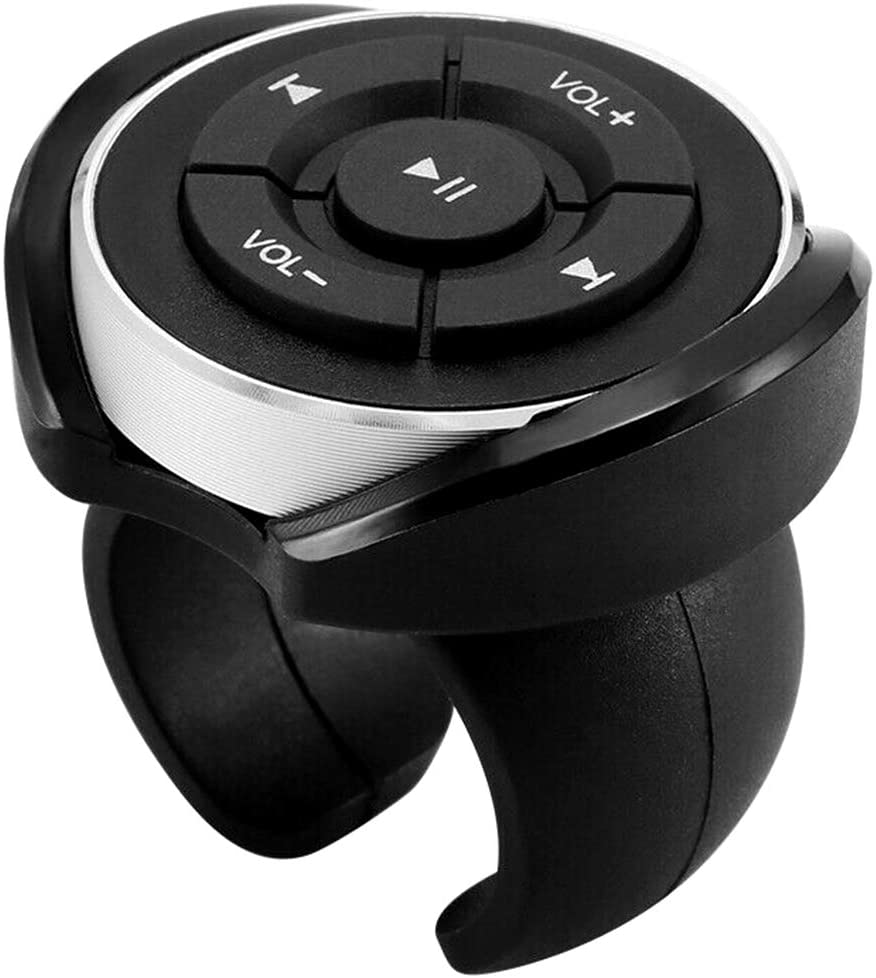
Requirements
- You are running Zwift and Discord on a Windows PC with Bluetooth capabilities
- Any sort of headset and microphone connected to the PC
- A Bluetooth media button (widely available, here’s one on Amazon that includes a handlebar clip)
- AutoHotkey installed on your system (if you don’t want to use the self-contained .exe file below)
Controller Functions
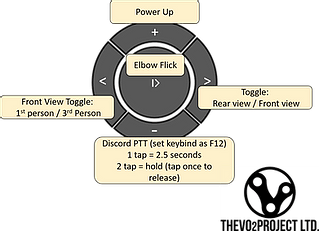
Volume Up: Activate Power up
Play / Pause: Elbow Flick
Next: Toggle 1st and 3rd person view
Previous: Toggle front and rear view
Volume Down: Discord Push to talk – press once activates for 2.5s, press twice activates until it is pressed again
Hardware Instructions
Software Instructions
Download the AutoHotKey script or grab the source code (written for Autohotkey)
Discord Setup
Operating Instructions and Troubleshooting
Once you have paired the button (you should only need to do this once), pressing the play pause button before loading the software each time will wake up the device and connect it to your PC. The controller is more reliable if you are paired before launching Zwift.
The software is set to automatically load Zwift and will automatically close itself when you quit Zwift.
The button works by mimicking pressing buttons on the keyboard. You can test if it is working properly by opening a word processor and pressing the controller button. It should start typing numbers and spaces (depending on which button you have pressed).
If it is not working, first check it is connected to your PC and that Zwift is the active window.
Occasionally, restarting your PC and removing and repairing your controller may be required if problems persist.
About This Project
Like many cyclists, I’ve found a lot more of my training and racing has been indoors this year. I’ve really enjoyed Zwift and have benefited a lot from the collaborative work of members of the indoor training community. It felt only fair to make a contribution myself, and maybe at the same time raise some money for charity.
If you have enjoyed using this e-racing controller software, please feel free to make a donation to World Bicycle Relief.
Editor’s note: this post originally ran on the VO2 project’s website. It is republished here with by permission.


Great idea. Are you prepared to sell the rights to Zwift so they can mass produce this item with the ability to synch different items to the buttons.
Keep up the good work on this. 👍
would be nice to enable DI2 over Bluetooth
Hi Andy
Bluetooth media button is £6 on Ebay uk
The one in the article is a £6 ebay soecial
Does the software work with other similar buttons?
Should work with any Bluetooth media button. But I just tested it today with the button linked in the post.
This is a great idea! Fixes so many frustrations in one solution.
I think this is great, and it would be great to be able to steer with buttons like this.
Any chance of this working on Mac in the near future?
Second the request for info on doing this with a Mac or with DI2 buttons
Yes, Mac natively without the need to run bootcamp or parallels etc.
I have the same problem, Andy’s my mate and needs my mac to work on it but I need my mac for zwifting. Catch 22 !!
Where does he live/ I might be able to lend him a Mac Mini ….
it would work natively out of the box with mac since the system prefs allows you to map any keys. Go to system prefs -> keyboard -> shortcuts -> app shortcuts. In there you can map the bluetooth keys to the function you’d want to control in zwift, discord, etc.
I’ve configured it successfully, on BigSur, using Karabiner-Elements. It’s pretty easy and it works like a charm.
Any chance of doing/posting a guide? Just upgraded to BigSur, but have never done anything in/with Karabiner. Thanks!
Wondering if we can configure existing Garmin Edge Remote to work with the software?
Does it still work if I use BT connection in my PC for Sterzo?
Yes! On my PC I running my hr belt, the sterzo and the remote on bluetooth
Thanks for all the positive comments! Some really good suggestions with trying to set it up on other devices and I suspect there may be ways to do so but don’t have the equipment or knowhow to test it myself. Likewise with mac compatibility – there are some alternative programs to AutoHotKey (iKey looks quite promising) that could work so would be interesting to see if somene can convert the script.
Looks like it stopped working after the latest Zwift update. Does anyone have the same experience/problem?
I pretty much gave up using the controller as I got annoyed with it going into sleep/power saving mode so quickly and then med to press a button twice. Once to wake it up and once to actually do what it’s supposed to. Not optimal in a sprint where you want you power up exactly when you press the button!
It’s definitely a limitation with these buttons, but i’ve not found it causes too many issues. You only have one power-up at a time so can just always press it twice to be safe.
you can turn this feature OFF in the device manager properties for devices
Can you explain me how? i don’t find this option
I’m thinking this could be good to program buttons to change resistance when using apps not connected to wahoo, like Pelton or Fitness+
Would love to be able to do something similar with the existing buttons on the hoods of the wahoo kickr bike!
I set it up today, I only changed the discord button as I use discord on my android phone. I assigned the unused discord button as a screenshot button. Whole project $19.99 bargain!
Can you tell me how you did this please
as this is what I want to do
Just got this set up last night using the button linked in the post. I tweaked the AHK file to run the button on the left shifter, since that hand isn’t usually busy during a ride or race, and also re-mapped the power-up to the center button, as that felt more intuitive and more neutral to both riding on the tops and in the drops.
This is a much cleaner solution than building something with Makey Makey. Thank you!!!
How is possible to remap the button?
On my laptop the BT controller defaults to the correct buttons, using f7 as volume down. To set the hot key in discord just press the BT controller button.
The problem I’m having is that once in zwift, the app takes away my control of the volume so I can’t turn the game noises down other than using the game settings.
How do I change one of the buttons to become a ride on instead?
You can pause the script at any time if you need to adjust volume (right click on the autohotkey icon on the right hand side of your windows task bar and press pause script). This is actually quite useful if you are watching a film whilst zwifting as the button will then revert to being a media controller.
To customise the script you’ll need to edit the .AHK file so one of the buttons sends the F3 key to give a ride on. The power up and elbow flick controls just have one command so you can use the code in them as a template.
What I did is that I added this line above my code. This makes hotkeys only working in Zwift window. This means that if I want to use volume up / down to really change audio, I just need to alt tab to another window and then press my volume up/down to change it.
#IfWinActive Zwift
volume_up::
Send {F1}
return
volume_down::
Send {F3}
return
Has anyone find a similar solution for Apple TV?
Could you get this to work with the companion app?
I’ve installed and got the buttons working. The only issue I’m facing is the bluetooth device is still controlling volume up and down (space/f12) rather than push to talk in discord, any ideas?
Sounds to me like the script isn’t running – you should see an autohotkey (green square with an “H”) on the right hand side of the taskbar.
Anyone having issues with Avira blocking the file?
You might be able to download the .ahk if the .exe is being blocked. You’ll then need to install autohotkey so you can run the script
Great stuff but as a non tech person, how easy would it be to disable to 2.5s discord option and just replace it with an on or off (like the double press).
Thanks for sharing ! Received my Bluetooth remote today. Installation was straightfoward including script mods and compiling. Everything works fine!
Hello, I did my first race yesterday with this multimedia button and I got a power dropout. What makes me think it’s because of this:
1) I never got any dropout before
2) The dropout happened exactly when I pushed one of the button
To add precision, I used it for the first time at mid-race. So my assumption would be that when I pressed the button, it made it come out of sleep mode and reconnect via bluetooth to PC, affecting my zwift bluetooth connexion.
Do you think it might be the root cause? I’m considering buying a ANT+ dongle for trainer and heart rate monitor so that I can use bluetooth only for my wireless keyboards, earbuds and multimedia button.
Did you already encounter this kind of issue?
Can anyone tell how to re assign the buttons? I can’t figure out how to open the zwift controller.exe file?
I get an open GL error when I run the new shortcut to Zwift. Also where do I put the .AHK file?
I get an open GL error when I run the new shortcut to Zwift. Also where do I put the .AHK file?
I downloaded the AHK file and the HotKey app for windows. I then created a shortcut on my desktop of the AHK file. You run the script with the hotkey app and everything seemed to work for me. I couldn’t download the EXE file because it said it had a virus. If somebody has a better way please post here!
I got the same problem. The EXE file had a virus.
It’s possible to do the same with a Garmin Control Remote?
Looks like it stopped working after the latest Zwift update. Does anyone have the same experience/problem?
Looks like something else was causing a problem. I got it to work again.
Occasionally I have had issues for a couple of days after zwift put out an update, these can be resolved by running the script in administrator mode. Incidently there is a new version out now that i’ve been working on for the past few months. It includes quite a few extra features, a better quality media controller and improved reliability
https://www.thevo2project.co.uk/product-page/e-controller-hardware-software
I get an error message when trying to download the AHK script from google drive saying the file is infected with a virus. Anyone else had this?
Hi Bernard, this can happen sometimes. In order to stop antivirus software flagging it i’d have to purchase a (fairly expensive) software publisher certificate. The software is not infected but if you are at all concerned I would suggest downloading autohotkey and the source code version of the script so you can check it yourself
I wanted to use this, but when I connected it to my laptop it wants to control my spotify music on my computer rather than let me use it for zwift. Do you know a way around it, short of not listening to spotify on the computer I run zwift on?
Hi Charles. This sounds like the autohotkey script isn’t running when you are testing it – make sure you are following the steps on the software instructions video
Hey, this is fun! I actually came up with the exact same idea, wrote about it and only just now found your article. I glued my controller to an old Garmin mount and use the Karabiner App to make it work on a Mac. You can read it here: https://onemanengine.com/10-dollar-zwift-solution/
Feel free to add my Mac knowledge+images to the article, just give me a shoutout 🙂
Any way of using this Bluetooth with Zwift running on Android? Even using the remote control to send things to companion could be good.
Hey @anicholes .
Have you tried sending “h” for the No-HUD dialog to the game?
This does not work for me. Can send all other characters, can even send “h” to an open message window, but sending it the the main game screen does not trigger any action.
Simple pressing “h” on the keyboard brings the screen up immediately.
Any idea, what is going on here?
Best regards
Markus
Hi Markus,
This is slightly tricky for some reason but I did manage to do it and will be including it in an update to the paid for version of the software. Essentially you have to use a combination of send {h down}, sleep and send {h up} commands.
Hope this helps,
Andy
Thanks Andy.
It helps, I know what you mean, will try it.
Hi, thanks a lot for your work! I installed the media button, and after running the script it works in a word document. However, in Zwift there is no response. Any idea what I do wrong?
Hi Emanuel,
Most likely it will need you to be running the script in administrator mode.
Hope this helps,
Andy
Hi
Is this device still working with Zwift as of September 2023?
thankyou
Hello,
I had saved this project from 2021 but never had a chance to make it.
Would the hotkey software still work with Jan 2025 of Zwift?