

Zwift version 1.126 begins its phased rollout today. The update includes a new Halo Bike, key functionality changes, a fresh look for powerups, and more. Read on for details!
New Halo Bike: Cervélo Baracchi
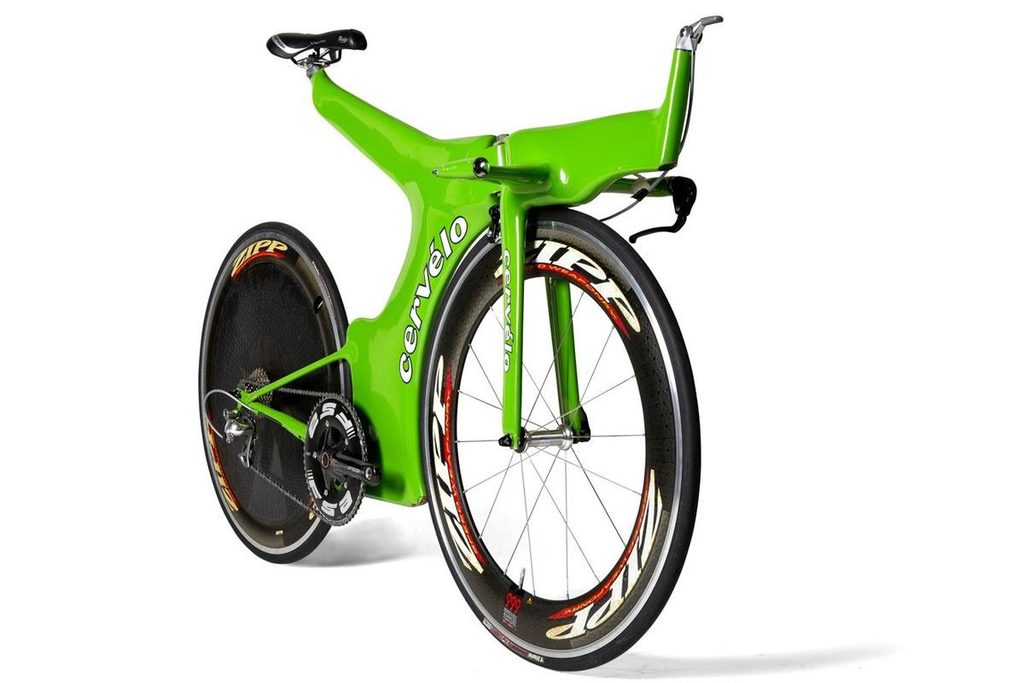
Today we get our first new Halo Bike since Halo Bikes became a thing on Zwift back in March 2025. It’s the Cervélo Baracchi, a time trial bike created by Cervélo founders Phil White and Gerard Vroomen in 1995 as the company’s first “professional” bike.
The Baracchi is rated 4 stars for aero and 1 star for weight, just like the only other Halo TT bike in Zwift, the Pinarello Espada. It also costs 10 million drops, just like the other Halo Bikes, and you must fully upgrade three Cervélo bikes before you can buy it.
Preliminary tests show the Baracchi is a bit more aero than the Espada, but also a bit heavier. We’ll publish the full details ASAP.
Watch Gerard Vroomen talk about the Baracchi on this GCN episode:
Moving Bike Swaps (and Upgrades!)
Zwift says, “Zwifters can now view, swap, and upgrade their bike frames in the Garage while their bike is in motion during activities (excluding events and races). In events or races, Zwifters must still come to a complete stop to change bike frames.”
That’s right – you can now swap your bike, purchase an upgrade, or just browse your garage, all without stopping! Here’s a quick demonstration:
Please note that you can only doing moving bike swaps/upgrades when free riding. If you’re in an event (any sort of calendar event or Meetup), you still have to stop moving to access your list of bikes and swap or upgrade a bike.
My opinion: I think we should be able to swap bikes on the move in group rides, but not in races. For three reasons:
- You often reach an upgrade stage in the middle of a group ride. Having to stop before you can purchase an upgrade is silly, and leads to some riders forgetting to do so at the end of their ride.
- Being able to swap bikes mid-ride would add some fun and even strategy to group rides.
- I’m always for letting people browse menus, their garage, etc unless there’s good reason not to. Since group rides aren’t races, I don’t see a reason to restrict swapping.
A few more notes:
- If using a laptop with a keyboard: the T key shortcut is still the fastest way to access the Garage.
- Your avatar will continue moving as long as you’re pedaling while you’re in the garage.
- When you click on a bike (even while previewing), it’s immediately applied to your current stats. However, others will see your bike equipped only after you’ve exited the Garage. This is the same behavior as before.
Looping Routes – Start Wherever You’d Like
Today’s update makes it much easier to complete a loop route after joining a RoboPacer or teleporting to a friend. The release note says: Zwifters joining an in-progress route (e.g. RoboPacers, teleporting to friends) now earn route completion after completing a full lap back to where they started. Previously, Zwifters needed to complete a full lap from the start of the route.
Before this update, if you joined (for example) a RoboPacer on Tick Tock, and the pacer was just 1km past the start/end line for the route, you would have to ride the remaining 15.8km of the 16.8km loop until you passed the start line, then ride the entire loop through to the start line, in order to earn the route badge.
This, of course, meant potentially a lot of extra work for riders joining Robopacers or teleporting to friends and hoping to earn a route badge. It was also confusing, as it’s not always clear where a route’s start/finish line is located.
Today’s change means you could join the RoboPacer in the Tick Tock example above, and simply ride the length of the route (16.8km) to get credit for route completion and earn the route badge.
First Person in Zwift Video
One popular request since Zwift Video’s rollout has been “first person view” – that is, the ability to hide your avatar. Zwift added this in today’s release, accessible via the action bar. Here’s a quick demo:
This is sort of a “quick and dirty” implementation of first-person view. The typical keyboard shortcut (camera angle 3) doesn’t work, and of course the view doesn’t move left or right as you steer. But if you’re just wanting a full field of vision as you ride a video route, this does the trick.
Powerup Redesign
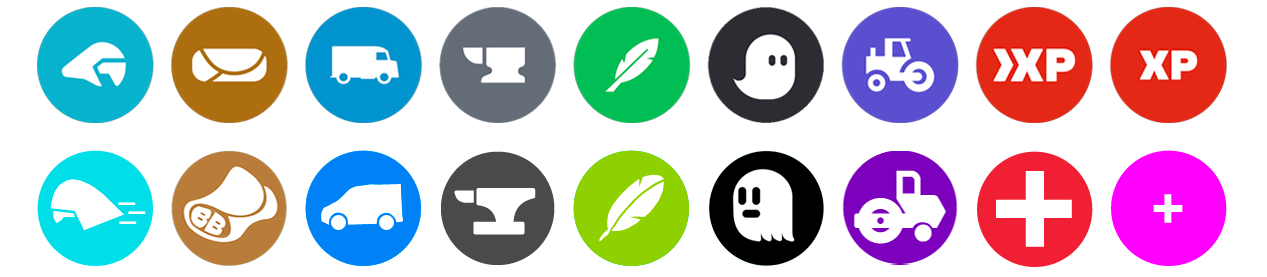
Zwift has updated their powerup icons with cleaner, more modern look. Here’s a comparison image showing the new icons above their older versions:
Release Notes
Zwift supplied these additional release notes:
- Fixed an issue that could prevent Zwift Video routes from loading on Windows when the user folder name contained special characters.
- Fixed an issue that could affect route progress shown under the mini-map after teleporting to a RoboPacer.
- Fixed an issue that could cause the Club selector to be missing when saving an activity.
- Fixed an issue that could cause the lap counter sign on The Watopia 150 route (Watopia) to not count down during events.
- Fixed an issue that could cause the second lap distance for several longer lapped routes like The Watopia 150! (Watopia) and Four Foalsmen (Watopia) to be incorrect.
- Fixed an issue that could prevent event organizers from creating multi-lap events on the Paris Roujours route (Paris).
- Fixed an issue that could potentially prevent virtual shifting from working on the Home screen.
- Improved device connection reliability for trainers connected via Wi-Fi / LAN.
- tvOS: Fixed an issue in tvOS 27 that could cause Zwift to display only in the lower-left corner of the screen on some TVs.
Discuss this update in Zwift’s forum > (link coming soon)
Questions or comments?
If you spotted any other changes or bugs in the update, or have comments about this release, please share below!

