

It’s been almost a year since I first wrote about the ZwiftPower ZRS browser plugin. This free plugin, created by an avid Zwifter, began its life delivering a simple but useful upgrade to the ZwiftPower experience by adding Zwift Racing Score results to event pages.
See the plugin at the Chrome web store >
Since its launch, the plugin’s creator (who goes by the pseudonym “int” on socials) has continued to build out features, adding ZRS History, Power Curves, a personal dashboard, and much more.
Today, I want to dig into a little-known but highly intriguing feature of this plugin: Power Data Analysis. In particular, I want to look at the plugin’s ability to analyze power data and draw objective conclusions about a rider’s use of Sticky Watts and/or Ghost Watts. Let’s jump in!
Defining Sticky Watts and Ghost Watts
I wrote a post unpacking the mechanism and exploitable benefits of sticky watts back in 2020. Everything in that past is still accurate today, including this simple summary of sticky watts:
Zwift processes the data for certain power meters in such a way that the wattage reading in-game gets “stuck” on a particular wattage for 3+ seconds whenever a rider stops pedaling quickly.
It’s important to note that only certain power meters/smart trainers are susceptible to sticky watts. Pedaling oddly doesn’t mean you’re abusing sticky watts – you have to have the hardware that allows for the abuse. Specifically, you need an event-based power meter. These devices only send data when they experience a particular physical event, such as a pedal revolution. The most common event-based power meters seen in Zwift are pedal-based power meters. Event-based power meters work differently than most smart trainers and smart bikes, which are time-based power meters, sending data at regular time intervals (say, once every second) regardless of whether you’re pedaling or not.
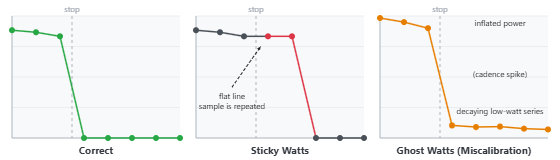
Ghost watts aren’t discussed as much in the Zwift Community, but they’re an important issue as well. Ghost watts are typically caused by a miscalibration which raises the “floor” of your power meter from 0 watts to, say 20 watts. They are easily spotted: if your cadence drops to zero, but power meter continues to send a reading to Zwift, whatever it is sending are ghost watts.
As the ZRS Plugin’s FAQ page explains:
It is important to note that coasting only makes the miscalibration visible, but every reported power sample at all times is affected — not just when coasting. In most cases this results in a small overreading of 10–30W, though deliberate miscalibration can produce hugely inflated readings of 100W or more.
Detecting Sticky Watts via the ZwiftPower ZRS Plugin
The ZRS Plugin does its work via ZwiftPower’s Race Report page, which is a bit hidden on the site but has existed for years. Here’s a link to a Race Report from my recent 100km Pizza Burner ride: zwiftpower.com/racereport.php?id=725850600006
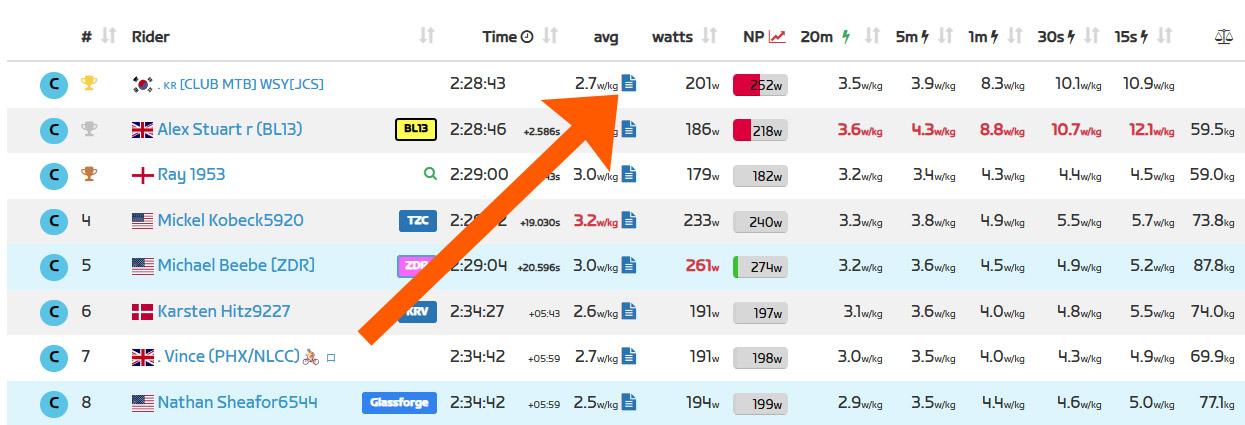
With the ZRS Plugin installed, the Race Report links are made more prominent – it’s the blue page icon next to a rider’s average power:
Clicking one of those links with the plugin installed produces an augmented Race Report page which includes the plugin’s Power Data Analysis at the top and ZwiftPower’s regular charts below:
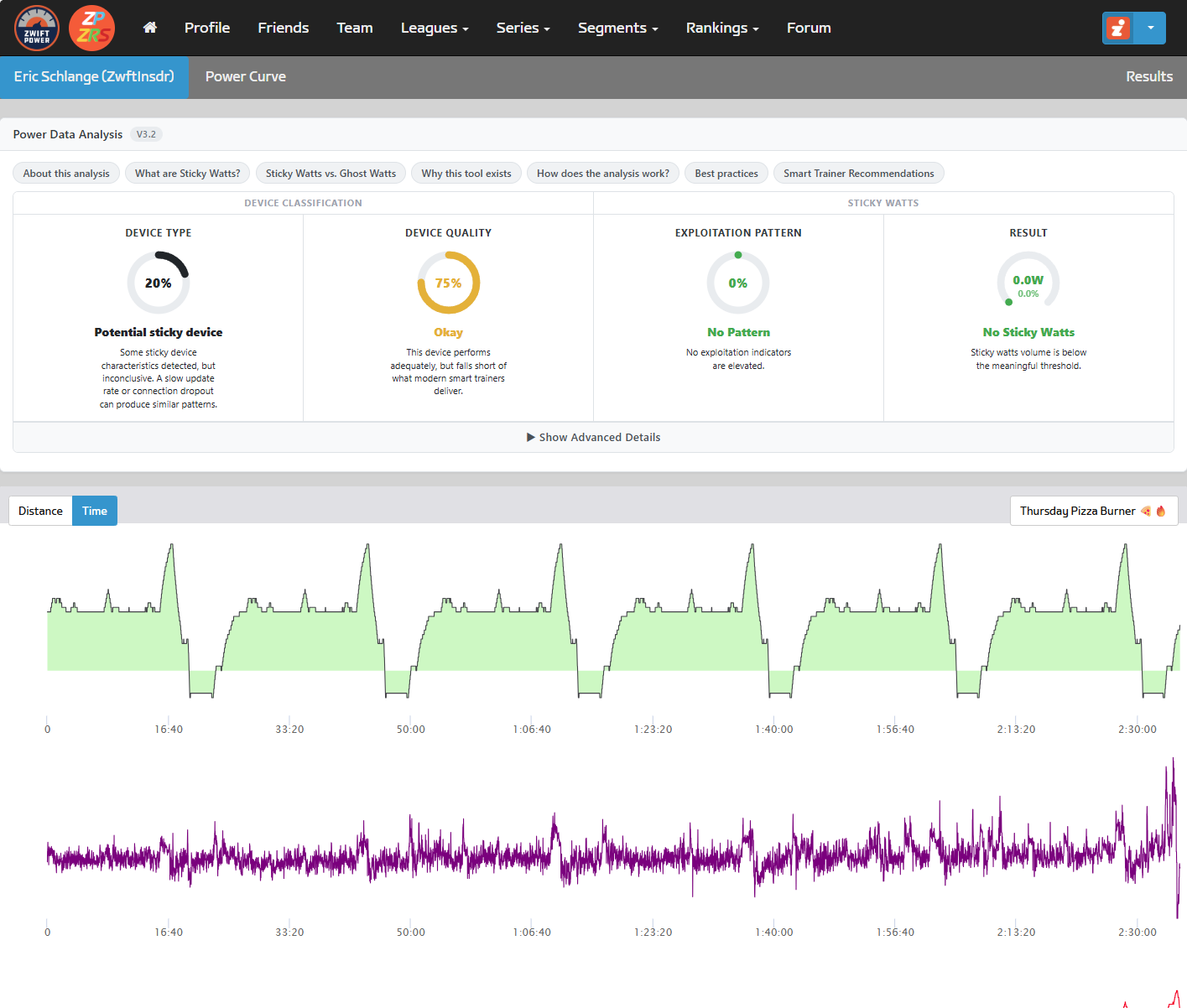
ZwiftPower ZRS’ Power Data Analysis computes and displays four scores:
- Device Type
- Device Quality
- Exploitation Pattern
- Result
You can read all about these by clicking the “How does the analysis work?” button on the Race Report, but basically, these scores are used to answer two questions: is this device susceptible to sticky watts, and if so, how much did it matter in this race?
My chart above shows that I used a potentially sticky device – which is true, since I paired my Favero Assiomas as the power source in Zwift. But it also shows that any sticky watts which occured were “below the meaningful threshold” – so no cause for concern.
Contrast my Race Report above with this Race Report from a rider who shall remain unnamed:
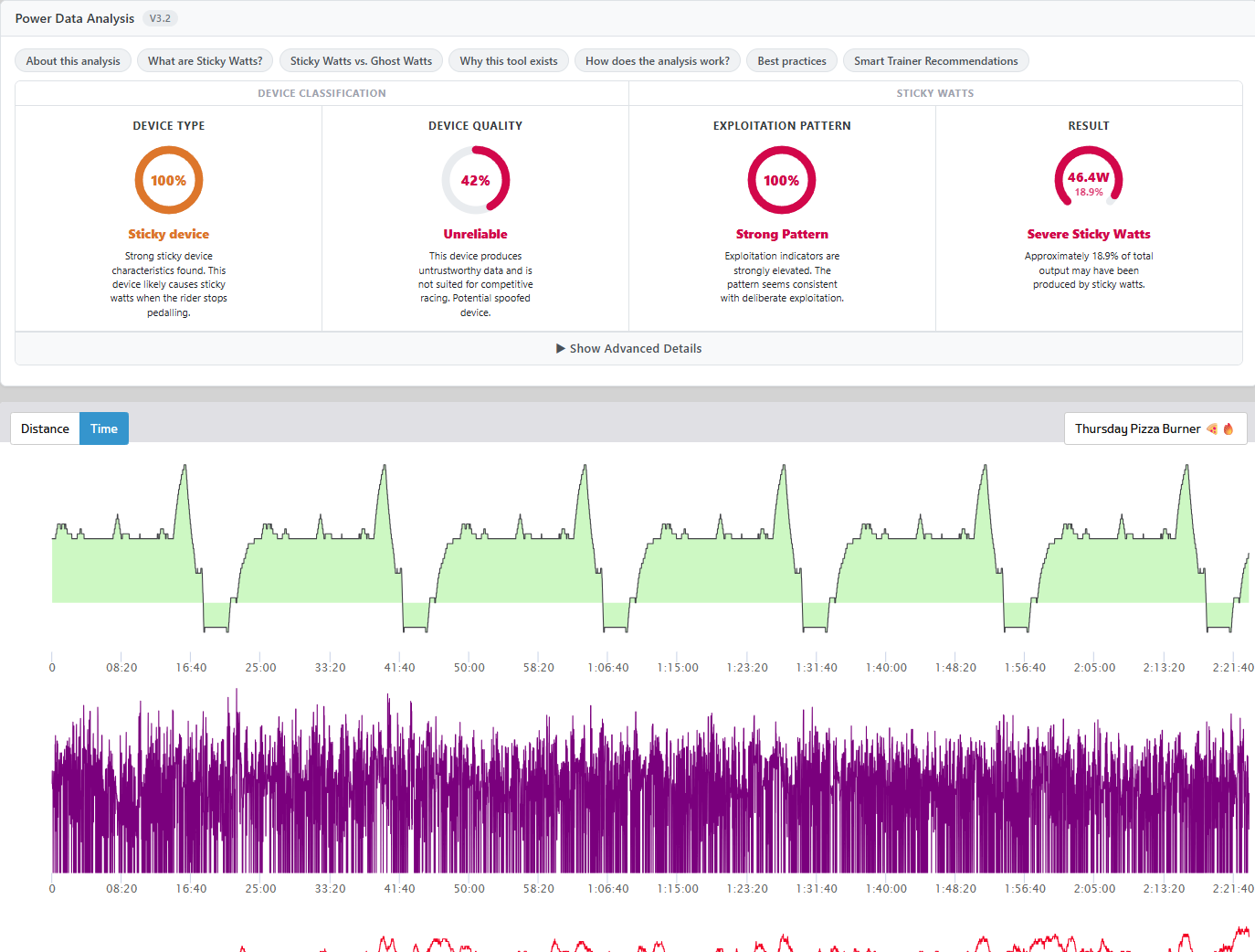
Wowzers! Major red flags here, including an estimate that 46.4W from the rider’s average power came from sticky watts.
Clicking the gauge drops down additional info which includes details of how each figure is calculated.
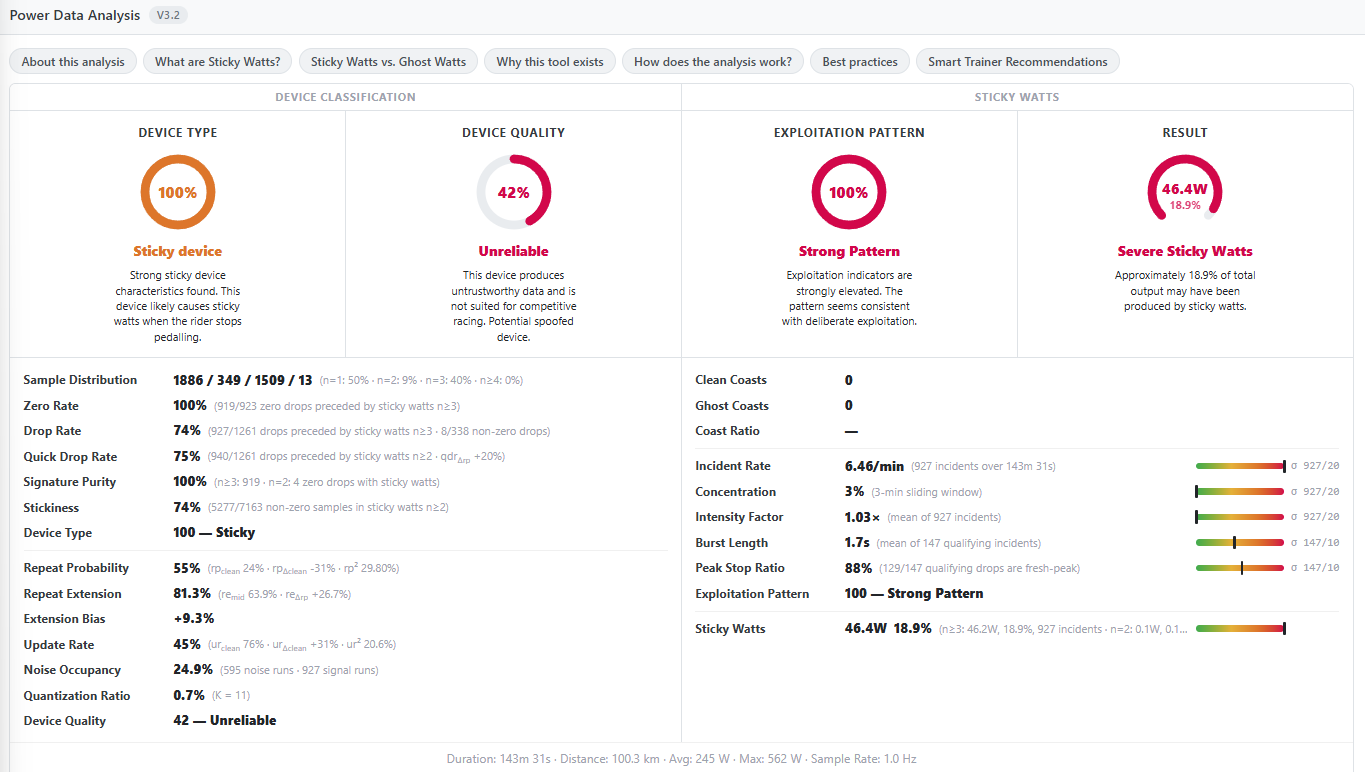
Of course, anyone who understands sticky watts can glance at this rider’s power chart and immediately see the pattern. Zooming into a random portion of his power chart, I see this:
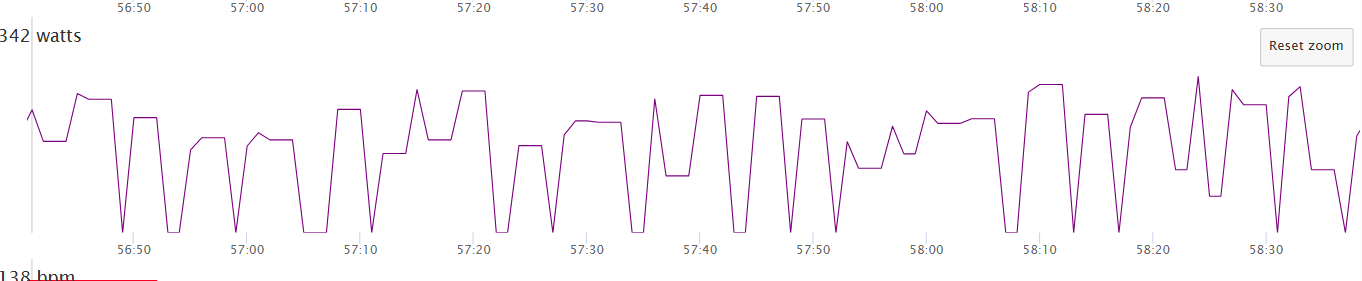
All those flat spots are sticky watts.
After checking a pile of riders’ Race Reports, I wasn’t able to find any examples of ghost watts – so I can’t include screenshots here.
Real-Time Detection in Zwift
If you think anything like me, seeing sticky watts detected so clearly and quickly by the ZwiftPower ZRS plugin makes me think: it’s way past time for Zwift to start detecting and dealing with sticky and ghost watts. At this point, 10+ years into the Zwift racing experience, it’s just silly that the ZwiftPower site (or Zwift’s newer results at zwift.com) can’t flag sticky and ghost watts after the fact.
And really, these patterns should be detected in real-time as we ride! I’m convinced that a fair number of riders abuse sticky watts without even realizing it. Those riders need to be informed of what’s going on, so they can take measures to resolve the issue. And bad actors who choose to continually abuse sticky watts? Give them a shadowban. Block them from racing. Or at least… at the very least… remove them from results.
Your Thoughts
I hope you enjoyed this look at yet another impressive feature from the ZwiftPower ZRS plugin. But now I’m curious: what do you think of all this? Share your thoughts below.


>> it’s way past time for Zwift to start detecting and dealing with sticky and ghost watts.
100% – surely if this add in can do it, they can do it! It causes a lot of upset in team racing and nothing any of the riders can do about it.
Agreed–can’t catch them all, but take the low hanging fruit. Suspend their IP address from races for a period of time so that they can’t simply create a new profile. Simply eliminating them from the final standings does not eliminate the impact they have on the race (other “clean” riders sitting on their wheels).
Unfortunately, IP addresses don’t work the way you think they do.
“It’s way past time…”??
Are you new around here, Eric? We’re talking about Zwift-time.
I look forward to riding the Zwift velodrome in 2035, and elimination races coming in 2041!!
Ghost watts isn’t a power meter issue nor a calibration issue, it is a Zwift bug.
I notice this every time I connect my trainer to both Zwift and a head unit (e.g., a Garmin Edge) and come to a downhill. When my cadence drops to zero, Garmin reports 0 rpm while Zwift jumps to 120-130 rpm. Garmin reports 0 Watts and Zwift reports 10-25 W (which makes it impossible to do a supertuck).
I have experienced this with two different trainers and with every connection protocol available (BT, ANT+, ANT+ FE-C), there is no difference.
I have sent numerous reports to Zwift support about this, with the measured data from both Zwift and Garmin in a comparison tool (Zwiftpower analysis) and they just do not seem to understand the problem at all. I have also talked to others having the same issue (unable to supertuck).
It is not about having an offset (the power data matches Zwift every time you pedal, but not when you stop pedaling) and it is only a drawback, not a benefit since it gives you 10-25W instead of a supertuck and you get dropped on every steep descent…
I have a tacx smartbike and the kickr core. On neither of them I have ever witnessed any strange watt behaviour in my rides. All of my rides across all different types of race formats report back with perfect analysis score. Never had a single issue with a super tuck.
Ditto. They know about it and just can’t fix it. I had the kickr core that they replaced with the Kickr core 2. Same problem. They acted like the update they put out quite a while ago fixed it, but it didn’t. Now, I just approximate what my actual power is for pr’s , but as far as racing goes… it sucks to be the people I race against.
Exactly right: “They know about it and just can’t fix it.”. This has been an issue ever since they introduced virtual shifting and Zwift falsely claimed to have fixed it via update. Reality is they have planted their head firmly in the sand.
Personally, I and others have posted detailed reports of the issue and recalibration attempts in the forums, with video evidence, and Zwift just ignores.
I can second. When upgraded to VS the measured Watts fluctuated when climbing Alpe du Zwift, which I had never seen before riding w/o VS. a simple comparison disclosed weird correlations between cadence & Watts obviously caused by VS and later also experienced by auto-calibration.
I have also noticed Ghost Watts in my setup, with Tacx Neo 2T, Apple TV, Zwift Click and iPhone 13 Pro all running on latest versions of firmware, depending on the Zwift version and the Companion App version, I see Ghost Watts on some releases and not on others.
I’m always running the latest version of all software, so it seems like Zwift have some software problems with Ghost Watts.
I think it might mainly be part of the complicated Bluetooth communication that has to go on, between all the devices – Zwift Click, Neo 2T, Heart Rate, iPhone and Apple TV.
Maybe the fault could also be a combination of software changes, between release from Apple and Zwift, but maybe the test harness tools Zwift apply, need a bit more focus on the connectivity areas.
Just a guess 🙂 – ride on
Anderfo – regarding the Zwift ghost watts bug and inability to supertuck: once you stop pedaling on the descent try shifting to the highest gear. That will cause a brief spike in the ghost watts, then Zwift will recognize the cadence is actually zero and will allow the supertuck to activate.
Glad this has finally been covered – Team Managers, Race Organisers should be all over this – the hard evidence is now at hand. I will accept that some riders will possibly be unaware of defective equipment but I suspect the majority are aware and chose to exploit it. Before we take on any new members we check and dip sample recent races. Plot twist – some riders are too good to be true
even if this ZRS Plugin cannot detect any cheat, it would be a tremendous help for clean racing. Im pretty sure there are other methos which cannot be detected (some riders improve way too extreme in just a few months) but its much better than nothing.
As someone lucky enough to have to race in the advanced race pens, it really saddens me to see how our races are affected, repeatedly, by riders who seem to be abusing the platform through dodgy power readings or not updating their weight on a regular basis.The very strongest riders can hang on and get pulled along, inflating the speeds and then for those that don’t have the numbers, getting dropped leaves you (okay, me!) with an even bigger gap before you might hope to join forces with other popped riders…
It would be awesome if Zwift could beef up the racing experience (likely just for the highest categories, or as an option for race organisers to turn on) by doing more to ask for at least an initial weight verification video and then thereafter if weight reduces by set increments (absolute and as a percentage). Same for height too.
Perhaps time to mirror gaming platforms like Xbox and restrict the ability to change your username too… So riders can’t hide by adopting a new identity.
And then for those riders who are known to abuse the platform – can we please make them invisible and undraftable and left off the results? Let them ride like that and see if it’s still worth their while…
Advanced races are just a joke now. It’s only worth doing private races like ECRO.
I’m “only” in B races and there seems to be some questionable weights and power numbers based on zwiftpower data.
As we’ve tried to build out better reporting on Fit files, one thing we track now is a count by “sticky duration”. Almost everyone has sticky watts in Zwift, but for most riders these sticky periods are infrequent and last up to 1 second in length. Where it gets interesting is when riders have dozens of incidents of 2, 3, 4, even 10(!)second periods where the same watts persist.
Sadly it’s up to organisers to police these things and without any inherent means to contact an organiser on the public calendar races there doesn’t seem to be much general risk in cheating. In-game detection would be amazing in that regard!
Actually, another thought – time to introduce the concept of a Race Licence. You’d pay a fee to get yourself vetted (weight & height verified, perhaps power meter/trainer QC too) and then you’d be able to race against other verified riders.
Could be a toggle option for race organisers?
I’d willingly pay for the privilege of cleaner racing… By being optional, no friction for people who just ‘ride’ or people who want to dip their toe into racing for the first time
You just described ecro
True (does it track weight changes over time?) – but integrated into the platform natively and more easily known about, then hopefully more choice of events to participate in.
I only came across ecro this year because a teammate was participating…but I’ve been on Zwift for years, follow Zwift insider etc and never heard of it!
Why are some names “Greyed” out and do not have the “Race Report” link?
I didn’t see any report of trainer type or version. That would be pretty cool if it’s available in the data.
If there is no race report then they have chosen to hide their data from Zwiftpower. If someone does this in a race there is about a 95% chance they are cheating.
Zwift have chosen not to write useful info like trainer type to the fit file so that info is not available.
I’ve looked up myself in a race and my name isn’t greyed out, but I don’t have a button to get to the Race Report. Instead it says “Source: Live data”. What setting should I alter to fix this?
Sometimes your race report will show up after a few minutes, assuming it’s not a super short race where the fit file never gets saved. Post a link to your profile if you want me to look closer!
I have the same issue. I have the Zwift Power ZRS plugin running (although I don’t keep my browser open while I ride). At the end when I got to Zwift Power, I always get a lightning bolt that says “Source: Live data” instead of a report. I got one report a single time… but I can’t remember if I did anything different on that ride (by the way Brian, my report said 0% chance of cheating…).
I have wondered if it is because instead of using my Garmin Neo 2T for power, I use the Quark power meter in my spider. The Neo 2T is still the controllable, so maybe Zwift is reading power from it as well and corroborating live the data from a pair of power sources? I have no idea. I can’t figure out why I don’t get the reports.
My profile is: ZwiftPower – Cilantro Thirteen
You keep saving your activities as private on zwift. Save them as public.
As a beneficiary/victim of sticky watts., I feel compelled to share my experience. I could write a whole book about my experience with sticky watts, but will try to keep it brief.
Firstly, for those wondering, Sticky Watts is not a Zwift issue, it occurs on Rouvy and MyWhoosh as well and most likely, also on TPV.
Secondly, at least in my case, although I do not intentionally try to take advantage of it, it is invariably present, to some degree in every race.
Thirdly, the harder the race, the more prominent Sticky Watts becomes.
Fourthly, the more downhills in a race (eg. Mayan San Remo), the more, sticky watts are generated.
Fifthly, sticky watts is not only an issue in racing, it impacts on the rider’s FTS, CP and other fitness data, making training planning difficult.
My Sticky Watts issue has been investigated by the trainer manufacturer, but even a replacement trainer has not fixed the issue.
Here’s a short YouTube video, I made about my situation, a few weeks ago (4) STICKY WATTS – Zwift, Rouvy, MyWhoosh – YouTube
Cross-post from the Zwift forum:
Simple fix: identify sticky watt riders with the yellow warning symbol ⚠ ⚠️
Riders who knowingly exploit sticky watts will stop.
Riders with technical issues will be notified.
Riders who don’t care will continue on with the cone of shame. 🤷
Even in non race events, sticky watts is cheating.
It’s easy for those without the issue to be ‘holier than thou’.
Not that simple and it is not a matter of me not caring. I do my best to minimize my sticky watts but sometimes, despite my best efforts, especially in particularly hard races and races with a lot of downhill, sticky watts feature strongly. I have a $Aus6,499 trainer. I did not ask for it to have sticky watts but it does. The manufacturer has not been able to fix the issue to date. I don’t care about winning, I just enjoy racing, I will keep doing it whether the manufacturer can fix the issue or not. Wouldn’t you?
I agree with you ‘Even in non race events, sticky watts is cheating’ but the reality is that I am primarily cheating myself and it is largely out of my control.
I promise you, it is not fun, having invested substantial money, in a sport, being treated as a leper, for an issue, you have little control on.
I think the responsibility should be with the device manufacturers to produce trainers that are not prone to sticky watts.
Penalising and shaming riders who cannot afford to change setups is not a good look.
I was looking at a few riders and their races… I noticed a new column between Device Classification and Sticky Watts at the top… “Calibration” for one Tiny Race. Never noticed that one before.
and then there are those guys who suddenly ride at domestic pro level when they were barely a B rider less than a year ago. Yet the plugin shows no red flags. I can only imagine what other hacks or cheats are out there.
Could we just ban event-based power meters like we ban zpower trainers?
So what happens to guys like this, he’s been doing it every ride since 2024? https://zwiftpower.com/profile.php?z=2808022
It has not been mentioned here but in some cases, sticky watts can be fixed by turning on the trainer’s ‘race mode’.
Using coffee break counts as sticky.
This can’t be accurate. Coffee break times are exact lengths. I am sure the analysis can detect and filter those out.
I wanna reach out to the Race Organizers:
If you do organize regular races please keep the community healthy and do not recognize results of people who do not even use a good enough race setup. Showing “Unknown Device” or “Potential Sticky Device” should not be encouraged to keep using.
Also people with an sudden increase in performance. Training hardly works like that. Please be critical and support clean racing even if that means that a couple of people get flagged or dont join anymore.
Guys like this cheating for over half a year. https://zwiftpower.com/profile.php?z=5451886
His current data isn’t showing sticky watts, so I’m not sure what you’re refering to…
I love all this stuff. I wsnt every watt and centimetre validated. Being able to see what we shouldnt be doing is nearly as valuable as where i want to be where you see what you SHOULD be doing!
Very little prevents zwifters from lying about height or weight, or using a miscalibrated power meter. Fixing sticky watts isn’t going to make the game fair. I do wish it were fixed because some people abuse it unintentionally — in fact I think the game “trains” you to do so over time. But at the end of the day, zwift is a training tool. If you take the race outcomes too much to heart, you’re using it wrong.
Here is an interesting example of someone who has managed to rack up dozens of Strava KOMs and gain credibility within the Zwift community by seriously manipulating his power readings for years. Recent example with 100% exploitation pattern:
https://zwiftpower.com/racereport.php?id=727839500005
The rider frequently posts 5 seconds 2000 watt bursts, and no he’s not on the Olympic team!
Yup, some clear sticky watts there. Bummer to see – I’ve ridden with Micah on lots of group rides. Seems like a nice guy… but apparently with a questionable kick!
Most power analysis for these techniques is pointless in isolation of other metrics like speed and cadence.
Beware any solid “conclusions” drawn on any of this extension’s “objectivity”.
And most of all – don’t go finger pointing – don’t be that guy.
100% disagree, for the record.
While there may be some cases where sticky watts aren’t easy to spot, it’s very clear in others. Speed and cadence would just make the case even stronger, but all you need is the power graph to spot it.
I found an intersting case involving an opponent in a race today. I read in the report: 122 incidents, 2.88 cases/minute, and 13.6% sticky watts. The alternating curves show a peak of 5–7 W/kg followed by 0 watts, particularly on climbs.
Is this enough to speak of cheating, or could there be “mitigating circumstances” related to the software or technical issues?