

Zwift version 1.63 begins its phased rollout today. It’s a minor game update, but badge hunters will be happy to see that some formerly event-only routes are now free rideable. See details below…
8 Routes Opened
The eight event-only routes Zwift created for Tour de Zwift 2024 and the just-finished Zwift Games are now free-ridable (or runnable, in the case of one of them):
- Big Flat 8
- Castle Crit
- Castle Crit Run
- Jurassic Coast
- Loop de Loop
- Mountain Mash
- Spiral into the Volcano
- Zwift Games 2024 Epic
If you haven’t completed these routes yet, and want to grab that route completion badge and XP bonus… Ride On!
Brake Sensitivity Adjustment
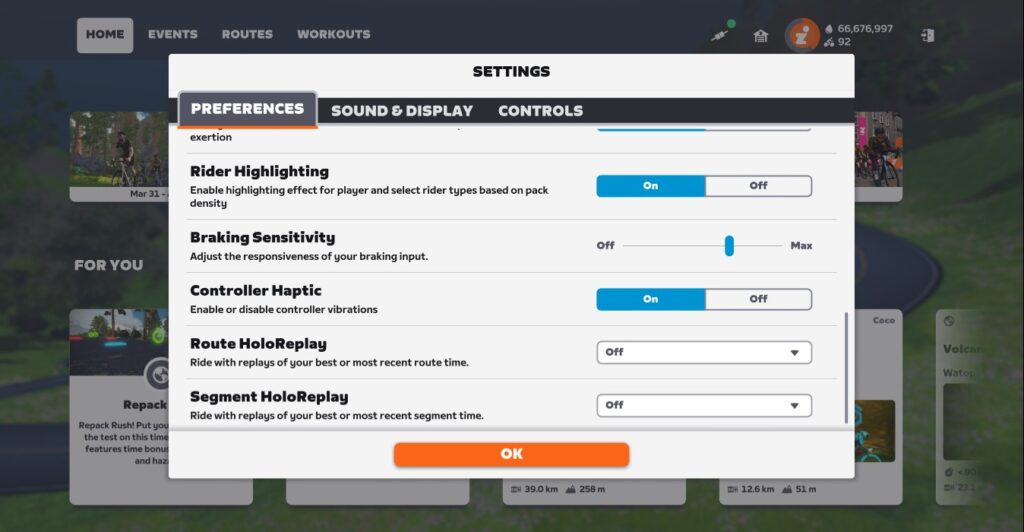
For Zwift Play users, brake sensitivity can now be adjusted in Settings, ranging from maximum sensitivity to off.
Our guess is that most Zwifters who choose to adjust this setting will just slide it to “off” because they’re annoyed at accidentally bumping their brakes. This setting lets you use Play steering and other features without worrying about hitting the brakes.
In the future, though, when Zwift modifies game dynamics to make braking a useful action, this slider may prove useful for dialing in your braking feel.
Steering Fix
The previous update introduced a bug which caused riders with connected steering devices to automatically steer towards the center of a lane after 4 seconds. This issue has been fixed.
Treadmill Connection Fix
Some Zwifters had problems connecting their treadmills after the previous update. This update fixes that issue.
More Release Notes
Zwift provided notes on additional tweaks and bug fixes in this update:
- Virtual Shifting: Fixed an issue in workouts where shifting quickly after starting a Free Ride block could result in the current gear being reset to 12.
- In-game achievement banners are now displayed for a longer period to make sure you don’t miss a celebratory moment.
- Fixed an issue that could potentially make it difficult to dismiss the Ride Report when navigating with a keyboard, Apple TV remote, or Zwift Play.
- Fixed a potential crash that could occur when capturing a screenshot.
- Android: Fixed an issue that could cause screenshots to not be saved on some Android devices.
Discuss this release on Zwift’s forum >
Questions or Comments?
If you spotted any other changes or bugs in the update, please comment below!


Virtual shifting update for Versions 4.& 5 on KICKR? Thats all I want to know….
That’s also the only feature I’m desperately looking forward to. But winter’s over now and it seems like they are not really in a hurry. I just hope they’ll effectively add it before next autumn.
I’m also waiting for this update to V5. However, this is the Wahoo website, not Zwift. We were promised an update mainly at the insistence of Zwift. Wahoo doesn’t want to add gears to old devices when you can buy new ones for them. So he will delay. I hope he will keep his promises.
I’ve been “virtually” shifting using my Wahoo app on my kickr for years. In fact, I don’t even have shifters or cables on my indoor bike. You guys are way behind.
How?
“In-game achievement banners are now displayed for a longer period to make sure you don’t miss a celebratory moment.”
Obviously just a minor thing but greatly appreciated by everyone who doesn’t have their eyes on the Zwift screen the whole time.
now all they need is to add a sound in the companion app
Race organisers, please start making regular use of Mountain Mash, it takes 23-30mins for lots in pen D that don’t exceed ~2.7W/Kg average…
Away with the repetitive pancake flat races!
Now we patiently wait for them to be on veloviewer 😁
New to Play but super happy with the brake sensitivity adjustment and the auto centralising. Great, thanks
Thank goodness we category B riders can FINALLY get the Mountain Mash route! Plus I’ve been waiting to schedule meetups on those new routes for ages. Wish Zwift would’ve prioritized getting those routes open for free-ride vice fiddling with the exp system. Better late than never, though.
We need zwift play in Australia
Love the additional free rides, still getting through them all here after switching from Pacer Rides which got a bit boring to be honest.
Boring update: how about something useful, like making the gradient profile and mini map larger and some advanced warning of time trials on Android instead of cartoonish gimmicks?
Gradient map larger +1
Also shadow or outline the white on yellow text!
Any word on when the new ranking/rating system is dropping?
Heard rumors it’s been ready for a while, but were waiting for the Zwift Games to conclude.
Zwift Racing Score, you’re talking about? It keeps getting pushed back… because they are concerned about getting it right. My guess is it’ll be released in the next few months, so it can be dialed in before August/September rolls around and seasonal Zwifters return.
Yup, that’s the one – thanks!
Brakes? We’re were going we don’t need brakes.
No, seriously, we don’t need brakes!
I’ve been using braking before it was even a thing in zwift racing. Especially Harrogate where using brakes to position yourself can save an extra 5 seconds of effort
Brakes are useful to the end of the ride, or to change the bike/wheels quicker for me.
Iam the only one who use it for?
with pace partners after sprint segments to avoid dropping the pp
When selecting routes, let them be drawn immediately and not like now, where a dot is drawn at a snail’s pace. You have to wait a long time until the entire route image appears. No sense. In the past, the entire route outline was shown at once.
I think I got bonus drops on the alpe spinner this morning is that a new thing?
Did u reach a new level there too?
Ah yes, that could be it.
Break Sensitivity Adjustment is a good step towards more customizable Zwift Play devices. What about adding sensitivity to its main feature, the steering? I am always struggling with pushing the paddle soft enough to get less than 100% steering…
Yes, please fix this!
Update: Steering with Zwift Play seems to me more sensitive and a bit slower now after the 1.63 update. Appreciate this!
Even though the release notes do not mention anything about it…
I don’t see the new event routes listed yet as available For example if I want to create a meetup for Mountain Mash
Yeah, they aren’t yet available in the Companion app for Meetups or Club Events. Maybe in the next Companion update?
They seem to available to select now when creating a club workout, but you get a server error when you save the event.
Steering fix Yes! Now I need a Kickr Core fix so I can get back on…
Any update on when the new level system will be rolled out. I know Zwift has said early May, but curious if there is a specific date yet.
Steering angle ratio is too small again in spite of using max sensitivity.
I have apple TV. The feature is not available when posting a photo finish
When I get a thumbs up during a robopacer ride the noise is so loud it hurts my ears in this version. Even putting the message and notification level down doesn’t barely solve it. I almost don’t hear the ride ons anymore, thumbs up noise still loud. Anybody also noticed that?
Zwift click broken after 1.63
I fear steering (at least on the Elite Sterzo) is still broken. In V1.63 it now feels like driving a 40t truck… Can’t we just go back to pre V1.62? I guess an option to adjust sensitivity (similar to brake adjustment) would do the job. Thx in advance.
I use Apple TV and have updated, but I dont see the option to turn braking off in the settings menu
I really would have liked to be able to se where the route is going on the mini map while cycling. Like a clearly marked line so I know where I will be heading next.
I would really like to see the country name or at least an abbreviation to the right of the flag for close by riders.
How about fixing the minimaps in Urukazi? When doing the climb up to / descend from the Sisha sprint (either way) it zooms in so much that it becomes completely useless. All you see is a massive arrow and about 10 meters of road. Similar issue (but not so drastic) on th northern end of NYC.
They really need to activate the brakes on Kickrbikes. Steering is activated, why not the brakes too? it makes no sense and is annoying on a bike that cost a few thousand to buy.
Anyone have a link to Zwift Laucher:? I cant don download from the main page , for any reason (windows)
Using Apple TV – the route stops after about 48km have been completed.
With 1.63, the companion app on Android is hiding my location arrow in the map behind the power/speed overlay. I can see the arrow but i cannot touch it. The arrow stays at the top of the map.
Has anyone else experienced this bug or have any suggestions?
The companion app is dated Feb 2024 so i am assuming that it was the latest Zwift update that borked it.
Nevermind, a 2nd reboot of the tablet fixed the issue Go figure