

The coffee stop is a time-honored tradition in road cycling, and in May 2023 Zwift brought it into the game. You may have noticed it: a circular coffee mug icon floating over riders’ heads in the group.
What’s it all about, and how does it work? You’ve come to the right place…
What is Coffee Stop?
Taking a “coffee stop” in Zwift doesn’t inject caffeine into your veins, but it does let your avatar keep pace with your current group while you take a short break! Here’s a quick demo:
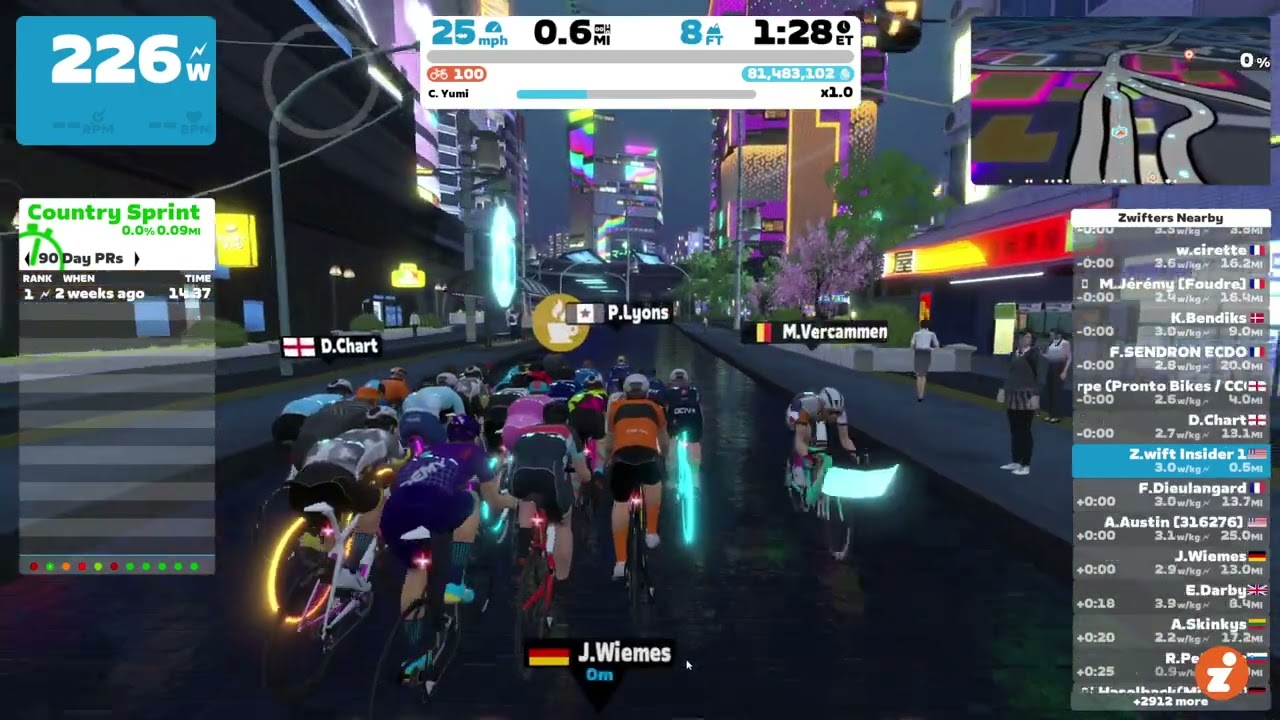
Why take a Coffee Stop?
Have you ever been riding with a great group on Zwift, but you need to hop off the bike to grab a towel, refill a water bottle, or take a nature break?
Coffee Stop lets you stop pedaling and do what you need to do without getting dropped from the group you’re in. Camaraderie often develops in packs of Zwift riders, and the Coffee Stop is Zwift’s method of preserving that special social aspect even when nature calls.
How To Take Coffee Stop
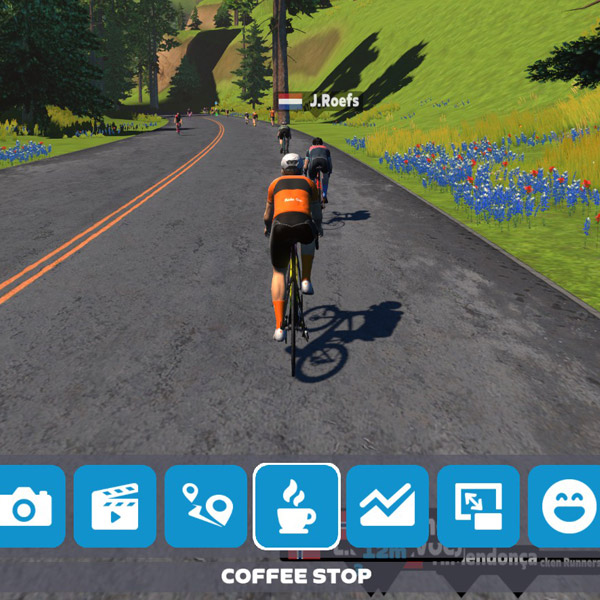
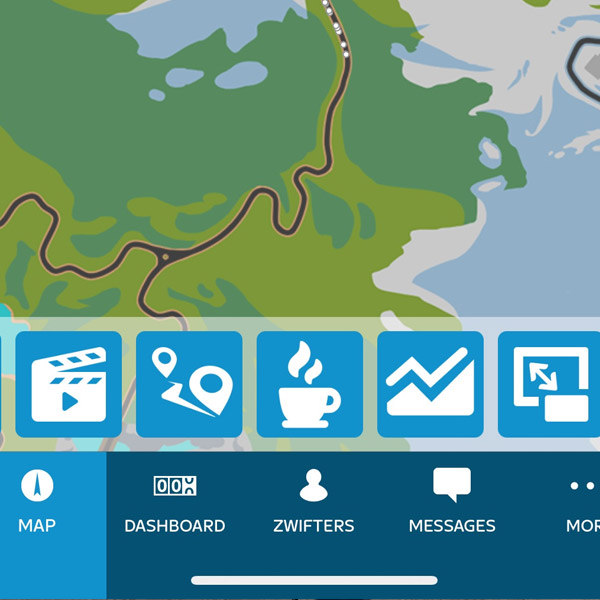
Need a coffee break? Simply tap the Coffee Stop icon (coffee mug) from the action bar or within the Companion app:
What? No Coffee?!
If the Coffee Stop button is greyed out, it may be that you recently used a Coffee Stop. Mousing over the Coffee Stop icon should tell you why it’s not activated or how long you have to wait before it will be active again:
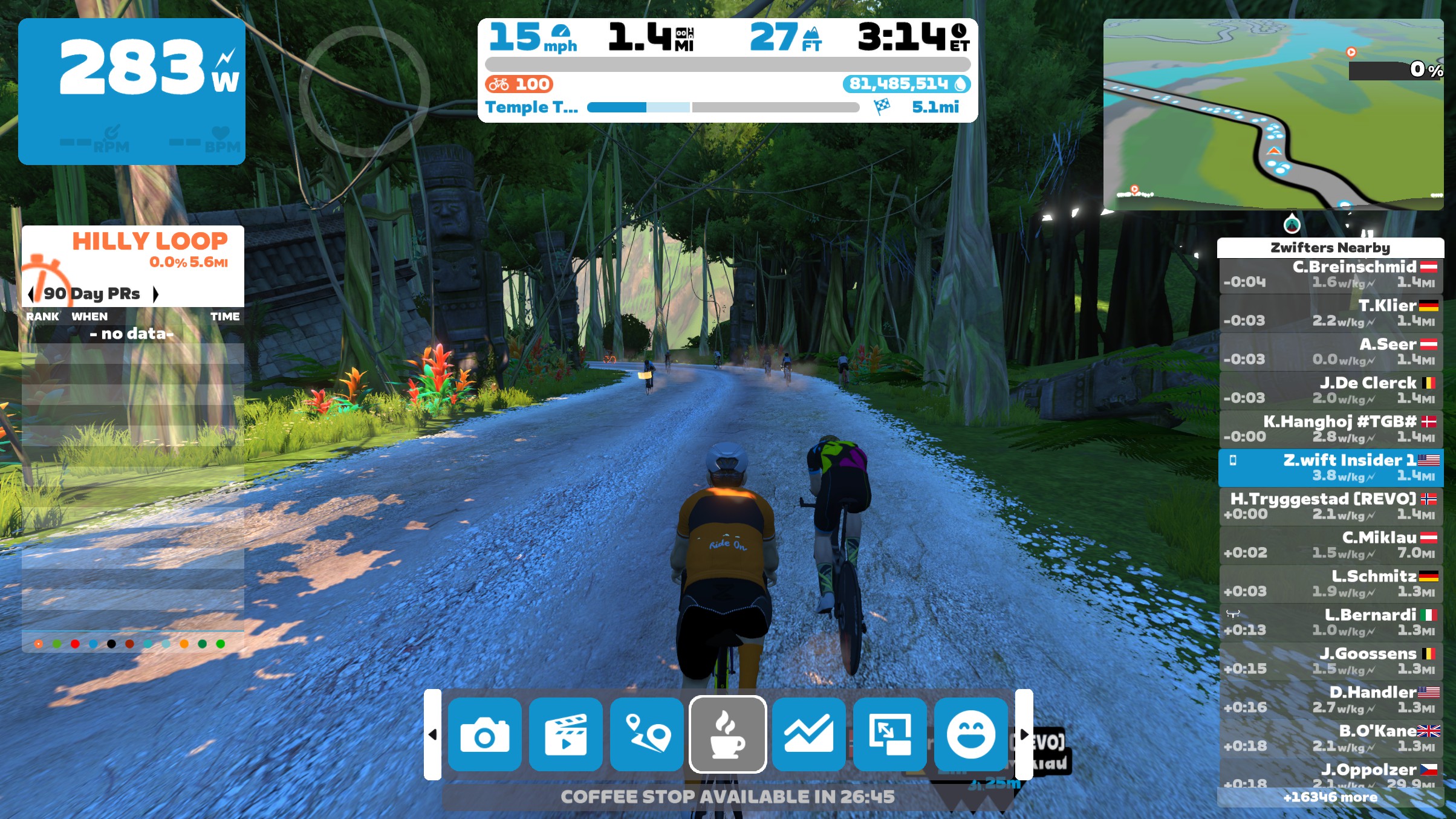
If no riders are nearby, you aren’t moving, or you’re near the end of a group ride event (see usage limits below), Coffee Stop will automatically be disabled:
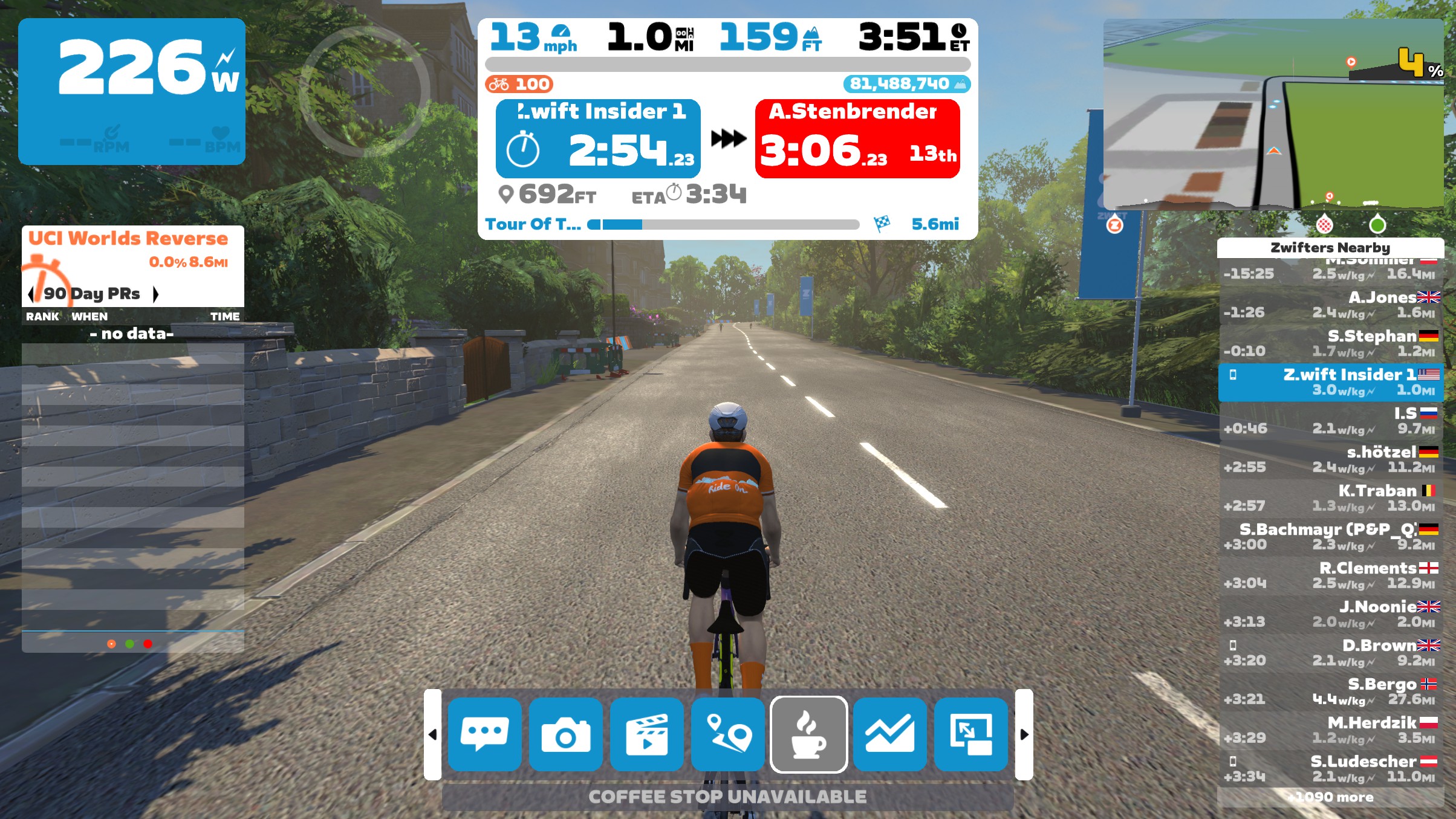
If the Coffee Stop button isn’t visible, that means you’re in a race event, group workout, or individual workout. None of these allow Coffee Stops.
Coffee Stop Usage Limits
- You can take one 30-second Coffee Stop in the first 5 minutes of your ride
- Once you pass the 5-minute mark of a ride, you can activate a 3-minute Coffee Stop
- Once you end a 3-minute Coffee Stop, a 30-minute timer begins. Only after these 30 minutes elapse can you trigger another 3-minute Coffee Stop.
- Coffee Stop is available on all routes in Zwift, but is automatically disabled in race events, group workouts, and individual workouts. Tip: during individual workouts you can just hit the “Pause” button in Companion or the Action Bar if you need to take a break for any reason.
- Coffee Stop is available in group rides, except it cannot be triggered in the last 5km of distance-based group rides or the last 15 minutes of time-based group rides.
- Coffee Stop is disabled if you aren’t moving or are riding alone (no nearby riders moving in the same direction).
Zwift Coffee Stop Minutiae
A few more bits for the Coffee-curious:
- It Keeps Adding Up: Yes, you will continue to accrue distance (and XP) during your Coffee Stop.
- Segments Count: You can complete all or part of a timed Zwift or Strava segment while taking a Coffee Stop.
- Strava Visibility: Your power, heart rate, and cadence continue to record during a Coffee Stop. So while your Coffee Stop won’t be super-obvious when looking at your ride on Strava or Zwift, it will show as a time block where you had zero power and zero cadence.
- Cutting It Short: If you want to end your coffee break early, just click “Done” on screen or in the Companion app.
- Riders Only: Coffee Stop is only available for cyclists on Zwift. No coffee for runners!
- Ending Early by Pedaling: Once your watts hit 0 after starting your Coffee Stop, if you begin pedaling again so your watts go to 40W+ for 5+ seconds, the Coffee Stop will automatically end. So make sure you’re ready to get going once you start pedaling!
Coffee Controversy
You may see some Zwifters complain about other riders “abusing” Coffee Stops. This is especially prevalent in group rides because yes, more coffee mugs tend to pop up on climbs than on flats or descents.
While we’re not here to tell you how to think, keep in mind that Coffee Stop is disabled in races. So while Coffee Stop users get a free ride for a few minutes, it’s a free ride in a social event where there are no winners.
Questions or Comments?
What do you think of Zwift’s Coffee Stop feature? Got questions about how it works? Share below!
Changelog
- February 24, 2026: Updated to include changes from v107 and v108 game updates.
- January 4, 2024: Original post published.

Seems to me most of the coffee stops happen at the base of big hills for some reason.
Really strange! Curious coincidence 🤔 😆
Have you never used a feather on a hill 💪? Ridiculous how people try and shame riders about this.
if a coffe stop rider is locked on you. you can always stop for a few seconds, and then go 😉 he will be left sitting there on the side of the road.
I’ve had that happen a few times, came back from a nature break to discover myself all alone by the side of the road.
Me too!!
Had someone do that to me, reversing direction once or twice works too
What’s the problem if someone uses a coffee stop to keep up with you on a group ride?
Why worry about it? It’s an honor to be chosen strong enough to drag someone with you at no cost to yourself.😉
In fairness, if you’re having a hard time keeping pace with the pack up a hill on a Sub2 ride or whatever, then IMO go ahead and use what you need to not to get dropped.
If you’re pushing pace with the flyers on a chill group ride like it’s a race then that’s already a bit ridiculous, although I guess we’ve probably all done it. And yeah, coffee stopping there (at any point really) is just sort of a self-dunk.
I was sweeping the other day and pushing big watts (for me) to bring a couple who fell off back and they coffee stopped to take the ride which was, I thought, great.
I imagined Zwift eventually disabling them at hills, perhaps when you’re within 2km?
Why? What is it costing any one else?
Had a few ‘coffee’ stops yesterday on TdZ stage 2 – really annoying and Zwift should consider removing the option / greying it out in certain cases IMO. When you’re cranking out 3.5 W/hk and you see the guy next to you suddenly having a coffee … a few times over a 32km course … yeah … right … 🙂
TdZ24 Stage 4, Petit KOM reverse: dudes hitting the base of the climb in the front group at over 6W/kg knowing they’ll hit that fresh delicious coffee button at the first plateau, do some yoga, maybe plant a tree, and then drill it down the other side of the hill on fresh legs and push a 15-second gap out to over a minute. It’s “just a game” when it’s not technically a race, but it’s super demoralizing and exceptionally tacky, and that discourages participation.
I’d love to see a virtual-wattage cap on the stoppers for any event that publishes a results sheet to ZwiftPower. Make it *just* powerful enough to draft in the bunch, but never exceed 4W/kg. Coffee stops should not be the ultimate power-up.
Or link it to 70% of their FTP as a max for the coffee break
Do coffee stops affect route badge unlocks?
no
No
Hey Eric, little typo at “Coffee Shop is available on all routes in Zwift” it should be Coffee Stop 😉
Fixed, thanks!
But wouldn’t that be cool!
Didn’t know about the first 5 minutes one, would have been super useful yesterday when I’d forgotten to pair my HR monitor during the TdZ stage & decided it couldn’t wait the 30 minutes. (Which I then had to use as I’d knocked my water bottle off the side table in the mad panic to get it paired so had to pick it up, luckily nothing spilt but was thirsty)
Yeah I used it for the first time today on the TdZ stage 1 event – the fan wasn’t facing me (wife moved it) so it gave me a chance to jump off and move it back. Not sure I agree with the 2 mins one but if not abused they are actually really useful.
On the first stage of TdZ last night there were quite a few comments about the use of “coffee stops” which as already highlighted in the earlier comments, coincidentally appeared either on the climbs up Leith Hill or Box Hill…
I’ve always had the view that it’s a group ride not a race therefore can understand the use for them as there’s nothing worse than dropping your drinks bottle onto the garage floor part way into a group ride (Not that I’ve ever done that! 🙄😳) but felt that they were certainly being abused yesterday. I witnessed one rider hit the button part way up Box Hill, cruised to where it levels off near the top then sprinted for the summit at 5-7WKG…
The baffling part for me, was that this was the second ride of this years series and positions on the ride weren’t working 😆 so instead of sprinting hard for 343rd/521st or whatever position, it became even more irrelevant…
Seems to one of those “marmite” issues for Zwifters though
Why are they being “abused”? Everyone has one so there is no advantage. The same option is available to everyone at the same time. No one is cheating, or hacking the game. If people choose not to use them that’s their decision. Also, as you say, it was a group rides. If people are bothered about position, go and race. They can’t be used in races.
Everyone can lie about their weight, so it isn’t cheating?
If you forget about results and position, it affects the group your in and potentially negatively your ride experience. If someone is about to break and uses the coffee, following this pause, they restart pushing with the group. Very unnatural result on the pace of this group. So you can get drop. You can be surrounded by cups at some point when it is hard pace… not fun
If you are being impacted by coffee stops you need to work on your own zwifting. I was on the 1st TDZ stage yesterday and there were loads of people using them up Leith hill. Zero impact to my experience. Maybe you need to work on your ride craft.
I’m not a gifted climber and have never used the option of taking a “coffee stop” I prefer to grind away for the feeling of satisfaction of when I (eventually) make it to the summit. So to see other Zwifters using their option to take a “coffee stop” when the going gets tough feels to me like it’s being abused… Just my opinion and as you say, when positions do matter, in races, it isn’t an option.
I wouldn’t use them either but as they are an option that is available to everyone it isn’t being abused. They are being used EXACTLY as they have been designed for. People should just worry about their own performance rather than that of those who are using a tool that is freely available to everyone.Their using it has zero impact to you or your workout.
Different people use Zwift for different purposes. Not all are racing, not all are at the same level of fitness, not all have the same goals or values within the game. I ride for fitness and fun, along with the social angle. I have no problem with anyone using the coffee stop because it personally doesn’t have any effect on me. I often ride with the Herd group and have absolutely no problem with anyone taking a coffee stop to keep from being dropped on a hill. It keeps us together!😃
I ride solo. I wish there was a way I could just pause for a moment. Have everything stop.
is this sarcasm? So hard to tell sometimes!
No, it is not sarcasm. I’m new to Zwift and am trying to learn. Sorry if that offends you.
If you are doing a solo free ride, when you stop peddling so does your timer, which is effectively a pause? I guess the same is not true if you are doing something more structured like a 24/7 group ride since that wouldn’t make sense in the context of a group activity
Yeah, sorry people. When I suggested Coffee Stops to zwift, it was for Nature Breaks.
Not to be used as you say, going up a slope in a group ride.
But they are only cheating themselves at the end of the day.
Just carry on riding your ride and forget about them.
Whenever something is invented, someone will find a way to abuse it somehow.
At least they can’t be used on Races, which is very important.
In principle it’s a great idea – I used it yesterday in the first 5 minutes for legitimate reason (turn fan on) and was nice not to lose my place in those 30 seconds.
For long rides where a longer ‘comfort break’ is needed it’s a great option. People will always find a way to use things to their advantage though. As you say it’s just cheating themselves at the end of the day. Some at the start of a hill will be legitimate though, so it’s best to ignore.
I think if you’re choosing to ride on a ride where it is enabled, and you choose to feel like there ought to be rules against certain types of use, then yeah, for now you have and should ignore.
Late join can be, and is, abused in very similar ways — there’s always a bunch of people popping up right after that first little hard bit.
If you can’t ignore then you can choose to ride in an event with more agreed and more usually enforced rules i.e. a race.
Other coping strategies:
– Understand coffee stops (and late joins, etc.) are, ultimately, a sign of weakness if they’re being used just to hold on or get some sort of advantage.
– If you’re afraid your buddy’s gonna win a bragging rights sprint after taking it then screenshot it and make fun of them for the rest of the year.
– If a coffee stop popping up stresses you out or ruins your ride or somehow you feel you can’t follow a large group anymore then, then you may have been red lining for too long. You’d probably be better off pushing less hard and moving up as people tire. Or you might choose to use the coffee stop yourself at the point you need to recover — it’s allowed.
I use the coffee stop and sometimes it’s my 4th or 5th time up a climb feeling a bit knackered and I really want to stay with the group I’m in. It sure is a relief knowing I can continue and get a little respite to get on with the ride and then sometimes I go on to 100k.It really is about yourselves so pedal on don’t be offended by others get going I’m glad every ride isn’t solo.Besides you don’t know what is going on in each other’s personal bodies. Recently I’ve been recovering from muscle problems and appreciate social rides I can stay in and that little help can keep me there.
I use Coffee Shop/Stop, but only on the longer distances where I need a pee break or am getting saddle sore. Sometimes yes I use it in a shorter ride to have a break when a supposed 2.2wpkg coached ride turns out to be 2,6! Otherwise I drop the group! No fun. However I never use it to climb the hills, that destroys the personal challenge.
I remembered on an unprecedentedly hard (for me) 100km ride where I had to use the feature 3 times to stay alive,…..that both the zwift, but particularly my Strava ‘marked down’ my performance for the ride. I need to recheck, but if you are looking at personal performance then coffee breaks ( stops/shops) are taken into account. So no you dont win
I am guessing, but I feel that if you use the feature on a long climb, you are losing more wpkg over the three minutes,……hence poorer results at the end.
So how are they cheating themselves? If you are a weaker rider and are faced with a hard hill that will end with you being dropped from the group without the ability to catch back up – you’re hurting yourself by using a method to stick with the group? I would tell someone in that situation “Hit the coffee stop and stick with us!”
It was not ment to be used as a tool to assist you in going up hills when the going gets tough.
It was designed to assist people who need a loo break whilst cycling in a group, or to pick up the dropped bottle or answer the door etc.
But it can have many uses I suppose. As you all say “each to their own”.
Important detail: if you use a coffee stop just before the last 15 minutes of a group ride, it will still be displayed as active once the 15 minutes limit is reached, but it will stop working and you will get dropped if you don’t pedal. It’s probably the same with the 5 km limit. Don’t know about the first 5 minutes.
Also important: if you pedal for a few second during the coffee stop, it will automatically end. So you don’t have to dismiss it, but you mustn’t pedal if you want to keep it active.
Interesting… I need to test those cases. I don’t think it shows as still active if you hit the 5km mark. But I’ll report back!
15 minute cutoff bug confirmed. Nothing changes on screen when you hit the 15 minute limit… it looks like your Coffee Stop is still active. But your rider just slows to a stop. Ouch!
5km cutoff bug also confirmed.
The Coffee Stop automatically ending when you start pedaling is also a thing. I couldn’t get it to trigger on the 30-second Coffee Stop you get in the first 5 minutes, but I did get it to trigger on the longer Coffee Stop. Seems to only happen after you’re at least 60 seconds into the stop, but I didn’t test it thoroughly because it’s a pain to test (with all the waiting around).
Confirmed conditions with Zwift for automatically ending if you start pedaling. I added this above:
“Once your watts hit 0 after starting your Coffee Stop, if you begin pedaling again so your watts go to 40W+ for 5+ seconds the Coffee Stop will automatically end. So make sure you’re ready to get going once you start pedaling!”
Yes, I’ve been caught out by that in the past when trying it out – I thought I would soft-pedal but simple ended up cancelling it unexpectedly and having to work harder to get back on!
Never seen so many pussies…
Using coffee stop on TdZ climbs in the past couple of days…
Agree!
If the climb or ride is too much then slow down or choose an easier ride
Or just use the option they give EVERYONE in the game. If only everyone was as hard as you guys 💪💪
Why is how others use it a matter to you? Some who ride outside probably think you’re cheating by using Zwift and staying “warm and cozy” inside. 😉
If people want to use a coffee stop on a hill during a group ride I don’t see the issue! It’s not a race. Cant’ see why people get upset.
Because they love being critical of other people. Complaining about it says more about them then the people using the coffee stops.
Exactly. We are all trying to better ourselves and sometimes we overstretch – in fact it is good to do so. If the coffee stop provides a shorty temporary safety net and helps someone feel that they can give a harder ride a go, then all power to them, I say.
Problem is if your pushing yourself to stay in a group up a climb and people take a “coffee stop” and then come back and push the pace it artificially raises the pace of the group potentially dropping those who’ve not had a rest
That I agree is dishonest
Hi Eric,
I get the feeling, that in a situation where riders around you engage the coffee stop function, some sort of sticky draft is happening (e.g. have to pedal harder to overtake, if possible at all). Have you noticed something similiar or do you know of anything in this regard?
Thank you & regards, Thomas!
Everyone gets the option (equality) and anyone can choose to use it when they feel they need to (equity), whether that’s nature calling or being physically or mentally tired. It affords more inclusivity, so it’s all good.
I love using pacer bots for long rides, so it it nice to have a coffee stop to refill liquids rather than end and have to start another. Also, a nice break and honestly you are not getting that much distance from it. I have also found sometimes if you switch to a different pacer bot, you have to stay with the group, I think, for 1 minute before you can use the coffee stop.
For those who get annoyed by apparent abuse of this feature, remember that the coffee stop can serve a useful purpose (aside from comfort breaks etc) on some group rides. For instance, there are many interval or endurance group rides where the whole point is for the group to work hard but stay together and if you get dropped then your ride is effectively over (unlike ToZ/ToW where you can drop back to find similar strength riders).
For those types of rides, a C rider might keep trying the B group but might be getting dropped when at their absolute limit.
The coffee stop provides a safety net which can help them to transition from C to B and then get strong enough to hang with the Bs. In a one hour ride it can only be used once, so it will not be adversely affecting the other riders, and everyone benefits of people keep coming back and get stronger.
I noticed them being used on stage 1 of Tour of Zwift yesterday. I was on the short route, 1 lap of Yorkshire and they were being used on the drag on that course. Less than 15 minutes into what will have been under a 30 minute ride for the people around me. They shouldn’t be available in the first hour of a ride and you shouldn’t be able to take them on any KOM segment
If somebody already rode on Zwift before teleporting to the start of Stage 1 of the TdZ the elapsed time will get added to the coffee break timer. It basically counts the overall time spent riding not the individual group ride.
Maybe just disable coffee stops for every ride / race with a leaderboard? This could end all the boring moaning 🙂
What about Zwift and Strava segment efforts/ PRs? I would really hope a segment effort does not count when using Coffee Stop?
It does.
Zwift autoflags climb portal efforts<100%. They should do the same for segments where a coffee stop was used.
Wouldn’t work, because the ENTIRE activity gets flagged for Strava as “gamified”. Do we really want to flag a user’s entire ride because they used a Coffee Stop? I don’t think that would go over well.
I think it would work perfectly. Pretty sure coffee stops wouldnt be abused as much. An alternative would be to charge like 200 XP per minute coffee stop.
Ofcourse I realize Zwift will never implement that. In fact, I’m surprised they havent added a badge yet, with a fat XP bonus, for first coffee stop usage.
It’s a complicated situation. A coffee stop involves a zero effort interval where other people pull you along for a while. By definition, it makes some sense not to include that segment as a personal best. Because it’s no longer a personal effort.
I haven’t yet used a coffee stop. But, I think it’s OK for anyone to use this coffee stop game feature for any purpose they deem fit.
Zwift is a fitness game. It does make people fitter. This game introduces compromises that every player must choose how to navigate. All players must choose how much fitness improvement they wish to gain from playing this game and how meaningful the fitness metrics it produces are for them.
I would prefer coffee stop distance not to be counted as part of ridden distance during a ride. Counting zero effort distances where others are pulling me seems absurd. If coffee stop distance was treated the same as teleport distance, I would be much more likely to use this feature.
Hopefully people don’t find it offensive that I am uncomfortable “tainting” my Strava miles with coffee stops. That’s my personal choice.
I don’t use Strava and don’t care how Zwift effects Strava. That is up to Strava to determine. I would imagine there are alot of folks like me that feel that way. My personal feelings about that scenario and no offense intended.
It seems some are suggesting this Coffee Stop is some new form of a PowerUp.
Why does that not surprise me. 😆
Biggest and best powerup of all, a 3 minute break that guarantees you stay with your group, especially on a climb, and if timed well can be used to drop those who you were with. If you need a 3 minute break to “stay” with the group your with your in the wrong group.
And why does it matter to you if I am in the wrong group? How are you hurt by that? IRL I slow down and help a friend keep up if he’s riding with me. But at 68 years old that’s a situation I am rarely in. I don’t understand why this is a debate. If you don’t like it – don’t use it!
If you’re in a fast paced blob and a bunch of folk all drop coffee stops at the same time, how does this affect the speed of the blob? My gut tells me the blob slows, to the detriment of the non-coffee riders!
„Once you activate a 3-minute Coffee Stop, a 30-minute timer begins.“
The 30 min break from coffee break starts at the end of your break, not at its beginning. If you have a break from 0:30-0:33, next break is avaible at 1:03
I stopped using zwift (after three uninterrupted years) because I had people racing me and then using that during hardcore climbs. There should be a way to ban or deny it for some rides.
I find it hard to believe that you stopped for this sole reason. If Zwift provides a service you need, why would you stop because of some other random rider (not in a race), racing to catch up with you and then triggering the coffee stop? That action has no impact on you at all.
I feel like coffee stops have expanded well beyond their original intention. I think they should have similar rules to teleporting, in that you should only be able to stick with a pacer bot, or someone you follow who follows you back. Maybe add in sticking with the beacon on a group ride.
That said, I bear no grudge against those who use them. If coffee stops are available then it isn’t a race.
But in Zwift you don’t only ride with people you know, and may join a long group ride with complete strangers but where you want to stay together anyway. That social aspect is a key attraction of Zwift and so I can see why they want to allow groups to stick together. IRL you would all just agree to stop if someone needs a pee or to refill a bidon etc., but that doesn’t really work in Zwift.
Ridiculous. I won’t use the “pee stop” that doesn’t reflect cycling realism.
Sure you don’t power ups either, right?
Happy New Year! Serious question: Does using coffee break (for a 2 min loo break) impact your ride’s average power? I assume it would since time and distance continue with power at zero, but just thought I’d check!
I had the same question and presume the same answer – that it lowers av power!
yes, avg power goes down during a coffee stop.
Happy New Year! Serious question: Does the use of Coffee Stop (for a two minute loo break) impact/lower a ride’s average power? I’m assuming it does, as distance and time continue but power shows zero, but just checking! This morning, I pushed hard throughout TdZ Stage Two option B and came away with a lower average power than I’d anticipated.
Yes, it does. Using a Coffee Stop will reduce your average power, since the clock is still running but your watts are at zero.
The core issue here is there’s really 3 classes of rides IRL, not 2:
Zwift only really recognizes (1) and (2). Many consider TdZ more of (3): that finishing the entire route matters. Coffee stops as currently implemented really have no place in (3).
For turning on my fan or picking up a dropped towel, I can readily do these few-second efforts drifting back through a pack.
Good points. I would add that Zwift also has structured group training rides, where keeping the group together is encouraged. Those only really exist IRL amongst riders of similar ability, but in Zwift there is more scope for people to stretch their ability and try to hang on to a group that might be a little too hard for them. A coffee stop can help them step up to a group which might otherwise be too hard for them, and no-one is harmed by that.
But I agree that TdZ rides should be treated like sportives, so that people drop back to a following group if they are struggling.
Wish we had those 2 yrs ago. I had prostate surgery and couldn’t ride more than 40 minutes without a nature break. I would lose the pack and couldn’t catch up. Thanks for making coffee
This is totally away from the crux of the “fairness” issue of the stops but functionally in larger groups when many take long coffee stops at the same time the icons all create a banner and 1-2 wheel back riders can’t see the front and it’s really annoying b/c it’s impossible to react if someone moves. this is especially true with faster bots who if they are 12-14m ahead it’s a full blown TT to re-connect. Not sure why those who take coffee breaks need an icon over their head the whole time…
I was winding up for a sprint segment the other day, when another rider locked onto me with a Coffee Stop. I found it actually motivated me to see how fast a time I could give him. Unfortunately for him, I’m not much of a sprinter. 😁
If somebody already rode on Zwift before teleporting to the start of an event the elapsed time will get added to the coffee stop timer. It basically counts the overall time spent riding not the individual event. This way it’s possible that a 3min coffee stop can used almost right from the beginning of an event, probably as soon as Zwift has figured out that you’re in a “blob”.
What i haven’t figured out though yet is happens if there’s a breakaway during a coffee stop. Does one stay with the slower group? The bigger group? How does Zwift choose who you stick to?
I’m a very weak rider. Rubberband rides are about the only way I can ride with others. The leaders on some actually encourage people to use coffee stops. The aim of the ride is for everyone to be able to stay together and complete the ride. Strong riders are already helping by pulling the blob and sweeping. Adding coffee stops enhances not undermines.
I’ve only used coffee stop twice, on rubberband rides. Both times were on hills and neither were in last 15 mins or 5 kms or involved pedaling. Both times the coffee stop ended abruptly well before time was up. The second time 2 others in the group were also dropped but others in the group had their coffee stop continue as normal.
I’m guessing most people who complain about CB are the climbers that weigh 50-70kg because that’s where they have a significant advantage. When a 90kg plus Clydesdale is dropping you on the descent and you use a CB there to recover, you never see the big boys complain! To me it levels the playing field a little especially when there’s no weight classifications on Zwift. At the end of the day we’re training for fun on group rides. If you’re racing you can’t use them, but let the big boys have a little fun trying to hold on until we get dropped on the next big climb without our CB. Yes, this is just one Clydesdales opinion. 😀
Does the zero power during the coffee stop interval factor into your average power for the ride?
Yup.
In RL if you eat, drink or mess with stuff in your jersey at the front, you are going to get yelled at. IMHO Coffee Stops should be allowed at the back of the pack. (or at least behind the pace rider.). Nothing spoils the view like 5 or 6 coffee mugs in your face.
So many comments here prove that there a lot of people who actually take Zwift seriously. Fair enough, I guess it’s a case of what gives you a thrill. But Zwift is just a video game, with cheats and gimmicks where not even so called races are serious, they can’t be as all forms of cheating are possible. As for the group rides, none of what others do on them mean squat. Half the riders or more on group riders bust their guts to ‘win’, sad sods. So just do your stuff but if you want better racing choose Indievelo.
so no coffee stops on organized rides like BTMR 100?
Here’s a test I’d like to see…. Two riders pretty much by themselves. One activates the coffee stop, a few seconds later the other rider does the same. If there’s no other riders around do they both stop or both feed off each others coffee stop power?
Zwift should require that the coffee stopper actually be in a group of riders. I was riding *by myself* when someone hammered to catch up with me, then hit “coffee break” and was stuck to me for the next 3 minutes. I know it’s just graphics on a screen, but still felt annoying.
I understand the annoyance, but if Zwift did what you said it would mess up the feature for riders who are just riding as a pair with a friend.
This is entirely fair. Maybe Zwift should have a countering option. Called “leave ’em behind,” “not your tow truck,” or just “f off,” where individual riders opt out of someone else’s coffee stop. If coffee stopper is in a group, nothing changes. If coffee stopper has hitched a ride with a solo unwilling stranger, they’re cut loose.
(I’m ultimately not that bothered by this, but it did feel strangely annoying and antisocial at the time.).
Coffee stop is always greyed out. You write “if the Coffee Stop button is greyed out, it may be that you recently used a Coffee Stop, or you’re in the awkward first 5-30 minutes window where no Coffee Stop are allowed.” But this is not the case. Right now I’ve been riding for 93km and am still not allowed a coffee break
Hey question if you create a meet-up will coffe break be available and even if you’re alone in the meet-up?
Coffee break isn’t available when you’re alone in any situation. Gotta have someone to tow you!
Although I hardly use the coffee stops, I like them, and I hope that Zwift will keep them. Here is one scenario where I used it a few times: I am a B rider but sometimes I like to ride with the A Pacer for about an hour to take me out of my comfort zone. If at some point I feel that I’m having a hard time to keep up with the pacer I take a coffee stop for 3 minutes, just to bring my HR down, and then I’m able to continue on with the pacer.
Ha, just discovered the 15 minute from the end bug there by accident. I decided to wait til 45mins into a 60min group ride to switch the oven on to pre-heat so I could get my dinner going straight after the ride. Put on coffee break, waddled to the kitchen and back, then found myself static at the roadside, and having to put in an almighty shift to get back on (with the generous aid of a group sweeper too I must add).
I’m glad I found this article, otherwise I’d probably be convinced I’d done something wrong!
Coffee stops! What’s that about? Never used one as I didn’t know they existed until this popped up on my Google timeline. It seems a bit odd to want to ride, but not want to ride. Then again, nobody ever said cyclists were sane people.
Hello I came across your website while researching [topic] and I was really impressed by [mention something specific]. I recently published a blog post on https://caffeinatedinsights.com that I think you might find interesting. I’d love to connect with you and discuss our work further.
Couldn’t use coffee stop today during the TdZ. At the bottom of the last climb of the Lutscher route (7.4km to go), it was unavailable, even though I hadn’t used it yet during the ride. I did join the event maybe 30 seconds late, maybe that’s related?
A really pointless addition to an otherwise excellent app. I could be wrong but you come to ride, not get dragged up hills because, A. You’re not good enough to keep up with the group. B. Lazy Just get out & train more that’s what the app is for, is t it?
My coffee break icon is always grey. I have done plenty of rides when others complained about this too. What’s going on? Why can’t it be activated?
Hi Eric, me and 2 friends are planning on riding the PRL Full at december 28th. Do you know if coffee stops are available at custom created club events? Because there are less options available in these kind of rides, I’ve noticed. Using coffee stops would be a great help to overcome this challenge 🙂 Thanks in advance for your response! Merijn
Yeah, I believe they’re automatically enabled for group rides. You can always create a test event to find out!
Not reading through the comments, so hoping for a reply or an update. I used it today on a descent, and my guy did not stay with the group. Others said it never worked on descents, but I’m sure I’ve used it before on descents, and this article doesn’t say anything about it not working on descents.
Definitely works on descents.