
Ever finish a Zwift workout and think, “That was good, but not quite what I needed today?” Or maybe you’ve scrolled endlessly through the workout library, wishing for something perfectly tailored to your current goal or how your legs are really feeling?
Zwift offers a strong library of workouts and flexible training plans, and many riders find real value in them. But sometimes you want a workout that reflects your current goals, recovery state, and fitness — something that adapts to you in the moment. That’s where ZwiftFit comes in.
Every ZwiftFit workout is dynamically generated based on your profile and inputs, meaning even if you request the same workout type twice, you’ll get a different version each time — always targeting the same goal, but never repeating exactly. It’s about keeping your training fresh and specific, every time you ride.
That’s the idea behind ZwiftFit, a new AI-powered web app that creates truly personalized ZWO-format workouts based on your profile, goals, and how you’re feeling today. As an avid Zwifter and independent developer, I built ZwiftFit to solve a problem I personally felt. Now I’m sharing it with the community.
Why ZwiftFit?
While there’s no shortage of workouts on Zwift, finding the right one to match your immediate goals and energy can feel like guesswork. And let’s be honest, repeating the same old sessions can quickly lead to boredom. We’ve all been there: scrolling through lists, picking a workout that looked good on paper, only to find it didn’t quite hit the mark for that specific day.
ZwiftFit solves this by generating workouts tailored to:
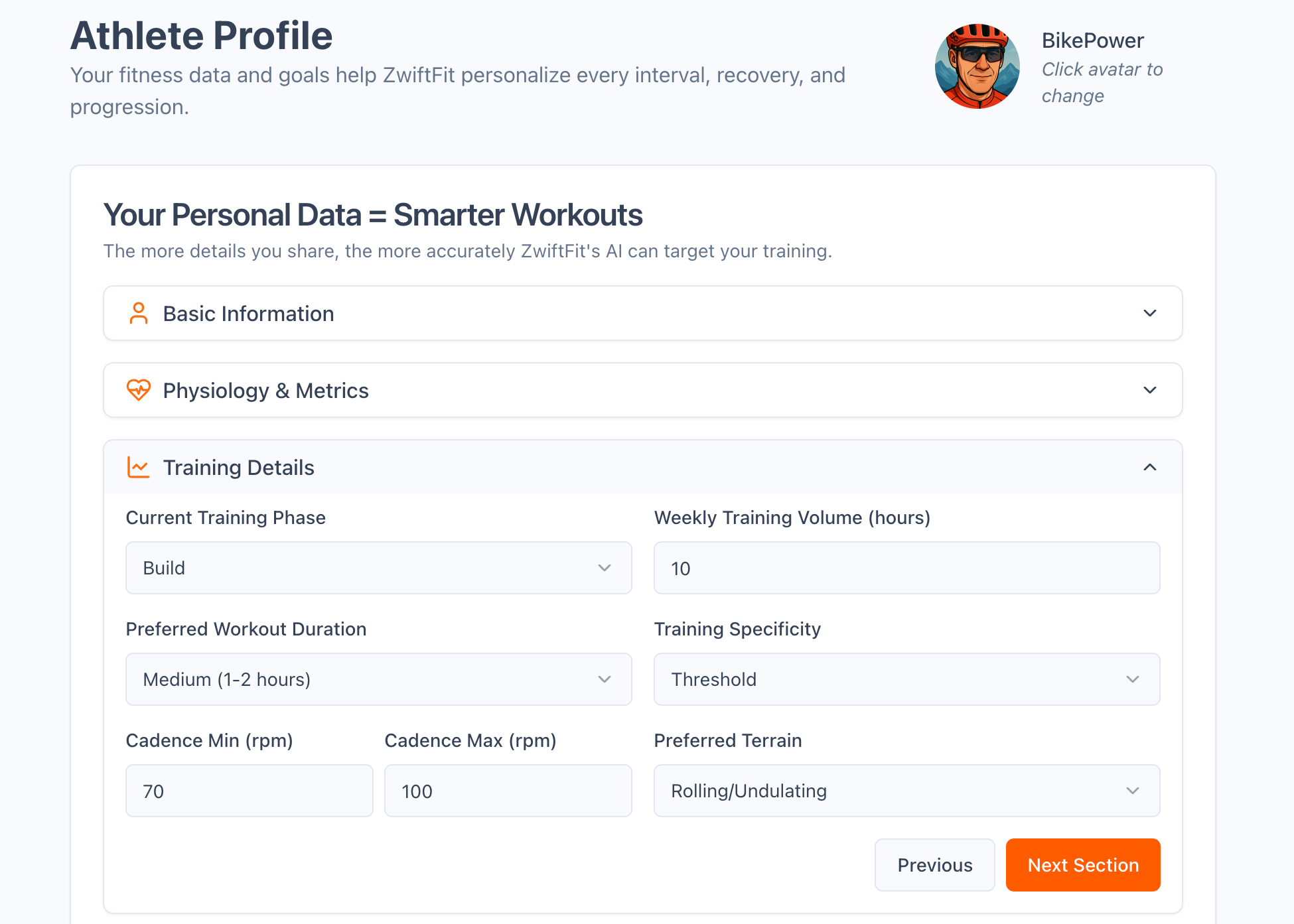
- Your FTP, gender, age, and training load
- Your training goals (e.g., improve climbing ability late in long rides, increase flatland power, sharpen race finish)
- Strengths and weaknesses defined in your user profile
- Physical limitations or injuries you’ve specified
- An upcoming race or event
- Daily readiness, HRV, and resting HR
- Even how you feel that day — from “Very Tired” to “Excellent”
It’s not about scrolling through a library. It’s about telling ZwiftFit who you are and what you need — and letting it create the session.
Two Ways to Create a Workout
ZwiftFit supports two core paths:
1. Quick Workouts
Choose from 9 workout types including:
- Endurance Ride
- HIIT Session
- Sprint Session
- Climbing Challenge
- Threshold Intervals
- Race Warm-Up
- Event Cooldown
With one click, you get a workout tailored to your current profile settings and duration preferences.
2. Custom Workouts
Need more control? Go custom. Custom Workouts give you a much deeper level of customization than Quick Workouts. There are seven main workout categories — like Recovery & Endurance, High-Intensity Intervals, and Strength & Skill Development — and within those, over two dozen specific workout types to choose from.
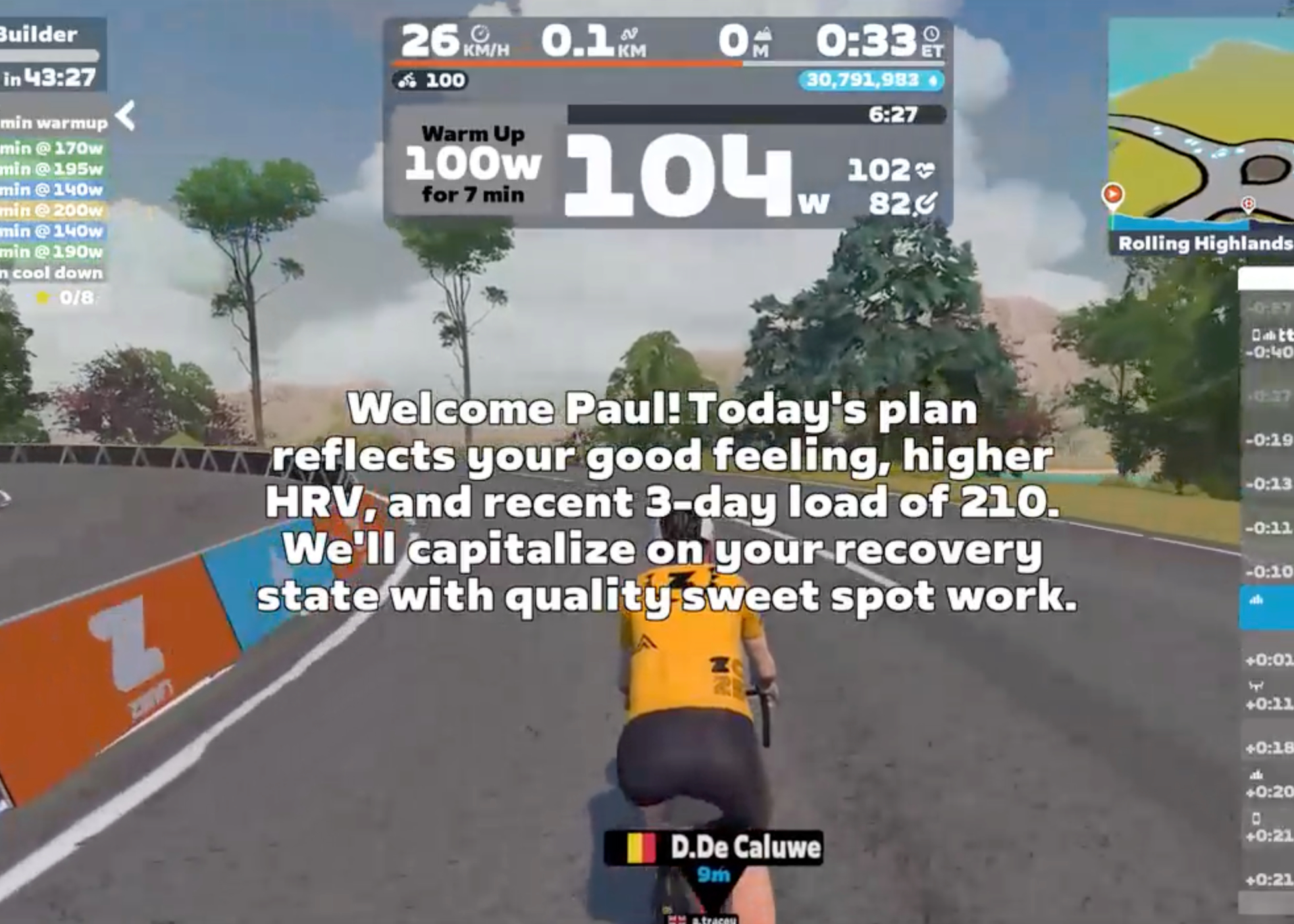
Once you’ve selected a type, ZwiftFit adapts it further based on your current profile and the specific workout options shown on the Custom Workout screen. Unlike your profile settings — which tend to remain stable over time — these session-specific options allow you to adjust key variables for the ride you’re about to do. You can specify:
- Workout duration (fixed or range) – so you can fit in the perfect session whether you have 30 minutes or two hours.
- Current feeling (Very Tired to Excellent) – ensuring your workout matches your actual recovery state, not just a pre-set plan.
- Resting heart rate and heart rate variability (HRV)
- 3-day and 7-day training load
- Warm-up and cool-down length (Short, Normal, Long)
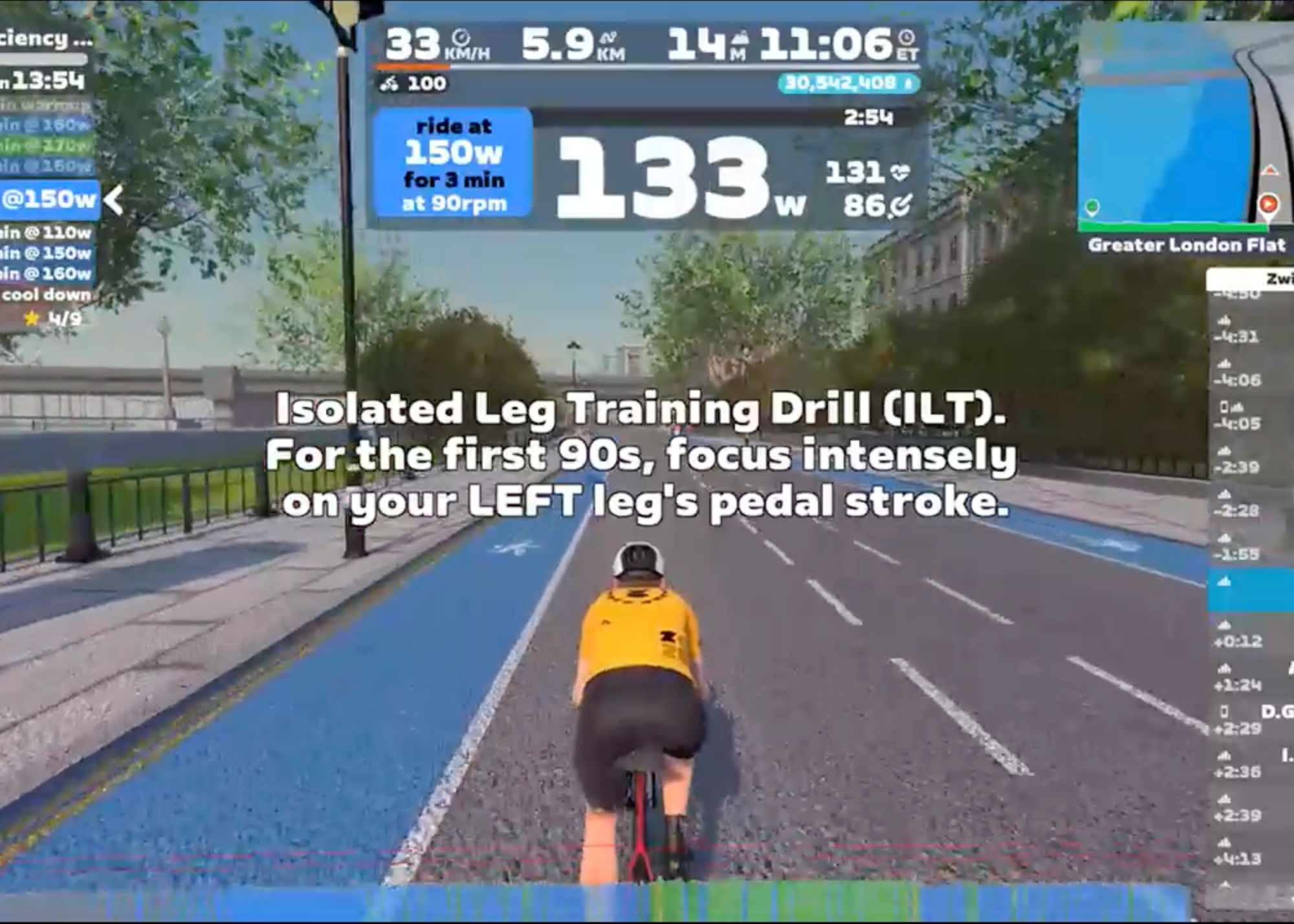
You can even add custom instructions — whether you want motivational tips, fun cycling trivia, or a focus on specific aspects of execution like cadence, pacing, or technique. ZwiftFit incorporates this input to further personalize your session in real time.
Event Prep & AI Flexibility
Beyond crafting the core of your session, ZwiftFit offers some useful additions designed to seamlessly integrate with your Zwift life and give you even more control.
One of ZwiftFit’s standout practical features, especially for the racing Zwifter, is its event-specific warm-ups. These are invaluable not only for races (which often start hard right from the gun) but also for a variety of other Zwift activities. To meet these diverse needs, ZwiftFit provides a range of targeted warm-up types, including: Race Warm-Up, Climb Preparation, Group Ride Primer, TT Preparation, Sprint Activation, Long Ride Preparation, and Hard Start Readiness. Each is designed to address the specific physical demands you’ll encounter in those events.
To complement the warm-ups, ZwiftFit also offers targeted Zwift Event Cooldowns to enhance recovery immediately following your rides or competitive efforts. These short routines are carefully structured to gradually lower intensity, aiding in the removal of metabolic byproducts and easing muscle tension. Options include Race Recovery, Climbing Recovery, Sprint Recovery, and Endurance Ride Recovery.
You can also choose the duration of these warm-up and cooldown sessions based on your available time and personal preference. For the best experience, generate both the warm-up and cooldown sessions ahead of time. That way, you can smoothly transition from race prep to recovery without needing to leave Zwift or revisit the app. It’s a convenient and practical addition that supports readiness and recovery across a wide range of Zwift activities.
Multiple AI models are available, each offering a distinct style for generating workouts. Some models might emphasize structured intervals, while others introduce more variety or different types of challenges. You’ll also find variations in the verbosity of instructions—some are more concise, others more detailed—and subtle differences in tone. For example, one model might suggest a straightforward “2×20 at threshold,” while another adds pacing cues, motivational prompts, or mental focus tips throughout the session. This variety allows you to select a model that aligns with your personal preference for a particular session or to simply change models periodically to keep your training stimulating and engaging. Whether you want to stick with your favorite or switch it up to explore different approaches, having multiple models gives ZwiftFit a unique adaptability.
Simple and Affordable
There’s no subscription. Just a credit system:
- New users get 30 free credits after signing up and verifying email.
- Earn 30 more credits by generating one Quick Workout, one Custom Workout, and then downloading either of those workout files.
- A 300-credit package costs just $2.99 — typically enough for 30–40 workouts (that’s less than 10 cents a session!)
For now, credit purchases are limited to the U.S., Australia, Japan and Switzerland due to international tax complexity, but other international users can still use the free credits and the FIT to CSV tool.
Bonus Tool: FIT to CSV Conversion
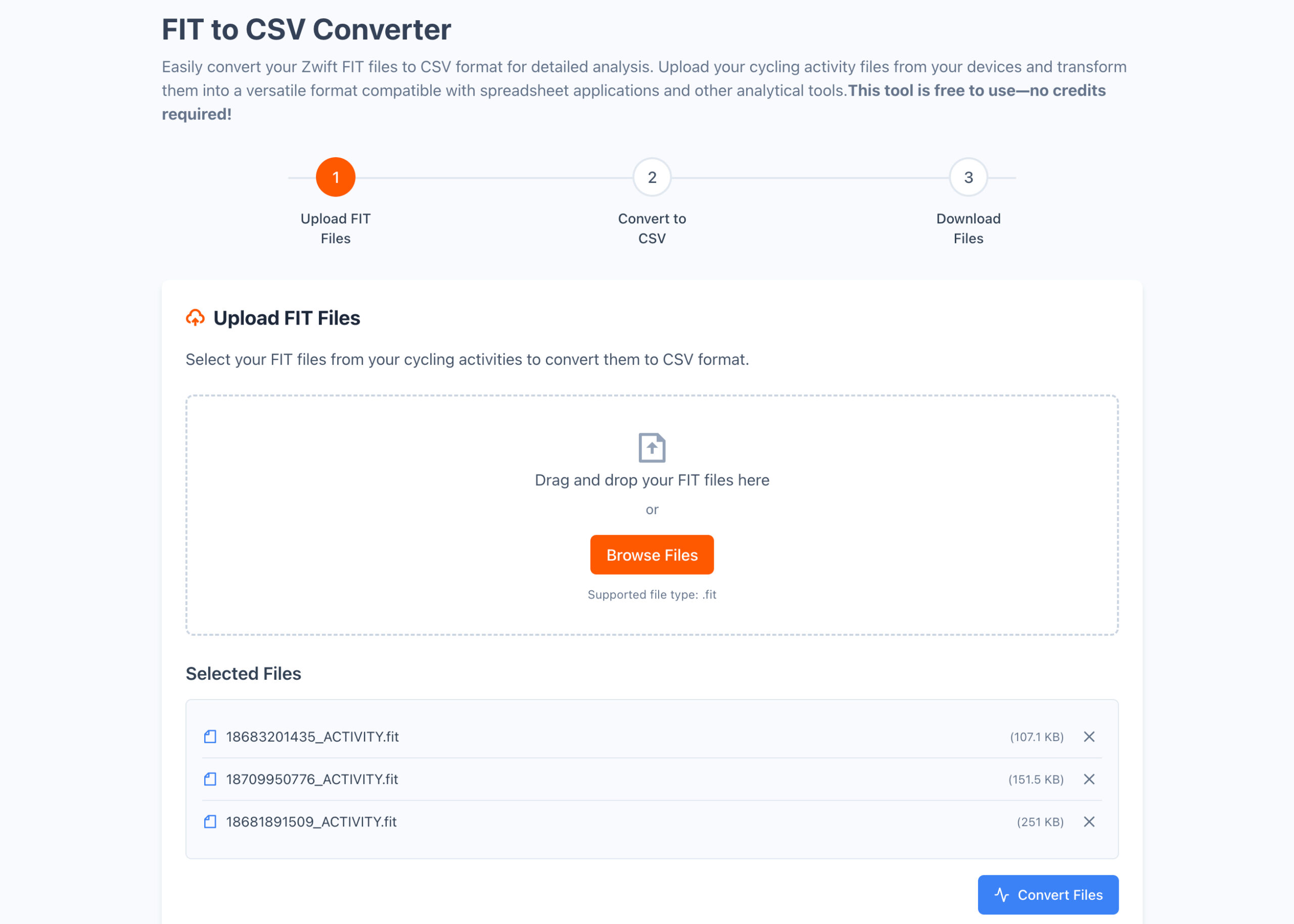
For data-driven riders who like digging into their workout files, ZwiftFit includes a free utility that converts your FIT files into CSV format. This makes it easy to import your Zwift workout data into spreadsheets or other analysis tools. There’s no cost and no credits required — just upload your FIT file and download the structured data. It’s a small but powerful addition for those who want more control over how they visualize and track performance.
Try It + Promo Video
ZwiftFit is available now at zwiftfit.com. You can also watch a short 30-second promo video below:
Final Thoughts
ZwiftFit is still evolving, but I hope it fills a real need in the Zwift training ecosystem — helping riders at every level get more out of their workouts with less friction.
If you give it a try, I’d love your feedback! Share your experiences or suggestions via my contact form or tag me @ZwiftFit on Instagram. Your feedback will help shape its future!


Hi everyone,
I wanted to post a general comment to thank everyone for the interest in ZwiftFit and for the questions that have been asked. I’d also like to offer some transparency about how I replied to questions posted in the comments as there seems to be some misunderstanding.
My process for replies has been to write my personal response first, and then use AI as a tool to help check for clarity and grammar. I review and edit every suggestion to ensure the final response is as helpful as possible and accurately reflects what I want to say.
This procedure requires much more time than just posting a quick response, but my goal is to provide the best answer that I can. I’m aware that other readers might have similar questions, and providing a thoughtful answer seemed to be worth the additional investment in time.
I’d also like to re-emphasize that ZwiftFit is an application developed for the community and not for the purpose of making money. It originally started as a project I developed for my own use, but after using it I realized that there were probably many others in the community who would find value in workouts that could be personalized by AI. Honestly, I still find it almost magical at times when I load a workout on a ride and see the workout structure and instructions personalized to me based on how I’m feeling at the moment.
The pricing structure for ZwiftFit is as low as I could calculate to make it affordable for as many members in the community as possible, while at the same time (hopefully) not losing money in the long term.
For anyone who is skeptical about using AI for training on Zwift, I’d encourage them to give ZwiftFit a try: there’s no cost to generate a few workouts to see if they help with individual training goals.
Ride on!
No one is paying more. Over their skis.
Hi Bigf thanks for reading and sharing your perspective. As a Zwifter of ten years myself, I completely understand the desire to keep costs down.
You’re right to question any new expense. I just wanted to clarify that ZwiftFit is a solo passion project, not a big commercial venture. The pricing is set up simply to cover the hard costs of the AI services that generate each unique workout. That’s also why I structured it with free credits up front and a pay-as-you-go model afterward, so someone could spend just a few dollars for credits that might last them many months.
Hope that context helps, and thanks again for the comment!
I find that sounds very interesting, and I’d love to try it out. I hope there’ll soon be a way to buy credits outside the US as well.
EDIT to add: I just registered on the website and created two workouts (1x quick, 1x custom). The previews for the workouts are really promising, and the website itself is clearly laid out and well-designed. I already know I’m going to love using this tool in the future, and that makes me hope even more that it’ll soon be possible to buy credits outside the US (Swiss here).
Thanks, Paul, this is a truly cool tool you’ve built!
Is this a “private” project using zwift or a “zwift original”?
Hi Diogo, that’s a great question for clarification! ZwiftFit is a “private” project. I’m an independent developer and a long-time Zwifter who built this as a passion project to add functionality I wanted for my own training. So, while it’s made for the Zwift community, it isn’t an official “Zwift Original” product. Thanks for asking!
Sounds like someone is in bed with zwift staff
Well, wheres the difference vs chatgpt plans? i guess a lot of ppl didnt even know that gpt can do training plans at every level. it even makes the zwift zwo files to use it drag n drop for zwift. (serious question)
Hi Andi,
That’s a fantastic question, and you’re right that many people might not be aware of what general AI models like ChatGPT can do. I appreciate you asking it seriously, as it gets to the core of why I built ZwiftFit.
You’ve hit on a few key differences I aimed to address:
So, you can think of ZwiftFit as a specialized tool that streamlines the process and adds layers of daily personalization, reliability, and model choice on top of what a general chatbot can do.
Thanks again for the great question!
Hi,
I’m training for an Ultra Cycling event (LondonEdingburghLondon, 1540 km on August 3) en do a lot of cycling outside. Zwift is used mainly to do structured workouts en cycling outside for endurance. Does Zwiftfit take into account the outside rides?
Hi Johan,
Thanks for the great question! And wow, training for London-Edinburgh-London is seriously impressive. That’s exactly the kind of scenario where blending indoor structure with outdoor volume is key.
To answer your question directly: yes, absolutely. ZwiftFit is designed to take your entire training load into account, including all your outdoor endurance rides.
The key to this is the optional “3-day Training Load” and “7-day Training Load” fields when you generate a custom workout. So, if you track your total load using a metric like TSS from TrainingPeaks (or Stress Points from Zwift), you can enter that number. ZwiftFit will then use that data—along with your other inputs like how you’re feeling, HRV, etc.—to scale the intensity of your structured workout appropriately. If your load from a long outdoor ride is high, it will adjust to give you a more manageable session, and vice-versa.
On a separate note, given you’re training for LEL, I’m guessing you might be based outside the U.S. I just want to be transparent and mention that while you can use all the free credits, purchasing new credits is currently limited to the U.S. The complexity of international tax laws for a solo project is a big hurdle, and I want to be careful not to get anyone’s hopes up about when that might change.
Best of luck with your training for such an epic event!
For ethical reasons, I’d prefer to pay (more) for a human coach, instead of paying for AI. Although I like innovation, I am scared of the direction our world is heading.
Hi Lukas,
That’s a really important and thoughtful point, and I appreciate you bringing it up. For what it’s worth, I completely agree with you on the invaluable role of a human coach.
I want to be very clear that ZwiftFit is not designed or intended to be a replacement for a coach. It cannot create long-term training plans or provide the nuanced, holistic guidance that a good coach offers. Its specific purpose is to generate a single, adaptive workout for today, based on your profile and how you’re feeling right now.
In fact, I see it as a tool that can be used in conjunction with a coach-directed training plan. For instance, if your coach prescribes ‘a two-hour endurance ride,’ you could use ZwiftFit to generate that session. The app would build the ZWO file for Zwift while adapting the specific power targets based on your current readiness state.
The low cost (averaging around 10 cents per workout) is designed to reflect this role—it’s an affordable utility to complement a training plan, not a substitute for a comprehensive coaching service.
Thanks again for raising such an important discussion.
I get your sentiment, and have no disagreement with it. But you should be aware that a lot of the coaches you’re probably familiar with are going to the model of using AI to enable a higher number of clients per paid human coach. Some of them are explicit about it (thinking FasCat or Carmichael Training Systems), but I have no doubt that more coaches than that are using AI to build your structured workout plan.
hopefully its better than the companion app training AI thing for training- I’ve ridden 400mi and 40k of climbing during one week – And all it ever says is Fresh I don’t or didn’t feel very fresh useless
Hi David,
Thanks for sharing that experience. That sounds incredibly frustrating when a tool tells you you’re “Fresh” after a massive week like that!
I just want to clarify that the training feature you’re describing in the Zwift Companion app is a separate, official Zwift feature, and it’s completely different from my independent project, ZwiftFit.
The key difference is actually in the approach you highlighted. Instead of trying to automatically determine your fitness state, ZwiftFit puts you in the driver’s seat. You provide your own inputs—like your subjective feeling for the day, your resting HR/HRV, and optionally, your recent 3-day and 7-day training load. This load can come from any source, including outdoor rides tracked via TSS in TrainingPeaks, for example.
ZwiftFit then uses the information you provide to generate a personalized workout that’s tailored to you at that specific moment. The goal is to always align the workout with your actual, real-world state, not a predicted one.
I should also mention, since you’re using kilometers, that purchasing new credits is currently limited to the U.S. due to international tax complexities, though all the free credits work for everyone.
Thanks for giving me the chance to clear that up!
You know what would make this even better?? If your server didn’t crash during the email verification process over and over.
Hi bucfan,
Ugh, you are absolutely right to be frustrated, and I am so sorry for the trouble you’re having. That’s a terrible experience, and I appreciate you taking the time to flag it.
I did a quick investigation as soon as I saw your comment. It turns out that my hosting provider, Replit, is currently dealing with a major outage from their upstream cloud provider. This is affecting lots of services across the internet, and unfortunately, the email verification for ZwiftFit is one of them.
As a solo developer on this project, I’m a bit at the mercy of these larger infrastructure issues, but I’m keeping a close eye on their status updates and hoping they get things back online soon.
Could I ask you to please try verifying your email again in a few hours? Hopefully, the issue will be resolved by then.
Thanks again for your patience and for wanting to give the app a try.
There was a big Google cloud outage today. Many services on the internet were down. Let’s extend Paul a little grace on his IT issues today.
Hi Chris,
Thank you, I really appreciate you posting that. You’re exactly right—it was a major cloud outage. As a developer just getting a new project off the ground, you can plan for almost anything except that!
Seeing supportive comments like yours really highlights what a great community this is. Thanks again for the kindness.
I love the people down voting us for pointing out the obvious issues signing up.
People don’t like it when someone posts a permanent negative comment for a temporary and fixable issue. All the login related comments are already off-topic as the login is now working. A better way would have been to use the contact form “just to make you aware sign-up/login is not working at the moment. Could you send an update once this is fixed”. Hope it’s a bit clearer why you have got down voted for this as well as how you can avoid it in the future.
This sounds a lot like xert. Does it automatically calculate your FTP and training readiness like xert does, and adapt the workout to said readiness?
Hi Andy,
That’s an excellent question, thanks for asking! Xert is a really powerful platform, and it’s helpful to clarify how ZwiftFit works differently.
You’ve hit on the main distinction:
So, you can think of ZwiftFit as a highly specialized workout generator that partners with the user for its data, rather than an analytics platform that generates the data itself.
Thanks again for the great question that helps clarify the difference!
Can’t even access the URL!
Hi Andy,
Thanks for the heads-up, and I’m really sorry you’re hitting that roadblock.
You’ve unfortunately run into the effects of a major, widespread outage from one of the big cloud providers, which is impacting my app’s hosting service. It’s affecting a large number of websites and services right now, so it’s not just an issue with the ZwiftFit site itself.
As the solo developer behind this passion project, I’m watching the hosting provider’s status page closely and hoping they resolve it soon.
I’d appreciate it if you could try the URL again a little later on. Thanks for your patience and for wanting to check out the app!
I signed up for the service, but there was no historical data in the application from Zwift to suggest how I should be working out today. Does it only use input from the workouts done through ZwiftFit? Can it pull in from Zwift my current training status and training score and the last few rides I did (eg.: I rode Alpe Du Zwift yesterday) to suggest a workout for today? Can it pull my FTP and weight from Zwift or do I need to keep that updated alongside Zwift?
Hi Aamer,
Thanks so much for signing up and for asking these really important questions! It’s a great opportunity to clarify how ZwiftFit works “under the hood.”
You’ve correctly identified a key point: ZwiftFit is an independent project and is not officially affiliated with Zwift. For privacy and technical reasons, this means it doesn’t have access to automatically pull your private data like ride history, training status, FTP, or weight from Zwift’s servers.
The design philosophy is centered around you providing the key information to ensure the workout is tailored perfectly for you at that specific moment. This puts you in control of the data.
So, to answer your specific questions:
So, while it does require a moment of manual input, this approach ensures you have full control over the data being used to adapt your workout for the day.
Thanks again for digging in and asking such great questions! It really helps clarify how the app is intended to be used.
Thanks for clarifying. Looking forward to playing around with it.
Is Strava relative effort same as TSS or Stress Points?
Hi GDL,
That’s an excellent question! The short answer is that Strava’s Relative Effort is not the same as TSS or Zwift’s Stress Points (SP), but Strava does have another metric that is very similar.
Here’s a quick breakdown:
For providing input to ZwiftFit, you’ll want to use Strava’s Training Load. While the formula isn’t identical to TSS or SP, it’s definitely close enough to be a great input for the app. You can add up the Training Load values from your Strava activities over the last 3 or 7 days and enter that total into the “Training Load” field when you create a custom workout.
As a helpful tip, once you generate a workout in ZwiftFit, the “Workout Preview” screen will show you the calculated SP for that specific session. This gives you an immediate idea of the training load for the workout you’re about to do.
Thanks for asking such a great, specific question! It really helps clarify how to use data from different platforms with ZwiftFit.
There is a free web app that links to your Strava account and can report your TSS score for the current week fast and easy. I’m not affiliated with this site, just a happy user. URL is http://stravatsscalculator.com/
I would pay a monthly subscription if the HRV, Readiness and so on would be pulled from Fitbit/Oura/Whoop/… and from this a personalized workout is generated each day, without me needing to input anything.
Hi Douglass,
Thanks for the excellent suggestion. You’re right, automatically pulling readiness data from platforms like Oura, Whoop, and others would be a powerful feature for an app like this.
It’s also a significant development undertaking. In these early stages of the project, I’m focused on gauging interest from the community to help decide which potential features to research first. Feedback like yours is very helpful because it clearly shows that this kind of integration is a desired feature.
So, while I can’t make any promises about if or when this might be implemented, I definitely appreciate you taking the time to share the idea. Thanks again.
I would like to try your solution, the question is how many workouts I need to import into your system to create a custom workout.
Hi Alexandre,
Thanks for the question, and I’m glad you’re interested in trying the app! That’s a great opportunity to clarify how the custom workout generation works.
To answer your question directly: you don’t need to import any workouts into ZwiftFit at all. The app generates brand new, unique workouts for you from scratch based on your inputs.
The process is designed to be straightforward. For a custom workout, you simply tell ZwiftFit what you’d like by providing some basic information, such as:
Based on those inputs, ZwiftFit generates a complete ZWO workout file that’s tailored to you for that specific session, which you can then use in Zwift.
Hope that helps clear things up! Thanks again for asking.
Ah ok. And this training file that you will generate is for a single training session or will it be generated for example for a session of days/hours?
That’s a great question about how to best use ZwiftFit for planning. It highlights the difference between creating workouts “in the moment” versus scheduling them ahead of time.
To clarify, ZwiftFit is currently designed to generate one high-quality, adaptive workout at a time, each as a separate ZWO file.
However, you’ve described a great way to use the app. You can absolutely create several workouts ahead of time to plan out your week. For example, you could generate a threshold, an endurance, and a climbing workout and have them ready to go. These sessions would still be personalized based on the more static data in your user profile, like your FTP, weight, and long-term goals.
The key trade-off is that workouts created in advance wouldn’t be adapted based on your daily readiness metrics (like subjective feeling, resting HR, HRV, or recent training load). The highest level of personalization comes from providing those “in-the-moment” inputs right before you’re about to ride.
That said, adding a more sophisticated scheduling feature is a fantastic idea and something I’ll definitely keep in mind as I think about the future evolution of the app.
So to conclude and stop asking questions, hehehe
If you’re receiving a threshold or resistance training session… how will your system be able to create new training sessions based on the ones that have already been generated but without the data from the results of the training sessions I’ve already done?
For example, I did one of your resistance training sessions, but perhaps at first this training session was a bit hard to maintain a cadence or levels close to the required power. How will the next training session created in your tool be based on this? In theory, with each training session I can take into account that I’ve become “stronger” and can have a longer training session. Did you understand my point?
At this time, ZwiftFit doesn’t have a mechanism to “learn” from the specific results of a workout you’ve just completed. For instance, it wouldn’t automatically know that you struggled to maintain the cadence or power targets in your last resistance session. The “adaptation” currently happens based on the readiness data (feeling, HRV) and total training load (SP/TSS) that you provide before you generate the next workout.
However, you’ve described a great scenario for using the “Additional Instructions” field in a Custom Workout. This is where you can act as the “human” part of the feedback loop by giving the AI direct commands for the workout it’s about to build.
For your example, before creating your next workout, you could add absolute instructions like:
The AI will take that natural language feedback and incorporate it into the structure of the next workout it builds for you, without needing any knowledge of your previous sessions.
Regarding your point about getting “stronger” over time—that progression is primarily handled when you update your FTP in your user profile. As your FTP increases, the entire structure of the workouts will scale up with it.
That said, your idea of building in a more formal feedback loop—where you could perhaps rate a workout’s difficulty or provide direct notes on it that the AI remembers for next time—is great. It’s a complex feature to implement correctly, so it wouldn’t be a short-term addition, but it’s an excellent concept that I will definitely be thinking about for the future of the app.
Thanks again for another really insightful question!
Thank you very much for the answers.
A feedback on the training done, could be my initial question, which would be to export the trainings in a FIT file from Zwift and import them into the tool in some way so that the system can identify whether it was possible to complete the training close to the established margins and thus indicate/ask what the “feeling” of the training was. Then, adding the raw data of the training result + “feeling” indicated by the user (examples: I felt good, I got tired but good, I didn’t like it, I got very tired and almost gave up) will give us an answer for the next generation of training.
I will test your tool as soon as possible. Great pedals.
That sounds very interesting. I will take a look at it and give it a go for tests. I will revert. Thanks for all the work you did on this
Thanks so much for your interest and for the kind words about the project. I look forward to hearing what you think after you’ve had a chance to test it out!
Thank you so much for creating this! Just finished my first Quick Workout and it was fantastic, perhaps one of the best non-race experiences I’ve had to date on Zwift. Looking forward to trying out the full Custom Workout for my next hard day, and anticipate being a VERY frequent user.
One feature that would be awesome in the short-term using the current pricing and code would be an option to create a series of workouts in a training plan at the same time. This would lose the option to feed in training load and day to day HR/HRV/fatigue data of course but would enable users to have a ready-to-go tailored and goal-oriented stable of workouts to use on-demand.
Long-term, would be really interested in integration into Zwift to allow the app to auto-calculate training load, use recent activity data to help provide recommendations for the type of training to create, and import user height, weight, and other related data. Realize that may be too heavy of a lift for one dev, the current pricing model, AI data protection concerns, etc. though.
Thank you again!!
Wow, thank you so much for the supportive and detailed feedback! Hearing you describe your first workout as “fantastic” and “one of the best non-race experiences” you’ve had is genuinely the most rewarding thing I could hope for. I’m thrilled you’re enjoying it and plan to keep using it.
Thank you also for sharing such great ideas for the future. This initial release of ZwiftFit was very much intended to “test the waters” and see what features resonate most with the community, so your feedback is perfectly timed.
Your suggestion for a feature to create a series of workouts—like a week’s worth at once—is fantastic. To be honest, it’s a use-case I hadn’t fully considered, and it makes perfect sense as a way to have a personalized, goal-oriented “stable” of workouts ready to go, even without the daily readiness inputs. It’s a brilliant idea.
And you’re spot on about the long-term vision. Deep integration with other platforms is definitely the ideal state. You’ve also correctly identified the challenges involved—it’s a significant development lift, especially for a solo project. It’s something I’m very interested in exploring, but it’s likely on a longer-term horizon.
I really appreciate you taking the time to not only use the app but to think so deeply about its potential. It’s insights and encouragement like yours that will truly shape the future of ZwiftFit. Thanks again!
I’m super excited about this. Can’t wait to give it a go. I have young kids so I’m rarely feeling well rested for more than a few days in a row as well as being knocked out of my rhythm by semi-regular colds. I can totally imagine how this kind of approach could be a real value add by helping tailor my workout to where I’m at on any given day.
Also, kudos to you for being so positive about even quite ungenerous feedback! And what’s going on with the downvotes on every comment, that’s not the usual ZI vibe.
And, for the record, I’d pay for it if it works well, so I guess “No one” isn’t quite on the mark 😉
Hi Matt,
Thanks for the supportive comment and for sharing your experience!
You’ve highlighted a great use case for the app—navigating those days where fatigue from life, kids, or colds makes it hard to stick to a rigid plan. The goal is definitely to help tailor the workout to prevent pushing too hard when your body isn’t ready.
Your thinking on how it would work is correct. It’s essentially a two-part process:
It’s that combination of user selection and AI adaptation that makes the difference.
I hope you find it useful when you give it a go. Thanks again for the encouragement!
I haven’t read all of the comments, so apologies if it’s covered, but are there any plans to sync with something like Strava/Intervals.ICU to get an overall picture of what other efforts we have going on aside from cycling?
I’ll give this a shot when I have some spare brain cycles. For now, Friday evening calls! Cheers!
Thanks for the great question and for your interest in trying out the app.
You’ve hit on what would be a very powerful feature. The ability to sync with platforms like Strava or Intervals.icu to get a complete picture of training stress—including non-cycling efforts—is a logical and valuable long-term goal for an app like this.
It’s also a significant development undertaking that would require a lot of research to implement correctly. In these early stages of the project, I’m focused on gathering feedback just like yours to help figure out what the most valuable future enhancements might be. Your suggestion is definitely a strong vote for deep data integration.
I appreciate you taking the time to share the idea. Enjoy your Friday evening and have a great weekend!
Cheers!
Paul are you real? Your replies sound pretty AI generated, too!?
Haha! I’m definitely real, although maybe I’ve been hanging out with LLMs a little bit too much 🤖
You can hide it a bit better by replacing the em-dashes with hyphens 😉 (in the article and the replies)
He could also give people the dignity of typing the responses himself and give better answers in 1/3rd the word count and not dump out a bottle of water and pump a kilo of emissions into the atmosphere with every answer.
JFC a slop workout creator is one thing but this guy is replying to every comment with a slop answer. Go ahead and tell me how this was a “great comment” that really “gets to the core of people’s concerns” and throw a “delves” in there. If you’re going to copy and paste vibe coded junk and then respond to comments about it with copy and pasted slop answers why should we bother reading, using, or paying? Why shouldn’t we just prompt chatgpt with the same information and skip the middleman?
Zwift, it’s full of selfish leaders who only think about themselves and their social status. They forgot about sports 😂
People cannot even update their weight everyday before riding to ensure the most accurate stats, I am sure they do not care about this silly project. You need to be honest with weight for true progress.
Hey Paul, Its really great you have taken the time to respond to all these comments by using CHatGPT – Its been invaluable in seeing how ChatGPT/AI will use a cookie cutter approach and not provide individual responses.
Whilst I presume you used AI to auto respond to all the queries as a time saver, its actually highlighted the failing of using a basic AI package which targets general engagement over the individual response.
You are offering a personalised service whilst providing cookie cutter responses. The training plans dont hold much hope if thats the way this works.
I was going to say the same thing, but you said it much better.
I tested ZWIFTFIT and I MUST say, that this idea was really nice. The AI is generating nice workouts, but I don‘t like to pay. I am twelve years old and the AI is looking on my age, when it is generating the workout.
Thank you giving ZwiftFit a try and and for the kind words! I’m really glad you’re enjoying the workouts. It’s also great that you noticed how the AI takes your age into account when building the sessions.
I’ve sent a follow-up note to your email address. Please check your inbox when you get a chance!
Thank you Paul Whitelock!
I would like to see in the screen during a workout is the sprint and KOM data information that is typically on the left side for the purpose of knowing where one is on the route. I know it is not relevant to the workout but…
Unfortunately, Zwift currently does not offer an API that allows the screen to be modified during a workout.
ZwiftFit does support route-aware warm-ups and cool-downs on the Custom Workout page. If you are warming up for a particular route, either for a race or just a general ride, you can select a warm-up optimized for that specific route.
ZwiftFit has knowledge of the climbs and sprints that occur along each Zwift route and it will generate a warm-up or a cool-down specifically tailored to each route.
The route-aware warm-ups and route-aware cool-downs don’t directly address the feature that you’d like, but perhaps it will be useful for the times that you want to warm up for a Zwift event or cool down after an event using a specific route.
Uuurgh. Looks like good option I’d gladly pay for, but apparently my money’s not good enough for them. It’s 2025 and developers are still foolishly geo-locking their software to exclude massive global markets?! Is it just following Zwift’s awful example of limiting their hardware sales to a handful of countries or what?
I know that the restriction to only allow purchases in specific countries is frustrating because it’s frustrating for me as the developer as well. The limitation isn’t about excluding riders, but about navigating the complex and costly tax rules for selling digital products in different countries.
I’d love to offer ZwiftFit worldwide, but with the costs of the AI models and hosting, I have to make sure it’s sustainable. That said, I’m always open to expanding: if enough riders in a country are interested, I’ll look into what’s required to make it happen.
I appreciate the interest!
Hello!
I logged on your page, and I’m wondering how do you check my fittnes level? I cant see any connections to zwift to get any previous training data. Am I missing something?
Currently you need to enter your fitness metrics in the app (in your Athlete Profile). The more data you share, the better the AI can personalize workouts for you. If you’re creating a custom workout, you can optionally enter readiness data (e.g., overnight HRV, resting heart rate, training load) to generate a workout that takes that up-to-the-moment data in to account.
I’m looking at options to automatically pull data into the account, but that type of integration is still in the investigation/planning phase.
Can you provide a summary of how the process of autophagy contributes to fibrosis in the liver?