
When it launched in 2014, Zwift grabbed cyclists’ attention because it enabled real-time interaction between riders: a social platform. And this is truer today more than ever: the interaction with other humans, the camaraderie developed over time, and the friendships built on the platform are motivating and valuable.
But sometimes, you may just want to ride or run solo, and there’s nothing wrong with that! We’ve had several Zwifters ask us how to do this easily – here are three ways.
Solution #1: Turn Off Your Internet Connection
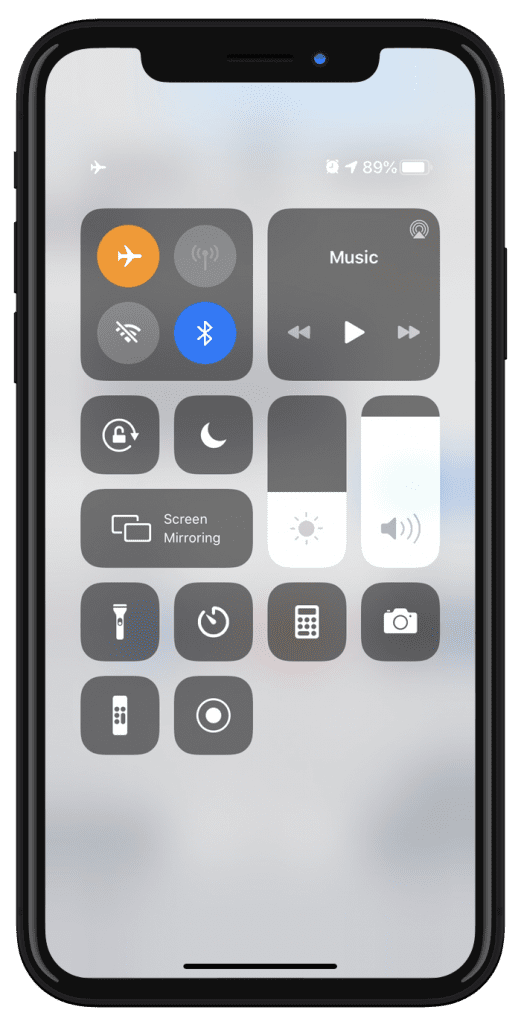
Once you’ve logged in and started your Zwift activity, turn off the Internet connection on your Zwift device. This will remove all other Zwifters from view, and remove you from their view.
It is quite easy to turn the Internet connection off on most devices – a click or two on Mac, PC, iOS, and Android. It’s more of a hassle on AppleTV, but can be done there through the Settings menu or by simply unplugging your ethernet cable if you’re using a wired connection.
Here’s the important part: reconnect the Internet before you save your activity and exit Zwift! This will allow the activity data to sync up with your account at my.zwift.com as well as Strava or other third-party connected apps.
Gotchas
Turning off the Internet may be the simplest way to ride alone on Zwift, but it also means your Zwift device will be without an Internet connection during your activity, which may be an annoyance. Additionally, your fans won’t be able to give you a ride on during your activity. If either of these an issue, try this next approach…
Solution #2: Firewall
This solution is really only practical if you’re running Zwift on a Mac or PC. Both macOS and Windows have built-in software firewalls that allow you to easily create rules governing the data flowing in and out of your computer. The nice thing about the firewall approach is it lets you maintain an Internet connection on your device while riding solo on Zwift.
Simply put: if you turn off outbound traffic to certain UDP and TCP ports via a firewall, all riders on course will be hidden and you will be hidden from their screens.
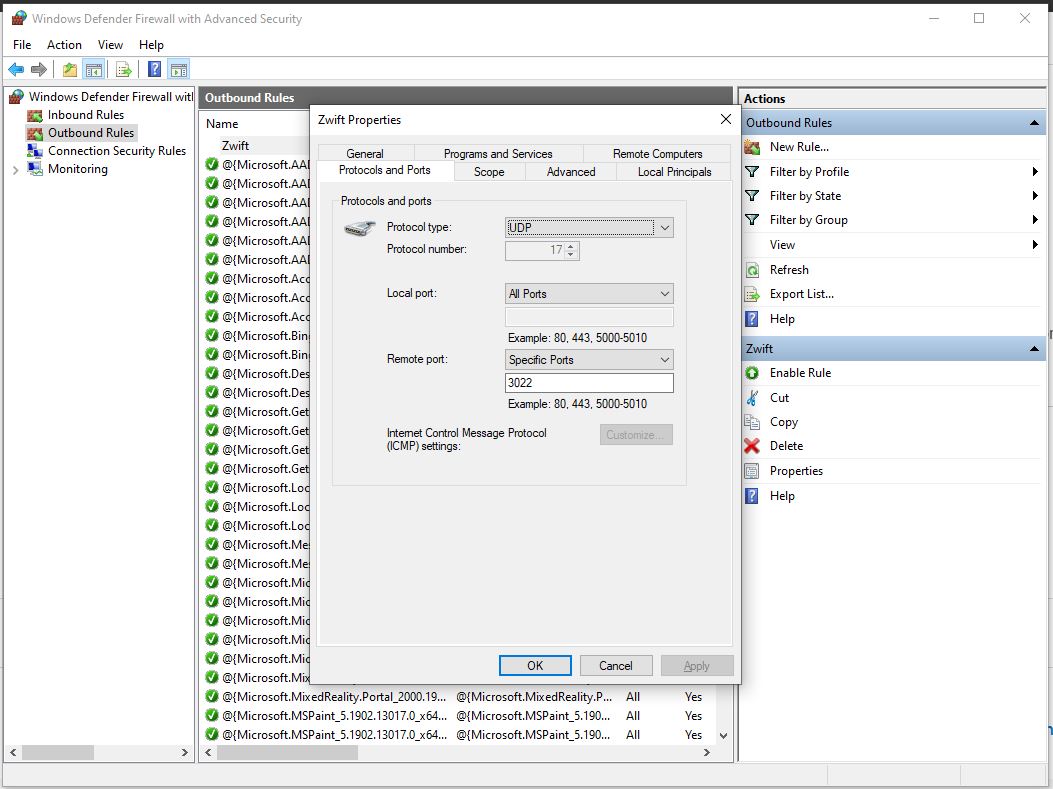
You will need to set up and enable two different firewall rules – one for UDP traffic, the other for TCP.
Setting up your UDP firewall rule on Windows 10:
- Open up the Windows Defender Firewall app
- Click “Outbound” then click “New Rule”
- Select “Port” from “What type of rule would you like to create?”
- Select UDP, and enter 3022,3024 as the “Specific remote port”
- Choose “Block the connection” (which is the default)
- Let the rule apply to Domain, Private, and Public (which is the default)
- Give it a name such as “Zwift Solo UDP” and click “Finish”
- Done! The rule will automatically be enabled, but you can click to disable it and ride with others anytime you’d like.
Setting up your TCP firewall rule on Windows 10:
- Open up the Windows Defender Firewall app
- Click “Outbound” then click “New Rule”
- Select “Port” from “What type of rule would you like to create?”
- Select TCP, and enter 3023,3025 as the “Specific remote port”
- Choose “Block the connection” (which is the default)
- Let the rule apply to Domain, Private, and Public (which is the default)
- Give it a name such as “Zwift Solo TCP” and click “Finish”
- Done! The rule will automatically be enabled, but you can click to disable it and ride with others anytime you’d like.
We won’t include instructions for macOS or other Windows versions here, but the rules are pretty simple to create, and you can always delete the rule if you think you messed something up.
Gotchas
We use this firewall method for much of our Zwift Insider Labs speed tests, and occasionally we’ve had issues with Zwift crashing if we boot up Zwift with the firewall enabled and begin our activity. To avoid this, boot up Zwift with the firewall setting disabled, then only enable it after you’ve begun your activity.
With the advent of Pack Dynamics 3.0, we’ve found that if you start riding with your firewall rules not enabled, then turn them on, riders will still appear on screen. The only ways around this are:
- Enable your firewall rules before you get into the game
- After you enable the firewall rules from in the game, and you’re still seeing riders around you, try popping into a different world. You shouldn’t see any riders there. Then go back to the original world you were in – riders won’t show there either.
Solution #3: World Hack
This last solution doesn’t ensure you’ll be riding solo, but it will greatly reduce the number of riders on course. If you use the world tag hack to access a world that isn’t today’s scheduled guest world, the only Zwifters there will be other world hackers or those participating in an event – and chances are those event participants will be hidden from view.
World hacking, therefore, is a nice way to get yourself into a barely-populated map, if that’s what you’re looking for. Learn all about the world tag hack >
Questions or comments?
Do you like to ride alone on Zwift sometimes? How do you accomplish it? Share below!
Justement j’utilise zwift pour ne pas être seul. C’est moins monotone et ça me motive pour rester actif pendant l’hiver.
Interesting!
But let’s say I’ve chosen to do a workout from the menu. If I start the workout and then turn off the internet, would the workout–its intervals, etc.–still go on? Would ERG mode still work?
Workouts work, and ERG mode works but you should do as advised and only block the port after you start and re-enable it before you click save.
If using the firewall method, you don’t need to open it up before saving. Firewall doesn’t affect saving.
Yes. That’s all run from your local device.
It’s possible to turn off the internet from within Zwift? It won’t start if I turn it off before I start Zwift…
Useful article thanks. Do you know what port Ride On’s come through on? My problem is that they don’t come through in game
I do not. I’ve had rides before where the Ride Ons don’t come in, even though I’m receiving them. But most rides it works fine.
Excellent! other riders is in my opinion the most annoying thing about Zwift.
Weird, because that’s what makes Zwift, Zwift.
I believe that there are other apps out there that use a map and don’t have other users.
Interesting that people have asked you how to ride without anyone on the course. This is what makes Zwift so great.
And even when I do my own solo rides on there, having other riders around makes it a lot less boring
Great Carl! But possibly some people think Zwift is Zwift from the courses/terrain they can ride. Perhaps that’s what makes Zwift fun for them. Perhaps they enjoy the solitude of not riding with others. It’s possible that others may have a different opinion than you.
I would say if you wanna ride solo, don’t use Zwift 🙂
absolutely. Otherwise there are a few software out there where u can ride with real scenery. I bought some but managed to ride 1 route complete. It was like looking at paint dry. I never looked forward to riding them like i do with Zwift. My fun with Zwift is to see how long i can hang in there with the better riders – just like in the real world cycling. Sometimes the buzz of a good ride in zwift is nearly as good as a good ride IRL. Not everyone likes Zwift but I do.
In my case, I like riding alone because I don’t want to be tempted to hang in there with better riders. I have a heart condition that requires me to ramp my HR very gradually and I can’t do max efforts like sprinting or full on TT. I can still do all the rides on Zwift and I’m not slow but I keep my HR very even. I try to ignore other riders and at times just shut my eyes for awhile. Sometimes though it’s nice to just be the only one there. Then there is no temptation to exceed my limits. One other reason, in real life I ride alone and while I do see other cyclists not near as many as I see on Zwift. Outdoors I might do some rides where I see 2 or 3 other cyclists the entire ride. Zwift, with all it’s riders, is not real world riding to me. Nothing wrong with that but it would seem like a trivial thing for Zwift to provide a simple on click solution to ride alone.
Or perhaps others can just do as they wish and not follow the advice of a wanna be. Zwift doesn’t need to be a one size fits all platform. Perhaps people can use it in various ways.
my potato computer lags in big groups, and i mostly do zwift workouts.
The extra latency caused by other riders can be annoying.
It wouldn’t be hard for Zwift to add a toggle button somewhere on the menu to enable “private” rides with nobody else about.
I don’t get it though, the biggest draw of Zwift is the interactive side of things! If you simply don’t want draft effect, choose a TT bike. Chasing down or riding alongside other riders adds motivation and enhances the whole experience. It’s what makes Zwift great! Each to their own I guess.
For you. For me it’s seriously creepy and distracting.
I can understand that sometimes peoples want to ride alone. So solo session should be available as option, easy task for zwift programmers.
Don’t understand why peoples must looking for so complicated solutions. Disconnecting internet, firewall blocking ….. Have no word for making such things so hard.
Here’s one more idea, and possibly the easiest way to ride alone, or close to it, in Zwift: Just pick ‘Jungle Circuit’ as your route, it’s pretty much deserted these days. 🤪
I see what you did there…
I’ve also found that setting the security settings on an Arris router to High will usually do the trick. Although Zwift will still work, and you will still get internet traffic in and out, it will effectively screen out other riders. It took me two weeks after setting up Zwift figure this out as the reason that my Zwift companion was not working and I was not seeing any other riders.
Thanks Eric for the article
I have one question: if I use the first method (turning off internet) is it still possible to see that I m riding from the app zwift companion?
Nope.
I tried this yesterday by just unplugging the Ethernet cable to my Apple TV after I was in-game. The Companion app will think you’re still at the spawn site the whole time until you reconnect the internet to the Apple TV, then all the riders will reappear and the companion app will show you at your current location. The problem I had was after I did all this, the ride didn’t save even though I got credit for the XP’s and drops. I’m going to try blocking the port in my router to see if that works better. With the routes being so crowded lately, it’s nice to have the option to ride solo for a recovery ride.
A variation of Solution 2 is to block the port in your router instead of in the Windows Firewall. This is a good option if you have Apple TV. I just tried it out and it worked like a charm.
How to block harassing Zwifters?
This might not have been available a year ago, but now you can create a meetup with the companion app, invite someone you know won’t be there, and select “meetup only view.” Nobody else will appear.
hola, cuando he terminado de pedalear en zwift no puedo guardar la ruta, porque?