

While doing some 2-rider drafting tests on Zwift recently, I noticed a pack dynamics “quirk” that I haven’t seen discussed elsewhere. You know how we love Zwift minutiae here at Zwift Insider… I couldn’t help myself! I went down the rabbit hole. For science. For Zwifting! And now you get to read the results. Let’s dive in…
The Watt Wasting Window
I’m calling this quirk the “watt wasting window” because it works like this: if you’re sitting in second wheel, there is a “window” or range of power you can hold to maintain your position.
There’s the minimum amount. This is what you want to hold in order to race efficiently.
But there’s also a maximum amount. This is the maximum power you can hold without coming around the rider in front of you and getting into the wind yourself.
The range of watts between minimum and maximum is large, which means you can waste a lot of watts in this situation. For example, in my video below, I show how you can sit on the wheel of a rider holding 300W at either ~230W (the minimum) or ~295W (the maximum). That’s a 65-watt swing. That’s big!
Here’s a quick video demonstrating how it works:
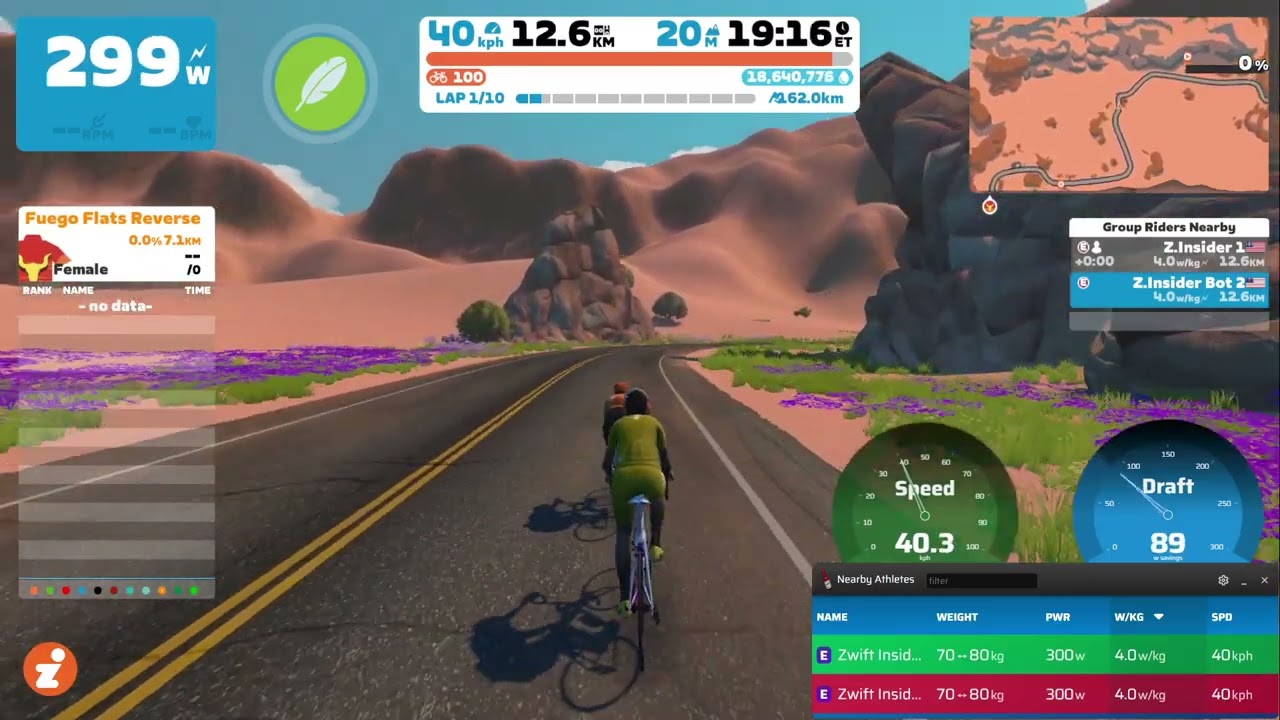
Before anyone asks: the overlays in the video are from Sauce for Zwift. It’s a very useful third-party Zwift add-on, but I used it for this video particularly so I could see more accurate rider speed and show the stats of both riders.
Applicable Scenarios
The most obvious scenario where this quirk matters is in a team time trial. Ever TTT racer knows that when you’re not at the front of the train putting in a pull, you have two jobs:
- Position yourself correctly
- Ride as efficiently as possible
It’s especially important to do these jobs well when you’re in the second position because messing them up can slow down your whole team or unnecessarily increase your fatigue right before you’re about to take a hard pull. To put it simply: you don’t want to waste any watts just before taking a pull in a TTT.
The watt wasting window grows larger the faster your front rider moves, too. That’s just how the math works! So if the front rider is holding 400W, the second rider can sit in at ~290W, but will also be sitting in at 395W – a range of 105 watts! Screenshots from recent tests:
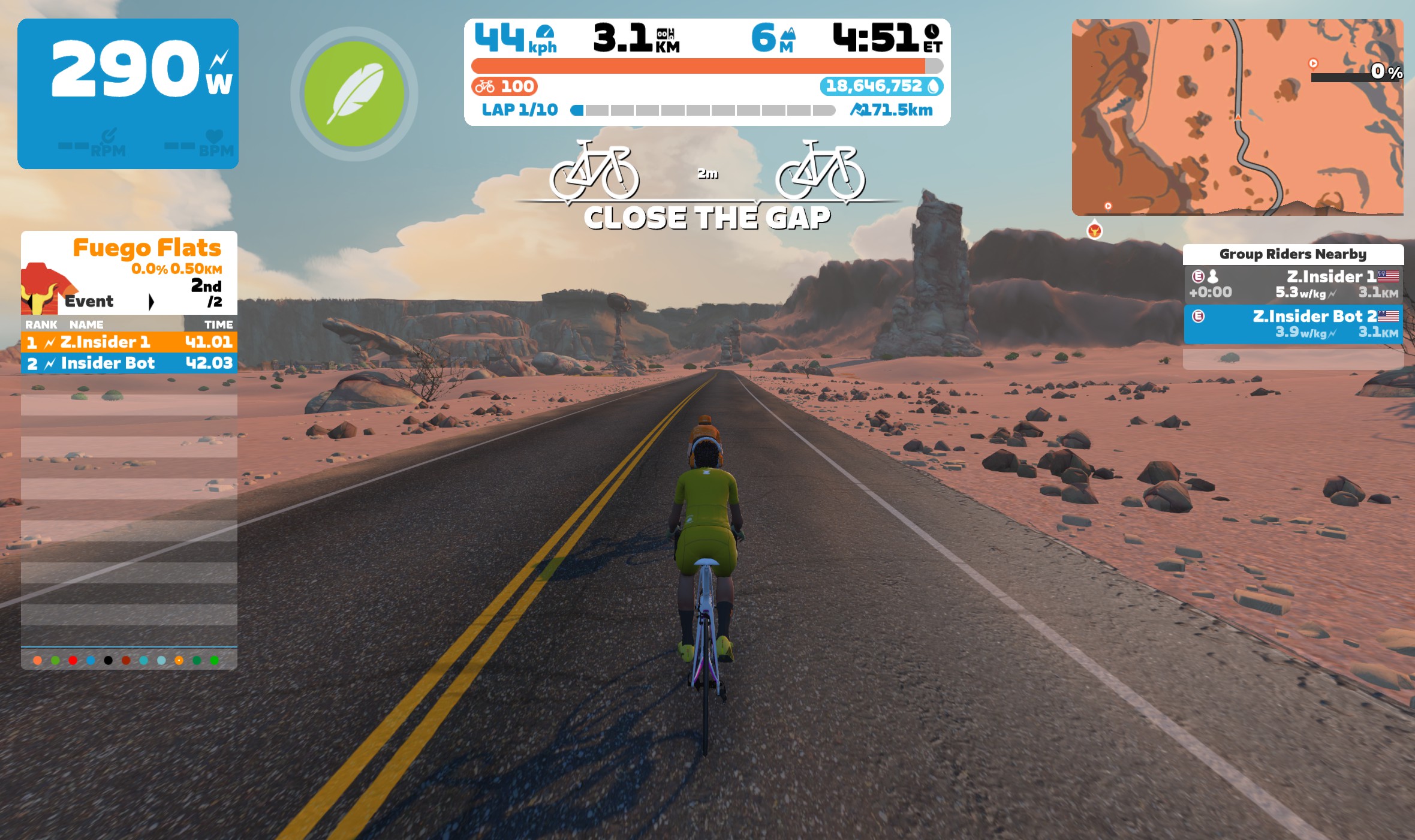
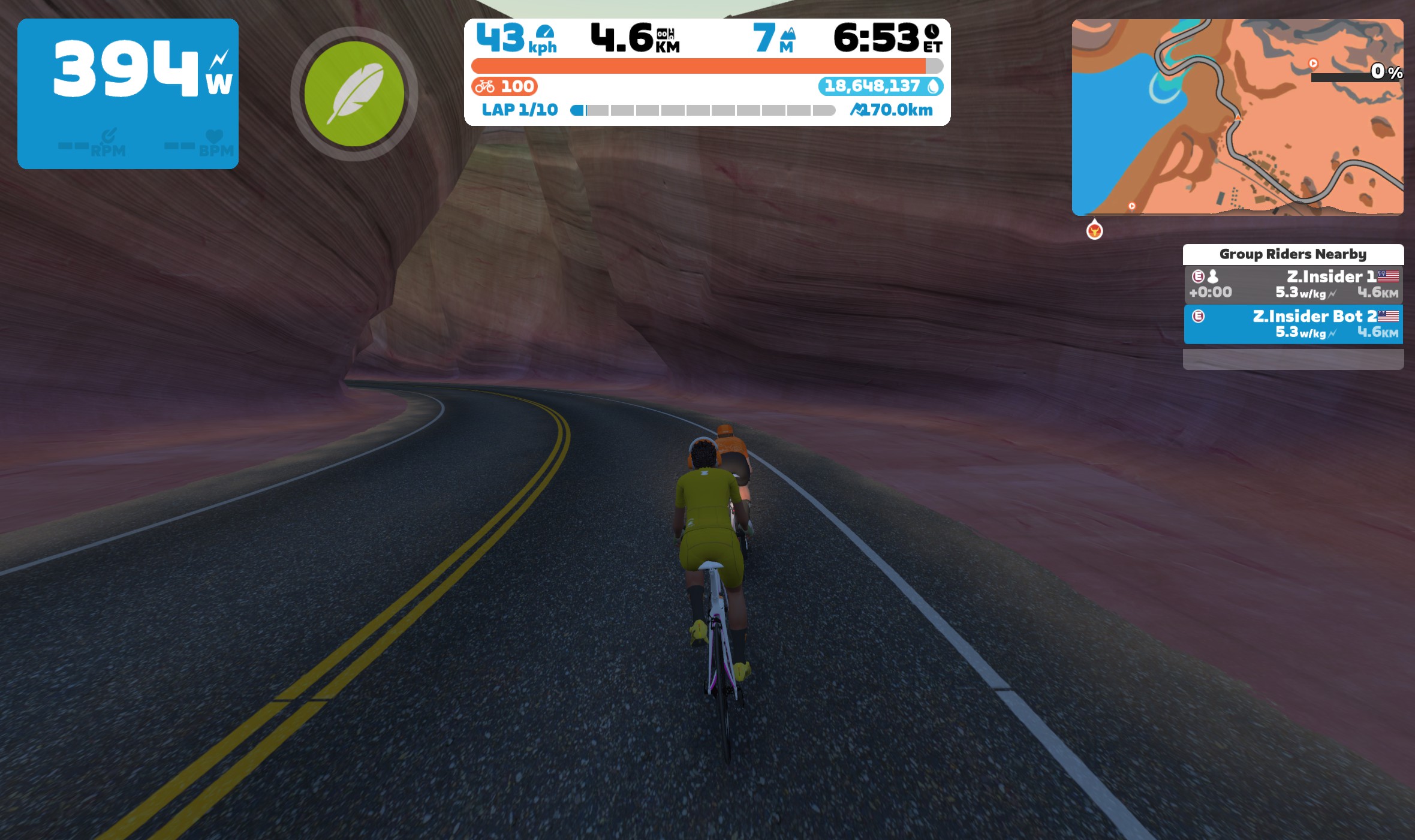
It’s useful to know about this quirk in other scenarios too. In fact, just one day after running these tests, I found myself in a race sitting in a chase group with two other riders. As I sat second wheel putting out around 300W, I remembered what I’d seen the day before, and I eased up to around 250W. Guess what? I stayed on that rider’s wheel.
Now I wonder how many watts I’ve wasted since Zwift changed Pack Dynamics to behave this way.
Non-Applicable Scenarios
If you’re wondering why you’ve never noticed the watt wasting window before, it’s because this quirk is only noticeable in specific scenarios.
In a typical Zwift race you’ll spend a lot of time moving around in the peloton, just trying to sit in efficiently. You may also be attacking off the front, or maybe even putting in a hard pull on the front of the group to keep the pace high.
In these scenarios, the watt wasting window doesn’t apply. You can move freely around the peloton, you can fly off the front with your leg-snapping attack, or you can sit in the wind and put in a big pull to keep the pace high so your teammate can sprint to glory in the final 300 meters. All without worrying about wasted watts. (Well, at least not the wasted watts I’m talking about today.)
In fact, you may even find yourself accidentally rolling through the peloton and onto the front, into the wind, due to the virtual momentum your avatar had from the power you put down several seconds before. While this may be wasted watts as well, they’re wasted watts of a different type, and not the watt wasting window I’m discussing here.
It’s Not a Bug, It’s a Feature
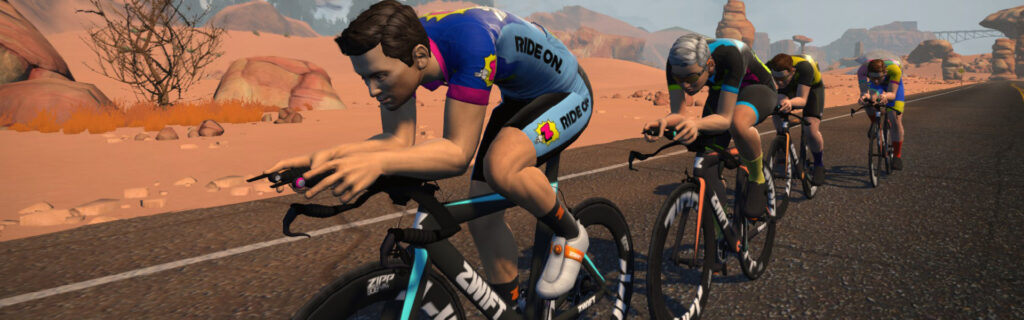
The watt wasting window applies to very specific scenario: when you’re stably sitting second wheel.
Zwifters may see this pack dynamics quirk as a bug that Zwift needs to fix, but I don’t think that’s the case. Perhaps avatar behavior could be tweaked a bit, but there’s good reason why it works the way it does.
To put it another way: just because Zwift isn’t behaving like outdoor riding doesn’t mean something is wrong. There are limits to the simulation.
Consider this: what’s the alternative? Instead of staying on the front rider’s wheel, what should happen to the second rider when they bump their watts up to just below the front rider’s power?
Outdoors, if you rode at 295W behind a rider holding 300W (all other things being equal) you would ride into their back wheel and crash. Clearly, that’s not going to happen in Zwift. So how should Zwift position your avatar? There are three possibilities:
- You stay on the wheel of the rider ahead – this is what’s currently happening.
- You move forward, so your avatar melds with the one ahead. But this looks bad visually.
- You move forward and off to the side of the rider, like you might do outside to avoid crashing.
#2 is a nonstarter for me. I’d be interested in experiencing #3 to see if it creates a more intuitive simulation, where I begin to automatically modulate my power for maximum efficiency.
But #1, the way it currently works, also seems like a sensible approach. And it works in such a way as to help you find that magical minimum power number, if you pay close attention…
Finding The Magical Minimum
Zwift could modify the UI to help riders find that minimum power level in this scenario, perhaps by showing some sort of “watts wasted” graph. But that may prove confusing to riders, and Zwift (rightly) wants to keep their UI very simple.
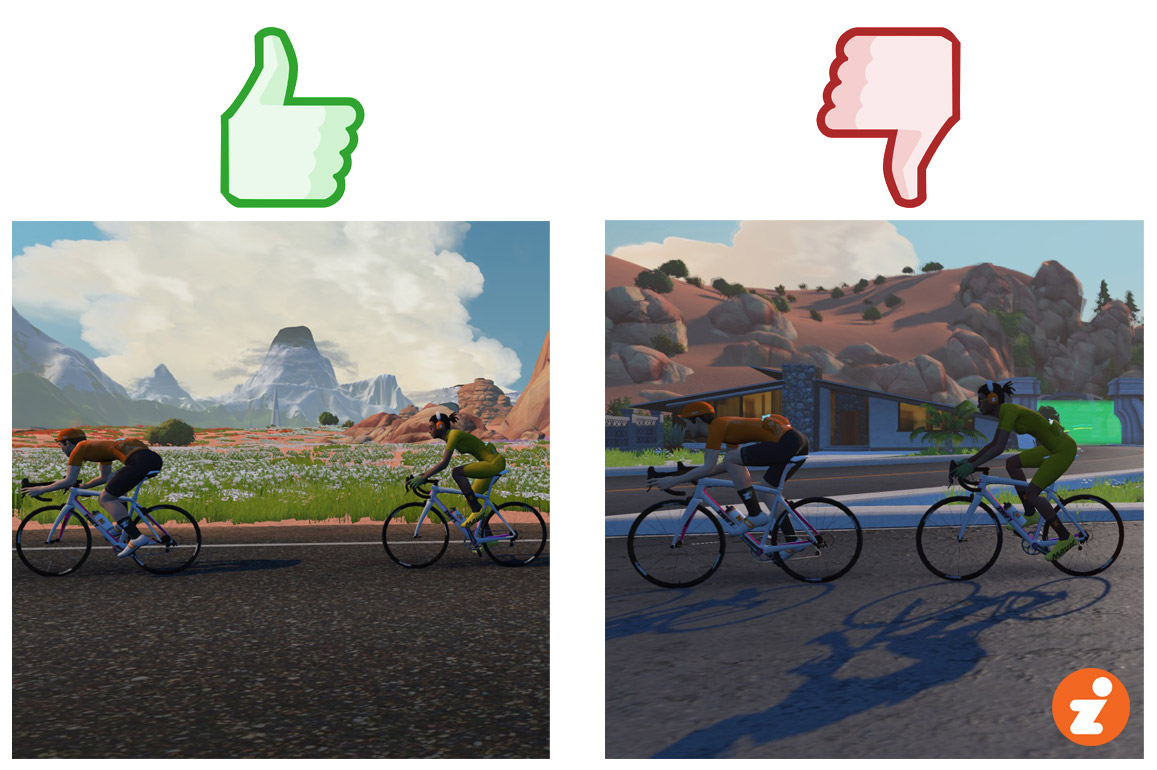
The good news is, if you find yourself in this very specific scenario where the watt wasting window applies, you can find that magical minimum today as you ride! The key is to keep a gap to the rider just ahead. Outdoors, a 6″ gap feels super efficient. But on Zwift, that probably means you’re putting out too much power! Let the gap go out to 2-3 meters (you’ll get a “close the gap” message), then try to hold it there. You won’t lose any draft benefit. If the gap starts to close, you’re putting out too much power. And if it starts to stretch, you need to add a few watts.
Give it a try, and let me know how it goes for you. Ride on!
Your Thoughts
Share below!


Does it work also when I’m at the end of a very large group?
No. As stated above, this behavior only happens when you’re sitting second wheel. If you’re moving around but staying in the draft, you’ll move quite freely.
Interesting. any chance you can do a video on it in a group ride scenario. I usually sit pretty much last wheel in a group unless i think an attack is going to happen in my head feel there is a still a watt wastage window but i’ll have to look at my figures in more detail next race to compare
It entirely depends on your weight / watt output; there absolutely is still braking and wasting watts for lighterweight folk in PD4.1.1 that we’re still in. It hasn’t changed since release (September?).
I get brake checked all the time when doing sweeps with others that are heavier than myself and get chucked out the rear because we’re in a smaller group, when fellow sweeps smash it for a second and I’m not ready and I’m sitting next to them.
In a larger group, it can still happen; it really comes down to that scenario of if you find yourself directly behind someone. Some days I seem to move freelyish; if the pack is tight enough, I very much run into a wall which is and has been true since PD4 initial.
Rear of the pack will always be the least steady, but the easiest. Middle of the pack will be fairly steady, with some wasted watts.
Front of the pack will be the most steady, but also the most effort; and depending on your weight and size of pack, may also be the most wasted watts (but not always. It really depends on what PD is doing and how fat the blob is.)
As Eric stated though; if your avatar is free to move about, wasted watts / braking doesn’t occur… too often. But if the blob is really fat, and you don’t appear to move freely, then yes, you can get brake checked quite often if a lightweight, or on the lower end of the watt spectrum.
I always thought there is a kind of mini-rubberband-effect in a large group as well. Meaning you don’t fall behind as long as you are not too much below the riders in front of you. On the flipside you will only start to move ahead if you are significantly above them. Can’t recall where I read this, but maybe it has changed since then
I ride with my brother and if we ride on an empty world like here in your example keeping in the draft is easy and you can save the watts. If you ride on a populated world this saving goes out of the window as everybody else seems to mess up the draft saving as one or both of you will be impacted by other people as you move into their draft or you get stuck behind a slower rider.
I always thought 1 was losing draft as soon as the message “close the gap” appeared.
And there for putting in a lot of (waisted) effort to close it.
I also thought this. So is this not the case then @Eric Schlange
1-2 meter is the safe zone for sure; once you get outside of 3+, you indeed start to lose draft benefit quickly.
Eric would definitely have to test this, but I presume the difference in watts between the “Close The Gap 2m” is insignificant compared to anything below it.
Not enough at least that will make/break someone’s abilities I mean, and cause them to be dropped (as opposed to sitting just slightly closer that is.)
Knowing the percent draft/power at various distances would be useful too. Setting the baseline as 100% at 2m, what is the draft 1,(2),3,4,5,6,7,8,9,10m,… At what point is it ~0%?
Is the effect less or more with changes in height and weight ? So if the front rider is significantly smaller than the one behind but has a high ability w/kg be interesting to see what effect these variations have ?
The front rider’s size doesn’t affect the power that the rear rider has to put out in any way. I have a post coming out about this in the next few days… But basically, a tiny front rider doing 40 KPH or a gigantic front rider doing 40 KPH both put out the same draft behind them in Zwift.
Presumably you tested this in TT events with the appropriate draft turned on. Otherwise its a bit of a pointless exercise as paxk dynamics & physics in zwift are different between free rides, events and TTs
Having now been riding both Rouvy and Zwift for a few months, I’d say Rouvy (and Sauce) have already rolled out what I think you’re favoring–in game real time feedback to the rider on the draft quality or wasted watts, and reasonably positioning us by overriding pure calculations within some reasonable boundary of “noise”.
Rouvy displays in the HUD the watts of draft, if any, a color coded quality label (poor-good-great-perfect) and even a little visual showing your relative position so you can dial it in. Source gives similar info. I think this should be relatively easy for Zwift to replicate, and it’s great real-time data.
Well said. Can’t understand why this hasn’t yet been implemented in the native Zwift HUD. RGT had it too. Crazy one would have to install a packet sniffer to get that information.
I think I’ve experienced exactly this when teleporting to the fastest pacebot to do VO2 intervals. Sometimes I am the only rider, ie second wheel, and the effect is very noticeable.
Didn’t know we could draft behind a pacebot. Cool
Visualizing the draft effect bolsters engagement in the simulation. Whether this is done abstractly with a gauge or color, or with more diagetic elements like billowing clothing or making visible air flow. Using the draft gauge on Sauce makes Zwift more fun.
Technically, we already covered this topic back with the latest Pack Dynamics was being introduced. We were curious of the power requirements to make a breakway off the front. Now we’re talking about the power requirements to not break away off the leader’s back (or intentionally fail to make a breakaway).
A watts wasted metric would be great to see but I would almost certainly exploit it to forcefully force myself into sweet spots with my Zwift Play steering.
RGT had this feature, it showed you the power window to hold a wheel.
You say second wheel only but I’ve noticed this same behavior on group rides if you’re behind the yellow beacon. It can be hard to move past that guy dangling off the back to get back in the bunch! It is significantly easier to stay in the bunch if you’re… in the bunch.
Also, did Zwift do away with the red power number / wasted watt indicator?
Interesting, I’ve tried Sauce for Zwift before to see where the best draft is in a Group (it shows a number indicating current drafting) and to me that seems to be just after the middle of a group – with some riders behind you. Do you have any thoughts on that?
Hey Eric. Great stuff. I’m guessing this would be proportional to the amount of draft, but might be interesting to know. Your test is on the flat, but what if you add some uphill drag, which reduces the draft amount, or some downhill, which increases the draft amount?
You say this only really applies to second wheel, but I wonder…?
So, we know that 2nd gets a 23% draft discount, 3rd a 30%, 4th 33% and 5th 35%. Is the reality that your window just reduces in other positions? so a +/- 7% in third, 3% in 4th and 2% in 5th? That would explain why it’s much harder to notice – these are numbers that are practically impossible to maintain steadily as a real rider on a bike.
They’re also moot since the big discount is staying behind the lead – much more marginal in a pack. However, I do have one question.
If Rider #1 is doing 300W and rider #2 is doing 231, that’s optimal. Rider #3 can do 210 and stay attached.
However, if Rider #1 is doing 300W and rider #2 does a non-optimal 291, what happens? He stays behind, but does that mean that 20% of the pack savings are just lost? Does #3 have to now do 210W to stay attached, or has that risen to 265W having just lost the whole pack saving from P2?
Equally, does that 3rd position have an optimal window of 210-231W to play in risking wasting 21W effort? Clearly at this point, the bigger problem is that it’s actually quite hard to maintain anything nearly like a smooth power +/- 21W anyway!
I’ve seen where the energy savings changes where you are within a pack.. supposedly the savings increase as you move to the front vs. hanging on the rear. Is that true?
This was the whole reason I got Sauce for Zwift. I thought by that using that draft meter I would be able to ride more efficiently, but based on your video I see I am still wasting watts. This doesn’t happen in the real world, if your drafting and put in more watts you will ride into the person you are drafting, so you know to back off and minimize your watts. I think a meter would be helpful. Maybe this is some thing the Sauce app can add? Or is it there and I have just not found it? It would really only be beneficial for competitive races and TTT’s. But the whole point of Zwift for me, is a tool just to stay fit. I don’t take the racing too seriously with such big discrepancies in power meters. So putting out more watts unnecessarily is not such a bad thing.
Why does Zwift tell you to “close the gap” if doing so is not advantageous?
I always thought that the message “Close the gap” meant that we were no longer in the wake of the riders ahead of us.
So as long as the message doesn’t disappear, i.e. even at 6 metres, I’d still have the advantage of the draft?