Zwift Training Plans: Browsing, Enrolling, Cancelling, and Finishing Your Training Plan

Last week Zwift reorganized/simplified their workout library, and some Zwifters have been left confused because they couldn’t find the Training Plan workouts they had been accessing via the library’s old folder structure.

There’s a bit of a confusing rabbit hole here that we’ll avoid going entirely down, but it’s worth mentioning that, for years, Zwift Training Plan workouts were only accessible if you signed up for a Training Plan. Then a couple of years back, Zwift put all those workouts into the library as individual, on-demand workouts, allowing you to access them without signing up for the Training Plan.

Whether that was a good or bad move is up for debate, but Zwift’s recent reorg removed many of those on-demand training plan workouts while retaining some of them in renamed folders. The end result: if you want to use workouts from Zwift’s Training Plans, it’s probably simplest to just enroll in the Training Plan. Here’s how that works…
Zwift Training Plans: How to Sign Up, Enroll, and Cancel a Training Plan

[adinserter block=”1″]

Accessing Zwift’s Training Plans

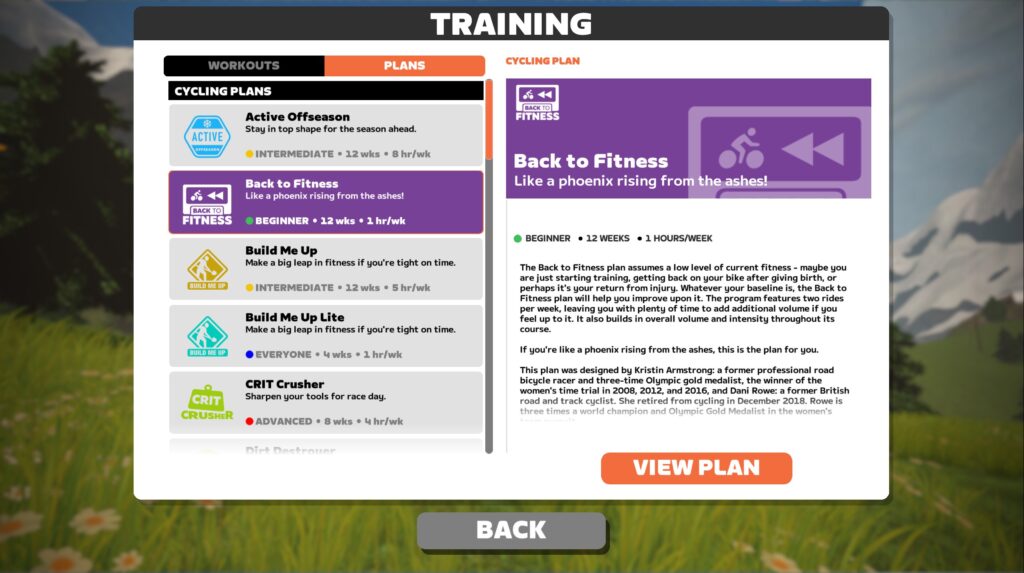
Interested in checking out what plans Zwift has to offer? Browsing the list is easy.

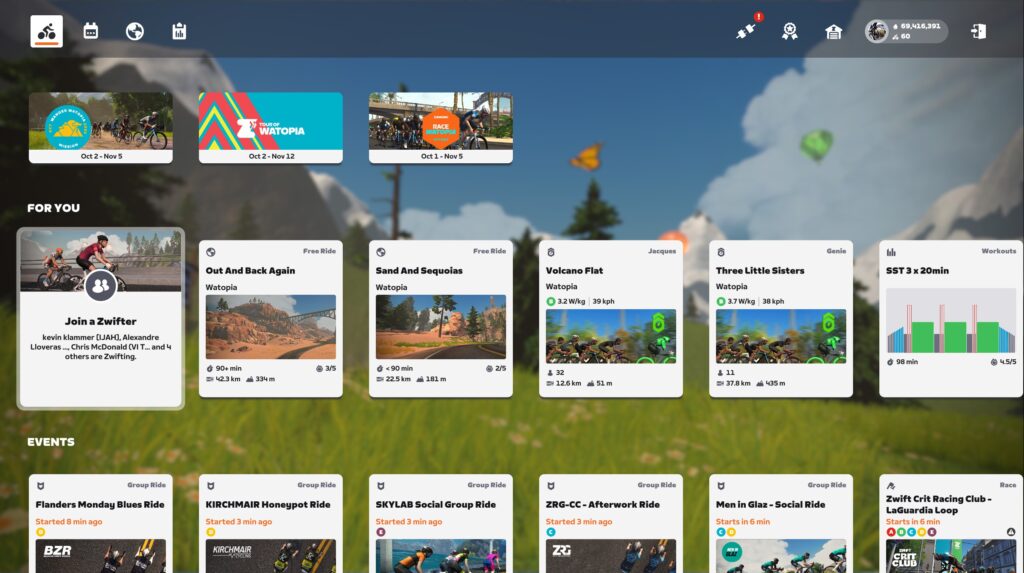
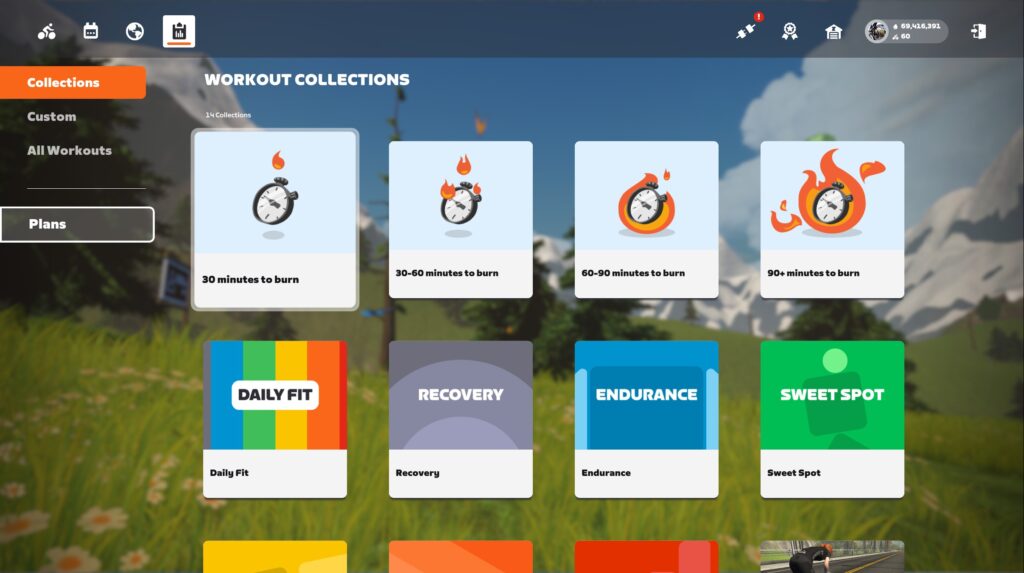
  1. Start up the game, then from the homescreen click the clipboard icon (top-left) to access the workouts view.
  2. From the workouts view, click “Plans” on the left.
  3. You can now browse the plans. Click “View Plan” to view the specific workouts for a selected plan.
Enrolling In a Training Plan

The beauty of a training plan is that it offers a structured, scheduled set of workouts to progressively take you from where you are today to where you want to be! But in order to get there, you’ve got to sign up for the plan.

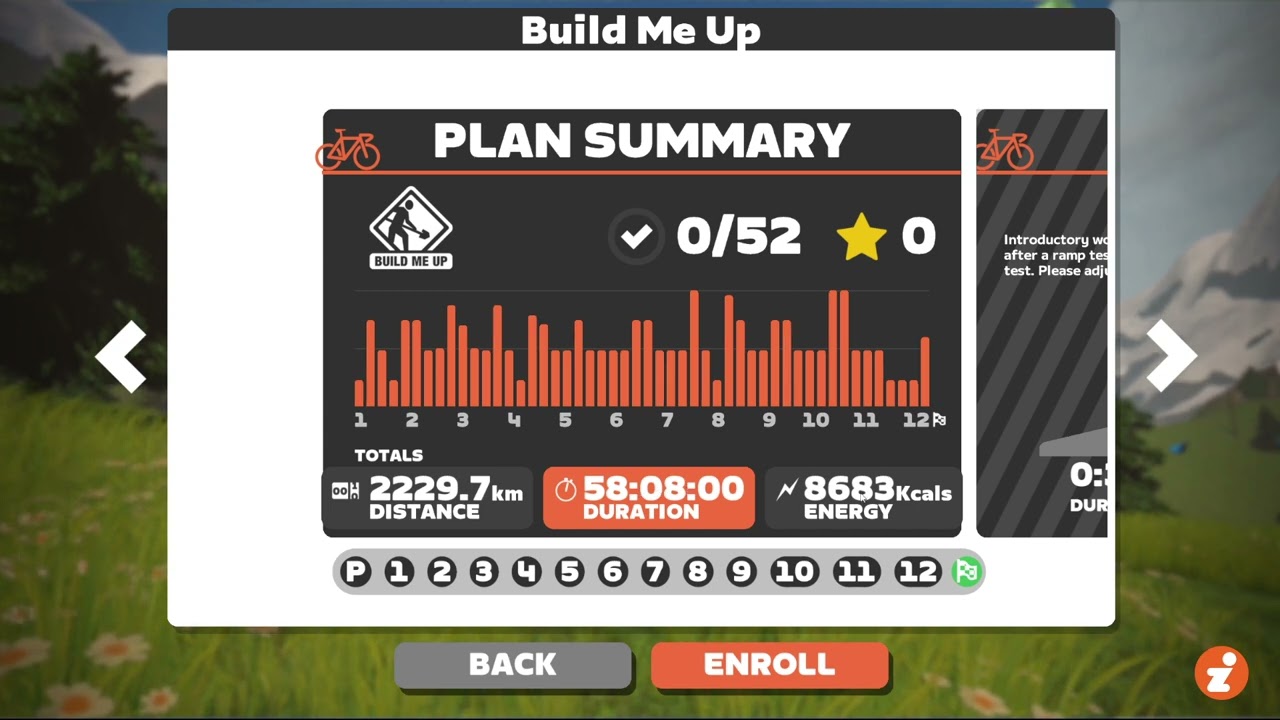
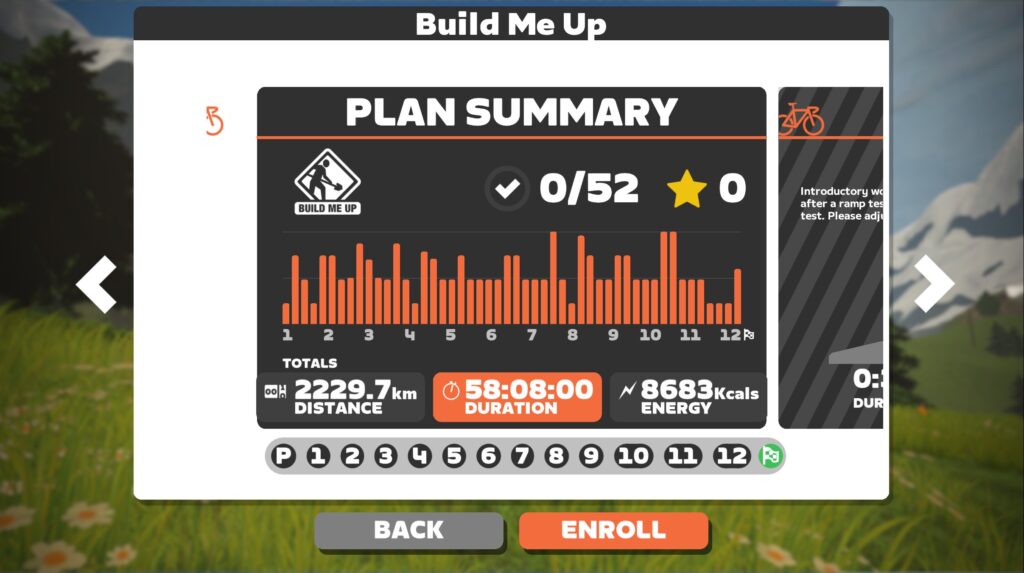
To enroll in a Zwift training plan, browse the plans (see instructions above) and click “View Plan” on the one you’re interested in. From this plan detail view you can click the big “Enroll” button to sign up. That’s the easy part done!
Completing a Training Plan

Now comes the work! After enrolling in your training plan, you can start the first workout right away.

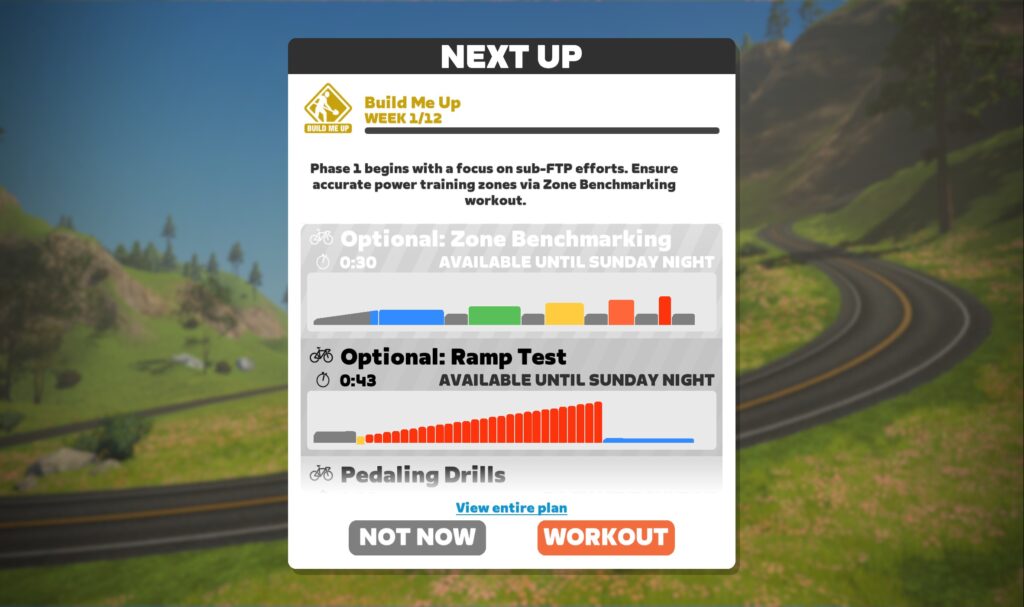
Some plans have optional workouts at the start. Do those if you’d like, or skip ahead to the first workout marked “Available Workout”.

The Companion app on your phone will show a list of upcoming workouts so you can see what’s in store, and the game will also show upcoming workouts when you first start up, so you can choose your workout easily:
Plans are organized into weeks, and each week may have 2-5 workouts scheduled. It is best to follow the weekly schedule if you can, but if life happens you can “pause” your plan by simply not doing the workouts. They’ll still be there when you come back!

You can also skip workouts, but this isn’t recommended since workouts progressively build on themselves.

If you complete a workout outside, just go into your plan view and click “I did it!” to mark it as complete.

Once you complete the plan, you’ll earn the achievement badge. Hurray!

[adinserter block=”4″]

Canceling a Training Plan

Canceling your Zwift Training Plan is easy… if you know where to look! The only place to do it is in the game under the detailed plan view, so you’ll need to pull up the list of plans then click “View Plan” under your plan.
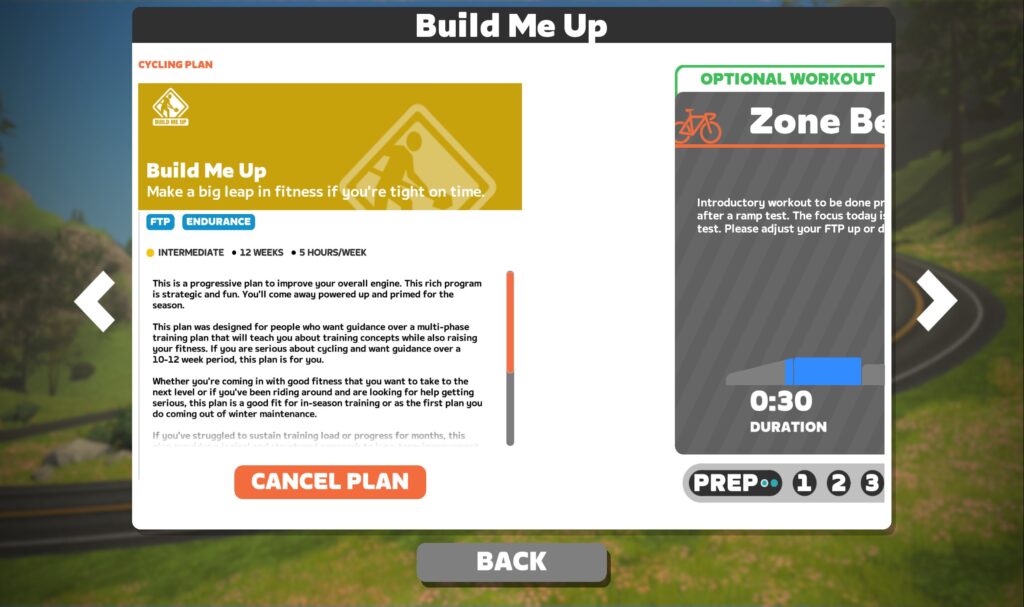
Here’s the tricky part: the “Cancel Plan” button is on the far left of this screen, so you’ll need to click the left arrow or click and drag to see it. Click the button, confirm your cancelation, and you’re done.

Questions or Comments?

Share below!

Eric Schlange
Eric Schlangehttps://zwiftinsider.com
Eric runs Zwift Insider in the spare time he finds between riding his bike and managing various business interests. He lives in Northern California with his beautiful wife Monica. Follow on Strava

26 COMMENTS

Subscribe
Notify of
guest

26 Comments
Oldest
Newest Most Voted
Juan Cafe
Juan Cafe
2 years ago

It would be nice if there were a master file of the plans so that you could research to find one that meets your goals without going into Zwift. One complaint I have about the workouts is the warm-up and cool downs. I’m older and it takes me longer to warm up. For cool downs, I just want to spin easy for 5 minutes. I don’t get the progressive decline thing they make you do.

Dave Boyle
Dave Boyle
2 years ago
Reply to  Juan Cafe

Honestly, you’re better off making your own workouts to meet your needs.

Eric Jensen
Eric Jensen
1 year ago
Reply to  Dave Boyle

This does categorically nothing to improve the topic of the post when a GIANT chunk of users can benefit from ANY training plan and are simply not going to put the 100+ hours you apparently have into learning about workouts better than Joe Friel et al.👎

Todd Tannenbaum
Todd Tannenbaum
2 years ago
Reply to  Juan Cafe

Re a master file of all the plans so you can check them out in detail, here you go:
https://whatsonzwift.com/workouts#zwift-plans

Eric Jensen
Eric Jensen
1 year ago
Reply to  Juan Cafe

Committing more necro: anyone that reads this, it is perfectly fine to get in to Zwift and spin around as long as you want in Zone 1, do the workout, and then spin around all you want after. Bare minimum round up the ride miles to the next full mile and grab 32 more XP.

Ioan
Ioan
2 years ago

A sloppy decision which ruined workouts for a lot of people . Now I have to recompose myself the entire list of workouts because what we have now its a long list of combined trainings plans

Cliff
Cliff
2 years ago

Thanks for that Cancel tip could not find that anywhere!

PRSboy
PRSboy
2 years ago

It has to be said, Zwifts new training plan organisation is a backward step. Before, you could select a progressive plan and do any workout when you wanted just by selecting it for your session. Now you have to enroll and do each workout by a deadline. A lot of great plans (eg GCN Zero to Hero, Etape plan etc) have been removed.

Thank goodness for ‘What’s on Zwift’ which has a great filtering tool, but even once you’ve found a workout you want to do it takes an age to find it on Zwift via the poxy Zwift interface because you can’t filter by name!

All we want is a proper filtering tool- duration, zone, stress points, name.

Todd Tannenbaum
Todd Tannenbaum
2 years ago

All of the workouts that Zwift removed are available now from Zwift as a free download. Instructions here:
https://forums.zwift.com/t/workout-refresh-october-2023/609799

Christoph Ziehmer
Christoph Ziehmer
2 years ago

It would be great to have the plan I‘m enrolled right available at the start window. Everytime I want to start a workout I have to click me through different sites/windows to access the plan, but then at first I reach the summary at the end and not the current workout. So I have to go back step by step from the summary to the workout I want to do. Very uncomfortable!

Steen Joergensen
Steen Joergensen
2 years ago

I have the same “struggle” 🤔
Where did the startup-screen go or can you change that behavior by a parameter ?

Christoph Ziehmer
Christoph Ziehmer
2 years ago

When I started my training yesterday surprisingly a new start screen showed up and I could choose to start the next workout in my plan …

Steen Joergensen
Steen Joergensen
2 years ago

Yes, I had the same experience on my training the day after my reply to you, but today (Sunday) it didn’t show up 🙁

Mike D
Mike D
2 years ago

Hi all, I started a training plan a few months ago, and I liked the way I had to complete workouts by a certain time. I was unable to complete the plan due to illness, so today I started the plan again. My progress has reset which is correct as I am starting over, but all the workouts are available and all 6 weeks of workouts say complete by Monday. I have cancelled the plan and enrolled again but, the issue remains the same.

Is this correct?

Joe Hanson
Joe Hanson
2 years ago
Reply to  Mike D

I have a very similar problem, I don’t think the cancellation worked. Every workout is available for me as I signed up to the same plan a couple of years ago! I don’t want to reset it though at this point, as I am 4 weeks into the plan. If I reset I’ll be stuck in week 1 again. Bit of a strange bug.

Rob C
Rob C
2 years ago

Currently 1 week into the Gravel Grinder plan. All my sessions say ‘Do by Saturday’ whereas I’d prefer the week to end on Sunday evening.
Anyone know how you can change the day on this?

Marcio
2 years ago

Do I have to pay extra to enroll or those plans are include in the month payment?

Andrew Ambery
Andrew Ambery
2 years ago

I was pretty upset after reading this and thinking that if I missed a few weeks due to holidays I’d still be able to follow through with my plan. After getting 10weeks into it now says the plan is expired and I cannot complete the last 2 weeks.

Rory
Rory
1 year ago

Hi, so I was 8 weeks into a plan, had a few days off due to travel, and when returning Zwift appeared to have ‘unenrolled’ me. The workouts that had been complete still said ‘completed’ but all their data was lost. The ‘enroll’ option was available again (in place of where it usually said ‘workout’). Upon selecting ’enroll’ Again everything was wiped and it presented like nothing had been done. anyway to recover the plan progress!?

John Hedley
John Hedley
1 year ago

If I sign up for a the Back to Fitness training plan which is twice a week and do those workouts during Mon-Fri can I go into Zwift and just do a regular workout on the weekends that are a longer workout time?

Wellco
Wellco
1 year ago

I have enrolled in several Zwift training plans over the years, but I have never completed one, not one since enrolling in 2015. Not because I’m lacking motivation, but because Zwift does the dirty on me. This year I have enrolled on the FTP builder plan twice. I get 4/5 weeks in and then I never get the screen to resume the plan when I log back in. How do I get back to my plan in progress? Please someone tell me I’m doing it wrong. This is really hacking me off. I use the plan to keep me motivated but sadly this is making me wonder what I am paying for.

Ren
Ren
1 year ago

It would be helpful to have a training plan “Pause” button so that when I am traveling and don’t have access to a smart trainer, I can resume the plan as soon as I’m back home. At present, the only feasible option is to quit the plan and restart it, since the workouts each build on the prior.

Get Started on Zwift

Newest Featured Posts

Support This Site

Write a post, shop through us, donate or advertise. Learn more

NEWSLETTER SIGNUP

Zwift tips and news every 2 weeks! Click to subscribe.

More Posts