
TrainingPeaks Workouts Not Syncing To Zwift? Here’s a Workaround

Many Zwifters maintain their workout schedule through TrainingPeaks, but unfortunately last week’s Zwift update seems to have broken the automatic downloading of today’s TrainingPeaks workout into your Zwift workouts list.

I’m sure ZwiftHQ is working on a fix, since TrainingPeaks is a very popular platform among Zwifters. But until that fix arrives, here’s how you can manually get your day’s workout in TrainingPeaks to show up in Zwift:
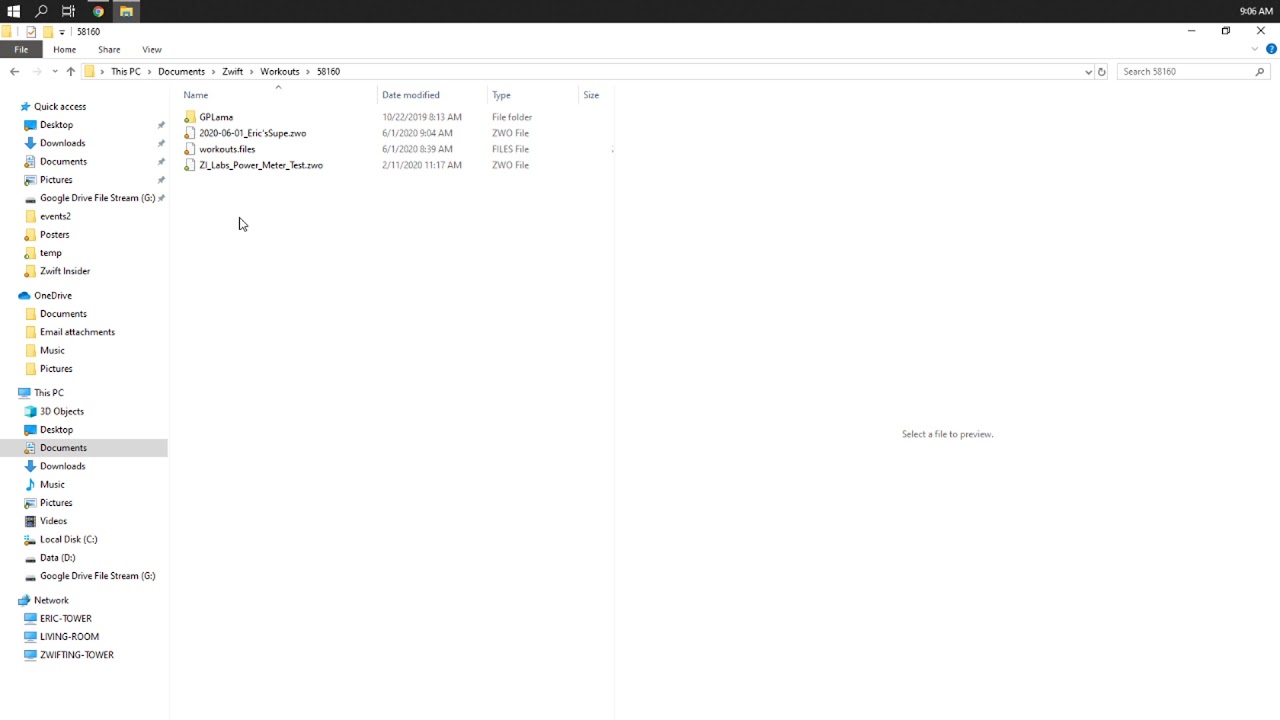
How To Manually Move TrainingPeaks Workouts Into Zwift

The idea is simple enough: it’s easy to download your TrainingPeaks workout in ZWO format, which is the format Zwift uses for its workouts. Then you just need to move that file into your Workouts folder on your PC or Mac, which is located at Documents\Zwift\Workouts\<<Your Numeric Zwift ID>>

When you boot up Zwift, your workout will now be visible under “Custom Workouts”.

Additionally, Zwift will copy that custom workout to its cloud, so if you start up Zwift on another device like iOS, Apple TV, or Android, you will see the custom workout there.

A Note for iOS/Android/Apple TV Users

It’s not as easy to copy the TrainingPeaks workout directly to an iOS or Android device, but it can be done. It cannot be done on Apple TV, though.

The simplest way to get the workout onto these devices is to have Zwift installed on a PC or Mac, and follow the instructions above to downloading your TrainingPeaks workout into your workouts folder on the PC or Mac. Then boot up Zwift, let it sync to the cloud, and your workout will then be available across all devices.

Questions or Comments?

Hope this quick tip helps a few Zwifters out. Got questions or comments? Share below!

Eric Schlange
Eric Schlangehttps://zwiftinsider.com
Eric runs Zwift Insider in the spare time he finds between riding his bike and managing various business interests. He lives in Northern California with his beautiful wife Monica. Follow on Strava

54 COMMENTS

Subscribe
Notify of
guest

54 Comments
Oldest
Newest Most Voted
Rob Smith
Rob Smith
6 years ago

That’s how I’ve always uploaded my work outs You mean there’s been another way?

Krzysztof Szabłowski
6 years ago
Reply to  Eric Schlange

no way.. where??? to what group of workouts ??? no TP list among workout list????

Hamish Wright
Hamish Wright
6 years ago

When you click/tap workouts button before you go into your ride Ive always found my TP workouts right at the top of the list. Hopefully you can find it there too! Ride on 🙂

Ross Barrett
Ross Barrett
6 years ago

It would show up in the workout for your current day, if you have a power based bike workout in your Trainingpeaks plan for the day and your accounts are connected. It’s sort of ephemeral, they don’t go into your library like a typical custom or manual workout, it’s just there as a “do today’s workout” option.

Eric
Eric
6 years ago
Reply to  Eric Schlange

Is this also on IOS??

Samir
6 years ago

tks man!!!

Paul Voorend
Paul Voorend
6 years ago

How do you do it on android? For some reason zwift doesn’t run on my laptop so I use my phone as my main device instead.

John Hawryluk
Member
John Hawryluk(@jbeaton1993)
6 years ago

Thanks for highlighting this. Was having heart palpitations when my app wasn’t showing my TP sessions.
 
When I’m downloading the session from Training Peaks as a ZWO file, it downloads as a .XML file – any ideas why this might be happening as TP says .ZWO is the preferred file type for zwift. I downloaded as a .FIT file and it seems ok but not sure if this is a suitable workaround.

John Hawryluk
Member
John Hawryluk(@jbeaton1993)
6 years ago
Reply to  Eric Schlange

Ace, thank you. I’ll try that tomorrow 😁😁

Ron Fox
Ron Fox
6 years ago

I’ve just been creating my workouts in custom workout. Really screwed me up the first day it occurred though!
 

Kylie
Kylie
6 years ago

Unfortunately I do not own a PC that will run Zwift so getting it to my iphone or ipan simply is impossible untill they fix it.

Andrew Fox
Andrew Fox
6 years ago

When I go to the Documents folder of the PC, there is no “Zwift” folder. How do I make it appear???

Garry
Garry
6 years ago
Reply to  Andrew Fox

Do you have Zwift installed on that PC? Silly question but….. If so and it is Windows you may have more than one Documents folder so try doing a search?
 

Christopher Noon
Christopher Noon
6 years ago

Thanks – I wondered what had happened. I tried it and it works

Tonya
Tonya
6 years ago

Thank you!!! Wasted an hour this morning trying to figure this out until I came across your article!

Ross Barrett
Ross Barrett
6 years ago

I reported this as a defect in the Zwift bug report forum on Saturday, but so far there has been no response. The connection is still broken today (June 2, 2020). The workaround of manually exporting and loading isn’t terrible, but certainly not a delighter.

My report: https://forums.zwift.com/t/trainingpeaks-workout-sync-broken-in-1-5-0775/467322

Somebody else got more traction with their report: https://forums.zwift.com/t/training-peaks-workouts-not-appearing-may-30-2020

Either way, not resolved.

Grant Massie
Grant Massie
6 years ago

I tried this, but I don’t have a Zwift ID number in my Workout folder. Do I need to create a folder in the Workout directory with my Zwift ID?

GaryRP
GaryRP
6 years ago

Still no TrainingPeaks scheduled workouts appearing automatically in Zwift. That’s three days now without this very useful feature. I know there is a workaround, but does anyone have an update from Zwift on when they expect to fix this? I raised a ticket with Zwift but the helpdesk is not even acknowledging the problem.

alan micklewright
alan micklewright
6 years ago

Hi….. thanks for your guide to drop workouts into zwift….question…so I presume once downloaded I open workouts folder… then drop it into the folder with my id number on??
thanks Alan

Fiks
Fiks
6 years ago

Have followed instructions of work around. The workout appears on Zwift on my PC under custom workouts but not on my iPad. Does it automatically syncs to cloud so can access it on my iPad.

Lance
Lance
6 years ago

I downloaded the .zwo file and placed it in my zwift workout folder on my windows PC as explained in the article. However, I run zwift on my iPad and the workout doesn’t show up under custom workouts. I have restarted all devices multiple times. Any thoughts?

Irma
Irma
6 years ago

This is the only reason I pay for Zwift! So that I can do my training peaks workouts on it. This is SO annoying!!

Martin Peinsipp
Martin Peinsipp
6 years ago

Hi! Thank you! You are right, it worked fine before the last update. 🙂

Martin

Vernon Smith
Vernon Smith
6 years ago

Thanks for this. It did not work for me. The files download and moved to workouts folder but they do not show up in workouts when running app.

Vernon Smith
Vernon Smith
6 years ago
Reply to  Vernon Smith

Got the workaround to work. I am on Mac so figured out there are two workout folders under Zwift. one uses my Zwift ID that is the one that works. saved a test workout and did search to find the Zwift ID based workout folder. synced and TP workouts show up.

Philippe DELECROIX
Philippe DELECROIX
6 years ago

Thank you so much Eric for this advice. I was surprised not to be able to find my trainingpeaks workout in Zwift and I’m happy to know that it comes from a Zwift’s bug…
Unfortunately, I’ve followed your instructions on my Macbook air and droped my workout downloaded from Trainingpeaks to the Zwift workout file and Zwift has not recognized it when I’ve launched it. I’ve just run in London for a short circuit… Any idea to solve the problem ?

John
John
6 years ago

Anyone have luck with appletv? The sync or linkage to Zwift from TrainingPeaks is still down and I have no mechanism to upload.

Garry Kirkland II
Garry Kirkland II
6 years ago

Yea, the Zwift update broke this capability for my TrainingPeaks workouts as well. I already knew about this manual upload feature, but thanks for posting the article. I’m not sure what I’d do without Zwift Insider sometimes 😁

Andrew Cook
Andrew Cook
6 years ago

Any new on this – sense there is a lot of frustration out there around this at this point in time!

Patrick
Patrick
6 years ago

I’m having the reverse problem. I did my work out (FTP test) and now it’s not uploading to TrainingPeaks for my coach to review. Any thoughts? Thanks.

Andreas
Andreas
6 years ago

Nice idea, but the sync to apple TV, iphone etc is unfortunately not working for me, no matter what I do…No custom workout folder or anything visible…

Shauna
Shauna
6 years ago

How do I do this on my apple phone?

Renee Meyer
Renee Meyer
6 years ago

For me, this problem seems to be limited to my Apple non-laptop devices (iPad and Apple TV). My workouts are showing up on my MacBook.

Darryl Holman
Darryl Holman
6 years ago

Is there anyway to do this if you use Apple TV instead of a PC?

Darryl Holman
Darryl Holman
6 years ago
Reply to  Darryl Holman

Nevermind, I just saw above where you said it can’t be done………… 🙁

Ross Barrett
Ross Barrett
6 years ago

This appears to be mostly fixed in latest update. The workout for the current day will appear in your workouts list under “Trainingpeaks” category. It’s not as intuitive as it was, but it is there.

Dan Vystrcil
Dan Vystrcil
6 years ago
Reply to  Ross Barrett

Still no love for Today’s Plan for me. I had to shove the zwo file over manually.

Dan Vystrcil
Dan Vystrcil
6 years ago
Reply to  Dan Vystrcil

I discovered this was completely my fault. I had the workout I wanted set on a different date. Zwift does sync Today’s Plan workouts for me.

Jorge Fumo
Jorge Fumo
6 years ago

I rode 15 miles in total today on my Intermittent workout which was about an hour ride and only 11 miles ride, I added the extra miles to end at 15 miles. Why didn’t it register the full 15 miles?!

Lynne
Lynne
6 years ago

Hi Eric. Thank you for your page. I’ve got the same issue but I don’t have a download button on my training peaks workout in the calendar. Any advise? Tx so much.

Chris Mac
Chris Mac
5 years ago

I am wondering if Zwift/Training Peaks are collaborating on making the same upload for run workouts from TP to Zwift, the option is available for bike workouts, but not for the run. There is the Zwift workout editor etc, but uploading directly from daily workouts is a lot simpler, any offerings on that one ? Cheers

Aidan
Aidan
5 years ago

My training peaks workout loads in zwift with no problem but it loads incorrectly in terms of the wattage it is asking me to do.

it loads up asking me to do the workout at in and around 300 watts when in TP it wants me to do the session in and around 200 watts.

is there a setting I need to change so that it makes the change as my coach intends.

Andy
Andy
5 years ago

My TrainingPeaks workouts are still not syncing with Zwift and I don’t have an option to download ZWO. Zwift customer support has been awful, so still haven’t been able to find a solution.

KPieoe
KPieoe
4 years ago

I dont have a download option on TP. What a joke.

Get Started on Zwift

Newest Featured Posts

Support This Site

Write a post, shop through us, donate or advertise. Learn more

NEWSLETTER SIGNUP

Zwift tips and news every 2 weeks! Click to subscribe.

More Posts